Home > Blog > How to Set Up Duo Mobile with a QR Code
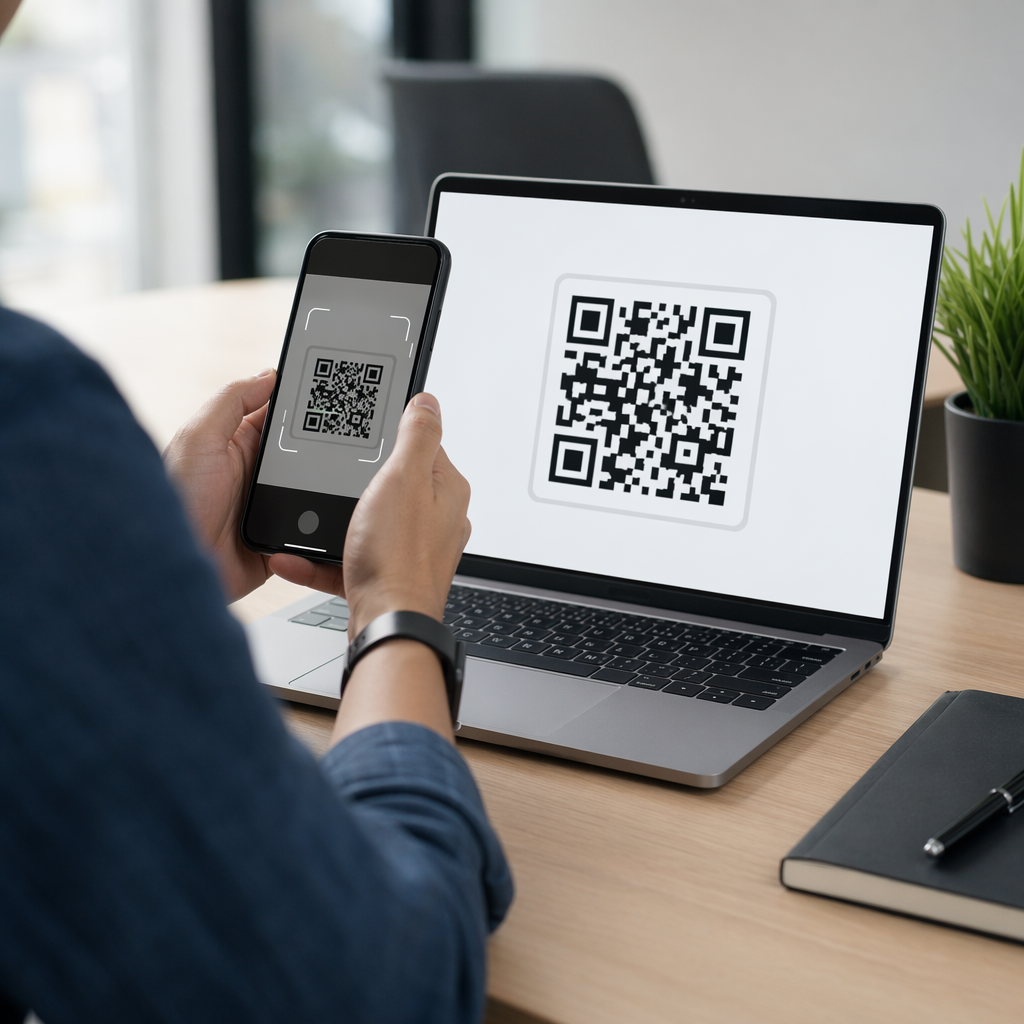
Phone scanning Duo QR

How to Set Up Duo Mobile with a QR Code

Set up Duo Mobile with a QR code using this step-by-step guide. Learn to scan enrollment codes, fix camera issues, and secure your account with backup methods.
Updated on April 29, 2026
Table Of Contents

Are you struggling to scan the QR code to activate Duo Mobile? A failed setup can leave your accounts vulnerable and lock you out of essential work applications. This guide provides a step-by-step walkthrough to ensure your device enrollment is fast, secure, and successful.

Preparing Your Device for Duo Enrollment

Before you can link your account, you must ensure your smartphone is ready to handle the security requirements of multi-factor authentication. Duo Mobile typically requires a modern operating system, such as iOS 16.0 or Android 11.0 and above, to function correctly. Begin by visiting your device’s official store to how to download apps with QR codes or search for the application manually to begin the installation.

Once the app is installed, you must grant it specific permissions to ensure a smooth setup process. The application requires access to your camera to read the enrollment code and needs notification permissions to send you login approvals. If you accidentally deny these permissions during the initial launch, you can re-enable them in your phone’s system settings under the Duo Mobile app entry.

Locating and Scanning the Activation QR Code

The setup process begins on your computer or the primary device you use for work. When you log into a Duo-protected application for the first time, you will be directed to an enrollment screen. After you select your device type and platform, the system will generate a unique QR code. This code acts as a digital handshake, securely linking your specific hardware to your user identity.

To scan the code, open the Duo Mobile app on your phone and tap the “Add” button or select the option to “Use a QR code.” Think of the scanner like a high-speed reader that needs a clear view to interpret the data correctly. To ensure a successful scan, position your phone so that the code fits within the on-screen guides and all four corners are clearly visible. If you are performing the enrollment entirely on a mobile device, look for a button labeled “Take me to Duo Mobile” to bypass the camera requirement and activate the account directly.
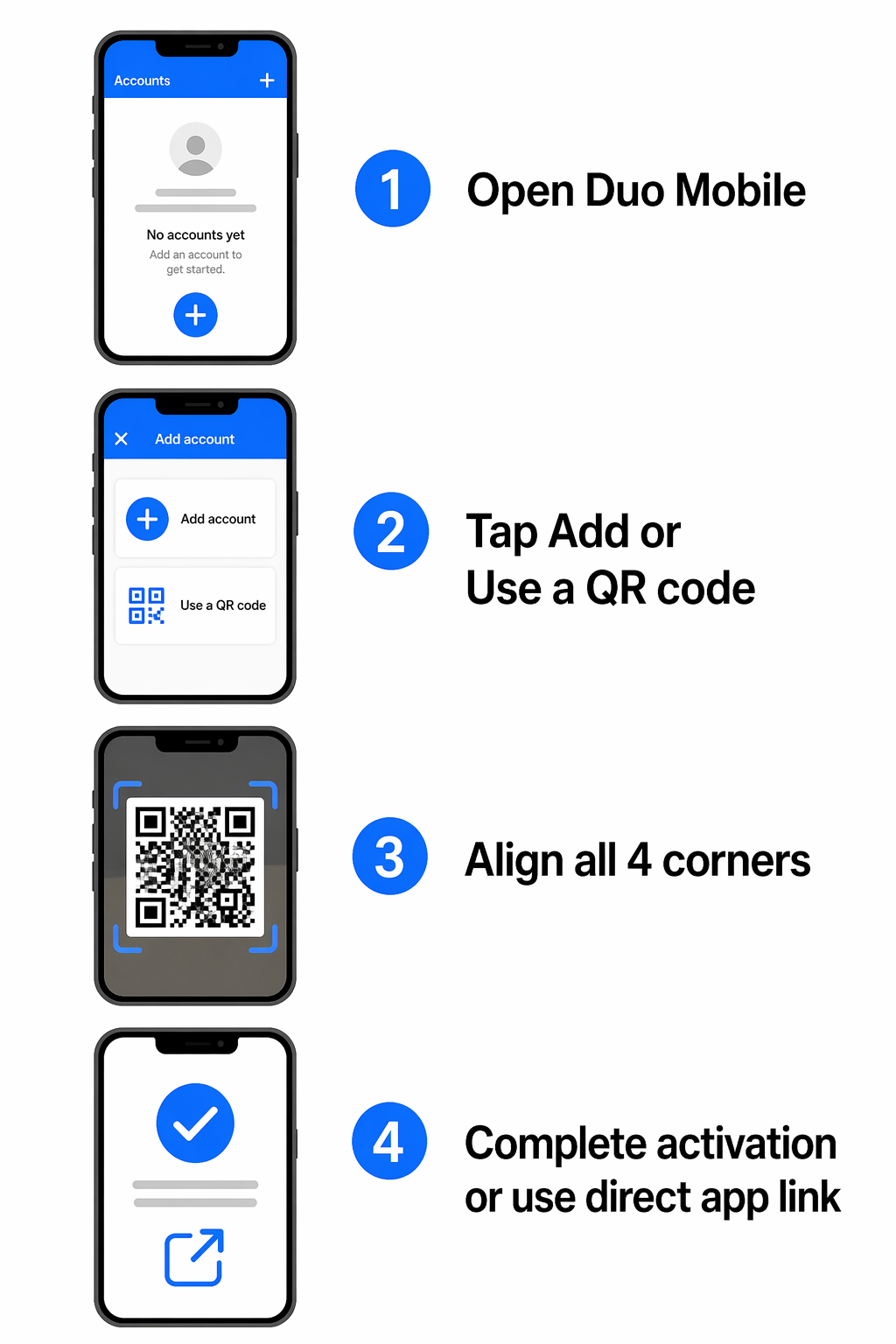
Duo setup steps infographic

Troubleshooting Common Scanning Failures

If your camera fails to recognize the code, several environmental factors might be at play. Lighting is often the primary culprit; ensure there is no glare on your computer screen that could obscure the pattern. You may also need to adjust your screen brightness to improve the contrast. For a QR code to be easily readable, it should ideally maintain a 4:1 contrast ratio and be at least 0.8 x 0.8 inches in size on your display.

In cases where the camera hardware is unresponsive, you can use a free online QR code scanner to verify the code or upload a screenshot of the enrollment page. If the QR code remains unscannable, look for the fallback option on the enrollment page labeled “Get an activation link instead.” This allows you to receive a time-sensitive link via email that will activate your account with a single tap, bypassing the need for a visual scan entirely.

Securing Your Account with Backup Methods

Once your primary device is linked, it is a best practice to establish backup authentication methods to prevent being locked out if your phone is lost or damaged. You can manage these options by selecting “Manage devices” in the Duo prompt. Adding a secondary phone number or a hardware security key ensures that you always have a way to verify your identity.
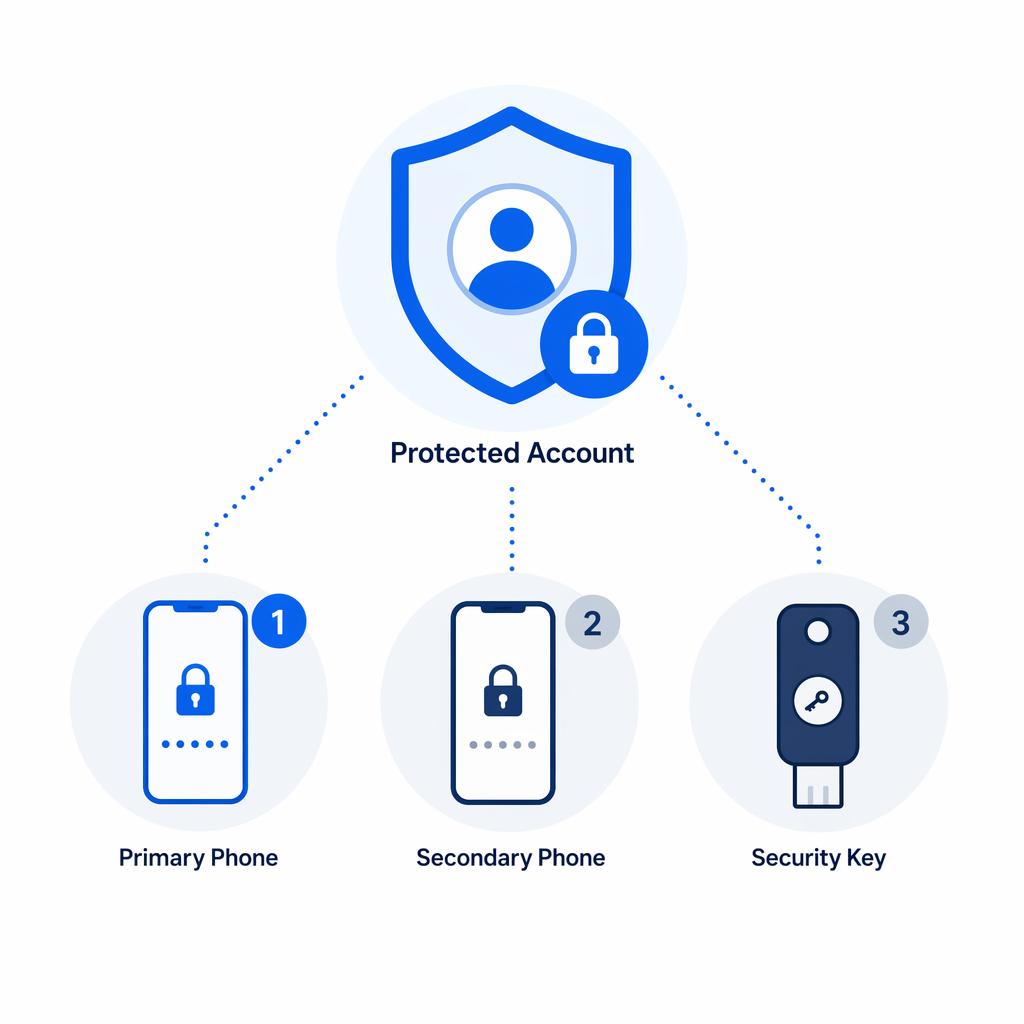
Duo backup methods illustration

Understanding the “why” behind this technology can help you maintain better security habits. Duo utilizes device-bound cryptography, meaning the private keys used to approve your logins never leave your device. This is similar to how encrypted QR codes protect sensitive data by ensuring only authorized users can interpret the information. By following testing QR code best practices, you can ensure your 2FA system remains a robust defense against unauthorized access.

Simplify Your Digital Security Want to learn how businesses use secure scanning to protect user data? Check out our guide on multi-factor authentication with QR codes to see how this technology streamlines identity verification today.

Frequently Asked Questions

What if I can’t scan the Duo QR code?

Ensure your screen brightness is high and there is no glare. If the camera still doesn’t recognize it, you can select “Get an activation link instead” on the enrollment page to receive a link via email.

Can I use Duo Mobile without an internet connection?

While Duo Push notifications require an internet connection, the Duo Mobile app can generate offline passcodes that you can enter manually to log in without Wi-Fi or cellular data.

How do I add a second device to my Duo account?

Log in to your organization’s Duo portal and select “Manage devices.” You will need to authenticate with your first device before you can add and scan a QR code for a new smartphone or tablet.

To maintain a high level of security, remember to update the Duo Mobile app regularly and utilize the built-in Security Checkup feature to monitor your device’s health. If you are also managing other security tools, you may find our LastPass QR code guide helpful for organizing your various authentication platforms. Consistently practicing these steps will keep your digital identity protected across all your professional and personal accounts.

About the author

Siim Kostabi is the Content Lead at Pageloot. He writes about our innovative QR code generator services. With a profound expertise spanning over half a decade on QR codes, Siim is a subject matter expert in the field. He makes significant strides in leveraging QR technology to simplify and augment digital interactions.

Category
Learn more about
Scanning app QR code
How to Download apps
QR code beverage label
QR Codes on Bottles & Cans
✅ The #1 Solution for QR Codes

If you need to create QR Codes online, you can Make a QR Code right here for free!
Pageloot is the #1 Go-To Solution to create and scan QR Codes.

Trusted by over 20 000 brands to get more sales, reviews & followers.

Client logos
Trusted by top brands
Rated 4.8 out of 5

4.86 / 5 stars rating

Hugo Laurent
Hugo Laurent
Restaurant owner
The most easy and reliable QR code Generator ever. PDF files can be uploaded instantly. Our restaurant menus are now digital.
Lucas Jansen
Lucas Jansen
Real estate developer
This is an excellent tool and the QR codes take you to just where you want. We only use the location QR code but there are so many useful features.
Emma Moretti
Emma Moretti
Retail products
Easy to use and quick. It works great and creates a perfect images, so employees can download my vCard.
Hugo Laurent
Hugo Laurent
Restaurant owner
The most easy and reliable QR code Generator ever. PDF files can be uploaded instantly. Our restaurant menus are now digital.
Lucas Jansen
Lucas Jansen
Real estate developer
This is an excellent tool and the QR codes take you to just where you want. We only use the location QR code but there are so many useful features.
Emma Moretti
Emma Moretti
Retail products
Easy to use and quick. It works great and creates a perfect images, so employees can download my vCard.
See More QR Codes
Scanning podcast QR code
QR Codes for Podcasts
Turn anything into a digital experience in less than 3 minutes.

Free 14-day trial.

No credit card required.

Get 30% off your first purchase

Use the code:

Share your MP3 files

Sign up to create PDF QR codes

Upload and display everything you need:

  • Audio files
  • Podcasts
  • Music

14-day free trial with sign-up.
QR codes expire after trial.

sign up to create an audio mp3 QR code

Get more scans with frames

Sign up to add more frames to your QR codes

Call-to-action frames help your customers interact with the QR Code easily. Try them out!

14-day free trial with sign-up.
QR codes expire after trial.

Sign up to add more frames to your QR codes

Add more style with shapes

Signup to create more shapes

QR Codes don’t have to be square. Try switching it up to fit your brand’s image.

14-day free trial with sign-up.
QR codes expire after trial.

Signup to create more shapes

Add a logo to your QR Code

Sign up to add your logo to QR codes

Make your QR code stand out by adding your logo and brand to it.

14-day free trial with sign-up.
QR codes expire after trial.

Sign up to add your logo to QR codes

Smart App Store redirects

Sign up to create an app store QR code

Add your App links to our smart App Store QR Code. The users are redirected based on their device.

14-day free trial with sign-up.
QR codes expire after trial.

Sign up to create an app store QR code

Upload an image to a QR Code

Sign up to create image QR codes

Share your images easily. Change any image dynamically within seconds.

14-day free trial with sign-up.
QR codes expire after trial.

Sign up to create image QR codes

Share your PDF files

Sign up to create PDF QR codes

Upload and display everything you need:

  • Menus & price lists
  • Instructions
  • Any documents

14-day free trial with sign-up.
QR codes expire after trial.

Sign up to create PDF QR codes

Edit later without printing

Sign up to edit your QR codes without printing again

Dynamic QR Codes let you change the contents of your QR Code without having to print new ones.

14-day free trial with sign-up.
QR codes expire after trial.

Sign up to edit your QR codes without printing again

When? Where? Track your QR Code scans

Sign up to track your QR codes

Discover which of your QR Codes receive the most scans and what excites your clients the most.

14-day free trial with sign-up.
QR codes expire after trial.

Sign up to track your QR codes

Print ready files available

Sign up to create vector QR codes like PDF and SVG

.EPS, .PDF, .SVG

Want to download your QR Codes in HD resolution? Get vector or pixel formats that are ready to be printed.

14-day free trial with sign-up.
QR codes expire after trial.

Sign up to create vector QR codes like PDF and SVG

Please wait. Your QR Code is loading... loading...

Make it your own

Sign up to save your QR code for later

Get more scans by creating awesome QR Codes with different colors, logos and call-to-action frames.

14-day free trial with sign-up.
QR codes expire after trial.

Sign up to save your QR code for later