
Are paper intake forms, delayed check-ins, and missing patient reviews creating bottlenecks in your dental practice? Processing manual paperwork wastes staff hours, increases waiting room delays, and frustrates incoming patients. Integrating scannable QR codes into your office streamlines daily communication, speeds up digital intake, and builds your online reputation.
Modernize Patient Intake and Digital Check-In Workflows
Paper registration packets require manual data entry, create physical clutter, and increase front-desk wait times. Displaying scannable intake codes in your reception area allows patients to complete medical history updates, consent agreements, and registration details on their own smartphones before entering the treatment room.
Using a Google Form QR code generator or converting registration documents with a PDF QR code generator allows your team to convert paper forms into digital entry points. Patients scan the code on a counter sign, complete the required fields, and submit their responses directly to your digital records system.
When implementing digital intake forms, you must maintain strict data security practices:
- Avoid encoding health data: Never store Protected Health Information (PHI) – such as patient names, medical histories, or contact info – directly within the static QR code pattern.
- Use encrypted destinations: Ensure all linked web pages use secure HTTPS protocols to protect data during transmission.
- Verify platform compliance: Host intake forms on secure systems that maintain encrypted databases and offer signed Business Associate Agreements (BAAs).
- Require authentication: Ensure access to existing patient portals or sensitive documents requires secure user login credentials.
Upgrade Your Dental Practice Workflows Today Streamline patient check-ins and reduce front-desk paperwork using customizable digital tools. Start building trackable workflows with the QR Code Generator today.
Collect Authentic Google Reviews at Checkout
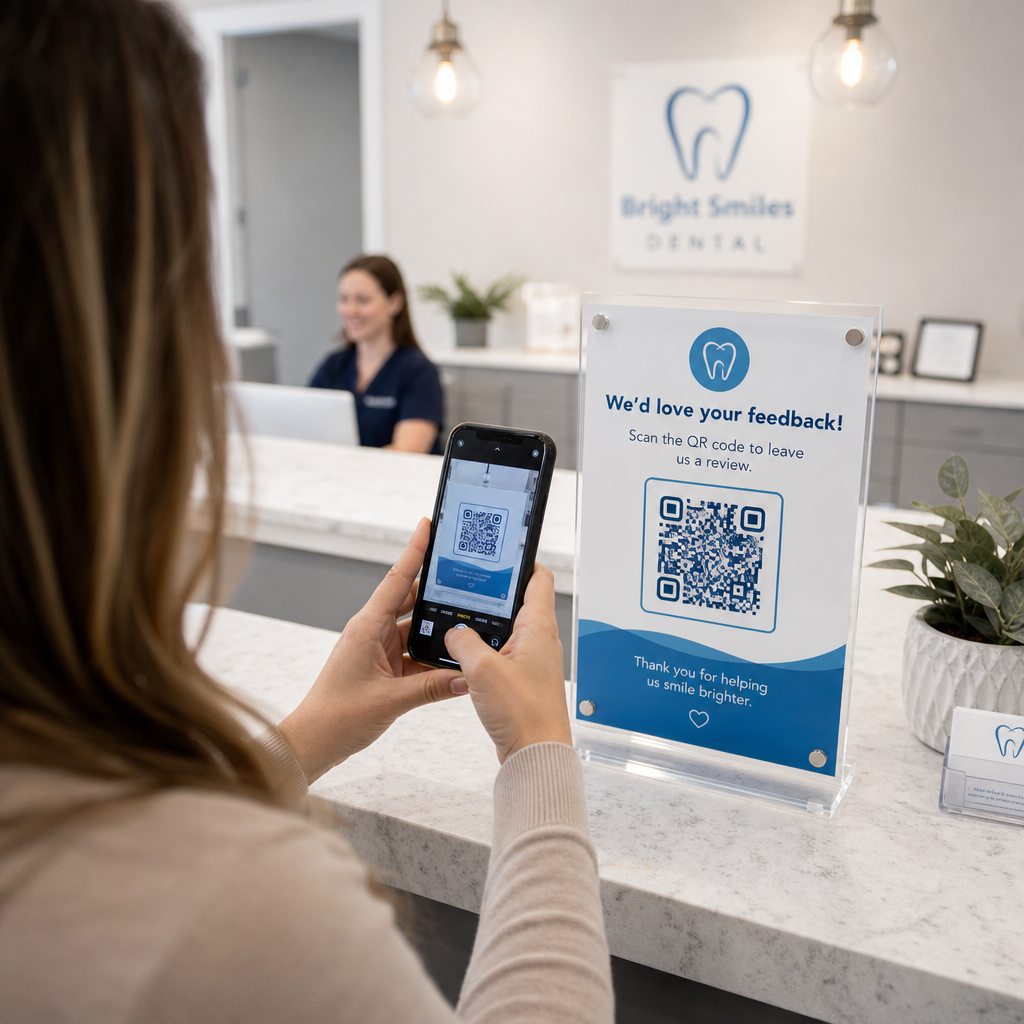
Positive online reviews build trust with prospective patients and improve your local search ranking. However, asking patients to manually search for your practice online after an appointment often results in low response rates. Placing dedicated review signage at your reception desk or on post-care summary sheets gives satisfied patients an immediate, single-scan path to leave feedback.
Using a specialized Google Review QR code generator routes patient mobile devices directly to your practice’s Google Business review submission page. Incorporating scannable codes into your broader strategy for customer feedback QR codes creates an automated system for growing online visibility.
To protect your business profile from search engine penalties, adhere strictly to platform guidelines:
- Avoid review gating: Provide every patient with equal access to leave feedback rather than screening for positive experiences.
- Prohibit review incentives: Never offer discounts, gift cards, free oral hygiene products, or raffle entries in exchange for writing a review.
- Collect reviews on personal devices: Encourage patients to scan the sign using their own mobile phones rather than gathering reviews on an office-owned kiosk or tablet.
Enhance Post-Care Communication and Patient Information
Clear post-treatment instructions reduce emergency follow-up calls and ensure proper recovery after surgical or restorative procedures. Printed post-op care sheets are frequently misplaced by patients. Adding scannable links to digital instructional guides, video tutorials, or downloadable documents keeps critical recovery steps accessible on patient mobile devices.
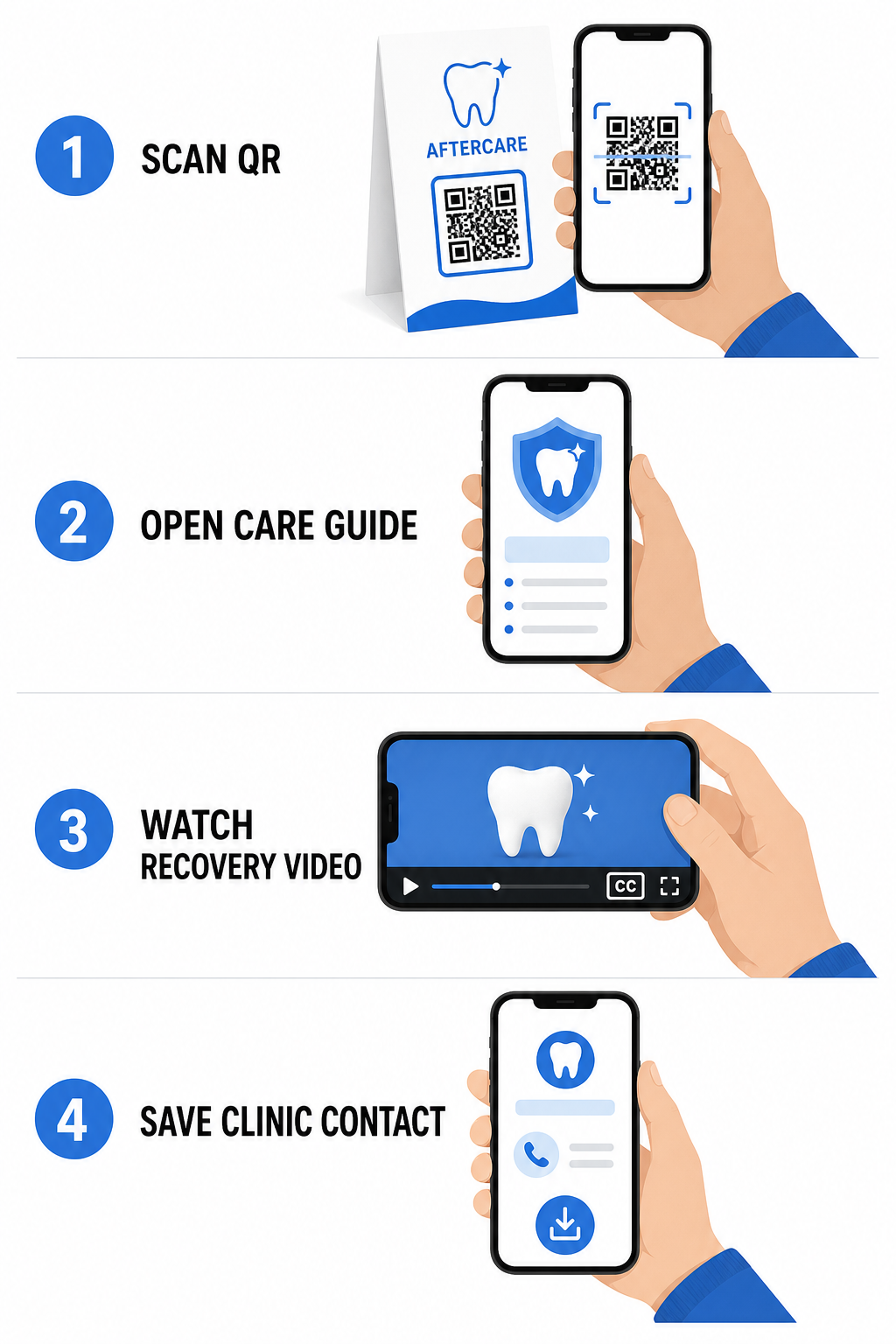
By leveraging tools designed for hospital and healthcare QR codes, your practice can provide instant access to educational resources, care guidelines, and clinic contacts:
- Provide post-op instruction sheets: Link appointment summaries to downloadable care guides created through a PDF QR code generator.
- Share educational video clips: Direct patients to instructional videos demonstrating proper brushing, flossing with braces, or caring for clear aligners.
- Grant reception Wi-Fi access: Display a Wi-Fi code on waiting room tables so patients can connect to guest internet securely without typing complex passwords.
- Distribute digital business cards: Add contact codes to appointment reminder cards so patients can save your office phone number and email directly to their mobile contacts.
Dynamic Marketing and Practice Branding Strategies
Marketing campaigns for dental practices require flexibility, clear visual identification, and measurable performance tracking. Customizing your scannable codes helps maintain practice branding across printed mailers, community flyers, and local advertisements.
Using a QR code generator with logo allows you to embed your dental clinic’s logo into the center of the code, reinforcing brand recognition while maintaining scannability. Combine custom visual branding with your broader strategy for small business QR codes to drive patient acquisition across physical touchpoints.
When choosing technology for print marketing, understand the functional differences between static vs dynamic QR codes:
| Feature | Static QR Codes | Dynamic QR Codes |
|---|---|---|
| Editable Content | Fixed; cannot be changed after printing | Fully editable link destination at any time |
| Scan Tracking | No scan tracking or analytics available | Monitors scan frequency, locations, and time |
| Data Pattern | Dense patterns for longer website addresses | Clean, simple patterns using short redirect URLs |
| Primary Dental Use | Fixed Wi-Fi login passwords, standard contact info | Promotional flyers, seasonal offers, print ad tracking |
Dynamic codes are essential for print advertising because you can redirect campaigns – such as switching a teeth-whitening promotion to a clear aligner campaign – without reprinting physical materials.
Track Your Dental Marketing Campaigns in Real Time Update link destinations post-print and monitor total patient scans using dynamic technology. Build your branded campaign materials with the QR Code Generator with Logo.
Essential Rules for Compliance, Accessibility, and Scannability
Proper design, placement, and compliance ensure your scannable materials deliver a smooth, accessible experience for every patient.
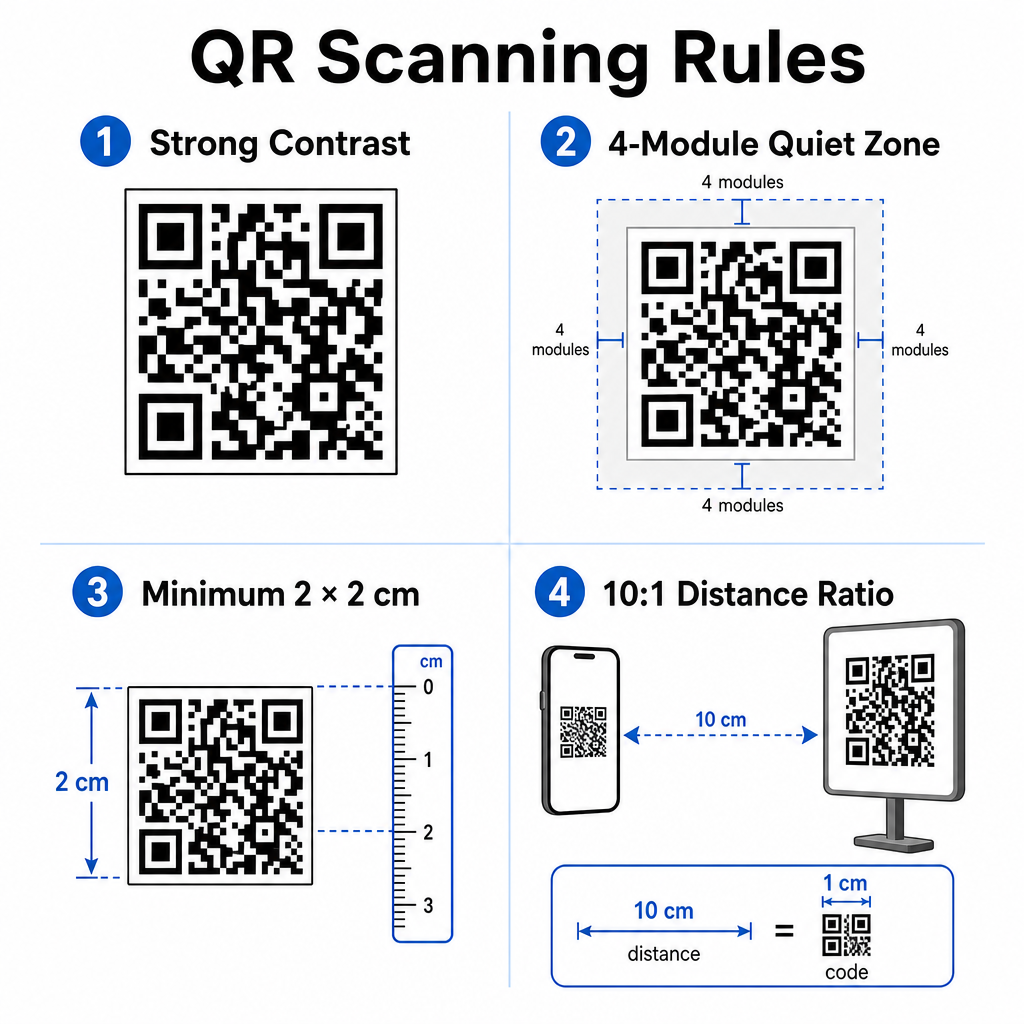
Follow these established guidelines for visual scannability and physical positioning:
- Maintain contrast: Print dark QR modules over a light, uniform background. Dark-on-white designs provide the highest scan reliability.
- Provide a quiet zone: Leave a clear border of at least 4 modules of unprinted space around all four sides of the code pattern.
- Observe minimum sizing: Print close-range codes (such as counter displays or business cards) at a minimum size of 2 x 2 cm (0.8 x 0.8 inches).
- Apply the distance rule: Follow a 10:1 scanning ratio. For every 10 cm of distance between the user’s camera and the sign, increase code width by 1 cm.
- Ensure strategic placement: Position waiting room signage at eye level on flat, glare-free, non-reflective surfaces, following proper QR code placement guidelines.
To comply with digital accessibility standards (ADA regulations), ensure your QR touchpoints accommodate all patients:
- Provide text alternatives: Always print a short URL or plain-text alternative adjacent to the code for patients who cannot scan.
- Optimize digital form accessibility: Ensure destination intake forms feature explicit form field labels, screen-reader compatibility, visible focus states, and keyboard-friendly navigation.
- Include video captions: Include closed captions and transcripts on all video instruction links accessed via scan points.
Refer to detailed guidelines on secure health data sharing to ensure your digital communication channels uphold privacy standards.
Integrating scannable codes across your dental practice reduces manual front-desk administration, accelerates patient check-ins, increases authentic online reviews, and keeps post-care instructions easily accessible. By choosing dynamic links, maintaining ADA accessibility standards, and securing patient data transfers, you build a modern and efficient care environment. Start creating your customizable, secure office touchpoints with the Pageloot QR Code Generator today.
Frequently Asked Questions
Yes, provided that no Protected Health Information (PHI) is embedded directly into the QR code graphic itself. The code must route users to a secure HTTPS web page hosted on a HIPAA-compliant platform that uses data encryption, user authentication, and signed Business Associate Agreements (BAAs).
No. Google explicitly prohibits offering payment, discounts, gift cards, or free services in exchange for customer reviews. You must also avoid review gating, ensuring all patients have open access to leave unbiased feedback.
For close-range scanning on reception desks or treatment trays, print codes at a minimum size of 2 x 2 cm (0.8 x 0.8 inches). For signs intended to be scanned from farther away, increase the size following a 10:1 distance-to-size ratio.