Struggling to make your QR codes look like they actually belong to your brand? A plain black-and-white code does the job technically, but it misses a real opportunity to reinforce recognition and drive more scans. This guide walks you through how to create professional branded QR codes using ready-made templates, your own logo and colors, and dynamic features that keep your campaigns flexible after printing.
Why Branded QR Codes Perform Better
A QR code is a touchpoint. Every time someone sees it on packaging, a flyer, or a business card, they’re making a quick judgment about whether to scan it. Branded QR codes – those that incorporate your logo, color scheme, and visual style – signal legitimacy and familiarity, which directly affects scan rates.
Research consistently shows that branded QR codes with logos can boost scan rates by 30% to 70% compared to generic black-and-white ones. That gap comes down to trust: a code that looks like it belongs to a brand people recognize gets scanned more readily than one that looks generic or unverifiable.
Beyond scan rates, branded codes create consistency across your marketing materials. When your QR code matches your packaging, signage, and digital assets, it reinforces brand identity rather than undercutting it.
Create On-Brand QR Codes Without Starting From Scratch Pageloot’s QR code templates give you ready-made designs you can customize with your colors, logo, and style – so every code looks like part of your brand, not an afterthought.
Choosing the Right Template for Your Brand
The template you choose sets the visual foundation for your QR code. A well-matched template reduces design time, ensures scannability, and gives your code a polished look that fits naturally within your existing materials.
When evaluating templates, prioritize:
- Brand alignment – Does the template’s color range, layout, and visual style match your existing identity?
- Use case fit – A template designed for a business card has different proportions and density than one built for a poster or product label
- Scannability – Pre-tested templates from reliable platforms are already optimized for contrast and quiet zone requirements
Pageloot’s QR code template library offers designs organized by use case, from retail and events to social profiles and menus. You can pick a template that already looks campaign-ready, then adjust colors, add your logo, and reuse it across materials for a consistent look.
Matching Templates to Your Industry
Different industries carry different visual expectations, and your QR code template should reflect that context:
- Restaurants and hospitality – Use warm tones and clean typography suited to table tents and menus; the goal is approachable and quick to scan
- Retail and e-commerce – Choose templates that complement product packaging without competing with it visually
- Real estate – Sophisticated, minimal designs with room for agent branding and contact details work well on signage and printed materials
- Healthcare – Clean, high-contrast designs in calm palettes establish the trust and clarity this context requires
- Education – Designs that balance approachability with authority; school colors and clear CTAs help guide students and parents
- Events and marketing agencies – Versatile templates that can be adapted per campaign while maintaining your agency’s overall identity
Customizing QR Codes with Your Branding Elements
Once you’ve chosen a template, the real brand work begins. Adding your logo, applying your color palette, and fine-tuning design details transforms a generic template into a code that looks unmistakably yours.
Adding Your Company Logo
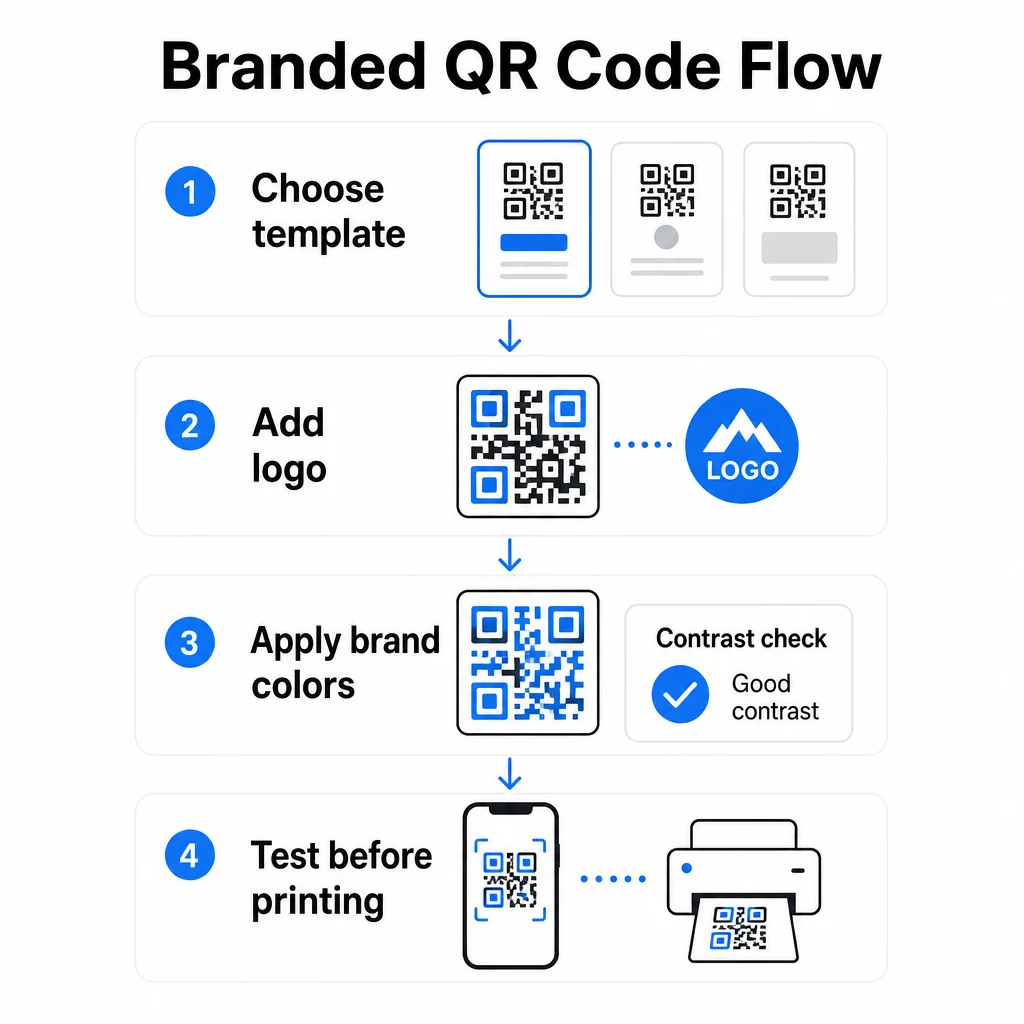
Placing your logo at the center of a QR code creates an immediate brand connection at the moment of scan. To do this correctly:
- Use a high-quality vector file (SVG or EPS) so your logo stays sharp at any size
- Keep the logo centered and away from the three finder pattern squares in the corners
- Limit logo coverage to no more than 20–30% of the total code area – beyond that, scannability drops
- Use Level H error correction when adding a logo; this allows the code to recover up to 30% of damaged or obscured data, compensating for the area your logo covers
Pageloot’s QR Code Generator with Logo handles error correction automatically when you upload a logo, reducing the risk of generating a code that looks good but won’t scan reliably.
Add Your Logo to a QR Code in Minutes Use the QR Code Generator with Logo to upload your brand logo, apply your colors, and download a print-ready file – no design software needed.
Applying Brand Colors Without Breaking Scannability
Color is where many branded QR codes run into trouble. The code still needs sufficient contrast between the data modules and the background to scan reliably. Guidelines to follow:
- Dark foreground on a light background is the most reliable combination; black on white remains the gold standard
- Aim for a minimum contrast ratio of 4.5:1 for small codes; 3:1 is acceptable for larger formats where the scanner has more surface area to read
- Avoid gradients and shadows – these create mid-tones that confuse scanners by making the boundary between modules ambiguous
- Never invert the colors (light code on dark background) without thorough multi-device testing; some scanners handle this poorly
For more detail on which color combinations work and which to avoid, the QR code color contrast best practices guide covers specific contrast ratio examples and a comparison table.
Advanced Customization Details
Beyond color and logos, a few additional design choices can elevate your QR code’s appearance without compromising function:
- Custom finder pattern shapes – The three squares in the corners can be rounded or styled; this adds personality while keeping the pattern recognizable to scanners
- Frames and calls-to-action – Adding a branded border and a short phrase like “Scan to See the Menu” or “Scan to Download” increases engagement by telling users exactly what they’ll get
- Quiet zone – Always maintain a blank margin of at least four modules on all sides of the code; this is an ISO/IEC 18004 requirement and is critical for scanners to locate the code correctly
- Minimum size – For print use, keep codes at least 2 × 2 cm (0.8 × 0.8 in) for close-range scanning; scale up proportionally for posters or signage using the general rule of 1 cm of code width per 10 cm of expected scanning distance
Use vector formats (SVG or EPS) for all print applications to prevent pixelation at larger sizes. For additional guidance, the best practices for QR code readability and custom QR code creation guide cover size, resolution, and placement in more detail.
Always test before printing. Print the code at its intended size, test it on multiple devices and scanner apps, and check it under the actual lighting conditions where it will be used. This is especially important when logos, non-standard colors, or small sizes are involved, as these variables can affect scannability in ways that aren’t visible on screen.
Using Dynamic QR Codes for Flexible Campaigns
Static QR codes lock in a fixed destination at the moment of creation. That’s fine for permanent use cases, but it creates problems the moment a URL changes, a promotion ends, or a menu gets updated – because you’d need to reprint every piece of material that carries the code.
Dynamic QR codes solve this. Instead of encoding the destination directly, they encode a short redirect URL that you control from a dashboard. When you need to change where the code points – a new landing page, an updated PDF, a seasonal offer – you update the destination without touching the printed code itself.
This makes dynamic codes the practical default for most business applications. Key advantages include:
- Edit the destination after printing without reprinting materials, saving time and cost
- Real-time analytics including total scans, unique scans, device types, and scan locations
- Device detection for use cases like app downloads, where the code automatically routes iOS users to the App Store and Android users to Google Play
- Expiration dates and password protection for time-sensitive or exclusive content
Pageloot’s dynamic QR code generator includes a centralized dashboard where you can monitor all active codes, update destinations, and pull performance data in real time. You can also add UTM parameters to QR code links for direct integration with Google Analytics, connecting scan data to your broader marketing funnel.
For context on how the underlying technology works, how error correction works in editable QR codes explains why dynamic codes remain scannable even as the encoded short URL stays constant across design or content updates.
Update Your Campaigns Without Reprinting Pageloot’s dynamic QR codes let you change destinations, track performance, and optimize campaigns from one dashboard – even after your materials are already printed.
Where to Use Branded QR Codes
Branded QR codes are versatile across physical and digital materials. Common applications include:
- Business cards – Link directly to a digital contact page, portfolio, or social profile; the business card QR code generator is purpose-built for this use case
- Restaurant menus – Dynamic codes on table tents let you update the menu without reprinting cards
- Product packaging – Link to instructions, reviews, or promotional content; consistent branding on the code reinforces the product’s identity
- Event materials – Flyers, tickets, and signage with codes that link to schedules, registration pages, or post-event content
- Retail signage – Drive foot traffic to online offers or loyalty programs
- Printed ads and direct mail – Track which campaigns generate scans using UTM parameters and analytics
For campaigns where you need a single QR code to point to multiple links or pieces of content, Pageloot’s landing page feature lets you create a branded mobile page behind a single scan – useful for social profiles, event info, or product collections.
You can explore the full range of available features and use cases on the Pageloot features overview.
Tracking Performance and Improving Results
The analytics behind your QR codes are what separate a passive touchpoint from a measurable marketing asset. Once your branded codes are deployed, the data they generate tells you what’s working and what needs adjustment.
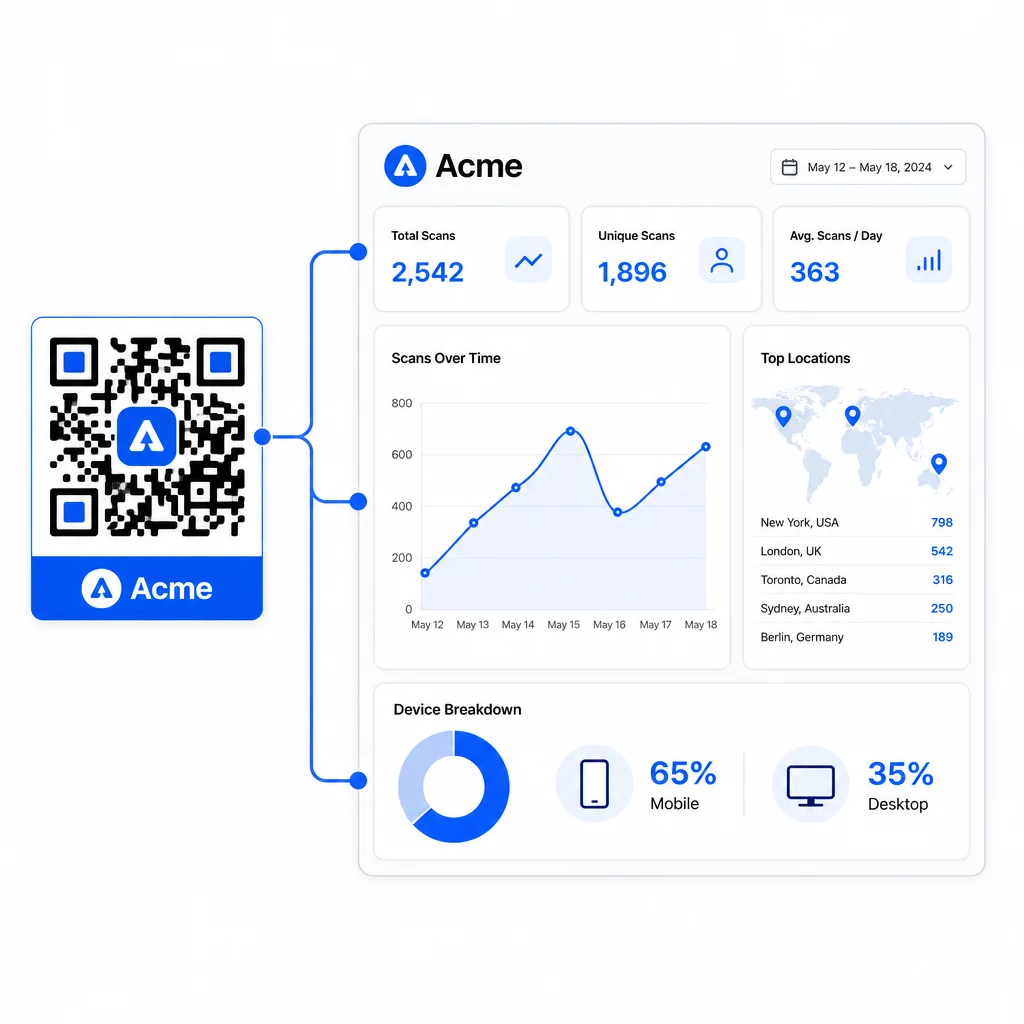
From the Pageloot dashboard, you can track:
- Total and unique scan counts per code
- Scan locations (country, city)
- Device types (iOS vs. Android, mobile vs. desktop)
- Scan timing patterns – which days and hours generate the most activity
This data lets you identify which placements drive engagement, compare performance across campaigns, and make design or placement changes informed by actual behavior rather than assumptions. For example, if scans on a particular flyer drop off mid-campaign, you can update the linked destination to a fresher offer without replacing the printed material.
Adding UTM parameters to your QR code URLs brings this data directly into Google Analytics, connecting offline scan behavior to your full conversion funnel.
Putting It All Together
Branded QR codes are most effective when design, functionality, and data work together. Starting with a well-matched template keeps your codes visually consistent and campaign-ready. Adding your logo, brand colors, and a clear call-to-action makes them recognizable and action-oriented. Using dynamic codes gives you the flexibility to update destinations and track performance without ever touching the printed materials.
Whether you’re placing codes on business cards, menus, packaging, or event signage, the combination of professional design and real-time analytics turns a simple code into a measurable part of your marketing strategy. Start with a free QR code from Pageloot’s generator and build from there.
Frequently Asked Questions
Use Level H error correction when adding a logo – this allows the code to recover up to 30% of obscured data, compensating for the logo’s coverage. Keep the logo to no more than 20–30% of the total code area and center it away from the finder patterns. For colors, maintain a minimum 4.5:1 contrast ratio between the foreground modules and the background, avoid gradients, and always test on multiple devices before printing.
A static QR code encodes the destination directly, so it cannot be changed after creation without generating a new code. A dynamic QR code encodes a short redirect URL that you control from a dashboard, meaning you can update the destination, add password protection, set expiration dates, and track scan analytics – all without reprinting your materials. For most marketing and business use cases, dynamic codes are the more practical choice.
The general minimum for close-range scanning is 2 × 2 cm (0.8 × 0.8 in). For materials where scanning distance is greater – such as posters or signage – use the 10:1 rule: add 1 cm of code width for every 10 cm of expected viewing distance. Branded codes with logos or custom colors may need to be slightly larger to ensure the added design complexity doesn’t reduce scannability.