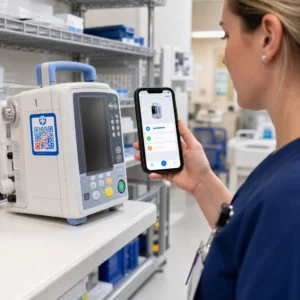
Haben Sie Schwierigkeiten, Ihre QR-Codes so aussehen zu lassen, als gehörten sie tatsächlich zu Ihrer Marke? Ein einfacher Schwarz-Weiß-Code erfüllt technisch seinen Zweck, verpasst aber eine echte Gelegenheit, die Wiedererkennung zu stärken und mehr Scans zu generieren. Dieser Leitfaden zeigt Ihnen, wie Sie professionelle QR-Codes mit Ihrem Branding erstellen, indem Sie vorgefertigte Vorlagen, Ihr eigenes Logo und Ihre Farben sowie dynamische Funktionen nutzen, die Ihre Kampagnen nach dem Druck flexibel halten.
Warum gebrandete QR-Codes besser abschneiden
Ein QR-Code ist ein Berührungspunkt. Jedes Mal, wenn jemand ihn auf einer Verpackung, einem Flyer oder einer Visitenkarte sieht, trifft er schnell eine Entscheidung, ob er ihn scannen soll. Gebrandete QR-Codes – solche, die Ihr Logo, Farbschema und visuellen Stil integrieren – signalisieren Legitimität und Vertrautheit, was sich direkt auf die Scanraten auswirkt.
Forschung zeigt durchweg, dass gebrandete QR-Codes mit Logos die Scanraten um 30 % bis 70 % steigern können im Vergleich zu generischen Schwarz-Weiß-Codes. Dieser Unterschied beruht auf Vertrauen: Ein Code, der aussieht, als gehöre er zu einer Marke, die Menschen erkennen, wird leichter gescannt als einer, der generisch oder nicht überprüfbar aussieht.
Über die Scanraten hinaus schaffen gebrandete Codes Konsistenz in Ihren Marketingmaterialien. Wenn Ihr QR-Code zu Ihrer Verpackung, Beschilderung und Ihren digitalen Assets passt, stärkt er die Markenidentität, anstatt sie zu untergraben.
Erstellen Sie markengerechte QR-Codes, ohne bei Null anzufangen Pageloots QR-Code Vorlagen bieten Ihnen vorgefertigte Designs, die Sie mit Ihren Farben, Ihrem Logo und Ihrem Stil anpassen können – so sieht jeder Code wie ein Teil Ihrer Marke aus und nicht wie ein nachträglicher Einfall.
Die Wahl der richtigen Vorlage für Ihre Marke
Die von Ihnen gewählte Vorlage bildet die visuelle Grundlage für Ihren QR-Code. Eine gut passende Vorlage reduziert die Designzeit, gewährleistet die Scannbarkeit und verleiht Ihrem Code ein professionelles Aussehen, das sich natürlich in Ihre bestehenden Materialien einfügt.
Bei der Bewertung von Vorlagen priorisieren Sie:
- Markenausrichtung – Passen Farbbereich, Layout und visueller Stil der Vorlage zu Ihrer bestehenden Identität?
- Passung zum Anwendungsfall – Eine für eine Visitenkarte entworfene Vorlage hat andere Proportionen und Dichte als eine für ein Poster oder ein Produktetikett erstellte.
- Scannbarkeit – Vorgetestete Vorlagen von zuverlässigen Plattformen sind bereits für Kontrast- und Ruhezonenanforderungen optimiert
Pageloots QR-Code-Vorlagenbibliothek bietet Designs, die nach Anwendungsfällen geordnet sind, von Einzelhandel und Veranstaltungen bis hin zu sozialen Profilen und Menüs. Sie können eine Vorlage auswählen, die bereits kampagnenfertig aussieht, dann Farben anpassen, Ihr Logo hinzufügen und sie über verschiedene Materialien hinweg für ein konsistentes Erscheinungsbild wiederverwenden.
Vorlagen an Ihre Branche anpassen
Verschiedene Branchen haben unterschiedliche visuelle Erwartungen, und Ihre QR-Code-Vorlage sollte diesen Kontext widerspiegeln:
- Restaurants und Gastgewerbe – Verwenden Sie warme Töne und eine klare Typografie, die für Tischaufsteller und Speisekarten geeignet ist; das Ziel ist ansprechend und schnell zu scannen
- Einzelhandel und E-Commerce – Wählen Sie Vorlagen, die die Produktverpackung ergänzen, ohne visuell mit ihr zu konkurrieren
- Immobilien – Anspruchsvolle, minimale Designs mit Platz für Agenten-Branding und Kontaktdaten eignen sich gut für Beschilderungen und gedruckte Materialien
- Gesundheitswesen – Klare, kontrastreiche Designs in ruhigen Farbpaletten schaffen das Vertrauen und die Klarheit, die dieser Kontext erfordert
- Bildung – Designs, die Zugänglichkeit mit Autorität in Einklang bringen; Schulfarben und klare CTAs helfen, Schüler und Eltern zu leiten
- Veranstaltungen und Marketingagenturen – Vielseitige Vorlagen, die pro Kampagne angepasst werden können, während die Gesamtidentität Ihrer Agentur erhalten bleibt
QR-Codes mit Ihren Branding-Elementen anpassen
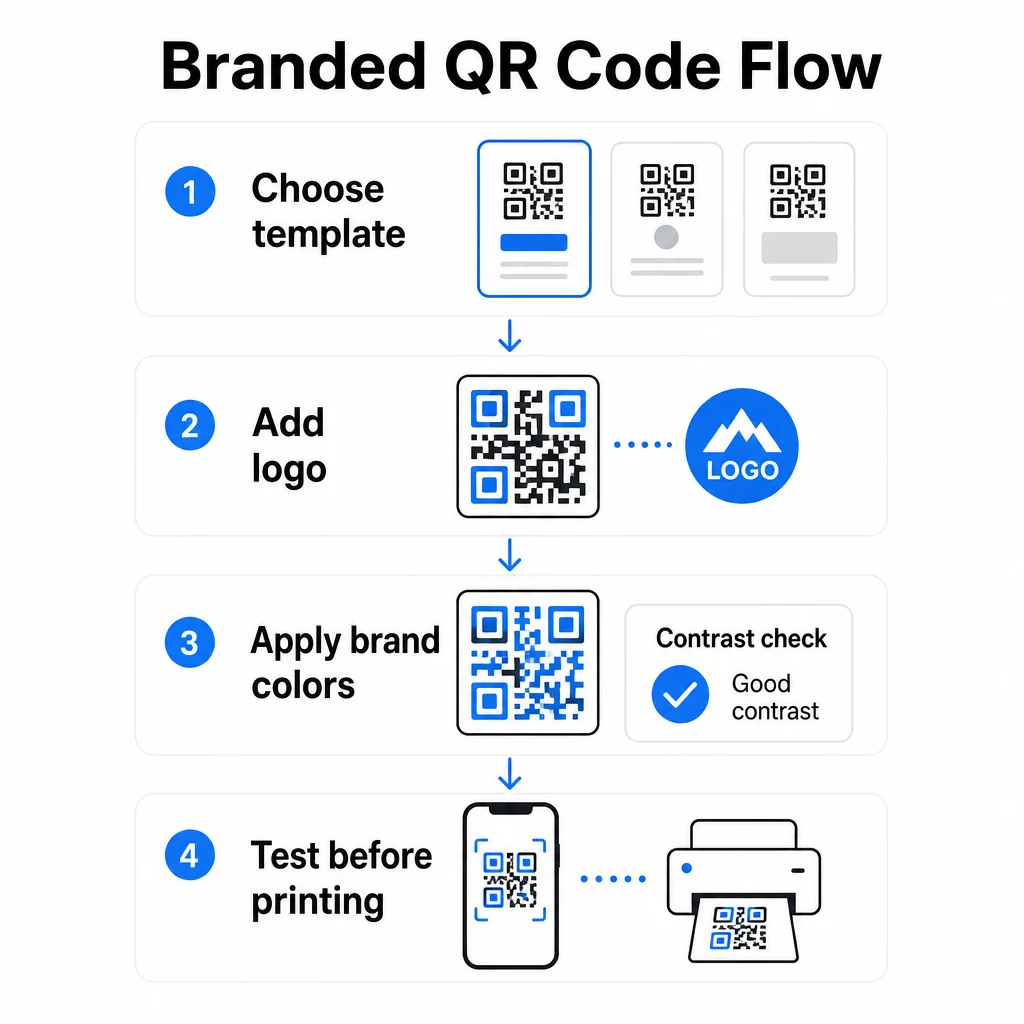
Sobald Sie eine Vorlage ausgewählt haben, beginnt die eigentliche Markenarbeit. Das Hinzufügen Ihres Logos, das Anwenden Ihrer Farbpalette und die Feinabstimmung von Designdetails verwandelt eine generische Vorlage in einen Code, der unverkennbar Ihnen gehört.
Hinzufügen Ihres Firmenlogos
Das Platzieren Ihres Logos in der Mitte eines QR-Codes schafft im Moment des Scannens eine sofortige Markenverbindung. Um dies korrekt zu tun:
- Verwenden Sie eine hochwertige Vektordatei (SVG oder EPS), damit Ihr Logo in jeder Größe scharf bleibt
- Halten Sie das Logo zentriert und fern von den drei Suchmuster-Quadraten in den Ecken
- Begrenzen Sie die Logoabdeckung auf nicht mehr als 20–30 % der gesamten Codefläche – darüber hinaus nimmt die Scannbarkeit ab
- Verwenden Sie . Fehlerkorrekturstufe H beim Hinzufügen eines Logos; dies ermöglicht es dem Code, bis zu 30 % beschädigter oder verdeckter Daten wiederherzustellen, wodurch der Bereich, den Ihr Logo abdeckt, kompensiert wird
Pageloots QR-Code Generator mit Logo führt die Fehlerkorrektur automatisch durch, wenn Sie ein Logo hochladen, wodurch das Risiko verringert wird, einen Code zu generieren, der gut aussieht, aber nicht zuverlässig scannt.
Fügen Sie Ihr Logo in wenigen Minuten zu einem QR-Code hinzu Verwenden Sie die QR-Code Generator mit Logo um Ihr Markenlogo hochzuladen, Ihre Farben anzuwenden und eine druckfertige Datei herunterzuladen – keine Designsoftware erforderlich.
Anwenden von Markenfarben ohne Beeinträchtigung der Scannbarkeit
Farbe ist der Punkt, an dem viele gebrandete QR-Codes Probleme bekommen. Der Code benötigt immer noch einen ausreichenden Kontrast zwischen den Datenmodulen und dem Hintergrund, um zuverlässig gescannt werden zu können. Zu beachtende Richtlinien:
- Dunkler Vordergrund auf hellem Hintergrund ist die zuverlässigste Kombination; Schwarz auf Weiß bleibt der Goldstandard
- Streben Sie ein Mindestkontrastverhältnis von 4,5:1 an für kleine Codes; 3:1 ist für größere Formate akzeptabel, bei denen der Scanner mehr Oberfläche zum Lesen hat
- Vermeiden Sie Farbverläufe und Schatten – diese erzeugen Zwischentöne, die Scanner verwirren, indem sie die Grenze zwischen Modulen mehrdeutig machen
- Kehren Sie niemals die Farben um (heller Code auf dunklem Hintergrund) ohne gründliche Tests auf mehreren Geräten; einige Scanner verarbeiten dies schlecht
Für weitere Details dazu, welche Farbkombinationen funktionieren und welche zu vermeiden sind, bietet der Leitfaden für Best Practices zum Farbkontrast von QR-Codes spezifische Beispiele für Kontrastverhältnisse und eine Vergleichstabelle.
Details zur erweiterten Anpassung
Neben Farben und Logos können einige zusätzliche Designentscheidungen das Erscheinungsbild Ihres QR-Codes verbessern, ohne die Funktion zu beeinträchtigen:
- Benutzerdefinierte Suchmusterformen – Die drei Quadrate in den Ecken können abgerundet oder stilisiert werden; dies verleiht Persönlichkeit, während das Muster für Scanner erkennbar bleibt
- Rahmen und Handlungsaufforderungen – Das Hinzufügen eines Markenrahmens und eines kurzen Satzes wie “Scannen, um die Speisekarte zu sehen” oder “Scannen zum Herunterladen” erhöht die Interaktion, indem es den Benutzern genau sagt, was sie erhalten werden
- Ruhezone – Halten Sie immer einen leeren Rand von mindestens vier Modulen auf allen Seiten des Codes ein; dies ist eine ISO/IEC 18004 Anforderung und entscheidend dafür, dass Scanner den Code korrekt lokalisieren können
- Mindestgröße – Für den Druckgebrauch sollten Codes für das Scannen aus nächster Nähe mindestens 2 × 2 cm (0,8 × 0,8 Zoll) groß sein; skalieren Sie proportional für Poster oder Beschilderungen nach der allgemeinen Regel von 1 cm Codebreite pro 10 cm erwarteter Scannentfernung
Verwenden Sie Vektorformate (SVG oder EPS) für alle Druckanwendungen, um Pixelbildung bei größeren Größen zu vermeiden. Für weitere Anleitungen, die Best Practices für die Lesbarkeit von QR-Codes und Anleitung zur Erstellung benutzerdefinierter QR-Codes behandeln Größe, Auflösung und Platzierung detaillierter.
Immer vor dem Drucken testen. Drucken Sie den Code in der vorgesehenen Größe, testen Sie ihn auf mehreren Geräten und Scanner-Apps und überprüfen Sie ihn unter den tatsächlichen Lichtverhältnissen, unter denen er verwendet wird. Dies ist besonders wichtig, wenn Logos, nicht standardisierte Farben oder kleine Größen beteiligt sind, da diese Variablen die Scannbarkeit auf Weisen beeinflussen können, die auf dem Bildschirm nicht sichtbar sind.
Dynamische QR-Codes für flexible Kampagnen verwenden
Statische QR-Codes legen ein festes Ziel zum Zeitpunkt der Erstellung fest. Das ist für dauerhafte Anwendungsfälle in Ordnung, aber es schafft Probleme, sobald sich eine URL ändert, eine Aktion endet oder eine Speisekarte aktualisiert wird – denn Sie müssten jedes Material, das den Code trägt, neu drucken.
Dynamische QR-Codes lösen dies. Anstatt das Ziel direkt zu kodieren, kodieren sie eine kurze Weiterleitungs-URL, die Sie über ein Dashboard steuern. Wenn Sie ändern müssen, wohin der Code zeigt – eine neue Landingpage, ein aktualisiertes PDF, ein saisonales Angebot – aktualisieren Sie das Ziel, ohne den gedruckten Code selbst zu berühren.
Dies macht dynamische Codes zur praktischen Standardlösung für die meisten Geschäftsanwendungen. Zu den Hauptvorteilen gehören:
- Ziel nach dem Drucken bearbeiten ohne Materialien neu zu drucken, was Zeit und Kosten spart
- Analyse in Echtzeit einschließlich Gesamtscans, eindeutiger Scans, Gerätetypen und Scan-Standorte
- Geräteerkennung für Anwendungsfälle wie App-Downloads, bei denen der Code iOS-Nutzer automatisch zum App Store und Android-Nutzer zu Google Play leitet
- Ablaufdaten und Passwortschutz für zeitlich begrenzte oder exklusive Inhalte
Pageloots Dynamischer QR-Code Generator umfasst ein zentrales Dashboard, in dem Sie alle aktiven Codes überwachen, Ziele aktualisieren und Leistungsdaten in Echtzeit abrufen können. Sie können auch UTM-Parameter zu QR-Code-Links hinzufügen, um eine direkte Integration mit Google Analytics zu ermöglichen und Scandaten mit Ihrem breiteren Marketing-Funnel zu verbinden.
Für den Kontext, wie die zugrunde liegende Technologie funktioniert, Fehlerkorrektur bei editierbaren QR-Codes erklärt erklärt, warum dynamische Codes scannbar bleiben, auch wenn die kodierte Kurz-URL bei Design- oder Inhaltsaktualisierungen konstant bleibt.
Kampagnen aktualisieren ohne Neudruck Pageloots dynamische QR-Codes ermöglichen es Ihnen, Ziele zu ändern, die Leistung zu verfolgen und Kampagnen von einem Dashboard aus zu optimieren – selbst nachdem Ihre Materialien bereits gedruckt wurden.
Wo gebrandete QR-Codes verwendet werden können
Gebrandete QR-Codes sind vielseitig einsetzbar für physische und digitale Materialien. Häufige Anwendungen sind:
- Visitenkarten – Direkt zu einer digitalen Kontaktseite, einem Portfolio oder einem sozialen Profil verlinken; der Visitenkarten mit QR-Code erstellen ist speziell für diesen Anwendungsfall konzipiert
- Speisekarten für Restaurants – Dynamische Codes auf Tischaufstellern ermöglichen es Ihnen, das Menü zu aktualisieren, ohne Karten neu drucken zu müssen
- Produktverpackungen – Verlinkung zu Anleitungen, Bewertungen oder Werbeinhalten; konsistentes Branding auf dem Code stärkt die Produktidentität
- Veranstaltungsmaterialien – Flyer, Tickets und Beschilderung mit Codes, die zu Zeitplänen, Registrierungsseiten oder Inhalten nach der Veranstaltung verlinken
- Einzelhandelsbeschilderung – Kundenfrequenz zu Online-Angeboten oder Treueprogrammen lenken
- Gedruckte Anzeigen und Direktwerbung – Verfolgen, welche Kampagnen Scans generieren, mithilfe von UTM-Parametern und Analysen
Für Kampagnen, bei denen Sie einen einzigen QR-Code benötigen, der auf mehrere Links oder Inhalte verweist, Pageloots Landingpage-Funktion ermöglicht es Ihnen, eine gebrandete mobile Seite hinter einem einzigen Scan zu erstellen – nützlich für soziale Profile, Veranstaltungsinformationen oder Produktsammlungen.
Sie können die gesamte Palette der verfügbaren Funktionen und Anwendungsfälle auf der Pageloot Funktionsübersicht.
Leistung verfolgen und Ergebnisse verbessern
Die Analysen hinter Ihren QR-Codes sind das, was einen passiven Berührungspunkt von einem messbaren Marketing-Asset trennt. Sobald Ihre gebrandeten Codes eingesetzt sind, sagen Ihnen die generierten Daten, was funktioniert und was angepasst werden muss.
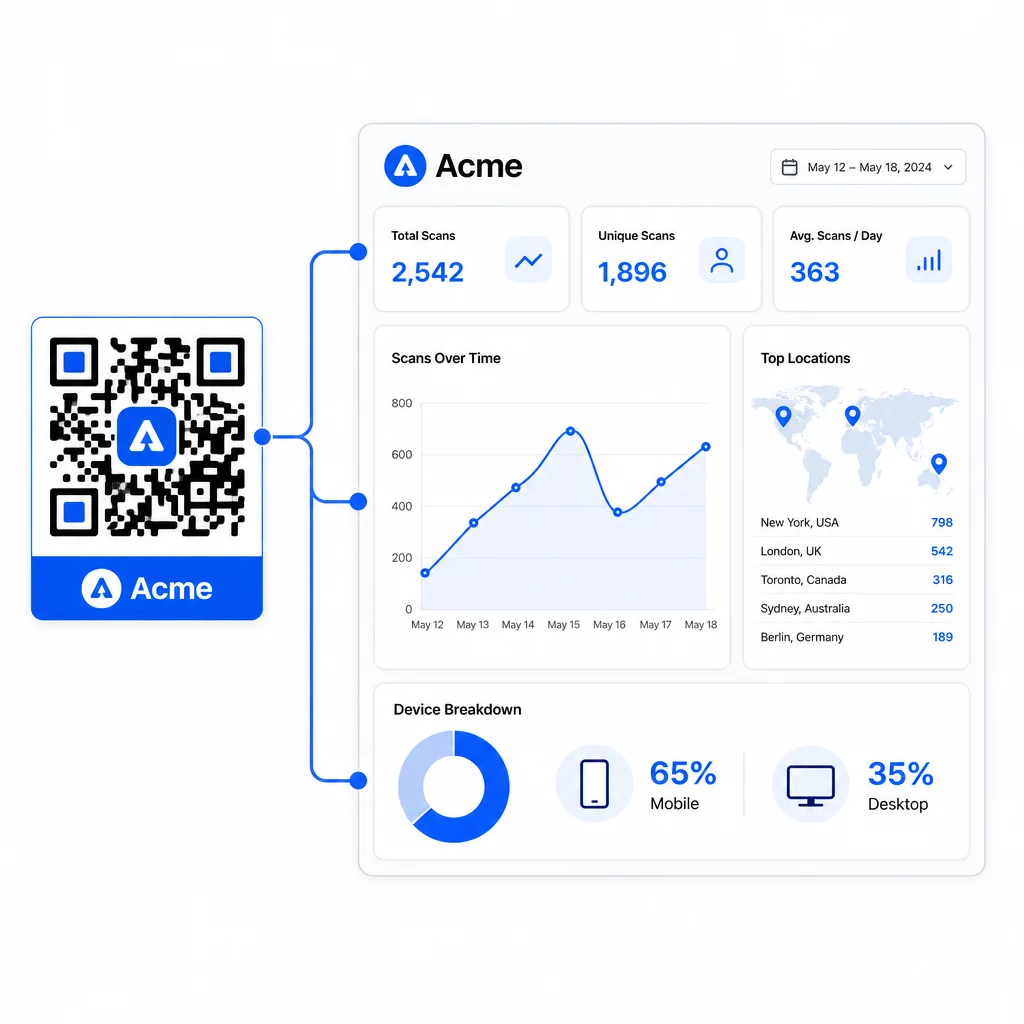
Vom Pageloot-Dashboard aus können Sie verfolgen:
- Gesamte und eindeutige Scan-Anzahlen pro Code
- Scan-Standorte (Land, Stadt)
- Gerätetypen (iOS vs. Android, mobil vs. Desktop)
- Scan-Zeitpunktmuster – welche Tage und Stunden die meiste Aktivität erzeugen
Diese Daten ermöglichen es Ihnen zu identifizieren, welche Platzierungen Engagement fördern, die Leistung über Kampagnen hinweg zu vergleichen und Design- oder Platzierungsänderungen vorzunehmen, die auf tatsächlichem Verhalten und nicht auf Annahmen basieren. Wenn beispielsweise die Scans auf einem bestimmten Flyer mitten in der Kampagne zurückgehen, können Sie das verknüpfte Ziel auf ein aktuelleres Angebot aktualisieren, ohne das gedruckte Material zu ersetzen.
Das Hinzufügen von UTM-Parametern zu Ihren QR-Code-URLs bringt diese Daten direkt in Google Analytics und verbindet das Offline-Scan-Verhalten mit Ihrem gesamten Conversion-Funnel.
Alles zusammenfügen
Branded QR-Codes sind am effektivsten, wenn Design, Funktionalität und Daten zusammenwirken. Der Start mit einer gut passenden Vorlage hält Ihre Codes visuell konsistent und kampagnenbereit. Das Hinzufügen Ihres Logos, Ihrer Markenfarben und eines klaren Call-to-Actions macht sie erkennbar und handlungsorientiert. Die Verwendung dynamischer Codes gibt Ihnen die Flexibilität, Ziele zu aktualisieren und die Leistung zu verfolgen, ohne jemals die gedruckten Materialien anfassen zu müssen.
Ob Sie Codes auf Visitenkarten, Speisekarten, Verpackungen oder Event-Beschilderungen platzieren, die Kombination aus professionellem Design und Echtzeit-Analysen verwandelt einen einfachen Code in einen messbaren Teil Ihrer Marketingstrategie. Beginnen Sie mit einem kostenlosen QR-Code aus dem Generator von Pageloot und bauen Sie darauf auf.
Häufig gestellte Fragen
Verwenden Sie die Fehlerkorrekturstufe H, wenn Sie ein Logo hinzufügen – dies ermöglicht es dem Code, bis zu 30 % der verdeckten Daten wiederherzustellen, was die Abdeckung durch das Logo kompensiert. Halten Sie das Logo auf nicht mehr als 20–30 % der gesamten Codefläche und zentrieren Sie es abseits der Suchmuster. Bei Farben ist ein Mindestkontrastverhältnis von 4,5:1 zwischen den Vordergrundmodulen und dem Hintergrund einzuhalten, vermeiden Sie Farbverläufe und testen Sie immer auf mehreren Geräten vor dem Druck.
Ein statischer QR-Code kodiert das Ziel direkt, sodass er nach der Erstellung nicht geändert werden kann, ohne einen neuen Code zu generieren. Ein dynamischer QR-Code kodiert eine kurze Weiterleitungs-URL, die Sie über ein Dashboard steuern, was bedeutet, dass Sie das Ziel aktualisieren, Passwortschutz hinzufügen, Ablaufdaten festlegen und Scan-Analysen verfolgen können – alles, ohne Ihre Materialien neu drucken zu müssen. Für die meisten Marketing- und Geschäftsanwendungsfälle sind dynamische Codes die praktischere Wahl.
Das allgemeine Minimum für das Scannen aus nächster Nähe beträgt 2 × 2 cm (0,8 × 0,8 Zoll). Für Materialien, bei denen die Scan-Entfernung größer ist – wie Plakate oder Beschilderungen – verwenden Sie die 10:1-Regel: Fügen Sie 1 cm Codebreite für alle 10 cm erwarteter Betrachtungsentfernung hinzu. Branded Codes mit Logos oder benutzerdefinierten Farben müssen möglicherweise etwas größer sein, um sicherzustellen, dass die zusätzliche Designkomplexität die Scannbarkeit nicht beeinträchtigt.