Kesulitan membuat kode QR Anda terlihat benar-benar milik merek Anda? Kode hitam-putih biasa memang berfungsi secara teknis, tetapi melewatkan peluang nyata untuk memperkuat pengenalan dan mendorong lebih banyak pemindaian. Panduan ini akan memandu Anda cara membuat kode QR bermerek profesional menggunakan templat siap pakai, logo dan warna Anda sendiri, serta fitur dinamis yang menjaga kampanye Anda tetap fleksibel setelah dicetak.
Mengapa Kode QR Bermerek Berkinerja Lebih Baik
Kode QR adalah titik sentuh. Setiap kali seseorang melihatnya di kemasan, selebaran, atau kartu nama, mereka membuat penilaian cepat tentang apakah akan memindainya. Kode QR bermerek – yang menggabungkan logo, skema warna, dan gaya visual Anda – menandakan legitimasi dan keakraban, yang secara langsung memengaruhi tingkat pemindaian.
Penelitian secara konsisten menunjukkan bahwa kode QR bermerek dengan logo dapat meningkatkan tingkat pemindaian sebesar 30% hingga 70% dibandingkan dengan yang hitam-putih generik. Kesenjangan itu bermuara pada kepercayaan: kode yang terlihat milik merek yang dikenal orang akan dipindai lebih mudah daripada yang terlihat generik atau tidak dapat diverifikasi.
Selain tingkat pemindaian, kode bermerek menciptakan konsistensi di seluruh materi pemasaran Anda. Ketika kode QR Anda cocok dengan kemasan, papan nama, dan aset digital Anda, itu memperkuat identitas merek daripada merusaknya.
Buat Kode QR Sesuai Merek Tanpa Memulai dari Awal Pageloot Template QR code memberi Anda desain siap pakai yang dapat Anda sesuaikan dengan warna, logo, dan gaya Anda – sehingga setiap kode terlihat seperti bagian dari merek Anda, bukan sekadar tambahan.
Memilih Templat yang Tepat untuk Merek Anda
Templat yang Anda pilih menetapkan dasar visual untuk kode QR Anda. Templat yang cocok mengurangi waktu desain, memastikan kemampuan pemindaian, dan memberikan tampilan yang rapi pada kode Anda yang sesuai secara alami dengan materi Anda yang sudah ada.
Saat mengevaluasi templat, prioritaskan:
- Keselarasan merek – Apakah rentang warna, tata letak, dan gaya visual templat sesuai dengan identitas Anda yang sudah ada?
- Kesesuaian kasus penggunaan – Templat yang dirancang untuk kartu nama memiliki proporsi dan kepadatan yang berbeda dari yang dibuat untuk poster atau label produk
- Kemampuan Pindai – Templat yang telah diuji sebelumnya dari platform tepercaya sudah dioptimalkan untuk persyaratan kontras dan zona tenang
Pageloot Pustaka templat kode QR menawarkan desain yang diatur berdasarkan kasus penggunaan, mulai dari ritel dan acara hingga profil sosial dan menu. Anda dapat memilih templat yang sudah terlihat siap kampanye, lalu menyesuaikan warna, menambahkan logo Anda, dan menggunakannya kembali di berbagai materi untuk tampilan yang konsisten.
Mencocokkan Templat dengan Industri Anda
Industri yang berbeda memiliki ekspektasi visual yang berbeda, dan templat kode QR Anda harus mencerminkan konteks tersebut:
- Restoran dan perhotelan – Gunakan nada hangat dan tipografi bersih yang cocok untuk tenda meja dan menu; tujuannya adalah mudah didekati dan cepat dipindai
- Ritel dan e-commerce – Pilih templat yang melengkapi kemasan produk tanpa bersaing secara visual
- Real estat – Desain minimalis dan canggih dengan ruang untuk branding agen dan detail kontak berfungsi baik pada papan nama dan materi cetak
- Kesehatan – Desain bersih, kontras tinggi dalam palet tenang membangun kepercayaan dan kejelasan yang dibutuhkan konteks ini
- Pendidikan – Desain yang menyeimbangkan kemudahan didekati dengan otoritas; warna sekolah dan CTA yang jelas membantu membimbing siswa dan orang tua
- Acara dan agensi pemasaran – Templat serbaguna yang dapat disesuaikan per kampanye sambil mempertahankan identitas keseluruhan agensi Anda
Menyesuaikan Kode QR dengan Elemen Branding Anda
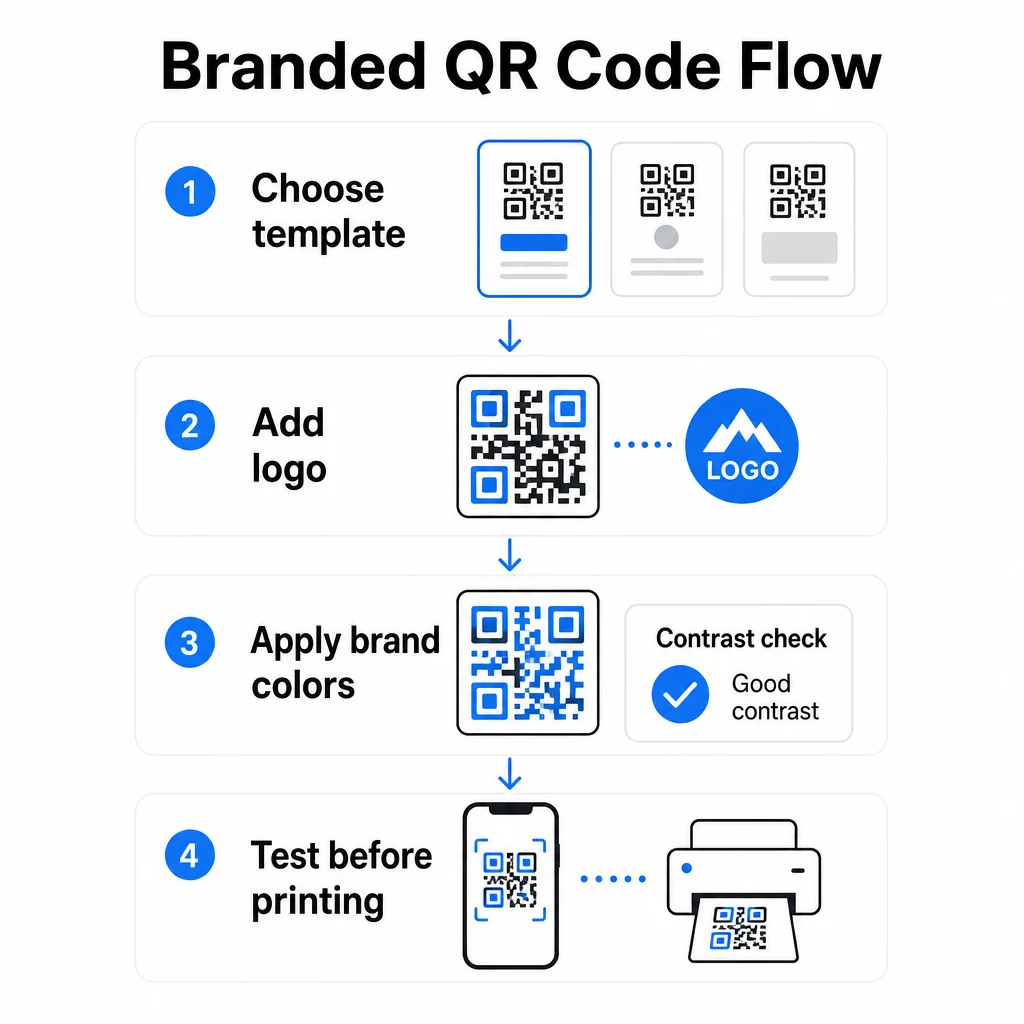
Setelah Anda memilih templat, pekerjaan branding yang sebenarnya dimulai. Menambahkan logo Anda, menerapkan palet warna Anda, dan menyempurnakan detail desain mengubah templat generik menjadi kode yang terlihat jelas milik Anda.
Menambahkan Logo Perusahaan Anda
Menempatkan logo Anda di tengah kode QR menciptakan koneksi merek instan pada saat pemindaian. Untuk melakukannya dengan benar:
- Gunakan file vektor berkualitas tinggi (SVG atau EPS) agar logo Anda tetap tajam pada ukuran berapa pun
- Jaga agar logo tetap di tengah dan jauh dari tiga kotak pola pencari di sudut-sudut
- Batasi cakupan logo hingga tidak lebih dari 20–30% dari total area kode – lebih dari itu, kemampuan pindai menurun
- Menggunakan Koreksi kesalahan Level H saat menambahkan logo; ini memungkinkan kode untuk memulihkan hingga 30% data yang rusak atau tersembunyi, mengkompensasi area yang ditutupi logo Anda
Pageloot Generator QR Code dengan Logo menangani koreksi kesalahan secara otomatis saat Anda mengunggah logo, mengurangi risiko menghasilkan kode yang terlihat bagus tetapi tidak dapat dipindai dengan andal.
Tambahkan Logo Anda ke Kode QR dalam Hitungan Menit Menggunakan Generator QR Code dengan Logo untuk mengunggah logo merek Anda, menerapkan warna Anda, dan mengunduh file siap cetak – tidak perlu perangkat lunak desain.
Menerapkan Warna Merek Tanpa Merusak Kemampuan Pindai
Warna adalah di mana banyak kode QR bermerek mengalami masalah. Kode masih membutuhkan kontras yang cukup antara modul data dan latar belakang agar dapat dipindai dengan andal. Pedoman yang harus diikuti:
- Latar depan gelap pada latar belakang terang adalah kombinasi paling andal; hitam di atas putih tetap menjadi standar emas
- Targetkan rasio kontras minimum 4.5:1 untuk kode kecil; 3:1 dapat diterima untuk format yang lebih besar di mana pemindai memiliki area permukaan yang lebih luas untuk dibaca
- Hindari gradien dan bayangan – ini menciptakan nada tengah yang membingungkan pemindai dengan membuat batas antara modul menjadi ambigu
- Jangan pernah membalik warna (kode terang di latar belakang gelap) tanpa pengujian multi-perangkat yang menyeluruh; beberapa pemindai menanganinya dengan buruk
Untuk detail lebih lanjut tentang kombinasi warna mana yang berfungsi dan mana yang harus dihindari, lihat panduan praktik terbaik kontras warna kode QR mencakup contoh rasio kontras spesifik dan tabel perbandingan.
Detail Kustomisasi Lanjutan
Selain warna dan logo, beberapa pilihan desain tambahan dapat meningkatkan tampilan kode QR Anda tanpa mengorbankan fungsi:
- Bentuk pola pencari kustom – Tiga kotak di sudut dapat dibulatkan atau ditata; ini menambah kepribadian sambil menjaga pola tetap dapat dikenali oleh pemindai
- Bingkai dan ajakan bertindak – Menambahkan batas bermerek dan frasa singkat seperti “Pindai untuk Melihat Menu” atau “Pindai untuk Mengunduh” meningkatkan keterlibatan dengan memberi tahu pengguna apa yang akan mereka dapatkan
- Zona tenang – Selalu pertahankan margin kosong setidaknya empat modul di semua sisi kode; ini adalah persyaratan ISO/IEC 18004 dan sangat penting agar pemindai dapat menemukan kode dengan benar
- Ukuran minimum – Untuk penggunaan cetak, jaga agar kode setidaknya 2 × 2 cm (0,8 × 0,8 inci) untuk pemindaian jarak dekat; tingkatkan secara proporsional untuk poster atau papan nama menggunakan aturan umum lebar kode 1 cm per 10 cm jarak pemindaian yang diharapkan
Gunakan format vektor (SVG atau EPS) untuk semua aplikasi cetak guna mencegah pikselasi pada ukuran yang lebih besar. Untuk panduan tambahan, praktik terbaik untuk keterbacaan kode QR dan panduan pembuatan kode QR kustom mencakup ukuran, resolusi, dan penempatan secara lebih rinci.
Selalu uji sebelum mencetak. Cetak kode pada ukuran yang dimaksudkan, uji pada beberapa perangkat dan aplikasi pemindai, dan periksa di bawah kondisi pencahayaan aktual di mana kode akan digunakan. Ini sangat penting ketika melibatkan logo, warna non-standar, atau ukuran kecil, karena variabel-variabel ini dapat memengaruhi kemampuan pindai dengan cara yang tidak terlihat di layar.
Menggunakan Kode QR Dinamis untuk Kampanye Fleksibel
Kode QR statis mengunci tujuan tetap pada saat pembuatan. Itu baik untuk kasus penggunaan permanen, tetapi menciptakan masalah saat URL berubah, promosi berakhir, atau menu diperbarui – karena Anda perlu mencetak ulang setiap materi yang membawa kode tersebut.
Kode QR dinamis memecahkan masalah ini. Alih-alih mengkodekan tujuan secara langsung, mereka mengkodekan URL pengalihan singkat yang Anda kontrol dari dasbor. Ketika Anda perlu mengubah ke mana kode mengarah – halaman arahan baru, PDF yang diperbarui, penawaran musiman – Anda memperbarui tujuan tanpa menyentuh kode yang dicetak itu sendiri.
Ini menjadikan kode dinamis sebagai standar praktis untuk sebagian besar aplikasi bisnis. Keunggulan utama meliputi:
- Edit tujuan setelah dicetak tanpa mencetak ulang materi, menghemat waktu dan biaya
- Analitik real time termasuk total pemindaian, pemindaian unik, jenis perangkat, dan lokasi pemindaian
- Deteksi perangkat untuk kasus penggunaan seperti unduhan aplikasi, di mana kode secara otomatis mengarahkan pengguna iOS ke App Store dan pengguna Android ke Google Play
- Tanggal kedaluwarsa dan perlindungan kata sandi untuk konten yang sensitif waktu atau eksklusif
Pageloot Generator QR Code Dinamis mencakup dasbor terpusat tempat Anda dapat memantau semua kode aktif, memperbarui tujuan, dan menarik data kinerja secara real time. Anda juga dapat menambahkan parameter UTM ke tautan kode QR untuk integrasi langsung dengan Google Analytics, menghubungkan data pemindaian ke corong pemasaran Anda yang lebih luas.
Untuk konteks tentang cara kerja teknologi yang mendasarinya, Cara kerja koreksi kesalahan pada kode QR yang dapat diedit menjelaskan mengapa kode dinamis tetap dapat dipindai meskipun URL pendek yang dikodekan tetap konstan di seluruh pembaruan desain atau konten.
Perbarui Kampanye Anda Tanpa Mencetak Ulang Pageloot kode QR dinamis memungkinkan Anda mengubah tujuan, melacak kinerja, dan mengoptimalkan kampanye dari satu dasbor – bahkan setelah materi Anda sudah dicetak.
Di Mana Menggunakan Kode QR Bermerek
Kode QR bermerek serbaguna di seluruh materi fisik dan digital. Aplikasi umum meliputi:
- Kartu nama – Tautkan langsung ke halaman kontak digital, portofolio, atau profil sosial; Generator kode QR kartu nama dirancang khusus untuk kasus penggunaan ini
- Menu restoran – Kode dinamis pada tenda meja memungkinkan Anda memperbarui menu tanpa mencetak ulang kartu
- Kemasan produk – Tautkan ke instruksi, ulasan, atau konten promosi; branding yang konsisten pada kode memperkuat identitas produk
- Materi acara – Pamflet, tiket, dan papan nama dengan kode yang terhubung ke jadwal, halaman pendaftaran, atau konten pasca-acara
- Papan nama ritel – Mendorong lalu lintas pejalan kaki ke penawaran online atau program loyalitas
- Iklan cetak dan surat langsung – Lacak kampanye mana yang menghasilkan pemindaian menggunakan parameter UTM dan analitik
Untuk kampanye di mana Anda memerlukan satu kode QR untuk mengarah ke beberapa tautan atau bagian konten, Fitur halaman arahan Pageloot memungkinkan Anda membuat halaman seluler bermerek di balik satu pemindaian – berguna untuk profil sosial, info acara, atau koleksi produk.
Anda dapat menjelajahi berbagai fitur dan kasus penggunaan yang tersedia di Ikhtisar fitur Pageloot.
Melacak Kinerja dan Meningkatkan Hasil
Analitik di balik kode QR Anda adalah yang memisahkan titik sentuh pasif dari aset pemasaran yang terukur. Setelah kode bermerek Anda diterapkan, data yang dihasilkannya memberi tahu Anda apa yang berhasil dan apa yang perlu disesuaikan.
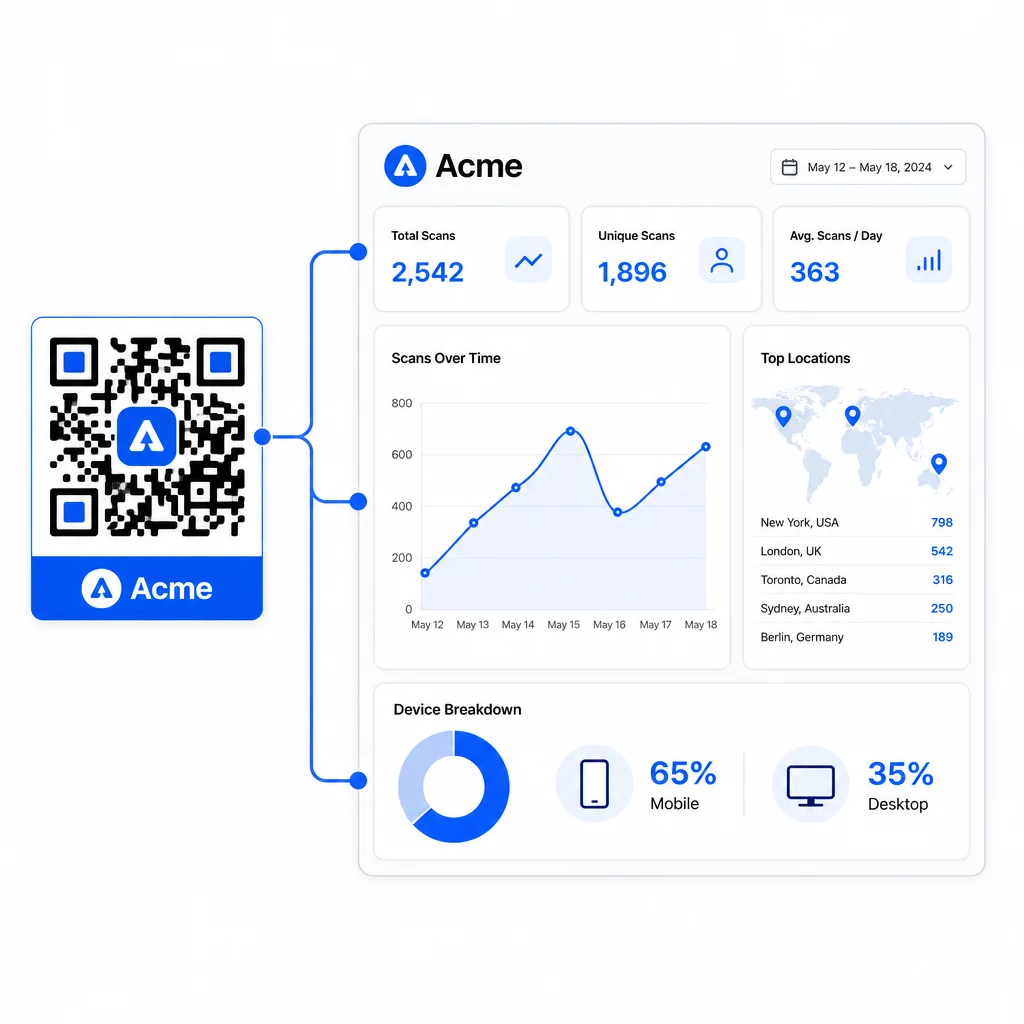
Dari dasbor Pageloot, Anda dapat melacak:
- Jumlah pemindaian total dan unik per kode
- Lokasi pemindaian (negara, kota)
- Jenis perangkat (iOS vs. Android, seluler vs. desktop)
- Pola waktu pemindaian – hari dan jam berapa yang menghasilkan aktivitas terbanyak
Data ini memungkinkan Anda mengidentifikasi penempatan mana yang mendorong keterlibatan, membandingkan kinerja di seluruh kampanye, dan membuat perubahan desain atau penempatan yang didasarkan pada perilaku aktual daripada asumsi. Misalnya, jika pemindaian pada selebaran tertentu menurun di tengah kampanye, Anda dapat memperbarui tujuan yang ditautkan ke penawaran yang lebih baru tanpa mengganti materi cetak.
Menambahkan parameter UTM ke URL kode QR Anda membawa data ini langsung ke Google Analytics, menghubungkan perilaku pemindaian offline ke corong konversi lengkap Anda.
Menyatukan Semuanya
Kode QR bermerek paling efektif bila desain, fungsionalitas, dan data bekerja sama. Memulai dengan templat yang cocok menjaga kode Anda tetap konsisten secara visual dan siap kampanye. Menambahkan logo, warna merek, dan ajakan bertindak yang jelas membuatnya mudah dikenali dan berorientasi pada tindakan. Menggunakan kode dinamis memberi Anda fleksibilitas untuk memperbarui tujuan dan melacak kinerja tanpa pernah menyentuh materi cetak.
Baik Anda menempatkan kode pada kartu nama, menu, kemasan, atau papan nama acara, kombinasi desain profesional dan analitik waktu nyata mengubah kode sederhana menjadi bagian yang terukur dari strategi pemasaran Anda. Mulailah dengan kode QR gratis dari generator Pageloot dan kembangkan dari sana.
Pertanyaan yang sering diajukan
Gunakan koreksi kesalahan Level H saat menambahkan logo – ini memungkinkan kode untuk memulihkan hingga 30% data yang tersembunyi, mengkompensasi cakupan logo. Jaga agar logo tidak lebih dari 20–30% dari total area kode dan pusatkan jauh dari pola pencari. Untuk warna, pertahankan rasio kontras minimum 4,5:1 antara modul latar depan dan latar belakang, hindari gradien, dan selalu uji pada beberapa perangkat sebelum mencetak.
Kode QR statis mengkodekan tujuan secara langsung, sehingga tidak dapat diubah setelah dibuat tanpa menghasilkan kode baru. Kode QR dinamis mengkodekan URL pengalihan singkat yang Anda kontrol dari dasbor, yang berarti Anda dapat memperbarui tujuan, menambahkan perlindungan kata sandi, menetapkan tanggal kedaluwarsa, dan melacak analitik pemindaian – semuanya tanpa mencetak ulang materi Anda. Untuk sebagian besar kasus penggunaan pemasaran dan bisnis, kode dinamis adalah pilihan yang lebih praktis.
Minimum umum untuk pemindaian jarak dekat adalah 2 × 2 cm (0,8 × 0,8 inci). Untuk materi di mana jarak pemindaian lebih besar – seperti poster atau papan nama – gunakan aturan 10:1: tambahkan lebar kode 1 cm untuk setiap 10 cm jarak pandang yang diharapkan. Kode bermerek dengan logo atau warna kustom mungkin perlu sedikit lebih besar untuk memastikan kompleksitas desain tambahan tidak mengurangi kemampuan pemindaian.