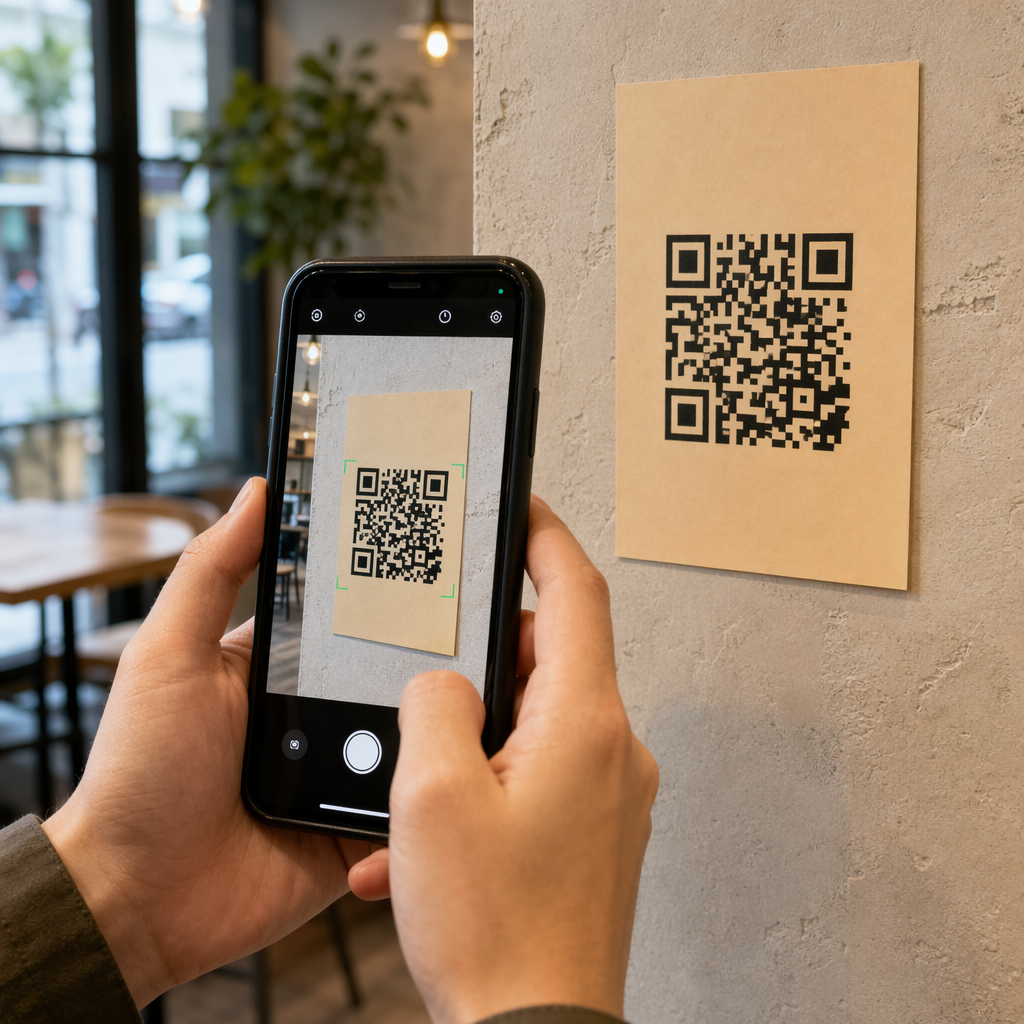
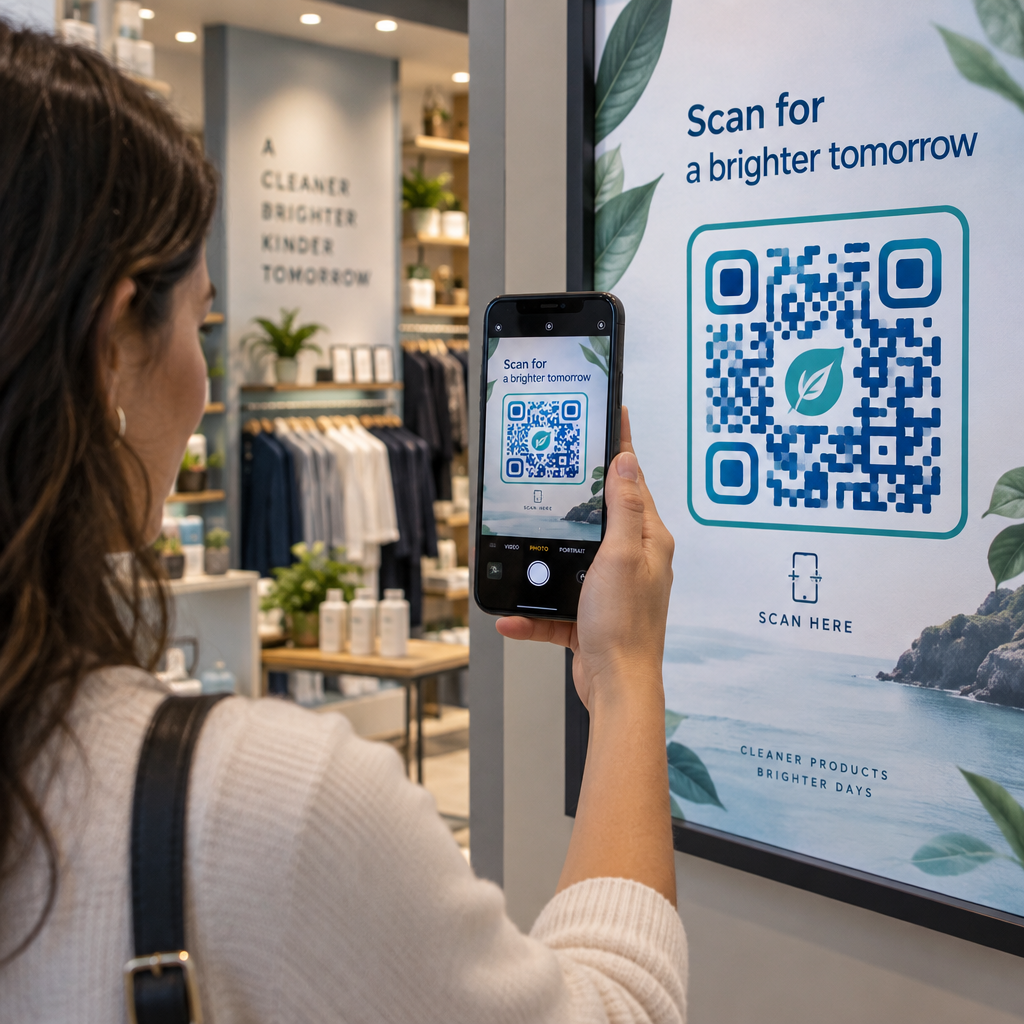
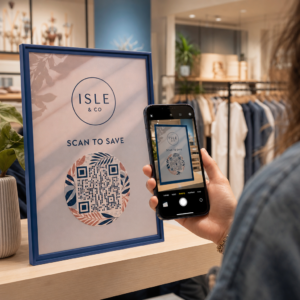
QR kodlarınızın markanıza ait görünmesini sağlamakta zorlanıyor musunuz? Düz siyah-beyaz bir kod teknik olarak işini görür, ancak tanınırlığı pekiştirmek ve daha fazla tarama sağlamak için gerçek bir fırsatı kaçırır. Bu kılavuz, hazır şablonlar, kendi logonuz ve renkleriniz ile kampanyalarınızı baskıdan sonra esnek tutan dinamik özellikler kullanarak profesyonel markalı QR kodları oluşturmayı size anlatıyor.
Neden Markalı QR Kodları Daha İyi Performans Gösterir?
Bir QR kodu bir temas noktasıdır. Birisi onu ambalajda, bir el ilanında veya bir kartvizitte her gördüğünde, tarayıp taramayacağına dair hızlı bir karar verir. Logonuzu, renk şemanızı ve görsel stilinizi içeren markalı QR kodları, meşruiyet ve aşinalık sinyali verir, bu da tarama oranlarını doğrudan etkiler.
Araştırmalar sürekli olarak şunu göstermektedir: logolu markalı QR kodları, tarama oranlarını ila oranında artırabilir jenerik siyah-beyaz olanlara kıyasla. Bu fark güvene dayanır: insanların tanıdığı bir markaya ait gibi görünen bir kod, jenerik veya doğrulanamaz görünen bir koda göre daha kolay taranır.
Tarama oranlarının ötesinde, markalı kodlar pazarlama materyallerinizde tutarlılık yaratır. QR kodunuz ambalajınızla, tabelalarınızla ve dijital varlıklarınızla eşleştiğinde, marka kimliğini zayıflatmak yerine pekiştirir.
Sıfırdan Başlamadan Markanıza Uygun QR Kodları Oluşturun Pageloot'un QR kod şablonları renkleriniz, logonuz ve stilinizle özelleştirebileceğiniz hazır tasarımlar sunar – böylece her kod sonradan eklenmiş gibi değil, markanızın bir parçası gibi görünür.
Markanız İçin Doğru Şablonu Seçmek
Seçtiğiniz şablon, QR kodunuzun görsel temelini oluşturur. İyi eşleşen bir şablon, tasarım süresini azaltır, taranabilirliği sağlar ve kodunuza mevcut materyallerinize doğal olarak uyan cilalı bir görünüm kazandırır.
Şablonları değerlendirirken şunlara öncelik verin:
- Marka uyumu – Şablonun renk aralığı, düzeni ve görsel stili mevcut kimliğinizle eşleşiyor mu?
- Kullanım durumu uygunluğu – Bir kartvizit için tasarlanmış bir şablon, bir poster veya ürün etiketi için yapılmış bir şablondan farklı oranlara ve yoğunluğa sahiptir.
- Taranabilirlik – Güvenilir platformlardan önceden test edilmiş şablonlar, kontrast ve sessiz bölge gereksinimleri için zaten optimize edilmiştir.
Pageloot'un QR kodu şablon kütüphanesi perakende ve etkinliklerden sosyal profillere ve menülere kadar kullanım durumuna göre düzenlenmiş tasarımlar sunar. Kampanyaya hazır görünen bir şablon seçebilir, ardından renkleri ayarlayabilir, logonuzu ekleyebilir ve tutarlı bir görünüm için farklı materyallerde yeniden kullanabilirsiniz.
Şablonları Sektörünüze Uygun Hale Getirme
Farklı sektörler farklı görsel beklentilere sahiptir ve QR kodu şablonunuz bu bağlamı yansıtmalıdır:
- Restoranlar ve konaklama – Masa üstü standlarına ve menülere uygun sıcak tonlar ve temiz tipografi kullanın; amaç, erişilebilir ve hızlı taranabilir olmaktır.
- Perakende ve e-ticaret – Ürün ambalajını görsel olarak rekabet etmeden tamamlayan şablonlar seçin.
- Gayrimenkul – Acente markalaması ve iletişim bilgileri için yer olan sofistike, minimalist tasarımlar, tabela ve basılı materyallerde iyi sonuç verir.
- Sağlık Hizmetleri – Sakin paletlerdeki temiz, yüksek kontrastlı tasarımlar, bu bağlamın gerektirdiği güveni ve netliği sağlar.
- Eğitim – Erişilebilirliği otoriteyle dengeleyen tasarımlar; okul renkleri ve net CTA'lar (Harekete Geçirici Mesajlar) öğrencilere ve velilere rehberlik etmeye yardımcı olur.
- Etkinlikler ve pazarlama ajansları – Ajansınızın genel kimliğini korurken kampanyaya göre uyarlanabilen çok yönlü şablonlar.
QR Kodlarını Marka Öğelerinizle Özelleştirme
Bir şablon seçtikten sonra asıl marka çalışması başlar. Logonuzu eklemek, renk paletinizi uygulamak ve tasarım detaylarını ince ayarlamak, genel bir şablonu şüphesiz size ait görünen bir koda dönüştürür.
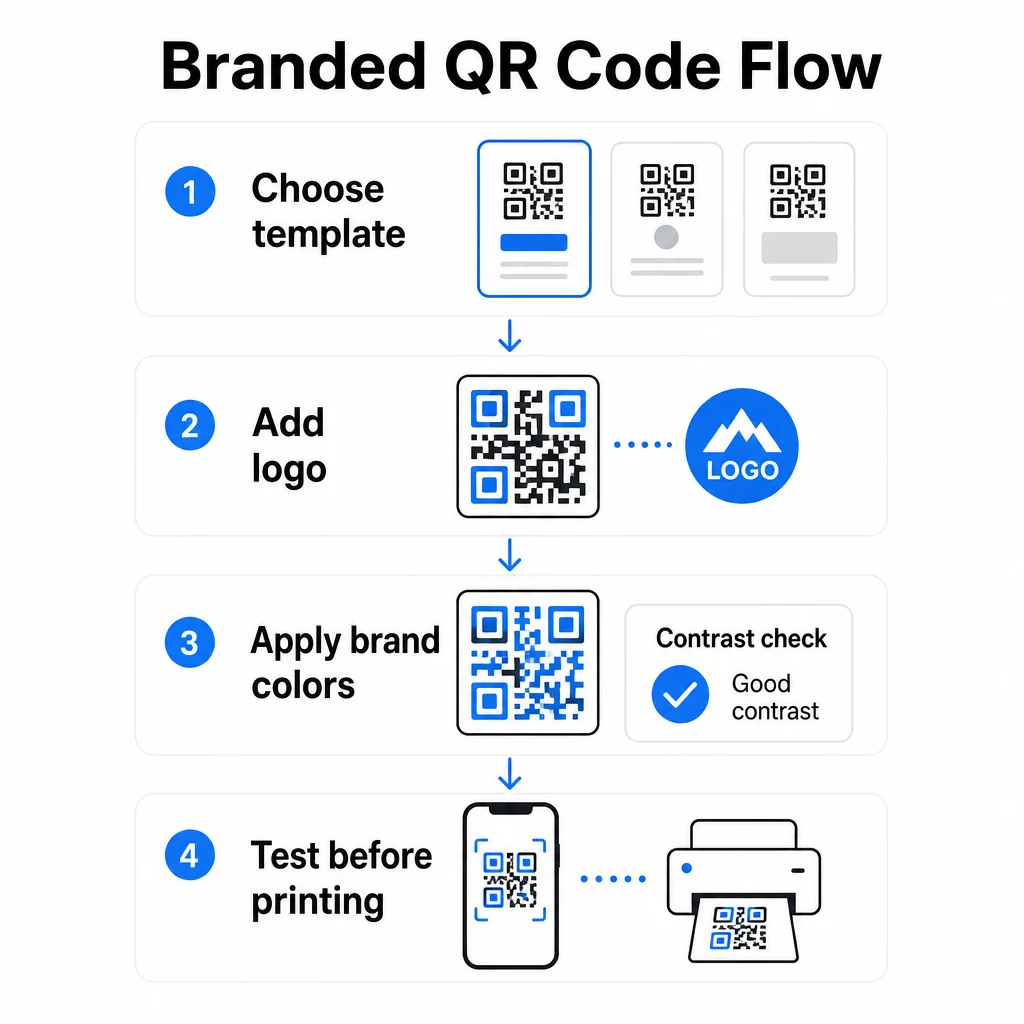
Şirket Logonuzu Ekleme
Logonuzu bir QR kodunun ortasına yerleştirmek, tarama anında anında bir marka bağlantısı oluşturur. Bunu doğru yapmak için:
- Kullanın yüksek kaliteli vektör dosyası (SVG veya EPS) böylece logonuz her boyutta keskin kalır
- Logoyu ortada ve köşelerdeki üç bulucu desen karesinden uzakta tutun
- Logo kapsamını şununla sınırlayın: toplam kod alanının -30'undan fazla olmamalıdır – bunun ötesinde, taranabilirlik düşer
- Kullanım H Seviyesi hata düzeltme bir logo eklerken; bu, kodun hasarlı veya gizlenmiş verilerin 'una kadarını kurtarmasına olanak tanır, logonuzun kapladığı alanı telafi eder
Pageloot'un Logolu QR Kod Oluşturucu bir logo yüklediğinizde hata düzeltmeyi otomatik olarak halleder, iyi görünen ancak güvenilir bir şekilde taranamayan bir kod oluşturma riskini azaltır.
Logonuzu Dakikalar İçinde Bir QR Koduna Ekleyin Kullan Logolu QR Kod Oluşturucu marka logonuzu yüklemek, renklerinizi uygulamak ve baskıya hazır bir dosya indirmek için – tasarım yazılımına gerek yok.
Taranabilirliği Bozmadan Marka Renklerini Uygulama
Renk, birçok markalı QR kodunun sorun yaşadığı yerdir. Kodun güvenilir bir şekilde taranabilmesi için veri modülleri ile arka plan arasında yeterli kontrast olması gerekir. İzlenecek yönergeler:
- Açık arka plan üzerinde koyu ön plan en güvenilir kombinasyondur; beyaz üzerine siyah altın standart olmaya devam ediyor
- Hedefleyin minimum 4.5:1 kontrast oranı küçük kodlar için; tarayıcının okumak için daha fazla yüzey alanına sahip olduğu daha büyük formatlar için 3:1 kabul edilebilir
- Degradelerden ve gölgelerden kaçının – bunlar, modüller arasındaki sınırı belirsizleştirerek tarayıcıları şaşırtan ara tonlar oluşturur
- Renkleri asla ters çevirmeyin (koyu arka plan üzerinde açık kod) kapsamlı çoklu cihaz testi yapmadan; bazı tarayıcılar bunu kötü yönetir
Hangi renk kombinasyonlarının işe yaradığı ve hangilerinden kaçınılması gerektiği hakkında daha fazla ayrıntı için, QR kodu renk kontrastı en iyi uygulamalar kılavuzu belirli kontrast oranı örneklerini ve bir karşılaştırma tablosunu kapsar.
Gelişmiş Özelleştirme Ayrıntıları
Renk ve logoların ötesinde, birkaç ek tasarım seçeneği, işlevsellikten ödün vermeden QR kodunuzun görünümünü yükseltebilir:
- Özel bulucu desen şekilleri – Köşelerdeki üç kare yuvarlatılabilir veya stilize edilebilir; bu, deseni tarayıcılar için tanınabilir tutarken kişilik katar
- Çerçeveler ve harekete geçirici mesajlar – Markalı bir kenarlık ve “Menüyü Görmek İçin Tara” veya “İndirmek İçin Tara” gibi kısa bir ifade eklemek, kullanıcılara tam olarak ne alacaklarını söyleyerek etkileşimi artırır.
- Sessiz bölge – Kodun her tarafında en az dört modüllük boş bir kenar boşluğu bırakın; bu bir ISO/IEC 18004 gereksinimidir ve tarayıcıların kodu doğru bir şekilde bulması için kritik öneme sahiptir.
- En küçük boyut – Baskı kullanımı için, yakın mesafeli tarama için kodları en az 2 × 2 cm (0.8 × 0.8 inç) tutun; posterler veya tabelalar için, beklenen tarama mesafesinin her 10 cm'si için 1 cm kod genişliği genel kuralını kullanarak orantılı olarak büyütün.
Daha büyük boyutlarda pikselleşmeyi önlemek için tüm baskı uygulamalarında vektör formatlarını (SVG veya EPS) kullanın. Ek rehberlik için, QR kodu okunabilirliği için en iyi uygulamaları ve özel QR kodu oluşturma rehberi boyut, çözünürlük ve yerleşimi daha ayrıntılı olarak ele alır.
Baskıdan önce daima test edin. Kodu amaçlanan boyutunda yazdırın, birden fazla cihaz ve tarayıcı uygulamasında test edin ve kullanılacağı gerçek aydınlatma koşullarında kontrol edin. Bu, özellikle logolar, standart olmayan renkler veya küçük boyutlar söz konusu olduğunda önemlidir, çünkü bu değişkenler taranabilirliği ekranda görünmeyen şekillerde etkileyebilir.
Esnek Kampanyalar İçin Dinamik QR Kodları Kullanma
Statik QR kodları, oluşturulduğu anda sabit bir hedefi kilitler. Bu, kalıcı kullanım durumları için sorun değil, ancak bir URL değiştiği, bir promosyon sona erdiği veya bir menü güncellendiği anda sorunlar yaratır – çünkü kodu taşıyan her materyali yeniden basmanız gerekir.
Dinamik QR kodları bunu çözer. Hedefi doğrudan kodlamak yerine, bir kontrol panelinden kontrol ettiğiniz kısa bir yönlendirme URL'si kodlarlar. Kodun işaret ettiği yeri değiştirmeniz gerektiğinde – yeni bir açılış sayfası, güncellenmiş bir PDF, mevsimlik bir teklif – basılı kodun kendisine dokunmadan hedefi güncellersiniz.
Bu, dinamik kodları çoğu iş uygulaması için pratik bir varsayılan haline getirir. Temel avantajları şunlardır:
- Baskıdan sonra hedefi düzenleyin materyalleri yeniden basmadan, zamandan ve maliyetten tasarruf ederek
- Gerçek zamanlı analiz toplam taramalar, benzersiz taramalar, cihaz türleri ve tarama konumları dahil
- Cihaz algılama uygulama indirmeleri gibi kullanım durumları için, kodun iOS kullanıcılarını otomatik olarak App Store'a ve Android kullanıcılarını Google Play'e yönlendirdiği
- Son kullanma tarihleri ve parola koruması zamana duyarlı veya özel içerik için
Pageloot'un Dinamik QR Kod Oluşturucu tüm aktif kodları izleyebileceğiniz, hedefleri güncelleyebileceğiniz ve performans verilerini gerçek zamanlı olarak çekebileceğiniz merkezi bir kontrol paneli içerir. Ayrıca, tarama verilerini daha geniş pazarlama huninize bağlayarak Google Analytics ile doğrudan entegrasyon için QR kod bağlantılarına UTM parametreleri ekleyebilirsiniz.
Temel teknolojinin nasıl çalıştığına dair bağlam için, Düzenlenebilir QR Kodlarda Hata Düzeltme Nasıl Çalışır kodlanmış kısa URL tasarım veya içerik güncellemelerinde sabit kalsa bile dinamik kodların neden taranabilir kaldığını açıklar.
Kampanyalarınızı Yeniden Basmadan Güncelleyin Pageloot'un dinamik QR kodları materyalleriniz zaten basılmış olsa bile, hedefleri değiştirmenize, performansı izlemenize ve kampanyaları tek bir kontrol panelinden optimize etmenize olanak tanır.
Markalı QR Kodları Nerede Kullanılır
Markalı QR kodları fiziksel ve dijital materyallerde çok yönlüdür. Yaygın uygulamalar şunları içerir:
- Kartvizitler – Doğrudan bir dijital iletişim sayfasına, portföye veya sosyal profile bağlantı verin; QR Kodlu Kartvizit Oluşturucu bu kullanım durumu için özel olarak tasarlanmıştır
- Restoran menüleri – Masa kartlarındaki dinamik kodlar, kartları yeniden basmadan menüyü güncellemenize olanak tanır
- Ürün ambalajı – Talimatlara, incelemelere veya promosyon içeriğine bağlantı verin; kod üzerindeki tutarlı markalama ürünün kimliğini pekiştirir
- Etkinlik materyalleri – Programlara, kayıt sayfalarına veya etkinlik sonrası içeriğe bağlantı veren kodlara sahip el ilanları, biletler ve tabelalar
- Perakende tabelaları – Yaya trafiğini çevrimiçi tekliflere veya sadakat programlarına yönlendirmek
- Basılı reklamlar ve doğrudan posta – UTM parametreleri ve analitik kullanarak hangi kampanyaların tarama oluşturduğunu takip etmek
Birden fazla bağlantıya veya içerik parçasına işaret etmesi için tek bir QR koduna ihtiyaç duyduğunuz kampanyalar için, Pageloot'un açılış sayfası özelliği tek bir taramanın arkasında markalı bir mobil sayfa oluşturmanızı sağlar – sosyal profiller, etkinlik bilgileri veya ürün koleksiyonları için kullanışlıdır.
Mevcut özelliklerin ve kullanım durumlarının tüm yelpazesini şurada keşfedebilirsiniz: Pageloot özelliklerine genel bakış.
Performansı Takip Etme ve Sonuçları İyileştirme
QR kodlarınızın arkasındaki analitikler, pasif bir temas noktasını ölçülebilir bir pazarlama varlığından ayıran şeydir. Markalı kodlarınız dağıtıldıktan sonra, ürettikleri veriler size neyin işe yaradığını ve neyin ayarlanması gerektiğini söyler.
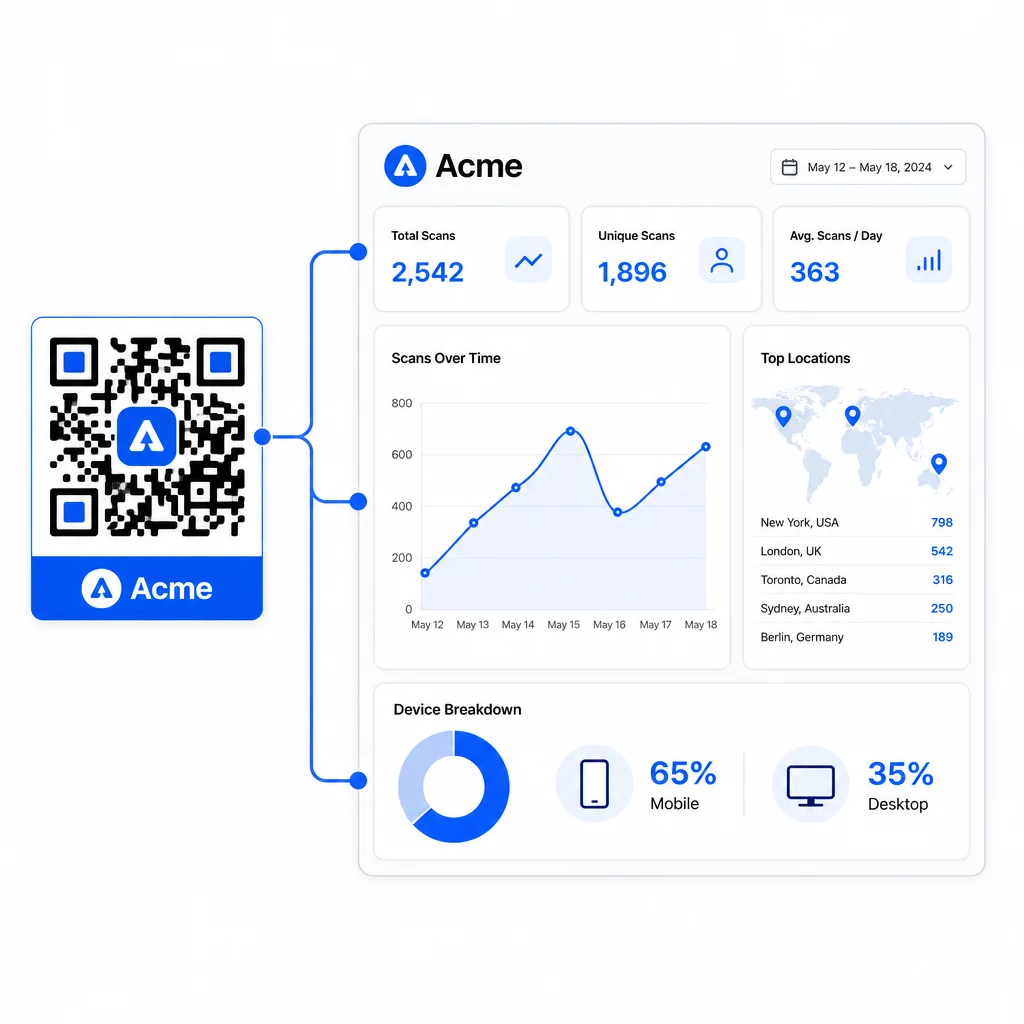
Pageloot kontrol panelinden şunları takip edebilirsiniz:
- Kod başına toplam ve benzersiz tarama sayıları
- Tarama konumları (ülke, şehir)
- Cihaz türleri (iOS'a karşı Android, mobil cihaza karşı masaüstü)
- Tarama zamanlama modelleri – hangi gün ve saatler en çok etkinliği oluşturur
Bu veriler, hangi yerleşimlerin etkileşimi artırdığını belirlemenize, kampanyalar arasında performansı karşılaştırmanıza ve varsayımlar yerine gerçek davranışlara dayalı tasarım veya yerleşim değişiklikleri yapmanıza olanak tanır. Örneğin, belirli bir el ilanındaki taramalar kampanya ortasında düşerse, basılı materyali değiştirmeden bağlantılı hedefi daha yeni bir teklifle güncelleyebilirsiniz.
QR kod URL'lerinize UTM parametreleri eklemek, bu verileri doğrudan Google Analytics'e getirerek çevrimdışı tarama davranışını tam dönüşüm huninize bağlar.
Hepsini Bir Araya Getirmek
Markalı QR kodları, tasarım, işlevsellik ve veriler birlikte çalıştığında en etkilidir. İyi eşleşen bir şablonla başlamak, kodlarınızı görsel olarak tutarlı ve kampanya için hazır tutar. Logonuzu, marka renklerinizi ve net bir harekete geçirici mesaj eklemek, onları tanınabilir ve eylem odaklı hale getirir. Dinamik kodlar kullanmak, basılı materyallere hiç dokunmadan hedefleri güncelleme ve performansı izleme esnekliği sağlar.
Kodları kartvizitlere, menülere, ambalajlara veya etkinlik tabelalarına yerleştiriyor olun, profesyonel tasarım ve gerçek zamanlı analitik kombinasyonu, basit bir kodu pazarlama stratejinizin ölçülebilir bir parçasına dönüştürür. Bir Pageloot'un oluşturucusundan ücretsiz QR kodu ile başlayın ve oradan geliştirin.
Sıkça sorulan sorular
Logo eklerken Seviye H hata düzeltmesini kullanın – bu, kodun gizlenmiş verilerin 'una kadarını kurtarmasına olanak tanır ve logonun kapladığı alanı telafi eder. Logoyu toplam kod alanının -30'undan fazla tutmayın ve bulucu desenlerinden uzağa ortalayın. Renkler için, ön plan modülleri ile arka plan arasında minimum 4.5:1 kontrast oranını koruyun, gradyanlardan kaçının ve yazdırmadan önce her zaman birden fazla cihazda test edin.
Statik bir QR kodu hedefi doğrudan kodlar, bu nedenle oluşturulduktan sonra yeni bir kod oluşturmadan değiştirilemez. Dinamik bir QR kodu, bir kontrol panelinden kontrol ettiğiniz kısa bir yönlendirme URL'sini kodlar; bu da hedefi güncelleyebileceğiniz, parola koruması ekleyebileceğiniz, son kullanma tarihleri belirleyebileceğiniz ve tarama analizlerini takip edebileceğiniz anlamına gelir – tüm bunları materyallerinizi yeniden basmadan yapabilirsiniz. Çoğu pazarlama ve iş kullanım durumu için dinamik kodlar daha pratik bir seçimdir.
Yakın mesafeli tarama için genel minimum 2 × 2 cm'dir (0.8 × 0.8 inç). Posterler veya tabelalar gibi tarama mesafesinin daha fazla olduğu materyaller için 10:1 kuralını kullanın: beklenen her 10 cm görüntüleme mesafesi için 1 cm kod genişliği ekleyin. Logolu veya özel renkli markalı kodlar, eklenen tasarım karmaşıklığının taranabilirliği azaltmamasını sağlamak için biraz daha büyük olabilir.