Struggling to keep order fulfillment accurate when every manual step adds risk of error? Mistakes in picking, packing, or shipping create delays that directly damage customer relationships. This guide explains how QR codes eliminate those friction points across every stage of fulfillment – from receiving inventory to confirming delivery.
What QR Codes Bring to Order Fulfillment
Unlike traditional 1D barcodes, which generally store 20–85 characters, a QR code can hold over 7,000 characters. That means a single label can encode an order number, shipping address, batch details, handling instructions, and a link to a live tracking page – all in one scan.
This data density makes QR codes useful at every stage of the fulfillment chain: receiving, picking, packing, shipping, and returns. Combined with dynamic QR codes that can be updated after printing, teams gain flexibility that traditional labels simply cannot provide.
Start Tracking Every Scan Across Your Fulfillment Workflow Use the QR Code Generator to create dynamic, trackable codes for inventory, shipping labels, and delivery confirmation – no reprinting required when details change.
Key Fulfillment Stages Improved by QR Codes
Inventory Management and Receiving
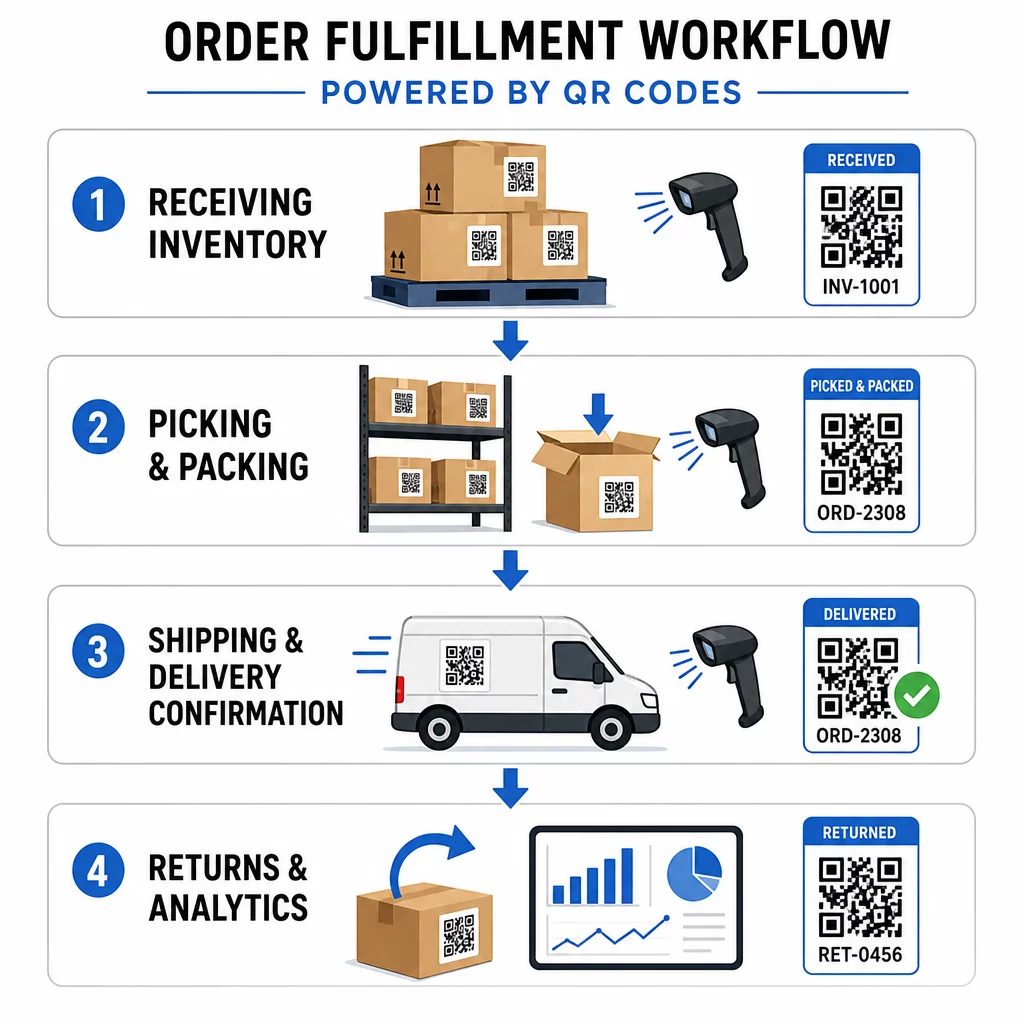
When new stock arrives, QR codes can encode batch numbers, expiration dates, supplier details, and storage locations into a single scannable label. Warehouse teams verify shipments and update inventory systems instantly, eliminating manual input errors that slow down receiving.
QR codes for product inventory move businesses from manual entries to an automated system that updates stock levels in real time the moment a label is scanned. That live view of stock across multiple locations is especially valuable during peak periods when errors are most likely.
For perishable goods, QR codes can include expiration dates and storage guidelines directly on the label. Scanning those codes also supports first-in-first-out (FIFO) rotation, reducing waste and maintaining product quality. For manufacturing environments, the same approach applies to raw materials, work-in-progress items, and finished goods – learn more about tracking materials and products in manufacturing.
Dynamic QR codes add further flexibility. When inventory data changes, you can update the destination without reprinting a single label – keeping physical labels and system records in sync without extra cost or downtime.
Picking and Packing Efficiency
Pick lists that include QR codes direct staff to precise warehouse locations and display exact quantities needed for each order. This reduces confusion, speeds up retrieval, and cuts the back-and-forth that comes from ambiguous instructions.
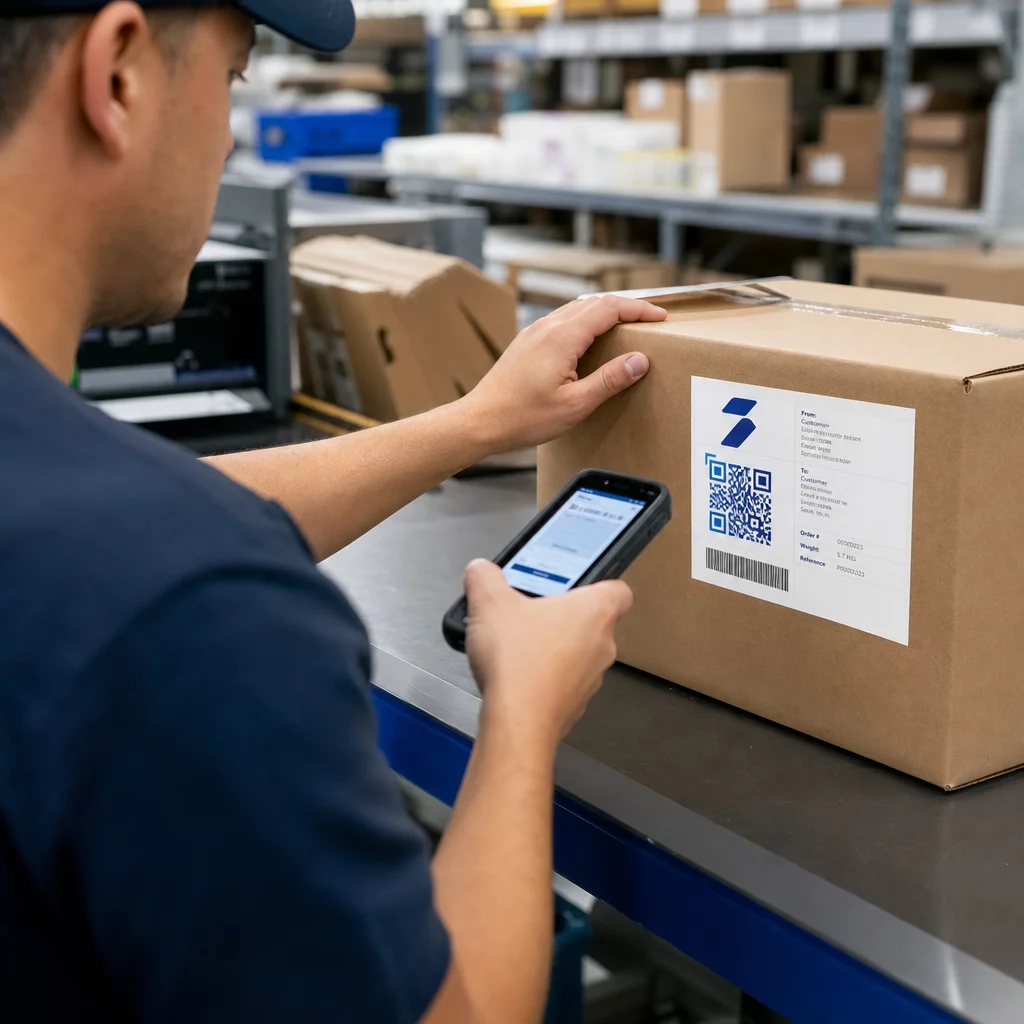
During packing, QR codes act as a final checkpoint. Each item carries a code that confirms product type, quantity, or special handling requirements. Packers scan to verify accuracy before the package leaves the facility – a simple step that prevents costly shipping errors.
For businesses with multiple warehouse locations, staff can scan codes to check stock at other zones, enabling quick transfers when needed. For customized products, QR codes can store assembly instructions, accessory requirements, or personalization details, ensuring complex orders are completed correctly without consulting multiple systems.
Shipping and Delivery Confirmation
QR codes on shipping labels consolidate order numbers, tracking details, delivery addresses, and special instructions into one scan. Shipping staff verify package contents and update tracking systems automatically, with no manual re-entry required.
Delivery confirmation becomes more reliable too. Drivers can use QR codes to confirm successful deliveries and capture digital signatures or photos linked to the order, creating a clear audit trail for any disputes. Customers can scan package codes to view order status, delivery updates, and return instructions – reducing inbound support requests.
For a deeper look at how QR codes address common delivery problems such as unclear tracking and missed updates, see how QR codes improve e-commerce deliveries.
Returns and Reverse Logistics
Returns are easier to manage when QR codes store return authorization numbers, original order details, and refund preferences. Customer service teams gain immediate access to complete order histories without searching multiple systems, speeding up the process and improving satisfaction.
Advanced QR Code Features for Logistics
Dynamic QR Codes for Flexible Updates
Static QR codes are fixed once printed – changing the destination means reprinting the label. Dynamic QR codes eliminate that constraint entirely. If a shipment’s destination changes, the code on the physical label can be updated instantly in the backend without touching the package.
This is particularly valuable in last-mile delivery. If a customer requests a new delivery time or provides updated access instructions, the QR code on their package reflects that change immediately, so drivers always have accurate information. For more on applying this to freight, see the guide on tracking shipments with QR codes.
Edit Shipping Details Without Reprinting Pageloot’s dynamic QR codes let you update destinations, tracking links, and delivery instructions after labels are already printed. Explore dynamic QR codes and see how they reduce reprinting costs across your operation.
Real-Time Analytics and Optimization
QR codes aren’t just about scanning – they generate data with every interaction. With Pageloot’s analytics dashboard, logistics managers can monitor scan frequency, timing, location, and device type to identify bottlenecks and optimize workflows.
For example, a high number of rescans at a packing station might signal a placement issue or a need for staff training. Geographic data can highlight regions where delivery performance lags. Time-based analytics help managers align staffing levels with peak activity periods. This data-driven approach turns routine scanning activity into actionable operational insight.
Customization and Branding
Branded QR codes – incorporating company logos, colors, and design elements – maintain consistency across shipping labels, delivery confirmations, and customer communications. Beyond aesthetics, design elements such as colored borders or priority icons help warehouse staff quickly identify handling requirements, reducing processing time.
When customizing codes, maintain sufficient contrast between the dark modules and the light background. A contrast ratio of at least 4:1 between code and background ensures reliable scanning across different devices and lighting conditions. For printed labels, use a minimum code size of 2 × 2 cm, and ensure there is a clear quiet zone (a blank margin of at least four modules wide) around the code.
Industry-Specific Applications
E-Commerce and Retail
In e-commerce, QR codes enable real-time order tracking at every fulfillment stage, giving customers and operations teams the transparency they need. They simplify returns by providing instant access to order histories and return authorizations, and they support supply chain tracking that helps businesses identify where losses occur.
Beyond logistics, QR codes on packaging create opportunities for post-purchase engagement – warranty registration, reorder links, and personalized promotions based on purchase history.
Supply Chain and Fleet Management
In supply chains, QR codes embed detailed shipment information – product contents, handling instructions, lot numbers – that updates automatically as items move through receiving, stocking, transfer, and sale stages. When paired with warehouse management systems, real-time inventory tracking becomes practical without expensive infrastructure upgrades.
For suppliers and resellers managing high volumes, bulk QR code generation allows thousands of unique codes to be created for packaging and labels, with scan analytics and distribution controls to monitor the full chain.
GS1 Digital Link and Standardization
The GS1 Sunrise 2027 initiative is driving a broader shift toward 2D barcodes in retail and logistics. Under this standard, QR codes encoded with GS1 Digital Link URIs carry Global Trade Item Numbers (GTINs) alongside additional data such as expiration dates and batch numbers – allowing a single code to serve both point-of-sale scanning and supply chain traceability. For businesses planning long-term fulfillment infrastructure, aligning with GS1 standards ensures compatibility across retail partners and logistics networks.
How to Implement QR Codes in Order Fulfillment
Choose the Right QR Code Type
The choice between static and dynamic codes depends on how often the underlying data changes.
- Static codes work well for fixed information: permanent product IDs, shelf location labels, or simple reference codes that never need updating.
- Dynamic codes are the right choice for order tracking, shipping labels, and any data that changes during fulfillment. They allow real-time updates without reprinting and provide scan analytics.
Different fulfillment stages benefit from specific QR code features:
- Receiving: Codes linked to purchase orders and vendor details, streamlining inventory updates
- Picking: Codes displaying item locations, quantities, and special instructions for faster, more accurate retrieval
- Packing: Codes providing access to shipping addresses, carrier preferences, and packaging guidelines
- Shipping: Codes encoding tracking numbers, delivery confirmation links, and customer notification triggers
Integrate with Existing Systems
QR codes deliver the most value when they connect to your warehouse management system (WMS), ERP, and shipping platforms. API connections allow QR code platforms to sync with inventory systems so stock levels update automatically on each scan, and to connect with shipping software so tracking numbers and customer notifications are generated automatically as packages are processed.
Start by mapping your fulfillment process to identify where QR codes create the most immediate value. Most businesses begin with one area – inventory receiving or order picking – to test and refine before scaling. A phased approach limits disruption and gives staff time to build confidence with the new workflow.
Train Your Team
Staff should be able to generate, scan, and interpret QR codes, and understand how they connect to your broader systems. Role-specific training is more effective than generic instruction:
- Receiving staff: Verifying shipments and updating inventory using QR codes
- Picking teams: Reading location codes, confirming quantities, and managing exceptions
- Packing teams: Generating shipping labels, running quality control scans, and triggering customer notifications
Hands-on practice, standard operating procedures (SOPs), and regular refresher sessions keep skills sharp. Address common issues – damaged codes, poor lighting, device connectivity – so staff can troubleshoot without escalating every problem.
Gather feedback from employees regularly to identify gaps and refine the process. Most teams see measurable improvements in accuracy and throughput shortly after adopting consistent training protocols.
Scale QR Code Operations Across Your Entire Fulfillment Network Pageloot supports manufacturing and supplier and reseller operations with bulk QR code creation, centralized management, and real-time analytics. Explore QR code solutions by industry to find the right setup for your workflows.
The Path Forward
QR codes are practical, low-cost tools that improve accuracy and speed at every stage of order fulfillment – without requiring expensive infrastructure. Whether you are managing a single warehouse or a multi-location distribution network, the combination of data-rich labels, dynamic updating, and real-time analytics gives your team better information and fewer manual steps.
The logical first step is picking one stage of your current process – receiving, picking, or shipping – and piloting QR codes there. Once the integration is stable and staff are confident, expand to the next stage. Start with Pageloot’s 14-day free trial to create your first codes and see how scan data feeds directly into your operational decisions.
Frequently Asked Questions
Static QR codes contain fixed information that cannot be changed once printed – suitable for permanent data like shelf location labels or product IDs. Dynamic QR codes store a short redirect URL that points to editable content, so you can update tracking details, delivery instructions, or inventory data without reprinting the label. Dynamic codes also generate scan analytics, making them the better choice for most active fulfillment workflows.
Integration typically works through API connections between your QR code platform and your WMS, ERP, or shipping software. When a QR code is scanned, the event triggers an automatic update in the connected system – adjusting stock levels, logging a shipment stage, or generating a customer notification. Most implementations start with a single workflow area to test compatibility before expanding to the full operation.
Customers can scan a QR code on their package to access real-time tracking updates, delivery confirmations, and return instructions – without calling support or navigating a website. Dynamic codes ensure customers always see the most current status, even if delivery details change after the label is printed. This transparency reduces uncertainty and cuts the volume of inbound support requests.