
Is your production floor hampered by manual data entry errors and a lack of real-time visibility? These inefficiencies lead to costly stockouts and assembly bottlenecks that shrink your operating margins. Implementing QR code tracking connects physical parts to digital records to streamline your manufacturing workflows from dock to dispatch.
Transforming Raw Material Receiving with Instant Verification
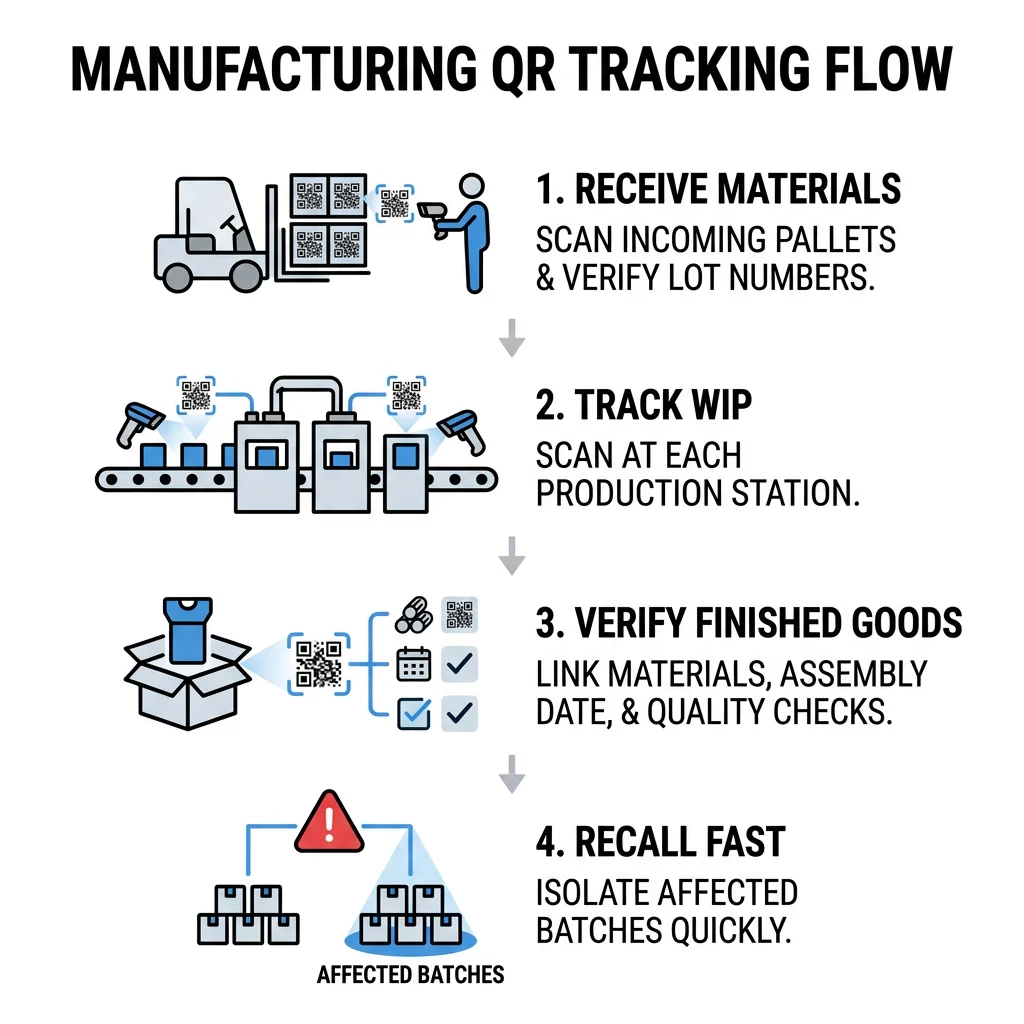
The foundation of material traceability begins at the receiving dock. By assigning and scanning QR codes on incoming shipments, warehouse personnel verify deliveries against purchase orders without relying on slow manual entry. Scanning raw materials upon arrival captures critical lot numbers, supplier details, delivery timestamps, and material certificates instantly.
Automating receiving checks helps maintain real-time inventory tracking across your storage locations. If a batch fails quality checks, staff can flag the item digitally as quarantined in your database. This instant status update ensures unapproved lots never advance onto the active production line, preventing costly downstream assembly errors.
Tracking Work-in-Progress Across Assembly Stages
Work-in-progress (WIP) tracking often becomes an operational blind spot once materials leave storage. Attaching QR codes to physical sub-assemblies, production totes, or job traveler sheets provides granular visibility into every step of the assembly cycle. Operators scan the code before starting an operation and scan again upon completion to record cycle times, workstation locations, and operator IDs.
Recording WIP movement creates actionable advantages across the shop floor:
- Identifies assembly line bottlenecks as soon as cycle delays occur
- Links specific component lots directly to the master work order
- Logs intermediate quality inspection results before parts advance
- Reduces paperwork overhead so operators can focus on production tasks
Update Production Workflows Without Reprinting Need to change routing steps or item destinations as materials move through your facility? Use the Dynamic QR Code Generator to create editable codes linked to your live production database.
Ensuring Traceability and Regulatory Compliance for Finished Goods
As items reach final assembly, a QR code acts as an end-to-end digital birth certificate. Scanning the finished item during packaging links the completed unit to every raw material batch, component serial number, and test record created during production. This end-to-end record is indispensable for broader supply chain tracking and compliance with international quality standards.
In sectors governed by strict traceability rules, standardizing data architecture protects your operations:
- GS1 Standards: Encode standard identifiers such as Global Trade Item Numbers (GTIN), batch or lot numbers using Application Identifier AI (10), serial numbers using AI (21), and expiration dates using AI (17).
- GS1 Digital Link: Express product identification keys inside a web URI structure to make items readable by both industrial hardware and web-connected mobile devices.
- Recall Readiness: Pinpoint affected finished products within hours rather than weeks during an audit or safety investigation.
- Regulatory Nuance: Note industry-specific boundaries; for example, the FDA’s Drug Supply Chain Security Act (DSCSA) mandates a 2D Data Matrix code on prescription drug packaging, which cannot be replaced by a standard QR code.
For general manufacturing and industrial assembly, following established product inventory guidelines helps align internal labeling with partner supply chain requirements.
Integrating Scans with Enterprise Architectures
An industrial tracking system relies on continuous communication between physical capture tools and central management databases. Following an ISA-95 enterprise-control model helps structure this data flow:
- Level 1 and 2 (Floor Sensing and Scanning): Industrial handheld readers, automated conveyor imagers, or mobile devices register code scans at workstations. For routine maintenance checks or field audits, technicians can even use a web-based free QR code scanner directly on a mobile browser.
- Level 3 (Manufacturing Execution Systems): The MES captures the physical event, checks routing rules, logs operator sign-offs, and validates bill-of-materials consumption.
- Level 4 (Enterprise Resource Planning): The ERP receives summarized visibility events to reconcile financial stock levels, issue purchase requisitions, and schedule customer shipments.
Structuring scan data as standardized visibility events – capturing what item was handled, where the scan occurred, when it happened, and why the business step took place – ensures clear traceability across heterogeneous software environments.
Industrial Labeling and Printing Standards
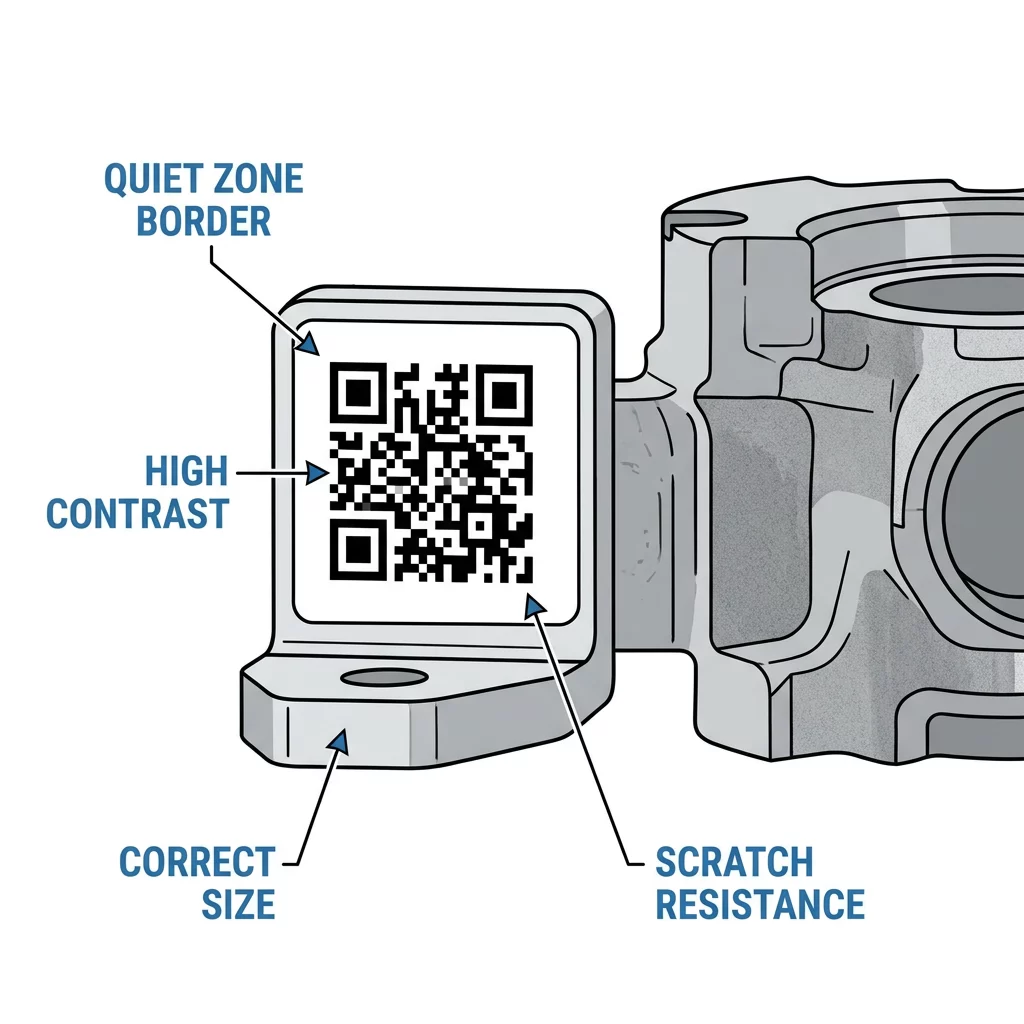
Manufacturing floors expose labels to oils, heat, abrasion, and harsh cleaning agents. A tracking code is only useful if it remains readable throughout the product lifecycle. Evaluating printing techniques and scannability before full deployment prevents costly scan failures on active lines.
Contrast and Placement
Scanners require stark contrast between dark modules and light backgrounds to decode symbols quickly. Under ISO/IEC 15415 standards, maintaining adequate symbol contrast is essential for passing industrial print quality grades.
| Color Combination | Contrast Ratio | Scannability Assessment |
|---|---|---|
| Black on White | 21:1 | Optimal for all factory environments |
| Navy Blue on Beige | 15:1 | Excellent readability |
| Dark Green on White | 4.5:1 | Acceptable (requires verification testing) |
| Light Gray on White | 1.5:1 | Unacceptable (leads to read failures) |
Place labels on smooth, flat surfaces rather than over curves, seams, or folds. Always preserve a clear quiet zone around the symbol measuring at least four module widths on all four sides.
Sizing and Error Correction
Industrial codes require proper dimensions based on operator scanning distance. Applying a 10:1 viewing ratio provides a dependable benchmark: an operator scanning from 10 inches away requires a label at least 1 inch wide. For standard handheld processing, maintain code dimensions of at least 0.8 x 0.8 inches (2 x 2 cm) printed at 300 DPI or higher.
To withstand surface abrasions, generate codes using Error Correction Level H. Level H embeds redundant mathematical patterns that allow scanners to reconstruct data even if up to 30% of the symbol surface suffers scratches, grease stains, or debris.
Comparing QR Codes to Barcodes and Data Matrix
Selecting the proper optical symbol depends on production geometry, data needs, and equipment constraints. Understanding the functional differences outlined in barcode vs QR code comparisons clarifies which format fits each production stage:
- Linear Barcodes: Ideal for basic SKU identification where data demands are minimal. For legacy retail or shipping tasks, a free barcode scanner can decode standard 1D lines, but 1D codes lack the data capacity and error recovery required for detailed manufacturing traceability.
- Data Matrix Codes: Highly compact 2D matrices designed for microscopic direct part marking (DPM) on metal, silicon, and medical devices. Reviewing Data Matrix vs QR code tradeoffs shows that Data Matrix excels when physical space is severely restricted.
- QR Codes: Optimal for workflows requiring multi-attribute GS1 encoding, rapid omnidirectional scanning by mobile devices or fixed scanners, and built-in error tolerance on harsh production floors.
Frequently Asked Questions
While QR codes offer greater data storage and omnidirectional reading compared to 1D barcodes, they cannot replace specialized symbols where regulations specify other formats, such as the 2D Data Matrix required on prescription drug packaging under the DSCSA.
Dynamic QR codes route scanners through an editable redirect link, allowing production teams to update job traveler records, routing steps, or part statuses in central databases without reprinting physical labels attached to totes or sub-assemblies.
For general manufacturing use, printed QR codes should measure at least 0.8 x 0.8 inches (2 x 2 cm) with a print resolution of 300 DPI or greater, surrounded by an unprinted quiet zone of at least four module widths on every side.