Vai nepieciešams palīdzēt klientiem atrast jūsu atrašanās vietu, neliekot viņiem ievadīt adresi? Manuāla adreses ievadīšana rada berzi – un neapmierinātus apmeklētājus. Šī rokasgrāmata palīdzēs jums pārvērst jebkuru Google Maps atrašanās vietu skenējamā QR kodā dažu minūšu laikā.
Google Maps atrašanās vietas saites iegūšana
Pirms kaut ko ģenerējat, jums ir nepieciešama pareizā saite no Google Maps. Saite, ko kopējat, precīzi nosaka, kur lietotāji nonāks, kad skenēs, tāpēc precizitāte šeit ir svarīga.
Atrodiet un piespraudiet savu atrašanās vietu
Atveriet Google Maps un meklējiet savu galamērķi. Varat ievadīt uzņēmuma nosaukumu, piemēram, “Starbucks Times Square”, pilnu ielas adresi vai atpazīstamu orientieri. Ja atrašanās vietai nav oficiālas adreses – āra pasākumu vieta, parka ieeja, autostāvvieta – nospiediet un turiet mobilajā ierīcē (vai noklikšķiniet datorā), lai nometu spraudīti precīzā vietā.
Kad spraudīte ir piesprausta, pietuviniet un apstipriniet, ka marķieris atrodas pareizajā punktā. Ja virzāt cilvēkus uz konkrētu ieeju, nevis uz vispārējo ēkas nospiedumu, attiecīgi pielāgojiet. Šis papilssolis novērš neskaidrības, kad ierodas apmeklētāji.
Kopējiet atrašanās vietas saiti
Kad jūsu atrašanās vieta ir apstiprināta, pieskarieties vai noklikšķiniet uz Kopīgot pogas:
- Mobilajā ierīcē: Ekrāna apakšdaļā pieskarieties atrašanās vietas nosaukumam, pēc tam pieskarieties kopīgošanas ikonai (bultiņa uz augšu) un atlasiet “Kopēt starpliktuvē”.”
- Datorā: Informācijas panelī vai zem trīs punktu izvēlnes noklikšķiniet uz Kopīgot, pēc tam atlasiet “Kopēt saiti”.”
Kopētā URL adrese parasti ir saīsināta saite, piemēram, `maps.app.goo.gl/xyz123`. Īsākas saites rada tīrākus, mazāk blīvus QR kodus, kas skenējas uzticamāk. Pirms turpināt, ielīmējiet saiti pārlūkprogrammā, lai apstiprinātu, ka tā atver pareizo atrašanās vietu.
Dažādi saišu veidi kalpo dažādiem mērķiem:
| Saites veids | Ko tas dara | Piemēra lietošanas gadījums |
|---|---|---|
| Vietas saite | Atver konkrētu uzņēmumu vai adresi | Veikala vai biroja koplietošana |
| Meklēšanas saite | Parāda meklēšanas vaicājuma rezultātus | Rāda “restorānus netālu no pasākuma vietas” |
| Norāžu saite | Atver iepriekš iestatītu navigācijas maršrutu | Viesu maršrutēšana no lidostas uz viesnīcu |
Vietnei QR kodi, ko izmanto norādēm un adreses koplietošanai, Vietas saite vai Norāžu saite parasti darbojas vislabāk – tās izlaiž meklēšanas soli un novirza lietotāju tieši uz navigāciju.
QR koda ģenerēšana
Kad saite ir gatava, apmeklējiet Google Maps QR kodu ģenerators un ielīmējiet savu URL ievades laukā. Izvēlieties QR koda veidu – “Saite” vai “Kartes” – un kods tiks ģenerēts nekavējoties.
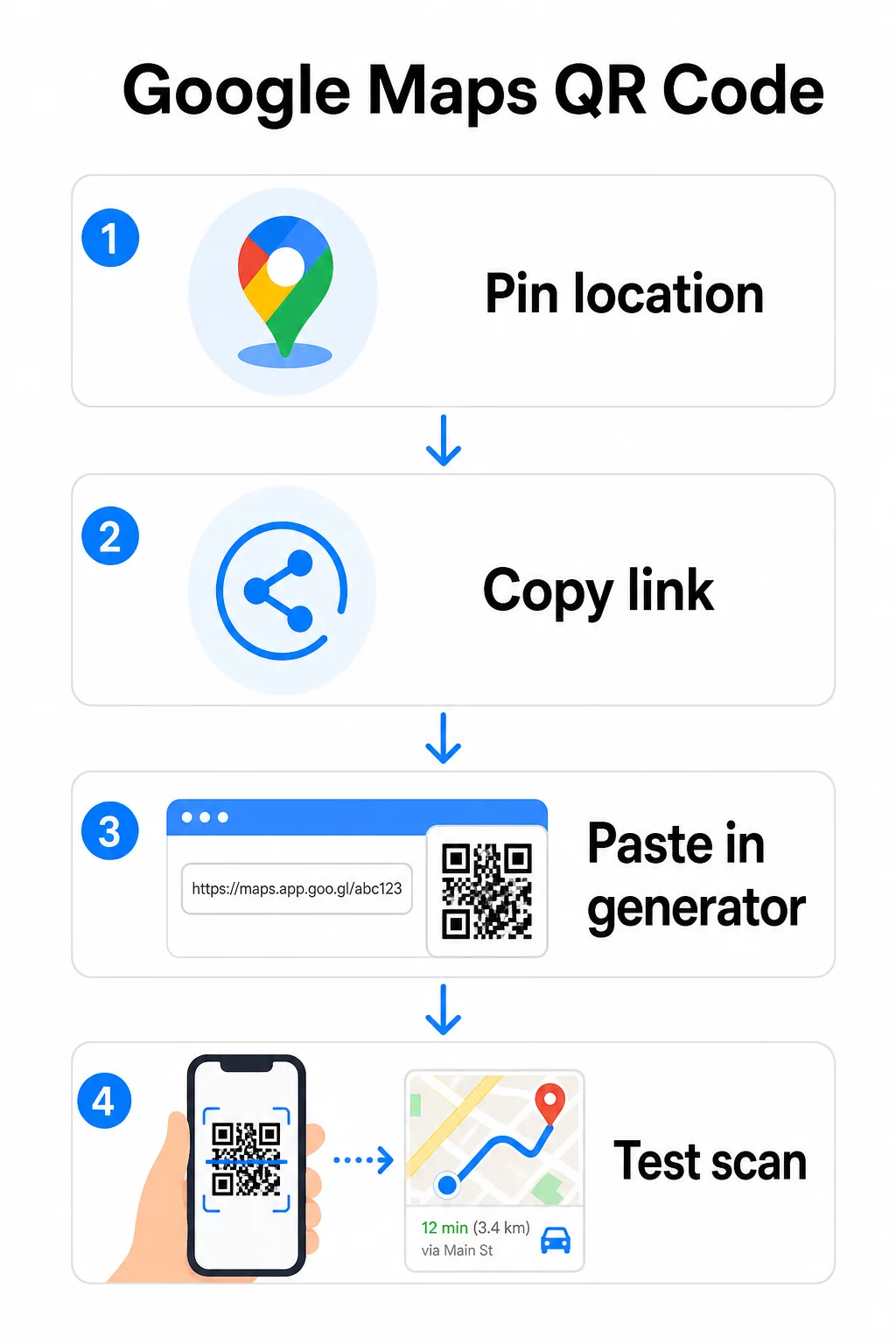
Pastāvīgai atrašanās vietai, kur nav nepieciešams mainīt galamērķi, a statisks QR kods ir bezmaksas un nekad nebeidzas. Lejupielādējiet to kā PNG, un esat gatavs to izmantot.
Jāatjaunina atrašanās vieta vai jāseko skenēšanas datiem? Izmantojiet Pageloot QR kodu ģenerators lai izveidotu dinamisku kodu, kas ļauj jebkurā laikā mainīt galamērķi no jūsu vadības paneļa – nav nepieciešama atkārtota drukāšana.
Statiskais pret dinamisko: Kurš jums ir nepieciešams?
Statiskais QR kods tieši iekodē Google Maps saiti rakstā. Tas ir pastāvīgs, bezmaksas un darbojas bez jebkāda konta. Kompromiss: ja jūsu atrašanās vieta mainās, jums ir jāģenerē un atkārtoti jāizdrukā jauns kods.
Dinamiskais QR kods tā vietā saglabā īsu novirzīšanas URL. Jūs kontrolējat, uz kurieni šī novirzīšana norāda no jūsu Pageloot vadības paneļa. Tas nozīmē:
- Jūs varat atjaunināt galamērķi, nepieskaroties izdrukātajam kodam
- Jūs saņemat reāllaika analītiku – skenēšanas skaitu, ierīču veidus, ģeogrāfiskās atrašanās vietas un laiku
- Jūs varat testēt un mainīt galamērķa saites sezonāliem pasākumiem vai pagaidu norises vietām
Ja drukājat kodus uz pastāvīgām izkārtnēm, statiskais darbojas labi. Kampaņām, pasākumiem, pagaidu atrašanās vietām vai jebkurai situācijai, kur galamērķis var mainīties, dinamiskie kodi ir praktiska izvēle.
QR koda pielāgošana
Vienkāršs melnbalts QR kods darbojas, taču zīmola kods darbojas labāk. Pageloot pielāgošanas iespējas ļauj jums:
- Pievienojiet savu uzņēmuma logotipu koda centrā
- Mainiet krāsas, lai tās atbilstu jūsu zīmola paletei (saglabājiet tumšus rakstus uz gaiša fona, lai nodrošinātu uzticamu skenēšanu)
- Izvēlieties no dažādām moduļu formām: Apaļa, Svītra vai Dimants
- Pievienojiet aicinājuma uz darbību rāmi ar tekstu, piemēram, “Skenēt norādēm” vai “Atrodiet mūs kartēs”
Pievienojot logotipu vai krāsas, izmantojiet kļūdu labošanas līmeni Q vai H. Šie iestatījumi ļauj QR kodam palikt skenējamam pat tad, ja līdz 25–30% no raksta ir aizsegts ar logotipu vai nelieliem bojājumiem. Logotipiem jābūt ne vairāk kā 30% no koda kopējās platības un jānodrošina, ka tie nepārklājas ar trim stūra “meklētāja” kvadrātiem.
Drukas materiāliem lejupielādējiet savu kodu kā SVG, PDF vai EPS failu. Šie vektoru formāti saglabā asumu jebkurā izmērā – tas ir būtiski liela formāta drukāšanai, piemēram, plakātiem vai veikalu izkārtnēm.
Vēlaties pilnībā zīmolotu atrašanās vietas kodu? Portāls Saites QR koda ģenerators atbalsta pielāgotas krāsas, logotipus un rāmju stilus ar 14 dienu bezmaksas izmēģinājuma versiju – nav nepieciešama kredītkarte.
Testēšana pirms publicēšanas
Vienmēr pārbaudiet savu QR kodu pirms tā nodošanas drukāšanai vai tiešraides kampaņai. Bojāts vai nepareizi novirzīts kods bojā uzticību un rada liekus drukas izdevumus.
Izpildiet šo kontrolsarakstu:
- Skenējiet ar tālruņa iebūvēto kameras lietotni gan iOS, gan Android ierīcēs
- Pārliecinieties, ka saite atver pareizo atrašanās vietu Google Maps
- Pārbaudiet ierīcē, kurā nav instalēta Google Maps lietotne – tai vajadzētu novirzīt uz Google Maps pārlūkprogrammā
- Skenējiet no dažādiem attālumiem un dažādos apgaismojuma apstākļos
- Ja esat pielāgojis dizainu, pārliecinieties, ka stūra meklētāja kvadrāti un klusā zona (tukšā apmale ap kodu) nav aizsegti
Drukas vajadzībām minimālais izmērs ir 2 × 2 collas (aptuveni 5 × 5 cm) nodrošina, ka lielākā daļa ierīču var droši skenēt tuvumā. Materiāliem, kas tiek skatīti no attāluma – plakātiem, baneriem, skatlogu displejiem – proporcionāli palieliniet izmēru. Vispārīga vadlīnija: kodam jābūt vismaz vienai desmitdaļai no attāluma, no kura cilvēki to skenēs.
Biežākās problēmas un risinājumi:
| Skenēšanas problēma | Risinājums |
|---|---|
| Izplūdis vai pikseļots kods | Eksportēt kā SVG, PDF vai EPS drukāšanai |
| Skeneris neatpazīst kodu | Palieliniet kontrastu; tumšs priekšplāns uz gaiša fona |
| Logotips bloķē skenēšanu | Pārliecinieties, ka logotips neaizsedz stūra kvadrātus; izmantojiet augstāku kļūdu korekciju |
| Kods ir pārāk mazs | Palieliniet līdz vismaz 2 × 2 collām fiziskiem materiāliem |
| Saite atver nepareizu atrašanās vietu | Pirms ģenerēšanas atkārtoti pārbaudiet nokopēto kopīgošanas saiti Google Maps |
Lai iegūtu sīkāku informāciju par izmēru, kontrastu un izvietojuma standartiem, skatiet labāko praksi QR kodu lasāmībā un QR kodu lietojamības vadlīnijas.
Kur izmantot Google Maps QR kodus
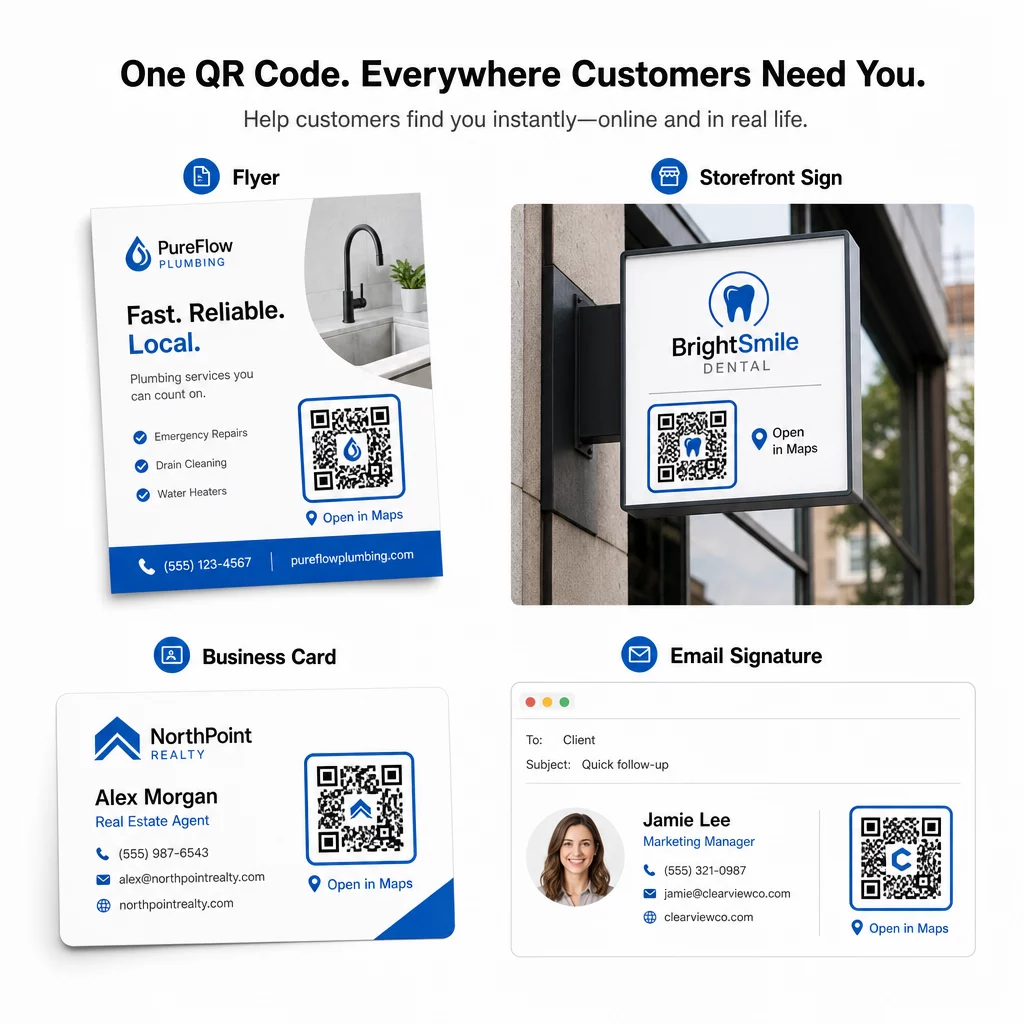
Pēc pārbaudes jūsu QR kods ir gatavs izvietošanai drukātajos un digitālajos kanālos:
Drukātie materiāli:
- Vizītkartes – aizstājiet drukātās adreses ar skenējamu kodu
- Skrejlapas un brošūras – virziet pasākuma viesus tieši uz norises vietu
- Veikalu skatlogi un durvju zīmes – palīdziet klientiem atrast autostāvvietu vai alternatīvas ieejas
- Nekustamā īpašuma izkārtnes – virziet pircējus uz atvērto durvju dienu vietām
- Produktu iepakojums – saistiet klientus ar jūsu fizisko mazumtirdzniecības vietu
Digitālie kanāli:
- E-pasta paraksti – aizstājiet statiskās adreses ar skenējamu atrašanās vietas kodu
- Sociālo mediju ieraksti un stāsti – popularizējiet jaunu atrašanās vietu vai pasākuma norises vietu
- Tīmekļa vietnes kājenes – ļaujiet apmeklētājiem atvērt norādes ar vienu pieskārienu
- Digitālās ēdienkartes – palīdziet ēdājiem atrast otru atrašanās vietu vai ēdināšanas biroju
Katrā izvietojumā iekļaujiet skaidru aicinājumu uz darbību pie koda. “Skenēt norādēm” vai “Atvērt kartēs” pasaka lietotājiem, kas tieši notiek, kad viņi skenē, kas palielina iesaisti. Lai iegūtu norādījumus par pozicionēšanu un izmēriem dažādos materiālos, QR kodu izvietošanas ceļvedis mārketingam aptver formātam specifiskus ieteikumus detalizēti.
Pageloot plānu salīdzinājums
| FUNKCIJA | Bezmaksas plāns | Pro plāns | Pielāgots/Uzņēmums |
|---|---|---|---|
| QR koda veids | Tikai statisks | Dinamisks un statisks | Dinamisks un statisks |
| Rediģējamas saites | Nē | Jā | Jā |
| Skenēšanas analītika | Nav | Reāllaikā (atrašanās vieta, ierīce) | Pilna vēsture un ekspertu ieskati |
| Gada skenēšanas ierobežojums | Neierobežots (statisks) | 250,000 | Pielāgota |
| Pielāgošana | Pamata (krāsas, logotips) | Papildu dizaina iespējas | Pilna zīmola integrācija |
| Mēneša cena | $0 | $38.34 | $106.52 |
Bezmaksas plāns ietver pastāvīgus statiskos kodus bez derīguma termiņa un neierobežotu skenēšanu. Maksas plāni atbloķē dinamisku rediģēšanu, reāllaika analīzi un uzlabotu pielāgošanu. Sākuma plāns sākas no $4.86/mēnesī ar 2 dinamiskiem kodiem un 15 000 gada skenējumiem – piemērots maziem uzņēmumiem, kas testē formātu. Visi maksas plāni ietver 14 dienu bezmaksas izmēģinājuma periodu bez kredītkartes.
Kā teica Lūkass Jansens, nekustamā īpašuma attīstītājs, kurš izmanto Pageloot atrašanās vietas QR kodus:
“Šis ir lielisks rīks, un QR kodi aizved tieši tur, kur vēlaties.”
Pastāvīgām atrašanās vietām bezmaksas statiskais kods ir vienkāršākais ceļš. Jebkam, kam nepieciešami atjauninājumi, izsekošana vai kampaņas mērīšana, dinamiskie kodi nodrošina elastību un datus, lai laika gaitā uzlabotos. Sāciet, kopējot savu Google Maps saiti, ģenerējot kodu vietnē Google Maps QR kodu ģenerators, un testējot to uz reālas ierīces, pirms tā tiek publicēta.
Biežāk uzdotie jautājumi
Lielākajai daļai lietojumu kopējiet vietas saiti no pogas Kopīgot pakalpojumā Google Maps – tā atver precīzu atrašanās vietu tieši pakalpojumā Google Maps vai pārlūkprogrammā. Ja vēlaties nosūtīt lietotājus tieši uz detalizētu navigāciju no fiksēta sākumpunkta, tā vietā izmantojiet norāžu saiti. Vienmēr vispirms ielīmējiet saiti pārlūkprogrammā, lai pārliecinātos, ka tā ved uz pareizo vietu, pirms koda ģenerēšanas.
Pēc jūsu atrašanās vietas atzīmēšanas pakalpojumā Google Maps izmantojiet pogu Kopīgot un nokopējiet tās nodrošināto URL. Šī saite ir piesaistīta konkrētām piespraudes koordinātām, nevis tikai vispārīgai meklēšanai. Izvairieties kopēt URL no jūsu pārlūkprogrammas adreses joslas, pārlūkojot karti – šī versija var ne vienmēr precīzi norādīt uz piesprausto punktu. Ielīmējiet kopīgošanas saiti pārlūkprogrammā, lai pārbaudītu pirms QR koda ģenerēšanas.
Izmantojiet vektorgrafikas formātu – SVG, EPS vai PDF – jebkurai drukas lietojumprogrammai. Vektorgrafikas faili mērogojas jebkurā izmērā, nezaudējot asumu, atšķirībā no PNG vai JPEG eksportiem, kas lielos drukas izmēros var izskatīties pikseļoti. Drukas materiāliem pārliecinieties arī, ka izšķirtspēja ir vismaz 300 DPI un ka kods ir vismaz 2 × 2 collas liels, lai nodrošinātu uzticamu skenēšanu tuvumā.