Perlu membantu pelanggan menemukan lokasi Anda tanpa membuat mereka mengetik alamat? Entri alamat manual menciptakan gesekan – dan pengunjung yang frustrasi. Panduan ini memandu Anda mengubah lokasi Google Maps apa pun menjadi kode QR yang dapat dipindai dalam hitungan menit.
Mendapatkan Tautan Lokasi Google Maps Anda
Sebelum Anda membuat apa pun, Anda memerlukan tautan yang tepat dari Google Maps. Tautan yang Anda salin menentukan dengan tepat ke mana pengguna akan mendarat saat mereka memindai, jadi ketepatan di sini penting.
Temukan dan Sematkan Lokasi Anda
Buka Google Maps dan cari tujuan Anda. Anda dapat memasukkan nama bisnis seperti “Starbucks Times Square,” alamat jalan lengkap, atau tengara yang dapat dikenali. Jika lokasi tidak memiliki alamat formal – tempat luar ruangan, pintu masuk taman, tempat parkir – tekan dan tahan di perangkat seluler (atau klik di desktop) untuk menjatuhkan pin di lokasi yang tepat.
Setelah disematkan, perbesar dan konfirmasikan penanda berada di titik yang tepat. Jika Anda mengarahkan orang ke pintu masuk tertentu daripada jejak bangunan umum, sesuaikanlah. Langkah ekstra ini mencegah kebingungan saat pengunjung tiba.
Salin Tautan Lokasi
Dengan lokasi Anda dikonfirmasi, ketuk atau klik Bagikan tombol:
- Di perangkat seluler: Ketuk nama lokasi di bagian bawah layar, lalu ketuk ikon Bagikan (panah ke atas) dan pilih “Salin ke Papan Klip.”
- Di desktop: Klik Bagikan di panel informasi atau di bawah menu tiga titik, lalu pilih “Salin Tautan.”
URL yang disalin biasanya adalah tautan yang dipersingkat seperti `maps.app.goo.gl/xyz123`. Tautan yang lebih pendek menghasilkan kode QR yang lebih bersih, tidak terlalu padat, dan memindai lebih andal. Sebelum melanjutkan, tempel tautan ke browser untuk mengonfirmasi bahwa tautan tersebut membuka lokasi yang benar.
Jenis tautan yang berbeda melayani tujuan yang berbeda:
| Jenis Tautan | Fungsinya | Contoh Kasus Penggunaan |
|---|---|---|
| Tautan Lokasi | Membuka bisnis atau alamat tertentu | Berbagi etalase toko atau kantor |
| Tautan Pencarian | Menampilkan hasil untuk kueri pencarian | Menampilkan “restoran dekat lokasi acara” |
| Tautan Petunjuk Arah | Membuka rute navigasi yang telah diatur sebelumnya | Mengarahkan tamu dari bandara ke hotel |
Untuk Kode QR yang digunakan untuk petunjuk arah dan berbagi alamat, Tautan Lokasi atau Tautan Petunjuk Arah biasanya berfungsi paling baik – keduanya melewati langkah pencarian dan langsung mengarahkan pengguna ke navigasi.
Membuat Kode QR Anda
Setelah tautan Anda siap, kunjungi Generator QR Code Google Maps dan tempel URL Anda ke kolom input. Pilih jenis kode QR – “Tautan” atau “Peta” – dan kode akan langsung dibuat.
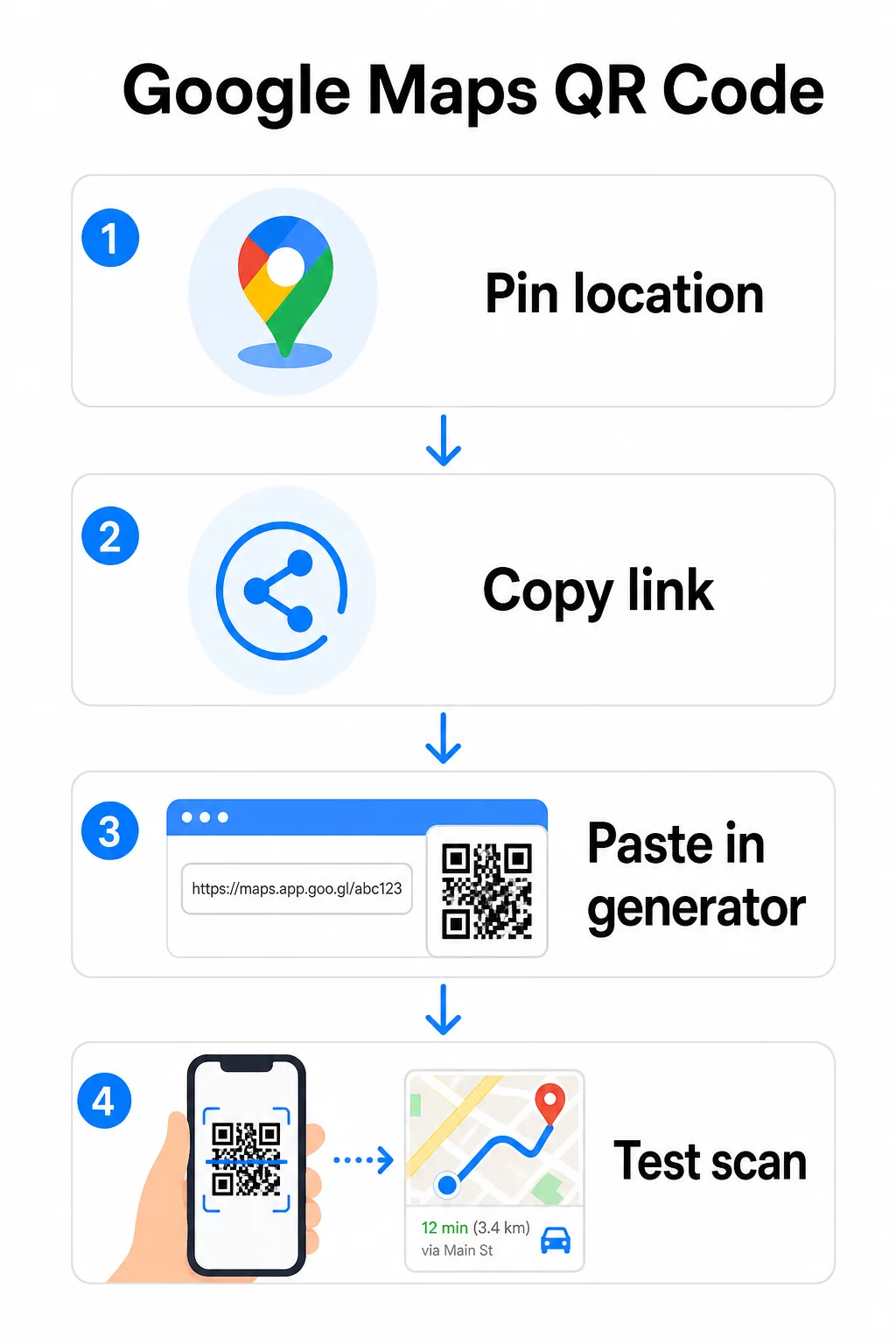
Untuk lokasi permanen tanpa perlu mengubah tujuan, sebuah kode QR statis gratis dan tidak pernah kedaluwarsa. Unduh sebagai PNG dan Anda siap menggunakannya.
Perlu memperbarui lokasi Anda atau melacak data pemindaian? Menggunakan Pembuat Kode QR Pageloot untuk membuat kode dinamis yang memungkinkan Anda mengubah tujuan kapan saja dari dasbor Anda – tidak perlu mencetak ulang.
Statik vs. Dinamis: Mana yang Anda Butuhkan?
Kode QR statik menyandikan tautan Google Maps langsung ke dalam pola. Kode ini permanen, gratis, dan berfungsi tanpa akun apa pun. Kekurangannya: jika lokasi Anda berubah, Anda perlu membuat dan mencetak ulang kode baru.
Kode QR dinamis menyimpan URL pengalihan singkat sebagai gantinya. Anda mengontrol ke mana pengalihan itu mengarah dari dasbor Pageloot Anda. Ini berarti:
- Anda dapat memperbarui tujuan tanpa menyentuh kode yang sudah dicetak
- Anda mendapatkan analitik waktu nyata – jumlah pemindaian, jenis perangkat, lokasi geografis, dan waktu
- Anda dapat menguji dan menukar tautan tujuan untuk acara musiman atau tempat sementara
Jika Anda mencetak kode pada papan nama permanen, statik berfungsi dengan baik. Untuk kampanye, acara, lokasi pop-up, atau situasi apa pun di mana tujuan mungkin berubah, kode dinamis adalah pilihan praktis.
Menyesuaikan Kode QR Anda
Kode QR hitam-putih biasa berfungsi, tetapi yang bermerek berkinerja lebih baik. Opsi penyesuaian Pageloot memungkinkan Anda:
- Tambahkan logo perusahaan Anda ke tengah kode
- Ubah warna agar sesuai dengan palet merek Anda (pertahankan pola gelap pada latar belakang terang untuk pemindaian yang andal)
- Pilih dari berbagai bentuk modul: Bulat, Garis, atau Berlian
- Tambahkan bingkai Ajakan Bertindak dengan teks seperti “Pindai untuk Petunjuk Arah” atau “Temukan Kami di Peta”
Saat menambahkan logo atau warna, gunakan tingkat koreksi kesalahan Q atau H. Pengaturan ini memungkinkan kode QR tetap dapat dipindai meskipun hingga 25–30% dari pola tertutup oleh logo atau kerusakan kecil. Jaga agar logo tidak lebih dari 30% dari total area kode dan pastikan tidak tumpang tindih dengan tiga kotak “penemu” di sudut.
Untuk materi cetak, unduh kode Anda sebagai file SVG, PDF, atau EPS. Format vektor ini tetap tajam pada ukuran berapa pun – penting untuk pencetakan format besar seperti poster atau papan nama toko.
Ingin kode lokasi bermerek penuh? Itu Generator Kode QR Tautan mendukung warna kustom, logo, dan gaya bingkai dengan uji coba gratis 14 hari – tidak memerlukan kartu kredit.
Pengujian Sebelum Anda Menerbitkan
Selalu uji kode QR Anda sebelum mencetaknya atau meluncurkan kampanye langsung. Kode yang rusak atau salah arah merusak kepercayaan dan membuang biaya cetak.
Jalankan daftar periksa ini:
- Pindai dengan aplikasi kamera bawaan ponsel Anda di iOS dan Android
- Konfirmasikan tautan membuka lokasi yang benar di Google Maps
- Uji pada perangkat tanpa aplikasi Google Maps terinstal – seharusnya mengarahkan ke Google Maps di browser
- Pindai dari berbagai jarak dan dalam kondisi pencahayaan yang berbeda
- Jika Anda telah menyesuaikan desain, konfirmasikan bahwa kotak penemu sudut dan zona tenang (batas kosong di sekitar kode) tidak terhalang
Untuk penggunaan cetak, ukuran minimum 2 × 2 inci (sekitar 5 × 5 cm) memastikan sebagian besar perangkat dapat memindai dengan andal dari jarak dekat. Untuk materi yang dilihat dari kejauhan – poster, spanduk, pajangan jendela – perbesar secara proporsional. Pedoman umum: kode harus setidaknya sepersepuluh dari jarak orang akan memindainya.
Masalah umum dan perbaikannya:
| Masalah Pemindaian | Perbaikan |
|---|---|
| Kode buram atau berpiksel | Ekspor sebagai SVG, PDF, atau EPS untuk dicetak |
| Pemindai gagal mengenali kode | Tingkatkan kontras; latar depan gelap pada latar belakang terang |
| Logo menghalangi pemindaian | Pastikan logo tidak menutupi kotak sudut; gunakan koreksi kesalahan yang lebih tinggi |
| Kode terlalu kecil | Tingkatkan menjadi setidaknya 2 × 2 inci untuk materi fisik |
| Tautan membuka lokasi yang salah | Verifikasi ulang tautan Bagikan yang disalin di Google Maps sebelum membuat |
Untuk detail lebih lanjut tentang standar ukuran, kontras, dan penempatan, lihat praktik terbaik untuk keterbacaan kode QR dan panduan kegunaan kode QR.
Di Mana Menggunakan Kode QR Google Maps
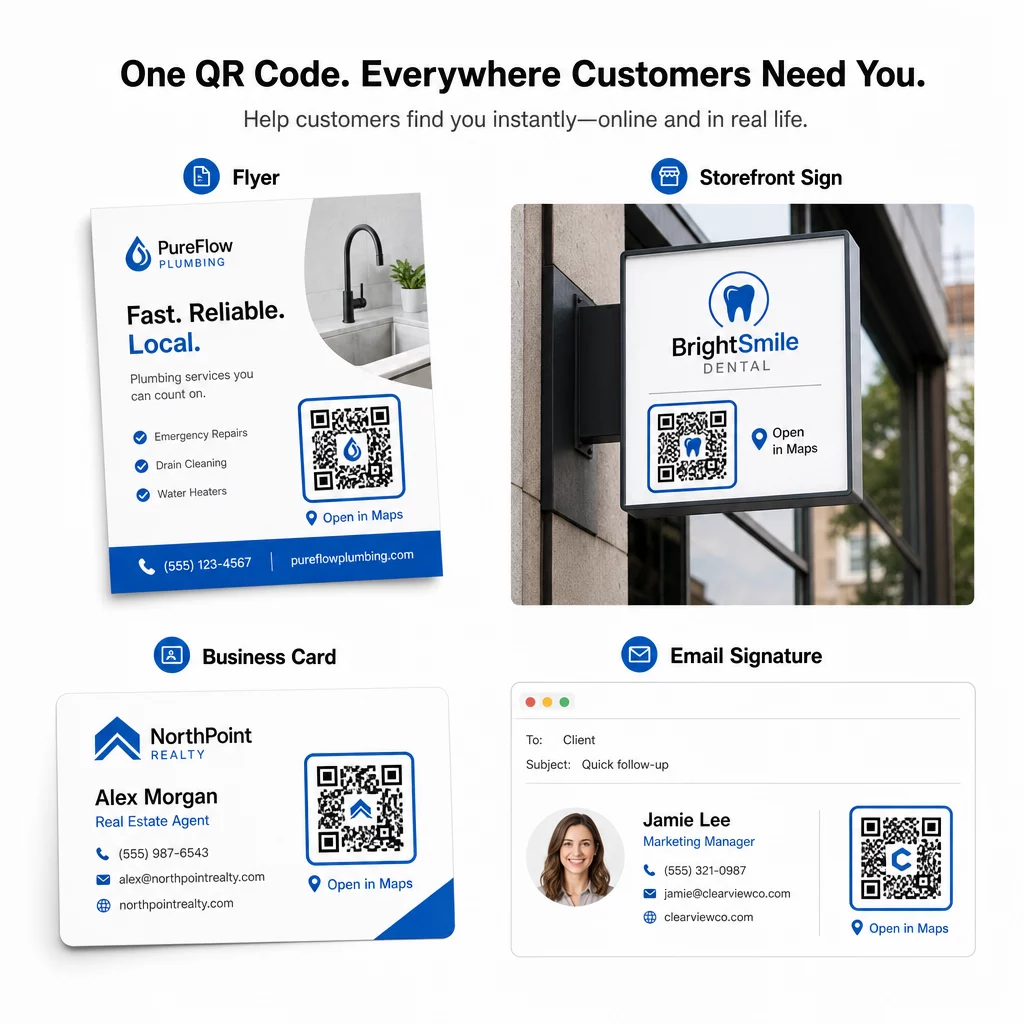
Setelah diuji, kode QR Anda siap digunakan di seluruh saluran cetak dan digital:
Materi cetak:
- Kartu nama – ganti alamat tercetak dengan kode yang dapat dipindai
- Pamflet dan brosur – arahkan tamu acara langsung ke lokasi
- Jendela toko dan tanda pintu – bantu pelanggan menemukan parkir atau pintu masuk alternatif
- Papan tanda real estat – arahkan pembeli ke lokasi open house
- Kemasan produk – hubungkan pelanggan ke lokasi ritel fisik Anda
Saluran digital:
- Tanda tangan email – ganti alamat statis dengan kode lokasi yang dapat dipindai
- Postingan dan Cerita media sosial – promosikan lokasi baru atau tempat acara
- Footer situs web – biarkan pengunjung membuka petunjuk arah dalam satu ketukan
- Menu digital – bantu pengunjung menemukan lokasi kedua atau kantor katering
Di setiap penempatan, sertakan ajakan bertindak yang jelas di dekat kode. “Pindai untuk Petunjuk Arah” atau “Buka di Peta” memberi tahu pengguna dengan tepat apa yang terjadi saat mereka memindai, yang meningkatkan keterlibatan. Untuk panduan tentang penempatan dan ukuran di berbagai materi, Panduan penempatan kode QR untuk pemasaran mencakup rekomendasi khusus format secara rinci.
Perbandingan Paket Pageloot
| FITUR | Paket Gratis | Paket Pro | Kustom/Perusahaan |
|---|---|---|---|
| Jenis Kode QR | Hanya Statis | Dinamis & Statis | Dinamis & Statis |
| Tautan yang Dapat Diedit | Tidak. | Ya. | Ya. |
| Analitik Pindai | Tidak Ada | Waktu Nyata (lokasi, perangkat) | Riwayat lengkap & wawasan ahli |
| Batas Pindai Tahunan | Tidak Terbatas (statis) | 250,000 | Kustom |
| Kustomisasi | Dasar (warna, logo) | Opsi desain lanjutan | Integrasi merek penuh |
| Harga Bulanan | $0 | $38.34 | $106.52 |
Paket gratis mencakup kode statis permanen tanpa kedaluwarsa dan pemindaian tak terbatas. Paket berbayar membuka pengeditan dinamis, analitik waktu nyata, dan penyesuaian lanjutan. Paket Starter dimulai dari $4.86/bulan dengan 2 kode dinamis dan 15.000 pemindaian tahunan – cocok untuk bisnis kecil yang menguji format. Semua paket berbayar mencakup uji coba gratis 14 hari tanpa kartu kredit.
Seperti yang dikatakan Lucas Jansen, seorang pengembang real estat yang menggunakan kode QR lokasi Pageloot:
“Ini adalah alat yang sangat baik dan kode QR membawa Anda tepat ke tempat yang Anda inginkan.”
Untuk lokasi permanen, kode statis gratis adalah jalur termudah. Untuk apa pun yang memerlukan pembaruan, pelacakan, atau pengukuran kampanye, kode dinamis memberi Anda fleksibilitas dan data untuk meningkatkan seiring waktu. Mulailah dengan menyalin tautan Google Maps Anda, membuat kode Anda di Generator QR Code Google Maps, dan mengujinya pada perangkat sungguhan sebelum ditayangkan.
Pertanyaan yang sering diajukan
Untuk sebagian besar penggunaan, salin Tautan Tempat dari tombol Bagikan di Google Maps – ini membuka lokasi persis secara langsung di Google Maps atau peramban. Jika Anda ingin mengirim pengguna langsung ke navigasi belokan demi belokan dari titik awal yang tetap, gunakan Tautan Arah sebagai gantinya. Selalu tempel tautan ke peramban terlebih dahulu untuk memastikan tautan tersebut mengarah ke lokasi yang tepat sebelum membuat kode.
Setelah menyematkan lokasi Anda di Google Maps, gunakan tombol Bagikan dan salin URL yang diberikannya. Tautan ini terikat pada koordinat pin tertentu, bukan hanya pencarian umum. Hindari menyalin URL dari bilah alamat browser Anda saat menjelajahi peta – versi tersebut mungkin tidak dapat diandalkan untuk mengarah ke titik yang disematkan. Tempel tautan Bagikan ke browser untuk memverifikasi sebelum membuat kode QR.
Gunakan format vektor – SVG, EPS, atau PDF – untuk aplikasi cetak apa pun. File vektor dapat diskalakan ke ukuran berapa pun tanpa kehilangan ketajaman, tidak seperti ekspor PNG atau JPEG yang dapat terlihat berpiksel pada dimensi cetak besar. Untuk materi cetak, pastikan juga resolusi Anda setidaknya 300 DPI dan bahwa kode berukuran setidaknya 2 × 2 inci untuk pemindaian jarak dekat yang andal.