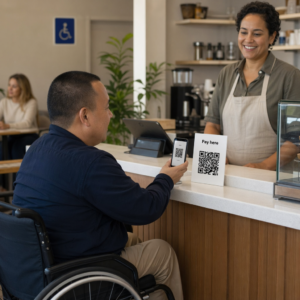
Reikia padėti klientams rasti jūsų vietą, neprašant jų įvesti adreso? Rankinis adreso įvedimas sukelia nepatogumų – ir nuvargina lankytojus. Šis vadovas parodys, kaip per kelias minutes bet kurią „Google Maps“ vietą paversti nuskaitomu QR kodu.
Kaip gauti „Google Maps“ vietos nuorodą
Prieš ką nors generuodami, jums reikia tinkamos nuorodos iš „Google Maps“. Nukopijuota nuoroda tiksliai nurodo, kur vartotojai pateks nuskenavę, todėl čia svarbu tikslumas.
Raskite ir pažymėkite savo vietą
Atidarykite “Google Maps” ir ieškokite savo kelionės tikslo. Galite įvesti įmonės pavadinimą, pvz., „Starbucks Times Square“, visą gatvės adresą arba atpažįstamą orientyrą. Jei vieta neturi oficialaus adreso – lauko renginių vieta, parko įėjimas, automobilių stovėjimo aikštelė – paspauskite ir palaikykite mobiliajame įrenginyje (arba spustelėkite darbalaukyje), kad numestumėte žymeklį tikslioje vietoje.
Pažymėję, priartinkite ir patvirtinkite, kad žymeklis yra tinkamoje vietoje. Jei nukreipiate žmones į konkretų įėjimą, o ne į bendrą pastato plotą, atitinkamai pakoreguokite. Šis papildomas žingsnis padeda išvengti painiavos atvykus lankytojams.
Nukopijuokite vietos nuorodą
Patvirtinę savo vietą, bakstelėkite arba spustelėkite Pasidalykite mygtuką:
- Mobiliajame įrenginyje: Bakstelėkite vietos pavadinimą ekrano apačioje, tada bakstelėkite bendrinimo piktogramą (rodyklė aukštyn) ir pasirinkite “Kopijuoti į iškarpinę”.”
- Darbalaukyje: Spustelėkite “Bendrinti” informacijos skydelyje arba po trijų taškų meniu, tada pasirinkite „Kopijuoti nuorodą“.”
Nukopijuotas URL paprastai yra sutrumpinta nuoroda, pvz., `maps.app.goo.gl/xyz123`. Trumpesnės nuorodos sukuria švaresnius, mažiau tankius QR kodus, kurie nuskaitomi patikimiau. Prieš tęsdami, įklijuokite nuorodą į naršyklę, kad patvirtintumėte, jog ji atidaro teisingą vietą.
Skirtingų tipų nuorodos skirtos skirtingiems tikslams:
| Nuorodos tipas | Ką ji daro | Pavyzdinis naudojimo atvejis |
|---|---|---|
| Vietos nuoroda | Atidaro konkretų verslą ar adresą | Dalijimasis parduotuvės fasadu ar biuru |
| Paieškos nuoroda | Rodo paieškos užklausos rezultatus | Rodoma “restoranai šalia vietos” |
| Krypties nuoroda | Atidaro iš anksto nustatytą navigacijos maršrutą | Svečių nukreipimas iš oro uosto į viešbutį |
Dėl QR kodai, naudojami kryptims ir adreso dalijimuisi, Vietos nuoroda arba Krypties nuoroda paprastai veikia geriausiai – jos praleidžia paieškos žingsnį ir nukreipia vartotoją tiesiai į navigaciją.
QR kodo generavimas
Kai nuoroda paruošta, apsilankykite Google Maps QR kodo generatorius ir įklijuokite savo URL į įvesties lauką. Pasirinkite QR kodo tipą – “Nuoroda” arba “Žemėlapiai” – ir kodas bus sugeneruotas akimirksniu.
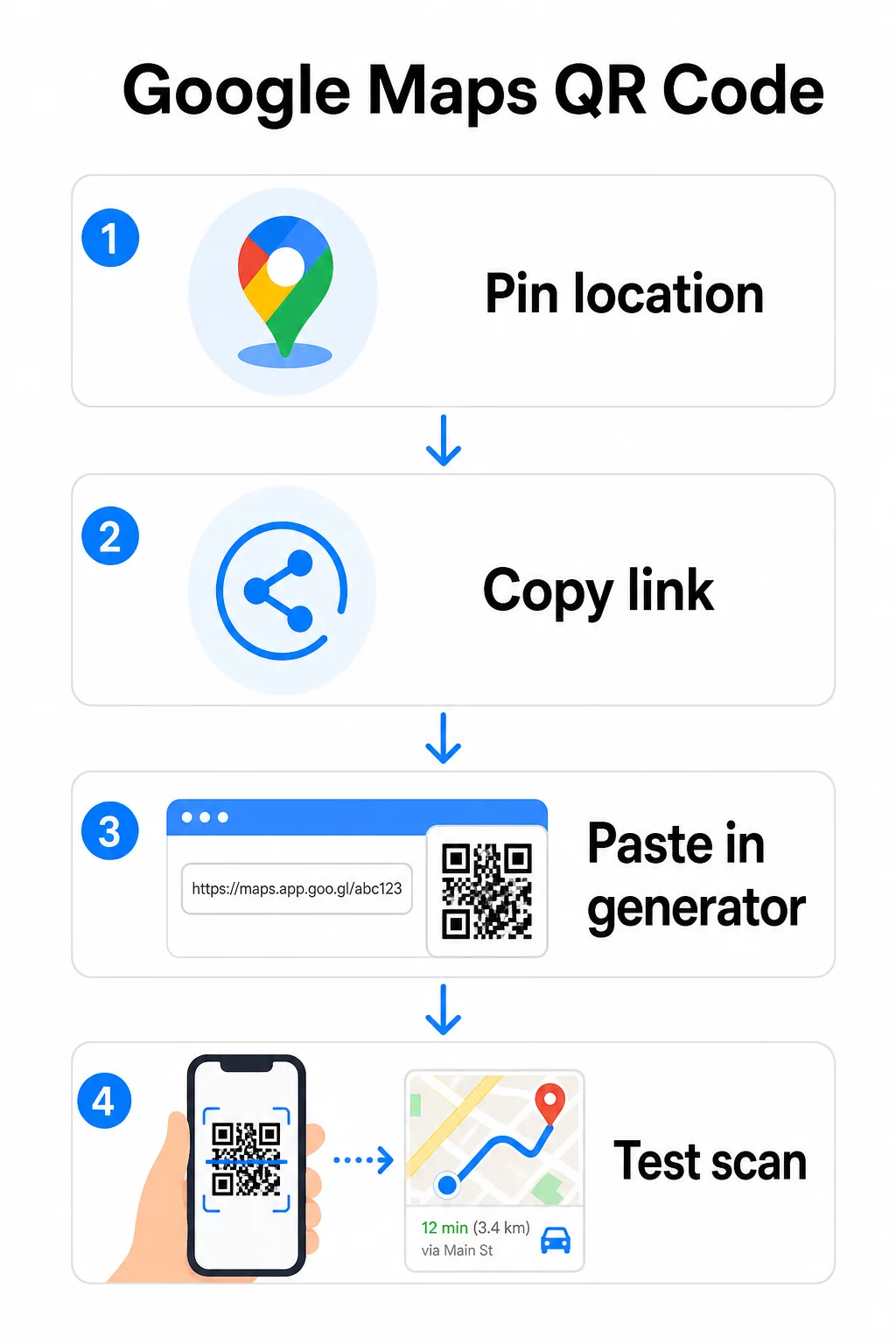
Nuolatinei vietai, kurios paskirties vietos nereikia keisti, statinis QR kodas yra nemokamas ir niekada nesibaigia. Atsisiųskite jį kaip PNG ir būsite pasiruošę jį naudoti.
Reikia atnaujinti savo vietą ar sekti nuskaitymo duomenis? Naudoti „Pageloot“ QR kodų generatorius sukurti dinaminį kodą, kuris leidžia bet kada pakeisti paskirties vietą iš savo prietaisų skydelio – nereikia perspausdinti.
Statinis vs. Dinaminis: Kurio jums reikia?
Statinis QR kodas tiesiogiai užkoduoja Google Maps nuorodą į šabloną. Jis yra nuolatinis, nemokamas ir veikia be jokios paskyros. Kompromisas: jei jūsų vieta pasikeičia, jums reikia sugeneruoti ir perspausdinti naują kodą.
Dinaminis QR kodas vietoj to saugo trumpą peradresavimo URL. Jūs kontroliuojate, kur nukreipia tas peradresavimas iš savo Pageloot prietaisų skydelio. Tai reiškia:
- Galite atnaujinti paskirties vietą neliesdami atspausdinto kodo
- Gaunate realaus laiko analizę – nuskaitymų skaičių, įrenginių tipus, geografines vietas ir laiką
- Galite išbandyti ir keisti paskirties nuorodas sezoniniams renginiams ar laikinoms vietoms
Jei spausdinate kodus ant nuolatinių iškabų, statinis veikia puikiai. Kampanijoms, renginiams, iššokančioms vietoms ar bet kokiai situacijai, kai paskirties vieta gali pasikeisti, dinaminiai kodai yra praktiškas pasirinkimas.
QR kodo pritaikymas
Paprastas juodai baltas QR kodas veikia, tačiau firminis veikia geriau. Pageloot pritaikymo parinktys leidžia jums:
- Pridėti savo įmonės logotipą į kodo centrą
- Pakeisti spalvas, kad atitiktų jūsų prekės ženklo paletę (laikykite tamsius raštus ant šviesaus fono, kad nuskaitymas būtų patikimas)
- Pasirinkti iš skirtingų modulio formų: Apvalus, Brūkšnelis arba Deimantas
- Pridėti raginimo veikti rėmelį su tekstu, pvz., “Nuskaitykite nuorodoms” arba “Raskite mus žemėlapiuose”
Pridėdami logotipą ar spalvas, naudokite klaidų taisymo lygį Q arba H. Šie nustatymai leidžia QR kodui likti nuskaitomam net jei iki 25–30% rašto yra uždengta logotipu ar nedideliu pažeidimu. Logotipai neturėtų užimti daugiau nei 30% viso kodo ploto ir užtikrinkite, kad jie nepersidengtų su trimis kampiniais “ieškiklio” kvadratais.
Spausdinimo medžiagoms atsisiųskite savo kodą kaip SVG, PDF arba EPS failą. Šie vektoriniai formatai išlieka ryškūs bet kokiu dydžiu – tai labai svarbu didelio formato spausdinimui, pavyzdžiui, plakatams ar vitrinų iškaboms.
Norite visiškai firminio vietos kodo? Tas Nuorodos QR kodo generatorius palaiko pasirinktines spalvas, logotipus ir rėmelių stilius su 14 dienų nemokamu bandomuoju laikotarpiu – nereikia kredito kortelės.
Testavimas prieš publikuojant
Visada patikrinkite savo QR kodą prieš jį spausdindami ar paleisdami gyvą kampaniją. Sugedęs ar klaidingai nukreipiantis kodas kenkia pasitikėjimui ir švaisto spausdinimo išlaidas.
Peržiūrėkite šį kontrolinį sąrašą:
- Nuskaitykite savo telefono numatytąja kameros programėle tiek iOS, tiek Android sistemose
- Patvirtinkite, kad nuoroda atidaro teisingą vietą Google Maps
- Išbandykite įrenginyje, kuriame nėra įdiegta Google Maps programėlė – ji turėtų nukreipti į Google Maps naršyklėje
- Nuskaitykite iš įvairių atstumų ir skirtingomis apšvietimo sąlygomis
- Jei pritaikėte dizainą, patvirtinkite, kad kampiniai ieškiklio kvadratai ir rami zona (tuščia kraštinė aplink kodą) yra neužblokuoti
Spausdinimui, minimalus dydis yra 2 × 2 coliai (apie 5 × 5 cm) užtikrina, kad dauguma įrenginių galėtų patikimai nuskaityti iš arti. Medžiagoms, matomoms iš toli – plakatams, reklaminiams skydams, vitrinoms – proporcingai padidinkite. Bendra gairė: kodas turėtų būti bent dešimtadalio atstumo, iš kurio žmonės jį nuskaitys.
Dažnos problemos ir sprendimai:
| Nuskaitymo problema | Sprendimas |
|---|---|
| Neryškus arba pikseliuotas kodas | Eksportuoti kaip SVG, PDF arba EPS spausdinimui |
| Skaitytuvas neatpažįsta kodo | Padidinkite kontrastą; tamsus priekinis planas šviesiame fone |
| Logotipas blokuoja nuskaitymą | Įsitikinkite, kad logotipas neuždengia kampinių kvadratų; naudokite didesnį klaidų taisymą |
| Kodas per mažas | Padidinkite iki bent 2 × 2 colių fizinėms medžiagoms |
| Nuoroda atidaro neteisingą vietą | Prieš generuodami dar kartą patikrinkite nukopijuotą bendrinimo nuorodą „Google Maps“ |
Daugiau informacijos apie dydžio, kontrasto ir išdėstymo standartus rasite geriausia praktika QR kodo skaitomumui ir QR kodo naudojimo gairėse.
Kur naudoti „Google Maps“ QR kodus
Išbandžius, jūsų QR kodas yra paruoštas diegti spausdintiniuose ir skaitmeniniuose kanaluose:
Spausdintinės medžiagos:
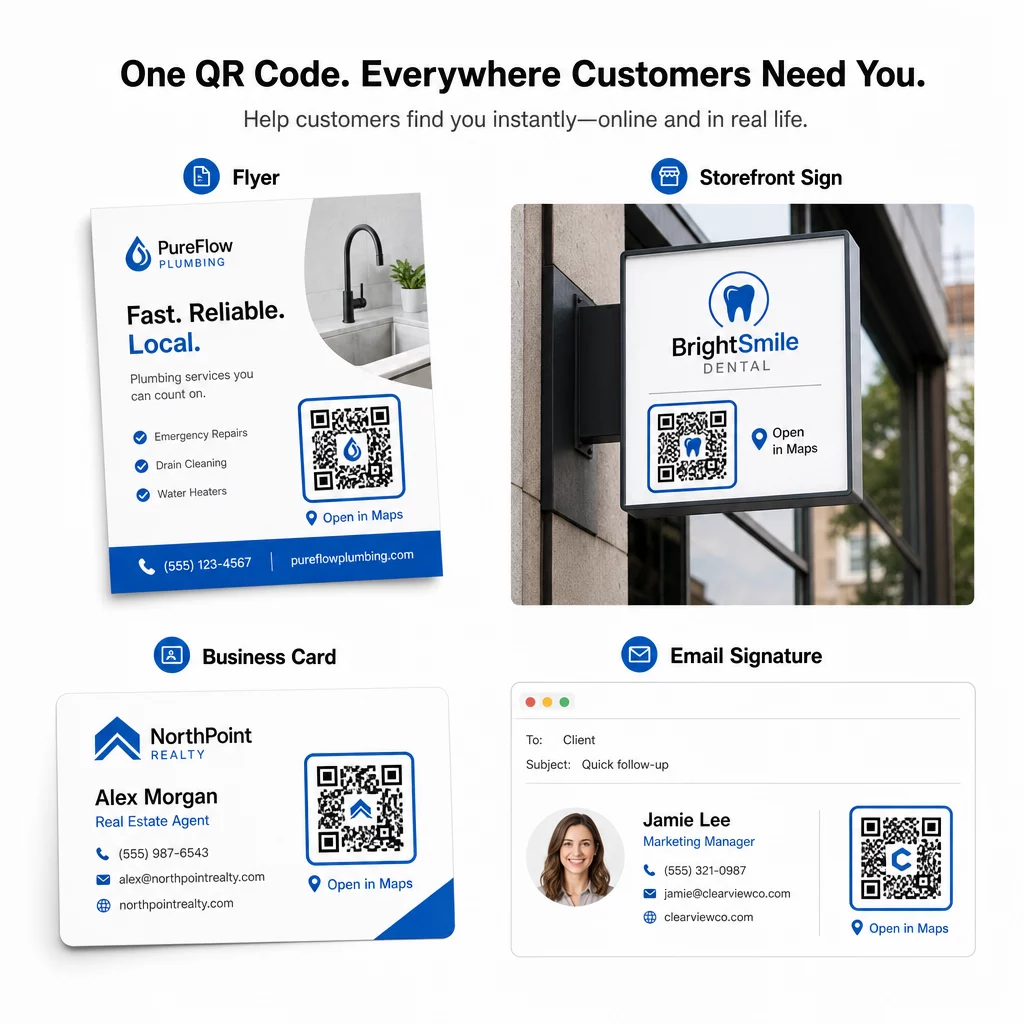
- Vizitinės kortelės – pakeiskite spausdintus adresus nuskaitomu kodu
- Skrajutės ir brošiūros – nukreipkite renginio svečius tiesiai į vietą
- Parduotuvių vitrinos ir durų iškabos – padėkite klientams rasti automobilių stovėjimo aikštelę arba alternatyvius įėjimus
- Nekilnojamojo turto iškabos – nukreipkite pirkėjus į atvirų durų dienos vietas
- Produkto pakuotė – susiekite klientus su jūsų fizine mažmeninės prekybos vieta
Skaitmeniniai kanalai:
- El. pašto parašai – pakeiskite statinius adresus nuskaitomu vietos kodu
- Socialinės žiniasklaidos įrašai ir istorijos – reklamuokite naują vietą ar renginio vietą
- Svetainės poraštės – leiskite lankytojams atidaryti nuorodas vienu palietimu
- Skaitmeniniai meniu – padėkite lankytojams rasti antrą vietą arba maitinimo biurą
Kiekvienoje vietoje šalia kodo įtraukite aiškų raginimą veikti. “Nuskaitykite nuorodoms” arba “Atidaryti žemėlapiuose” tiksliai pasako vartotojams, kas nutiks nuskenavus, o tai padidina įsitraukimą. Norėdami gauti patarimų dėl padėties ir dydžio įvairiose medžiagose, QR kodo išdėstymo vadovas rinkodarai išsamiai aprašo konkretaus formato rekomendacijas.
Pageloot planų palyginimas
| FUNKCIJA | Nemokamas planas | Pro planas | Individualus/Įmonė |
|---|---|---|---|
| QR kodo tipas | Tik statinis | Dinaminis ir statinis | Dinaminis ir statinis |
| Redaguojamos nuorodos | Ne | Taip | Taip |
| Skenavimo analizė | Jokių | Realiuoju laiku (vieta, įrenginys) | Visa istorija ir ekspertų įžvalgos |
| Metinis nuskaitymų limitas | Neribota (statinė) | 250,000 | Pritaikyta |
| Tinkinimas | Pagrindinis (spalvos, logotipas) | Išplėstinės dizaino parinktys | Visapusiška prekės ženklo integracija |
| Mėnesio kaina | $0 | $38.34 | $106.52 |
Nemokamas planas apima nuolatinius statinius kodus be galiojimo pabaigos ir neribotą nuskaitymų skaičių. Mokami planai atrakina dinaminį redagavimą, realaus laiko analizę ir išplėstinį pritaikymą. Pradinis planas prasideda nuo $4.86/mėn. su 2 dinaminiais kodais ir 15 000 metinių nuskaitymų – tinka mažoms įmonėms, išbandančioms formatą. Visi mokami planai apima 14 dienų nemokamą bandomąjį laikotarpį, nereikalaujant kredito kortelės.
Kaip sakė Lucas Jansen, nekilnojamojo turto vystytojas, naudojantis Pageloot vietos QR kodus:
“Tai puikus įrankis, o QR kodai nukreipia jus būtent ten, kur norite.”
Nuolatinėms vietoms nemokamas statinis kodas yra paprasčiausias būdas. Viskam, kam reikia atnaujinimų, stebėjimo ar kampanijos matavimo, dinaminiai kodai suteikia lankstumo ir duomenų, kad laikui bėgant galėtumėte tobulėti. Pradėkite nukopijuodami savo Google Maps nuorodą, sugeneruodami kodą adresu Google Maps QR kodo generatorius, ir išbandyti jį tikrame įrenginyje prieš paleidžiant.
Dažniausiai užduodami klausimai
Daugeliui naudojimo atvejų nukopijuokite vietos nuorodą iš mygtuko „Dalintis“ „Google Maps“ – ji atidaro tikslią vietą tiesiogiai „Google Maps“ arba naršyklėje. Jei norite nukreipti vartotojus tiesiai į nuoseklią navigaciją iš fiksuoto pradinio taško, vietoj to naudokite nuorodą „Nuorodos“. Visada pirmiausia įklijuokite nuorodą į naršyklę, kad patvirtintumėte, jog ji nukreipia į tinkamą vietą, prieš generuodami kodą.
Prikabinus savo vietą Google Maps, naudokite mygtuką „Dalintis“ ir nukopijuokite jo pateiktą URL. Ši nuoroda yra susieta su konkrečiomis prikabintomis koordinatėmis, o ne tik su bendra paieška. Venkite kopijuoti URL iš naršyklės adreso juostos naršant žemėlapį – ta versija gali nepatikimai nukreipti į prikabintą tašką. Įklijuokite „Dalintis“ nuorodą į naršyklę, kad patikrintumėte prieš generuodami QR kodą.
Naudokite vektorinį formatą – SVG, EPS arba PDF – bet kokiam spausdinimo pritaikymui. Vektoriniai failai keičia mastelį iki bet kokio dydžio neprarasdami ryškumo, skirtingai nei PNG ar JPEG eksportai, kurie gali atrodyti pikseliuoti dideliuose spausdinimo matmenyse. Spausdinimo medžiagoms taip pat užtikrinkite, kad jūsų raiška būtų bent 300 DPI ir kad kodas matuotų bent 2 × 2 colių patikimam nuskaitymui iš arti.