Потрібно допомогти клієнтам знайти ваше місцезнаходження, не змушуючи їх вводити адресу? Ручне введення адреси створює тертя – і розчарованих відвідувачів. Цей посібник проведе вас через перетворення будь-якого місцезнаходження Google Maps на сканований QR-код за лічені хвилини.
Отримання посилання на ваше місцезнаходження в Google Maps
Перш ніж щось генерувати, вам потрібне правильне посилання з Google Maps. Посилання, яке ви копіюєте, точно визначає, куди потрапляють користувачі після сканування, тому точність тут має значення.
Знайдіть і закріпіть своє місцезнаходження
Відкрийте Google Maps і знайдіть своє місце призначення. Ви можете ввести назву компанії, наприклад “Starbucks Times Square”, повну поштову адресу або впізнаваний орієнтир. Якщо місцезнаходження не має офіційної адреси – відкритий майданчик, вхід у парк, парковка – натисніть і утримуйте на мобільному (або клацніть на комп'ютері), щоб встановити позначку в точному місці.
Після закріплення збільште масштаб і переконайтеся, що маркер знаходиться в потрібній точці. Якщо ви направляєте людей до певного входу, а не до загального контуру будівлі, відкоригуйте відповідно. Цей додатковий крок запобігає плутанині, коли прибувають відвідувачі.
Скопіюйте посилання на місцезнаходження
Після підтвердження вашого місцезнаходження торкніться або клацніть Поділіться кнопку:
- На мобільному: Торкніться назви місцезнаходження внизу екрана, потім торкніться значка “Поділитися” (стрілка вгору) і виберіть «Копіювати в буфер обміну».”
- На комп'ютері: Натисніть “Поділитися” на інформаційній панелі або в меню з трьома крапками, потім виберіть «Копіювати посилання».”
Скопійована URL-адреса зазвичай є скороченим посиланням, наприклад `maps.app.goo.gl/xyz123`. Коротші посилання створюють чистіші, менш щільні QR-коди, які скануються надійніше. Перш ніж продовжити, вставте посилання в браузер, щоб переконатися, що воно відкриває правильне місцезнаходження.
Різні типи посилань служать різним цілям:
| Тип посилання | Що він робить | Приклад використання |
|---|---|---|
| Посилання на місце | Відкриває конкретний бізнес або адресу | Надання доступу до вітрини магазину або офісу |
| Посилання для пошуку | Відображає результати пошукового запиту | Показ “ресторанів поблизу місця проведення” |
| Посилання на маршрут | Відкриває попередньо встановлений навігаційний маршрут | Направлення гостей з аеропорту до готелю |
Для QR-коди, що використовуються для навігації та обміну адресами, посилання на місце або посилання на маршрут зазвичай працює найкраще – вони пропускають крок пошуку та одразу перенаправляють користувача до навігації.
Генерація вашого QR-коду
Коли ваше посилання готове, відвідайте Генератор QR-кодів Google Maps і вставте свою URL-адресу в поле введення. Виберіть тип QR-коду – “Посилання” або “Карти” – і код згенерується миттєво.
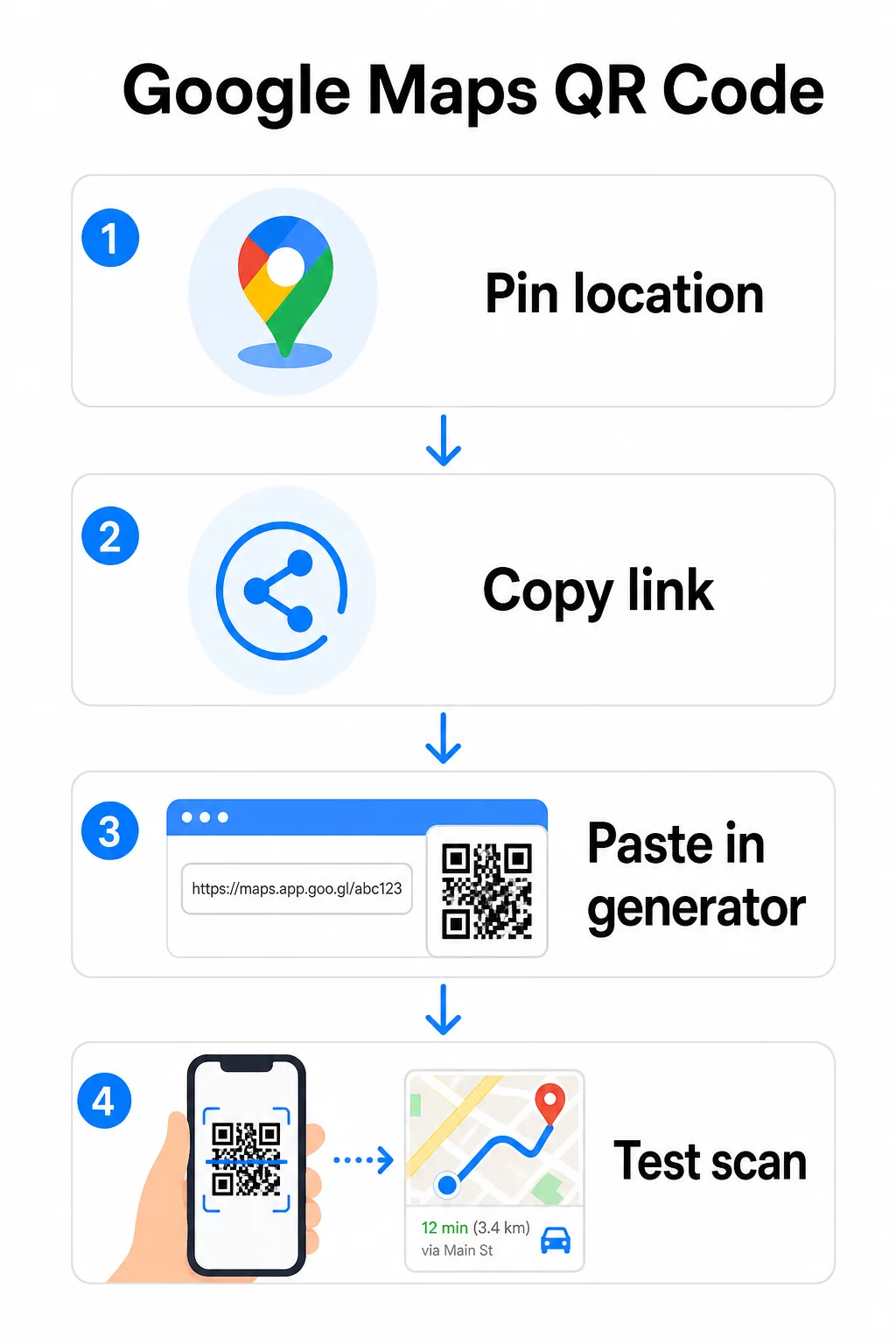
Для постійного місця розташування, де немає потреби змінювати пункт призначення, статичний QR-код є безкоштовним і ніколи не закінчується. Завантажте його як PNG, і ви готові його використовувати.
Потрібно оновити ваше місцезнаходження або відстежувати дані сканувань? Використовувати Генератор QR-кодів Pageloot щоб створити динамічний код, який дозволяє змінювати місце призначення в будь-який час з вашої панелі керування – без необхідності повторного друку.
Статичний проти Динамічного: Який вам потрібен?
Статичний QR-код кодує посилання на Google Maps безпосередньо в шаблон. Він постійний, безкоштовний і працює без будь-якого облікового запису. Компроміс: якщо ваше місцезнаходження змінюється, вам потрібно згенерувати та передрукувати новий код.
Динамічний QR-код замість цього зберігає коротку URL-адресу перенаправлення. Ви контролюєте, куди вказує це перенаправлення, зі своєї панелі керування Pageloot. Це означає:
- Ви можете оновлювати місце призначення, не торкаючись надрукованого коду
- Ви отримуєте аналітику в реальному часі – кількість сканувань, типи пристроїв, географічні місцезнаходження та час
- Ви можете тестувати та змінювати посилання на місце призначення для сезонних подій або тимчасових локацій
Якщо ви друкуєте коди на постійних вивісках, статичний варіант підходить. Для кампаній, подій, тимчасових локацій або будь-яких ситуацій, де місце призначення може змінюватися, динамічні коди є практичним вибором.
Налаштування вашого QR-коду
Звичайний чорно-білий QR-код працює, але брендований працює краще. Параметри налаштування Pageloot дозволяють вам:
- Додати логотип вашої компанії у центр коду
- Змінити кольори відповідно до палітри вашого бренду (зберігайте темні візерунки на світлому фоні для надійного сканування)
- Вибрати з різних форм модулів: Круглий, Пунктирний або Діамантовий
- Додати рамку із закликом до дії з текстом на кшталт “Сканувати для маршруту” або “Знайти нас на Картах”
Додаючи логотип або кольори, використовуйте рівень виправлення помилок Q або H. Ці налаштування дозволяють QR-коду залишатися сканованим, навіть якщо до 25–30% візерунка закриті логотипом або незначними пошкодженнями. Зберігайте логотипи розміром не більше 30% від загальної площі коду та переконайтеся, що вони не перекривають три кутові “пошукові” квадрати.
Для друкованих матеріалів завантажуйте свій код як файл SVG, PDF або EPS. Ці векторні формати залишаються чіткими за будь-якого розміру – це критично важливо для широкоформатного друку, такого як плакати або вивіски магазинів.
Хочете повністю брендований код розташування? Цей Генератор QR-кодів для посилань підтримує власні кольори, логотипи та стилі рамок з 14-денною безкоштовною пробною версією – кредитна картка не потрібна.
Тестування перед публікацією
Завжди тестуйте свій QR-код, перш ніж відправляти його на друк або запускати живу кампанію. Несправний або неправильно спрямований код підриває довіру та призводить до зайвих витрат на друк.
Перевірте цей контрольний список:
- Скануйте за допомогою вбудованої програми камери вашого телефону як на iOS, так і на Android
- Підтвердьте, що посилання відкриває правильне місце розташування в Google Maps
- Протестуйте на пристрої без встановленої програми Google Maps – воно має перенаправляти на Google Maps у браузері
- Скануйте з різних відстаней та за різних умов освітлення
- Якщо ви налаштували дизайн, переконайтеся, що кутові пошукові квадрати та тиха зона (порожня рамка навколо коду) не заблоковані
Для друку мінімальний розмір 2 × 2 дюйми (приблизно 5 × 5 см) забезпечує надійне сканування більшістю пристроїв з близької відстані. Для матеріалів, що переглядаються здалеку – плакатів, банерів, вітрин – масштабуйте пропорційно. Загальна рекомендація: код має бути щонайменше в одну десяту відстані, з якої люди його скануватимуть.
Поширені проблеми та їх вирішення:
| Проблема сканування | Вирішення |
|---|---|
| Розмитий або пікселізований код | Експортуйте як SVG, PDF або EPS для друку |
| Сканер не розпізнає код | Збільште контраст; темний передній план на світлому фоні |
| Логотип блокує сканування | Переконайтеся, що логотип не закриває кутові квадрати; використовуйте вищу корекцію помилок |
| Код занадто малий | Збільште до щонайменше 2 × 2 дюймів для фізичних матеріалів |
| Посилання відкриває неправильне місце | Повторно перевірте скопійоване посилання для спільного доступу в Google Картах перед генерацією |
Для отримання додаткової інформації щодо розмірів, контрасту та стандартів розміщення дивіться найкращих практик для читабельності QR-кодів і рекомендацій щодо зручності використання QR-кодів.
Де використовувати QR-коди Google Карт
Після тестування ваш QR-код готовий до розгортання на друкованих та цифрових каналах:
Друковані матеріали:
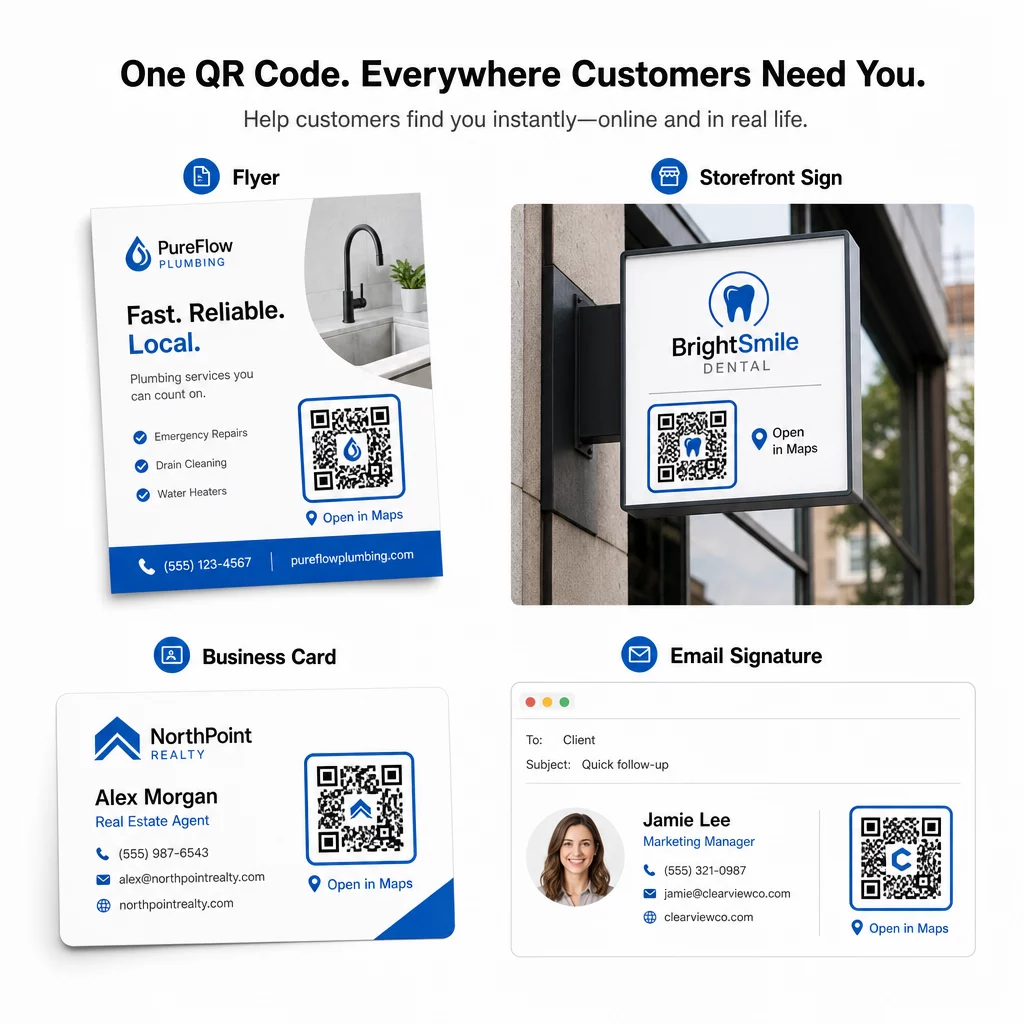
- Візитівки – замініть надруковані адреси на сканований код
- Флаєри та брошури – направляйте гостей заходу безпосередньо до місця проведення
- Вітрини магазинів та дверні вивіски – допоможіть клієнтам знайти парковку або альтернативні входи
- Вивіски нерухомості – направляйте покупців до місць відкритих показів
- Упаковка продукції – пов'язуйте клієнтів з вашим фізичним роздрібним магазином
Цифрові канали:
- Підписи електронної пошти – замініть статичні адреси на сканований код місцезнаходження
- Публікації та історії в соціальних мережах – просувайте нове місце або місце проведення заходу
- Нижні колонтитули веб-сайту – дозвольте відвідувачам відкривати маршрути одним дотиком
- Цифрові меню – допоможіть відвідувачам знайти друге місце або офіс кейтерингу
У кожному розміщенні додайте чіткий заклик до дії біля коду. “Сканувати для маршруту” або “Відкрити в Картах” точно повідомляє користувачам, що станеться після сканування, що підвищує залученість. Для отримання рекомендацій щодо позиціонування та розміру на різних матеріалах, Посібник з розміщення QR-кодів для маркетингу докладно висвітлює рекомендації щодо конкретних форматів.
Порівняння планів Pageloot
| ФУНКЦІЯ | Безкоштовний план | Професійний план | Індивідуальний/Корпоративний |
|---|---|---|---|
| Тип QR-коду | Лише статичний | Динамічний і статичний | Динамічний і статичний |
| Посилання, що редагуються | Ні. | Так. | Так. |
| Аналітика сканувань | Відсутні | У реальному часі (місцезнаходження, пристрій) | Повна історія та експертні висновки |
| Річний ліміт сканувань | Безлімітний (статичний) | 250,000 | Власне |
| Налаштування | Базовий (кольори, логотип) | Розширені параметри дизайну | Повна інтеграція бренду |
| Місячна ціна | $0 | $38.34 | $106.52 |
Безкоштовний план охоплює постійні статичні коди без терміну дії та необмежену кількість сканувань. Платні плани відкривають динамічне редагування, аналітику в реальному часі та розширені можливості налаштування. Стартовий план починається від $4.86/місяць з 2 динамічними кодами та 15 000 річних сканувань – підходить для малого бізнесу, який тестує формат. Усі платні плани включають 14-денну безкоштовну пробну версію без необхідності введення даних кредитної картки.
Як сказав Лукас Янсен, забудовник нерухомості, який використовує QR-коди місцезнаходження Pageloot:
“Це чудовий інструмент, і QR-коди ведуть вас саме туди, куди ви хочете”.”
Для постійних локацій безкоштовний статичний код є найпростішим шляхом. Для всього, що вимагає оновлень, відстеження або вимірювання кампаній, динамічні коди надають вам гнучкість і дані для покращення з часом. Почніть з копіювання посилання на Google Maps, згенеруйте свій код на Генератор QR-кодів Google Maps, і тестування його на реальному пристрої, перш ніж він буде запущений.
Поширені запитання
Для більшості випадків використання скопіюйте посилання на місце з кнопки «Поділитися» в Google Картах – воно відкриває точне місце розташування безпосередньо в Google Картах або браузері. Якщо ви хочете направити користувачів безпосередньо до покрокової навігації з фіксованої початкової точки, використовуйте посилання на маршрут замість цього. Завжди спочатку вставляйте посилання в браузер, щоб переконатися, що воно веде до правильного місця, перш ніж генерувати код.
Після закріплення вашої локації в Google Картах, скористайтеся кнопкою "Поділитися" та скопіюйте URL-адресу, яку вона надає. Це посилання прив'язане до конкретних координат позначки, а не просто до загального пошуку. Уникайте копіювання URL-адреси з адресного рядка вашого браузера під час перегляду карти – ця версія може ненадійно вказувати на закріплену точку. Вставте посилання для спільного доступу в браузер, щоб перевірити його перед створенням QR-коду.
Використовуйте векторний формат – SVG, EPS або PDF – для будь-якого друкованого застосування. Векторні файли масштабуються до будь-якого розміру без втрати чіткості, на відміну від експорту PNG або JPEG, які можуть виглядати пікселізованими при великих розмірах друку. Для друкованих матеріалів також переконайтеся, що роздільна здатність становить щонайменше 300 DPI і що розмір коду становить щонайменше 2 × 2 дюйми для надійного сканування з близької відстані.