Χρειάζεστε βοήθεια για να βρουν οι πελάτες την τοποθεσία σας χωρίς να χρειάζεται να πληκτρολογήσουν μια διεύθυνση; Η μη αυτόματη εισαγωγή διεύθυνσης δημιουργεί τριβή – και απογοητευμένους επισκέπτες. Αυτός ο οδηγός σας καθοδηγεί στο πώς να μετατρέψετε οποιαδήποτε τοποθεσία στους Χάρτες Google σε έναν κωδικό QR που μπορεί να σαρωθεί μέσα σε λίγα λεπτά.
Λήψη του συνδέσμου τοποθεσίας σας στους Χάρτες Google
Πριν δημιουργήσετε οτιδήποτε, χρειάζεστε τον σωστό σύνδεσμο από τους Χάρτες Google. Ο σύνδεσμος που αντιγράφετε καθορίζει ακριβώς πού θα οδηγηθούν οι χρήστες όταν σαρώσουν, οπότε η ακρίβεια εδώ έχει σημασία.
Βρείτε και καρφιτσώστε την τοποθεσία σας
Ανοίξτε τους Χάρτες Google και αναζητήστε τον προορισμό σας. Μπορείτε να εισαγάγετε ένα όνομα επιχείρησης όπως “Starbucks Times Square”, μια πλήρη διεύθυνση οδού ή ένα αναγνωρίσιμο ορόσημο. Εάν η τοποθεσία δεν έχει επίσημη διεύθυνση – ένας υπαίθριος χώρος, μια είσοδος πάρκου, ένας χώρος στάθμευσης – πατήστε παρατεταμένα στο κινητό (ή κάντε κλικ στην επιφάνεια εργασίας) για να ρίξετε μια καρφίτσα στο ακριβές σημείο.
Μόλις καρφιτσωθεί, μεγεθύνετε και επιβεβαιώστε ότι ο δείκτης βρίσκεται στο σωστό σημείο. Εάν κατευθύνετε τους ανθρώπους σε μια συγκεκριμένη είσοδο αντί για το γενικό αποτύπωμα του κτιρίου, προσαρμόστε ανάλογα. Αυτό το επιπλέον βήμα αποτρέπει τη σύγχυση όταν φτάνουν οι επισκέπτες.
Αντιγράψτε τον σύνδεσμο τοποθεσίας
Με την τοποθεσία σας επιβεβαιωμένη, πατήστε ή κάντε κλικ στο Κοινοποίηση κουμπί:
- Στο κινητό: Πατήστε το όνομα της τοποθεσίας στο κάτω μέρος της οθόνης, στη συνέχεια πατήστε το εικονίδιο Κοινή χρήση (βέλος προς τα πάνω) και επιλέξτε “Αντιγραφή στο πρόχειρο”.”
- Σε υπολογιστή: Κάντε κλικ στην Κοινή χρήση στον πίνακα πληροφοριών ή κάτω από το μενού με τις τρεις τελείες, στη συνέχεια επιλέξτε “Αντιγραφή συνδέσμου”.”
Η αντιγραμμένη διεύθυνση URL είναι συνήθως ένας συντομευμένος σύνδεσμος όπως `maps.app.goo.gl/xyz123`. Οι συντομότεροι σύνδεσμοι παράγουν καθαρότερους, λιγότερο πυκνούς κωδικούς QR που σαρώνουν πιο αξιόπιστα. Πριν προχωρήσετε, επικολλήστε τον σύνδεσμο σε ένα πρόγραμμα περιήγησης για να επιβεβαιώσετε ότι ανοίγει τη σωστή τοποθεσία.
Διαφορετικοί τύποι συνδέσμων εξυπηρετούν διαφορετικούς σκοπούς:
| Τύπος συνδέσμου | Τι κάνει | Παράδειγμα Περίπτωσης Χρήσης |
|---|---|---|
| Σύνδεσμος Τοποθεσίας | Ανοίγει μια συγκεκριμένη επιχείρηση ή διεύθυνση | Κοινή χρήση βιτρίνας καταστήματος ή γραφείου |
| Σύνδεσμος Αναζήτησης | Εμφανίζει αποτελέσματα για ένα ερώτημα αναζήτησης | Εμφάνιση “εστιατορίων κοντά στον χώρο” |
| Σύνδεσμος Οδηγιών | Ανοίγει μια προκαθορισμένη διαδρομή πλοήγησης | Καθοδήγηση επισκεπτών από ένα αεροδρόμιο σε ένα ξενοδοχείο |
Για Κωδικοί QR που χρησιμοποιούνται για οδηγίες και κοινή χρήση διεύθυνσης, ένας Σύνδεσμος Τοποθεσίας ή Σύνδεσμος Οδηγιών συνήθως λειτουργεί καλύτερα – παρακάμπτουν το βήμα αναζήτησης και οδηγούν τον χρήστη απευθείας στην πλοήγηση.
Δημιουργία του κωδικού QR σας
Με τον σύνδεσμό σας έτοιμο, επισκεφθείτε το Δημιουργία QR code Google Maps και επικολλήστε το URL σας στο πεδίο εισαγωγής. Επιλέξτε τον τύπο κωδικού QR – “Σύνδεσμος” ή “Χάρτες” – και ο κωδικός δημιουργείται άμεσα.
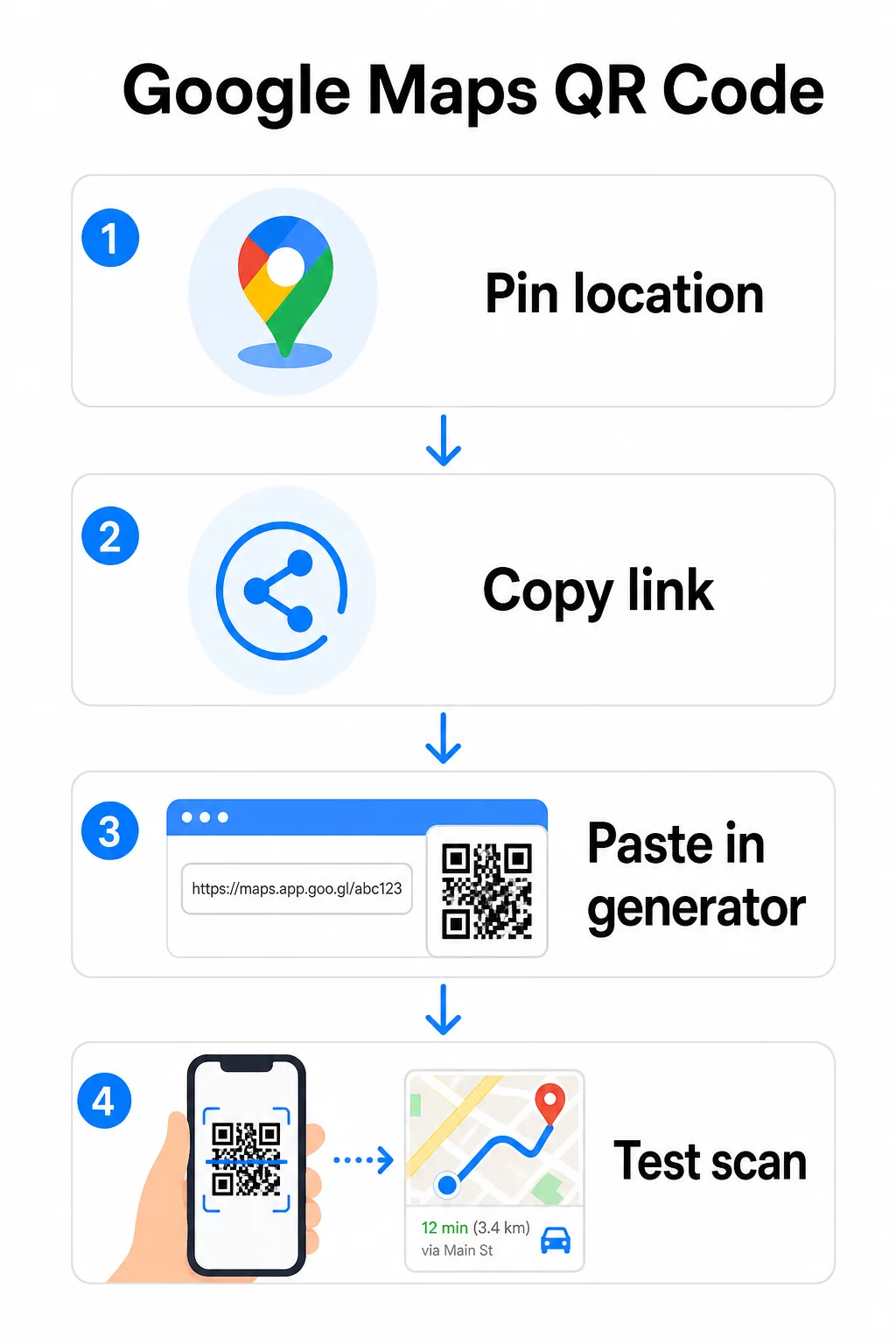
Για μια μόνιμη τοποθεσία χωρίς ανάγκη αλλαγής του προορισμού, ένας στατικό κωδικό QR είναι δωρεάν και δεν λήγει ποτέ. Κατεβάστε το ως PNG και είστε έτοιμοι να το χρησιμοποιήσετε.
Χρειάζεται να ενημερώσετε την τοποθεσία σας ή να παρακολουθήσετε δεδομένα σάρωσης; Χρησιμοποιήστε το Δημιουργία κώδικα Pageloot QR για να δημιουργήσετε έναν δυναμικό κωδικό που σας επιτρέπει να αλλάζετε τον προορισμό ανά πάσα στιγμή από τον πίνακα ελέγχου σας – χωρίς να απαιτείται επανεκτύπωση.
Στατικός εναντίον Δυναμικού: Ποιον Χρειάζεστε;
Ένας στατικός κωδικός QR κωδικοποιεί τον σύνδεσμο των Χαρτών Google απευθείας στο μοτίβο. Είναι μόνιμος, δωρεάν και λειτουργεί χωρίς κανέναν λογαριασμό. Το αντάλλαγμα: εάν η τοποθεσία σας αλλάξει, πρέπει να δημιουργήσετε και να επανεκτυπώσετε έναν νέο κωδικό.
Ένας δυναμικός κωδικός QR αποθηκεύει αντ' αυτού μια σύντομη διεύθυνση URL ανακατεύθυνσης. Ελέγχετε πού οδηγεί αυτή η ανακατεύθυνση από τον πίνακα ελέγχου του Pageloot. Αυτό σημαίνει:
- Μπορείτε να ενημερώσετε τον προορισμό χωρίς να αγγίξετε τον εκτυπωμένο κωδικό
- Λαμβάνετε αναλύσεις σε πραγματικό χρόνο – αριθμούς σαρώσεων, τύπους συσκευών, γεωγραφικές τοποθεσίες και χρονοδιάγραμμα
- Μπορείτε να δοκιμάσετε και να αλλάξετε συνδέσμους προορισμού για εποχιακές εκδηλώσεις ή προσωρινούς χώρους
Εάν εκτυπώνετε κωδικούς σε μόνιμη σήμανση, ο στατικός λειτουργεί μια χαρά. Για καμπάνιες, εκδηλώσεις, αναδυόμενες τοποθεσίες ή οποιαδήποτε κατάσταση όπου ο προορισμός ενδέχεται να αλλάξει, οι δυναμικοί κωδικοί είναι η πρακτική επιλογή.
Προσαρμογή του κωδικού QR σας
Ένας απλός ασπρόμαυρος κωδικός QR λειτουργεί, αλλά ένας επώνυμος αποδίδει καλύτερα. Οι επιλογές προσαρμογής του Pageloot σας επιτρέπουν να:
- Προσθέσετε το λογότυπο της εταιρείας σας στο κέντρο του κωδικού
- Αλλάξετε χρώματα για να ταιριάζουν με την παλέτα της επωνυμίας σας (διατηρήστε σκούρα μοτίβα σε ανοιχτό φόντο για αξιόπιστη σάρωση)
- Επιλέξετε από διαφορετικά σχήματα μονάδων: Στρογγυλό, Παύλα ή Διαμάντι
- Προσθέσετε ένα πλαίσιο Call-to-Action με κείμενο όπως “Σάρωση για Οδηγίες” ή “Βρείτε μας στους Χάρτες”
Όταν προσθέτετε ένα λογότυπο ή χρώματα, χρησιμοποιήστε επίπεδο διόρθωσης σφαλμάτων Q ή H. Αυτές οι ρυθμίσεις επιτρέπουν στον κωδικό QR να παραμένει αναγνώσιμος ακόμα και αν έως και το 25–30% του μοτίβου είναι καλυμμένο από ένα λογότυπο ή μικρές ζημιές. Κρατήστε τα λογότυπα να μην υπερβαίνουν το 30% της συνολικής περιοχής του κωδικού και βεβαιωθείτε ότι δεν επικαλύπτουν τα τρία γωνιακά τετράγωνα “εύρεσης”.
Για έντυπα υλικά, κατεβάστε τον κωδικό σας ως αρχείο SVG, PDF ή EPS. Αυτές οι διανυσματικές μορφές παραμένουν ευκρινείς σε οποιοδήποτε μέγεθος – κρίσιμο για εκτυπώσεις μεγάλου μεγέθους όπως αφίσες ή πινακίδες καταστημάτων.
Θέλετε έναν πλήρως επώνυμο κωδικό τοποθεσίας; ο Γεννήτρια Κωδικών QR Συνδέσμων υποστηρίζει προσαρμοσμένα χρώματα, λογότυπα και στυλ πλαισίου με δωρεάν δοκιμή 14 ημερών – δεν απαιτείται πιστωτική κάρτα.
Δοκιμή πριν τη δημοσίευση
Πάντα να δοκιμάζετε τον κωδικό QR σας πριν τον δεσμεύσετε για εκτύπωση ή μια ζωντανή καμπάνια. Ένας χαλασμένος ή λανθασμένα κατευθυνόμενος κωδικός βλάπτει την εμπιστοσύνη και σπαταλά το κόστος εκτύπωσης.
Ελέγξτε αυτή τη λίστα:
- Σαρώστε με την εγγενή εφαρμογή κάμερας του τηλεφώνου σας σε iOS και Android
- Επιβεβαιώστε ότι ο σύνδεσμος ανοίγει τη σωστή τοποθεσία στους Χάρτες Google
- Δοκιμάστε σε μια συσκευή χωρίς εγκατεστημένη την εφαρμογή Χαρτών Google – θα πρέπει να ανακατευθύνει στους Χάρτες Google στο πρόγραμμα περιήγησης
- Σαρώστε από πολλαπλές αποστάσεις και υπό διαφορετικές συνθήκες φωτισμού
- Εάν έχετε προσαρμόσει το σχέδιο, επιβεβαιώστε ότι τα γωνιακά τετράγωνα εύρεσης και η ήσυχη ζώνη (το κενό περίγραμμα γύρω από τον κωδικό) είναι ανεμπόδιστα
Για χρήση σε εκτύπωση, ένα ελάχιστο μέγεθος 2 × 2 ίντσες (περίπου 5 × 5 εκ.) διασφαλίζει ότι οι περισσότερες συσκευές μπορούν να σαρώνουν αξιόπιστα από κοντινή απόσταση. Για υλικά που προβάλλονται από απόσταση – αφίσες, πανό, βιτρίνες – αυξήστε αναλογικά το μέγεθος. Μια γενική οδηγία: ο κωδικός πρέπει να είναι τουλάχιστον το ένα δέκατο της απόστασης από την οποία θα τον σαρώνουν οι χρήστες.
Συνήθη προβλήματα και λύσεις:
| Πρόβλημα σάρωσης | Λύση |
|---|---|
| Θολός ή εικονοστοιχειωμένος κωδικός | Εξαγωγή ως SVG, PDF ή EPS για εκτύπωση |
| Ο σαρωτής δεν αναγνωρίζει τον κωδικό | Αυξήστε την αντίθεση· σκούρο προσκήνιο σε ανοιχτό φόντο |
| Το λογότυπο εμποδίζει τη σάρωση | Βεβαιωθείτε ότι το λογότυπο δεν καλύπτει τα τετράγωνα στις γωνίες· χρησιμοποιήστε υψηλότερη διόρθωση σφαλμάτων |
| Ο κωδικός είναι πολύ μικρός | Αυξήστε σε τουλάχιστον 2 × 2 ίντσες για φυσικά υλικά |
| Ο σύνδεσμος ανοίγει λάθος τοποθεσία | Επαληθεύστε ξανά τον αντιγραμμένο σύνδεσμο κοινής χρήσης στους Χάρτες Google πριν τη δημιουργία |
Για περισσότερες λεπτομέρειες σχετικά με τα πρότυπα μεγέθους, αντίθεσης και τοποθέτησης, δείτε βέλτιστες πρακτικές για την αναγνωσιμότητα των κωδικών QR και οδηγίες χρηστικότητας κωδικών QR.
Πού να χρησιμοποιήσετε κωδικούς QR των Χαρτών Google
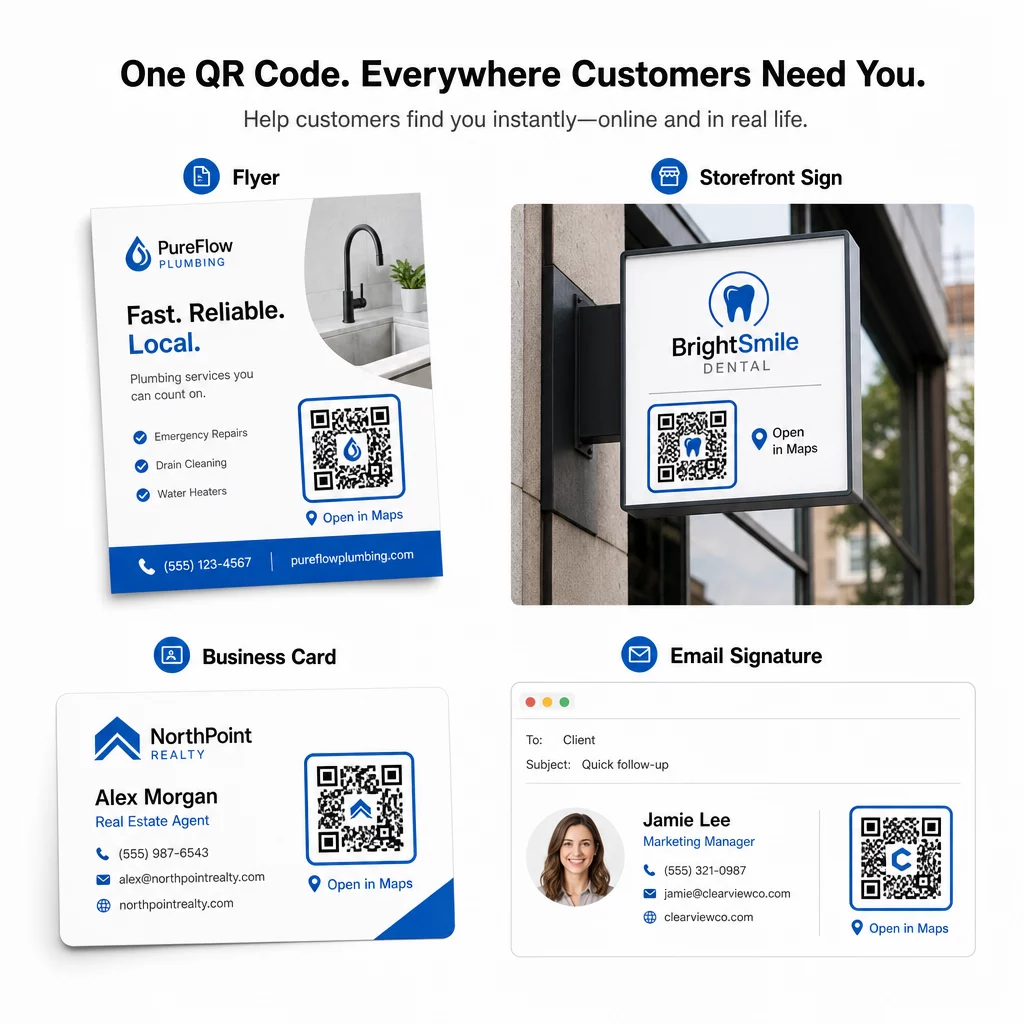
Μόλις δοκιμαστεί, ο κωδικός QR σας είναι έτοιμος να αναπτυχθεί σε έντυπα και ψηφιακά κανάλια:
Έντυπα υλικά:
- Επαγγελματικές κάρτες – αντικαταστήστε τις τυπωμένες διευθύνσεις με έναν κωδικό που μπορεί να σαρωθεί
- Φυλλάδια και μπροσούρες – καθοδηγήστε τους καλεσμένους της εκδήλωσης απευθείας στον χώρο
- Βιτρίνες καταστημάτων και πινακίδες πόρτας – βοηθήστε τους πελάτες να βρουν χώρο στάθμευσης ή εναλλακτικές εισόδους
- Πινακίδες ακινήτων – κατευθύνετε τους αγοραστές σε τοποθεσίες ανοιχτών σπιτιών
- Συσκευασία προϊόντων – συνδέστε τους πελάτες με τη φυσική σας τοποθεσία λιανικής
Ψηφιακά κανάλια:
- Υπογραφές email – αντικαταστήστε τις στατικές διευθύνσεις με έναν κωδικό τοποθεσίας που μπορεί να σαρωθεί
- Αναρτήσεις και Ιστορίες στα μέσα κοινωνικής δικτύωσης – προωθήστε μια νέα τοποθεσία ή χώρο εκδηλώσεων
- Υποσέλιδα ιστοσελίδων – αφήστε τους επισκέπτες να ανοίξουν οδηγίες με ένα πάτημα
- Ψηφιακά μενού – βοηθήστε τους πελάτες να βρουν μια δεύτερη τοποθεσία ή γραφείο catering
Σε κάθε τοποθέτηση, συμπεριλάβετε μια σαφή παρότρυνση για δράση κοντά στον κωδικό. Το “Σάρωση για Οδηγίες” ή “Άνοιγμα στους Χάρτες” λέει στους χρήστες τι ακριβώς συμβαίνει όταν σαρώνουν, γεγονός που αυξάνει την αφοσίωση. Για καθοδήγηση σχετικά με την τοποθέτηση και το μέγεθος σε διαφορετικά υλικά, το Οδηγό τοποθέτησης κωδικών QR για το μάρκετινγκ καλύπτει λεπτομερώς τις συστάσεις ανάλογα με τη μορφή.
Σύγκριση Προγραμμάτων Pageloot
| ΛΕΙΤΟΥΡΓΙΑ | Δωρεάν Πρόγραμμα | Πλάνο Pro | Προσαρμοσμένο/Επιχειρησιακό |
|---|---|---|---|
| Τύπος κώδικα QR | Μόνο Στατικό | Δυναμικό & Στατικό | Δυναμικό & Στατικό |
| Επεξεργάσιμοι Σύνδεσμοι | Όχι | Ναι | Ναι |
| Αναλύσεις Σαρώσεων | Καμία | Πραγματικός χρόνος (τοποθεσία, συσκευή) | Πλήρες ιστορικό & ειδικές πληροφορίες |
| Ετήσιο Όριο Σαρώσεων | Απεριόριστο (στατικό) | 250,000 | Προσαρμοσμένος |
| Προσαρμογή | Βασικό (χρώματα, λογότυπο) | Προηγμένες επιλογές σχεδιασμού | Πλήρης ενσωμάτωση επωνυμίας |
| Μηνιαία Τιμή | $0 | $38.34 | $106.52 |
Το δωρεάν πρόγραμμα καλύπτει μόνιμους στατικούς κωδικούς χωρίς λήξη και απεριόριστες σαρώσεις. Τα επί πληρωμή προγράμματα ξεκλειδώνουν δυναμική επεξεργασία, αναλύσεις σε πραγματικό χρόνο και προηγμένη προσαρμογή. Ένα πρόγραμμα Starter ξεκινά από $4.86/μήνα με 2 δυναμικούς κωδικούς και 15.000 ετήσιες σαρώσεις – κατάλληλο για μικρές επιχειρήσεις που δοκιμάζουν τη μορφή. Όλα τα επί πληρωμή προγράμματα περιλαμβάνουν δωρεάν δοκιμή 14 ημερών χωρίς να απαιτείται πιστωτική κάρτα.
Όπως το έθεσε ο Lucas Jansen, ένας κατασκευαστής ακινήτων που χρησιμοποιεί τους κωδικούς QR τοποθεσίας της Pageloot:
“Αυτό είναι ένα εξαιρετικό εργαλείο και οι κωδικοί QR σε οδηγούν ακριβώς εκεί που θέλεις.”
Για μόνιμες τοποθεσίες, ένας δωρεάν στατικός κωδικός είναι ο απλούστερος τρόπος. Για οτιδήποτε απαιτεί ενημερώσεις, παρακολούθηση ή μέτρηση καμπάνιας, οι δυναμικοί κωδικοί σάς δίνουν την ευελιξία και τα δεδομένα για να βελτιώνεστε με την πάροδο του χρόνου. Ξεκινήστε αντιγράφοντας τον σύνδεσμο των Χαρτών Google (Google Maps link), δημιουργώντας τον κωδικό σας στο/στην Δημιουργία QR code Google Maps, και δοκιμάζοντάς το σε μια πραγματική συσκευή πριν κυκλοφορήσει.
Συχνές ερωτήσεις
Για τις περισσότερες χρήσεις, αντιγράψτε τον Σύνδεσμο Τοποθεσίας από το κουμπί Κοινοποίηση στους Χάρτες Google – ανοίγει την ακριβή τοποθεσία απευθείας στους Χάρτες Google ή σε ένα πρόγραμμα περιήγησης. Εάν θέλετε να στείλετε τους χρήστες απευθείας σε πλοήγηση βήμα προς βήμα από ένα σταθερό σημείο εκκίνησης, χρησιμοποιήστε έναν Σύνδεσμο Οδηγιών αντ' αυτού. Πάντα να επικολλάτε τον σύνδεσμο σε ένα πρόγραμμα περιήγησης πρώτα για να επιβεβαιώσετε ότι οδηγεί στο σωστό σημείο πριν δημιουργήσετε τον κώδικα.
Αφού καρφιτσώσετε την τοποθεσία σας στους Χάρτες Google, χρησιμοποιήστε το κουμπί Κοινή χρήση και αντιγράψτε το URL που παρέχει. Αυτός ο σύνδεσμος συνδέεται με τις συγκεκριμένες συντεταγμένες της καρφίτσας, όχι απλώς με μια γενική αναζήτηση. Αποφύγετε την αντιγραφή του URL από τη γραμμή διευθύνσεων του προγράμματος περιήγησής σας ενώ περιηγείστε στον χάρτη – αυτή η έκδοση ενδέχεται να μην οδηγεί αξιόπιστα στο καρφιτσωμένο σημείο. Επικολλήστε τον σύνδεσμο Κοινή χρήση σε ένα πρόγραμμα περιήγησης για να τον επαληθεύσετε πριν δημιουργήσετε τον κωδικό QR.
Χρησιμοποιήστε μια διανυσματική μορφή – SVG, EPS ή PDF – για οποιαδήποτε εφαρμογή εκτύπωσης. Τα διανυσματικά αρχεία κλιμακώνονται σε οποιοδήποτε μέγεθος χωρίς να χάνουν την ευκρίνεια, σε αντίθεση με τις εξαγωγές PNG ή JPEG που μπορεί να εμφανίζονται pixelated σε μεγάλες διαστάσεις εκτύπωσης. Για έντυπα υλικά, βεβαιωθείτε επίσης ότι η ανάλυσή σας είναι τουλάχιστον 300 DPI και ότι ο κωδικός έχει διαστάσεις τουλάχιστον 2 × 2 ίντσες για αξιόπιστη σάρωση από κοντινή απόσταση.