Behöver du hjälpa kunder att hitta din plats utan att de behöver skriva in en adress? Manuell adressinmatning skapar friktion – och frustrerade besökare. Den här guiden visar dig hur du förvandlar vilken Google Maps-plats som helst till en skanningsbar QR-kod på några minuter.
Hämta din Google Maps-platslänk
Innan du genererar något behöver du rätt länk från Google Maps. Länken du kopierar avgör exakt var användare hamnar när de skannar, så precision är viktigt här.
Hitta och fäst din plats
Öppna Google Maps och sök efter din destination. Du kan ange ett företagsnamn som “Starbucks Times Square”, en fullständig gatuadress eller ett igenkännbar landmärke. Om platsen inte har någon formell adress – en utomhusplats, en parkentré, en parkeringsplats – tryck och håll på mobilen (eller klicka på datorn) för att släppa en nål på exakt plats.
När nålen är fäst, zooma in och bekräfta att markören sitter på rätt punkt. Om du dirigerar människor till en specifik ingång snarare än byggnadens allmänna fotavtryck, justera därefter. Detta extra steg förhindrar förvirring när besökare anländer.
Kopiera platslänken
När din plats är bekräftad, tryck eller klicka på Dela knappen:
- På mobil: Tryck på platsnamnet längst ner på skärmen, tryck sedan på Dela-ikonen (pil uppåt) och välj “Kopiera till urklipp”.”
- På datorn: Klicka på Dela i informationspanelen eller under menyn med tre punkter, välj sedan “Kopiera länk”.”
Den kopierade URL:en är vanligtvis en förkortad länk som `maps.app.goo.gl/xyz123`. Kortare länkar ger renare, mindre täta QR-koder som skannar mer tillförlitligt. Innan du går vidare, klistra in länken i en webbläsare för att bekräfta att den öppnar rätt plats.
Olika länktyper tjänar olika syften:
| Länktyp | Vad den gör | Exempel på användningsfall |
|---|---|---|
| Platslänk | Öppnar en specifik verksamhet eller adress | Dela en butiksfasad eller ett kontor |
| Söklänk | Visar resultat för en sökfråga | Visar “restauranger nära platsen” |
| Vägbeskrivningslänk | Öppnar en förinställd navigeringsrutt | Dirigera gäster från en flygplats till ett hotell |
För QR-koder som används för vägbeskrivningar och delning av adresser, en Platslänk eller Vägbeskrivningslänk fungerar oftast bäst – de hoppar över söksteget och skickar användaren direkt till navigeringen.
Generera din QR-kod
När din länk är klar, besök QR-kodgenerator för Google Maps och klistra in din URL i inmatningsfältet. Välj QR-kodstyp – “Länk” eller “Kartor” – och koden genereras omedelbart.
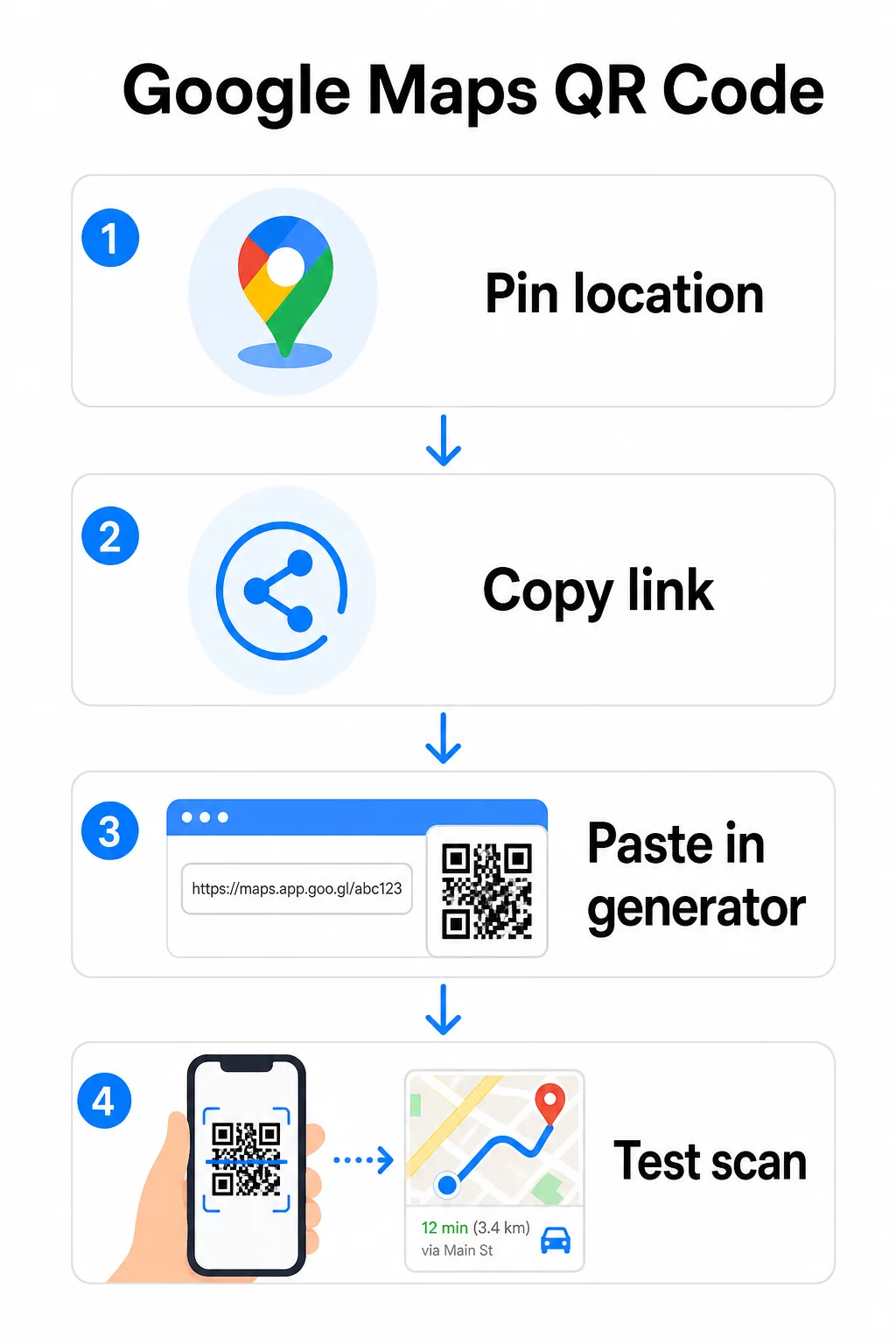
För en permanent plats utan behov av att ändra destinationen, en statisk QR-kod är gratis och upphör aldrig att gälla. Ladda ner den som en PNG och du är redo att använda den.
Behöver du uppdatera din plats eller spåra skanningsdata? Använd Pageloot QR-kodgenerator för att skapa en dynamisk kod som låter dig ändra destinationen när som helst från din kontrollpanel – ingen omtryckning krävs.
Statisk vs. Dynamisk: Vilken behöver du?
En statisk QR-kod kodar Google Maps-länken direkt i mönstret. Den är permanent, gratis och fungerar utan något konto. Nackdelen: om din plats ändras måste du generera och trycka om en ny kod.
En dynamisk QR-kod lagrar istället en kort omdirigerings-URL. Du styr vart den omdirigeringen pekar från din Pageloot-kontrollpanel. Detta innebär:
- Du kan uppdatera destinationen utan att röra den tryckta koden
- Du får realtidsanalys – antal skanningar, enhetstyper, geografiska platser och tidpunkt
- Du kan testa och byta destinationslänkar för säsongsevenemang eller tillfälliga platser
Om du trycker koder på permanent skyltning fungerar statiska bra. För kampanjer, evenemang, pop-up-platser eller någon situation där destinationen kan ändras, är dynamiska koder det praktiska valet.
Anpassa din QR-kod
En enkel svartvit QR-kod fungerar, men en märkesanpassad presterar bättre. Pageloots anpassningsalternativ låter dig:
- Lägg till din företagslogotyp i mitten av koden
- Ändra färger för att matcha din varumärkespalett (behåll mörka mönster på en ljus bakgrund för tillförlitlig skanning)
- Välj bland olika modulformer: Rund, Streck eller Diamant
- Lägg till en Call-to-Action-ram med text som “Skanna för vägbeskrivning” eller “Hitta oss på kartor”
När du lägger till en logotyp eller färger, använd felkorrigeringsnivå Q eller H. Dessa inställningar gör att QR-koden förblir skanningsbar även om upp till 25–30% av mönstret döljs av en logotyp eller mindre skada. Håll logotyper till högst 30% av kodens totala yta och se till att de inte överlappar de tre hörnens “sökare”.
För tryckt material, ladda ner din kod som en SVG-, PDF- eller EPS-fil. Dessa vektorformat förblir skarpa i alla storlekar – avgörande för storformatstryck som affischer eller skyltar för butiksfasader.
Vill du ha en helt varumärkesanpassad platskod? De Länk QR-kodgenerator stöder anpassade färger, logotyper och ramstilar med en 14-dagars gratis provperiod – inget kreditkort krävs.
Testa innan du publicerar
Testa alltid din QR-kod innan du trycker den eller använder den i en live-kampanj. En trasig eller felriktad kod skadar förtroendet och slösar bort tryckkostnader.
Gå igenom denna checklista:
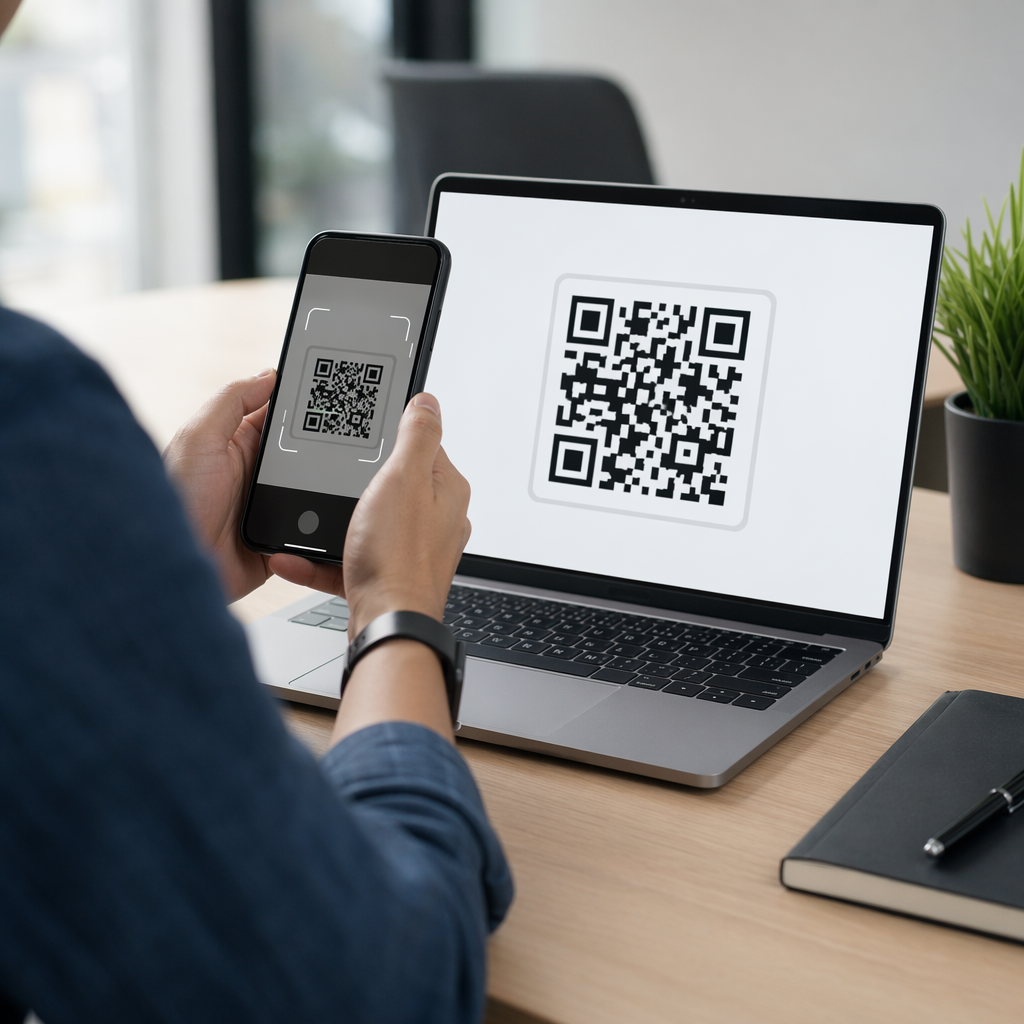
- Skanna med telefonens inbyggda kameraapp på både iOS och Android
- Bekräfta att länken öppnar rätt plats i Google Maps
- Testa på en enhet utan Google Maps-appen installerad – den ska omdirigera till Google Maps i webbläsaren
- Skanna från flera avstånd och under olika ljusförhållanden
- Om du har anpassat designen, bekräfta att hörnens sökare och den tysta zonen (den tomma ramen runt koden) är fria
För utskrift, en minimistorlek på 2 × 2 tum (ungefär 5 × 5 cm) säkerställer att de flesta enheter kan skanna tillförlitligt på nära håll. För material som ses på avstånd – affischer, banderoller, fönsterutställningar – skala upp proportionerligt. En allmän riktlinje: koden bör vara minst en tiondel av avståndet från vilket människor kommer att skanna den.
Vanliga problem och lösningar:
| Skanningsproblem | Lösning |
|---|---|
| Suddig eller pixlig kod | Exportera som SVG, PDF eller EPS för utskrift |
| Skannern känner inte igen koden | Öka kontrasten; mörk förgrund på ljus bakgrund |
| Logotyp blockerar skanning | Se till att logotypen inte täcker hörnrutorna; använd högre felkorrigering |
| Koden är för liten | Öka till minst 2 × 2 tum för fysiskt material |
| Länken öppnar fel plats | Kontrollera den kopierade delningslänken i Google Maps igen innan du genererar |
För mer information om storlek, kontrast och placeringsstandarder, se bästa praxis för läsbarhet av QR-koder och riktlinjerna för QR-kodsanvändbarhet.
Var man kan använda Google Maps QR-koder
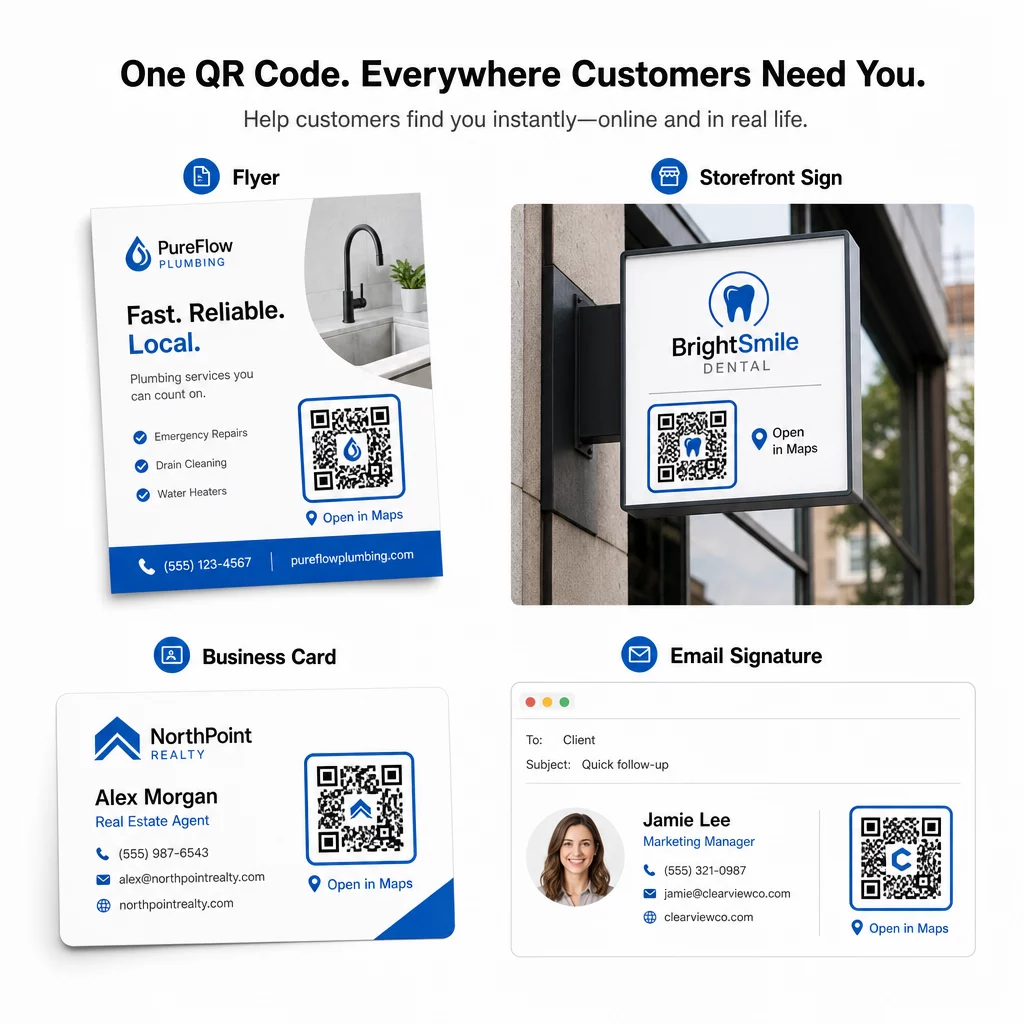
När den har testats är din QR-kod redo att distribueras över tryckta och digitala kanaler:
Tryckt material:
- Visitkort – ersätt tryckta adresser med en skanningsbar kod
- Flyers och broschyrer – guida evenemangsgäster direkt till platsen
- Butiksfönster och dörrskyltar – hjälp kunder att hitta parkering eller alternativa ingångar
- Fastighetsskyltar – dirigera köpare till visningsplatser
- Produktförpackningar – länka kunder till din fysiska butik
Digitala kanaler:
- E-postsignaturer – ersätt statiska adresser med en skanningsbar platskod
- Inlägg och Stories i sociala medier – marknadsför en ny plats eller evenemangslokal
- Webbplatsens sidfötter – låt besökare öppna vägbeskrivningar med ett tryck
- Digitala menyer – hjälp gäster att hitta en andra plats eller cateringkontor
På varje placering, inkludera en tydlig uppmaning nära koden. “Skanna för vägbeskrivning” eller “Öppna i kartor” berättar för användarna exakt vad som händer när de skannar, vilket ökar engagemanget. För vägledning om positionering och storlek över olika material, den Placeringsguide för QR-koder för marknadsföring täcker formatspecifika rekommendationer i detalj.
Pageloot Planjämförelse
| FUNKTION | Gratisplan | Pro-plan | Anpassad/Företag |
|---|---|---|---|
| Typ av QR-kod | Endast statisk | Dynamisk & Statisk | Dynamisk & Statisk |
| Redigerbara länkar | Nej | Ja | Ja |
| Skanningsanalys | Inga | Realtid (plats, enhet) | Fullständig historik & expertinsikter |
| Årlig skanningsgräns | Obegränsat (statiskt) | 250,000 | Egen |
| Anpassning | Grundläggande (färger, logotyp) | Avancerade designalternativ | Fullständig varumärkesintegration |
| Månadspris | $0 | $38.34 | $106.52 |
Gratisplanen täcker permanenta statiska koder utan utgångsdatum och obegränsade skanningar. Betalplaner låser upp dynamisk redigering, realtidsanalys och avancerad anpassning. En Starter-plan börjar på $4.86/månad med 2 dynamiska koder och 15 000 årliga skanningar – lämplig för småföretag som testar formatet. Alla betalplaner inkluderar en 14-dagars gratis provperiod utan kreditkort.
Som Lucas Jansen, en fastighetsutvecklare som använder Pageloots plats-QR-koder, uttryckte det:
“Detta är ett utmärkt verktyg och QR-koderna tar dig precis dit du vill.”
För permanenta platser är en gratis statisk kod den enklaste vägen. För allt som kräver uppdateringar, spårning eller kampanjmätning ger dynamiska koder dig flexibiliteten och datan för att förbättra över tid. Börja med att kopiera din Google Maps-länk, generera din kod på QR-kodgenerator för Google Maps, och testa den på en riktig enhet innan den går live.
Vanliga frågor
För de flesta användningsområden, kopiera platslänken från Dela-knappen i Google Maps – den öppnar den exakta platsen direkt i Google Maps eller en webbläsare. Om du vill skicka användare direkt till steg-för-steg-navigering från en fast startpunkt, använd en vägbeskrivningslänk istället. Klistra alltid in länken i en webbläsare först för att bekräfta att den leder till rätt plats innan du genererar koden.
Efter att ha fäst din plats i Google Maps, använd Dela-knappen och kopiera den URL den tillhandahåller. Denna länk är kopplad till de specifika fästpunktskoordinaterna, inte bara en allmän sökning. Undvik att kopiera URL:en från webbläsarens adressfält medan du bläddrar på kartan – den versionen kanske inte tillförlitligt leder till den fästa punkten. Klistra in Dela-länken i en webbläsare för att verifiera innan du genererar QR-koden.
Använd ett vektorformat – SVG, EPS eller PDF – för alla utskriftsapplikationer. Vektorfiler skalas till vilken storlek som helst utan att förlora skärpa, till skillnad från PNG- eller JPEG-exporter som kan se pixliga ut vid stora utskriftsdimensioner. För utskriftsmaterial, se också till att din upplösning är minst 300 DPI och att koden mäter minst 2 × 2 tum för tillförlitlig närskanning.