Трябва ли да помогнете на клиентите да намерят вашето местоположение, без да ги карате да въвеждат адрес? Ръчното въвеждане на адрес създава затруднения – и разочаровани посетители. Това ръководство ви превежда през превръщането на всяко местоположение от Google Карти в сканируем QR код за минути.
Получаване на връзка към вашето местоположение в Google Карти
Преди да генерирате каквото и да е, имате нужда от правилната връзка от Google Карти. Връзката, която копирате, определя точно къде ще попаднат потребителите, когато сканират, така че точността тук е от значение.
Намерете и маркирайте вашето местоположение
Отворете Google Карти и потърсете вашата дестинация. Можете да въведете име на фирма като “Starbucks Times Square”, пълен уличен адрес или разпознаваема забележителност. Ако местоположението няма официален адрес – открито място, вход на парк, паркинг – натиснете и задръжте на мобилно устройство (или щракнете на настолен компютър), за да поставите маркер на точното място.
След като е маркирано, увеличете и потвърдете, че маркерът е на правилното място. Ако насочвате хора към конкретен вход, а не към общия отпечатък на сградата, коригирайте съответно. Тази допълнителна стъпка предотвратява объркване, когато посетителите пристигнат.
Копирайте връзката към местоположението
След като местоположението ви е потвърдено, докоснете или щракнете върху Споделете бутон:
- На мобилно устройство: Докоснете името на местоположението в долната част на екрана, след това докоснете иконата за споделяне (стрелка нагоре) и изберете “Копиране в клипборда”.”
- На десктоп: Щракнете върху Споделяне в информационния панел или под менюто с три точки, след това изберете “Копиране на връзка”.”
Копираният URL адрес обикновено е съкратена връзка като `maps.app.goo.gl/xyz123`. По-късите връзки създават по-чисти, по-малко плътни QR кодове, които се сканират по-надеждно. Преди да продължите, поставете връзката в браузър, за да потвърдите, че отваря правилното местоположение.
Различните типове връзки служат за различни цели:
| Тип връзка | Какво прави | Пример за употреба |
|---|---|---|
| Връзка към място | Отваря конкретен бизнес или адрес | Споделяне на витрина или офис |
| Връзка за търсене | Показва резултати от заявка за търсене | Показване на “ресторанти близо до мястото” |
| Връзка за упътвания | Отваря предварително зададен навигационен маршрут | Насочване на гости от летище до хотел |
За QR кодове, използвани за упътвания и споделяне на адрес, връзка към място или връзка за упътвания обикновено работи най-добре – те пропускат стъпката за търсене и отвеждат потребителя директно до навигацията.
Генериране на вашия QR код
С готовата си връзка посетете QR код за Google Maps и поставете вашия URL адрес в полето за въвеждане. Изберете типа QR код – “Връзка” или “Карти” – и кодът се генерира незабавно.
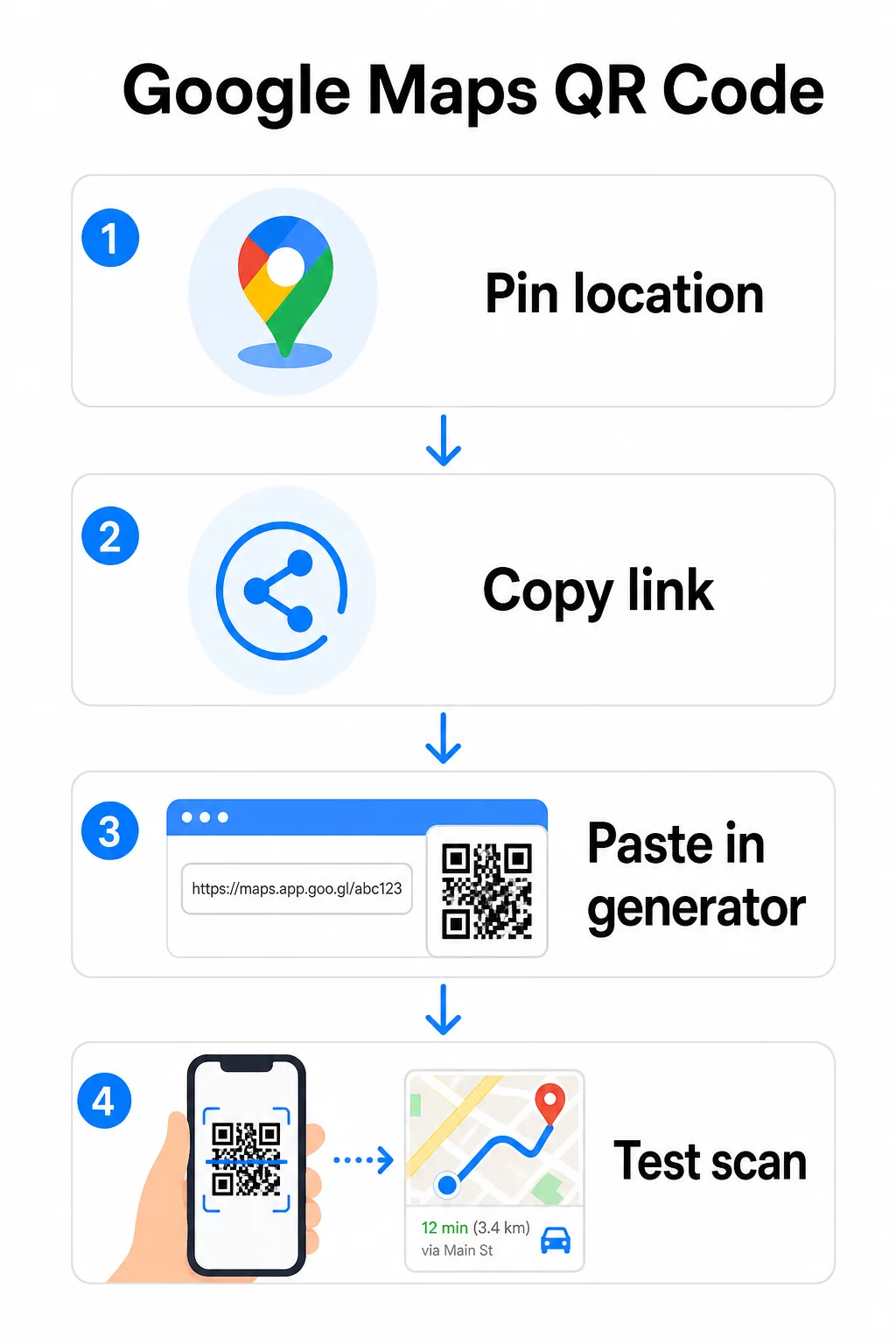
За постоянно местоположение без нужда от промяна на дестинацията, a статичен QR код е безплатен и никога не изтича. Изтеглете го като PNG и сте готови да го използвате.
Трябва ли да актуализирате местоположението си или да проследявате данни от сканиране? Използвай Генератор на QR кодове на PageLoot за да създадете динамичен код, който ви позволява да променяте дестинацията по всяко време от вашето табло – не е необходимо препечатване.
Статичен срещу Динамичен: Кой ви е необходим?
Статичният QR код кодира връзката към Google Maps директно в шаблона. Той е постоянен, безплатен и работи без никакъв акаунт. Компромисът: ако местоположението ви се промени, трябва да генерирате и препечатате нов код.
Динамичният QR код съхранява вместо това кратък URL адрес за пренасочване. Вие контролирате къде сочи това пренасочване от вашето табло за управление на Pageloot. Това означава:
- Можете да актуализирате дестинацията, без да докосвате отпечатания код
- Получавате анализи в реално време – брой сканирания, типове устройства, географски местоположения и време
- Можете да тествате и сменяте връзки към дестинации за сезонни събития или временни обекти
Ако печатате кодове върху постоянни табели, статичният работи добре. За кампании, събития, изскачащи местоположения или всяка ситуация, в която дестинацията може да се промени, динамичните кодове са практичният избор.
Персонализиране на вашия QR код
Обикновен черно-бял QR код работи, но брандираният се представя по-добре. Опциите за персонализиране на Pageloot ви позволяват да:
- Добавите логото на вашата компания в центъра на кода
- Промените цветовете, за да съответстват на вашата маркова палитра (запазете тъмните шарки на светъл фон за надеждно сканиране)
- Изберете от различни форми на модули: Кръг, Тире или Диамант
- Добавите рамка с призив за действие с текст като “Сканирай за упътвания” или “Намери ни на карти”
Когато добавяте лого или цветове, използвайте ниво на корекция на грешки Q или H. Тези настройки позволяват на QR кода да остане сканируем, дори ако до 25–30% от шаблона е скрит от лого или леки повреди. Дръжте логата да не надвишават 30% от общата площ на кода и се уверете, че не се припокриват с трите ъглови “търсещи” квадрата.
За печатни материали изтеглете кода си като SVG, PDF или EPS файл. Тези векторни формати остават ясни при всякакъв размер – критично важно за широкоформатен печат като плакати или табели за витрини.
Искате напълно брандиран код за местоположение? На Генератор на QR кодове за връзки поддържа персонализирани цветове, лога и стилове на рамки с 14-дневен безплатен пробен период – не е необходима кредитна карта.
Тестване преди публикуване
Винаги тествайте своя QR код, преди да го отпечатате или да го използвате в кампания на живо. Счупен или неправилно насочен код уврежда доверието и води до загуба на разходи за печат.
Прегледайте този контролен списък:
- Сканирайте с родното приложение за камера на телефона си както на iOS, така и на Android
- Потвърдете, че връзката отваря правилното местоположение в Google Maps
- Тествайте на устройство без инсталирано приложение Google Maps – то трябва да пренасочи към Google Maps в браузъра
- Сканирайте от различни разстояния и при различни условия на осветление
- Ако сте персонализирали дизайна, потвърдете, че ъгловите търсещи квадрати и тихата зона (празната граница около кода) са безпрепятствени
За печатна употреба, минимален размер от 2 × 2 инча (приблизително 5 × 5 см) гарантира, че повечето устройства могат да сканират надеждно от близко разстояние. За материали, разглеждани от разстояние – плакати, банери, витрини – мащабирайте пропорционално. Общо правило: кодът трябва да е поне една десета от разстоянието, от което хората ще го сканират.
Често срещани проблеми и решения:
| Проблем при сканиране | Решение |
|---|---|
| Размазан или пикселизиран код | Експортирайте като SVG, PDF или EPS за печат |
| Скенерът не разпознава кода | Увеличете контраста; тъмен преден план на светъл фон |
| Логото блокира сканирането | Уверете се, че логото не покрива ъгловите квадрати; използвайте по-висока корекция на грешките |
| Кодът е твърде малък | Увеличете до поне 2 × 2 инча за физически материали |
| Връзката отваря грешно местоположение | Проверете отново копираната връзка за споделяне в Google Карти, преди да генерирате |
За повече подробности относно стандартите за оразмеряване, контраст и разположение, вижте най-добрите практики за четливост на QR кодовете и насоки за използваемост на QR кодове.
Къде да използвате QR кодове на Google Карти
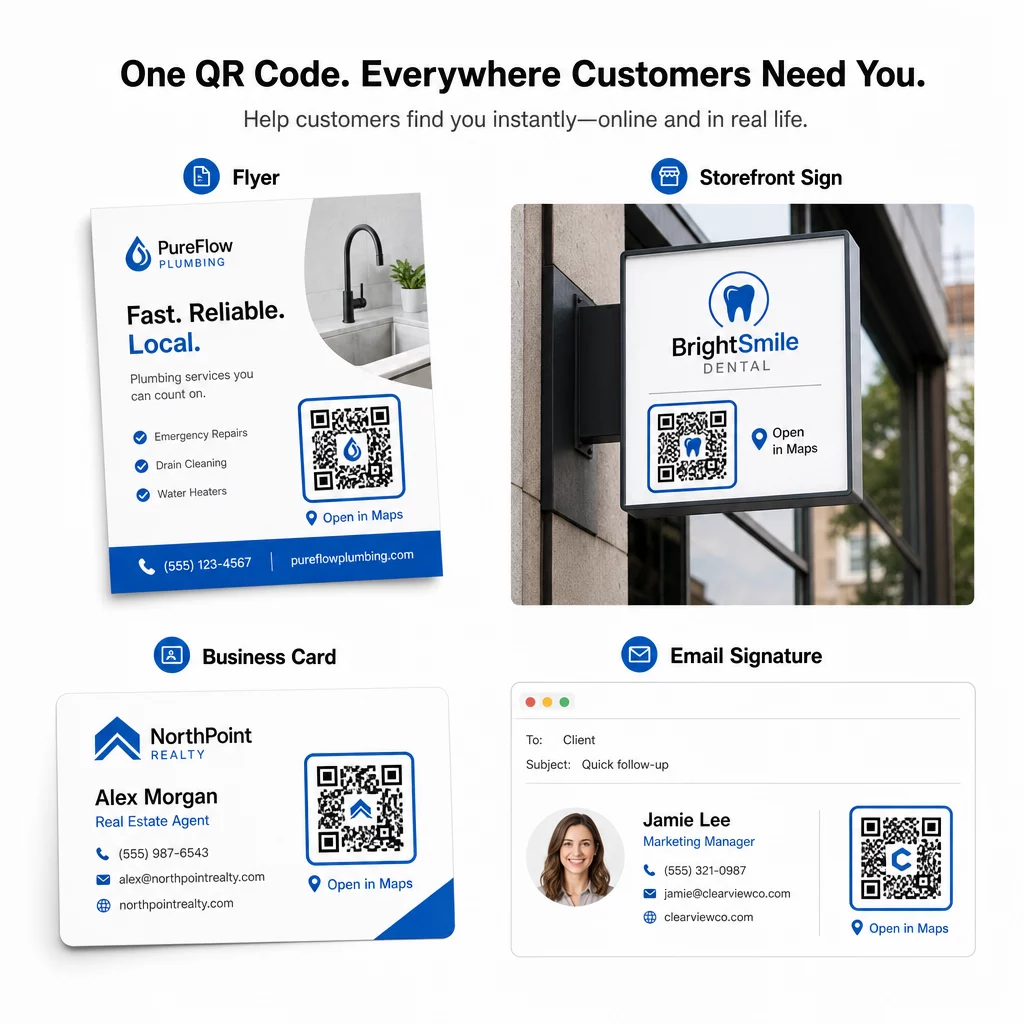
След като бъде тестван, вашият QR код е готов за разполагане в печатни и дигитални канали:
Печатни материали:
- Визитки – заменете отпечатаните адреси със сканируем код
- Флаери и брошури – насочете гостите на събитието директно към мястото
- Витрини и табели на врати – помогнете на клиентите да намерят паркинг или алтернативни входове
- Табели за недвижими имоти – насочете купувачите към местата за отворени врати
- Опаковки на продукти – свържете клиентите с вашето физическо търговско място
Дигитални канали:
- Имейл подписи – заменете статичните адреси със сканируем код за местоположение
- Публикации и истории в социалните медии – популяризирайте ново местоположение или място за събитие
- Долни колонтитули на уебсайтове – позволете на посетителите да отварят упътвания с едно докосване
- Дигитални менюта – помогнете на посетителите да намерят второ местоположение или кетъринг офис
При всяко разположение включете ясен призив за действие близо до кода. “Сканирай за упътвания” или “Отвори в карти” казва на потребителите какво точно се случва, когато сканират, което увеличава ангажираността. За насоки относно позиционирането и оразмеряването при различни материали, Ръководство за поставяне на QR кодове за маркетинг обхваща подробно препоръки, специфични за формата.
Сравнение на плановете на Pageloot
| ФУНКЦИЯ | Безплатен план | Професионален план | Персонализиран/Корпоративен |
|---|---|---|---|
| Тип QR код | Само статични | Динамични и статични | Динамични и статични |
| Редактируеми връзки | Не | Да | Да |
| Анализи на сканиранията | Няма | В реално време (местоположение, устройство) | Пълна история и експертни прозрения |
| Годишен лимит за сканиране | Неограничен (статичен) | 250,000 | Собствен |
| Персонализиране | Основен (цветове, лого) | Разширени опции за дизайн | Пълна интеграция на марката |
| Месечна цена | $0 | $38.34 | $106.52 |
Безплатният план покрива постоянни статични кодове без изтичане и неограничени сканирания. Платените планове отключват динамично редактиране, анализи в реално време и разширени персонализации. Стартовият план започва от $4.86/месец с 2 динамични кода и 15 000 годишни сканирания – подходящ за малки фирми, тестващи формата. Всички платени планове включват 14-дневен безплатен пробен период без нужда от кредитна карта.
Както каза Лукас Янсен, предприемач в областта на недвижимите имоти, който използва QR кодовете за местоположение на Pageloot:
“Това е отличен инструмент и QR кодовете ви отвеждат точно там, където искате.”
За постоянни местоположения, безплатен статичен код е най-простият път. За всичко, което изисква актуализации, проследяване или измерване на кампании, динамичните кодове ви дават гъвкавостта и данните за подобряване с течение на времето. Започнете, като копирате връзката си от Google Maps, генерирайки кода си на QR код за Google Maps, и тестването му на реално устройство, преди да бъде пуснато на живо.
Често задавани въпроси
За повечето случаи, копирайте връзката към мястото от бутона Споделяне в Google Карти – тя отваря точното местоположение директно в Google Карти или браузър. Ако искате да изпратите потребителите директно към навигация завой по завой от фиксирана начална точка, използвайте връзка за упътвания вместо това. Винаги първо поставете връзката в браузър, за да потвърдите, че води до правилното място, преди да генерирате кода.
След като отбележите местоположението си в Google Карти, използвайте бутона Споделяне и копирайте URL адреса, който предоставя. Тази връзка е свързана с конкретните координати на отбелязаната точка, а не просто общо търсене. Избягвайте да копирате URL адреса от адресната лента на браузъра си, докато разглеждате картата – тази версия може да не води надеждно до отбелязаната точка. Поставете връзката за споделяне в браузър, за да проверите, преди да генерирате QR кода.
Използвайте векторен формат – SVG, EPS или PDF – за всяко печатно приложение. Векторните файлове се мащабират до всякакъв размер, без да губят рязкост, за разлика от експортираните PNG или JPEG файлове, които могат да изглеждат пикселизирани при големи размери за печат. За печатни материали също така се уверете, че разделителната способност е поне 300 DPI и че кодът е с размери най-малко 2 × 2 инча за надеждно сканиране от близко разстояние.