Potrzebujesz pomóc klientom znaleźć Twoją lokalizację bez konieczności wpisywania adresu? Ręczne wprowadzanie adresu powoduje tarcia – i sfrustrowanych odwiedzających. Ten przewodnik pokaże Ci, jak w kilka minut zamienić dowolną lokalizację z Google Maps w skanowalny kod QR.
Uzyskiwanie linku do Twojej lokalizacji w Google Maps
Zanim cokolwiek wygenerujesz, potrzebujesz odpowiedniego linku z Google Maps. Link, który skopiujesz, dokładnie określa, gdzie użytkownicy trafią po zeskanowaniu, więc precyzja ma tu znaczenie.
Znajdź i przypnij swoją lokalizację
Otwórz Google Maps i wyszukaj swoje miejsce docelowe. Możesz wpisać nazwę firmy, taką jak “Starbucks Times Square”, pełny adres ulicy lub rozpoznawalny punkt orientacyjny. Jeśli lokalizacja nie ma formalnego adresu – miejsce na zewnątrz, wejście do parku, parking – naciśnij i przytrzymaj na urządzeniu mobilnym (lub kliknij na komputerze stacjonarnym), aby upuścić pinezkę w dokładnym miejscu.
Po przypięciu, powiększ i potwierdź, że znacznik znajduje się w odpowiednim miejscu. Jeśli kierujesz ludzi do konkretnego wejścia, a nie do ogólnego obrysu budynku, dostosuj to odpowiednio. Ten dodatkowy krok zapobiega zamieszaniu, gdy przybędą odwiedzający.
Skopiuj link do lokalizacji
Po potwierdzeniu lokalizacji, dotknij lub kliknij Udostępnij przycisk:
- Na urządzeniu mobilnym: Dotknij nazwy lokalizacji na dole ekranu, następnie dotknij ikony Udostępnij (strzałka w górę) i wybierz “Kopiuj do schowka”.”
- Na komputerze stacjonarnym: Kliknij Udostępnij w panelu informacyjnym lub pod menu z trzema kropkami, a następnie wybierz “Kopiuj link”.”
Skopiowany adres URL to zazwyczaj skrócony link, taki jak `maps.app.goo.gl/xyz123`. Krótsze linki tworzą czystsze, mniej gęste kody QR, które skanują się bardziej niezawodnie. Zanim przejdziesz dalej, wklej link do przeglądarki, aby potwierdzić, że otwiera on prawidłową lokalizację.
Różne typy linków służą różnym celom:
| Typ linku | Co robi | Przykład użycia |
|---|---|---|
| Link do miejsca | Otwiera konkretną firmę lub adres | Udostępnianie witryny sklepowej lub biura |
| Link do wyszukiwania | Wyświetla wyniki dla zapytania wyszukiwania | Pokazywanie “restauracji w pobliżu miejsca” |
| Link do wskazówek dojazdu | Otwiera wstępnie ustawioną trasę nawigacji | Kierowanie gości z lotniska do hotelu |
Dla Kody QR używane do wskazówek dojazdu i udostępniania adresu, link do miejsca lub link do wskazówek dojazdu zazwyczaj działa najlepiej – pomijają krok wyszukiwania i przenoszą użytkownika bezpośrednio do nawigacji.
Generowanie kodu QR
Gdy link jest gotowy, odwiedź Generator kodów QR do Google Maps i wklej swój adres URL w polu wprowadzania. Wybierz typ kodu QR – “Link” lub “Mapy” – a kod zostanie natychmiast wygenerowany.
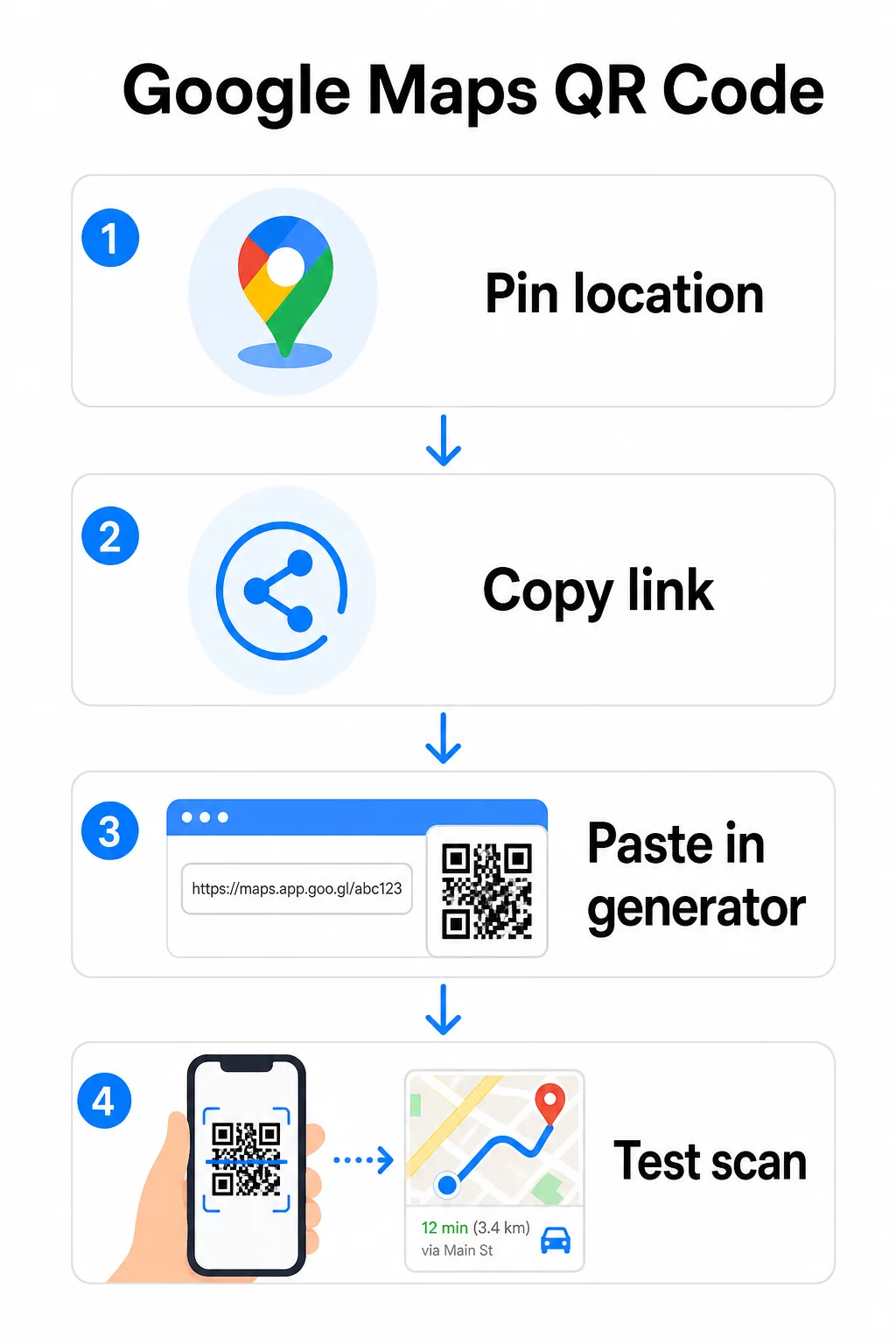
Dla stałej lokalizacji, bez potrzeby zmiany miejsca docelowego, a statyczny kod QR jest darmowy i nigdy nie wygasa. Pobierz go jako PNG i jest gotowy do użycia.
Potrzebujesz zaktualizować swoją lokalizację lub śledzić dane skanowania? Użyj Pageloot Generator kodów QR aby stworzyć dynamiczny kod, który pozwala zmieniać miejsce docelowe w dowolnym momencie z Twojego pulpitu nawigacyjnego – bez konieczności ponownego drukowania.
Statyczny vs. Dynamiczny: Który jest Ci potrzebny?
Statyczny kod QR koduje link do Google Maps bezpośrednio w wzorze. Jest trwały, darmowy i działa bez żadnego konta. Kompromis: jeśli Twoja lokalizacja się zmieni, musisz wygenerować i ponownie wydrukować nowy kod.
Dynamiczny kod QR przechowuje zamiast tego krótki URL przekierowania. Kontrolujesz, dokąd to przekierowanie prowadzi z Twojego pulpitu nawigacyjnego Pageloot. Oznacza to:
- Możesz zaktualizować miejsce docelowe bez dotykania wydrukowanego kodu
- Otrzymujesz analizy w czasie rzeczywistym – liczbę skanów, typy urządzeń, lokalizacje geograficzne i czas
- Możesz testować i zamieniać linki docelowe dla wydarzeń sezonowych lub tymczasowych miejsc
Jeśli drukujesz kody na stałych szyldach, statyczny działa dobrze. W przypadku kampanii, wydarzeń, tymczasowych lokalizacji lub każdej sytuacji, w której miejsce docelowe może się zmienić, kody dynamiczne są praktycznym wyborem.
Dostosowywanie kodu QR
Zwykły czarno-biały kod QR działa, ale markowy działa lepiej. Opcje dostosowywania Pageloot pozwalają Ci:
- Dodaj logo swojej firmy do centrum kodu
- Zmień kolory, aby pasowały do palety Twojej marki (zachowaj ciemne wzory na jasnym tle dla niezawodnego skanowania)
- Wybierz spośród różnych kształtów modułów: Okrągły, Kreska lub Diament
- Dodaj ramkę z wezwaniem do działania z tekstem takim jak “Skanuj, aby uzyskać wskazówki” lub “Znajdź nas na mapach”
Podczas dodawania logo lub kolorów, użyj poziomu korekcji błędów Q lub H. Te ustawienia pozwalają kodowi QR pozostać skanowalnym, nawet jeśli do 25–30% wzoru jest zasłonięte przez logo lub drobne uszkodzenia. Utrzymuj logo na poziomie nie większym niż 30% całkowitej powierzchni kodu i upewnij się, że nie nakładają się one na trzy narożne kwadraty “wyszukiwania”.
W przypadku materiałów drukowanych pobierz swój kod jako plik SVG, PDF lub EPS. Te formaty wektorowe zachowują ostrość w każdym rozmiarze – co jest kluczowe dla druku wielkoformatowego, takiego jak plakaty czy oznakowanie witryn sklepowych.
Chcesz w pełni markowy kod lokalizacji? Plik Generator kodów QR do linków obsługuje niestandardowe kolory, logo i style ramek z 14-dniowym bezpłatnym okresem próbnym – karta kredytowa nie jest wymagana.
Testowanie przed publikacją
Zawsze testuj swój kod QR przed oddaniem go do druku lub uruchomieniem kampanii na żywo. Uszkodzony lub błędnie skierowany kod niszczy zaufanie i marnuje koszty druku.
Przejdź przez tę listę kontrolną:
- Skanuj za pomocą natywnej aplikacji aparatu w telefonie zarówno na iOS, jak i Androidzie
- Potwierdź, że link otwiera prawidłową lokalizację w Google Maps
- Przetestuj na urządzeniu bez zainstalowanej aplikacji Google Maps – powinno przekierować do Google Maps w przeglądarce
- Skanuj z różnych odległości i w różnych warunkach oświetleniowych
- Jeśli dostosowałeś projekt, upewnij się, że narożne kwadraty wyszukiwania i strefa ciszy (pusta ramka wokół kodu) są niezakłócone
Do użytku w druku, minimalny rozmiar to 2 × 2 cale (około 5 × 5 cm) zapewnia, że większość urządzeń może niezawodnie skanować z bliskiej odległości. W przypadku materiałów oglądanych z daleka – plakatów, banerów, witryn sklepowych – skaluj proporcjonalnie. Ogólna zasada: kod powinien mieć co najmniej jedną dziesiątą odległości, z której ludzie będą go skanować.
Częste problemy i rozwiązania:
| Problem ze skanowaniem | Rozwiązanie |
|---|---|
| Rozmyty lub rozpikselowany kod | Eksportuj jako SVG, PDF lub EPS do druku |
| Skaner nie rozpoznaje kodu | Zwiększ kontrast; ciemny pierwszy plan na jasnym tle |
| Logo blokuje skanowanie | Upewnij się, że logo nie zakrywa narożnych kwadratów; użyj wyższej korekcji błędów |
| Kod zbyt mały | Zwiększ do co najmniej 2 × 2 cale dla materiałów fizycznych |
| Link otwiera niewłaściwą lokalizację | Ponownie zweryfikuj skopiowany link Udostępnij w Google Maps przed wygenerowaniem |
Więcej szczegółów na temat rozmiarów, kontrastu i standardów umieszczania znajdziesz w najlepszymi praktykami w zakresie czytelności kodów QR oraz wytycznymi dotyczącymi użyteczności kodów QR.
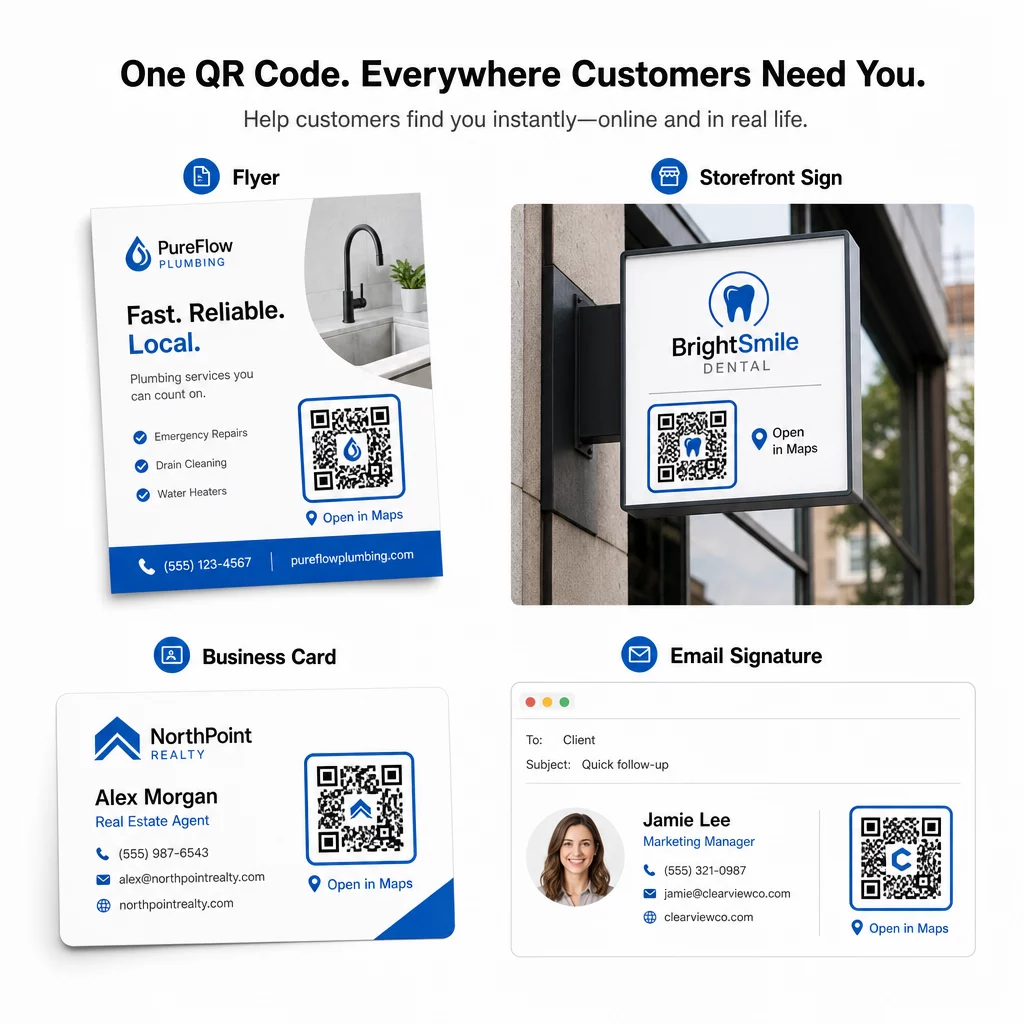
Gdzie używać kodów QR Google Maps
Po przetestowaniu Twój kod QR jest gotowy do wdrożenia w kanałach drukowanych i cyfrowych:
Materiały drukowane:
- Wizytówki – zastąp drukowane adresy kodem do zeskanowania
- Ulotki i broszury – kieruj gości wydarzeń bezpośrednio do miejsca
- Witryny sklepowe i szyldy na drzwiach – pomóż klientom znaleźć parking lub alternatywne wejścia
- Oznakowanie nieruchomości – kieruj kupujących do lokalizacji dni otwartych
- Opakowania produktów – połącz klientów z Twoją fizyczną lokalizacją handlową
Kanały cyfrowe:
- Podpisy e-mail – zastąp statyczne adresy kodem lokalizacji do zeskanowania
- Posty i Stories w mediach społecznościowych – promuj nową lokalizację lub miejsce wydarzenia
- Stopki stron internetowych – pozwól odwiedzającym otworzyć wskazówki jednym dotknięciem
- Cyfrowe menu – pomóż gościom znaleźć drugą lokalizację lub biuro cateringowe
W każdym miejscu umieść wyraźne wezwanie do działania w pobliżu kodu. “Skanuj, aby uzyskać wskazówki” lub “Otwórz w Mapach” dokładnie informuje użytkowników, co się stanie po zeskanowaniu, co zwiększa zaangażowanie. Wskazówki dotyczące pozycjonowania i rozmiaru na różnych materiałach znajdziesz w Przewodnik po umieszczaniu kodów QR w marketingu szczegółowo omawia zalecenia dotyczące konkretnych formatów.
Porównanie planów Pageloot
| FUNKCJA | Plan darmowy | Plan Pro | Niestandardowe/Korporacyjne |
|---|---|---|---|
| Typ kodu QR | Tylko statyczne | Dynamiczne i statyczne | Dynamiczne i statyczne |
| Edytowalne linki | Nie | Tak | Tak |
| Analityka skanów | Brak | W czasie rzeczywistym (lokalizacja, urządzenie) | Pełna historia i spostrzeżenia ekspertów |
| Roczny limit skanów | Nieograniczone (statyczne) | 250,000 | Własny |
| Dostosowanie | Podstawowe (kolory, logo) | Zaawansowane opcje projektowania | Pełna integracja marki |
| Cena miesięczna | $0 | $38.34 | $106.52 |
Darmowy plan obejmuje stałe kody statyczne bez daty ważności i nieograniczoną liczbę skanów. Płatne plany odblokowują dynamiczną edycję, analizy w czasie rzeczywistym i zaawansowaną personalizację. Plan Starter zaczyna się od 4,86 USD/miesiąc z 2 kodami dynamicznymi i 15 000 rocznych skanów – odpowiedni dla małych firm testujących format. Wszystkie płatne plany obejmują 14-dniowy bezpłatny okres próbny bez konieczności podawania karty kredytowej.
Jak ujął to Lucas Jansen, deweloper nieruchomości, który korzysta z kodów QR lokalizacji Pageloot:
“To doskonałe narzędzie, a kody QR prowadzą dokładnie tam, gdzie chcesz.”
Dla stałych lokalizacji najprostszym rozwiązaniem jest darmowy kod statyczny. W przypadku wszystkiego, co wymaga aktualizacji, śledzenia lub pomiaru kampanii, kody dynamiczne zapewniają elastyczność i dane do poprawy w czasie. Zacznij od skopiowania linku do Google Maps, wygenerowania kodu na Generator kodów QR do Google Maps, i testowanie go na prawdziwym urządzeniu, zanim zostanie uruchomiony.
Najczęściej zadawane pytania
W większości zastosowań skopiuj Link do Miejsca z przycisku Udostępnij w Mapach Google – otwiera on dokładną lokalizację bezpośrednio w Mapach Google lub przeglądarce. Jeśli chcesz wysłać użytkowników prosto do nawigacji krok po kroku z ustalonego punktu początkowego, użyj zamiast tego Linku do Wskazówek Dojazdu. Zawsze najpierw wklej link do przeglądarki, aby potwierdzić, że prowadzi do właściwego miejsca, przed wygenerowaniem kodu.
Po przypięciu swojej lokalizacji w Google Maps, użyj przycisku Udostępnij i skopiuj udostępniony przez niego adres URL. Ten link jest powiązany z konkretnymi współrzędnymi przypięcia, a nie tylko z ogólnym wyszukiwaniem. Unikaj kopiowania adresu URL z paska adresu przeglądarki podczas przeglądania mapy – ta wersja może nie zawsze niezawodnie prowadzić do przypiętego punktu. Wklej link Udostępnij do przeglądarki, aby zweryfikować go przed wygenerowaniem kodu QR.
Użyj formatu wektorowego – SVG, EPS lub PDF – do wszelkich zastosowań drukowanych. Pliki wektorowe skalują się do dowolnego rozmiaru bez utraty ostrości, w przeciwieństwie do eksportów PNG lub JPEG, które mogą wyglądać na rozpikselowane przy dużych wymiarach druku. W przypadku materiałów drukowanych upewnij się również, że rozdzielczość wynosi co najmniej 300 DPI i że kod mierzy co najmniej 2 × 2 cale dla niezawodnego skanowania z bliskiej odległości.