Vai meklējat veidus, kā padarīt jūsu muzeja eksponātus saistošākus, nepārveidojot visu apmeklētāju pieredzi? Statiskas sienas etiķetes un drukātas brošūras var paveikt tikai tik daudz – apmeklētāji arvien vairāk sagaida digitālu piekļuvi bagātīgākam saturam savās ierīcēs. Šis ceļvedis aptver praktiskākos veidus, kā ieviest QR kodus muzejos, sākot no audio ceļvežiem un digitālajām kartēm līdz biļešu tirdzniecībai un pieejamībai.
Kāpēc muzeji ievieš QR kodus
QR kodi sniedz muzejiem lētu veidu, kā izveidot daudzslāņainu informācijas sistēmu, kas sniedzas daudz tālāk par to, kas ietilpst uz fiziskas etiķetes. Apmeklētājs, stāvot pie artefakta, var skenēt kodu un nekavējoties piekļūt paplašinātam tekstam, attēliem, video, audio stāstījumiem vai pat paplašinātajai realitātei – viss savā viedtālrunī, savā tempā.
Galvenā pievilcība ir elastība. Muzeji var jebkurā laikā atjaunināt kodam piesaistīto saturu, neko nepārprintējot, kas padara dinamiskos QR kodus īpaši praktiskus mainīgām izstādēm vai sezonālām programmām. Papildus satura piegādei, QR kodi arī paver tiešu kanālu apmeklētāju atsauksmju vākšanai, daudzvalodu satura piedāvāšanai un fizisko ekspozīciju savienošanai ar virtuālajām ekskursijām un tiešsaistes kolekcijām.
Izveidojiet atjaunināmus muzeja QR kodus Nepieciešams atsvaidzināt ekspozīcijas saturu, nepārprintējot norādes? Izmantojiet Dinamisks QR kodu ģenerators lai izveidotu kodus, kurus varat rediģēt jebkurā laikā no centrālā vadības paneļa.
Biežākie QR kodu izmantošanas veidi muzejos
| Lietošanas gadījums | Ko tas nodrošina |
|---|---|
| Audio un video ceļveži | Stāstītas ekspozīciju vēstures, mākslinieku intervijas, animētas rekonstrukcijas |
| Digitālās kartes | Navigējami stāvu plāni, kuriem apmeklētāji piekļūst savos tālruņos |
| Ekspozīcijas informācija | Paplašināts teksts, vēsturiskais konteksts, artefakta izcelsme |
| Interaktīvas pieredzes | Paplašinātās realitātes pārklājumi, dārgumu medības, viktorīnas |
| Biļešu tirdzniecība | Bezkontakta ieeja, izmantojot skenējamas digitālās biļetes |
| Wi-Fi piekļuve | Tūlītējs tīkla savienojums, neievadot paroles |
| Apmeklētāju atsauksmes | Aptaujas veidlapas, pieejamas tieši no izstādes zāles |
| Dāvanu veikala akcijas | Saites uz ekskluzīviem veikala piedāvājumiem vai tiešsaistes produktu lapām |
| Ziedojumi un dalība | Portāli ziedošanai vai pievienošanās, pieejami ar vienu skenēšanu |
Audio un video gidi
QR kodu audio tūres ļauj apmeklētājiem skenēt kodu pie katra eksponāta un klausīties stāstījumus, kuratoru komentārus vai fona stāstus savās ierīcēs. Tas aizstāj apjomīgu nomātu audio aprīkojumu un atbalsta elastīgus, pašu tempā veicamus maršrutus pa muzeju. Iestādēm, kas vēlas iet tālāk, AR QR kodi var pārveidot muzeja stāstniecību slāņojot 3D modeļus vai animācijas tieši virs fiziskiem artefaktiem, kad apmeklētājs pavērš savu tālruni pret eksponātu.
Muzeji var izveidot audio gidus, izmantojot MP3 QR koda izveide, kas ļauj augšupielādēt audio failus un ģenerēt skenējamu kodu, ko apmeklētāji var atskaņot tieši no savas ierīces. Video saturam – piemēram, mākslinieku intervijām vai soli pa solim restaurācijas vizualizācijām – a YouTube QR koda ģenerators padara vienkāršu jebkura eksponāta saistīšanu ar mitinātu video.
Digitālās kartes un pašvadītas tūres
Lieli muzeji var izmantot PDF QR kodi lai apmeklētājiem nodrošinātu interaktīvu digitālo karti, kas palīdz orientēties sadaļās, atrast konkrētus eksponātus un plānot apmeklējumu atbilstoši viņu interesēm. Kodu izvietošana norādītajās tūres “pieturvietās”, kas saistītas ar audio failiem vai tīmekļa lapām, kurās aprakstīts, ko apmeklētājs redz, nodrošina pilnīgi neatkarīgu izpēti, izmantojot tikai viedtālruni.
Lai dziļāk aplūkotu šo pieredžu veidošanu, ceļvedis QR kodu izmantošanai virtuālajās tūrēs izskaidro pilnu iestatīšanas procesu, sākot no satura mitināšanas līdz kodu izstrādei un izvietošanai.
Izstādes informācija un interaktīvā pieredze
QR kodu izvietošana pie eksponātiem ļauj apmeklētājiem piekļūt papildu kontekstam – vēsturiskajam fonam, mākslinieku biogrāfijām, kolekcijas izcelsmei – nepārslogojot etiķeti. Daži muzeji iet vēl tālāk, veidojot dārgumu medības, kur katrs kods pie artefakta sniedz informāciju par objektu un norādi uz nākamo pieturvietu. Šis formāts veicina aktīvu izpēti un notur apmeklētāju interesi vairākās galerijās.
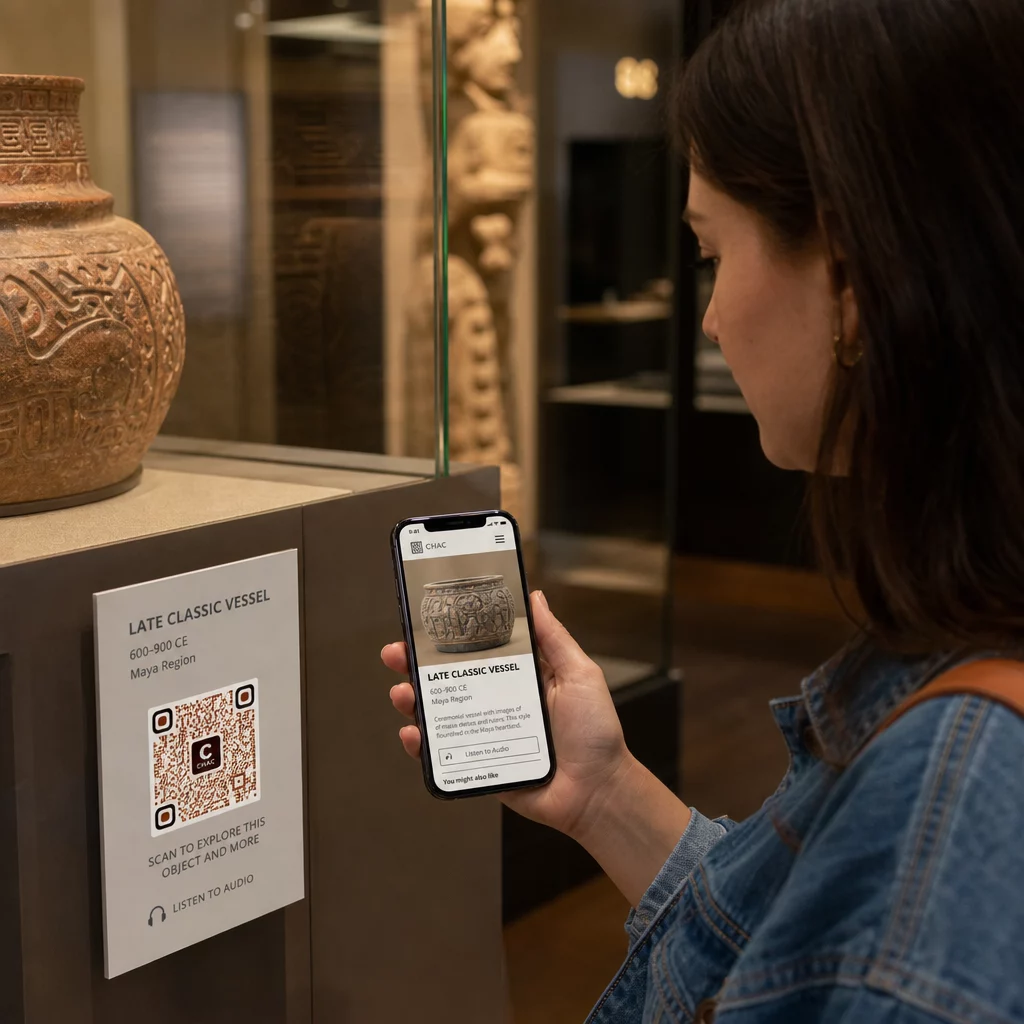
Muzeji ir izmantojuši arī QR kodus mūsdienu mākslas instalācijās lai savienotu fizisko darbu ar digitālo stāstu stāstīšanu, tostarp spēlējamu saturu un dizaina vēstures stāstījumus, kas iestrādāti pašos kodos.
Biļešu tirdzniecība un bezkontakta ieeja
Digitālā biļešu tirdzniecība, izmantojot QR kodus, nodrošina apmeklētājiem skenējamas biļetes, ko viņi var parādīt ieejas punktos tieši no saviem tālruņiem. Tas vienkāršo ieejas pārvaldību, samazina rindas un novērš atkarību no fiziskām biļetēm – īpaši noderīgi intensīvas satiksmes periodos.
Apmeklētāju atsauksmes
QR kodu izvietošana pie izejām vai visā galerijas telpā ļauj apmeklētājiem ātri aizpildīt atsauksmju veidlapu, nesaņemot papīra aptauju. Apkopotie dati palīdz muzejiem izprast apmeklētāju preferences, novērtēt eksponātus un plānot uzlabojumus. A saites QR kodam norāde uz tiešsaistes veidlapu ir vienkāršākais veids, kā to iestatīt.
Pieejamības apsvērumi
QR kodi var būtiski uzlabot pieejamību, ja tie tiek ieviesti pārdomāti – taču tie var arī radīt šķēršļus, ja šīs vajadzības netiek risinātas jau sākumā.
Nodrošiniet alternatīvu. Ne katram apmeklētājam būs viedtālrunis vai viņš jutīsies ērti, skenējot kodu. Vienmēr piedāvājiet citu veidu, kā piekļūt tam pašam saturam, piemēram, tuvumā izdrukātu URL, SMS opciju vai darbinieku, kurš var palīdzēt. Apmeklētājiem ar redzes traucējumiem vai vāju redzi SMS piekļuve var būt ērtāka nekā QR skenēšana.
Izstrādājiet ar kontrastu un redzamību. Izmantojiet tumšus koda elementus uz gaiša fona un tiecieties uz kontrasta attiecību vismaz 4:1. Tas atbilst WCAG 2.1 prasībām par teksta kontrasta attiecību un nodrošina, ka kods paliek salasāms apmeklētājiem ar vāju redzi. Detalizētas norādes par to, kā to panākt, ir atrodamas QR kodu lietojamības labākā prakse atsaucē.
Pielāgojiet kodu izmēru skenēšanas attālumam. Aptuvenais īkšķa likums ir attiecība 10:1 – uz katriem 10 cm paredzamā skenēšanas attāluma kodam jābūt vismaz 1 cm platam. Praktiskais minimums lielākajai daļai muzeju izvietojumu ir 2 × 2 cm (apmēram 0,8 × 0,8 collas), lai gan lielāki formāti ir labāki eksponātiem, kas tiek skatīti no attāluma.
Apsveriet izvietojuma augstumu. Uzstādiet kodus tādā augstumā un leņķī, lai apmeklētāji ratiņkrēslos vai ar ierobežotu augumu varētu ērti sasniegt un skenēt. Acu līmeņa izvietojums 3 līdz 5 pēdu augstumā no grīdas labi der stāvošiem apmeklētājiem; pilnīgai iekļaušanai var būt nepieciešami zemāki izvietojumi.
Nodrošiniet īsas, skaidras instrukcijas. Ne visi apmeklētāji zinās, kā skenēt QR kodu. Īsa instrukcija – “Atveriet kameras lietotni un pavērsiet to pret šo kodu” – novērš minējumus. Saglabājiet instrukcijas konsekventas visā muzejā, lai apmeklētājiem nebūtu jāapgūst mijiedarbība no jauna pie katra eksponāta.
Testējiet ar palīgtehnoloģijām. Pirms palaišanas pārbaudiet, vai saistītais saturs un jebkādas alternatīvas piekļuves metodes pareizi darbojas ar ekrāna lasītājiem un palielināšanas rīkiem, piemēram, VoiceOver un TalkBack.
Muzejiem, kas īpaši interesējas par audio pieejamību, ar balsi aktivizējami QR kodi piedāvājiet brīvroku alternatīvu, kas savieno skenēšanu ar runātu stāstījumu – īpaši noderīgi apmeklētājiem, kuri nevar ērti orientēties vizuālajās saskarnēs.
Kā iestatīt QR kodus savā muzejā
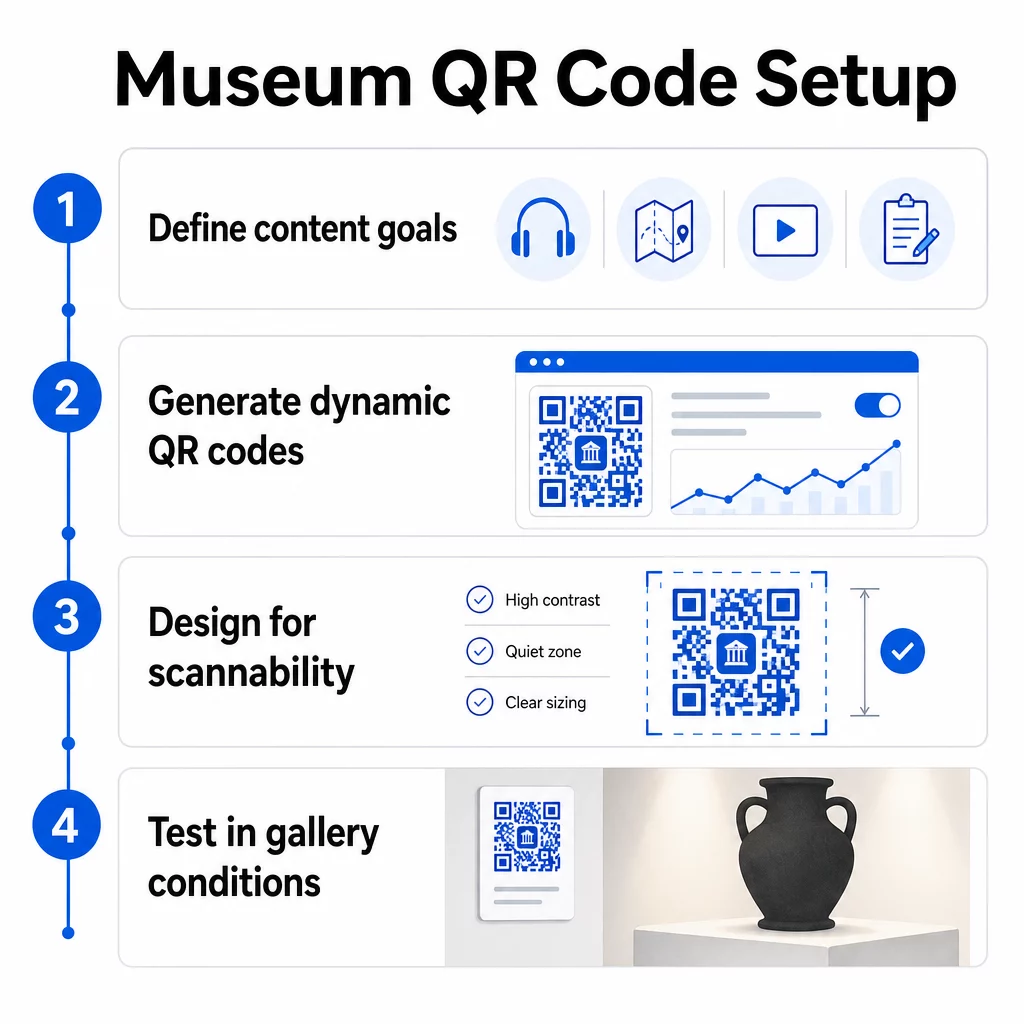
1. solis: Definējiet savu saturu un mērķus.
Pirms viena koda ģenerēšanas izlemiet, ko katrs kods sniegs un kam tas kalpos. Audio ceļvedim galvenajam artefaktam ir atšķirīgas prasības nekā atsauksmju veidlapai pie izejas. Izveidojiet savu kodu veidu karti – audio, PDF karte, video, aptaujas saite – un saskaņojiet katru ar atbilstošo satura formātu.
2. solis: Ģenerējiet savus kodus
Izmantojiet QR kodu platformu, kas atbalsta dinamiskos kodus, lai jūs varētu atjaunināt galamērķus bez atkārtotas drukāšanas. Pageloot QR kodu ģenerators ļauj jums izveidot kodus URL, PDF failiem, audio failiem, video un citiem, pēc tam pārvaldīt tos no viena vadības paneļa. Dinamiskie kodi nodrošina arī skenēšanas analītiku – sekojot līdzi apjomam, atrašanās vietai, ierīces tipam un laikam – lai jūs varētu redzēt, kuras izstādes rada vislielāko interesi.
Sekojiet līdzi izstādes iesaistei Vēlaties uzzināt, ar kuriem artefaktiem apmeklētāji visvairāk mijiedarbojas? Izmantojiet dinamiskos QR kodus ar iebūvētu analītiku lai uzraudzītu skenēšanas datus katrā jūsu muzeja izstādē.
3. solis: Izstrādājiet skenējamībai
Izmantojiet konsekventu zīmolu – jūsu muzeja krāsas un logotipu – vienlaikus saglabājot augstu kontrastu starp kodu un tā fonu. Ap katru kodu saglabājiet skaidru kluso zonu (tukšu apmali). Detalizētiem dizaina norādījumiem, labāko praksi QR kodu lasāmībā raksts praktiski aptver kontrasta attiecības, klusās zonas, logotipa izvietojumu un kļūdu labošanas līmeņus.
4. solis: Drukājiet un izvietojiet kodus stratēģiski
Drukājiet kodus pietiekamā izmērā paredzētajam skenēšanas attālumam, izmantojot augstas izšķirtspējas vektoru formātus (SVG, EPS vai PDF), lai izvairītos no izplūšanas. Novietojiet tos acu līmenī netālu no izstādes, uz kuru tie atsaucas – nevis pāri telpai. Lielām vai sarežģītām instalācijām, galīgo ceļvedi QR kodu izvietošanai sniedz videi specifiskus padomus, kas labi pielāgojami muzeju apstākļiem.
5. solis: Pārbaudiet pirms atvēršanas
Pārbaudiet katru kodu gan iOS, gan Android ierīcēs, jūsu galerijas faktiskajos apgaismojuma apstākļos. Pārbaudiet, vai saistītās lapas ātri ielādējas, izmantojot mobilos datus (ne tikai WiFi), vai audio un video saturs tiek atskaņots pareizi un vai jebkādi alternatīvi piekļuves ceļi darbojas, kā paredzēts.
Populāri muzeji, kuros izmanto QR kodus
- Smitsona Nacionālais Dabas vēstures muzejs ir izmantojis ar QR kodu saistītas paplašinātās realitātes pieredzes, lai atdzīvinātu fiziskās ekspozīcijas ar digitālām pārklājumiem un 3D rekonstrukcijām.
- Metropolitēna mākslas muzejs integrē QR kodu piekļuvi savā standarta apmeklētāju pieredzē kā iespēju piekļūt tā digitālajam ceļvedim.
- Akropoles muzejs piedāvā uz QR kodu balstītu audio ceļvedi, kas ļauj veikt pašvadītas ekskursijas, padarot apmeklējumu elastīgāku un informatīvāku starptautiskajiem apmeklētājiem.
- Britu muzejs izmanto QR kodus, lai apmeklētāji varētu piekļūt papildu saturam un uzzināt vairāk par eksponātiem savā tempā.
Lai iegūtu plašāku ieskatu inovatīvās lietojumprogrammās, ceļvedis par QR kodiem virtuālām mākslas ekskursijām dokumentē, kā iestādes izmanto šos rīkus, lai paplašinātu muzeja pieredzi ārpus fiziskajām sienām.
Biežāk uzdotie jautājumi
Muzeja QR kods var novirzīt uz gandrīz jebkuru digitālo saturu: audio stāstījumiem, video ceļvežiem, paplašinātās realitātes pieredzēm, PDF kartēm, ekspozīciju informācijas lapām, daudzvalodu tekstu, atsauksmju veidlapām, ziedojumu portāliem vai virtuālām ekskursijām. Izvēlētais formāts ir atkarīgs no tā, kas vislabāk kalpo katrai ekspozīcijai un apmeklētāju vajadzībām.
Nē. Mūsdienu iOS un Android viedtālruņi var skenēt QR kodus tieši, izmantojot iebūvēto kameras lietotni – nav nepieciešama atsevišķa lietotne. Dažām vecākām ierīcēm var būt nepieciešams īpašs QR skeneris, tāpēc ir laba prakse to pieminēt savās instrukcijās un nodrošināt, ka jūsu saistītais saturs ātri ielādējas standarta mobilajā pārlūkprogrammā.
Dinamiskie QR kodi ļauj jebkurā laikā atjaunināt saturu, uz ko norāda kods, bez fiziskā koda atkārtotas drukāšanas. Tas nozīmē, ka varat atsvaidzināt eksponātu aprakstus, nomainīt audio failus jaunai sezonai vai labot bojātu saiti, netraucējot jūsu drukātās norādes. Dinamiskie kodi nodrošina arī skenēšanas analīzi – parādot, kuri eksponāti piesaista vislielāko iesaisti, kādos laikos un kādās ierīcēs – sniedzot jūsu komandai praktiski izmantojamus datus eksponātu plānošanai un apmeklētāju pieredzes uzlabošanai.