هل تحتاج إلى مساعدة العملاء في العثور على موقعك دون مطالبتهم بكتابة عنوان؟ إدخال العنوان يدويًا يخلق احتكاكًا – وزوارًا محبطين. يرشدك هذا الدليل خلال تحويل أي موقع على خرائط Google إلى رمز QR قابل للمسح في دقائق.
الحصول على رابط موقعك على خرائط Google
قبل أن تنشئ أي شيء، تحتاج إلى الرابط الصحيح من خرائط Google. يحدد الرابط الذي تنسخه بالضبط المكان الذي يصل إليه المستخدمون عند المسح، لذا الدقة هنا مهمة.
ابحث عن موقعك وثبّته
افتح خرائط Google وابحث عن وجهتك. يمكنك إدخال اسم عمل مثل “ستاربكس تايمز سكوير”، أو عنوان شارع كامل، أو معلم معروف. إذا لم يكن للموقع عنوان رسمي – مكان خارجي، مدخل حديقة، موقف سيارات – اضغط مع الاستمرار على الهاتف المحمول (أو انقر على سطح المكتب) لإسقاط دبوس في المكان المحدد.
بمجرد تثبيته، قم بالتكبير وتأكيد أن العلامة تقع في النقطة الصحيحة. إذا كنت توجه الأشخاص إلى مدخل معين بدلاً من مساحة المبنى العامة، فاضبط ذلك وفقًا لذلك. تمنع هذه الخطوة الإضافية الارتباك عند وصول الزوار.
انسخ رابط الموقع
بعد تأكيد موقعك، انقر أو اضغط على مشاركة الزر:
- على الهاتف المحمول: انقر على اسم الموقع في أسفل الشاشة، ثم انقر على أيقونة المشاركة (السهم المتجه للأعلى) واختر “نسخ إلى الحافظة”.”
- على سطح المكتب: انقر على مشاركة في لوحة المعلومات أو ضمن قائمة النقاط الثلاث، ثم اختر “نسخ الرابط”.”
الرابط المنسوخ هو عادة رابط مختصر مثل `maps.app.goo.gl/xyz123`. الروابط الأقصر تنتج رموز QR أنظف وأقل كثافة يمكن مسحها ضوئيًا بشكل أكثر موثوقية. قبل المتابعة، الصق الرابط في متصفح لتأكيد أنه يفتح الموقع الصحيح.
أنواع الروابط المختلفة تخدم أغراضًا مختلفة:
| نوع الرابط | ماذا يفعل | مثال على حالة الاستخدام |
|---|---|---|
| رابط مكان | يفتح نشاطًا تجاريًا أو عنوانًا محددًا | مشاركة واجهة متجر أو مكتب |
| رابط بحث | يعرض نتائج استعلام بحث | إظهار “مطاعم بالقرب من المكان” |
| رابط الاتجاهات | يفتح مسار تنقل محدد مسبقًا | توجيه الضيوف من المطار إلى الفندق |
إلى عن على رموز QR المستخدمة للاتجاهات ومشاركة العنوان, ، يعمل رابط المكان أو رابط الاتجاهات عادةً بشكل أفضل – فهما يتخطيان خطوة البحث ويوصلان المستخدم مباشرة إلى التنقل.
إنشاء رمز QR الخاص بك
مع جاهزية الرابط الخاص بك، قم بزيارة مولد باركود QR لموقع Google Maps والصق عنوان URL الخاص بك في حقل الإدخال. حدد نوع رمز QR – “رابط” أو “خرائط” – وسيتم إنشاء الرمز على الفور.
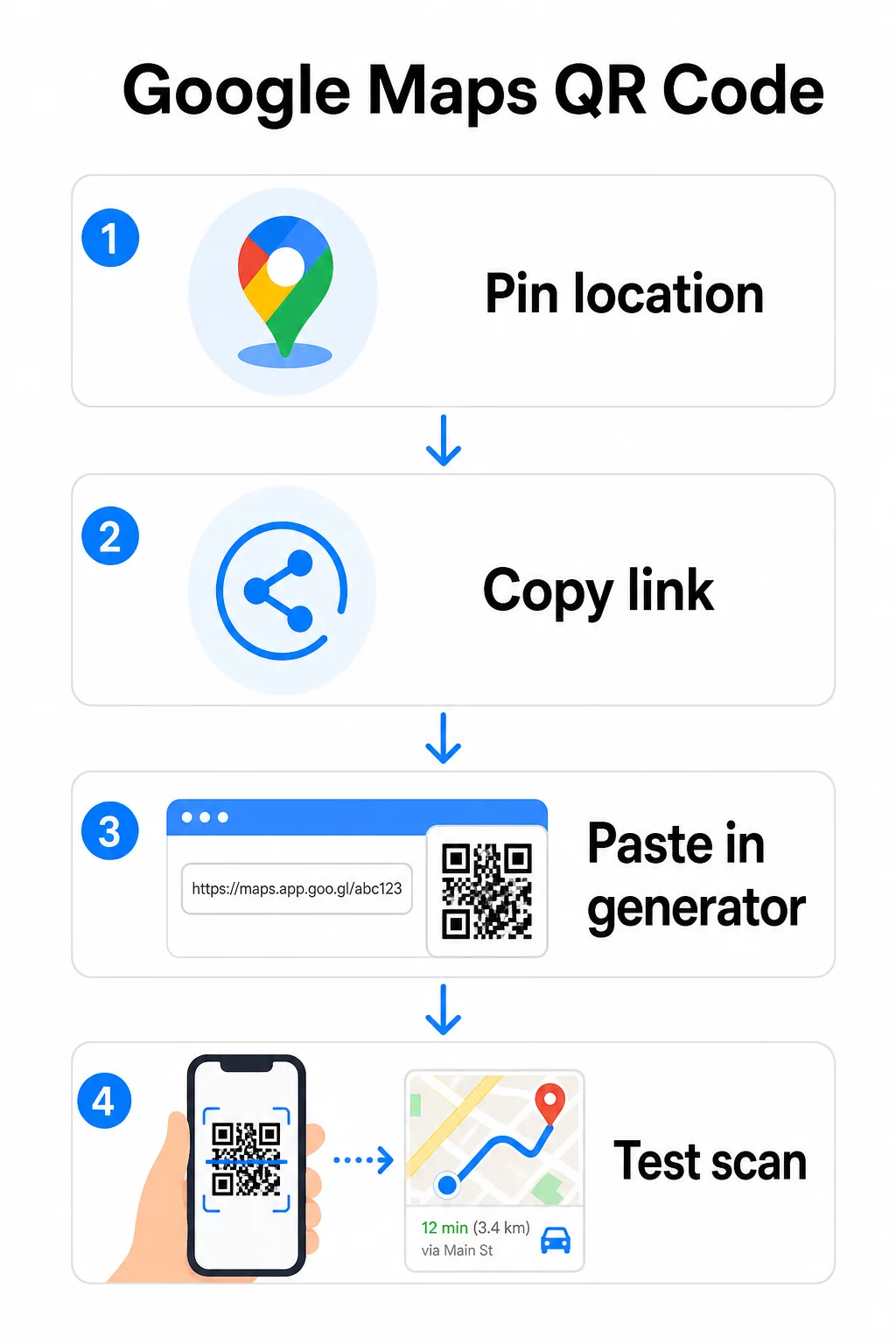
لموقع دائم لا يحتاج إلى تغيير الوجهة، فإن رمز الاستجابة السريعة الثابت مجاني ولا تنتهي صلاحيته أبدًا. قم بتنزيله كملف PNG وستكون جاهزًا لاستخدامه.
هل تحتاج إلى تحديث موقعك أو تتبع بيانات المسح الضوئي؟ استخدم ال Pageloot مولد رمز الاستجابة السريعة لإنشاء رمز ديناميكي يتيح لك تغيير الوجهة في أي وقت من لوحة التحكم الخاصة بك – دون الحاجة إلى إعادة الطباعة.
ثابت مقابل ديناميكي: أيهما تحتاج؟
يقوم رمز QR الثابت بتشفير رابط خرائط Google مباشرة في النمط. إنه دائم ومجاني ويعمل بدون أي حساب. المقايضة: إذا تغير موقعك، فستحتاج إلى إنشاء رمز جديد وإعادة طباعته.
يخزن رمز QR الديناميكي عنوان URL قصيرًا لإعادة التوجيه بدلاً من ذلك. يمكنك التحكم في المكان الذي يشير إليه هذا التوجيه من لوحة تحكم Pageloot الخاصة بك. وهذا يعني:
- يمكنك تحديث الوجهة دون لمس الرمز المطبوع
- تحصل على تحليلات في الوقت الفعلي – عدد عمليات المسح، وأنواع الأجهزة، والمواقع الجغرافية، والتوقيت
- يمكنك اختبار وتبديل روابط الوجهة للأحداث الموسمية أو الأماكن المؤقتة
إذا كنت تطبع رموزًا على لافتات دائمة، فإن الرمز الثابت يعمل بشكل جيد. أما بالنسبة للحملات، والفعاليات، والمواقع المؤقتة، أو أي موقف قد تتغير فيه الوجهة، فإن الرموز الديناميكية هي الخيار العملي.
تخصيص رمز QR الخاص بك
يعمل رمز QR الأبيض والأسود العادي، لكن الرمز ذو العلامة التجارية يؤدي أداءً أفضل. تتيح لك خيارات تخصيص Pageloot ما يلي:
- أضف شعار شركتك إلى منتصف الرمز
- غيّر الألوان لتتناسب مع لوحة ألوان علامتك التجارية (حافظ على الأنماط الداكنة على خلفية فاتحة لضمان مسح ضوئي موثوق)
- اختر من بين أشكال الوحدات المختلفة: دائري، شرطة، أو ماسي
- أضف إطارًا للدعوة إلى اتخاذ إجراء بنص مثل “امسح للحصول على الاتجاهات” أو “اعثر علينا على الخرائط”
عند إضافة شعار أو ألوان، استخدم مستوى تصحيح الخطأ Q أو H. تسمح هذه الإعدادات لرمز الاستجابة السريعة بالبقاء قابلاً للمسح حتى لو تم حجب ما يصل إلى 25-30% من النمط بواسطة شعار أو تلف بسيط. حافظ على ألا تتجاوز الشعارات 30% من المساحة الإجمالية للرمز وتأكد من أنها لا تتداخل مع المربعات الثلاثة “المكتشفة” في الزاوية.
بالنسبة للمواد المطبوعة، قم بتنزيل رمزك كملف SVG أو PDF أو EPS. تظل هذه التنسيقات المتجهة حادة بأي حجم – وهو أمر بالغ الأهمية للطباعة ذات التنسيق الكبير مثل الملصقات أو لافتات واجهات المتاجر.
هل تريد رمز موقع ذو علامة تجارية كاملة؟ ال مولد رمز الاستجابة السريعة للروابط يدعم الألوان المخصصة والشعارات وأنماط الإطارات مع تجربة مجانية لمدة 14 يومًا – لا يلزم وجود بطاقة ائتمان.
الاختبار قبل النشر
اختبر رمز الاستجابة السريعة الخاص بك دائمًا قبل الالتزام به للطباعة أو حملة مباشرة. فالرمز المعطل أو الموجه بشكل خاطئ يضر بالثقة ويهدر تكاليف الطباعة.
مر على قائمة التحقق هذه:
- امسح باستخدام تطبيق الكاميرا الأصلي لهاتفك على كل من iOS و Android
- تأكد من أن الرابط يفتح الموقع الصحيح في خرائط Google
- اختبر على جهاز لا يحتوي على تطبيق خرائط Google مثبتًا – يجب أن يعيد التوجيه إلى خرائط Google في المتصفح
- امسح من مسافات متعددة وتحت ظروف إضاءة مختلفة
- إذا قمت بتخصيص التصميم، فتأكد من أن مربعات البحث في الزاوية والمنطقة الهادئة (الحدود الفارغة حول الرمز) غير معوقة
للاستخدام المطبوع، حجم أدنى يبلغ 2 × 2 بوصة (حوالي 5 × 5 سم) يضمن أن معظم الأجهزة يمكنها المسح الضوئي بشكل موثوق من مسافة قريبة. بالنسبة للمواد التي تُعرض من مسافة بعيدة – الملصقات، اللافتات، واجهات العرض – قم بتكبيرها بشكل متناسب. إرشادات عامة: يجب أن يكون الكود على الأقل عُشر المسافة التي سيمسحها الأشخاص منه.
المشكلات الشائعة والإصلاحات:
| مشكلة المسح الضوئي | الإصلاح |
|---|---|
| كود ضبابي أو منقط (بكسل) | التصدير بصيغة SVG أو PDF أو EPS للطباعة |
| الماسح الضوئي يفشل في التعرف على الكود | زيادة التباين؛ مقدمة داكنة على خلفية فاتحة |
| الشعار يحجب المسح الضوئي | تأكد من أن الشعار لا يغطي المربعات الزاوية؛ استخدم تصحيح أخطاء أعلى |
| الكود صغير جدًا | زيادة إلى 2 × 2 بوصة على الأقل للمواد المادية |
| الرابط يفتح موقعًا خاطئًا | أعد التحقق من رابط المشاركة المنسوخ في خرائط Google قبل الإنشاء |
لمزيد من التفاصيل حول معايير الحجم والتباين والموضع، انظر أفضل الممارسات لقابلية قراءة رمز الاستجابة السريعة و إرشادات قابلية استخدام رمز QR.
أين تستخدم رموز QR لخرائط Google
بمجرد اختباره، يصبح رمز الاستجابة السريعة الخاص بك جاهزًا للنشر عبر القنوات المطبوعة والرقمية:
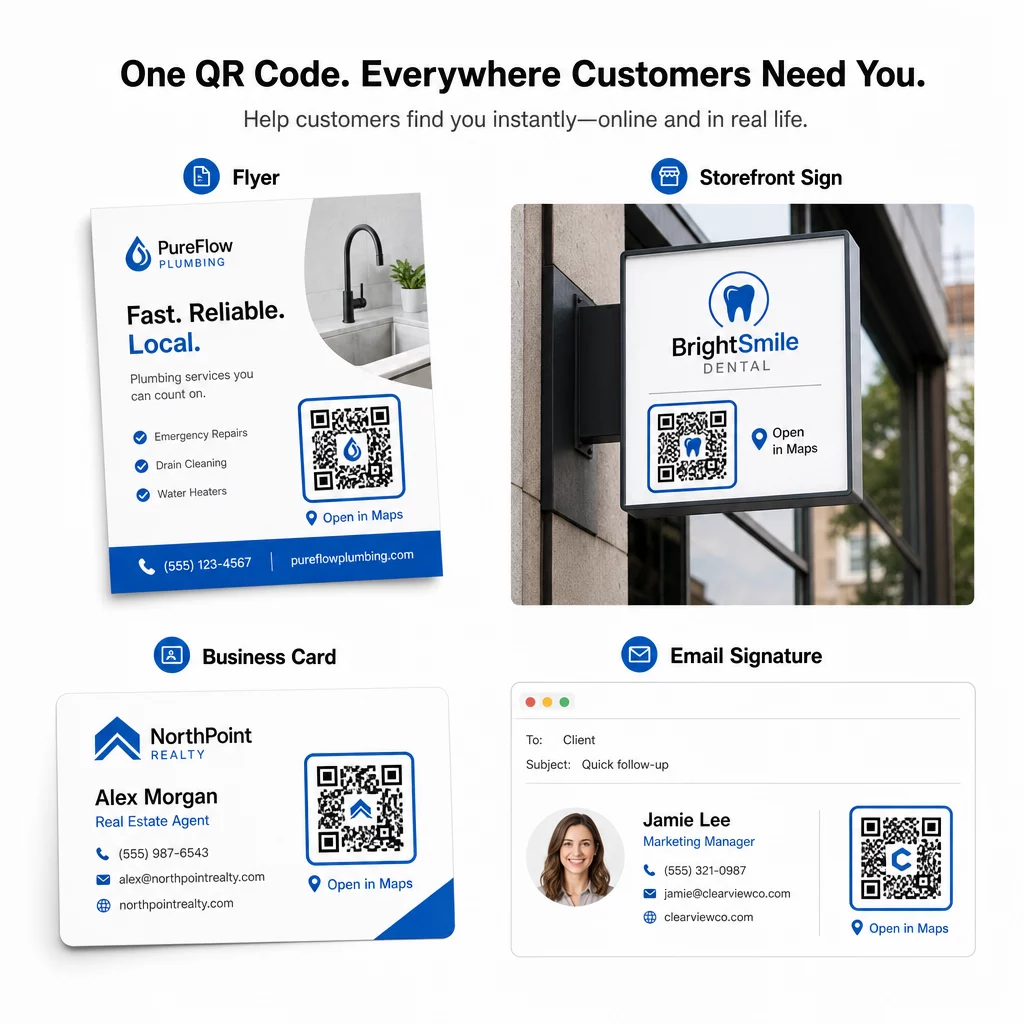
المواد المطبوعة:
- بطاقات العمل – استبدل العناوين المطبوعة برمز قابل للمسح الضوئي
- النشرات والكتيبات – وجّه ضيوف الحدث مباشرة إلى المكان
- واجهات المتاجر ولافتات الأبواب – ساعد العملاء في العثور على موقف للسيارات أو مداخل بديلة
- لافتات العقارات – وجّه المشترين إلى مواقع المنازل المفتوحة
- تغليف المنتجات – اربط العملاء بموقع متجرك الفعلي
القنوات الرقمية:
- توقيعات البريد الإلكتروني – استبدل العناوين الثابتة برمز موقع قابل للمسح الضوئي
- منشورات وقصص وسائل التواصل الاجتماعي – روّج لموقع جديد أو مكان حدث
- تذييلات المواقع الإلكترونية – اسمح للزوار بفتح الاتجاهات بنقرة واحدة
- القوائم الرقمية – ساعد رواد المطعم في العثور على موقع ثانٍ أو مكتب تموين
في كل موضع، قم بتضمين دعوة واضحة لاتخاذ إجراء بالقرب من الرمز. “امسح للحصول على الاتجاهات” أو “افتح في الخرائط” يخبر المستخدمين بالضبط ما يحدث عند المسح، مما يزيد من التفاعل. للحصول على إرشادات حول تحديد الموضع والحجم عبر المواد المختلفة، فإن دليل وضع رمز الاستجابة السريعة (QR) للتسويق يغطي التوصيات الخاصة بالتنسيق بالتفصيل.
مقارنة خطط Pageloot
| ميزة | الخطة المجانية | الخطة الاحترافية | مخصص/للمؤسسات |
|---|---|---|---|
| نوع رمز الاستجابة السريعة | ثابت فقط | ديناميكي وثابت | ديناميكي وثابت |
| روابط قابلة للتعديل | لا | نعم | نعم |
| تحليلات المسح | لا شيء | في الوقت الفعلي (الموقع، الجهاز) | سجل كامل ورؤى الخبراء |
| حد المسح السنوي | غير محدود (ثابت) | 250,000 | مخصص |
| التخصيص | أساسي (الألوان، الشعار) | خيارات تصميم متقدمة | تكامل كامل للعلامة التجارية |
| السعر الشهري | $0 | $38.34 | $106.52 |
تغطي الخطة المجانية رموزًا ثابتة دائمة بدون انتهاء صلاحية ومسحًا غير محدود. تفتح الخطط المدفوعة إمكانية التعديل الديناميكي والتحليلات في الوقت الفعلي والتخصيص المتقدم. تبدأ خطة المبتدئين بسعر $4.86/الشهر مع رمزين ديناميكيين و15,000 مسح سنوي – مناسبة للشركات الصغيرة التي تختبر التنسيق. تتضمن جميع الخطط المدفوعة فترة تجريبية مجانية لمدة 14 يومًا بدون الحاجة إلى بطاقة ائتمان.
كما قال لوكاس يانسن، مطور عقاري يستخدم رموز QR للمواقع من Pageloot:
“هذه أداة ممتازة ورموز QR تأخذك إلى حيث تريد تمامًا.”
للمواقع الدائمة، الرمز الثابت المجاني هو المسار الأبسط. لأي شيء يتطلب تحديثات أو تتبعًا أو قياس حملة، تمنحك الرموز الديناميكية المرونة والبيانات للتحسين بمرور الوقت. ابدأ بنسخ رابط خرائط Google الخاص بك، ثم أنشئ رمزك في الـ مولد باركود QR لموقع Google Maps, ، واختباره على جهاز حقيقي قبل إطلاقه.
الأسئلة الشائعة
لمعظم الاستخدامات، انسخ رابط المكان من زر المشاركة في خرائط جوجل – فهو يفتح الموقع الدقيق مباشرةً في خرائط جوجل أو المتصفح. إذا كنت ترغب في إرسال المستخدمين مباشرةً إلى التنقل خطوة بخطوة من نقطة بداية ثابتة، فاستخدم رابط الاتجاهات بدلاً من ذلك. الصق الرابط دائمًا في المتصفح أولاً للتأكد من أنه يوجه إلى المكان الصحيح قبل إنشاء الرمز.
بعد تثبيت موقعك في خرائط جوجل، استخدم زر المشاركة وانسخ الرابط الذي يوفره. هذا الرابط مرتبط بإحداثيات الدبوس المحددة، وليس مجرد بحث عام. تجنب نسخ الرابط من شريط عنوان متصفحك أثناء تصفح الخريطة – فقد لا تشير تلك النسخة بشكل موثوق إلى النقطة المثبتة. الصق رابط المشاركة في متصفح للتحقق قبل إنشاء رمز الاستجابة السريعة.
استخدم تنسيقًا متجهًا – SVG أو EPS أو PDF – لأي تطبيق طباعة. تتوسع ملفات المتجهات إلى أي حجم دون فقدان الحدة، على عكس صادرات PNG أو JPEG التي قد تبدو منقطة عند أبعاد الطباعة الكبيرة. بالنسبة للمواد المطبوعة، تأكد أيضًا من أن دقة الوضوح لا تقل عن 300 DPI وأن الكود يقيس 2 × 2 بوصة على الأقل للمسح الموثوق به من مسافة قريبة.