Potrebujete pomôcť zákazníkom nájsť vašu polohu bez toho, aby museli zadávať adresu? Manuálne zadávanie adresy vytvára trenie – a frustrovaných návštevníkov. Tento sprievodca vás prevedie premenou akejkoľvek polohy z Máp Google na skenovateľný QR kód v priebehu niekoľkých minút.
Získanie odkazu na vašu polohu v Mapách Google
Predtým, ako čokoľvek vygenerujete, potrebujete správny odkaz z Máp Google. Odkaz, ktorý skopírujete, presne určuje, kam sa používatelia dostanú po naskenovaní, takže presnosť je tu dôležitá.
Nájdite a pripnite svoju polohu
Otvorte Mapy Google a vyhľadajte svoj cieľ. Môžete zadať názov firmy ako “Starbucks Times Square”, celú ulicu alebo rozpoznateľný orientačný bod. Ak miesto nemá formálnu adresu – vonkajšie priestory, vchod do parku, parkovisko – stlačte a podržte na mobile (alebo kliknite na počítači), aby ste umiestnili špendlík na presné miesto.
Po pripnutí priblížte a potvrďte, že značka je na správnom mieste. Ak smerujete ľudí k špecifickému vchodu namiesto všeobecného pôdorysu budovy, upravte to. Tento dodatočný krok predchádza zmätku, keď návštevníci prídu.
Skopírujte odkaz na polohu
Po potvrdení vašej polohy ťuknite alebo kliknite na Zdieľať tlačidlo:
- Na mobile: Ťuknite na názov polohy v spodnej časti obrazovky, potom ťuknite na ikonu Zdieľať (šípka nahor) a vyberte “Kopírovať do schránky”.”
- Na počítači: Kliknite na Zdieľať v informačnom paneli alebo pod ponukou s tromi bodkami a potom vyberte “Kopírovať odkaz”.”
Skopírovaná URL adresa je zvyčajne skrátený odkaz ako `maps.app.goo.gl/xyz123`. Kratšie odkazy vytvárajú čistejšie, menej husté QR kódy, ktoré sa skenujú spoľahlivejšie. Predtým, ako budete pokračovať, vložte odkaz do prehliadača, aby ste potvrdili, že otvára správnu polohu.
Rôzne typy odkazov slúžia na rôzne účely:
| Typ odkazu | Čo robí | Príklad použitia |
|---|---|---|
| Odkaz na miesto | Otvorí konkrétnu firmu alebo adresu | Zdieľanie výkladu alebo kancelárie |
| Odkaz na vyhľadávanie | Zobrazí výsledky pre vyhľadávací dopyt | Zobrazenie “reštaurácií v blízkosti miesta konania” |
| Odkaz na trasu | Otvorí prednastavenú navigačnú trasu | Navigácia hostí z letiska do hotela |
Pre QR kódy používané na navigáciu a zdieľanie adries, odkaz na miesto alebo odkaz na trasu zvyčajne funguje najlepšie – preskočia krok vyhľadávania a presunú používateľa priamo do navigácie.
Generovanie vášho QR kódu
Keď máte odkaz pripravený, navštívte Google Maps QR kód generátor a vložte svoju URL adresu do vstupného poľa. Vyberte typ QR kódu – “Odkaz” alebo “Mapy” – a kód sa okamžite vygeneruje.
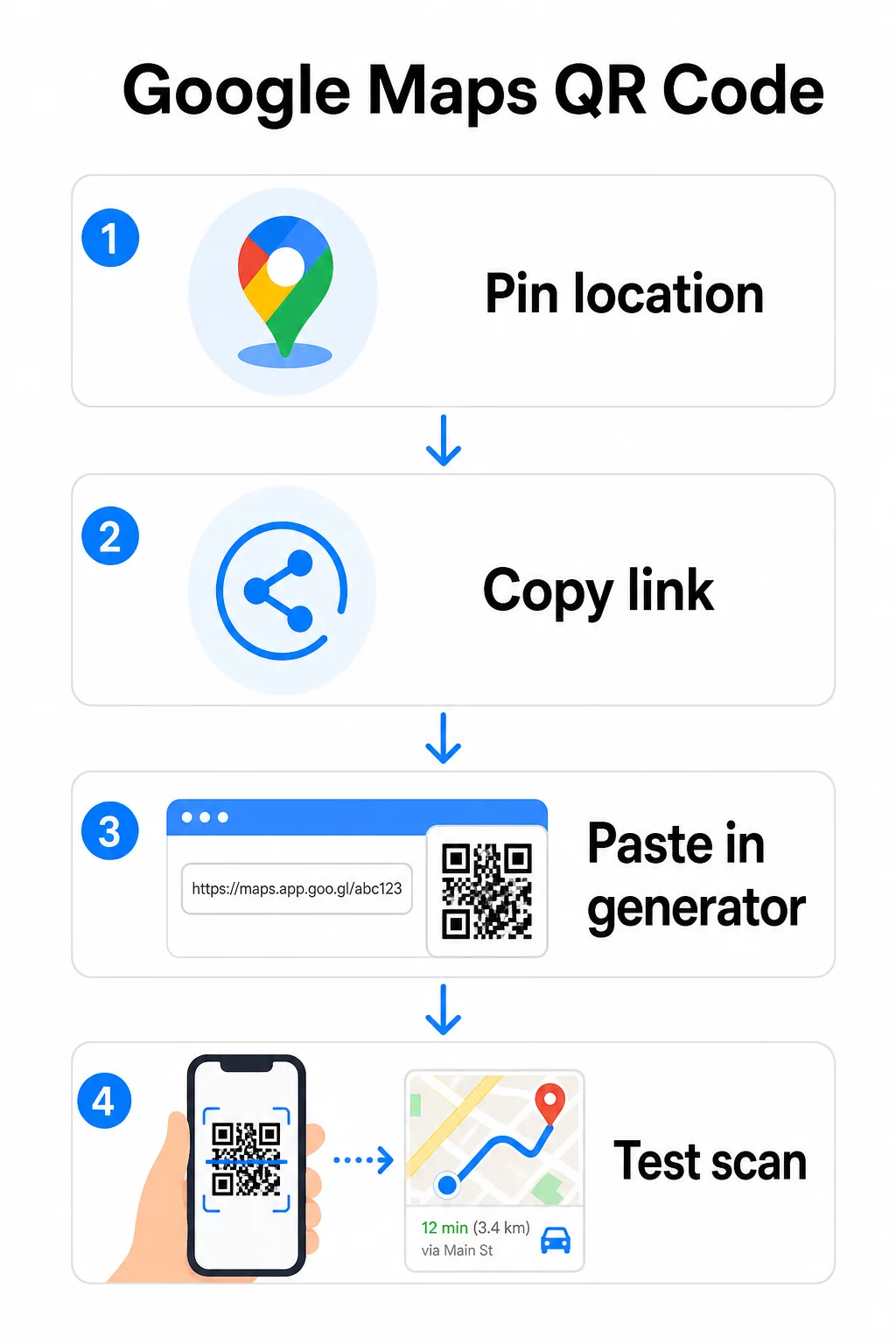
Pre trvalé umiestnenie bez potreby meniť cieľ, a statický QR kód je zadarmo a nikdy nevyprší. Stiahnite si ho ako PNG a ste pripravení ho použiť.
Potrebujete aktualizovať svoju polohu alebo sledovať údaje o skenovaní? Použi Generátor QR kódov Pageloot na vytvorenie dynamického kódu, ktorý vám umožní kedykoľvek zmeniť cieľ z vášho ovládacieho panela – bez potreby opätovnej tlače.
Statický vs. Dynamický: Ktorý potrebujete?
Statický QR kód kóduje odkaz na Google Maps priamo do vzoru. Je trvalý, bezplatný a funguje bez akéhokoľvek účtu. Kompromis: ak sa vaša poloha zmení, musíte vygenerovať a znova vytlačiť nový kód.
Dynamický QR kód namiesto toho ukladá krátku presmerovaciu URL adresu. Z vášho ovládacieho panela Pageloot ovládate, kam toto presmerovanie smeruje. To znamená:
- Môžete aktualizovať cieľ bez toho, aby ste sa dotkli vytlačeného kódu
- Získate analýzy v reálnom čase – počet skenov, typy zariadení, geografické polohy a časovanie
- Môžete testovať a vymieňať cieľové odkazy pre sezónne podujatia alebo dočasné miesta
Ak tlačíte kódy na trvalé značenie, statický funguje dobre. Pre kampane, podujatia, dočasné miesta alebo akúkoľvek situáciu, kde sa cieľ môže zmeniť, sú dynamické kódy praktickou voľbou.
Prispôsobenie vášho QR kódu
Obyčajný čiernobiely QR kód funguje, ale značkový funguje lepšie. Možnosti prispôsobenia Pageloot vám umožňujú:
- Pridajte logo vašej spoločnosti do stredu kódu
- Zmeňte farby tak, aby zodpovedali palete vašej značky (pre spoľahlivé skenovanie udržujte tmavé vzory na svetlom pozadí)
- Vyberte si z rôznych tvarov modulov: Okrúhly, Čiarkovaný alebo Diamantový
- Pridajte rámik s výzvou na akciu s textom ako “Skenujte pre smer” alebo “Nájdite nás na mapách”
Pri pridávaní loga alebo farieb použite úroveň opravy chýb Q alebo H. Tieto nastavenia umožňujú, aby QR kód zostal skenovateľný, aj keď je až 25 – 30 % vzoru zakrytých logom alebo menším poškodením. Logá by nemali presahovať 30 % celkovej plochy kódu a uistite sa, že neprekrývajú tri rohové “vyhľadávacie” štvorce.
Pre tlačové materiály si stiahnite kód ako súbor SVG, PDF alebo EPS. Tieto vektorové formáty zostávajú ostré v akejkoľvek veľkosti – čo je kľúčové pre veľkoformátovú tlač, ako sú plagáty alebo výklady obchodov.
Chcete plne značkový kód polohy? Ten Generátor QR kódov pre odkazy podporuje vlastné farby, logá a štýly rámov so 14-dňovou bezplatnou skúšobnou verziou – bez nutnosti zadávať kreditnú kartu.
Testovanie pred publikovaním
Vždy otestujte svoj QR kód predtým, ako ho použijete na tlač alebo v živej kampani. Nefunkčný alebo nesprávne nasmerovaný kód poškodzuje dôveru a plytvá nákladmi na tlač.
Prejdite si tento kontrolný zoznam:
- Naskenujte pomocou natívnej aplikácie fotoaparátu vášho telefónu na iOS aj Androide
- Potvrďte, že odkaz otvára správnu polohu v Google Maps
- Otestujte na zariadení bez nainštalovanej aplikácie Google Maps – malo by presmerovať na Google Maps v prehliadači
- Skenujte z viacerých vzdialeností a za rôznych svetelných podmienok
- Ak ste prispôsobili dizajn, potvrďte, že rohové vyhľadávacie štvorce a tichá zóna (prázdny okraj okolo kódu) sú neprekážané
Pre tlačové použitie, minimálna veľkosť 2 × 2 palce (približne 5 × 5 cm) zabezpečuje, že väčšina zariadení dokáže spoľahlivo skenovať zblízka. Pre materiály prezerané z diaľky – plagáty, bannery, výklady – zväčšite proporcionálne. Všeobecné pravidlo: kód by mal byť aspoň jedna desatina vzdialenosti, z ktorej ho ľudia budú skenovať.
Bežné problémy a riešenia:
| Problém so skenovaním | Riešenie |
|---|---|
| Rozmazaný alebo pixelovaný kód | Exportujte ako SVG, PDF alebo EPS pre tlač |
| Skener nerozpozná kód | Zvýšte kontrast; tmavé popredie na svetlom pozadí |
| Logo blokuje skenovanie | Uistite sa, že logo nezakrýva rohové štvorce; použite vyššiu korekciu chýb |
| Kód je príliš malý | Zväčšite na minimálne 2 × 2 palce pre fyzické materiály |
| Odkaz otvára nesprávne miesto | Pred generovaním znova overte skopírovaný odkaz Zdieľať v Mapách Google |
Pre viac podrobností o štandardoch veľkosti, kontrastu a umiestnenia pozrite osvedčených postupov pre čitateľnosť QR kódov a pokynoch pre použiteľnosť QR kódov.
Kde použiť QR kódy Máp Google
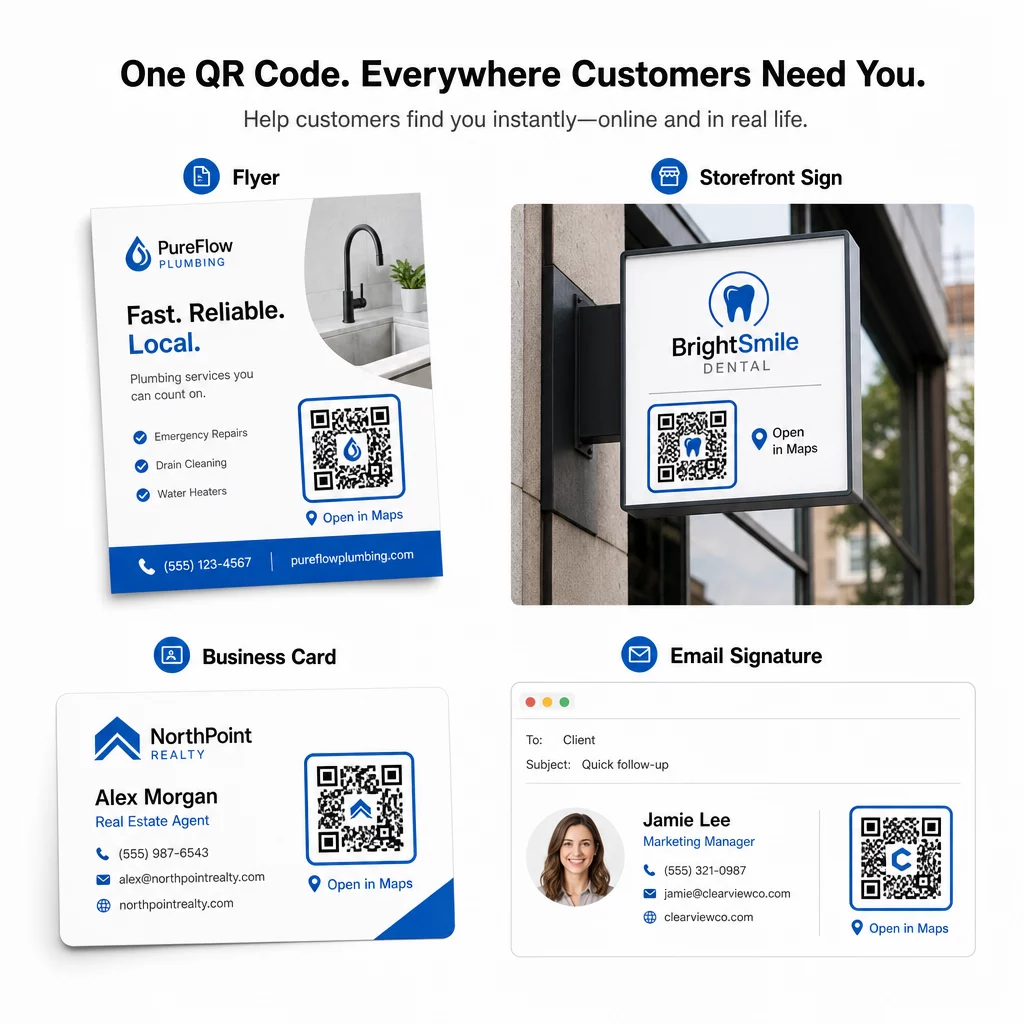
Po otestovaní je váš QR kód pripravený na nasadenie naprieč tlačenými a digitálnymi kanálmi:
Tlačené materiály:
- Vizitky – nahraďte tlačené adresy skenovateľným kódom
- Letáky a brožúry – nasmerujte hostí podujatia priamo na miesto konania
- Výklady obchodov a dverové tabule – pomôžte zákazníkom nájsť parkovanie alebo alternatívne vchody
- Realitné tabule – nasmerujte kupujúcich na miesta otvorených dverí
- Obaly produktov – prepojte zákazníkov s vašou fyzickou maloobchodnou prevádzkou
Digitálne kanály:
- E-mailové podpisy – nahraďte statické adresy skenovateľným kódom miesta
- Príspevky a príbehy na sociálnych sieťach – propagujte nové miesto alebo miesto konania podujatia
- Pätičky webových stránok – umožnite návštevníkom otvoriť pokyny jedným klepnutím
- Digitálne menu – pomôžte stravníkom nájsť druhú pobočku alebo cateringovú kanceláriu
Pri každom umiestnení zahrňte jasnú výzvu k akcii v blízkosti kódu. “Naskenujte pre pokyny” alebo “Otvoriť v mapách” presne povie používateľom, čo sa stane, keď naskenujú, čo zvyšuje angažovanosť. Pre pokyny k umiestneniu a veľkosti naprieč rôznymi materiálmi, the Sprievodca umiestnením QR kódu pre marketing pokrýva podrobné odporúčania špecifické pre formát.
Porovnanie plánov Pageloot
| FUNKCIA | Bezplatný plán | Plán Pro | Vlastné/Podnikové |
|---|---|---|---|
| Typ kódu QR | Len statické | Dynamické a statické | Dynamické a statické |
| Upraviteľné odkazy | Nie | Áno | Áno |
| Analytika skenov | Žiadne | V reálnom čase (poloha, zariadenie) | Kompletná história a odborné poznatky |
| Ročný limit skenov | Neobmedzené (statické) | 250,000 | Vlastný |
| Prispôsobenie | Základné (farby, logo) | Pokročilé možnosti dizajnu | Plná integrácia značky |
| Mesačná cena | $0 | $38.34 | $106.52 |
Bezplatný plán zahŕňa trvalé statické kódy bez expirácie a neobmedzené skenovanie. Platené plány odomykajú dynamické úpravy, analýzy v reálnom čase a pokročilé prispôsobenie. Plán Starter začína na 4,86 €/mesiac s 2 dynamickými kódmi a 15 000 ročnými skenmi – vhodný pre malé podniky testujúce formát. Všetky platené plány zahŕňajú 14-dňovú bezplatnú skúšobnú verziu bez nutnosti zadania kreditnej karty.
Ako to povedal Lucas Jansen, realitný developer, ktorý používa QR kódy polohy od Pageloot:
“Toto je vynikajúci nástroj a QR kódy vás zavedú presne tam, kam chcete.”
Pre trvalé lokality je najjednoduchšou cestou bezplatný statický kód. Pre čokoľvek, čo vyžaduje aktualizácie, sledovanie alebo meranie kampaní, vám dynamické kódy poskytujú flexibilitu a dáta na zlepšenie v priebehu času. Začnite skopírovaním odkazu na Google Maps a vygenerovaním kódu na Google Maps QR kód generátor, a testovanie na reálnom zariadení predtým, ako sa spustí.
Často kladené otázky
Pre väčšinu použití skopírujte odkaz na miesto z tlačidla Zdieľať v Mapách Google – otvorí presnú polohu priamo v Mapách Google alebo v prehliadači. Ak chcete používateľov poslať priamo do podrobnej navigácie z pevného východiskového bodu, použite namiesto toho odkaz na trasu. Vždy vložte odkaz najprv do prehliadača, aby ste potvrdili, že vedie na správne miesto, pred vygenerovaním kódu.
Po pripnutí vašej polohy v Google Maps, použite tlačidlo Zdieľať a skopírujte URL adresu, ktorú poskytuje. Tento odkaz je viazaný na konkrétne súradnice pripnutia, nielen na všeobecné vyhľadávanie. Vyhnite sa kopírovaniu URL adresy z adresného riadka prehliadača počas prehliadania mapy – táto verzia sa nemusí spoľahlivo rozlíšiť na pripnutý bod. Vložte odkaz na zdieľanie do prehliadača, aby ste ho overili pred vygenerovaním QR kódu.
Použite vektorový formát – SVG, EPS alebo PDF – pre akúkoľvek tlačovú aplikáciu. Vektorové súbory sa škálujú na akúkoľvek veľkosť bez straty ostrosti, na rozdiel od exportov PNG alebo JPEG, ktoré sa môžu javiť ako pixelované pri veľkých tlačových rozmeroch. Pre tlačové materiály tiež zabezpečte, aby bolo vaše rozlíšenie aspoň 300 DPI a aby kód meral aspoň 2 × 2 palce pre spoľahlivé skenovanie zblízka.