Besoin d'aider les clients à trouver votre emplacement sans leur faire taper une adresse ? La saisie manuelle d'adresse crée des frictions – et des visiteurs frustrés. Ce guide vous explique comment transformer n'importe quel emplacement Google Maps en un code QR scannable en quelques minutes.
Obtenir le lien de votre emplacement Google Maps
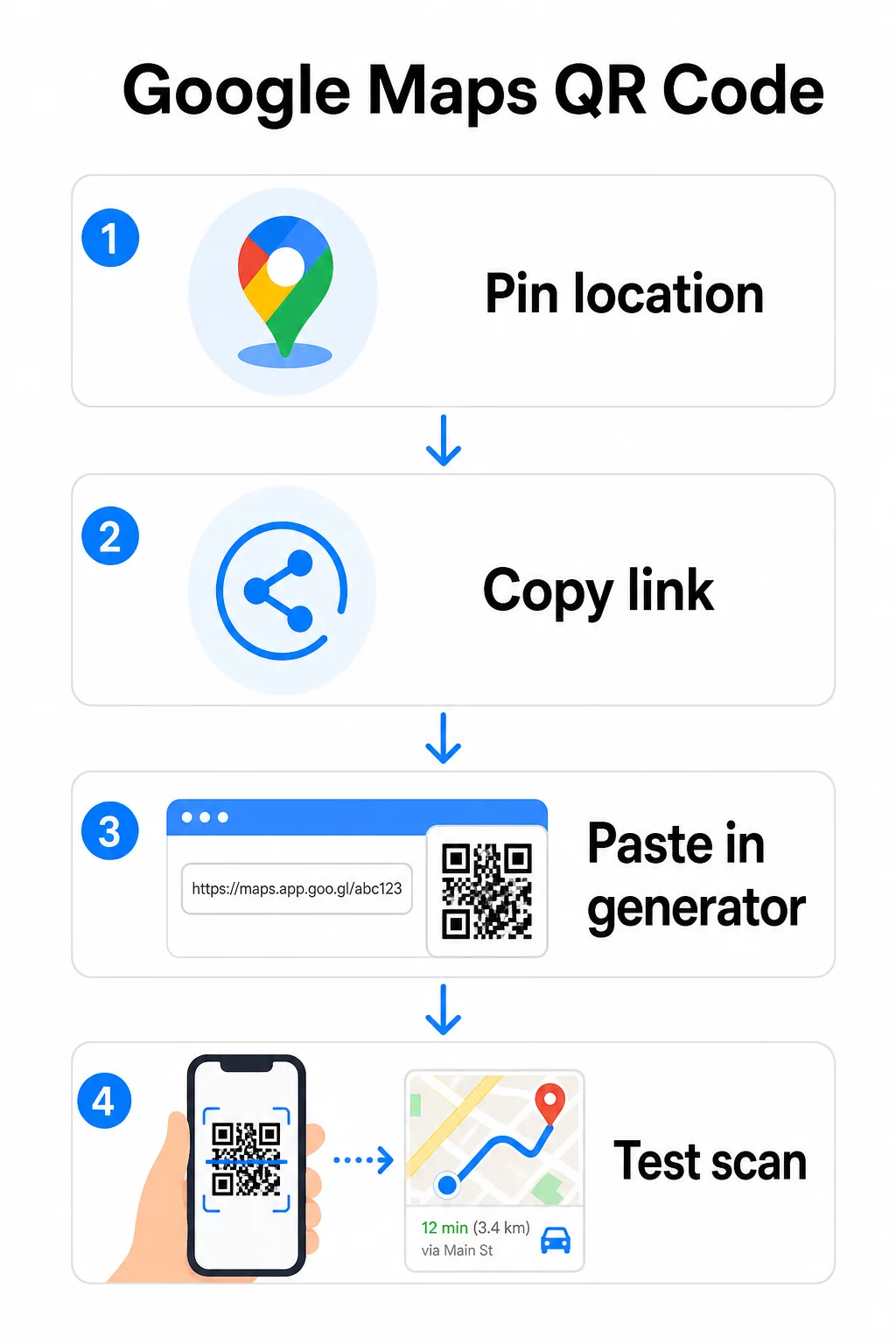
Avant de générer quoi que ce soit, vous avez besoin du bon lien depuis Google Maps. Le lien que vous copiez détermine exactement où les utilisateurs atterrissent lorsqu'ils scannent, donc la précision est importante ici.
Trouver et épingler votre emplacement
Ouvrez Google Maps et recherchez votre destination. Vous pouvez saisir un nom d'entreprise comme “ Starbucks Times Square ”, une adresse complète, ou un repère reconnaissable. Si l'emplacement n'a pas d'adresse formelle – un lieu extérieur, une entrée de parc, un parking – appuyez et maintenez sur mobile (ou cliquez sur ordinateur) pour déposer une épingle à l'endroit exact.
Une fois épinglé, zoomez et confirmez que le marqueur se trouve au bon endroit. Si vous dirigez les gens vers une entrée spécifique plutôt que vers l'empreinte générale du bâtiment, ajustez en conséquence. Cette étape supplémentaire évite la confusion à l'arrivée des visiteurs.
Copier le lien de l'emplacement
Une fois votre emplacement confirmé, appuyez ou cliquez sur le Partager bouton :
- Sur mobile : Appuyez sur le nom de l'emplacement en bas de l'écran, puis appuyez sur l'icône Partager (flèche vers le haut) et sélectionnez “ Copier dans le presse-papiers ”.”
- Sur ordinateur : Cliquez sur Partager dans le panneau d'informations ou sous le menu à trois points, puis sélectionnez “ Copier le lien ”.”
L'URL copiée est généralement un lien raccourci comme `maps.app.goo.gl/xyz123`. Les liens plus courts produisent des codes QR plus propres, moins denses et qui scannent plus fiablement. Avant de continuer, collez le lien dans un navigateur pour confirmer qu'il ouvre le bon emplacement.
Différents types de liens servent à différentes fins :
| Type de lien | Ce qu'il fait | Exemple de cas d'utilisation |
|---|---|---|
| Lien de lieu | Ouvre une entreprise ou une adresse spécifique | Partager une vitrine ou un bureau |
| Lien de recherche | Affiche les résultats d'une requête de recherche | Afficher “ restaurants près du lieu ” |
| Lien d'itinéraire | Ouvre un itinéraire de navigation prédéfini | Guider les invités d'un aéroport à un hôtel |
Pour Codes QR utilisés pour les itinéraires et le partage d'adresses, un lien de lieu ou un lien d'itinéraire fonctionne généralement mieux – ils évitent l'étape de recherche et dirigent l'utilisateur directement vers la navigation.
Générer votre code QR
Une fois votre lien prêt, visitez le Générateur de QR code Google Maps et collez votre URL dans le champ de saisie. Sélectionnez le type de code QR – “ Lien ” ou “ Cartes ” – et le code est généré instantanément.
Pour un emplacement permanent sans besoin de changer la destination, un code QR statique est gratuit et n'expire jamais. Téléchargez-le au format PNG et vous êtes prêt à l'utiliser.
Besoin de mettre à jour votre emplacement ou de suivre les données de scan ? Utilisez le Générateur de code QR Pageloot pour créer un code dynamique qui vous permet de modifier la destination à tout moment depuis votre tableau de bord – aucune réimpression n'est requise.
Statique vs. Dynamique : De quel type avez-vous besoin ?
Un code QR statique encode le lien Google Maps directement dans le motif. Il est permanent, gratuit et fonctionne sans aucun compte. L'inconvénient : si votre emplacement change, vous devez générer et réimprimer un nouveau code.
Un code QR dynamique stocke une courte URL de redirection à la place. Vous contrôlez la destination de cette redirection depuis votre tableau de bord Pageloot. Cela signifie :
- Vous pouvez mettre à jour la destination sans toucher au code imprimé
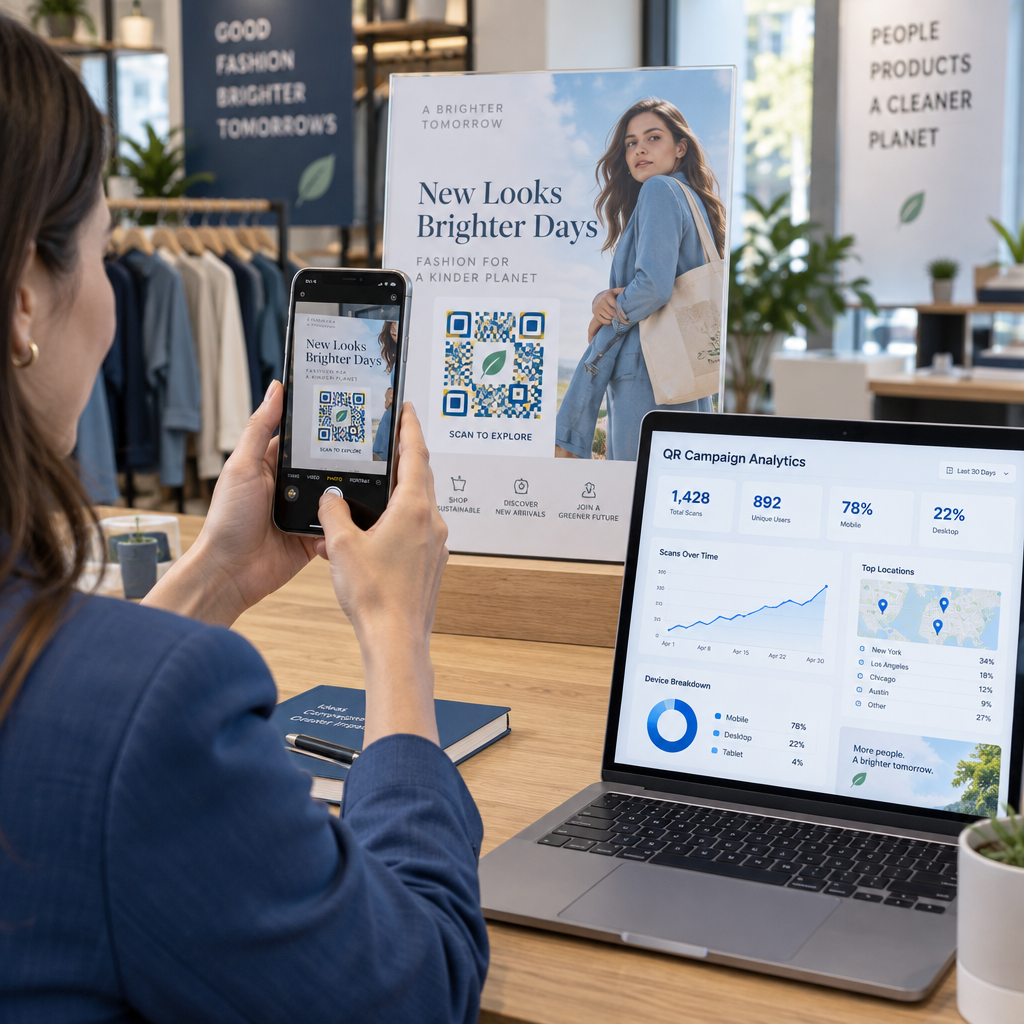
- Vous obtenez des analyses en temps réel – nombre de scans, types d'appareils, emplacements géographiques et horaires
- Vous pouvez tester et échanger des liens de destination pour des événements saisonniers ou des lieux temporaires
Si vous imprimez des codes sur une signalisation permanente, le statique fonctionne bien. Pour les campagnes, les événements, les emplacements éphémères ou toute situation où la destination pourrait changer, les codes dynamiques sont le choix pratique.
Personnaliser votre code QR
Un code QR noir et blanc simple fonctionne, mais un code de marque est plus performant. Les options de personnalisation de Pageloot vous permettent de :
- Ajouter le logo de votre entreprise au centre du code
- Changer les couleurs pour correspondre à la palette de votre marque (gardez des motifs sombres sur un fond clair pour une lecture fiable)
- Choisir parmi différentes formes de modules : Rond, Tiret ou Diamant
- Ajouter un cadre d'appel à l'action avec du texte comme “ Scanner pour les directions ” ou “ Nous trouver sur les cartes ”
Lorsque vous ajoutez un logo ou des couleurs, utilisez le niveau de correction d'erreur Q ou H. Ces paramètres permettent au code QR de rester scannable même si jusqu'à 25 à 30 % du motif est obscurci par un logo ou des dommages mineurs. Gardez les logos à un maximum de 30 % de la surface totale du code et assurez-vous qu'ils ne chevauchent pas les trois carrés de “ recherche ” des coins.
Pour les supports imprimés, téléchargez votre code au format SVG, PDF ou EPS. Ces formats vectoriels restent nets quelle que soit la taille – ce qui est essentiel pour l'impression grand format comme les affiches ou la signalisation de vitrine.
Vous voulez un code de localisation entièrement personnalisé à votre marque ? Le Générateur de codes QR de liens prend en charge les couleurs personnalisées, les logos et les styles de cadre avec un essai gratuit de 14 jours – aucune carte de crédit requise.
Test avant publication
Testez toujours votre code QR avant de l'imprimer ou de le lancer dans une campagne en direct. Un code cassé ou mal dirigé nuit à la confiance et gaspille les coûts d'impression.
Parcourez cette liste de contrôle :
- Scannez avec l'application appareil photo native de votre téléphone sur iOS et Android
- Confirmez que le lien ouvre le bon emplacement dans Google Maps
- Testez sur un appareil sans l'application Google Maps installée – il devrait rediriger vers Google Maps dans le navigateur
- Scannez à différentes distances et sous différentes conditions d'éclairage
- Si vous avez personnalisé le design, confirmez que les carrés de recherche des coins et la zone de silence (la bordure vierge autour du code) sont dégagés
Pour l'impression, une taille minimale de 2 × 2 pouces (environ 5 × 5 cm) assure que la plupart des appareils peuvent scanner de manière fiable à courte portée. Pour les matériaux vus de loin – affiches, bannières, vitrines – agrandissez proportionnellement. Une ligne directrice générale : le code doit être au moins un dixième de la distance à laquelle les gens le scanneront.
Problèmes courants et solutions :
| Problème de scan | Solution |
|---|---|
| Code flou ou pixélisé | Exporter en SVG, PDF ou EPS pour l'impression |
| Le scanner ne reconnaît pas le code | Augmenter le contraste ; premier plan sombre sur fond clair |
| Le logo bloque le scan | Assurez-vous que le logo ne couvre pas les carrés d'angle ; utilisez une correction d'erreur plus élevée |
| Code trop petit | Augmenter à au moins 2 × 2 pouces pour les supports physiques |
| Le lien ouvre le mauvais emplacement | Revérifiez le lien de partage copié dans Google Maps avant de générer |
Pour plus de détails sur les normes de taille, de contraste et de placement, voir les meilleures pratiques pour la lisibilité des codes QR et directives d'utilisation des codes QR.
Où utiliser les codes QR Google Maps
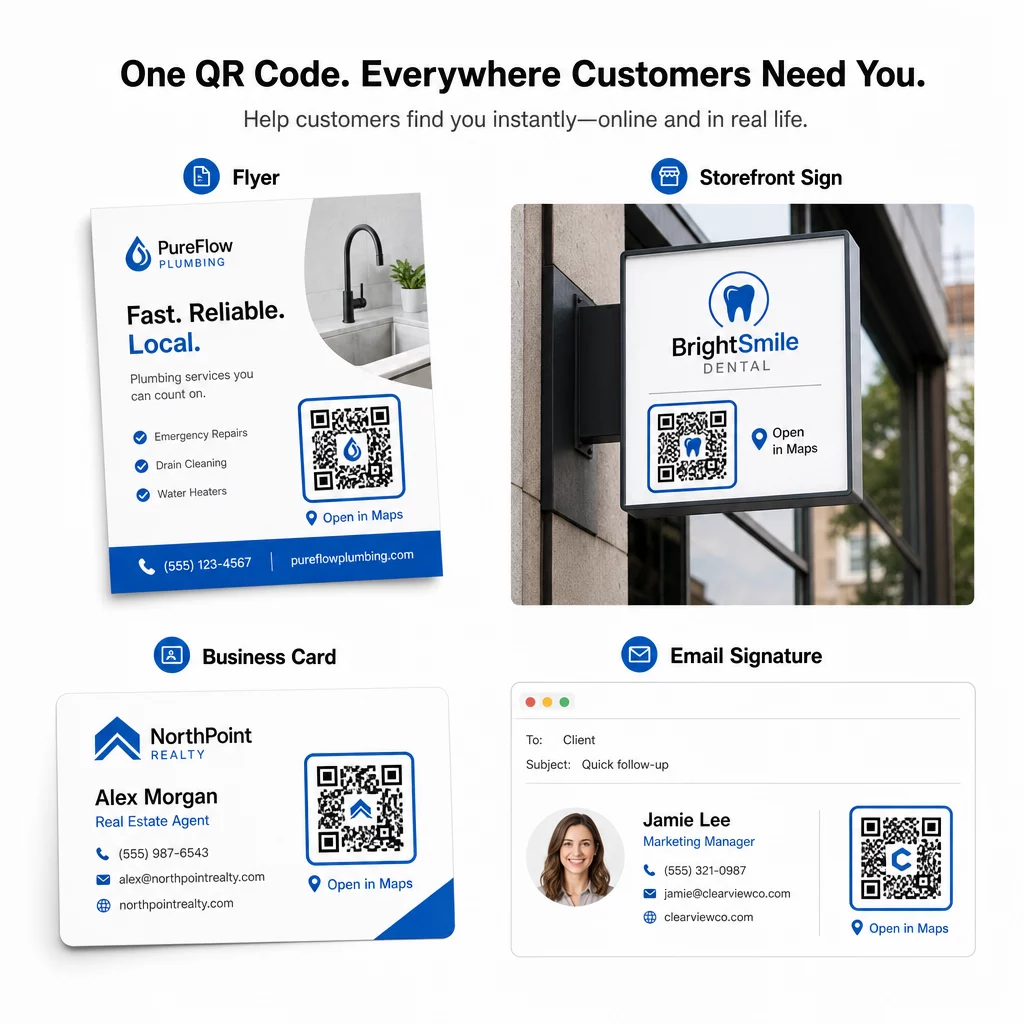
Une fois testé, votre code QR est prêt à être déployé sur les canaux imprimés et numériques :
Matériaux imprimés :
- Cartes de visite – remplacez les adresses imprimées par un code scannable
- Flyers et brochures – guidez les invités de l'événement directement vers le lieu
- Vitres de magasin et panneaux de porte – aidez les clients à trouver un parking ou des entrées alternatives
- Panneaux immobiliers – dirigez les acheteurs vers les lieux de portes ouvertes
- Emballages de produits – liez les clients à votre emplacement de vente au détail physique
Canaux numériques :
- Signatures d'e-mail – remplacez les adresses statiques par un code de localisation scannable
- Publications et Stories sur les réseaux sociaux – faites la promotion d'un nouveau lieu ou d'un lieu d'événement
- Pieds de page de site web – permettez aux visiteurs d'ouvrir les directions en un seul clic
- Menus numériques – aidez les convives à trouver un deuxième emplacement ou un bureau de traiteur
Dans chaque emplacement, incluez un appel à l'action clair près du code. “ Scannez pour les directions ” ou “ Ouvrir dans les cartes ” indique aux utilisateurs exactement ce qui se passe lorsqu'ils scannent, ce qui augmente l'engagement. Pour des conseils sur le positionnement et la taille sur différents matériaux, le Guide de placement des codes QR pour le marketing couvre en détail les recommandations spécifiques au format.
Comparaison des plans Pageloot
| FONCTIONNALITÉ | Plan Gratuit | Plan Pro | Personnalisé/Entreprise |
|---|---|---|---|
| Type de code QR | Statique uniquement | Dynamique et Statique | Dynamique et Statique |
| Liens modifiables | Non | Oui | Oui |
| Analyse des scans | Aucune | Temps réel (localisation, appareil) | Historique complet et analyses d'experts |
| Limite de scans annuels | Illimité (statique) | 250,000 | Personnalisé |
| Personnalisation | Basique (couleurs, logo) | Options de conception avancées | Intégration complète de la marque |
| Prix mensuel | $0 | $38.34 | $106.52 |
Le plan gratuit couvre les codes statiques permanents sans expiration et avec des scans illimités. Les plans payants débloquent l'édition dynamique, l'analyse en temps réel et la personnalisation avancée. Un plan Starter commence à $4,86/mois avec 2 codes dynamiques et 15 000 scans annuels – adapté aux petites entreprises testant le format. Tous les plans payants incluent un essai gratuit de 14 jours sans carte de crédit requise.
Comme l'a dit Lucas Jansen, un promoteur immobilier qui utilise les codes QR de localisation de Pageloot :
“ C'est un excellent outil et les codes QR vous mènent exactement là où vous voulez. ”
Pour les emplacements permanents, un code statique gratuit est le chemin le plus simple. Pour tout ce qui nécessite des mises à jour, un suivi ou une mesure de campagne, les codes dynamiques vous offrent la flexibilité et les données nécessaires pour vous améliorer au fil du temps. Commencez par copier votre lien Google Maps, générez votre code à l'adresse suivante : Générateur de QR code Google Maps, et le tester sur un appareil réel avant sa mise en ligne.
Questions fréquentes
Pour la plupart des utilisations, copiez le Lien de lieu depuis le bouton Partager dans Google Maps – il ouvre l'emplacement exact directement dans Google Maps ou un navigateur. Si vous voulez envoyer les utilisateurs directement vers la navigation pas à pas depuis un point de départ fixe, utilisez plutôt un Lien d'itinéraire. Collez toujours le lien d'abord dans un navigateur pour confirmer qu'il mène au bon endroit avant de générer le code.
Après avoir épinglé votre position dans Google Maps, utilisez le bouton Partager et copiez l'URL qu'il fournit. Ce lien est lié aux coordonnées spécifiques de l'épingle, et non à une simple recherche générale. Évitez de copier l'URL de la barre d'adresse de votre navigateur pendant que vous naviguez sur la carte – cette version pourrait ne pas toujours pointer de manière fiable vers le point épinglé. Collez le lien de partage dans un navigateur pour vérifier avant de générer le code QR.
Utilisez un format vectoriel – SVG, EPS ou PDF – pour toute application d'impression. Les fichiers vectoriels s'adaptent à n'importe quelle taille sans perdre de netteté, contrairement aux exportations PNG ou JPEG qui peuvent apparaître pixélisées à de grandes dimensions d'impression. Pour les supports d'impression, assurez-vous également que votre résolution est d'au moins 300 DPI et que le code mesure au moins 2 × 2 pouces pour une numérisation fiable à courte portée.