Menerapkan ratusan atau ribuan kode QR satu per satu bukanlah alur kerja – itu adalah hambatan. Ketika kampanye mencakup lini produk, lokasi, atau seluruh jaringan distribusi, pembuatan manual menimbulkan kesalahan, penundaan, dan biaya pencetakan ulang yang secara diam-diam menguras sumber daya. Panduan ini menjelaskan cara menggunakan alat kode QR dinamis massal untuk menghasilkan, mengelola, dan melacak volume kode yang besar secara efisien di seluruh perusahaan Anda.
Mengapa Kode QR Dinamis Adalah Fondasi yang Tepat
Sebelum menyelami pembuatan massal, penting untuk memahami mengapa kode QR dinamis secara khusus penting pada skala perusahaan.
SEBUAH kode QR statis menyandikan tujuan tetap langsung ke dalam polanya. Setelah dicetak, tujuan tersebut tidak dapat diubah. Jika URL berubah, halaman produk berpindah, atau kampanye berakhir, setiap kode yang dicetak menjadi usang – dan mencetak ulang ribuan label atau materi sangat mahal.
Kode QR dinamis bekerja secara berbeda. Mereka menunjuk ke tautan pengalihan singkat yang Anda kendalikan. Ketika seseorang memindai kode, mereka diarahkan melalui pengalihan tersebut ke tujuan apa pun yang saat ini Anda tetapkan. Anda dapat memperbarui tujuan kapan saja – bahkan setelah kode dicetak dan didistribusikan – tanpa menghasilkan kode baru atau menyentuh selembar materi cetak pun. Mereka juga mendukung pelacakan pemindaian dan analitik, yang tidak dapat disediakan oleh kode statis.
Bagi perusahaan yang mengelola kampanye besar, lini produk, atau aset fisik, kode dinamis menghilangkan siklus pencetakan ulang dan memberi Anda visibilitas berkelanjutan tentang kinerja setiap kode.
Mulai Membuat Kode QR Dinamis dalam Skala Besar Siap untuk menghasilkan kode QR yang dapat diedit dan dilacak untuk kampanye perusahaan Anda? Coba Generator QR Code Dinamis gratis selama 14 hari – tidak memerlukan kartu kredit.
Cara Kerja Pembuatan Kode QR Massal
Menghasilkan ribuan kode QR unik tidak harus berarti ribuan langkah manual. Platform QR perusahaan mendukung dua metode utama untuk pembuatan massal: unggahan CSV dan integrasi API.
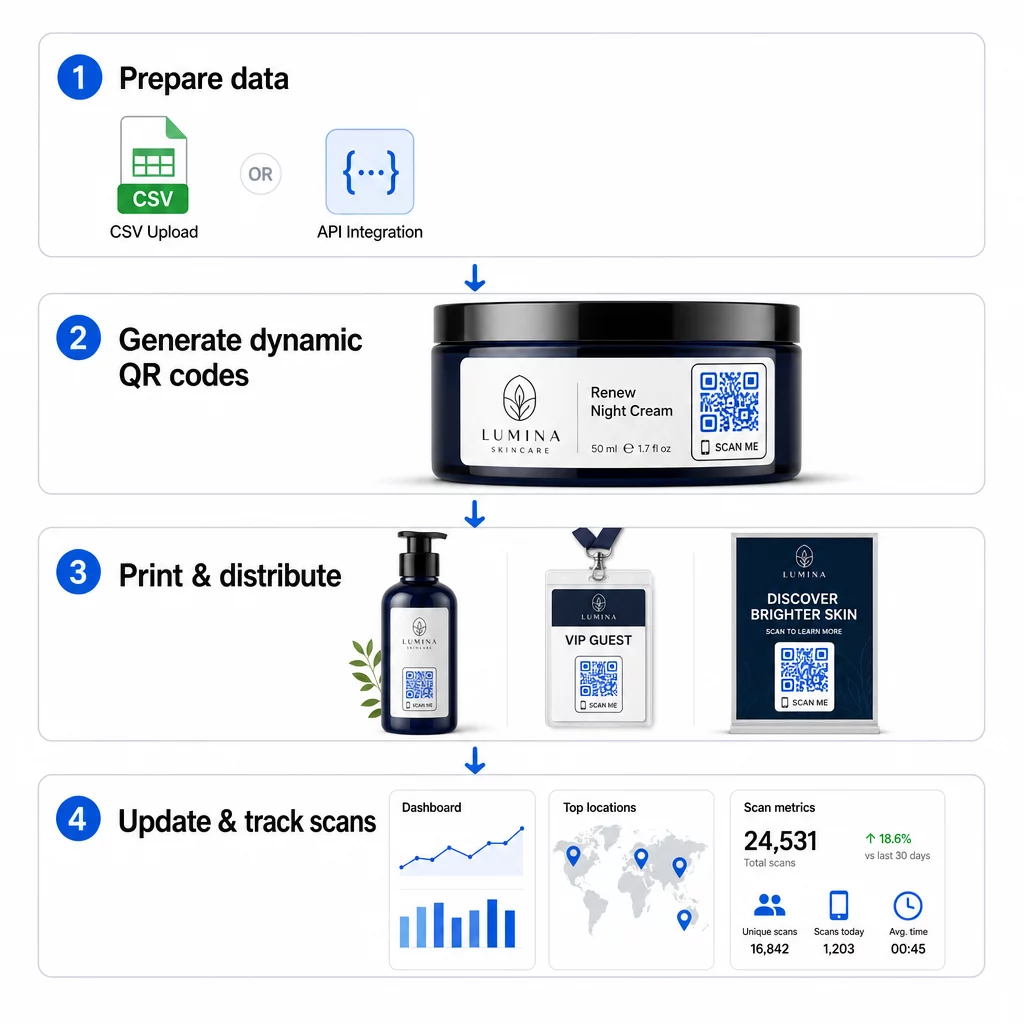
Unggah CSV
Unggah CSV adalah metode pembuatan massal yang paling mudah diakses. Anda menyiapkan lembar kerja di mana setiap baris berisi data untuk satu kode QR – biasanya URL tujuan, label atau pengidentifikasi, dan informasi variabel apa pun seperti SKU produk, nomor batch, atau tag kampanye. Anda kemudian mengunggah file tersebut ke platform, dan sistem menghasilkan kode QR yang sesuai untuk setiap baris.
Saat menyiapkan file CSV Anda, perhatikan praktik-praktik berikut:
- Simpan file dalam format CSV UTF-8 untuk menghindari kesalahan pengkodean
- Tempatkan kolom pengidentifikasi atau folder di awal
- Gunakan format tanggal yang konsisten (yyyy-mm-dd) untuk setiap kolom tanggal
- Definisikan kolom yang diperlukan dengan jelas dan validasi header sebelum mengunggah
Platform seperti Pageloot memungkinkan pengguna untuk menghasilkan ratusan kode dari satu unggahan CSV, menjadikannya praktis untuk katalog produk, tiket acara, atau kampanye spesifik lokasi di mana setiap kode membutuhkan data unik.
Integrasi API
Untuk tim yang membutuhkan pembuatan kode QR yang tertanam langsung ke dalam alur kerja mereka yang sudah ada, integrasi API adalah pendekatan yang lebih ampuh. Alih-alih mengekspor CSV secara manual, sistem Anda meneruskan parameter langsung ke platform QR – memicu pembuatan kode secara otomatis saat produk baru ditambahkan, pesanan ditempatkan, atau kampanye diluncurkan.
Pembuatan berbasis API juga mendukung pembaruan massal dinamis. Menggunakan permintaan PATCH atau PUT, Anda dapat memperbarui URL tujuan di ribuan kode secara bersamaan – tanpa intervensi manual apa pun. Ini sangat berguna ketika URL kampanye berubah, halaman produk direstrukturisasi, atau konten musiman perlu diganti di seluruh lini produk.
Integrasi API menghubungkan pembuatan kode QR ke alat yang sudah Anda gunakan: sistem manajemen inventaris, platform CRM, backend e-commerce, dan alat otomatisasi pemasaran. Hasilnya adalah saluran data yang mulus di mana kode QR dibuat, diperbarui, dan dihentikan sejalan dengan operasi Anda yang lebih luas.
Fitur Inti yang Perlu Dievaluasi dalam Platform Perusahaan
Tidak semua platform QR dibangun untuk beban kerja perusahaan. Saat mengevaluasi opsi, prioritaskan kemampuan berikut:
Kapasitas pembuatan massal – Platform harus menangani volume Anda tanpa menurunkan kinerja. Cari dukungan untuk pembuatan batch tanpa batas atau bervolume tinggi, bukan hanya batch kecil.
Pengeditan dinamis – Setiap kode di perpustakaan Anda harus dapat diedit setelah dibuat. Ini menghilangkan biaya pencetakan ulang saat tujuan berubah dan memungkinkan Anda menggunakan kembali materi fisik di berbagai kampanye.
Manajemen terpusat – Satu dasbor untuk mengatur, mencari, dan memperbarui seluruh portofolio kode QR Anda. Bagi perusahaan yang menjalankan puluhan kampanye secara bersamaan, organisasi sama pentingnya dengan kecepatan pembuatan.
Pencitraan merek dan kustomisasi – Kode perusahaan harus mencerminkan merek Anda. Cari integrasi logo, skema warna kustom, dan templat desain yang dapat diterapkan secara konsisten di seluruh batch besar. Dukungan data variabel memungkinkan Anda menyematkan pengidentifikasi unik – seperti SKU produk atau kode promosi – dalam desain atau tujuan setiap kode.
Analitik dan pelaporan - Pelacakan kode QR mengubah setiap pemindaian menjadi titik data. Dasbor waktu nyata harus menampilkan jumlah pemindaian, lokasi geografis, jenis perangkat, dan stempel waktu. Pelaporan tingkat kampanye harus menunjukkan tingkat konversi dan tren keterlibatan sehingga Anda dapat mengoptimalkan saat berjalan.
Keamanan dan kepatuhan – Penerapan perusahaan memerlukan kontrol akses berbasis peran sehingga hanya pengguna yang berwenang yang dapat membuat, mengedit, atau menghapus kode. Enkripsi data melindungi informasi saat transit dan saat tidak digunakan. Kepatuhan terhadap GDPR, HIPAA, atau SOX tergantung pada industri Anda dan jenis data yang ditangani kode QR Anda.
Format ekspor – Format vektor resolusi tinggi (SVG, EPS, PDF) memastikan kode direproduksi dengan jelas dalam ukuran apa pun, mulai dari label produk hingga spanduk pameran dagang.
Kasus Penggunaan Perusahaan untuk Kode QR Dinamis Massal
Kombinasi pembuatan massal dan kemampuan edit dinamis membuka berbagai aplikasi operasional:
Pelabelan dan pengemasan produk – Hasilkan kode unik untuk setiap SKU atau batch, tautkan ke manual digital, halaman pendaftaran garansi, atau verifikasi keaslian. Jika URL tujuan berubah, perbarui secara terpusat daripada mencetak ulang label.
Tiket acara dan check-in – Buat satu kode per peserta yang berisi izin akses sesi dan data pendaftaran. Kode dinamis memungkinkan Anda memperbarui informasi tempat atau jadwal sesi setelah tiket didistribusikan.
Pembayaran nirsentuh dan menu digital – Tetapkan kode unik untuk setiap meja, kios, atau lokasi. Perbarui konten menu atau harga secara terpusat tanpa mengganti materi fisik.
Kampanye pemasaran yang dipersonalisasi – Tautkan setiap kode ke halaman arahan yang disesuaikan dengan segmen audiens, wilayah, atau riwayat pembelian tertentu. Lacak versi mana yang mendorong keterlibatan tertinggi dan sesuaikan kampanye.
Penyebaran perangkat lunak dan aplikasi – Distribusikan kode unik yang memicu instalasi atau konfigurasi aplikasi khusus departemen, mengurangi biaya dukungan TI selama peluncuran besar.
Rantai pasokan dan pelacakan aset – Sematkan nomor batch, tanggal pembuatan, dan catatan inspeksi ke dalam kode yang melekat pada aset fisik. Data pemindaian menyediakan jejak audit real-time di seluruh jaringan distribusi Anda.
Analitik dan Otomatisasi dalam Skala Besar
Pembuatan massal hanyalah separuh dari persamaan. Untuk membenarkan investasi dan meningkatkan kampanye di masa mendatang, Anda memerlukan data kinerja yang andal.
SEBUAH Sistem manajemen kode QR mengumpulkan metrik termasuk total pemindaian, pemindaian unik, stempel waktu pemindaian, lokasi geografis, dan jenis perangkat. Dasbor real-time membuat data ini dapat ditindaklanjuti – Anda dapat mengidentifikasi kode mana yang berkinerja buruk di tengah kampanye dan memperbarui tujuannya untuk menguji konten atau penawaran yang berbeda.
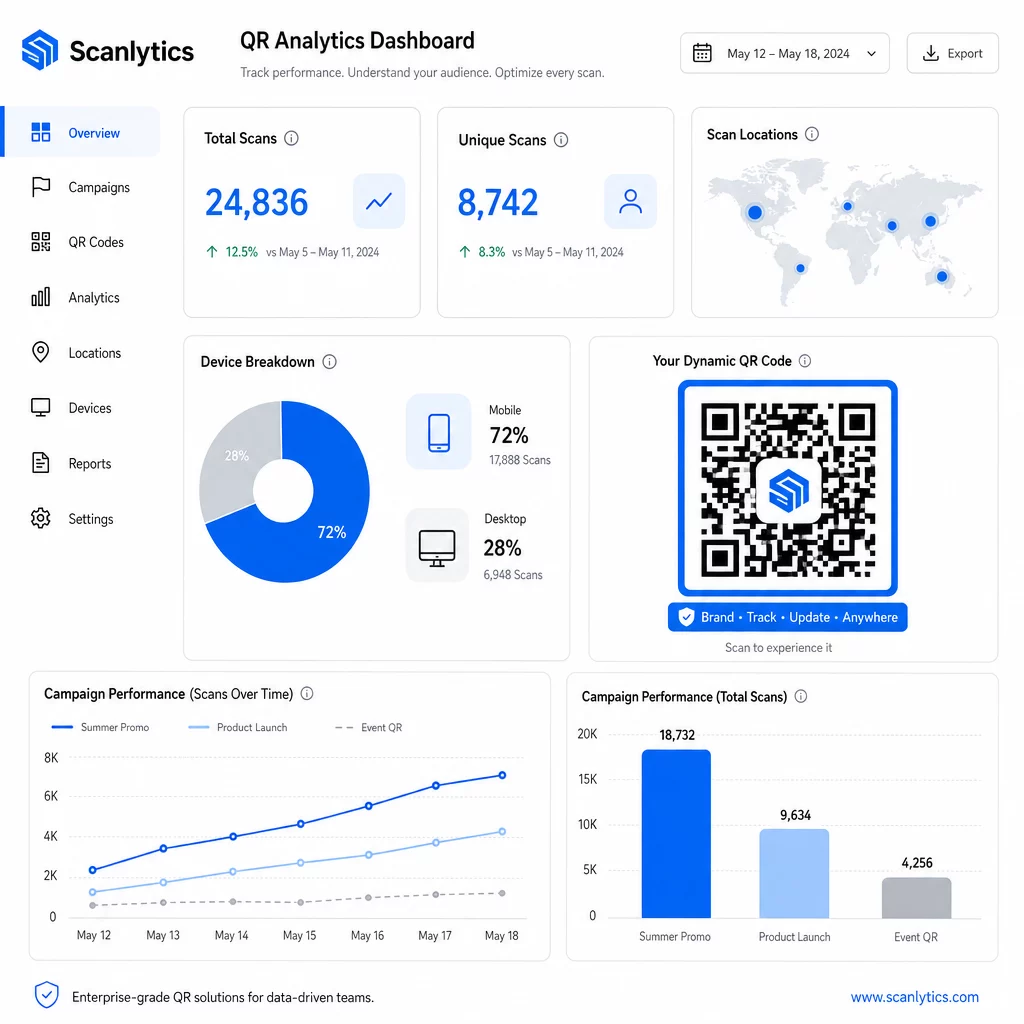
Ketika dipasangkan dengan alat otomatisasi pemasaran, peristiwa pemindaian dapat memicu urutan tindak lanjut secara otomatis. Pelanggan yang memindai kode produk dapat masuk ke audiens penargetan ulang, menerima SMS, atau ditambahkan ke alur kerja CRM – tanpa transfer data manual apa pun.
Penyebaran terjadwal menambah lapisan efisiensi lainnya. Kode dapat dikonfigurasi untuk mengaktifkan secara otomatis saat peluncuran kampanye dan menonaktifkan di akhir promosi, memastikan konten selalu terkini tanpa memerlukan pemantauan manual.
Lacak Setiap Pemindaian di Seluruh Kampanye Anda Itu Platform kode QR Pageloot memberikan tim perusahaan dasbor terpusat untuk analitik waktu nyata, pengeditan dinamis, dan manajemen massal – semuanya di satu tempat.
Membandingkan Platform Kode QR Perusahaan
Saat mengevaluasi platform, pembeda utamanya adalah kapasitas massal, pengeditan dinamis, kedalaman analitik, standar keamanan, dan fleksibilitas integrasi.
| Platform | Pembuatan Massal | Pengeditan Dinamis | ANALITIK | Integrasi | Keamanan |
|---|---|---|---|---|---|
| Pageloot | Pembuatan batch tanpa batas melalui CSV atau API | Pengeditan waktu nyata tanpa mencetak ulang | Jumlah pemindaian, lokasi, perangkat, dasbor waktu nyata | CRM, Akses API | Sesuai GDPR, data terenkripsi |
| Uniqode | Hingga 2.000 kode per batch | Pembaruan konten dinamis | Pelacakan lokasi, waktu, perangkat | HubSpot, Salesforce, Zapier (5.000+ alat) | SOC 2 Tipe II, SSO, akses berbasis peran |
| Batch QR | Batch bervolume tinggi dari input data | Pembaruan URL waktu nyata | Pemantauan waktu akses | Terbatas | Standar |
| Hovercode | Dasbor terpusat untuk volume besar | Pembaruan dinamis | Lokasi pemindaian, perangkat, stempel waktu | API, webhook, CRM | Izin multi-pengguna |
| Generator Kode QR Langsung | Ribuan kode melalui API atau Google Sheets | Dukungan QR Dinamis | Analitik geografis | CRM, sistem inventaris | Standar |
Dukungan Pageloot untuk lebih dari 25 jenis kode QR dan pembuatan massal tanpa batas membuatnya sangat serbaguna untuk perusahaan yang mengelola berbagai jenis kampanye secara bersamaan. Untuk tim yang membutuhkan integrasi pihak ketiga yang mendalam, platform seperti Uniqode menawarkan pustaka konektor yang lebih luas. Pilihan yang tepat tergantung pada volume Anda, tumpukan teknologi yang ada, dan persyaratan kepatuhan.
Untuk agensi yang mengelola kampanye QR atas nama beberapa klien, Alat agensi Pageloot menambahkan laporan klien yang dapat dibagikan, opsi label putih, dan izin berbasis peran yang menjaga data klien terpisah dan disajikan secara profesional.
Memulai dengan Kode QR Dinamis Massal
Jalur paling efisien untuk manajemen kode QR skala perusahaan mengikuti pola yang konsisten:
- Audit kasus penggunaan kode QR Anda saat ini dan identifikasi di mana pembuatan massal akan menghemat waktu paling banyak
- Petakan bidang data yang dibutuhkan setiap jenis kode – URL tujuan, pengidentifikasi variabel, tag kampanye
- Pilih platform yang mendukung unggahan CSV dan integrasi API sehingga Anda dapat menskalakan salah satu pendekatan sesuai kebutuhan
- Bangun struktur penamaan dan folder sebelum unggahan massal pertama Anda untuk menjaga portofolio besar tetap terorganisir
- Uji batch kecil sebelum penerapan penuh, memverifikasi bahwa setiap kode memindai dengan benar dan mengarahkan ke tujuan yang tepat
- Siapkan pelacakan analitik sejak hari pertama sehingga Anda memiliki data kinerja dasar untuk setiap kampanye
Kode QR dinamis massal bekerja paling baik ketika pembuatan, manajemen, dan analitik ditangani dalam satu platform. Memisahkan fungsi-fungsi ini di berbagai alat menciptakan celah data dan pekerjaan rekonsiliasi manual yang merusak peningkatan efisiensi yang ingin Anda capai.
Itu Generator kode QR dinamis Pageloot mencakup ketiga fungsi – membuat kode secara massal, mengedit tujuan tanpa mencetak ulang, dan memantau kinerja secara real time – dari satu dasbor terpusat. Mulai uji coba gratis 14 hari untuk menghasilkan batch pertama Anda dan lihat bagaimana platform ini berskala dengan kebutuhan kampanye Anda.
Pertanyaan yang sering diajukan
Kode QR statis menyandikan tujuan tetap yang tidak dapat diubah setelah pembuatan. Jika URL atau konten berubah, Anda harus mencetak ulang setiap kode. Kode QR dinamis menggunakan tautan pengalihan singkat yang Anda kendalikan, memungkinkan Anda memperbarui tujuan kapan saja tanpa mencetak ulang. Bagi perusahaan yang mengelola volume kode besar di seluruh kampanye jangka panjang atau materi fisik, kode dinamis menghilangkan biaya pencetakan ulang dan memungkinkan pelacakan pemindaian berkelanjutan.
Anda menyiapkan spreadsheet di mana setiap baris berisi data untuk satu kode QR – biasanya URL tujuan, pengidentifikasi unik, dan bidang variabel apa pun seperti SKU produk atau tag kampanye. Anda menyimpan file dalam format CSV UTF-8 dan mengunggahnya ke platform. Sistem menghasilkan kode QR unik untuk setiap baris dan mengemasnya untuk diunduh, seringkali sebagai file ZIP. Pendekatan ini berfungsi dengan baik untuk katalog produk, tiket acara, dan kampanye spesifik lokasi di mana setiap kode membutuhkan data yang berbeda.
Platform QR Perusahaan melacak metrik termasuk jumlah pemindaian total, pemindaian unik, stempel waktu pemindaian, lokasi geografis setiap pemindaian, dan jenis perangkat (termasuk sistem operasi). Dasbor waktu nyata membuat data ini tersedia saat pemindaian terjadi, sehingga tim dapat mengidentifikasi kode yang berkinerja buruk dan memperbarui tujuan mereka di tengah kampanye. Platform yang lebih canggih juga mendukung pelacakan konversi dan integrasi dengan alat CRM atau otomatisasi pemasaran sehingga peristiwa pemindaian dapat memicu alur kerja tindak lanjut secara otomatis.