Apakah versi palsu produk Anda sampai ke pelanggan? Selain kehilangan pendapatan, barang palsu merusak kepercayaan merek dan dapat membahayakan pembeli. Halaman ini menjelaskan bagaimana kode QR, yang diimplementasikan dengan identitas unik yang diserialkan dan infrastruktur yang tepat, menciptakan sistem otentikasi produk yang praktis dan terukur.
Mengapa Pemalsuan Adalah Masalah yang Layak Diselesaikan Secara Sistematis
Skala perdagangan barang palsu sangat signifikan. OECD dan EUIPO memperkirakan bahwa barang palsu menyumbang sekitar $467 miliar dalam perdagangan global pada tahun 2021, mewakili 2.3% dari total impor global. Sebuah laporan Kantor Paten dan Merek Dagang A.S. menemukan bahwa pemalsuan dan pembajakan merugikan bisnis A.S. lebih dari $200 miliar per tahun dan berkontribusi pada hilangnya lebih dari 750.000 pekerjaan.
Bagi pemilik merek, kerugian finansial langsung diperparah oleh kerusakan yang lebih sulit diukur: pelanggan yang membeli produk versi palsu Anda dan memiliki pengalaman buruk akan menyalahkan merek Anda, bukan pemalsu.
Sistem otentikasi berbasis QR mengatasi masalah ini pada tingkat item. Alih-alih hanya memverifikasi bahwa jenis produk asli, sistem ini memverifikasi bahwa unit tertentu, individual, adalah asli – dan memberi Anda data untuk mendeteksi ketika ada yang salah.
Mengapa Kode QR Standar Saja Tidak Cukup
Sebelum menjelajahi cara kerja otentikasi QR, penting untuk memahami batasan inti yang sering diabaikan banyak merek.
Kode QR generik mudah diduplikasi. Pemalsu dapat memotret kode Anda dengan resolusi tinggi, mencetaknya kembali pada ribuan produk palsu, dan kode-kode kloning tersebut akan memindai dan berperilaku identik dengan aslinya. Jika kode QR Anda hanya mengarah ke halaman produk atau URL verifikasi statis, itu tidak memberikan perlindungan nyata.
Kode QR statis tradisional yang digunakan untuk ketertelusuran atau informasi produk tidak memberikan otentikasi intrinsik. Jika produk itu sendiri palsu, halaman yang ditautkan masih tampak asli dan tidak dapat mengkonfirmasi keasliannya sendiri.
Otentikasi QR yang efektif membutuhkan tiga hal yang bekerja sama:
- Serialisasi: setiap item individual mendapatkan kode unik, bukan hanya setiap SKU atau batch
- Verifikasi sisi server: setiap pemindaian diperiksa terhadap catatan tepercaya, bukan hanya URL tujuan
- Logika pemantauan: anomali seperti pemindaian berulang dari lokasi berbeda, atau jumlah pemindaian yang melebihi kuantitas yang diharapkan, memicu peringatan
Kode QR adalah antarmuka yang menghadap pelanggan. Keamanan berada di infrastruktur di baliknya.
Cara Kerja Otentikasi QR Serial
Kode QR serial menetapkan kode unik untuk setiap unit produk individual. Ketika pelanggan memindai kode tersebut, sistem tidak hanya memuat halaman – ia melakukan pencarian terhadap catatan produk untuk mengkonfirmasi bahwa item spesifik ini, dengan pengidentifikasi spesifik ini, dikenal dan valid.
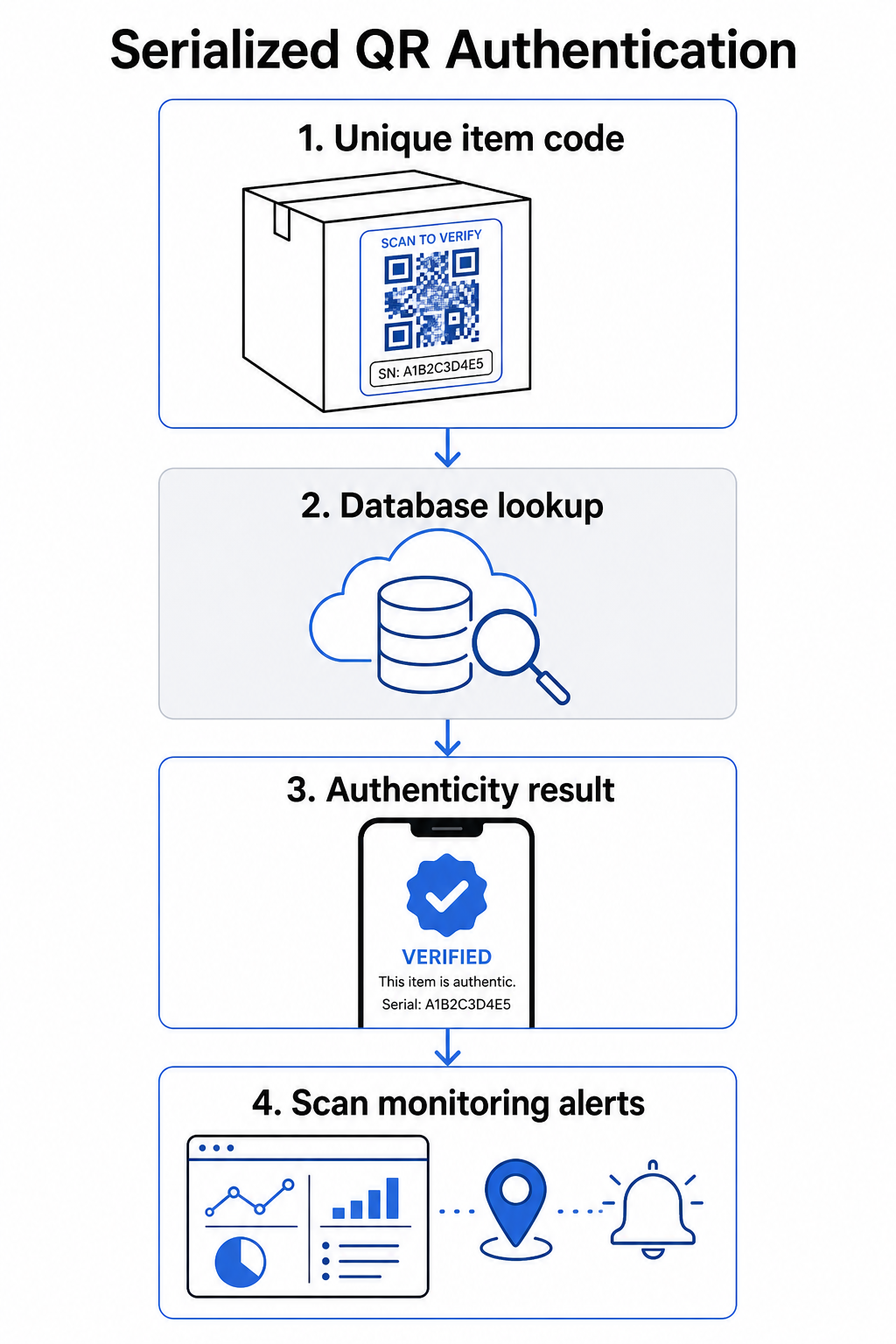
Alur kerja otentikasi lengkap biasanya mencakup langkah-langkah berikut:
- Buat pengidentifikasi unik untuk setiap item – ini bisa berupa nomor seri, referensi batch, stempel waktu produksi, atau kombinasi yang dikodekan sebagai URI GS1 Digital Link, yang mencakup Pengidentifikasi Aplikasi GS1 untuk GTIN, nomor batch/lot, dan nomor seri
- Tautkan pengidentifikasi tersebut ke catatan produk digital – disimpan dalam database aman yang dikendalikan sistem Anda
- Hasilkan dan tetapkan kode QR unik yang mengarah ke titik akhir verifikasi yang membawa pengidentifikasi atau token buram, bukan data mentah itu sendiri
- Terapkan kode QR ke produk fisik – untuk item bernilai lebih tinggi, menempatkannya di bawah panel gosok atau di seluruh segel anti-rusak mencegah transfer dan penggunaan kembali label
- Catat setiap pemindaian sebagai peristiwa – menangkap stempel waktu, lokasi, dan informasi perangkat untuk mendukung pemantauan berkelanjutan
- Sajikan halaman verifikasi yang menampilkan detail produk dan hasil keaslian yang jelas sehingga pelanggan segera tahu apa yang mereka lihat
Halaman verifikasi itu sendiri penting. Halaman yang dirancang dengan baik menampilkan nama produk, detail batch atau garansi, dan konfirmasi keaslian yang lugas. Beberapa sistem juga menampilkan berapa kali kode tertentu telah dipindai – kode yang mengumpulkan pemindaian jauh lebih banyak dari yang diharapkan menjadi pemicu kecurigaan untuk barang palsu yang menggunakan kode duplikat.
Kelola dan Lacak Setiap Kode Produk Pageloot Generator QR Code Dinamis memungkinkan Anda membuat kode QR yang dapat dilacak, diedit, dan mengakses dasbor analitik lengkap yang menunjukkan kapan dan di mana setiap pemindaian terjadi – memberi Anda lapisan pemantauan yang dibutuhkan sistem otentikasi Anda.
Peran Kode QR Dinamis dalam Otentikasi
Kode QR dinamis adalah dasar praktis untuk autentikasi produk karena mereka memisahkan kode yang dicetak dari tujuan yang ditunjuknya. Kode fisik pada produk tidak pernah berubah, tetapi tujuan dan logika di baliknya dapat diperbarui kapan saja tanpa pencetakan ulang.
Ini penting untuk autentikasi dalam beberapa cara spesifik:
- Anda dapat memperbarui halaman verifikasi jika infrastruktur backend Anda berubah, tanpa menarik kembali atau mencetak ulang produk berlabel
- Anda dapat menonaktifkan kode jika suatu batch ditarik kembali atau jika aktivitas penipuan terdeteksi di sekitar pengenal tertentu
- Anda dapat mengarahkan ulang pemindaian ke pengalaman yang berbeda berdasarkan jumlah pemindaian, geografi, atau waktu – misalnya, mengarahkan pemindaian pertama ke halaman verifikasi lengkap dan pemindaian berikutnya ke pemberitahuan peringatan
Platform Pageloot mendukung pengeditan tujuan kode QR setelah dicetak dan menyediakan analitik pemindaian termasuk lokasi, jenis perangkat, dan waktu pemindaian – yang semuanya langsung masuk ke alur kerja pemantauan.
Untuk merek yang mengelola volume produk besar, Pageloot mendukung pembuatan kode QR massal melalui unggahan CSV, dengan skala hingga 100.000 kode, yang membuat pembuatan kode berseri praktis bahkan pada skala manufaktur. Pemasok dan pengecer dapat menjelajahi alat khusus melalui Solusi pemasok dan pengecer Pageloot.
Menggabungkan Kode QR dengan Elemen Keamanan Fisik
Peneliti keamanan dan spesialis perlindungan merek secara konsisten mencatat bahwa kode QR saja tidak dapat mencegah pemalsuan. Perlindungan yang efektif menggabungkan lapisan QR dengan elemen fisik atau struktural yang lebih sulit ditiru.
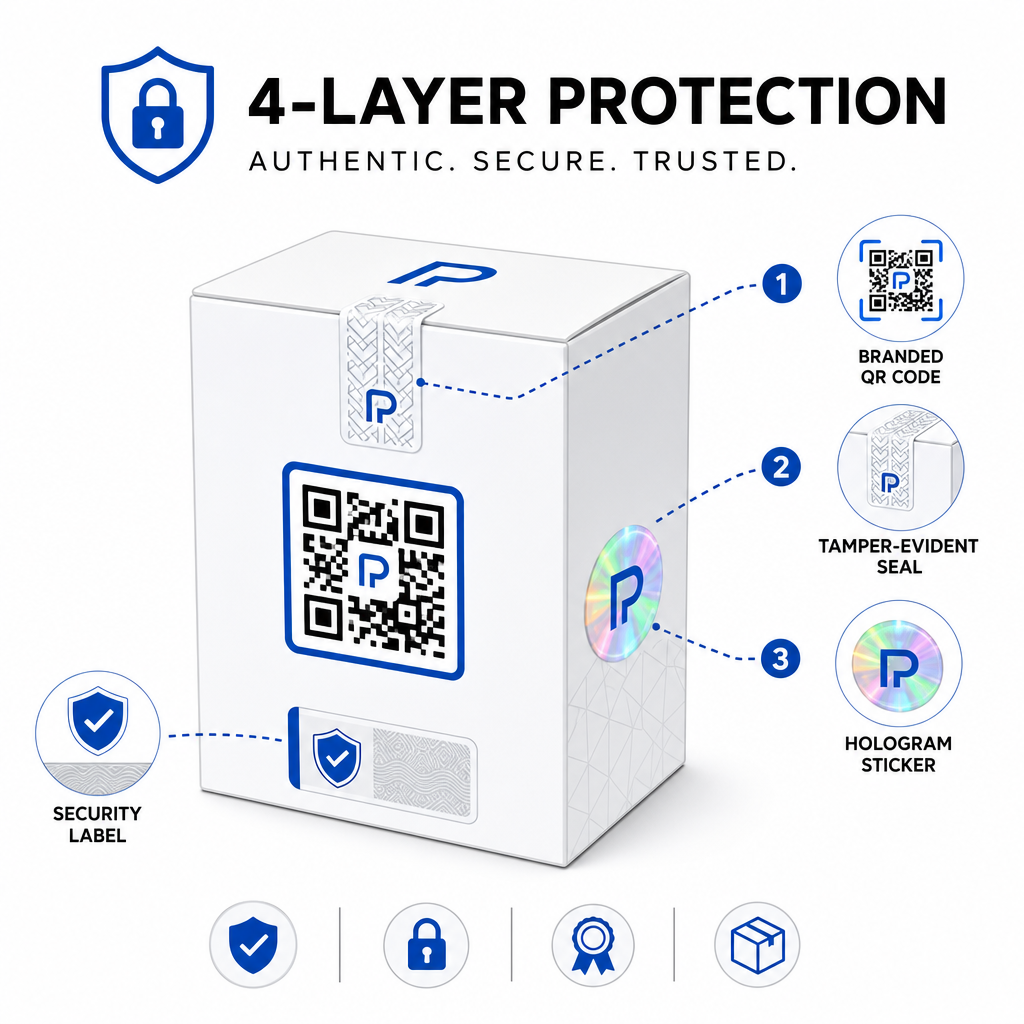
Pendekatan umum meliputi:
- Segel anti-rusak: menempatkan kode QR melintasi segel yang menunjukkan kerusakan terlihat jika dilepas
- Panel gosok: menyembunyikan kode QR di bawah lapisan yang dilepas pembeli pada penggunaan pertama, membuat kode lebih sulit difoto oleh pemalsu sebelum pembelian
- Overlaminasi holografik atau tinta keamanan: menambahkan lapisan fisik yang terlihat rusak saat disalin
- Pola anti-salin yang aman: beberapa sistem menyematkan tekstur anti-salin mikroskopis dalam desain kode QR itu sendiri, menyebabkan pola rusak atau menghilang saat difoto dan dicetak ulang
Strategi kombinasi penting karena menggeser autentikasi dari satu titik kegagalan. Pemalsu yang dapat menduplikasi kode QR tidak dapat dengan mudah juga meniru segel anti-rusak, hologram, atau substrat sensitif salinan pada saat yang bersamaan.
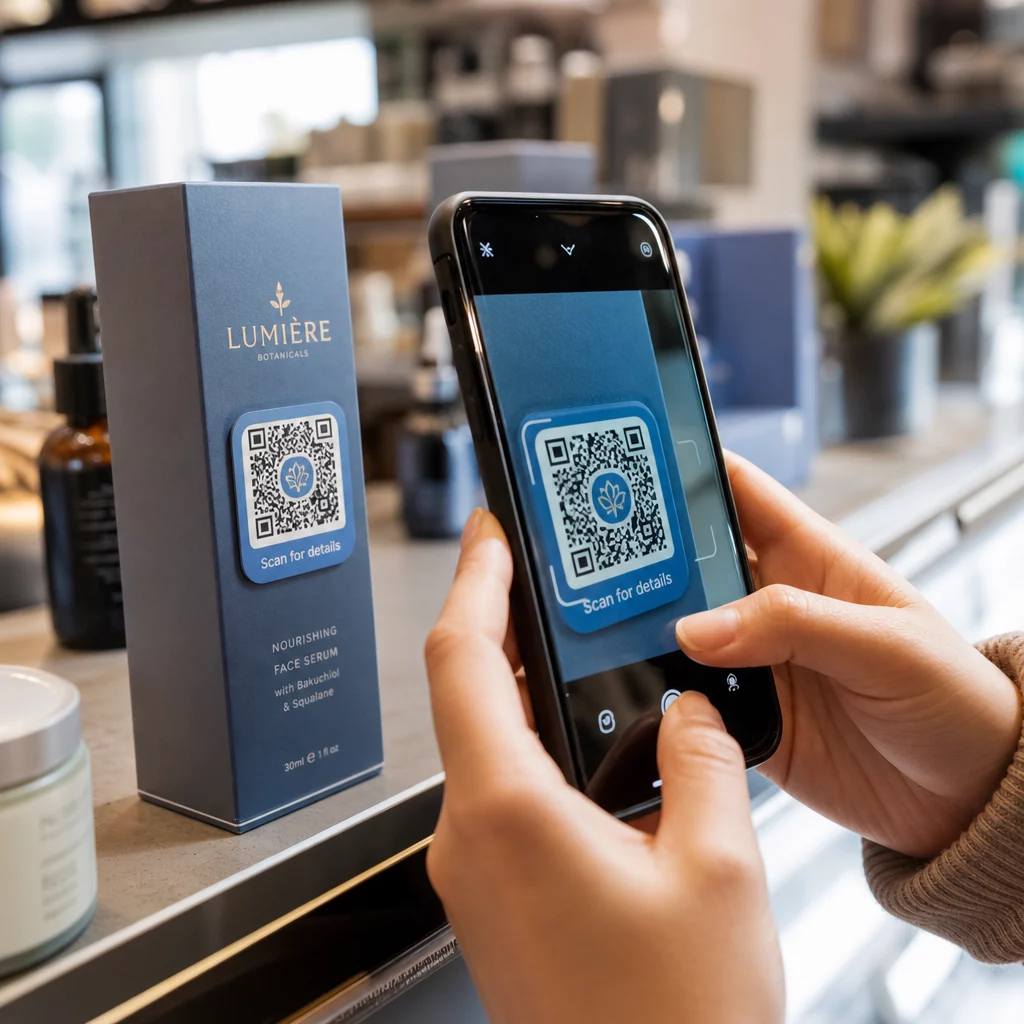
Untuk melihat lebih luas tentang bagaimana kode QR berinteraksi dengan kemasan produk fisik, panduan tentang kode QR pada kemasan produk mencakup penempatan dan desain secara rinci.
Verifikasi Sisi Server dan Pemantauan Pemindaian
Lapisan keamanan terpenting dalam sistem autentikasi QR adalah yang tidak pernah dilihat pelanggan: validasi sisi server.
Ketika pelanggan memindai kode QR yang diautentikasi, sistem harus:
- Validasi pengenal terhadap database produk Anda sebelum menyajikan hasil apa pun
- Catat peristiwa pemindaian dengan stempel waktu, koordinat GPS atau lokasi berbasis IP, dan sidik jari perangkat
- Periksa anomali seperti kode yang sama dipindai dari dua lokasi yang berjauhan secara geografis dalam hitungan menit, atau satu kode berseri mengumpulkan pemindaian melampaui penggunaan sah yang masuk akal
- Gunakan token buram daripada pengenal mentah dalam konten QR, sehingga bahkan jika seseorang membaca data QR secara langsung mereka tidak dapat membuat palsu yang valid tanpa akses ke logika server Anda
Pendekatan ini – di mana kode QR hanya membawa referensi buram dan semua verifikasi yang berarti terjadi di sisi server – adalah standar yang direkomendasikan oleh praktisi keamanan untuk kasus penggunaan autentikasi.
Untuk menyelami secara teknis tentang bagaimana enkripsi dapat lebih melindungi sistem autentikasi berbasis QR, posting tentang kode QR terenkripsi untuk platform autentikasi mencakup metode enkripsi dan pertimbangan kepatuhan secara rinci.
Desain dan Penempatan untuk Kode QR Autentikasi
Kode QR autentikasi yang tidak dapat dipindai pelanggan mengalahkan tujuannya sendiri. Praktik terbaik standar untuk kualitas cetak dan penempatan berlaku sama di sini:
- Ukuran minimum: ikuti aturan praktis 1 cm per 10 cm jarak pemindaian untuk memastikan pemindaian yang andal di berbagai perangkat
- Kontras tinggi: gunakan modul gelap pada latar belakang terang, dan hindari hasil akhir yang mengkilap atau reflektif yang menyebabkan silau
- Zona tenang: sisakan batas yang jelas setidaknya empat modul di sekitar kode, bebas dari teks atau elemen desain
- Resolusi cetak: gunakan format vektor atau PNG minimal 300 DPI untuk aplikasi cetak
- Penempatan datar: hindari permukaan melengkung, jahitan, atau lipatan yang mendistorsi geometri kode
- Ajakan bertindak yang jelas: sertakan instruksi singkat di dekat kode, seperti “Pindai untuk memverifikasi keaslian,” agar pelanggan memahami untuk apa kode tersebut
Untuk panduan lebih rinci mengenai penempatan khusus kemasan, panduan utama kode QR untuk label produk mencakup ukuran, kontras, dan posisi secara mendalam.
Kode QR bermerek dengan logo Anda tertanam juga menandakan legitimasi kepada pelanggan sekilas. Generator QR Code dengan Logo memungkinkan Anda menggabungkan identitas merek langsung ke dalam desain kode tanpa mengorbankan kemampuan pindai.
Untuk Siapa Pendekatan Ini Dibangun
Otentikasi produk berbasis QR relevan di berbagai kategori produk dan industri:
| Jenis Produk | Kebutuhan Otentikasi |
|---|---|
| Elektronik dan aksesori konsumen | Tingkat pemalsuan tinggi; validasi garansi |
| Farmasi dan produk kesehatan | Keamanan konsumen; kepatuhan regulasi |
| Barang mewah dan pakaian | Perlindungan merek; pencegahan pasar abu-abu |
| Komponen dan suku cadang industri | Sertifikasi keamanan; integritas rantai pasok |
| Makanan dan minuman | Ketertelusuran batch; verifikasi impor |
Merek yang menjual melalui pengecer pihak ketiga atau platform e-commerce sangat rentan karena mereka memiliki kontrol langsung yang lebih sedikit atas apa yang sampai ke pelanggan akhir. Otentikasi berseri memberi mereka saluran langsung untuk memverifikasi unit apa pun, terlepas dari tempat pembeliannya.
Pageloot solusi industri produk dirancang untuk merek yang menggunakan kode QR pada kemasan dan label untuk menghubungkan produk fisik dengan pengalaman digital, termasuk alur kerja verifikasi.
Buat Kode Berseri dalam Skala Besar Perlu membuat kode QR unik untuk setiap unit dalam proses produksi Anda? Pageloot Generator Kode QR mendukung pembuatan massal dengan dasbor terpusat untuk melacak, memperbarui, dan mengelola kode di seluruh katalog Anda.
Pengujian Sebelum Anda Menyebarkan
Sebelum menerapkan kode QR otentikasi ke proses produksi, pengujian menyeluruh mencegah kegagalan yang merusak kepercayaan pelanggan pada saat yang paling penting. Langkah-langkah utama meliputi:
- Pindai kode yang dicetak dengan beberapa perangkat dan aplikasi kamera bawaan di berbagai kondisi pencahayaan
- Verifikasi bahwa pengidentifikasi dalam pemindaian memetakan dengan benar ke catatan produk yang tepat di basis data Anda
- Konfirmasikan halaman verifikasi memuat dengan benar di perangkat seluler dan menampilkan hasil otentikasi dengan jelas
- Uji logika deteksi anomali dengan memindai kode yang sama berulang kali dan mengonfirmasi sistem pemantauan Anda menandainya dengan tepat
- Periksa bahwa berinteraksi dengan elemen keamanan fisik – seperti melepas panel gosok atau merusak segel – menghasilkan hasil yang diharapkan di sistem Anda
Untuk pendekatan terstruktur terhadap proses ini, panduan tentang praktik terbaik pengujian otentikasi kode QR mencakup alur kerja pengujian lengkap secara rinci.
***
Membangun Sistem Otentikasi yang Dapat Diskalakan
Otentikasi produk berbasis QR bukanlah pengaturan sekali pakai. Ini memerlukan manajemen berkelanjutan: memantau data pemindaian, menyelidiki anomali, memperbarui tujuan verifikasi ketika produk ditarik kembali, dan memperluas sistem seiring pertumbuhan lini produk Anda.
Platform manajemen QR terpusat membuat ini realistis secara operasional. Dasbor Pageloot memungkinkan tim mengatur kode berdasarkan kampanye atau kategori produk menggunakan folder, melihat kinerja pemindaian agregat di seluruh set kode besar, dan memperbarui tujuan tanpa mencetak ulang – kemampuan yang penting ketika Anda mengelola kode berseri di puluhan ribu unit.
Kode QR pada produk Anda adalah apa yang dilihat pelanggan. Sistem di baliknya adalah yang sebenarnya melindungi mereka – dan merek Anda. Bangun keduanya dengan perhatian yang sama, dan otentikasi QR berseri menjadi salah satu alat paling praktis dan skalabel yang tersedia untuk pencegahan pemalsuan. Jelajahi bagaimana bisnis di berbagai vertikal mendekati implementasi kode QR di pusat solusi industri Pageloot.
Mulai Melindungi Produk Anda Buat kode QR yang dapat dilacak, dapat diedit dan pantau setiap pemindaian dari satu dasbor. Coba Generator QR Code Dinamis gratis selama 14 hari – tidak memerlukan kartu kredit.
Pertanyaan yang sering diajukan
Tidak. Kode QR biasa dapat difoto dan dicetak ulang pada produk palsu, dan kode kloningan tersebut akan memindai secara identik dengan yang asli. Autentikasi yang efektif membutuhkan kode unik berseri yang dikombinasikan dengan verifikasi sisi server yang memvalidasi setiap pemindaian terhadap catatan produk tepercaya, ditambah pemantauan anomali seperti jumlah pemindaian yang tidak terduga atau ketidakcocokan geografis.
Kode QR berseri unik untuk satu item fisik, bukan hanya jenis produk atau SKU. Saat dipindai, itu mengidentifikasi unit spesifik tersebut dan memeriksanya terhadap catatan basis data. Kode QR produk biasa biasanya menautkan semua unit produk yang sama ke URL yang sama, yang berarti pemalsu yang mengkloning kode tersebut dapat menerapkannya ke produk palsu dan membuatnya berperilaku persis seperti aslinya.
Pageloot mendukung pembuatan kode QR massal melalui unggahan CSV, penskalaan hingga 100.000 kode, menjadikan otentikasi serial praktis bahkan pada volume produksi tinggi. Kode dapat diatur berdasarkan lini produk atau batch menggunakan folder, dan semua data pemindaian dilacak secara terpusat di dasbor.