Szukasz sposobów, aby wystawy w Twoim muzeum były bardziej angażujące, bez gruntownej przebudowy całego doświadczenia zwiedzających? Statyczne etykiety ścienne i drukowane broszury mogą zdziałać niewiele – zwiedzający coraz częściej oczekują cyfrowego dostępu do bogatszych treści na swoich własnych urządzeniach. Ten przewodnik omawia najbardziej praktyczne sposoby wdrażania kodów QR w muzeach, od audioprzewodników i cyfrowych map po sprzedaż biletów i dostępność.
Dlaczego muzea przyjmują kody QR
Kody QR dają muzeom niskokosztowy sposób na stworzenie warstwowego systemu informacyjnego, który wykracza daleko poza to, co mieści się na fizycznej etykiecie. Zwiedzający stojący przed artefaktem może zeskanować kod i natychmiast uzyskać dostęp do rozszerzonego tekstu, obrazów, wideo, narracji audio, a nawet rzeczywistości rozszerzonej – wszystko na swoim własnym smartfonie, we własnym tempie.
Główną zaletą jest elastyczność. Muzea mogą aktualizować treści powiązane z kodem w dowolnym momencie bez ponownego drukowania czegokolwiek, co sprawia, że dynamiczne kody QR są szczególnie praktyczne dla wystaw rotacyjnych lub programów sezonowych. Poza dostarczaniem treści, kody QR otwierają również bezpośredni kanał do zbierania opinii zwiedzających, oferowania treści wielojęzycznych oraz łączenia fizycznych ekspozycji z wirtualnymi wycieczkami i kolekcjami online.
Twórz aktualizowalne kody QR dla muzeów Chcesz odświeżyć zawartość wystawy bez ponownego drukowania oznakowania? Użyj Generator dynamicznych kodów QR aby tworzyć kody, które możesz edytować w dowolnym momencie z centralnego panelu.
Popularne sposoby wykorzystania kodów QR w muzeach
| Skrzynia użytkowa | Co oferuje |
|---|---|
| Przewodniki audio i wideo | Narracje o wystawach, wywiady z artystami, animowane rekonstrukcje |
| Mapy cyfrowe | Interaktywne plany pięter dostępne dla zwiedzających na ich telefonach |
| Informacje o wystawie | Rozszerzony tekst, kontekst historyczny, pochodzenie artefaktu |
| Interaktywne doświadczenia | Nakładki rzeczywistości rozszerzonej, podchody, quizy |
| Sprzedaż biletów | Bezdotykowe wejście za pomocą skanowalnych biletów cyfrowych |
| Dostęp do Wi-Fi | Natychmiastowe połączenie z siecią bez wpisywania haseł |
| Opinie odwiedzających | Formularze ankietowe dostępne bezpośrednio z sali wystawowej |
| Promocje w sklepie z pamiątkami | Linki do ekskluzywnych ofert sklepowych lub stron produktów online |
| Darowizny i członkostwo | Portale do darowizn lub dołączania dostępne za pomocą jednego skanu |
Przewodniki audio i wideo
Audiodeskrypcje z kodami QR pozwalają zwiedzającym zeskanować kod przy każdym eksponacie i słuchać narracji, komentarzy kuratorów lub historii w tle na własnych urządzeniach. Zastępuje to nieporęczny, wypożyczany sprzęt audio i wspiera elastyczne, samodzielne trasy po muzeum. Dla instytucji, które chcą pójść dalej, Kody QR AR mogą przekształcić opowiadanie historii w muzeum poprzez nakładanie modeli 3D lub animacji bezpośrednio na fizyczne artefakty, gdy zwiedzający skieruje swój telefon na eksponat.
Muzea mogą tworzyć audioprzewodniki za pomocą Generator kodów QR do MP3, który pozwala przesyłać pliki audio i generować skanowalny kod, który zwiedzający mogą odtwarzać bezpośrednio ze swojego urządzenia. W przypadku treści wideo – takich jak wywiady z artystami lub wizualizacje renowacji krok po kroku – Generator kodów QR do YouTube ułatwia połączenie dowolnego eksponatu z hostowanym wideo.
Mapy cyfrowe i wycieczki z przewodnikiem
Duże muzea mogą wykorzystać Kody QR PDF aby zapewnić odwiedzającym interaktywną mapę cyfrową, która pomaga im nawigować po sekcjach, lokalizować konkretne eksponaty i planować wizytę zgodnie z ich zainteresowaniami. Umieszczanie kodów w wyznaczonych “przystankach” wycieczki, które prowadzą do plików audio lub stron internetowych opisujących to, co widzi odwiedzający, umożliwia w pełni niezależną eksplorację za pomocą jedynie smartfona.
Aby przyjrzeć się bliżej tworzeniu tych doświadczeń, przewodnik po wykorzystaniu kodów QR do wirtualnych wycieczek przedstawia pełny proces konfiguracji, od hostowania treści po projektowanie i umieszczanie kodów.
Informacje o wystawach i interaktywne doświadczenia
Umieszczanie kodów QR w pobliżu eksponatów umożliwia odwiedzającym dostęp do dodatkowego kontekstu – tła historycznego, biografii artystów, proweniencji kolekcji – bez zagracania etykiety. Niektóre muzea idą o krok dalej, tworząc gry terenowe, gdzie każdy kod w pobliżu artefaktu dostarcza informacji o obiekcie i wskazówkę prowadzącą do następnego przystanku. Ten format zachęca do aktywnej eksploracji i utrzymuje zaangażowanie odwiedzających w wielu galeriach.
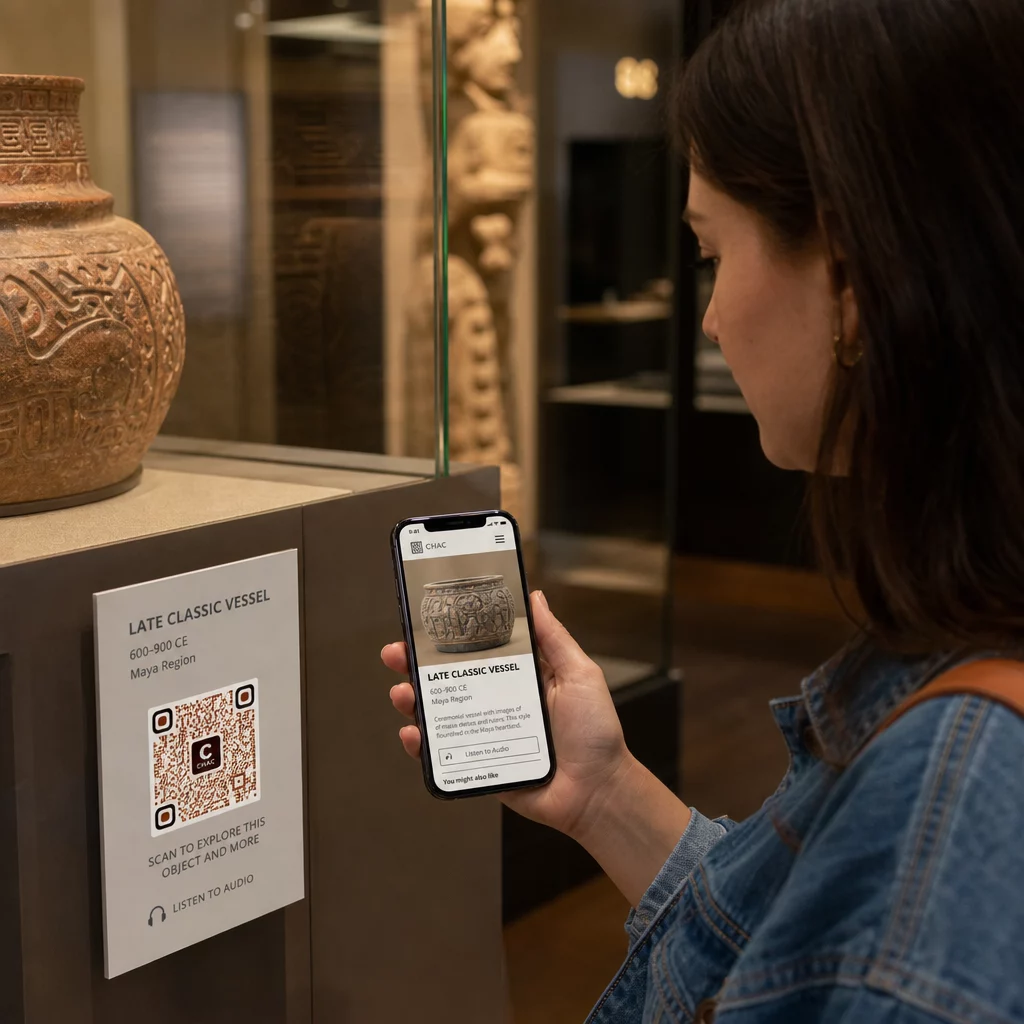
Muzea wykorzystywały również kody QR w instalacjach sztuki nowoczesnej aby połączyć fizyczne dzieła z cyfrowym opowiadaniem historii, w tym treściami z elementami grywalizacji i narracjami z historii designu osadzonymi w samych kodach.
Bilety i bezdotykowe wejście
Bilety cyfrowe za pośrednictwem kodów QR zapewniają odwiedzającym bilety do zeskanowania, które mogą pokazać w punktach wejścia bezpośrednio ze swoich telefonów. Upraszcza to zarządzanie wstępem, skraca kolejki i eliminuje zależność od fizycznych zapasów biletów – co jest szczególnie przydatne w okresach dużego ruchu.
Opinie odwiedzających
Umieszczanie kodów QR przy wyjściach lub na całej powierzchni galerii pozwala odwiedzającym szybko wypełnić formularz opinii bez otrzymywania papierowej ankiety. Zebrane dane pomagają muzeom zrozumieć preferencje odwiedzających, ocenić wystawy i zaplanować ulepszenia. A kodu QR z linku wskazujący na formularz online to najprostszy sposób na jego konfigurację.
Kwestie dostępności
Kody QR mogą znacząco poprawić dostępność, jeśli zostaną wdrożone z rozwagą – ale mogą również tworzyć bariery, jeśli te potrzeby nie zostaną uwzględnione z góry.
Zapewnij alternatywę. Nie każdy odwiedzający będzie miał smartfon lub będzie czuł się komfortowo skanując kod. Zawsze oferuj inną metodę dostępu do tej samej treści, taką jak pobliski wydrukowany adres URL, opcja SMS lub pracownik, który może pomóc. Odwiedzający niewidomi lub słabowidzący mogą uznać dostęp przez SMS za bardziej użyteczny niż skanowanie kodów QR.
Projektuj z myślą o kontraście i widoczności. Używaj ciemnych elementów kodu na jasnym tle i dąż do współczynnika kontrastu co najmniej 4:1. Spełnia to wymagania WCAG 2.1 dotyczące kontrastu elementów nietekstowych i zapewnia czytelność kodu dla odwiedzających z wadami wzroku. Szczegółowe wskazówki dotyczące osiągnięcia tego są dostępne w najlepszych praktyk użyteczności kodów QR odniesieniu.
Dopasuj rozmiar kodów do odległości skanowania. Przybliżona zasada to stosunek 10:1 – na każde 10 cm oczekiwanej odległości skanowania, kod powinien mieć co najmniej 1 cm szerokości. Praktyczne minimum dla większości miejsc w muzeach to 2 × 2 cm (około 0,8 × 0,8 cala), choć większe formaty są lepsze dla eksponatów oglądanych z daleka.
Rozważ wysokość umieszczenia. Montuj kody na wysokości i pod kątem, które umożliwią wygodne sięgnięcie i zeskanowanie przez odwiedzających na wózkach inwalidzkich lub osoby niskiego wzrostu. Umieszczenie na wysokości wzroku, 3 do 5 stóp od podłogi, sprawdza się dla odwiedzających stojących; niższe umieszczenie może być potrzebne dla pełnej inkluzywności.
Zapewnij krótkie, jasne instrukcje. Nie wszyscy odwiedzający będą wiedzieć, jak zeskanować kod QR. Krótka instrukcja – “Otwórz aplikację aparatu i skieruj ją na ten kod” – eliminuje zgadywanie. Utrzymuj spójne instrukcje w całym muzeum, aby odwiedzający nie musieli uczyć się interakcji na nowo przy każdym eksponacie.
Testuj z technologiami wspomagającymi. Przed uruchomieniem sprawdź, czy połączona treść i wszelkie alternatywne metody dostępu działają poprawnie z czytnikami ekranu i narzędziami powiększającymi, takimi jak VoiceOver i TalkBack.
Dla muzeów szczególnie zainteresowanych dostępnością audio, kody QR aktywowane głosem zaoferuj bezdotykową alternatywę, która łączy skanowanie z narracją głosową – szczególnie przydatną dla odwiedzających, którzy nie mogą komfortowo poruszać się po interfejsach wizualnych.
Jak skonfigurować kody QR w swoim muzeum
Krok 1: Zdefiniuj swoją treść i cele
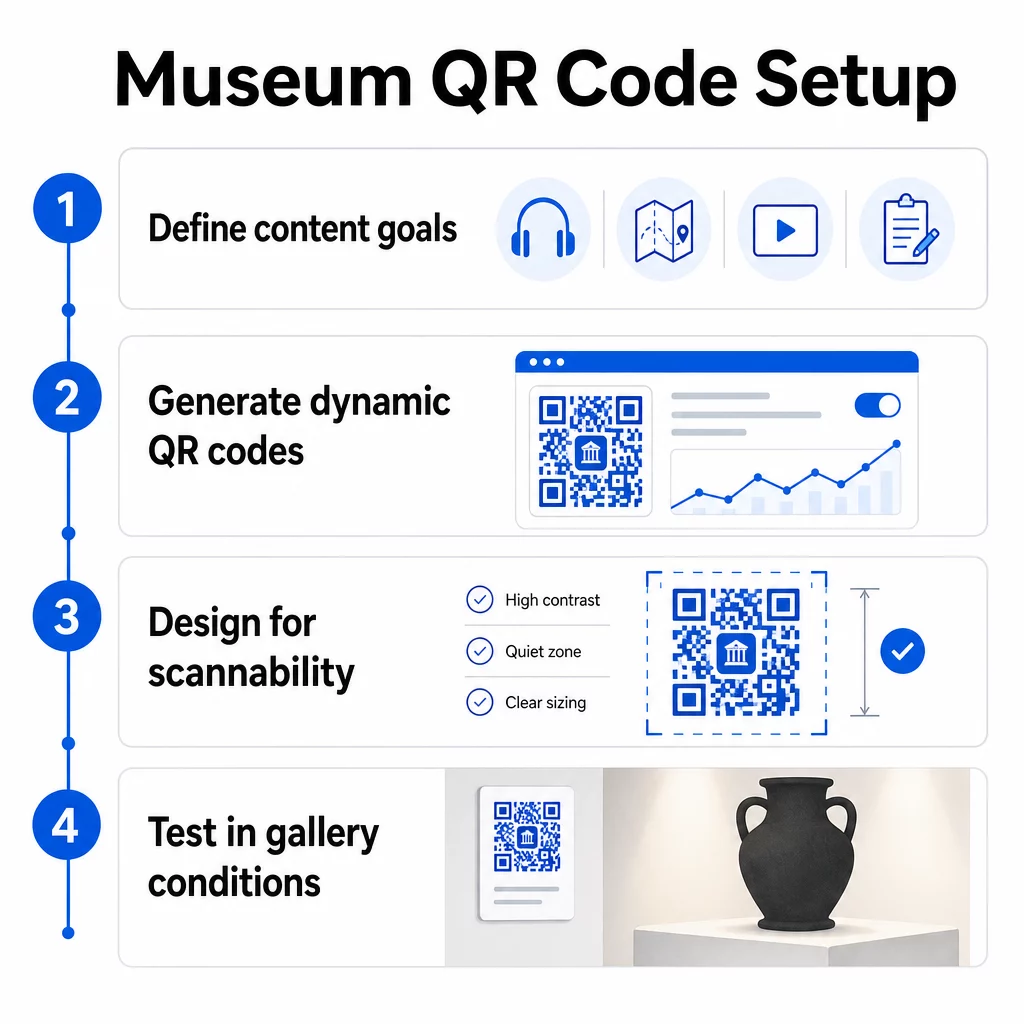
Zanim wygenerujesz choć jeden kod, zdecyduj, co każdy kod ma dostarczyć i komu służy. Przewodnik audio do kluczowego artefaktu ma inne wymagania niż formularz opinii przy wyjściu. Określ typy swoich kodów – audio, mapa PDF, wideo, link do ankiety – i dopasuj każdy do odpowiedniego formatu treści.
Krok 2: Generowanie kodów
Użyj platformy kodów QR, która obsługuje kody dynamiczne, dzięki czemu możesz aktualizować miejsca docelowe bez ponownego drukowania. Pageloot Generator kodów QR umożliwia tworzenie kodów dla adresów URL, plików PDF, plików audio, wideo i innych, a następnie zarządzanie nimi z jednego pulpitu nawigacyjnego. Kody dynamiczne zapewniają również analizę skanów – śledzenie liczby, lokalizacji, typu urządzenia i czasu – dzięki czemu możesz zobaczyć, które eksponaty generują największe zainteresowanie.
Śledź zaangażowanie w eksponaty Chcesz wiedzieć, z którymi artefaktami zwiedzający angażują się najbardziej? Użyj dynamicznych kodów QR z wbudowaną analityką do monitorowania danych skanowania dla każdego eksponatu w Twoim muzeum.
Krok 3: Projektowanie pod kątem skanowalności
Zastosuj spójne oznakowanie – kolory i logo Twojego muzeum – zachowując jednocześnie wysoki kontrast między kodem a jego tłem. Zachowaj wyraźną strefę ciszy (pustą ramkę) wokół każdego kodu. Aby uzyskać szczegółowe wskazówki dotyczące projektowania, najlepszymi praktykami w zakresie czytelności kodów QR artykuł omawia współczynniki kontrastu, strefy ciszy, umiejscowienie logo i poziomy korekcji błędów w praktycznych terminach.
Krok 4: Drukuj i umieszczaj kody strategicznie
Drukuj kody w odpowiednim rozmiarze do przewidywanej odległości skanowania, używając wektorowych formatów wysokiej rozdzielczości (SVG, EPS lub PDF), aby uniknąć rozmycia. Umieszczaj je na wysokości wzroku w pobliżu eksponatu, do którego się odnoszą – nie po drugiej stronie pomieszczenia. W przypadku instalacji na dużą skalę lub złożonych, kompletnym przewodnikiem po umieszczaniu kodów QR zawiera porady specyficzne dla środowiska, które dobrze sprawdzają się w warunkach muzealnych.
Krok 5: Testuj przed otwarciem
Przetestuj każdy kod zarówno na urządzeniach z systemem iOS, jak i Android, w rzeczywistych warunkach oświetleniowych Twojej galerii. Sprawdź, czy połączone strony ładują się szybko na danych komórkowych (nie tylko Wi-Fi), czy treści audio i wideo odtwarzają się poprawnie oraz czy wszelkie alternatywne trasy dostępu działają zgodnie z przeznaczeniem.
Popularne muzea korzystające z kodów QR
- Narodowe Muzeum Historii Naturalnej Smithsonian wykorzystało doświadczenia rzeczywistości rozszerzonej powiązane z kodami QR, aby ożywić fizyczne eksponaty za pomocą cyfrowych nakładek i rekonstrukcji 3D.
- Metropolitan Museum of Art integruje dostęp za pomocą kodów QR do standardowego doświadczenia zwiedzających jako opcję dostępu do cyfrowego przewodnika.
- Muzeum Akropolu oferuje audioprzewodnik oparty na kodach QR, który umożliwia samodzielne zwiedzanie, czyniąc wizytę bardziej elastyczną i informacyjną dla międzynarodowych gości.
- Muzeum Brytyjskie wykorzystuje kody QR, aby zwiedzający mogli uzyskać dostęp do dodatkowych treści i dowiedzieć się więcej o eksponatach we własnym tempie.
Aby uzyskać szerszą perspektywę na innowacyjne zastosowania, przewodnik po kodach QR do wirtualnych wycieczek artystycznych dokumentuje, w jaki sposób instytucje wykorzystują te narzędzia do rozszerzania doświadczenia muzealnego poza fizyczne ściany.
Najczęściej zadawane pytania
Kod QR muzeum może prowadzić do niemal dowolnej treści cyfrowej: narracji audio, przewodników wideo, doświadczeń rozszerzonej rzeczywistości, map PDF, stron z informacjami o eksponatach, tekstów wielojęzycznych, formularzy opinii, portali do darowizn lub wirtualnych wycieczek. Wybrany format zależy od tego, co najlepiej służy każdemu eksponatowi i potrzebom odwiedzającego.
Nie. Nowoczesne smartfony z systemami iOS i Android mogą skanować kody QR bezpośrednio za pomocą wbudowanej aplikacji aparatu – nie jest wymagana żadna oddzielna aplikacja. Niektóre starsze urządzenia mogą wymagać dedykowanego skanera QR, więc dobrą praktyką jest wspomnienie o tym w swoich instrukcjach i upewnienie się, że połączona treść szybko ładuje się w standardowej przeglądarce mobilnej.
Dynamiczne kody QR pozwalają aktualizować treść, na którą wskazuje kod, w dowolnym momencie bez ponownego drukowania fizycznego kodu. Oznacza to, że możesz odświeżać opisy eksponatów, wymieniać pliki audio na nowy sezon lub naprawiać uszkodzony link bez naruszania wydrukowanych oznakowań. Kody dynamiczne dostarczają również analityki skanowania – pokazując, które eksponaty przyciągają największe zaangażowanie, o jakich porach i na jakich urządzeniach – dostarczając Twojemu zespołowi użytecznych danych do planowania wystaw i ulepszania doświadczeń odwiedzających.