Are unauthorized edits or fragmented access putting your enterprise QR code campaigns at risk? When multiple departments manage digital touchpoints without centralized oversight, a single error can lead to broken links, security vulnerabilities, or brand inconsistency. Pageloot provides the governance tools and role-based access control (RBAC) needed to secure your workflows and protect your data.
Why Centralized Governance is Critical for Enterprise QR Codes
For large organizations, managing thousands of QR codes across different regions and departments requires more than just a simple generator. Without centralized governance, marketing teams risk “shadow IT,” where employees use unverified, free tools that lack encryption or fail to follow secure QR code generation best practices. This fragmentation makes it difficult to maintain a consistent brand voice and poses significant security risks if a third-party tool is compromised.
An enterprise-grade platform ensures that every QR code generated aligns with corporate security standards, such as GDPR compliance and SOC 2 requirements. By centralizing management, administrators can enforce domain restrictions, ensuring that all codes point to approved, SSL-certified (HTTPS) destinations. This proactive approach prevents phishing attacks and ensures a seamless, trustworthy experience for your end users.
Precision Permissions with Role-Based Access Control
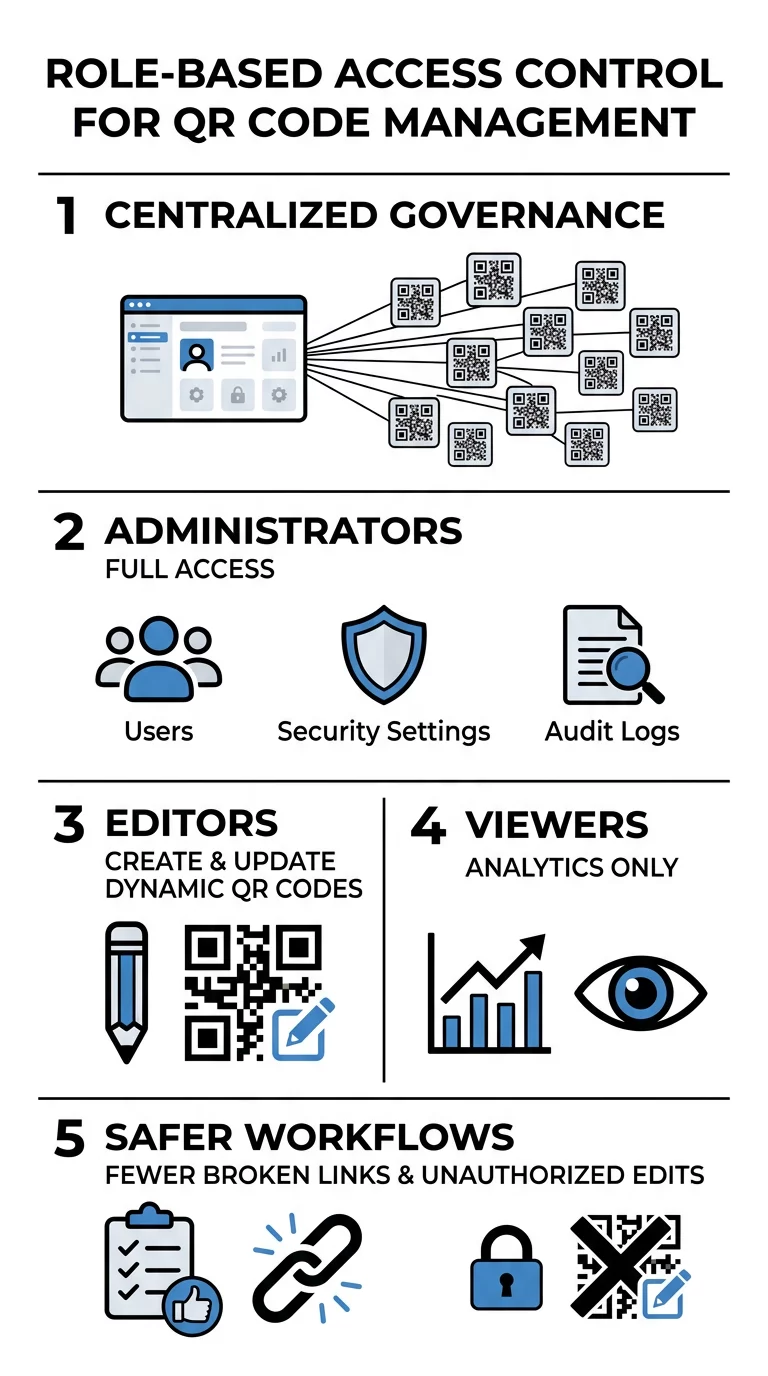
Role-Based Access Control (RBAC) allows you to define exactly who can create, edit, or view specific QR code campaigns. Instead of sharing a single login across an entire department, you can assign granular permissions to maintain the principle of least privilege. This ensures that users only have the access necessary for their specific job functions, reducing the likelihood of internal errors or malicious changes.
- Administrators: These users have full control over account settings, user provisioning via SSO, and high-level audit logs to oversee the entire organization.
- Editors: These team members have the ability to create and modify dynamic QR codes but are restricted from changing organizational security settings or billing information.
- Viewers: These users can access real-time analytics and scan data to monitor performance without the ability to alter code destinations or design templates.
This structure prevents accidental updates to live campaigns and ensures that only authorized personnel can change the destination of high-traffic assets, such as those used for attendance tracking.
Folder-Based Governance and Team Workspaces
Large enterprises often need to isolate data between departments to prevent clutter and improve security. Pageloot uses a workspace and folder-based system to keep these operations separate while remaining under one administrative umbrella. This organization allows you to apply permissions at the group level, making it easier to manage large teams without micro-managing individual user settings.
For example, software companies that manage different versions of product manuals or app download links across multiple development tiers can use specific folders for each product line. Similarly, a marketing agency managing several brands can ensure that team members only see the assets relevant to their specific client. This isolation is a key component of maintaining data integrity and professional standards across a diverse portfolio of campaigns.
Centralize your team’s QR code workflows today. Explore Pageloot Enterprise Solutions
SSO and Secure Authentication Workflows
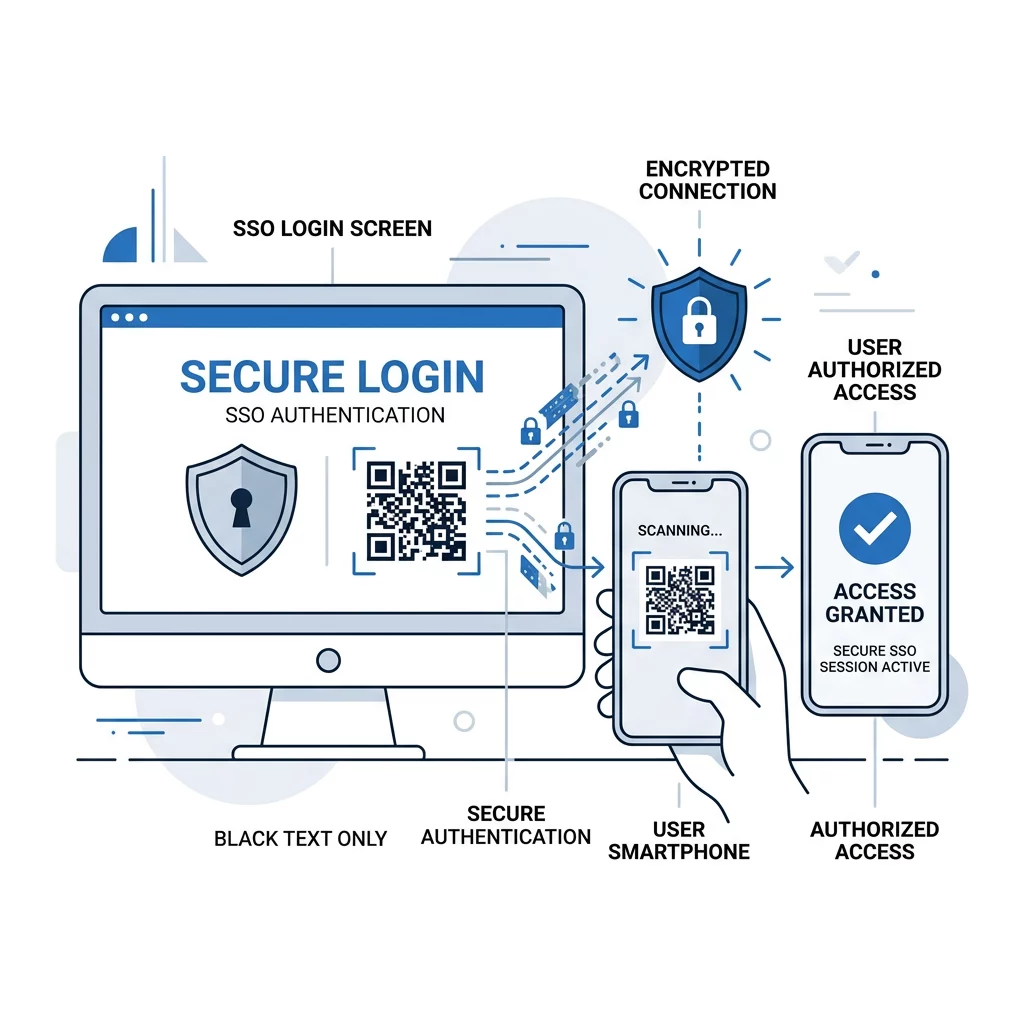
To further secure your environment, enterprise platforms integrate with Single Sign-On (SSO) providers via SAML or SCIM. This eliminates the need for manual password management and ensures that when an employee leaves the company, their access to the QR code management platform is revoked automatically through your central directory. This automation is a critical safeguard against unauthorized access from former staff members.
Integrating QR codes with SSO also facilitates mobile-based logins and secure workstation access. Using an authenticated mobile app to scan a code can verify an identity through secure cryptographic protocols, removing the need for traditional passwords. For more on how these technologies intersect, you can read about QR codes vs passwords in SSO to understand how encrypted tokens provide a more secure and efficient alternative to traditional credentials.
Real-Time Analytics and Audit Trails for Compliance
Governance is not just about restricting access; it is about maintaining complete visibility over your digital assets. Every scan and every administrative change should be trackable to ensure accountability. Pageloot’s dashboard provides real-time analytics that function as a digital audit trail, allowing you to see exactly how your codes are being used and modified.
- Scan Frequency and Location: Administrators can monitor for anomalies or suspicious scan patterns that might indicate a compromised physical code or a bot attack.
- Change History: The system tracks exactly which user updated a destination URL or modified a design preset, providing a clear record for internal reviews.
- Engagement Metrics: You can measure the ROI of campaigns across different regions using dynamic QR codes for access control or marketing efforts.
This level of transparency is essential for industries with strict compliance requirements, such as finance or healthcare, where knowing who accessed what data – and when – is a legal necessity. By maintaining these records, your organization can confidently navigate audits and demonstrate a commitment to data security.
Frequently Asked Questions
Yes, this is possible by using dynamic QR codes. These codes point to a short redirect link that can be updated in the Pageloot dashboard at any time, even after the code has been printed on thousands of units or large-scale signage.
By assigning specific roles, you ensure that junior staff or external vendors cannot accidentally delete or change the destination URL of a live campaign. Only those with “Editor” or “Administrator” status can make changes, and these edits are tracked in the audit log.
Yes. You can follow Salesforce QR code authentication best practices to sync scan data directly with your CRM. This allows your sales and marketing teams to trigger automated follow-ups or lead-scoring workflows based on real-time scan engagement. Ready to secure your enterprise QR code workflows? Start your 14-day free trial today and experience the power of centralized governance.