How can you prevent employees from sharing access credentials without creating a bottleneck at your front entrance? Traditional security tokens are easily duplicated, leaving your physical perimeter vulnerable to unauthorized entry. Integrating dynamic QR codes with biometric verification provides a high-assurance, touchless solution for modern enterprise environments.
Addressing the Vulnerabilities of Physical Access
In traditional security environments, professionals face three primary threats: spoofing, replay attacks, and credential sharing. Spoofing occurs when an unauthorized person uses a high-resolution photo or a fake QR code to trick a scanner. Replay attacks are more sophisticated, involving the interception of a valid signal that is then reused before it expires to gain entry.
The most common issue, however, is simple credential sharing. In a static QR-only system, a user can screenshot their access code and text it to an unauthorized colleague or visitor. By layering biometrics – such as facial recognition or fingerprint scanning – onto the QR workflow, you ensure that the person holding the device is the authorized owner of the credential. This creates a multi-factor authentication (MFA) environment where the QR code acts as the “something you have” (the mobile device) and the biometric data serves as the “something you are,” significantly improving your identity verification protocols.
Why Dynamic QR Codes are Essential for High Security
For high-security access control, static QR codes are often insufficient because the data they contain remains fixed. This makes them permanent targets for theft or duplication. Instead, enterprise systems should utilize dynamic QR codes for access control which function similarly to short-lived, one-time passwords (OTPs).
Dynamic codes offer several critical security advantages:
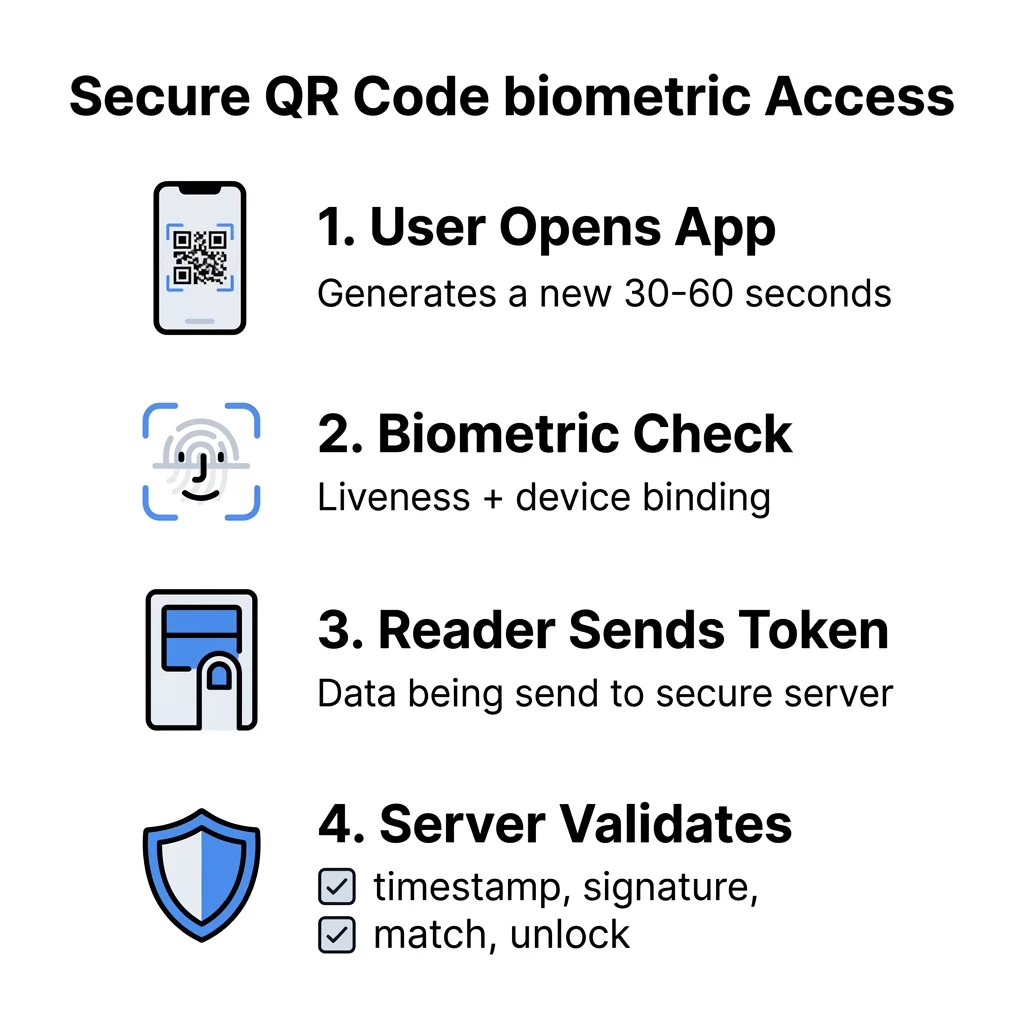
- Time-to-Live (TTL) Restrictions: You can set codes to expire every 30 to 60 seconds, rendering intercepted screenshots or recordings useless almost immediately.
- Instant Revocation: Administrators can disable a user’s access in real-time through a centralized dashboard without needing to retrieve physical hardware or reprinting badges.
- Reduced Data Density: Because dynamic codes point to a secure server-side token rather than storing raw data, the QR code readability is higher, ensuring faster scans even in challenging lighting.
When evaluating your strategy, understanding the difference between static vs dynamic QR codes is vital. While static codes are useful for permanent information like Wi-Fi credentials, dynamic codes provide the agility required to respond to real-time security threats.
Technical Layers of a Secure Access Workflow
A robust integration requires a secure pipeline that protects data from the moment a code is generated on a smartphone to the moment the door unlocks. This involves moving beyond simple data encoding toward a multi-layered cryptographic approach.
Cryptographic Signing and Encryption
You should never store raw biometric templates or sensitive personally identifiable information (PII) directly within a QR code. Instead, use encrypted QR codes that contain a cryptographically signed token. Using standards like AES-256 ensures that even if a code is intercepted, it cannot be tampered with or decrypted without your specific server-side keys.
Device Binding and Liveness Detection
To prevent users from simply passing their phone to another person, you can bind the QR generation process to a specific device ID. By requiring the user to enroll their specific smartphone, the system ensures that the QR code is only valid when generated from that authorized hardware. This is most effective when paired with “liveness detection,” a biometric check that ensures a physical person is present rather than a photograph or video of their face.
Server-Side Validation
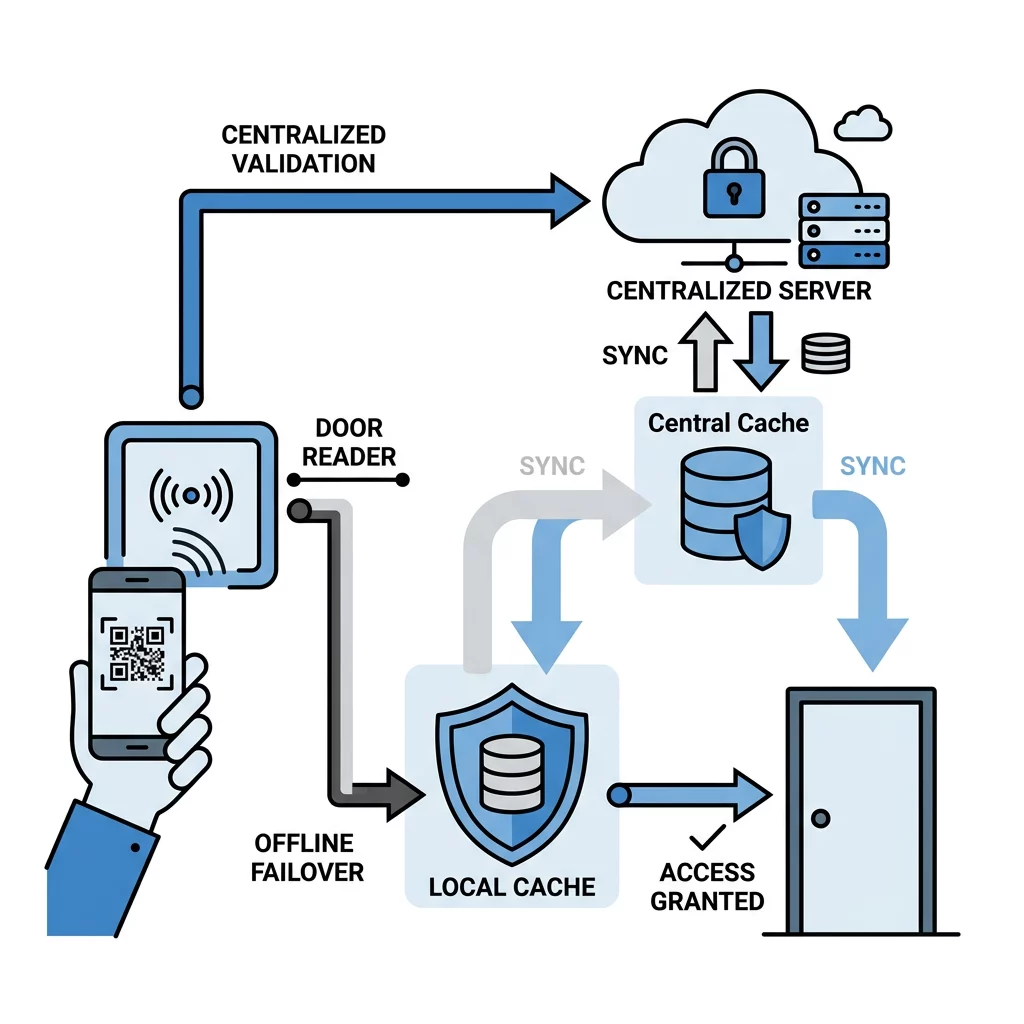
The scanner at your entry point should act as a “dumb” reader that passes data to a centralized secure server. The server verifies the token, checks the timestamp, and confirms the biometric match before sending an “unlock” signal. This architecture prevents “client-side trust” vulnerabilities where a compromised reader could be tricked into granting access locally.
Secure your facility with enterprise-grade tools. Use our QR Code Generator to create dynamic, trackable, and secure access credentials tailored to your specific security architecture.
Optimizing Scannability and Performance
Security is only effective if it does not hinder the flow of people. To ensure your biometric integration remains efficient, you must follow color contrast best practices to maintain a high level of scannability. Scanners rely on distinct contrast between the foreground and background to decode patterns quickly; aim for a minimum contrast ratio of 4.5:1.
Physical factors also play a role in performance. For close-range scanning, the QR code should be at least 0.8 x 0.8 inches. Additionally, you should consider the environment where the scanner is placed. Using smooth, matte surfaces for any printed codes can help avoid glare, which is a common cause of scanning failure. Following these security in cyber defense standards ensures that your hardware and software work in harmony.
Compliance and Data Privacy Considerations
When handling biometric data, your system must comply with regional regulations such as GDPR, CCPA, and BIPA. These laws classify biometrics as sensitive data, requiring strict consent and data minimization practices. Think of biometric data like a master key; if it is lost or stolen, it cannot be “changed” like a password.
Best practices for maintaining compliance include:
- Template Hashing: Store mathematical representations (hashes) of biometrics rather than actual images of faces or fingerprints to ensure that even if a database is breached, the raw biometric cannot be reconstructed.
- Encryption at Rest: Ensure all stored identifiers and audit logs are encrypted on your central servers using enterprise-grade protocols.
- Audit Logging: Maintain detailed logs of every scan, including timestamps and device IDs, to meet secure QR code generation standards for identity proofing and forensic trails.
Managing Offline Failover and Edge Cases
A common concern for security directors is what happens during a network outage. If your system relies entirely on real-time server validation, a Wi-Fi drop could lock out your entire workforce. To mitigate this risk, you can implement an offline failover mode using cached, signed tokens.
In an offline scenario, the reader stores a local “blacklist” of revoked IDs and can verify the cryptographic signature of a QR code locally using a pre-shared key. Once the network connection is restored, the reader automatically syncs its local logs with the central server to ensure all access events are recorded for your audit trail. This ensures that security remains high even when connectivity is intermittent.
FAQ
Not if you implement dynamic QR codes with short expiration windows (TTL). If the code refreshes every 60 seconds, a photograph taken earlier will be rejected by the scanner because the timestamp will have expired. Pairing this with biometric liveness detection ensures that only a live user can trigger a valid scan.
Because the system uses biometric verification, the thief would still need to bypass the facial recognition or fingerprint scan to generate a valid QR code. Furthermore, administrators can use a management platform to instantly revoke that specific device ID, preventing any further codes from being generated for that account.
Yes. You can issue time-limited dynamic QR codes to visitors via email or a dedicated app. For higher security, visitors can perform a one-time biometric enrollment at a self-service kiosk, which then binds their access privileges to their specific mobile device for the duration of their visit. Integrating biometrics with QR technology creates a secure, scalable, and user-friendly access environment. By moving away from static credentials and embracing dynamic, encrypted workflows, you can protect your physical perimeter against modern threats. To start building your secure access system, explore our professional tools for secure QR code generation and management.