Managing hundreds – or thousands – of QR codes across campaigns, locations, and product lines is harder than it looks. Without a clear system, teams end up with broken links, inconsistent branding, and no real visibility into what’s working. This guide covers the practical strategies and tools that keep large-scale QR code deployments organized, trackable, and easy to update.
Choose the Right QR Code Type Before You Scale
The most important decision you’ll make before scaling any QR code program is choosing between dynamic and static codes – because that choice determines what you can change, track, and automate later.
Dynamické kódy QR use a short redirect URL that you control. Because the printed code only points to that redirect, you can update the destination, swap content, or change tracking parameters at any time without reprinting anything. They also unlock tracking capabilities including scan counts, timestamps, geographic location, device type, and operating system. This makes them the right choice for marketing campaigns, promotions, restaurant menus, event materials, and any use case where content changes or performance data matters.
Statické kódy QR encode a destination directly into the pattern itself. Once printed, that data is permanent – you cannot update the link or track scans without generating a new code. They’re well-suited for information that genuinely never changes: a fixed Wi-Fi password, a permanent regulatory document, or a museum exhibit with stable content.
| Funkcia | Dynamické QR kódy | Statické QR kódy |
|---|---|---|
| Editable after printing | ✅ Áno | ❌ Nie |
| Sledovanie skenovania | ✅ Áno | ❌ Nie |
| Geographic analytics | ✅ Áno | ❌ Nie |
| Analytika v reálnom čase | ✅ Áno | ❌ Nie |
| Náklady | Vyžaduje sa predplatné | zadarmo |
| Najlepšie pre | Campaigns, menus, promotions | Fixed, permanent content |
For a deeper look at how these two options compare, see the full static vs. dynamic QR code breakdown.
Start Managing Dynamic QR Codes Today Need editable codes with built-in tracking and a centralized dashboard? The Generátorom dynamických QR kódov lets you create, update, and monitor all your codes in one place.
Build a Naming and Organization System That Scales
When you’re managing dozens of codes, loose naming conventions are an inconvenience. At hundreds or thousands, they become a serious operational problem. A consistent naming structure, combined with a logical folder hierarchy, keeps your team aligned and your codes findable at any stage of a campaign.
Use a Standardized Naming Convention
A reliable naming format captures everything you need to identify a code without opening it. One practical structure:
`Dept-CampaignChannel-GeoObjective-AssetTypeVerziaStatus`
For example: `MKT-Summer25OOH-USPromo-Posterv2ACTIVE`
Set dates in YYYY-MM format, use version numbers (v1, v2) to distinguish iterations, and always include a status indicator (ACTIVE, PAUSED, ARCHIVED). This prevents confusion when multiple versions of the same campaign are live simultaneously.
Record Structured Metadata for Every Code
Beyond the name, each QR code should carry structured metadata that anyone on your team can reference. Fields to include:
- Owner (person or team responsible)
- Business unit or product line
- Target URL and backup URL
- Code type (dynamic or static)
- Start date and end date
- Call-to-action copy
- Access or security level
End dates and backup URLs are especially important at scale – they prevent dead-end scans after a campaign closes, and a backup URL ensures users still land somewhere useful if the primary destination goes down.
Organize with Folders and Tags
A two-tier folder structure works well for most teams: top-level folders for business units or product lines, and subfolders for individual campaigns or locations. Tags add a second layer of filtering – mark codes by region (US, EU), channel (email, out-of-home, packaging), placement type (poster, bottle, screen), and status (active, archived).
Pageloot QR code folders feature supports team-based folder sharing with role-based permissions, so you can give new team members read access to analytics while restricting who can edit or delete codes. This is especially useful for agencies managing multiple clients or enterprises running codes across departments.
Generate Codes in Bulk Without Losing Control
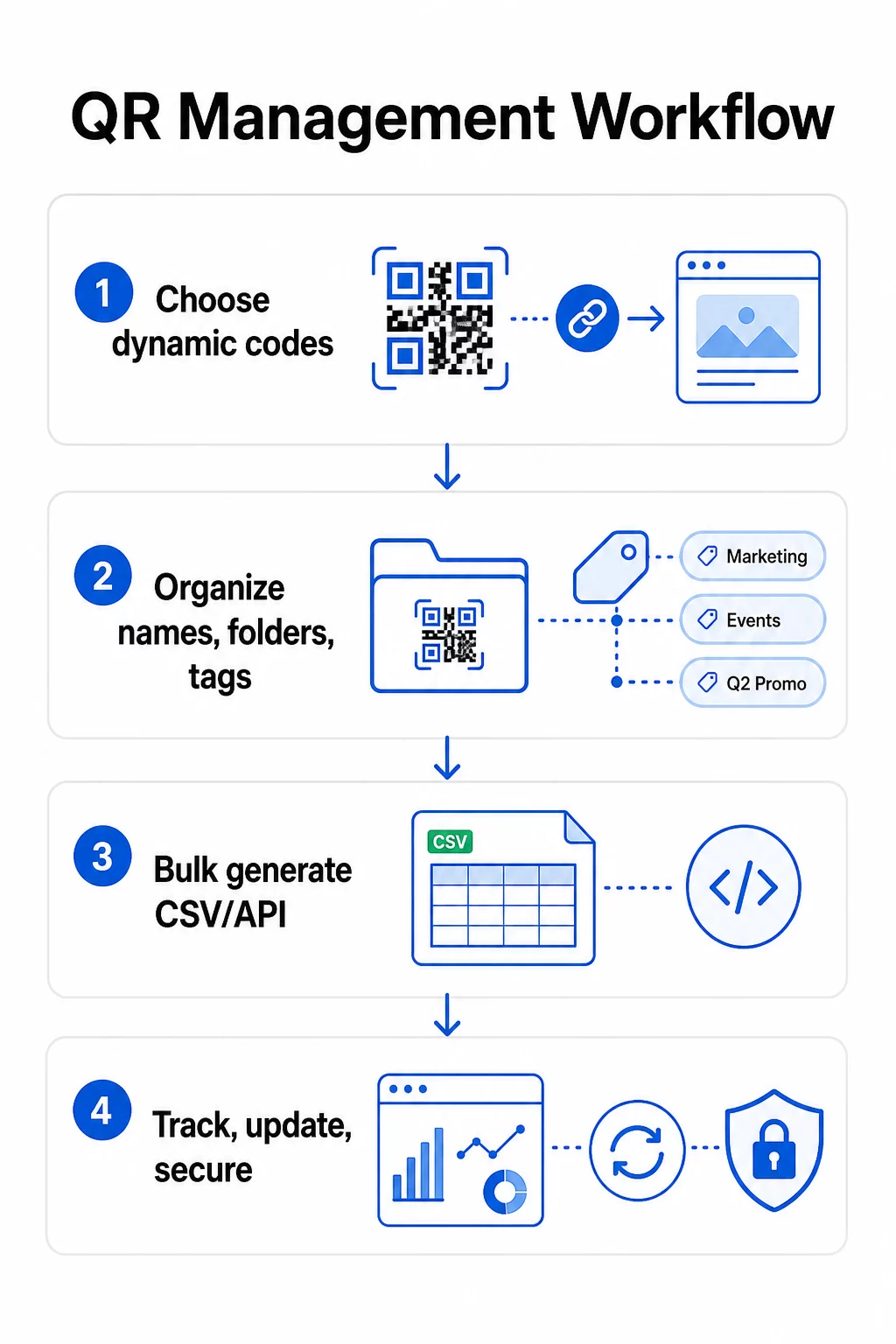
Once your naming and folder structure is in place, bulk creation becomes straightforward – provided your input data is clean and your process includes a validation step before generating at volume.
Use CSV Files for Batch Generation
CSV-based bulk generation is the most practical method for creating large volumes of codes efficiently. A well-structured CSV file for QR code generation should include:
- `unique_id` – your internal identifier
- `qr_type` – URL, PDF, vCard, form, etc.
- `destination_url` – the target destination
- `campaign_name` – for reporting and filtering
- `folder` – where the code should live in your dashboard
- `template_name` – the branded design to apply
- `utm_parameters` – source, medium, campaign, content
- `startdate` / `enddate` – campaign window
- `status` – active or paused
- `owner` – responsible team member
Before uploading, validate the CSV: confirm all required fields are populated, check that URLs are live and correctly formatted, and run a test batch of five to ten codes across different devices to catch errors before they propagate through the full run.
For automated bulk generation at enterprise scale, API-based QR code management allows you to pass parameters programmatically, trigger batch creation from your own systems, and update destination URLs across thousands of codes simultaneously using PATCH or PUT requests.
Add UTM Parameters Consistently
UTM parameters are what connect QR code scans to your broader analytics stack. Without them, you can see that someone scanned a code, but you can’t easily attribute that scan to a specific campaign, channel, or placement in Google Analytics.
Follow these conventions to keep your data clean:
- Use lowercase throughout – UTM tracking is case-sensitive, and mixed capitalization creates fragmented reporting
- Keep parameter values descriptive but concise: `utmsource=storedisplay`, `utmmedium=qrcode`, `utmcampaign=summersale_2025`
- Use `utmcontent` to distinguish between placements within the same campaign (e.g., `windowposter` vs. `checkout_counter`)
- Document your naming taxonomy in a shared reference document so every team member follows the same rules
For a full walkthrough of UTM setup and Google Analytics 4 reporting, see parametrov UTM pre QR kódy.
Connect Your QR Scans to Campaign Analytics Pageloot agency and team platform supports automatic UTM appending, role-based access control, and shareable client reports – making attribution tracking significantly easier across large deployments.
Keep Branding Consistent Across Every Code
At scale, visual consistency matters for two reasons: it builds recognition and trust with the people scanning your codes, and it prevents a patchwork of mismatched designs from diluting your brand identity.
Before generating a large batch, define and lock your design standards:
- Logo placement and minimum size
- Brand color palette (dark foreground on light background remains the most reliable pattern for scanning)
- Corner and module style
- Quiet zone requirements (at minimum four modules of clear space on all sides)
- Minimum print size (at least 2 × 2 cm for close-range scanning; scale up using the 10:1 rule – code width should be at least one-tenth the expected scanning distance)
- File formats: SVG or PDF for print materials (300+ DPI), PNG for digital use
Dynamic QR codes offer a practical advantage here: because they encode a short redirect URL rather than a long destination, the underlying pattern is less dense. That leaves more room to incorporate logos and custom colors without compromising scannability.
Save these standards as reusable branded templates in your QR code platform. Pageloot allows you to create templates for different contexts – a compact format for business cards, a bolder version for large-format signage – and apply them consistently across every bulk generation run.
Before committing to a large print run, test a sample of physical prints across multiple devices and lighting conditions. If any codes fail to scan reliably, increase the physical size, strengthen the color contrast, or widen the quiet zone.
Track Performance With the Right Metrics
Generating codes efficiently is only half the job. Understanding how they perform – and acting on that data – is what drives continuous improvement.
The key metrics to monitor for large-scale deployments are:
- Total scans and unique scans: Total scans show overall engagement; unique scans reveal your actual reach. A high ratio of total to unique scans may indicate strong repeat engagement or, in some cases, a poorly optimized landing page driving users to scan multiple times.
- Geographic distribution: Pageloot’s analytics provide location-based scan data, accurate to approximately the city level. Use this to identify which regions or placements outperform others and reallocate resources accordingly.
- Device and operating system: If the majority of your scans come from a specific device type, prioritize testing your landing pages on that platform. Mobile-first optimization is essential for most QR-driven campaigns.
- Time-based trends: Scan data over time reveals peak engagement windows. For time-sensitive campaigns – retail promotions, events – this data helps you schedule content changes at the right moment.
- Conversion tracking: Scan volume alone doesn’t indicate campaign success. Set clear downstream goals (form submissions, purchases, app downloads) and use UTM data plus your analytics platform to measure whether scans lead to the actions you want.
For a detailed approach to building reporting views around these metrics, see the guide to using a QR code analytics dashboard.
Build Dashboards That Surface Actionable Insights
Raw scan data across hundreds of codes becomes unwieldy without structured views. Organize your reporting into:
- Campaign-level dashboards: Compare performance across active campaigns, filtered by time period. Track cost-per-scan, conversion rate, and ROI against campaign benchmarks.
- Location-based views: Map scan distribution geographically to identify high-performing placements and inform future deployment decisions.
- Audience segmentation: Group users by device type, scan frequency, or behavior patterns to tailor follow-up content.
Set up automated alerts for significant deviations – a sudden spike in scans from an unusual geographic source could indicate a broken redirect or fraudulent activity, while a sharp drop might signal a broken link that needs immediate attention.
Update and Maintain Codes Without Reprinting
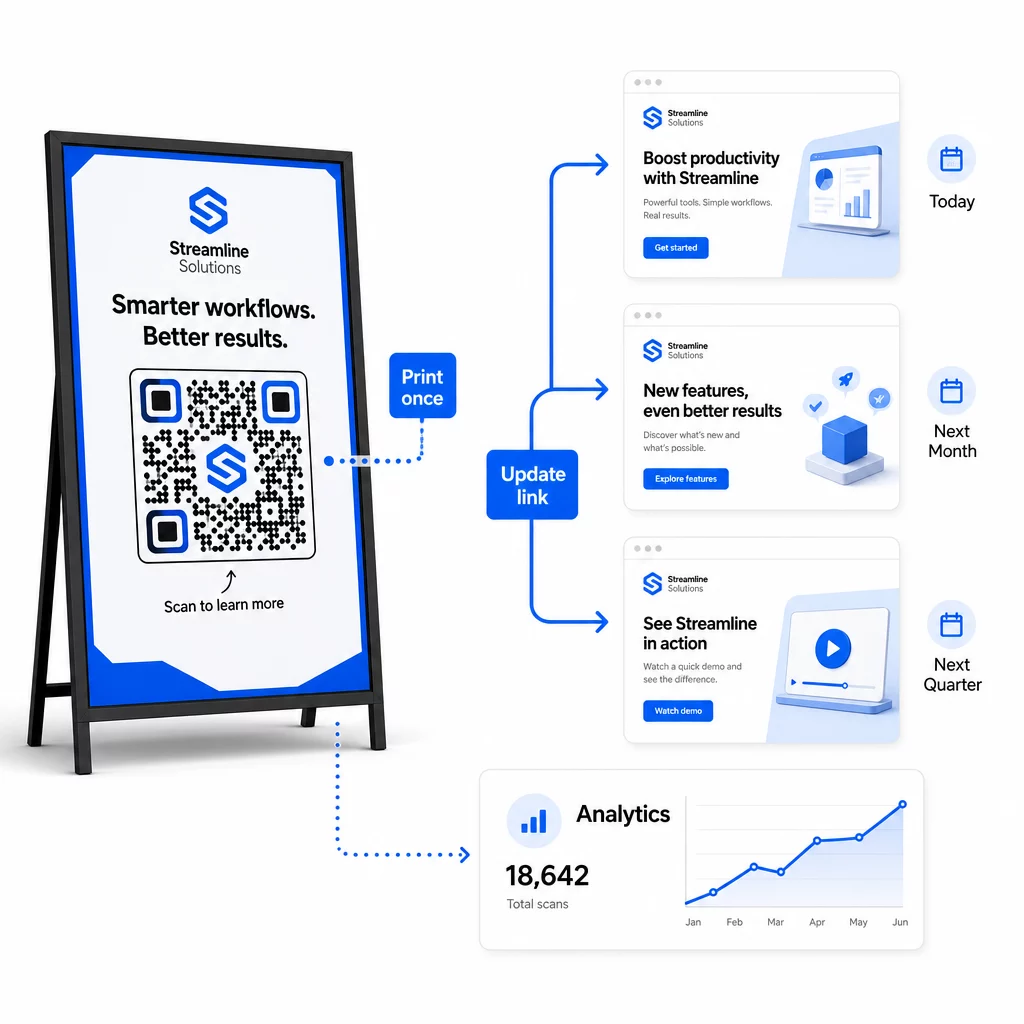
One of the core operational advantages of dynamic QR codes is the ability to edit destination URLs after printing – no new codes, no new print runs, no interruption to active materials. At scale, this capability becomes essential.
Implement Version Control for Destination Changes
Every time you update a dynamic QR code’s destination, log the change with:
- Date and time of update
- Previous destination URL
- New destination URL
- Reason for the change
- Who authorized it
Use a versioning scheme – v1.0 for initial launch, v1.1 for minor adjustments, v2.0 for a significant destination change – so your team always knows which version is live and can roll back if something breaks. For teams with multiple contributors, role-based permissions ensure that only authorized users can make changes to active codes.
Automate Time-Based Redirects
For campaigns with predictable content schedules, timed redirects remove the need for manual intervention. A restaurant can serve breakfast, lunch, and dinner menus from a single printed QR code by scheduling destination changes at set times. A retailer can configure a code to redirect to a promotional page during a sale window and return to the standard product page automatically when the promotion ends.
This approach is particularly valuable when QR codes are printed on materials with long lead times. You can finalize the physical production well in advance, confident that the code will serve the right content when the campaign goes live.
Monitor Links Automatically
At scale, manually checking whether every destination URL is live is not practical. Set up automated link monitoring to alert your team when a destination returns an error, so you can redirect scans to a backup URL before users encounter a broken experience. Documenting backup URLs in your metadata – as described in the naming convention section above – means your team always has a fallback ready.
Secure Your QR Code Program as It Grows
Operational efficiency at scale requires governance – clear ownership, appropriate access controls, and proactive monitoring to protect your data and your users.
Role-based access control is the foundation of a secure, well-governed QR code program. Assign permissions that match each team member’s responsibilities: analytics viewers can see scan data but not edit codes; campaign managers can update destinations but not delete codes; administrators have full access. This structure prevents accidental or unauthorized changes while enabling collaboration across large teams.
For enterprises managing QR codes across multiple departments, Pageloot supports workspace-level access controls and team folder sharing, allowing decentralized teams to manage their own codes without visibility into other groups’ campaigns.
Beyond access control, watch for anomalous scan patterns – unexpected volume spikes, high concentrations of scans from a single IP range, or geographic distributions inconsistent with your campaign placements. These patterns can indicate bot activity or other fraudulent scanning that would corrupt your analytics data. Automated monitoring that flags these patterns early protects both your data integrity and your campaign performance insights.
Maintain an audit log of all changes to active codes: who changed what, when, and why. When a campaign issue surfaces, this record is the fastest path to diagnosis and resolution.
Často kladené otázky
Dynamic QR codes let you update the destination URL or content after the code has been printed, without generating or reprinting anything. At scale, this means you can correct broken links, update seasonal promotions, or redirect users to new content across thousands of deployed codes from a single dashboard – eliminating reprinting costs and operational downtime.
Use lowercase throughout, keep values descriptive and concise, and standardize your parameter structure in a shared reference document. A reliable pattern is: `utmsource` for the specific placement (e.g., `storedisplay`), `utmmedium=qrcode` consistently across all codes, `utmcampaign` for the campaign name with date (e.g., `summersale2025`), and `utmcontent` to distinguish individual placements within the same campaign. Avoid internal UTM links, and run pre-launch QA checks to confirm all parameters are passing correctly to your analytics platform.
Define your design standards – logo placement, brand colors, quiet zone size, minimum print dimensions, and file formats – before generating any batch, then save these as reusable branded templates in your QR code platform. Apply the same template across every code in a batch run. Dynamic QR codes make this easier because their shorter encoded data produces less dense patterns, leaving more room for logos and custom colors without compromising scannability.