Are your custom QR codes failing to scan in the real world? When a branded code does not work, it frustrates customers and damages your credibility. This guide explains how to balance visual branding with technical requirements to ensure every code scans reliably across all devices.
Why Contrast is the Foundation of Scannability
The most common reason QR codes fail is insufficient contrast between the foreground pattern and the background. Optical sensors read codes by measuring differences in light reflectance. Darker colors absorb light, while lighter colors reflect it back to the sensor. If the difference between the two is too small, camera software cannot distinguish individual data modules.
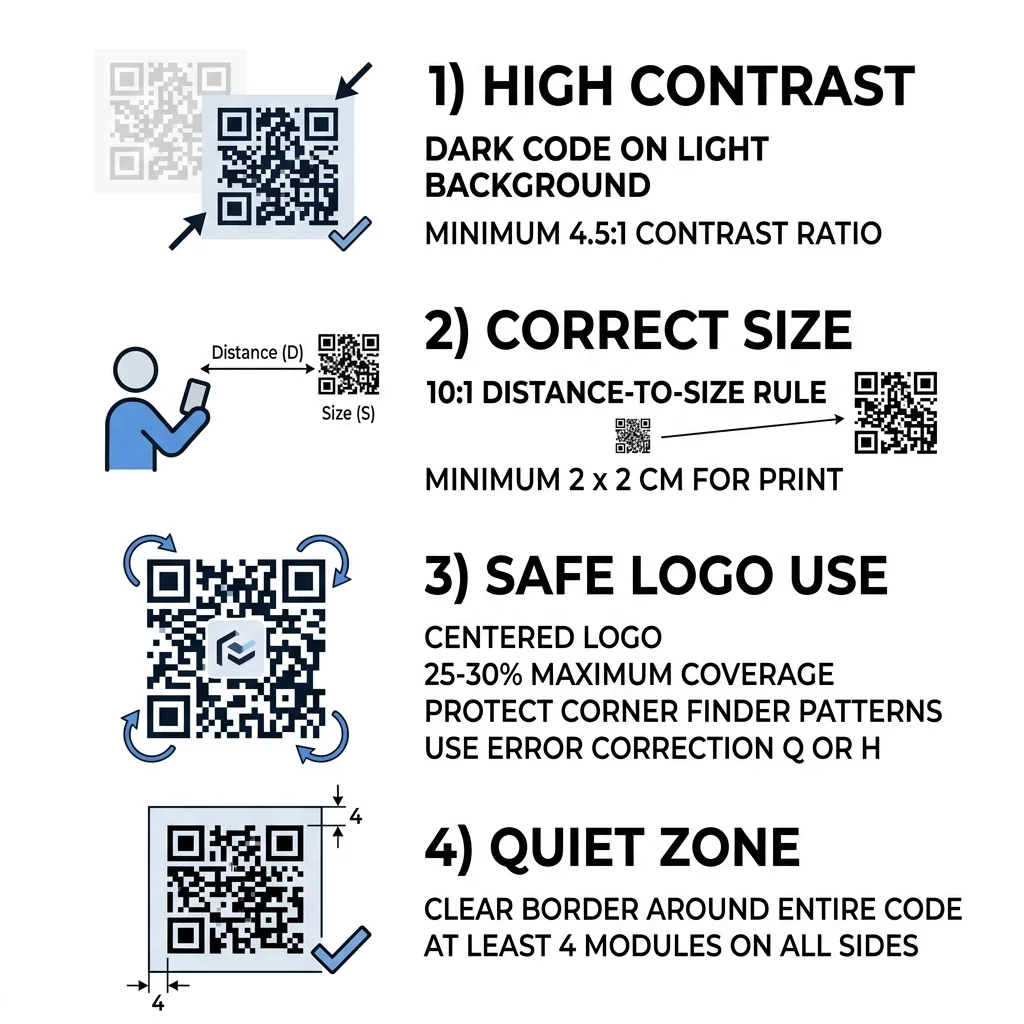
To keep your code functional, maintain at least a 55% contrast difference and follow established color contrast best practices by aiming for a contrast ratio of at least 4.5:1. While black-on-white provides the optimal 21:1 ratio, you can use brand colors effectively if you pair dark foreground modules with a light background.
Avoid inverting your colors. While some modern smartphone cameras can detect white codes on dark surfaces, many older devices and third-party scanning tools will fail completely. In addition, avoid using color gradients, soft dropshadows, or transparency effects across the data grid, as subtle color shifts create mid-tones that blur module edges.
| Foreground Color | Background Color | Contrast Ratio | Scannability Result |
|---|---|---|---|
| Black | White | 21:1 | Optimal performance across all devices |
| Navy Blue | Beige | 15:1 | Excellent scannability with brand styling |
| Dark Green | White | 4.5:1 | Acceptable; requires careful device testing |
| Light Gray | White | 1.5:1 | Poor; fails on most smartphone cameras |
| White | Black | 21:1 | Unreliable; inverted styling fails on older apps |
Sizing Your QR Code for Distance and Visibility
QR code sizing is a physical requirement dictated by the focal length and resolution of mobile camera lenses. A code that is printed too small will blur when viewed from a distance, preventing optical sensors from resolving individual modules.
To determine the minimum dimensions for any layout, use the 10:1 distance-to-size ratio. Divide your expected scanning distance by 10 to establish the minimum width and height of the code. For example, if customers scan a poster from 40 inches away, the code should measure at least 4 x 4 inches.
For handheld media such as business cards, coupons, and table tents, never print smaller than the recommended minimum of 0.8 x 0.8 inches (2 x 2 cm). You can consult our detailed QR code size guide to calculate specific dimensions for outdoor billboards, packaging labels, and direct mail.
Data density also affects your required size. A standard static QR code that encodes a long URL packs hundreds of tiny modules into the grid, making the code much harder to read at smaller sizes. You can keep the grid clean and open by using a free QR code generator to build dynamic QR codes. Dynamic codes store a short redirect link, keeping module density low and scannability high.
Design Scannable Branded Codes in Minutes Want to integrate brand colors and custom logos without sacrificing technical reliability? Create custom vector codes with real-time design previews using the QR code generator with logo today.
Integrating Logos Without Breaking Functionality
Adding a brand mark or icon to the center of a QR code boosts brand recognition and assures users that the link is safe to open. This customization is made possible by Reed-Solomon error correction, a mathematical algorithm that reconstructs obscured, missing, or damaged data modules within the grid.
Standard QR codes offer four error correction levels:
- Level L (Low) recovers up to 7% of damaged data and provides the lowest module density.
- Level M (Medium) recovers up to 15% of damaged data and serves as the standard for basic black-and-white marketing codes.
- Level Q (Quartile) recovers up to 25% of damaged data and supports moderate design modifications.
- Level H (High) recovers up to 30% of damaged data and is required whenever you embed custom graphics or logos.
When designing a branded code, review how error correction works so you can balance data recovery against pattern complexity. Level H allows you to overlay a graphic, but the logo should occupy no more than 25% to 30% of the total surface area. Keep the logo centered and avoid adding tiny text or complex graphic details that become unreadable at smaller print sizes.
Never obstruct the critical functional patterns of the QR code. The three large squares in the corners – known as the finder patterns or position detection markers – tell the camera how the code is oriented. If you cover or distort these corner eyes, or the smaller alignment patterns nearby, the scanning software cannot interpret the data grid. Learn more about safe placement rules in our tutorial on how to add logos to QR codes.
Preserving the Quiet Zone Around Your Code
The quiet zone is the blank margin that completely borders the four outer edges of a QR code. This border creates an optical buffer zone that signals to scanning software where surrounding artwork ends and the data grid begins.
Under the ISO/IEC 18004 standard, the quiet zone must have a width of at least four modules (4X) on all four sides. If your code’s individual square modules are 2 mm wide, you must leave an unprinted border of at least 8 mm around the entire symbol.
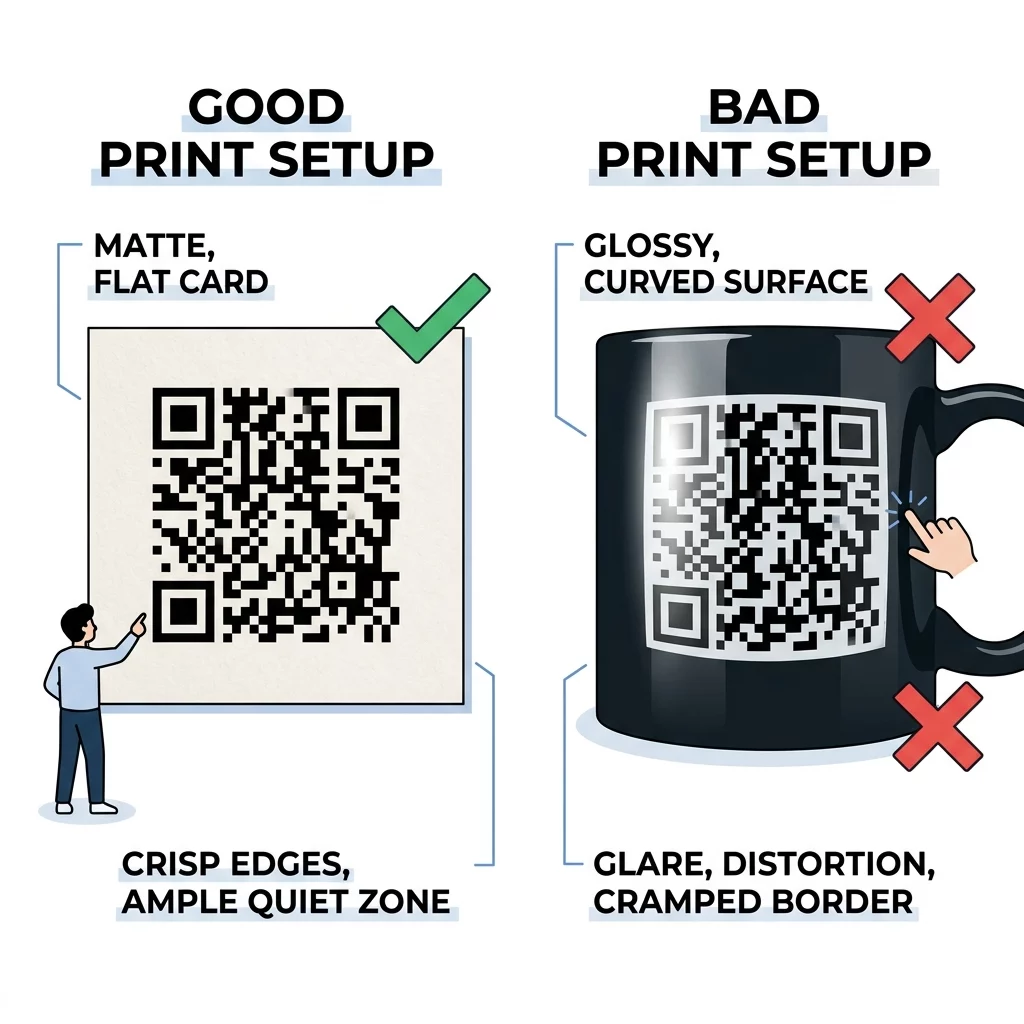
Encroaching on the quiet zone is a frequent design error in commercial packaging and print layouts. When text, border lines, or decorative background illustrations touch the edge of the code, camera sensors merge those elements into the data grid, triggering immediate decode errors. Always maintain the full quiet zone and ensure its background color matches the light modules of the code.
Print Materials and Real-World Validation
A digital QR code that scans smoothly on a high-definition monitor can still fail on physical materials if the printing process or surface environment is not accounted for during design.
To maintain optical clarity, follow these production guidelines:
- Export your artwork exclusively in vector formats like SVG, EPS, or vector PDF so the edges stay perfectly sharp at any scale.
- Maintain a minimum resolution of 300 DPI if you must work with raster formats like PNG or TIFF.
- Select matte or satin paper stocks over high-gloss varnishes and metallic foils to prevent ambient light reflections from blinding camera sensors.
- Position codes on flat surfaces rather than across folds, ridges, corners, or tightly curved bottles that distort the geometric grid.
- Place public codes at natural eye level and ensure the display environment provides adequate lighting.
Always take time to test a QR code before printing large production runs. Produce a single physical proof on the actual material you intend to use. Then, conduct comprehensive field tests using both iOS and Android smartphones, built-in camera tools, and an online QR code scanner to verify rapid scanning under low-light and off-angle conditions.
Launching Reliable Custom QR Campaigns
Designing an attractive QR code should never come at the expense of scanning performance. By maintaining strong foreground-to-background contrast, sizing codes based on actual viewing distances, protecting the four-module quiet zone, and setting error correction to Level H for embedded logos, you guarantee smooth interactions for every customer.
Before you launch your next campaign, review our guide to testing QR codes for mobile usability to verify that your post-scan landing pages load quickly and display correctly across all screen sizes. With technical standards in place, you can confidently deploy branded QR codes that capture attention and drive measurable digital engagement.
Frequently Asked Questions
For close-range scanning on business cards and packaging, keep your QR code at least 0.8 x 0.8 inches (2 x 2 cm). For larger distances, follow the 10:1 ratio, allowing 1 inch of code width for every 10 inches of distance between the user and the code.
Most barcode readers and smartphone cameras are programmed to identify dark patterns on light backgrounds by measuring reflected light. Inverting the colors causes edge-detection algorithms to fail, particularly on older smartphones, third-party apps, or in dimly lit spaces.
You should select Level H error correction, which recovers up to 30% of covered or obscured data. This allows you to place a centered logo covering up to 25% to 30% of the code without breaking the scanner’s ability to decode the underlying information.