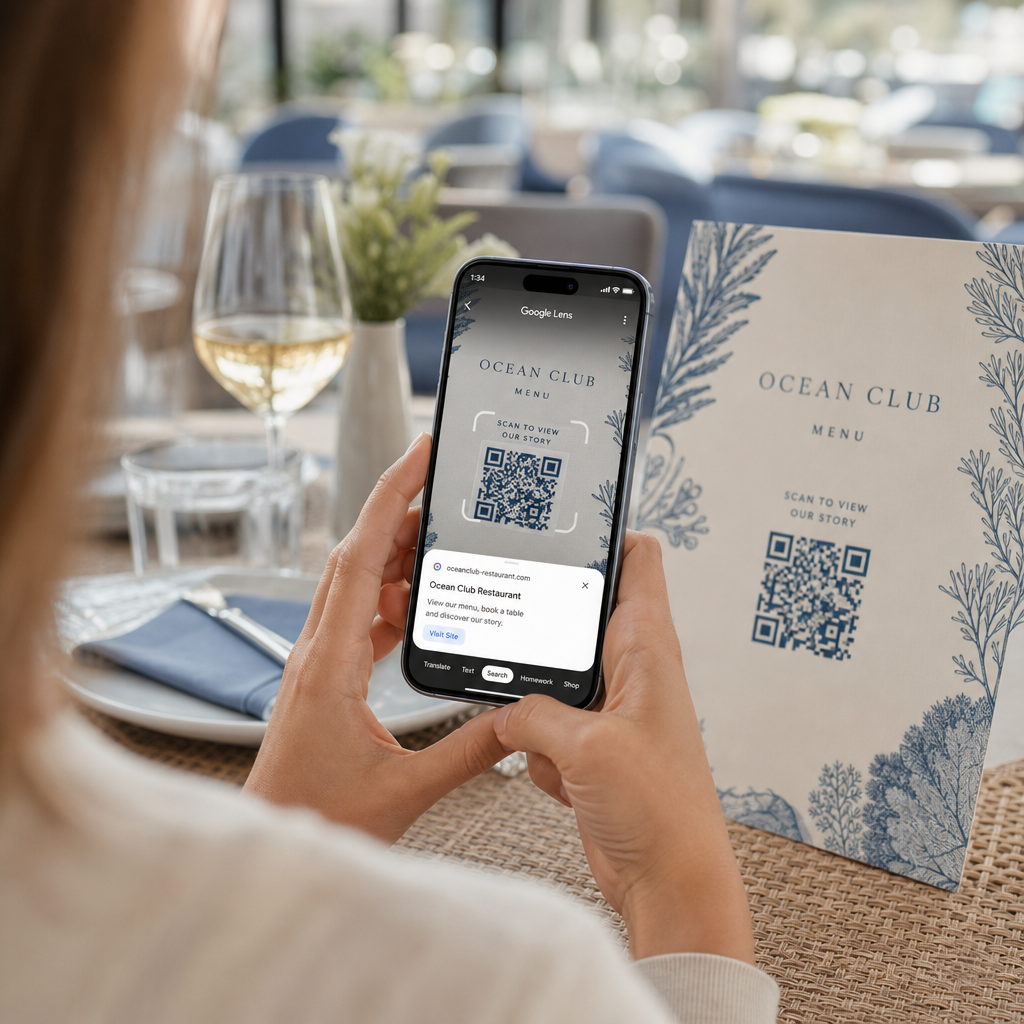
Telefonunuz bir QR kodu okumadığı için dijital bir menü veya web sitesi açmakta zorlanıyor musunuz? Kodları hızlı bir şekilde tarayamamak, bilgiye anında erişmeniz gerektiğinde gereksiz gecikmelere ve hayal kırıklığına neden olur. Google Lens'i nasıl kullanacağınızı öğrenmek, fiziksel kodları ve kaydedilmiş görüntüleri akıllı telefonunuzu kullanarak zahmetsizce taramanızı sağlar.
Google Uygulaması ile Canlı QR Kodları Nasıl Taranır
Google Lens, bir QR kodunun görsel desenini analiz etmek için görsel tanıma yazılımını kullanır. Koyu ve açık karelerin düzenini web bağlantıları veya iletişim bilgileri gibi okunabilir dijital verilere dönüştürür. Çoğu Android cihazda Google Lens doğrudan sisteme entegre edilmişken, iOS cihazlarda standart Google uygulaması aracılığıyla erişilebilir.
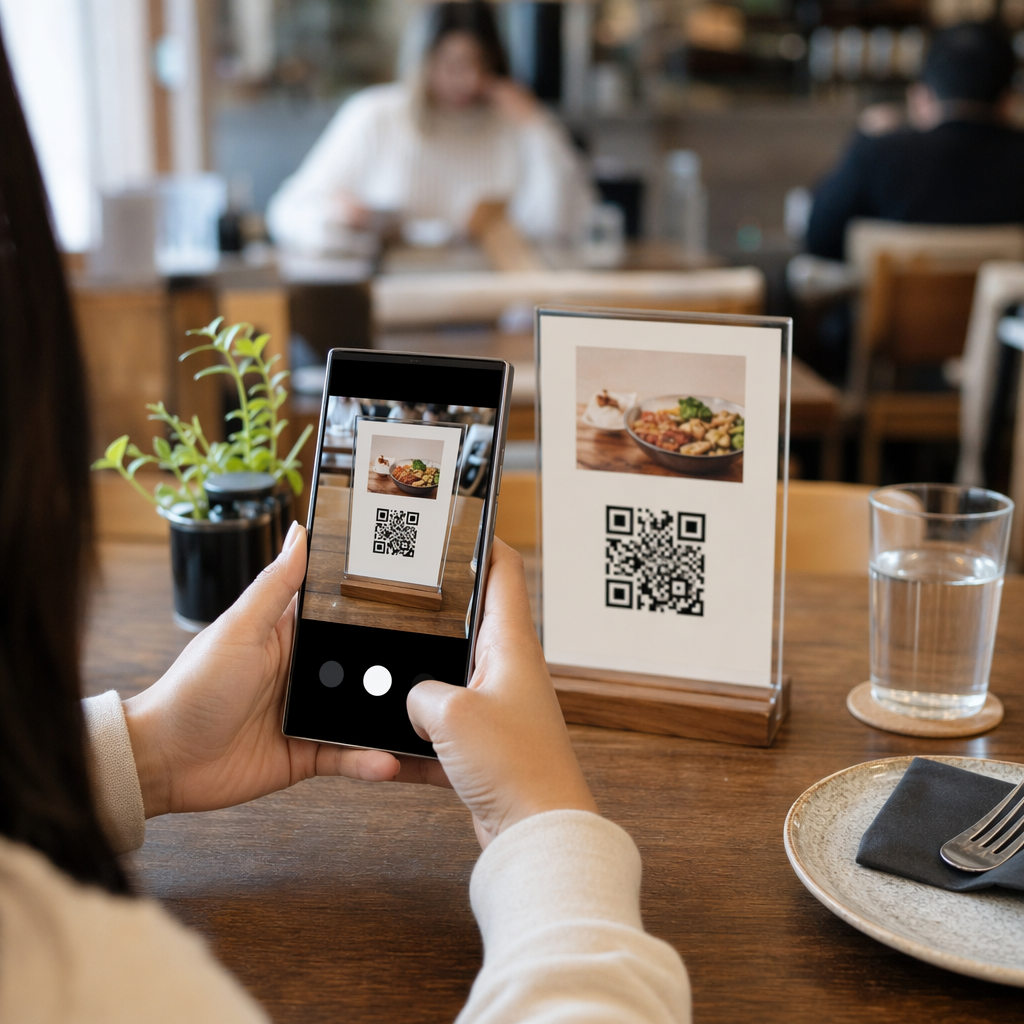
Önünüzdeki fiziksel bir QR kodunu taramak için:
- Google uygulamasını açın veya telefonunuzun ana ekranında Google Arama çubuğu widget'ını bulun.
- Lens simgesine dokunun arama çubuğunun sağ tarafında bulunur.
- Kamera seçeneğini seçin cihazınız kamera izinleri vermenizi isterse.
- Kamera çerçevenizi hedefleyin kareyi ekranınızın ortasında tutarak hedef QR koduna.
- Açılır bağlantıya dokunun ilgili web sayfasını veya belgeyi açmak için kodun üzerinde beliren.
Bir Android akıllı telefon kullanıyorsanız, ayrı bir araç açmaya gerek kalmadan kodları genellikle birincil kamera uygulamanızın içinde doğrudan tarayabilirsiniz. Kamera ayarları menünüze erişin ve etkinleştirin Google Lens önerileri. Etkinleştirildiğinde, standart kameranız çerçeveye giren QR kodlarını otomatik olarak algılar. Ayrıntılı cihaza özel yapılandırma talimatları için, hakkındaki tam kılavuzumuzu okuyun. Android'de QR Kod Nerede ve Nasıl Okutulur.
Kaydedilmiş Bir Fotoğraftan veya Ekran Görüntüsünden QR Kodu Nasıl Taranır
E-posta, kısa mesaj veya sosyal medya aracılığıyla gelen bir QR kodunu taramak için ikinci bir cihaza ihtiyacınız yoktur. Google Lens, görüntü dosyasında kaydedilen piksel matrisini okuyarak depolanmış görüntü dosyalarını doğrudan fotoğraf galerinizden analiz edebilir.
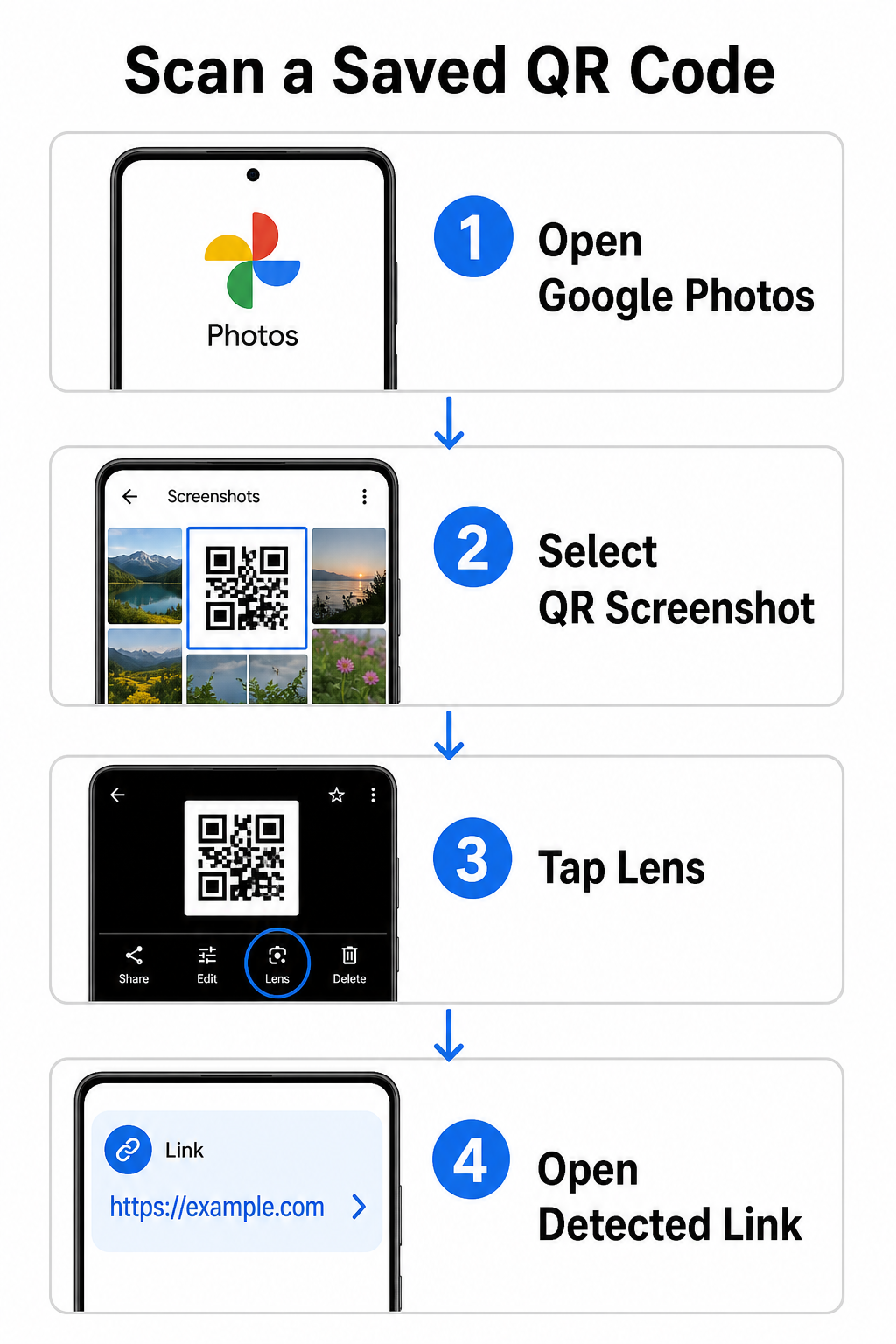
Bir Android cihazda kaydedilmiş bir resimden QR kodunu çözmek için:
- Google Fotoğraflar uygulamasını açın akıllı telefonunuzda.
- Fotoğrafı seçin veya hedef QR kodunu içeren ekran görüntüsünü.
- Lens simgesine dokunun alt menü çubuğunda konumlandırılmış.
- Algılanan bağlantıya dokunun web sayfasını açmak için QR kodunun üzerinde gösterilen.
Bir iPhone'da, ana Google uygulamasını açın, Lens kamera simgesine arama çubuğunun içinde dokunun ve Fotoğraflar düğmesini kamera rulosundan bir görüntü seçmek için kullanın. Farklı mobil platformlardaki ek yöntemler için, kapsamlı eğitimimize göz atın: akıllı telefonlarla QR kodlarını tarama.
QR Kodlarını Doğrudan Tarayıcınızda Tarayın Kaydedilmiş bir görüntüyü çözmek veya Google Lens'i açmadan kameranızı kullanmak mı istiyorsunuz? Çevrimiçi QR Kodu Tarayıcıyı herhangi bir web tarayıcısından kodlanmış içeriği anında görüntülemek için kullanın.
Yaygın Google Lens Tarama Sorunlarını Giderme
Google Lens bir kodu tanıyamadığında, genellikle çevresel faktörler veya kirli donanım bileşenleri sorumludur. Kamera sensörleri, siyah veri modülleri ile beyaz arka plan alanları arasındaki yüksek görsel kontrasta güvenir. Lekeler, yetersiz aydınlatma veya yanlış mesafe bu modül kenarlarını bulanıklaştırarak kodu optik yazılım için okunamaz hale getirir.
Tarama hatalarını hızlıca çözmek için şu adımları izleyin:
- Kamera merceğini silin veri modüllerini gizleyen lekeleri gidermek için temiz bir bezle.
- Ortam aydınlatmasını iyileştirin fiziksel işaretlerin etrafında, böylece görsel sensörler yüksek kontrastlı desenleri işleyebilir.
- Okuma mesafenizi ayarlayın doğru kamera otomatik odaklaması sağlamak için yaklaşık 8 ila 12 inç'e.
- Fiziksel yüzeyi kontrol edin kare şeklini bozan hasar, katlanma veya parlamaya karşı.
Google Lens hala kodu algılamıyorsa, Google Lens önerilerinin etkin kalıp kalmadığını doğrulamak için cihazınızın kamera ayarlarını kontrol edin. Sorunlar devam ederse, özel tarama araçlarını keşfetmek tarama yeteneklerini geri kazandırabilir. Güvenilir alternatifleri ayrıntılı incelememizde karşılaştırın: en iyi QR kodu tarama uygulamaları.
QR Kodlarını Tararken Güvenliği Sağlama
QR kodları mobil tarayıcıları otomatik olarak harici web hedeflerine yönlendirebildiği için, temel güvenlik önlemleri uygulamak kişisel cihazınızı aldatıcı bağlantılardan korur. Kamusal tabelalara basılı fiziksel QR kodları yerleşik güvenlik sertifikalarına sahip değildir; bu da kötü niyetli kişilerin bazen orijinal işaretlerin üzerine kötü amaçlı çıkartma katmanları yerleştirebileceği anlamına gelir.
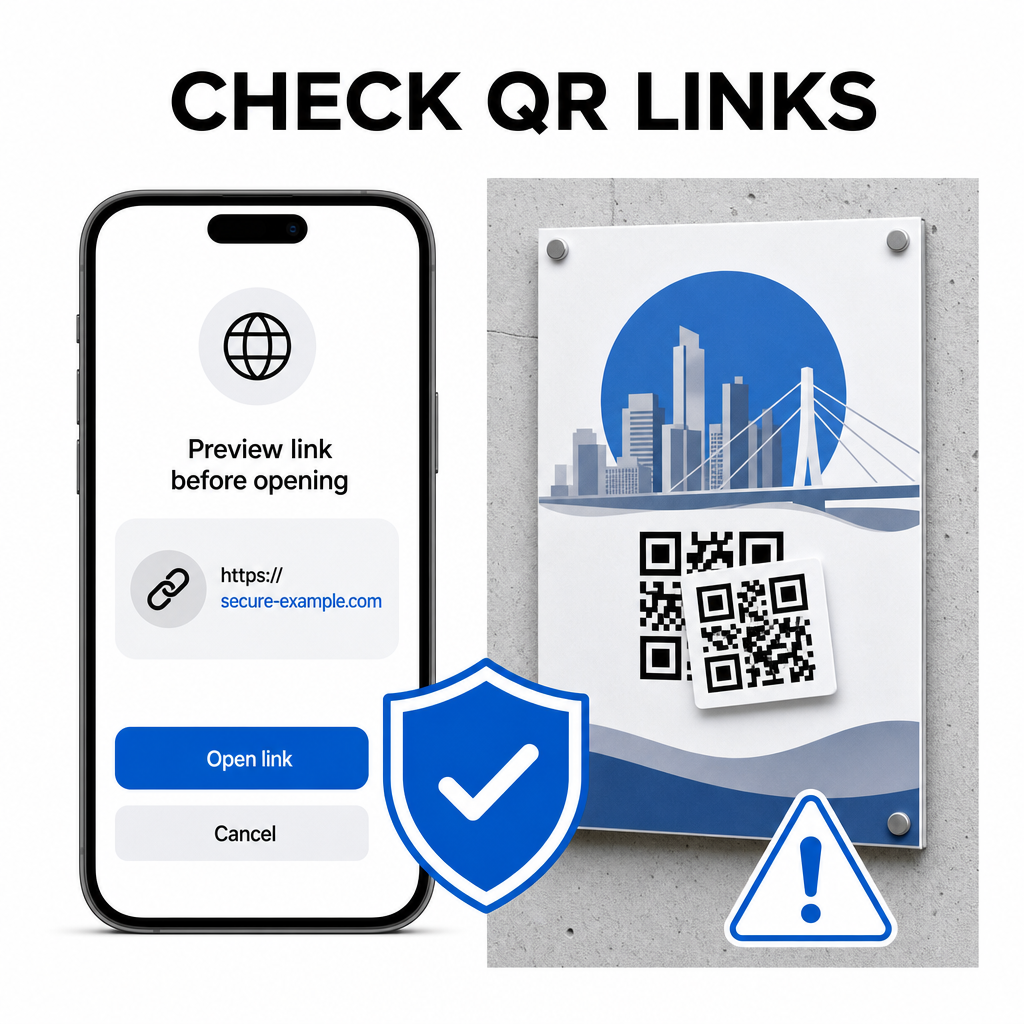
Kodları tararken şu pratik güvenlik alışkanlıklarını uygulayın:
- Önizleme URL'sini inceleyin Google Lens'te dokunmadan önce web adresinin beklenen siteyle eşleştiğini doğrulamak için.
- Fiziksel kurcalama olup olmadığını kontrol edin basılı tabelalardaki, örneğin orijinal bir kodun üzerine yapıştırılmış bir çıkartma gibi.
- Hassas kimlik bilgilerini girmekten kaçının beklenmedik kodlar aracılığıyla ulaşılan sayfalarda oturum açma veya bankacılık bilgileri gibi.
- Mobil uygulamaları güvenli bir şekilde indirin gömülü bağlantılar kullanmak yerine doğrudan resmi uygulama mağazalarını ziyaret ederek.
Web sayfalarıyla etkileşime girmeden önce hedef bağlantıları kontrol etmek, kişisel verilerinizin korunmasını sağlar. Kamera algılama ayarları ve güvenlik en iyi uygulamaları hakkında daha geniş tavsiyeler için, şuradaki eksiksiz rehberimizi keşfedin: QR kodları nasıl taranır.
Hızlı ve Güvenli QR Kod Tarama
Google Lens'e hakim olmak, herhangi bir akıllı telefonda menüleri, ödeme portallarını ve promosyon bağlantılarını almayı kolaylaştırır. Kameranızı temiz tutmak, doğru odak mesafesini korumak ve önizleme bağlantılarını dokunmadan önce doğrulamak sorunsuz bir tarama deneyimi sağlar. Bir kodu uygulamaya güvenmeden hızlı bir şekilde çözmeniz gerekiyorsa, ücretsiz çevrimiçi QR tarayıcıyı herhangi bir web tarayıcısından kodlanmış bağlantıları anında görüntülemek için kullanın.
Sıkça sorulan sorular
Hayır, çoğu modern Android cihazda Google Lens özellikleri doğrudan varsayılan Google Arama çubuğuna, Google Asistan'a veya yerel Kamera uygulaması ayarlarına yerleşiktir.
Google Lens, JPEG veya PNG gibi görüntü dosyalarını tarar. Bir PDF'i taramak için, belgenin içindeki QR kodunun ekran görüntüsünü alın ve bu ekran görüntüsünü Google Lens'te veya çevrimiçi bir okuyucuda açın.
Tarayıcı sekmesini herhangi bir bilgi girmeden hemen kapatın. Fiziksel QR kodunun üzerine bir çıkartma yapıştırılıp yapıştırılmadığını veya kameranızın bitişik bir kodu yanlış okuyup okumadığını kontrol edin.