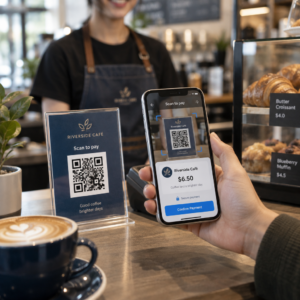
Yeni biriyle tanıştığınız anda iletişim bilgilerinizi paylaşmak ister misiniz? Geleneksel kağıt kartlar kaybolur, atılır veya yanlışlıkla manuel olarak yazılır. Bir isim kartı QR kodu tüm bunları çözer – tek bir tarama, tüm iletişim profilinizi anında herhangi bir akıllı telefona kaydeder.
İsim kartı QR kodu nedir?
İsim kartı QR kodu, kartvizitinize basılmış veya görüntülenmiş, iletişim bilgilerinizi vCard (VCF) formatında kodlayan taranabilir bir koddur. Biri akıllı telefon kamerasını ona doğrulttuğunda, cihaz deseni okur ve adınızı, unvanınızı, şirketinizi, telefon numaranızı, e-posta adresinizi, web sitenizi ve sosyal medya bağlantılarınızı doğrudan kişilerine kaydetmelerini ister – yazmaya gerek kalmaz.
İki ana türü şunlardır: statik ve Dinamik. Statik kodlar verileri desenin içinde kalıcı olarak saklar. Dinamik kodlar bir yönlendirme bağlantısı kullanır, bu da kartlarınızı yeniden bastırmadan iletişim bilgilerinizi istediğiniz zaman güncelleyebileceğiniz anlamına gelir – telefon numaranız veya unvanınız değişirse önemli bir avantajdır.
İsim Kartınız İçin Bir vCard QR Kodu Oluşturun İletişim bilgilerinizi girin, tasarımı markanıza uyacak şekilde özelleştirin ve dakikalar içinde baskıya hazır bir dosyayı şununla indirin: vCard QR Kod Oluşturucu.
İsim kartınıza neden bir QR kodu eklemelisiniz?
Fiziksel kartvizitler hala önemini koruyor – anketler profesyonellerin 'inin hala bunları kullandığını ve yarısından fazlasının haftalık olarak dağıttığını gösteriyor. Ancak kağıt kartların neredeyse 'i bir hafta içinde atılıyor. Bir QR kodu eklemek, alıcılara bilgilerinizi dijital olarak kaydetmek için anında, sorunsuz bir yol sunarak bilgilerinizin çöpe gitme olasılığını azaltır.
İşte temel avantajları:
- Anında kişi kaydetme – Alıcılar bir kez tarar ve tam vCard'ınız kaydetmeye hazır olur, manuel veri girişi ve yazım hatalarını ortadan kaldırır.
- Dinamik güncellemeler – Telefon numaranızı, unvanınızı veya şirketinizi yeni bir baskı sipariş etmeden değiştirin; QR kodu her zaman güncel bilgilerinizi gösterir.
- Tarama analizi – Kodunuzun kaç kez, ne zaman ve hangi konumlardan tarandığını yerleşik bir performans paneli aracılığıyla takip edin.
- Özelleştirilebilir tasarım – QR kodunun renklerini, şeklini ve logosunu kişisel veya şirket markanıza uyacak şekilde eşleştirin, böylece kart tasarımının doğal bir parçası gibi hissettirsin.
- Çevre dostu ağ oluşturma – Bilgileriniz geliştikçe daha az yeniden baskı ve daha az israf edilen kart stoğu.
- İletişim bilgilerinin ötesindeki bağlantılar – Alıcıları tek bir taramayla doğrudan LinkedIn profilinize, portföyünüze, e-postanıza veya herhangi bir URL'ye bağlayın.
Bir kartvizit QR koduna neler kodlayabilirsiniz
QR kodunuz bir telefon numarası ve e-posta ile sınırlı olmak zorunda değildir. Hedeflerinize bağlı olarak şunları kodlayabilirsiniz:
- Bir vCard tam iletişim profilinizle (ad, unvan, şirket, telefon, e-posta, web sitesi, sosyal bağlantılar)
- Doğrudan bağlantı LinkedIn profilinize profesyonel ağ oluşturma için
- Bir Bağlantı Adresi portföyünüze, açılış sayfanıza veya rezervasyon takviminize işaret eden
- Bir önceden doldurulmuş e-posta böylece alıcılar taradıktan hemen sonra size mesaj gönderebilir
- Bir kartvizit sayfası tam dijital profilinizi mobil uyumlu bir açılış sayfasında görüntüleyen
Doğru türü seçmek, ağ oluşturma bağlamınıza bağlıdır. Çoğu profesyonel için, bir vCard QR kodu en güçlü varsayılandır çünkü her modern akıllı telefon kamerasıyla yerel olarak çalışır – iOS 11 ve sonrası ile çoğu Android cihaz VCF dosyasını otomatik olarak ayrıştırır ve kullanıcıdan kişiyi eklemesini ister.
Pageloot ile kartvizit QR kodu nasıl oluşturulur
Süreç sadece birkaç dakika sürer:
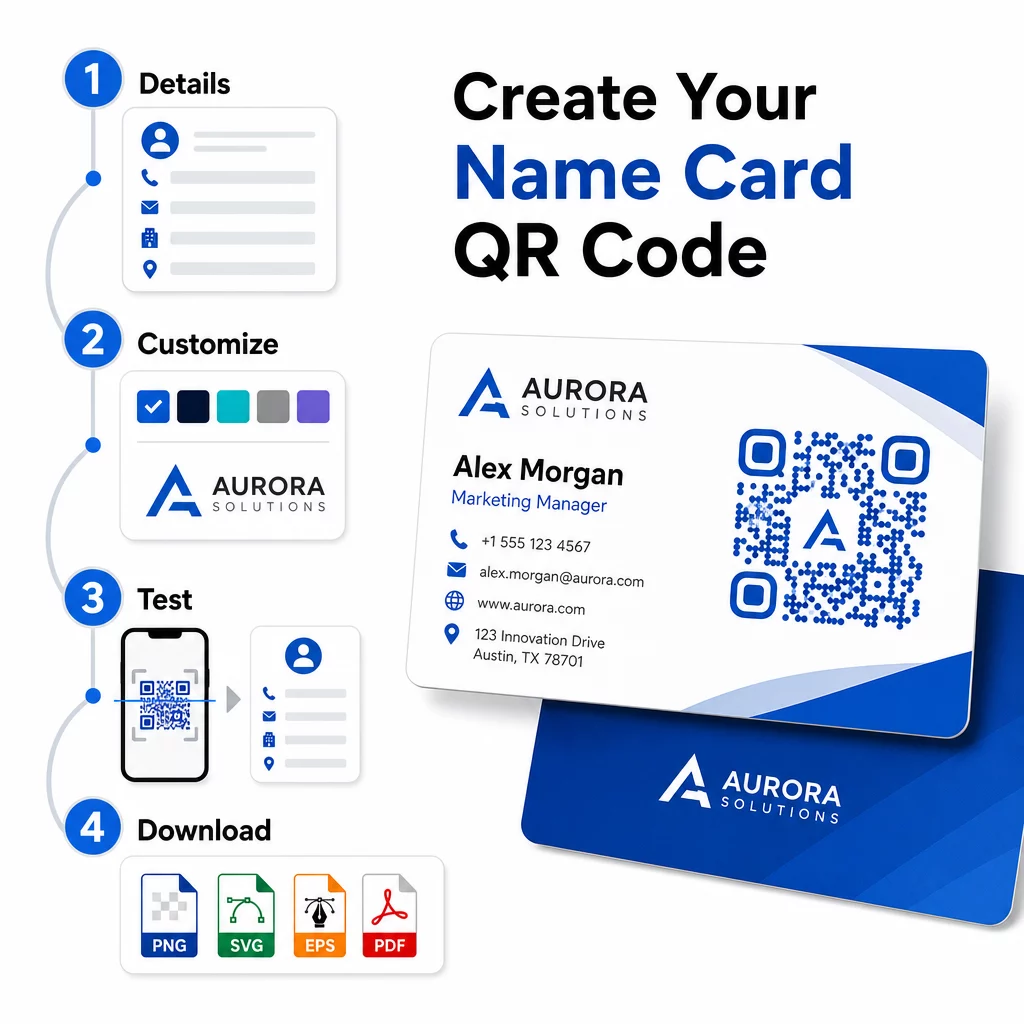
- Bilgilerinizi girin – Açın vCard QR Kod Oluşturucu ve adınızı, unvanınızı, şirketinizi, telefon numaranızı, e-posta adresinizi ve web sitenizi doldurun. Minimum olarak bir ad ve bir iletişim yöntemine ihtiyacınız var.
- Tasarımı özelleştirin – Markanıza uygun renkleri seçin, bir gövde stili ve kenar şekli belirleyin ve logonuzu kodun ortasına yerleştirmek için yükleyin. Bu Logolu QR Kod Oluşturucu markalı kodları görsel olarak daha belirgin hale getirir ve tarama oranlarını artırabilir.
- Oluşturun ve test edin – Pageloot kodu anında üretir. Doğru çözüldüğünü onaylamak için herhangi bir baskı dosyasını sonlandırmadan önce kodu birden fazla cihazda kendiniz tarayın.
- Baskıya hazır bir dosya indirin – PNG, SVG, EPS veya PDF olarak dışa aktarın. Kartvizit baskısı için, kaliteden ödün vermeden ölçeklenebildikleri için vektör formatları (SVG veya EPS) önerilir. Ayrıca şeffaf bir PNG indirin karmaşık kart arka planlarının üzerine yerleştirmek için.
Tamamen markalı bir kartvizit QR kodu ister misiniz? Logonuzu ekleyin, marka renklerini seçin ve baskıya hazır bir dosyayı kullanarak dışa aktarın QR Kod Oluşturucu – başlaması ücretsiz, kredi kartı gerekmez.
Baskı boyutu ve yerleştirme yönergeleri
Fiziksel boyutları doğru ayarlamak, güvenilir tarama için çok önemlidir. Pageloot'un kartvizit QR kodları için yönergeleri şunları önermektedir:
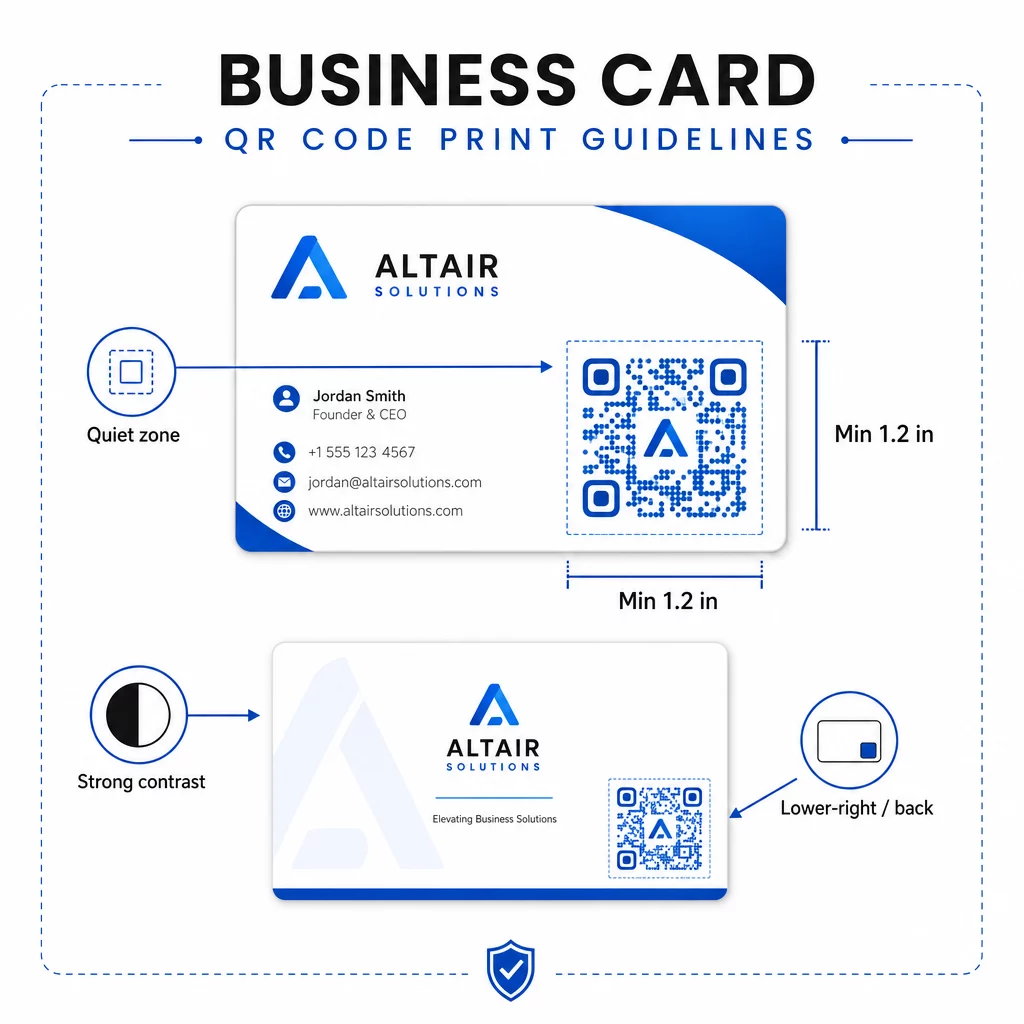
- Minimum boyut: URL veya kısa bir vCard gibi basit veriler için 0.8 × 0.8 inç (2 × 2 cm)
- Ayrıntılı vCard'lar için önerilen boyut: bireysel modüllerin temiz bir şekilde taranabilecek kadar büyük kalması için en az 1.2 × 1.2 inç (3 × 3 cm)
- Sessiz bölge: kodun dört tarafında da en az 0.25 inç boş beyaz alan bırakın – bu boş kenarlık, tarama uygulamalarının desenin kenarlarını bulmasına yardımcı olur
- Kontrast: kod ile arka planı arasında minimum 4:1 kontrast oranı hedefleyin; birçok eski tarayıcı uygulamasının okuyamadığı açık zemin üzerine koyu (ters çevrilmiş) tasarımlardan kaçının
- Baskı çözünürlüğü: ofset veya dijital baskı için 300–600 DPI olarak dışa aktarın
Çoğu profesyonel, ön tasarımın dağınık olmaması için QR kodunu kartın arkasına veya anında görünürlük için ön tarafın sağ alt köşesine yerleştirir. Kod, kart alanının yaklaşık 'sini kaplamalıdır – adınızı ve unvanınızı gölgede bırakmadan fark edilecek kadar belirgin olmalıdır.
Farklı baskı materyallerindeki boyutlandırmaya daha derinlemesine bakmak için, tam Kartvizitler için QR kodu boyut yönergeleri ve rehberine QR kodlu kartvizit tasarımı.
Dinamik isim kartı QR kodları ile performansı izleme
İletişim bilgileriniz hiç değişmiyorsa ve kullanım verilerine ihtiyacınız yoksa statik QR kodları iyi çalışır. Dinamik kodlar iki kritik yetenek ekler:
- Düzenlenebilir hedef – vCard'ınızı, URL'nizi veya bağlantılı sayfanızı Pageloot'un kontrol paneli aracılığıyla istediğiniz zaman güncelleyin. Basılı kod aynı kalır; yalnızca hedef değişir.
- Tarama analizi – Tarama sayılarını, zaman damgalarını, coğrafi konumları ve cihaz türlerini gerçek zamanlı olarak görüntüleyerek, ağ materyallerinizin ne kadar etkili performans gösterdiğine dair ölçülebilir bir içgörü elde edin.
Konferanslara, fuarlara veya sektör etkinliklerine düzenli olarak katılıyorsanız, dinamik kodlar hangi etkinliklerin en çok takip sağladığını anlamanıza ve dağıtımınızı buna göre ayarlamanıza olanak tanır. Dinamik kodlara ve analiz paneline erişmek için 14 günlük ücretsiz deneme sürümüne kaydolun – kredi kartı gerekmez.
Dinamik QR kodlarını kullanma ve kampanyaları izleme hakkında daha fazla bilgi için şuraya bakın: vCard QR kodları için nihai rehberimizde ve şu kılavuz: farklı baskı malzemeleri için QR kodu boyutlandırma.
Sıkça sorulan sorular
vCard detaylarınızın tamamını ekleyebilirsiniz – ad, unvan, şirket, telefon numarası, e-posta adresi, web sitesi ve sosyal medya bağlantıları. Ayrıca doğrudan bir LinkedIn profiline, bir portföy sayfasına veya önceden doldurulmuş bir e-postaya bağlantı verebilirsiniz. vCard formatı en çok yönlü seçenektir çünkü modern akıllı telefonlar onu yerel olarak okur ve kullanıcıları tek dokunuşla kişiyi kaydetmeye yönlendirir.
Evet, dinamik bir QR kodu kullanırsanız. Dinamik kodlar bir yönlendirme kullanır, böylece bağlantılı iletişim bilgilerini veya hedef URL'yi basılı koda dokunmadan Pageloot paneli üzerinden istediğiniz zaman değiştirebilirsiniz. Statik kodlar verileri desende kalıcı olarak saklar ve oluşturulduktan sonra düzenlenemez.
Bir URL gibi basit veriler için, minimum 0,8 × 0,8 inç (2 × 2 cm) yeterlidir. Birden fazla alanı olan ayrıntılı bir vCard için, modülleri güvenilir bir şekilde taranabilecek kadar büyük tutmak amacıyla en az 1,2 × 1,2 inç (3 × 3 cm) kullanın. Kodun etrafında her zaman en az 0,25 inçlik net beyaz bir kenarlık bırakın ve tam baskınızı yapmadan önce birden fazla cihazda test edin.