Are your customers frustrated by QR codes that simply will not scan? A faulty code leads to lost user engagement, wasted print budgets, and abandoned conversions. This guide explains the technical standards and visual practices required to ensure your QR codes scan reliably across every mobile device.
Why Contrast is the Foundation of Scannability
The most common reason for a failed scan is poor contrast between the QR code modules and their background. Smartphone cameras detect data by measuring the light reflected back to the sensor. Darker modules absorb light, while lighter backgrounds reflect it. If the difference in reflectance is too subtle, the scanner cannot decode the matrix.
To keep your assets functional, review QR code color contrast best practices before committing to print. Always place a darker data pattern on a lighter background. Standard black modules on a pure white background yield a contrast ratio of 21:1, representing the most reliable combination. While customized brand colors can work, you should maintain a minimum contrast ratio of 4.5:1.
Avoid inverted designs – such as white modules on a dark background – because many native camera apps fail to decode inverted matrices. You must also avoid subtle gradients, shadows, and low-contrast combinations like light gray on white or dark red on black.
| Color Pairing | Estimated Contrast Ratio | Scan Reliability | Recommended Use |
|---|---|---|---|
| Black on White | 21:1 | Excellent | Ideal for all print and digital media |
| Navy Blue on Beige | ~15:1 | Excellent | Strong branded alternative for packaging |
| Dark Green on White | ~4.5:1 | Good | Acceptable for high-resolution print |
| Red on Black | ~1.5:1 | Very Poor | Avoid; scanner sensors cannot distinguish modules |
| White on Dark (Inverted) | 21:1 | Unreliable | Avoid; many default phone cameras cannot parse |
Sizing Your QR Code for Distance and Data Density
A QR code that appears sharp up close can become completely unreadable if scanned from across a room. Physical sizing must scale directly with scanning distance and the amount of data encoded in the matrix.
For close-range handheld materials such as business cards, brochures, and restaurant table tents, the minimum reliable print size is 2 x 2 cm (0.8 x 0.8 inches). Printing smaller than this threshold prevents budget smartphone lenses from resolving individual modules.
For medium- and long-range applications, apply the 10:1 distance-to-size ratio:
- Measure the expected scanning distance between the user and the code.
- Divide that distance by 10 to establish the minimum width and height of the code.
- Add extra width if the code encodes a long URL or incorporates custom visual branding.
A poster viewed from 1 meter away requires a code at least 10 x 10 cm, while an outdoor billboard viewed from 15 meters requires a code of at least 1.5 x 1.5 meters. For detailed dimension charts across print formats, consult our QR code size guide.
Design Scannable Codes with Real-Time Validation Want to create branded codes that scan effortlessly across all operating systems? Use the QR code generator to build custom, high-contrast designs with automated scannability checks.
Technical Standards for Quiet Zones and Error Correction
Every functional QR code relies on two built-in structural safeguards: the surrounding margin and the internal error correction architecture.
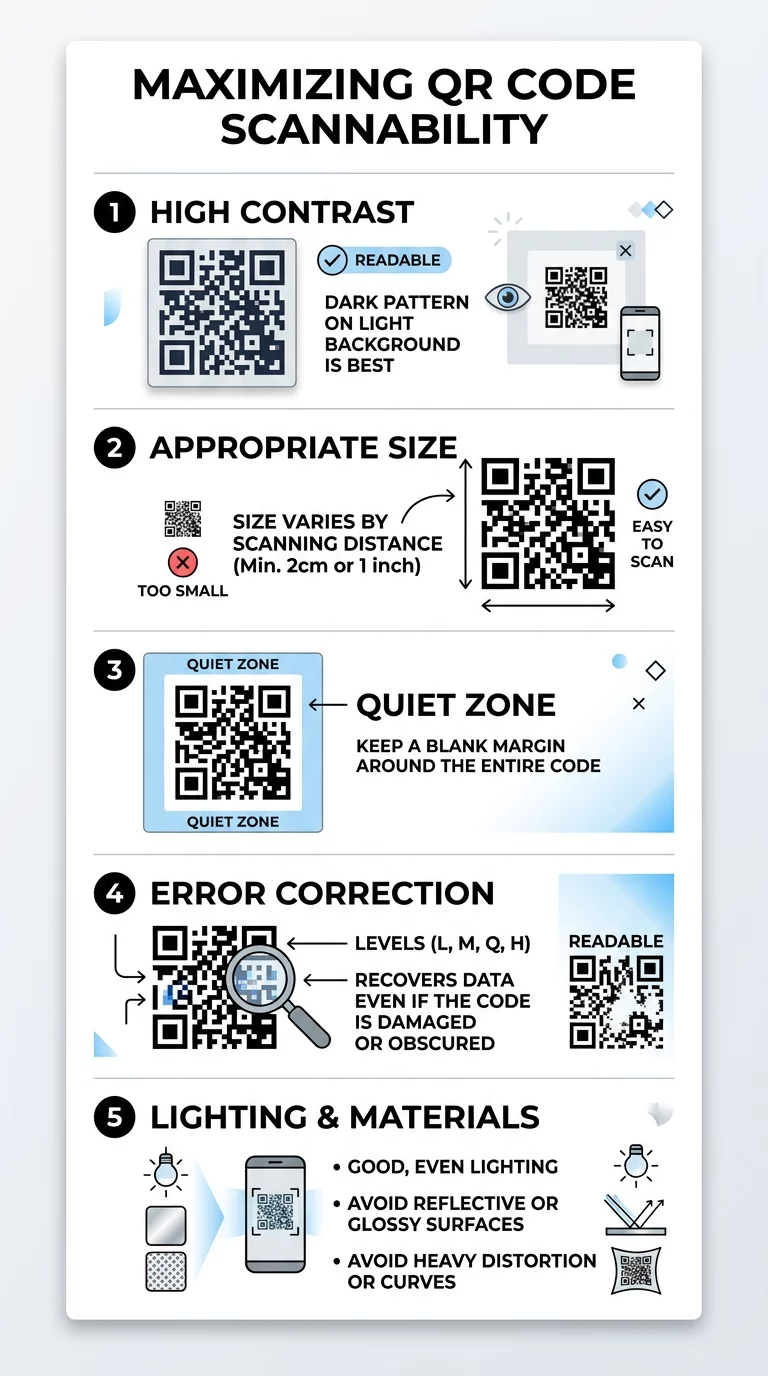
- The Quiet Zone: International specifications (ISO/IEC 18004) require an unobstructed margin surrounding all four sides of the matrix. This margin must measure at least four modules wide. Placing text, framing graphics, or background imagery inside this perimeter prevents the scanner from isolating where the code starts and ends.
- Error Correction Architecture: QR codes employ Reed–Solomon error correction algorithms to reconstruct missing or distorted data. This safeguard allows symbols to scan even when scratched, partially obscured, or printed on uneven materials. You can learn how error correction works to choose the right resilience level for your deployment.
There are four standardized error correction levels:
- Level L (Low): Recovers approximately 7% of lost data. Best reserved for clean, controlled indoor environments with dense static information.
- Level M (Medium): Recovers approximately 15% of lost data. Serves as the industry default for standard, unmodified marketing prints.
- Level Q (Quartile): Recovers approximately 25% of lost data. Suitable for outdoor signage and high-traffic retail packaging.
- Level H (High): Recovers up to 30% of lost data. Mandatory when embedding custom logos or deploying graphics in harsh outdoor conditions.
Balancing Visual Design with Finder Pattern Protection
Customizing your code improves brand recognition and encourages engagement, but over-styling introduces read errors.
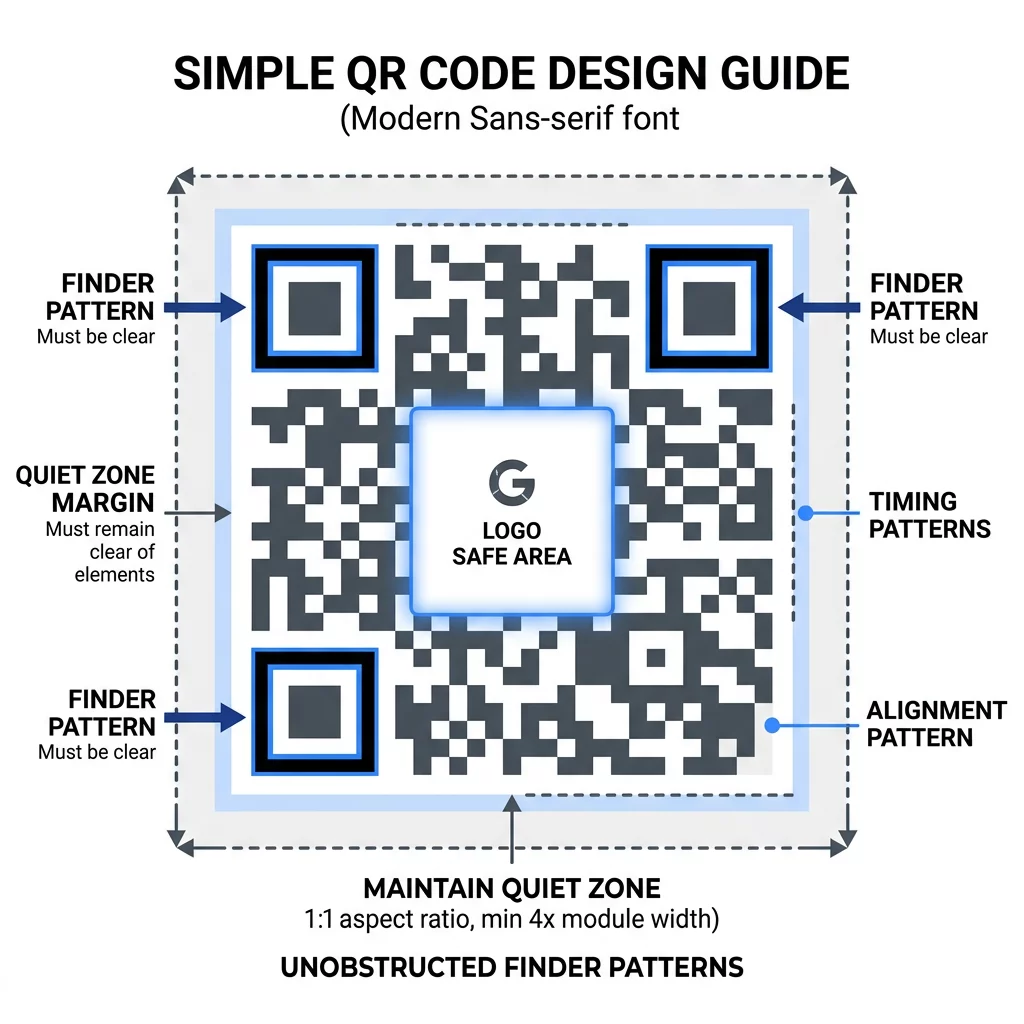
When you explore how to add logos to QR codes, keep the graphic centered and restrict its size to no more than 25% to 30% of the total surface area. Because the logo directly obscures data modules, you must set error correction to Level H so the scanner can reconstruct the covered bytes.
Never obscure or alter the three large squares situated in the corners. These elements, called finder patterns, feature an exact 1:1:3:1:1 module ratio that allows cameras to identify the code’s orientation from any viewing angle. Using a dedicated QR code generator with logo ensures that your central artwork remains within safe boundary zones while leaving corner finder patterns intact.
Surface Materials, Print Techniques, and Lighting
The substrate on which a code appears can impact optical recognition just as much as digital file formatting. Lighting conditions between 100 and 1,000 lux should always be evaluated during production.
Understanding how printing techniques impact QR code scannability helps you avoid practical production pitfalls:
- Substrate Finishes: Highly reflective materials such as gloss-laminated cardstock, glass, and brushed metals create specular glare that blinds optical camera sensors. Choose matte paper, dull varnishes, or vinyl coatings to diffuse light evenly.
- Geometric Curvature: Printing on curved containers such as cans, cosmetic tubes, or drink bottles introduces cylindrical distortion. Scanners struggle to read modules warped around a curve. Place codes along the flattest axis, enlarge the overall size, or keep the data string as short as possible.
- File Resolution: Standard compressed formats like low-resolution JPEG introduce edge artifacts and pixelation. For professional press runs, export vector artwork as SVG, EPS, or high-resolution PDF files at 300 to 600 DPI to maintain sharp module edges.
Strategic placement also dictates whether users scan your asset. Reviewing key principles for QR code placement in marketing ensures your graphics appear at ergonomic, eye-level heights where shadows, folds, and reflections are minimized.
Reducing Matrix Density with Dynamic QR Codes
If you examine why your QR code is not working, dense data clustering is frequently the root problem. Static codes embed the entire destination URL directly into the matrix. As URLs grow longer, the matrix expands into hundreds of tiny, tightly packed modules that cheap camera sensors cannot resolve.
Dynamic QR codes resolve this issue by encoding a short, permanent redirect URL. Because the encoded character count remains brief, the resulting visual grid stays minimal with larger, easily recognizable modules. Dynamic codes also let you update destination URLs without reprinting your packaging, while built-in analytics track scan counts, operating systems, and engagement locations over time.
Comprehensive Real-World Testing Workflows
Never send a QR code to commercial print without validating the design across physical environments. Reviewing how to test QR codes for mobile usability helps uncover defects before expensive print runs.
- Test with multiple physical devices, including flagship iOS handsets, budget Android models, and mid-tier tablets.
- Verify scanning performance using native camera apps as well as a dedicated QR code scanner tool.
- Print proofs on the exact production stock to account for ink absorption, surface texture, and paper brightness.
- Scan the printed proof under diverse lighting, simulating dim indoor rooms, harsh fluorescent lighting, and direct sunlight.
- Test scans from off-center angles and maximum intended distances to establish reading tolerances.
Launching Reliable Visual Campaigns
Achieving reliable scannability does not require sacrificing visual design. By maintaining high contrast ratios, protecting the four-module quiet zone, selecting appropriate error correction levels, and reducing matrix density with dynamic URLs, you ensure frictionless user experiences. Test every asset in its final physical form so your audience connects immediately to your digital touchpoints.
Frequently Asked Questions
For close-range scanning on items like business cards, the practical minimum size is 2 x 2 cm (0.8 x 0.8 inches). Codes containing denser data or viewed from farther away require larger dimensions to remain readable.
Older smartphone sensors struggle with low contrast, inverted color schemes, and heavy data density. While newer flagship cameras compensate for subtle contrast variations, older lenses require crisp edges, dark-on-light coloring, and adequate quiet zones.
Gradients and photographic backgrounds are not recommended because they introduce mid-tones that confuse optical sensors. If your brand guidelines require background visuals, isolate the code within a solid, high-contrast container that maintains the four-module quiet zone.