
Are you struggling to measure the impact of your offline marketing materials? Without clear data, you are essentially guessing which flyers or packaging drive the most traffic to your website. This guide explains how to track QR code scans and use analytics to turn physical touchpoints into measurable digital insights.
The Foundation of QR Code Tracking
To understand how tracking works, you must first distinguish between static and dynamic codes. Static QR codes encode information directly into the pattern, meaning the data is permanent and cannot be monitored once the code is printed. In contrast, dynamic QR codes function by using a short redirect URL. When a user scans the code, they are briefly routed through a tracking server before arriving at the final destination.
This redirection process is the “engine” of your analytics. Because the scan passes through a server first, the system can log the exact moment of the interaction, the type of device used, and the general location of the user. This architecture also allows you to update the destination URL at any time without having to reprint your materials, providing both flexibility and a continuous stream of data.
Setting Up Your Tracking Campaign
Implementing a tracking system requires a dedicated management platform that supports dynamic functionality. The process begins by selecting a generator that offers a centralized dashboard where you can organize multiple campaigns. After entering your destination URL, you should enable tracking features to ensure every interaction is recorded.
Once the code is generated, it is vital to test the redirect across different devices to verify that the data is appearing in your dashboard correctly. Many businesses choose to group their codes by location or campaign type to make the resulting data easier to analyze. For those looking for immediate feedback, how to track QR code scans in real-time involves using platforms that provide live updates, allowing you to see engagement as it happens during an event or product launch.
Monitor Your Campaign in Real-Time Want to see exactly where and when your customers are customers scanning your materials? Use the Dynamic QR Code Generator to create trackable codes and access a full performance dashboard today.
Integrating with Google Analytics 4
For a more comprehensive view of the customer journey, you can connect your QR codes to Google Analytics 4 (GA4). This is achieved by adding UTM parameters to your destination URL. These tags tell your analytics software exactly where the traffic originated, allowing you to compare QR code performance against social media, email, or paid search.
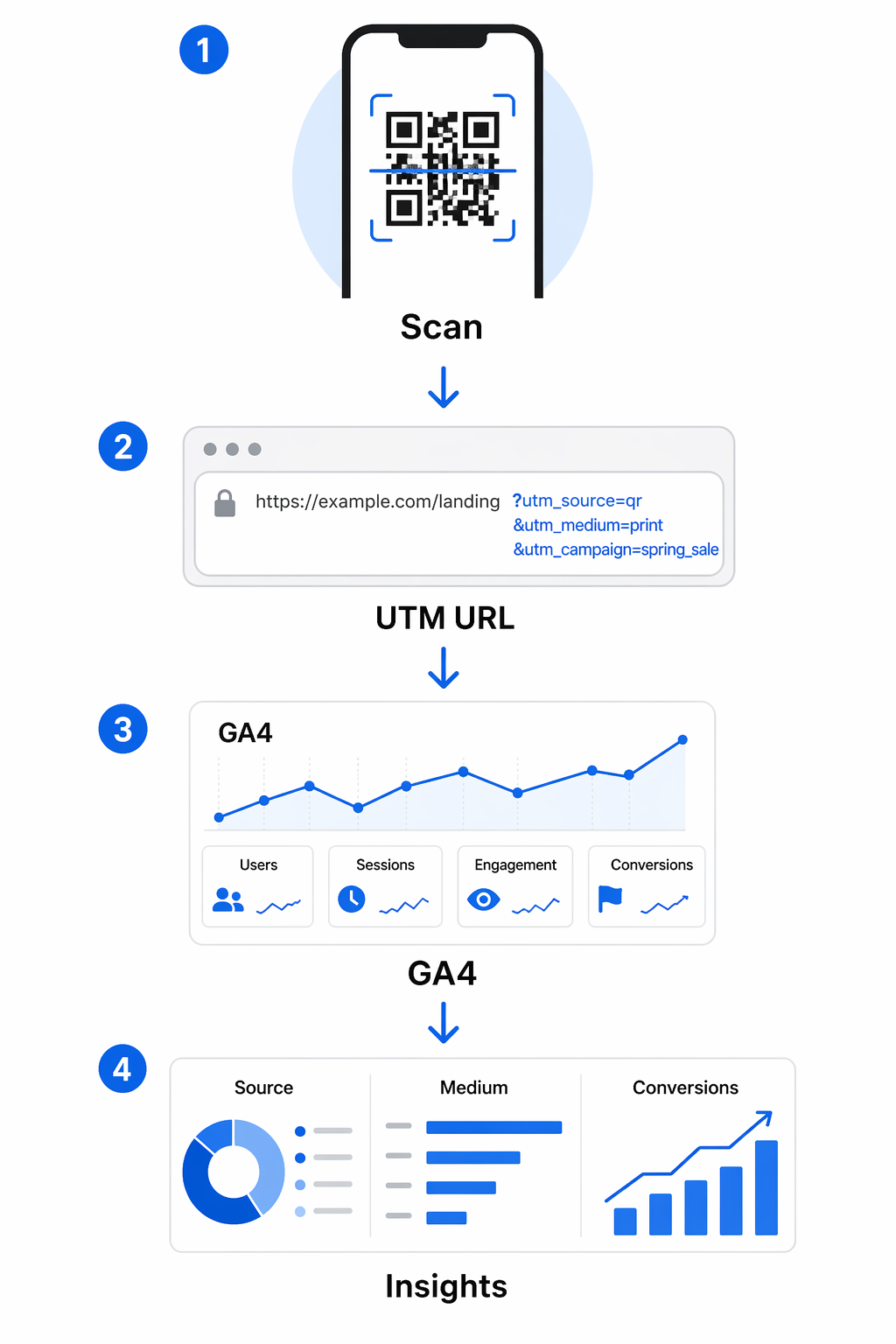
When setting up your links, you should define specific parameters such as the source, medium, and campaign name. For example, setting the medium to “qr_code” allows you to filter your GA4 reports to see only the traffic generated from physical scans. Utilizing UTM parameters for QR codes ensures that you can track conversions, such as form submissions or purchases, back to the specific poster or package that initiated the session.
Key Metrics for Measuring Performance
A robust analytics dashboard provides several layers of data that help you refine your marketing strategy. By reviewing these metrics regularly, you can identify which physical placements are most effective and which regions show the highest interest in your offerings.
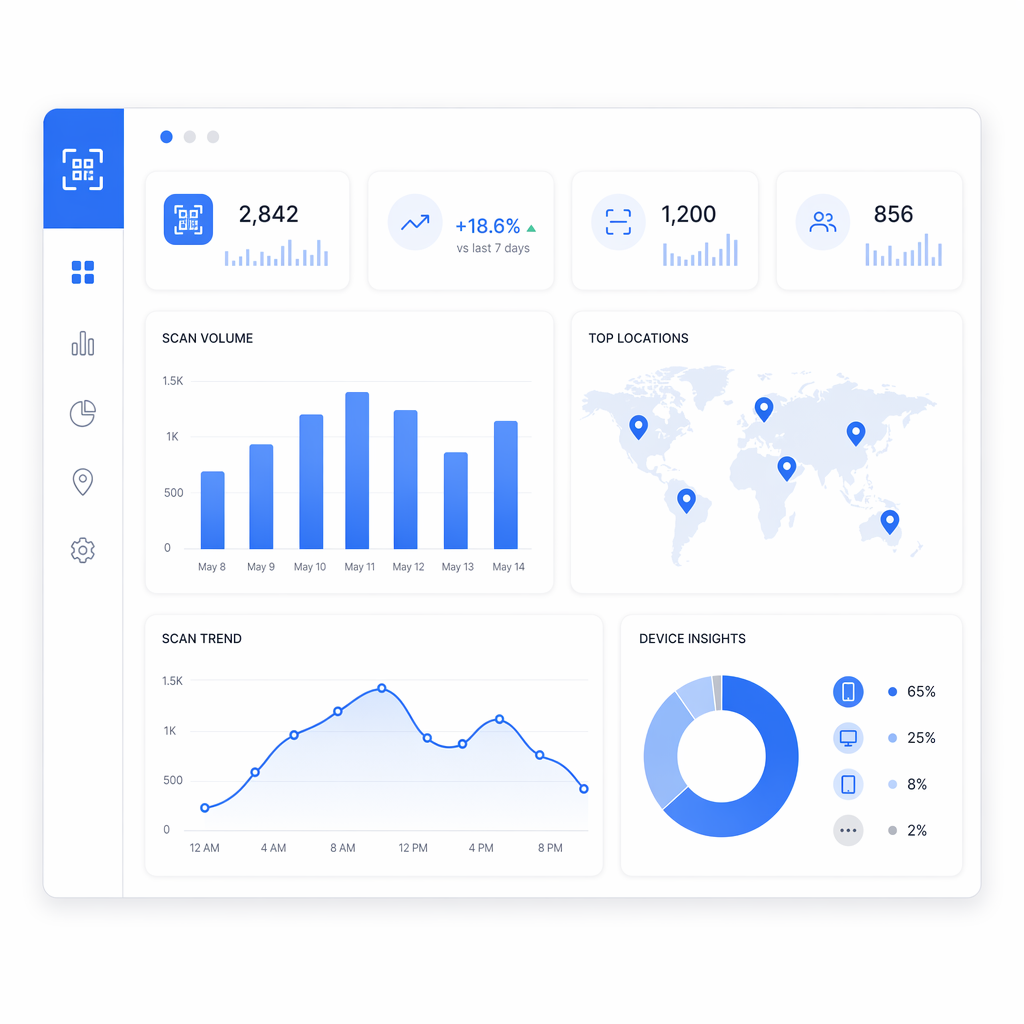
- Scan Volume: Tracking total scans versus unique scans helps you understand how many individuals are interested and how often they return to your content.
- Geographic Data: You can view the city or country where scans occur. Some advanced systems even offer geolocation analytics to provide more precise data based on user permission.
- Temporal Trends: Analyzing the time and date of scans reveals when your audience is most active, which can inform the timing of future promotions.
- Device Insights: Knowing whether your audience uses iOS or Android helps you optimize the landing page experience for the specific hardware they carry.
Focusing on these enterprise QR code analytics allows you to move beyond simple scan counts and begin understanding the “why” and “where” behind customer engagement. This data-driven approach ensures that your marketing budget is allocated to the channels and locations that produce the highest return on investment.
Frequently Asked Questions
You can only track a QR code if it was originally created as a dynamic code. Static QR codes do not have the redirection capability required to log scan data, and this cannot be added after the code is printed.
No, most modern tracking is handled through a web-based dashboard provided by your QR code management platform. You can log in via any browser to view scan counts, locations, and device types in real-time.
Most analytics platforms collect non-personal data such as IP-based location, device type, and scan time. If you require precise GPS coordinates, users must typically provide explicit permission through their mobile browser.