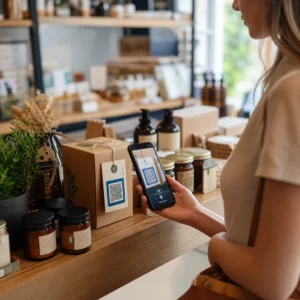
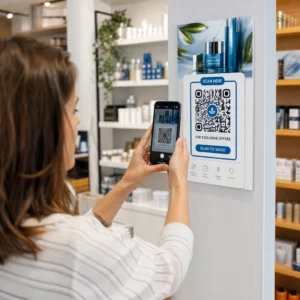
Label kode QR memungkinkan pelanggan beralih dari kemasan di tangan mereka ke halaman produk, manual, tautan pemesanan ulang, atau obrolan dukungan dalam satu pemindaian. Panduan ini menunjukkan cara membuat label produk QR yang dapat dipindai pada percobaan pertama: jenis kode apa yang akan digunakan, seberapa besar untuk mencetaknya, di mana menempatkannya, dan apa yang harus diuji sebelum proses pencetakan penuh.
Kode QR pada Label Produk: Jawaban Singkat
- Ukuran: cetak kode minimal 2 x 2 cm (0,8 x 0,8 inci). Gunakan 2,5 hingga 3 cm jika pelanggan memindai dari rak atau konter.
- Zona tenang: pertahankan batas kosong minimal 4 modul (sekitar 4 hingga 8 mm pada label) di keempat sisinya.
- Warna: kode gelap dengan latar belakang terang. Hitam di atas putih adalah yang paling aman.
- Resolusi: gunakan file vektor (SVG, PDF, atau EPS) untuk dicetak. Jika Anda menggunakan PNG, ekspor pada ukuran cetak akhir pada 300 dpi.
- Tipe: gunakan kode statis untuk tautan yang tidak akan pernah berubah. Gunakan kode dinamis jika tujuan mungkin berubah atau Anda menginginkan statistik pemindaian.
- Uji: cetak satu pada bahan label yang sebenarnya dan pindai dengan dua atau tiga ponsel sebelum Anda memesan cetakan penuh.
Mengapa Kode QR Harus Ada pada Label Produk
Label yang dicetak memiliki ruang terbatas dan tidak dapat diperbarui setelah dicetak. Kode QR menambahkan lebih banyak ruang: detail bahan dan sumber, video pengaturan, pendaftaran garansi, manual pengguna, dan daftar suku cadang semuanya dapat berada di balik satu kotak kecil.
Penggunaan umum kode QR pada produk:
- Informasi produk: spesifikasi, bahan, alergen, atau instruksi perawatan yang tidak muat pada label.
- Manual dan pengaturan: manual PDF atau video pendek, sehingga Anda dapat mencetak pamflet yang lebih kecil atau tidak sama sekali.
- Pemesanan ulang: tautan langsung ke halaman produk, berguna untuk barang habis pakai seperti filter, kopi, atau perlengkapan kebersihan.
- Dukungan: tautan ke halaman bantuan, formulir, atau obrolan WhatsApp.
- Daur ulang dan pengembalian: instruksi pembuangan atau formulir pengembalian.
- Penawaran dan loyalitas: kode diskon, halaman pendaftaran, atau permintaan ulasan setelah pembelian.
Untuk melihat lebih luas jenis kemasan dan pengalaman pelanggan, lihat panduan kode QR pada kemasan produk.
Pilih Kode QR Dinamis atau Statis
SEBUAH kode QR statis menyimpan tujuan di dalam pola. Pembuatannya gratis, tidak pernah kedaluwarsa, dan berfungsi selama halaman yang ditunjuknya ada. Jika URL tersebut berubah, kode yang dicetak akan menunjuk ke tempat yang salah dan Anda harus mencetak ulang.
SEBUAH kode QR dinamis menyimpan tautan pengalihan singkat, sehingga Anda dapat mengubah tujuan kapan saja tanpa mengubah kode yang dicetak. Pada label produk, ini membantu dalam tiga cara:
- Anda dapat mengganti promosi musiman atau halaman arahan tanpa perlu pencetakan baru.
- Anda dapat memperbaiki tautan yang rusak atau berpindah segera.
- Anda dapat melihat statistik pemindaian: kapan, di mana, dan dengan perangkat apa orang-orang memindai.
Gunakan kode statis ketika tautan bersifat permanen, misalnya manual yang di-hosting di situs Anda sendiri. Gunakan kode dinamis ketika label akan tetap berada di rak selama berbulan-bulan dan tujuannya mungkin berubah. Anda dapat membuat kode QR untuk label produk Anda dengan generator Pageloot gratis. Kode dinamis dilengkapi dengan uji coba gratis 14 hari, dan paket-paketnya tercantum di halaman harga Pageloot.
Lacak Setiap Pemindaian dari Label Produk Anda. Untuk melihat di mana dan kapan pelanggan memindai kemasan Anda, buat kode dinamis dengan Pembuat Kode QR Pageloot dan gunakan dasbor pemindaian.
Cara Membuat Label Kode QR: Langkah demi Langkah
- Tentukan ke mana kode tersebut harus mengarah. Pilih halaman yang ramah seluler dan buat singkat serta cepat dimuat.
- Buka generator kode QR, pilih jenis (URL, PDF, video, atau lainnya) dan masukkan tujuannya.
- Pilih statis atau dinamis. Centang opsi dinamis hanya jika Anda ingin mengedit tujuan nanti atau melacak pemindaian.
- Jaga desain tetap sederhana: kode gelap, latar belakang terang, tanpa gradien di belakang pola.
- Unduh file vektor (SVG atau PDF) untuk desainer label, atau PNG pada ukuran akhir.
- Tempatkan kode pada karya seni label sesuai ukuran yang direncanakan, dengan zona tenang dan ajakan bertindak singkat di sampingnya.
- Cetak label uji pada bahan asli dan pindai sebelum produksi penuh.
Ukuran: Seberapa Besar Kode yang Dibutuhkan?
Ukuran adalah alasan paling umum mengapa kode QR label gagal dipindai. Jika kode terlalu kecil, kamera ponsel tidak dapat memisahkan modul individual (persegi kecil yang membentuk pola).
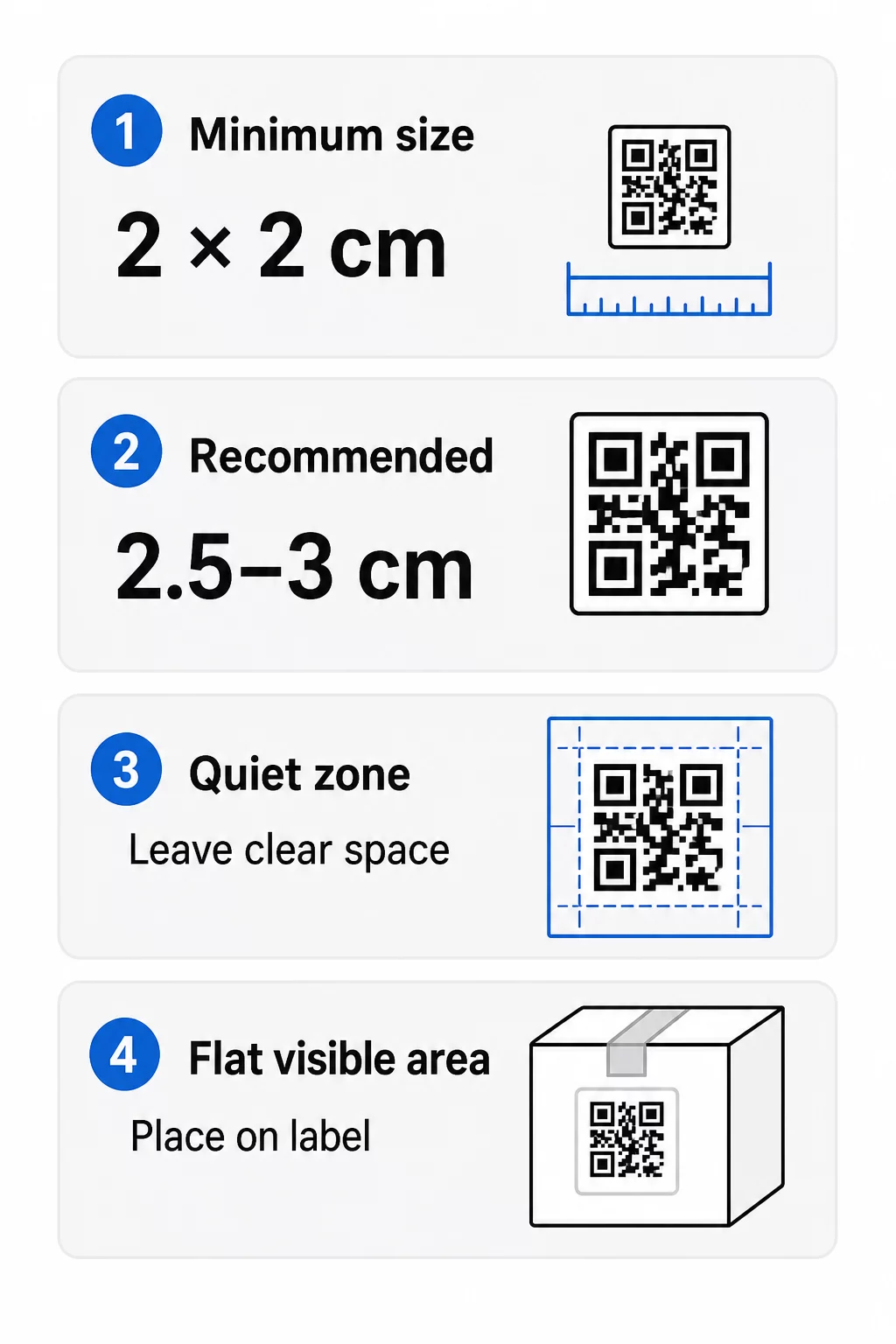
- Minimum absolut: 2 x 2 cm (0.8 x 0.8 inci) untuk kode yang dipindai dari jarak lengan.
- Direkomendasikan untuk kemasan produk: 2.5 hingga 3 cm per sisi.
- Aturan jarak: ponsel membaca kode dari sekitar 10 kali lebarnya. Kode 3 cm dapat dipindai dari sekitar 30 cm (12 inci); kode 10 cm dari sekitar 1 m.
- Kode padat membutuhkan lebih banyak ruang: URL yang panjang membuat pola lebih padat dengan modul yang lebih kecil. Gunakan tautan pendek, atau kode dinamis, untuk menjaga pola tetap sederhana.
Jika Anda menambahkan logo, perbesar ukurannya sebesar 20 hingga 30 persen. Jika Anda menggunakan warna khusus, tambahkan 10 hingga 15 persen. Anggap ini sebagai titik awal dan konfirmasikan dengan cetakan uji. Untuk bahan cetak yang berbeda, lihat panduan ukuran kode QR untuk bahan cetak.
Penempatan: Di Mana Meletakkan Kode pada Label
- Letakkan kode di area datar, bukan di lipatan, jahitan, tepi, atau perforasi.
- Pilih panel yang terlihat. Label depan atau belakang lebih baik daripada bagian bawah kemasan.
- Gunakan satu kode per panel agar pemindai tidak bingung.
- Biarkan zona tenang kosong. Tidak ada teks, batas, atau karya seni di dalamnya.
- Tambahkan ajakan bertindak singkat di samping kode, seperti “Pindai untuk manual” atau “Pindai untuk memesan ulang”.
- Jangan letakkan kode di bawah bungkus plastik penyusut, segel panas, atau tepi pernis yang menimbulkan silau.
Permukaan melengkung membutuhkan perhatian ekstra. Pada botol, toples, dan tabung, pola membengkok menjauhi kamera. Jaga ukuran kode tetap kecil relatif terhadap kelengkungan, letakkan di bagian paling datar, dan uji dari beberapa sudut. Mencetak kode pada label datar yang menempel pada kelengkungan bekerja lebih baik daripada mencetaknya pada bahu yang sangat melengkung.
Untuk informasi lebih lanjut tentang penempatan, baca Panduan penempatan kode QR untuk pemasaran.
Zona Tenang: Batas Kosong yang Membuat Pemindaian Berfungsi
Setiap kode QR membutuhkan zona tenang: margin kosong di sekitar seluruh simbol. Ini memberitahu pemindai di mana kode dimulai dan berakhir.
Zona tenang standar setidaknya selebar 4 modul di keempat sisinya. Satu modul adalah lebar satu kotak kecil. Pada kode label biasa ini sekitar 4 hingga 8 mm. Jangan mencetak nama merek Anda, batas, atau teks label di dalamnya. Jika label dicetak pada latar belakang yang ramai, letakkan kode pada kotak cahaya solid.
Kontras: Kode Gelap, Latar Belakang Terang
Pemindai membaca perbedaan antara modul gelap dan latar belakang terang. Tanpa kontras yang cukup, pola tidak terdeteksi.
- Gunakan latar depan gelap pada latar belakang terang. Hitam di atas putih adalah yang paling dapat diandalkan.
- Targetkan rasio kontras setidaknya 4:1.
- Hindari warna serupa untuk latar depan dan latar belakang, seperti hijau tua di atas hijau sedang.
- Hindari kode terang-di-gelap (inverted). Beberapa pemindai tidak dapat membacanya, jadi ujilah sebelum Anda menggunakannya.
- Hindari gradien dan bayangan pada pola.
- Hindari mencetak kode pada permukaan yang sangat mengkilap, bergaris, atau tidak rata.
Warna merek kustom dapat berfungsi jika Anda mengujinya di bawah pencahayaan nyata. Ini panduan praktik terbaik kontras warna kode QR memiliki tabel perbandingan pasangan umum.
Koreksi Kesalahan: Perlindungan Kerusakan Bawaan
Kode QR memiliki empat tingkat koreksi kesalahan. Ini menetapkan seberapa banyak kode dapat rusak atau tertutup dan masih dapat dibaca:
| Tingkat | Kapasitas Pemulihan | Terbaik untuk |
|---|---|---|
| L (Rendah) | sekitar 7% | Permukaan bersih, tanpa tumpang tindih logo |
| M (Sedang) | sekitar 15% | Label produk umum |
| Q (Kuartil) | sekitar 25% | Label dengan logo atau elemen merek di atas kode |
| H (Tinggi) | sekitar 30% | Permukaan yang berisiko tergores atau aus, atau desain yang kompleks |
Untuk sebagian besar label produk, Level M atau Q adalah pilihan yang baik. Dengan logo di tengah, gunakan Q atau H. Level yang lebih tinggi membuat pola lebih padat, sehingga Anda mungkin memerlukan ukuran cetak yang sedikit lebih besar.
Resolusi Cetak dan Format File
- Berkas vektor (SVG, PDF, EPS) dapat diskalakan ke ukuran apa pun tanpa kehilangan ketajaman. Gunakan berkas ini kapan pun pencetak atau desainer label Anda menerimanya.
- PNG atau JPEG: ekspor pada ukuran cetak akhir dengan 300 dpi. 200 dpi dapat berfungsi untuk kode kecil pada kertas halus.
- Jangan memperbesar PNG kecil untuk label yang lebih besar. Tepian akan buram dan kode mungkin berhenti dapat dipindai.
- Periksa bukti cetak. Penyebaran tinta dapat mengisi modul kecil pada kertas yang menyerap.
Keduanya Generator QR Code dengan Logo dan generator PNG kode QR dapat mengekspor berkas untuk dicetak. Periksa opsi unduhan di alat tersebut untuk format yang Anda butuhkan.
Kasus Penggunaan Praktis untuk Kode QR Label Produk
Pilih tujuan berdasarkan apa yang dibutuhkan pelanggan saat memegang produk:
- Makanan dan minuman: halaman dengan bahan, alergen, dan asal, atau resep.
- Elektronik dan perkakas: video pengaturan, manual dalam format PDF, dan formulir garansi.
- Kosmetik: langkah-langkah penggunaan dan daftar bahan lengkap.
- Barang habis pakai: halaman pemesanan ulang sekali ketuk.
- Perangkat keras dan kemasan: instruksi daur ulang atau pengembalian.
- Produk apa pun: permintaan ulasan singkat atau diskon untuk pesanan berikutnya.
Sebagian besar dari ini mendapat manfaat dari kode QR dinamis, karena halaman dapat diperbarui setelah label dicetak. Untuk contoh berdasarkan sektor, lihat solusi kode QR berdasarkan industri. Untuk loyalitas, pengemasan, dan keterlibatan, lihat solusi kode QR produk.
Selalu Uji Sebelum Mencetak dalam Skala Besar
Sebelum pencetakan massal:
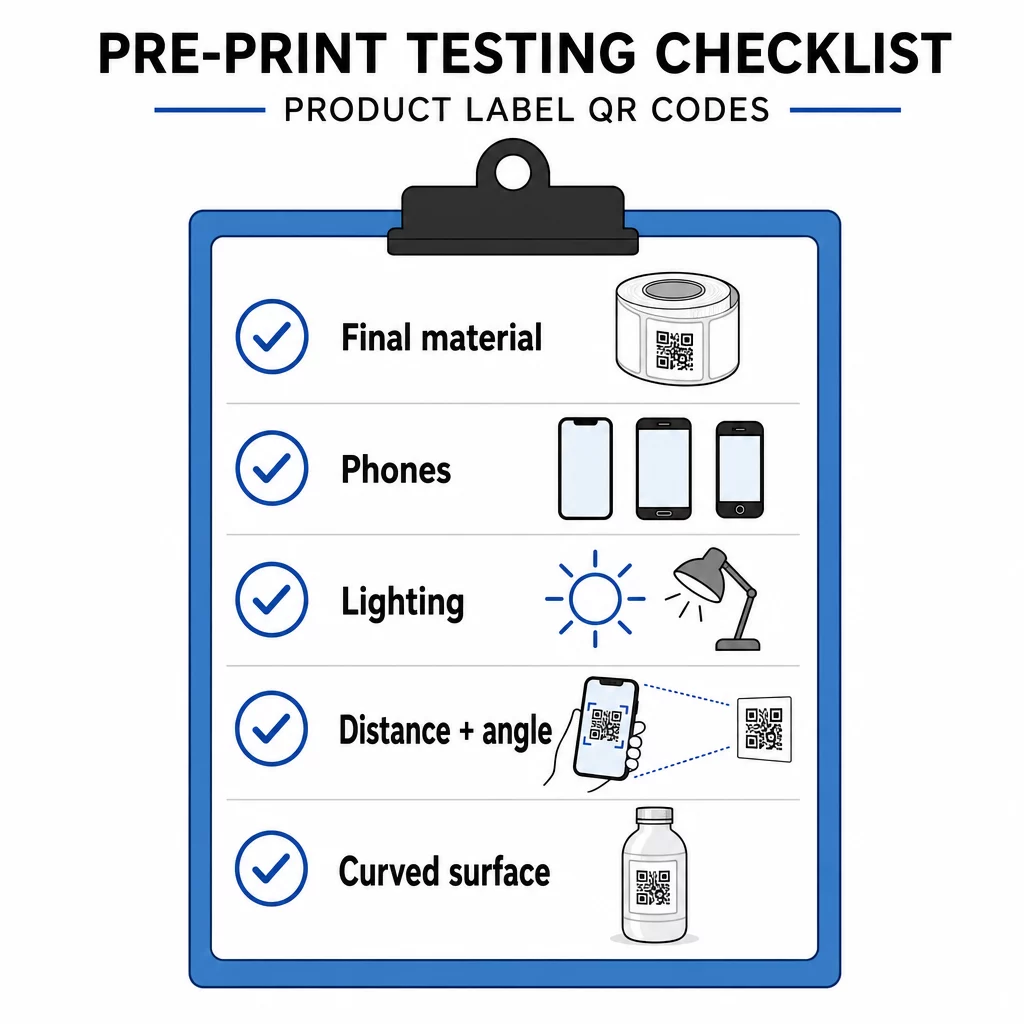
- Cetak kode dalam ukuran akhir pada bahan label yang sebenarnya.
- Pindai dengan setidaknya dua atau tiga ponsel, baik iPhone maupun Android.
- Pindai dalam cahaya terang, cahaya siang hari, dan cahaya redup.
- Pindai dari jarak dan sudut yang akan digunakan pelanggan.
- Pada permukaan melengkung, pindai dari kiri, tengah, dan kanan.
- Buka tujuan di ponsel dengan data seluler, bukan hanya dengan Wi-Fi.
Kode QR pada Produk Tidak Dapat Dipindai? Periksa Hal-Hal Berikut
- Terlalu kecil: perbesar kode atau perpendek tautan.
- Zona tenang terlalu sempit: teks atau karya seni menyentuh kode.
- Kontras rendah: warna terang, gradien, atau kode terbalik.
- Silau: film mengkilap atau pernis memantulkan cahaya. Gunakan hasil akhir matte atau pindahkan kode.
- Cetak buram: resolusi rendah atau tinta menyebar. Gunakan file vektor dan tinjau bukti cetak.
- Permukaan melengkung atau berkerut: pindahkan kode ke area yang lebih datar.
- Tujuan salah: tautan telah berubah. Dengan kode dinamis, edit tujuan. Dengan kode statis, Anda harus mencetak ulang.
Untuk pemeriksaan lebih lanjut, lihat praktik terbaik keterbacaan kode QR.
Pertanyaan yang sering diajukan
Ukuran minimum umum adalah 2 x 2 cm (0,8 x 0,8 inci) untuk kode yang dipindai dalam jangkauan lengan. Untuk kemasan, 2,5 hingga 3 cm per sisi lebih aman. Sebagai panduan, ponsel membaca kode dari sekitar 10 kali lebar cetaknya.
Pilih tujuan, buat kode di pembuat kode QR, unduh file vektor atau PNG resolusi tinggi, tambahkan ke desain label Anda dengan zona tenang dan ajakan bertindak singkat, lalu cetak label uji dan pindai di beberapa ponsel sebelum produksi penuh.
Hanya dengan kode QR dinamis. Kode dinamis menyimpan tautan pengalihan singkat, sehingga Anda dapat mengubah tujuan tanpa mengubah kode yang sudah dicetak. Kode statis tidak dapat diubah setelah dicetak.
Kode statis tidak pernah kedaluwarsa, karena tujuannya disimpan dalam pola. Kode dinamis berfungsi selama paket Anda aktif, jadi periksa paket Anda sebelum Anda mencetak label yang akan tetap digunakan selama bertahun-tahun.
Gunakan format vektor: SVG, PDF atau EPS. Format tersebut tetap tajam di ukuran berapa pun. Jika Anda harus menggunakan PNG, ekspor dalam ukuran cetak akhir pada 300 dpi dan jangan perbesar.
Ya. Gunakan tingkat koreksi kesalahan Q atau H untuk logo, perbesar kode sebesar 20 hingga 30 persen, pertahankan kontras yang kuat antara gelap dan terang, dan uji label yang dicetak sebelum produksi penuh.
Di area yang rata dan terlihat seperti pada label depan atau belakang, jauh dari lipatan, jahitan, dan tepi, dengan zona kosong yang tenang dan ajakan bertindak singkat di sampingnya.