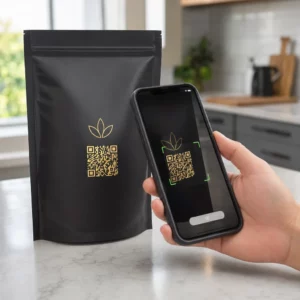
Etiquetas de código QR permitem que um cliente vá da embalagem em suas mãos para uma página de produto, um manual, um link de recompra ou um chat de suporte em uma única leitura. Este guia mostra como fazer uma etiqueta de produto QR que digitaliza na primeira tentativa: qual tipo de código usar, qual o tamanho imprimir, onde colocá-lo e o que testar antes de uma tiragem completa.
Código QR em Etiquetas de Produto: A Resposta Curta
- Tamanho: imprima o código com pelo menos 2 x 2 cm (0.8 x 0.8 polegadas). Use 2.5 a 3 cm se os clientes digitalizarem de uma prateleira ou balcão.
- Zona de silêncio: mantenha uma borda em branco de pelo menos 4 módulos (cerca de 4 a 8 mm em uma etiqueta) em todos os quatro lados.
- Cores: código escuro em um fundo claro. Preto no branco é o mais seguro.
- Resolução: use um arquivo vetorial (SVG, PDF ou EPS) para impressão. Se usar PNG, exporte-o no tamanho final de impressão a 300 dpi.
- Tipo: use um código estático para um link que nunca mudará. Use um código dinâmico se o destino puder mudar ou se você quiser estatísticas de leitura.
- Teste: imprima um na etiqueta de material real e digitalize-o com dois ou três telefones antes de encomendar a tiragem completa.
Por que os Códigos QR Pertencem às Etiquetas de Produtos
Uma etiqueta impressa tem espaço limitado e não pode ser atualizada depois de impressa. Um código QR adiciona mais espaço: detalhes de ingredientes e origem, vídeos de configuração, registro de garantia, manuais do usuário e listas de peças de reposição podem todos estar atrás de um pequeno quadrado.
Usos típicos de um código QR em um produto:
- Informações do produto: especificações, ingredientes, alérgenos ou instruções de cuidado que não cabem na etiqueta.
- Manuais e configuração: um manual em PDF ou um vídeo curto, para que você possa imprimir um folheto menor ou nenhum.
- Recompra: um link direto para a página do produto, útil para consumíveis como filtros, café ou produtos de limpeza.
- Suporte: um link para uma página de ajuda, um formulário ou um chat do WhatsApp.
- Reciclagem e devoluções: instruções de descarte ou um formulário de devolução.
- Ofertas e fidelidade: um código de desconto, uma página de inscrição ou um pedido de avaliação após a compra.
Para uma visão mais ampla dos tipos de embalagem e da experiência do cliente, consulte o guia para códigos QR em embalagens de produtos.
Escolha um Código QR Dinâmico ou Estático
UMA código QR estático armazena o destino dentro do padrão. É gratuito, nunca expira e funciona enquanto a página para a qual aponta existir. Se essa URL mudar, o código impresso apontará para o lugar errado e você precisará reimprimir.
UMA código QR dinâmico armazena um link de redirecionamento curto, para que você possa alterar o destino a qualquer momento sem mudar o código impresso. Em rótulos de produtos, isso ajuda de três maneiras:
- Você pode trocar uma promoção sazonal ou página de destino sem uma nova tiragem de impressão.
- Você pode corrigir um link quebrado ou movido imediatamente.
- Você pode ver as estatísticas de leitura: quando, onde e em que dispositivo as pessoas escanearam.
Use um código estático quando o link for permanente, por exemplo, um manual hospedado em seu próprio site. Use um código dinâmico quando os rótulos permanecerem nas prateleiras por meses e o destino puder mudar. Você pode criar um código QR para o rótulo do seu produto com o gerador gratuito Pageloot. Os códigos dinâmicos vêm com um teste gratuito de 14 dias, e os planos estão listados na página de preços da Pageloot.
Acompanhe Cada Leitura dos Rótulos dos Seus Produtos. Para ver onde e quando os clientes escaneiam sua embalagem, crie um código dinâmico com o Gerador de Código QR Pageloot e use o painel de leitura.
Como Fazer Rótulos com Código QR: Passo a Passo
- Decida para onde o código deve levar. Escolha uma página otimizada para celular e mantenha-a curta e rápida para carregar.
- Abra o gerador de código QR, escolha o tipo (URL, PDF, vídeo ou outro) e insira o destino.
- Escolha estático ou dinâmico. Marque a opção dinâmica apenas se quiser editar o destino mais tarde ou rastrear as leituras.
- Mantenha o design simples: código escuro, fundo claro, sem gradientes atrás do padrão.
- Baixe um arquivo vetorial (SVG ou PDF) para o designer de rótulos, ou um PNG no tamanho final.
- Coloque o código na arte do rótulo no tamanho planejado, com a zona de silêncio e uma pequena chamada para ação ao lado.
- Imprima um rótulo de teste no material real e escaneie-o antes da tiragem completa.
Tamanho: Qual o Tamanho Necessário para o Código?
O tamanho é a razão mais comum para um código QR de rótulo falhar na leitura. Se o código for muito pequeno, a câmera do telefone não consegue separar os módulos individuais (os pequenos quadrados que compõem o padrão).
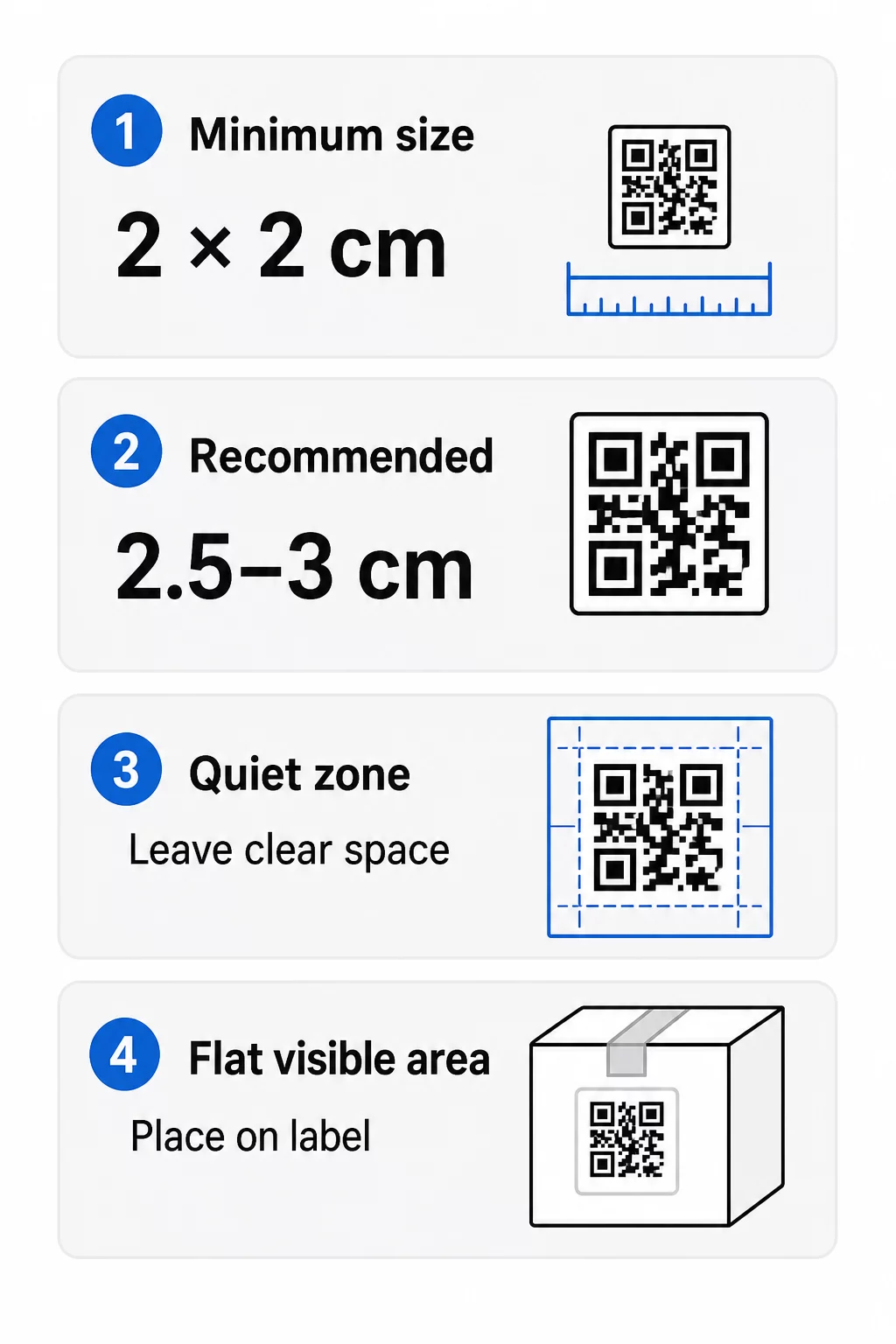
- Mínimo absoluto: 2 x 2 cm (0.8 x 0.8 polegadas) para um código escaneado à distância de um braço.
- Recomendado para embalagens de produtos: 2.5 a 3 cm por lado.
- Regra da distância: um telefone lê um código de cerca de 10 vezes a sua largura. Um código de 3 cm é lido de cerca de 30 cm (12 polegadas); um código de 10 cm de cerca de 1 m.
- Códigos densos precisam de mais espaço: uma URL longa cria um padrão mais denso com módulos menores. Use um link curto, ou um código dinâmico, para manter o padrão simples.
Se adicionar um logotipo, aumente o tamanho em 20 a 30 por cento. Se usar cores personalizadas, adicione 10 a 15 por cento. Trate estes como pontos de partida e confirme com uma impressão de teste. Para diferentes materiais de impressão, consulte o guia de dimensionamento de código QR para materiais impressos.
Posicionamento: Onde Colocar o Código na Etiqueta
- Coloque o código numa área plana, não sobre dobras, costuras, bordas ou perfurações.
- Escolha um painel visível. A etiqueta frontal ou traseira é melhor do que o fundo da embalagem.
- Use um código por painel para que os leitores não fiquem confusos.
- Mantenha a zona silenciosa vazia. Sem texto, borda ou arte dentro dela.
- Adicione uma breve chamada para ação ao lado do código, como "Escanear para o manual" ou "Escanear para reordenar".
- Não coloque o código sob filme retrátil, selo térmico ou uma borda de verniz que crie reflexo.
Superfícies curvas precisam de cuidado extra. Em garrafas, frascos e tubos, o padrão curva-se para longe da câmara. Mantenha o código pequeno em relação à curva, coloque-o na parte mais plana e teste de vários ângulos. Imprimir o código numa etiqueta plana que se assenta na curva funciona melhor do que imprimi-lo numa superfície acentuadamente curva.
Para mais sobre posicionamento, leia o Guia de posicionamento de código QR para marketing.
A Zona de Silêncio: A Borda Vazia Que Faz a Leitura Funcionar
Todo código QR precisa de um zona de silêncio: uma margem em branco ao redor de todo o símbolo. Ela informa ao leitor onde o código começa e termina.
A zona de silêncio padrão tem pelo menos 4 módulos de largura em todos os quatro lados. Um módulo é a largura de um pequeno quadrado. Num código de etiqueta típico, isso é de cerca de 4 a 8 mm. Não imprima o nome da sua marca, uma borda ou texto da etiqueta dentro dela. Se a etiqueta for impressa num fundo movimentado, coloque o código numa caixa de luz sólida.
Contraste: Código Escuro, Fundo Claro
Leitores leem a diferença entre módulos escuros e um fundo claro. Sem contraste suficiente, o padrão não é detectado.
- Use um primeiro plano escuro sobre um fundo claro. Preto sobre branco é o mais confiável.
- Procure uma taxa de contraste de pelo menos 4:1.
- Evite tons semelhantes para primeiro plano e fundo, como verde escuro sobre verde médio.
- Evite códigos claros sobre escuros (invertidos). Alguns scanners não conseguem lê-los, então teste antes de usá-los.
- Evite gradientes e sombras sobre o padrão.
- Evite imprimir o código em uma superfície muito brilhante, nervurada ou irregular.
Cores personalizadas da marca podem funcionar se você as testar sob iluminação real. O guia de melhores práticas de contraste de cores de códigos QR tem uma tabela de comparação de combinações comuns.
Correção de Erro: Proteção Contra Danos Integrada
Códigos QR têm quatro níveis de correção de erro. Eles definem o quanto do código pode ser danificado ou coberto e ainda ser lido:
| Nível | Capacidade de Recuperação | Melhor para |
|---|---|---|
| L (Baixo) | cerca de 7% | Superfícies limpas, sem sobreposição de logotipo |
| M (Médio) | cerca de 15% | Rótulos gerais de produtos |
| Q (Quartil) | cerca de 25% | Etiquetas com um logótipo ou elementos da marca sobre o código |
| H (Alto) | cerca de 30% | Superfícies em risco de arranhões ou desgaste, ou designs complexos |
Para a maioria das etiquetas de produtos, Nível M ou Q é uma boa escolha. Com um logótipo no centro, use Q ou H. Níveis mais altos tornam o padrão mais denso, então você pode precisar de um tamanho de impressão ligeiramente maior.
Resolução de Impressão e Formatos de Arquivo
- Arquivos vetoriais (SVG, PDF, EPS) escalam para qualquer tamanho sem perder a nitidez. Use-os sempre que sua impressora ou designer de etiquetas os aceitar.
- PNG ou JPEG: exporte no tamanho de impressão final a 300 dpi. 200 dpi pode funcionar para códigos pequenos em papel liso.
- Não amplie um PNG pequeno para uma etiqueta maior. As bordas ficam borradas e o código pode parar de ser escaneado.
- Verifique a prova de impressão. A expansão da tinta pode preencher pequenos módulos em papel absorvente.
Ambos os Gerador de QR Code com Logo e o gerador de PNG de código QR podem exportar ficheiros para impressão. Verifique as opções de download na ferramenta para o formato que você precisa.
Casos de Uso Práticos para Códigos QR em Rótulos de Produtos
Escolha o destino com base no que o cliente precisa ao segurar o produto:
- Alimentos e bebidas: uma página com ingredientes, alergénios e origem, ou uma receita.
- Eletrónicos e ferramentas: um vídeo de configuração, o manual em PDF e um formulário de garantia.
- Cosméticos: passos de uso e uma lista completa de ingredientes.
- Consumíveis: uma página de reordenar com um toque.
- Hardware e embalagem: instruções de reciclagem ou devolução.
- Qualquer produto: um pedido de avaliação curta ou um desconto para o próximo pedido.
A maioria destes beneficia de códigos QR dinâmicos, porque a página pode ser atualizada depois que o rótulo é impresso. Para exemplos por setor, veja soluções de código QR por indústria. Para fidelidade, embalagem e engajamento, veja soluções de código QR para produtos.
Sempre Teste Antes de Imprimir em Escala
Antes de uma tiragem completa:
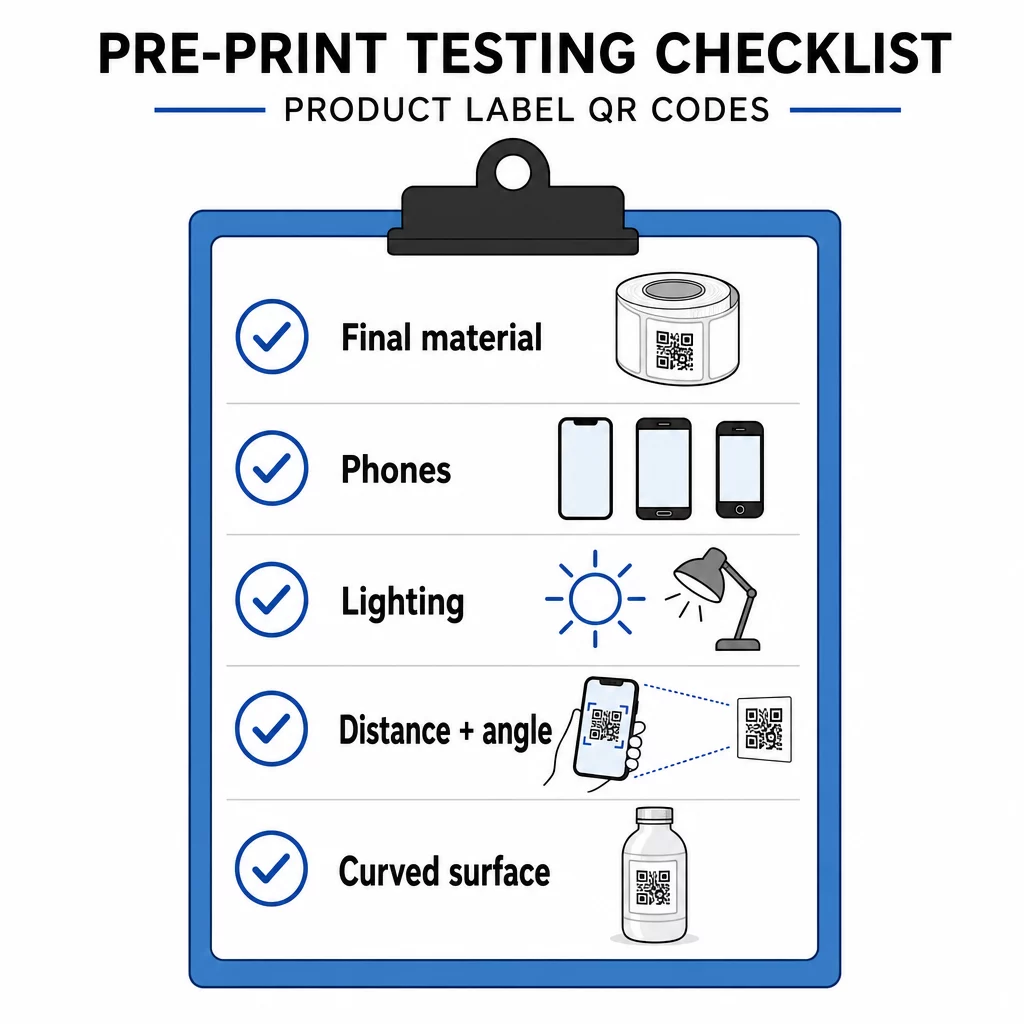
- Imprima o código em seu tamanho final no material real da etiqueta.
- Digitalize com pelo menos dois ou três telefones, tanto iPhone quanto Android.
- Digitalize sob luz brilhante, luz do dia e luz fraca.
- Digitalize da distância e ângulo que um cliente usará.
- Em uma superfície curva, digitalize da esquerda, centro e direita.
- Abra o destino em um telefone com dados móveis, não apenas via Wi-Fi.
Código QR em um Produto Não Escaneia? Verifique Estes Pontos
- Pequeno demais: amplie o código ou encurte o link.
- Zona de silêncio muito estreita: texto ou arte toca o código.
- Baixo contraste: cores claras, gradientes ou um código invertido.
- Reflexo: filme brilhante ou verniz reflete a luz. Use um acabamento fosco ou mova o código.
- Impressão borrada: baixa resolução ou tinta espalhada. Use um arquivo vetorial e revise a prova.
- Superfície curva ou amassada: mova o código para uma área mais plana.
- Destino errado: o link mudou. Com um código dinâmico, edite o destino. Com um código estático, você deve reimprimir.
Para mais verificações, veja o guia de melhores práticas de legibilidade de código QR.
Perguntas frequentes
O mínimo comum é 2 x 2 cm (0,8 x 0,8 polegadas) para códigos escaneados à distância de um braço. Para embalagens, 2,5 a 3 cm por lado é mais seguro. Como guia, um telefone lê um código a cerca de 10 vezes a sua largura impressa.
Escolha o destino, crie o código em um gerador de código QR, baixe um arquivo vetorial ou um PNG de alta resolução, adicione-o à arte da sua etiqueta com uma zona de silêncio e uma breve chamada para ação, depois imprima uma etiqueta de teste e escaneie-a em vários telefones antes da tiragem completa.
Apenas com um código QR dinâmico. Um código dinâmico armazena um link de redirecionamento curto, assim você pode alterar o destino sem mudar o código impresso. Um código estático não pode ser alterado após a impressão.
Um código estático nunca expira, porque o destino é armazenado no padrão. Um código dinâmico funciona enquanto o seu plano estiver ativo, portanto, verifique o seu plano antes de imprimir etiquetas que permanecerão em uso por anos.
Utilize um formato vetorial: SVG, PDF ou EPS. Eles permanecem nítidos em qualquer tamanho. Se for imprescindível usar PNG, exporte-o no tamanho de impressão final a 300 dpi e não o amplie.
Sim. Use o nível de correção de erro Q ou H para um logotipo, amplie o código em 20 a 30 por cento, mantenha um forte contraste entre claro e escuro, e teste a etiqueta impressa antes da execução completa.
Numa área plana e visível, como o rótulo frontal ou traseiro, longe de dobras, costuras e bordas, com uma zona de silêncio vazia e uma breve chamada para ação ao lado.