Ψάχνετε τρόπους να κάνετε τα εκθέματα του μουσείου σας πιο ελκυστικά χωρίς να αναθεωρήσετε πλήρως την εμπειρία των επισκεπτών σας; Οι στατικές ετικέτες τοίχου και τα έντυπα φυλλάδια μπορούν να κάνουν τόσα πολλά – οι επισκέπτες αναμένουν όλο και περισσότερο ψηφιακή πρόσβαση σε πλουσιότερο περιεχόμενο στις δικές τους συσκευές. Αυτός ο οδηγός καλύπτει τους πιο πρακτικούς τρόπους εφαρμογής κωδικών QR σε μουσεία, από οδηγούς ήχου και ψηφιακούς χάρτες μέχρι έκδοση εισιτηρίων και προσβασιμότητα.
Γιατί τα Μουσεία Υιοθετούν τους Κωδικούς QR
Οι κωδικοί QR προσφέρουν στα μουσεία έναν οικονομικό τρόπο δημιουργίας ενός πολυεπίπεδου συστήματος πληροφοριών που ξεπερνά κατά πολύ ό,τι χωράει σε μια φυσική ετικέτα. Ένας επισκέπτης που στέκεται μπροστά σε ένα τεχνούργημα μπορεί να σαρώσει έναν κωδικό και να αποκτήσει άμεση πρόσβαση σε εκτεταμένο κείμενο, εικόνες, βίντεο, ηχητικές αφηγήσεις ή ακόμα και επαυξημένη πραγματικότητα – όλα στο δικό του smartphone, με τον δικό του ρυθμό.
Η βασική ελκυστικότητα είναι η ευελιξία. Τα μουσεία μπορούν να ενημερώνουν το περιεχόμενο που συνδέεται με έναν κωδικό ανά πάσα στιγμή χωρίς να ανατυπώνουν τίποτα, γεγονός που καθιστά τους δυναμικούς κωδικούς QR ιδιαίτερα πρακτικούς για περιοδικές εκθέσεις ή εποχιακά προγράμματα. Πέρα από την παροχή περιεχομένου, οι κωδικοί QR ανοίγουν επίσης ένα άμεσο κανάλι για τη συλλογή σχολίων επισκεπτών, την προσφορά πολύγλωσσου περιεχομένου και τη σύνδεση φυσικών εκθεμάτων με εικονικές περιηγήσεις και διαδικτυακές συλλογές.
Δημιουργήστε Ενημερώσιμους Κωδικούς QR Μουσείων Χρειάζεται να ανανεώσετε το περιεχόμενο της έκθεσης χωρίς να ανατυπώσετε την σήμανση; Χρησιμοποιήστε το Δημιουργία dynamic QR code για να δημιουργήσετε κωδικούς που μπορείτε να επεξεργαστείτε ανά πάσα στιγμή από έναν κεντρικό πίνακα ελέγχου.
Συνηθισμένοι Τρόποι Χρήσης Κωδικών QR σε Μουσεία
| Χρήση θήκης | Τι Προσφέρει |
|---|---|
| Οδηγοί ήχου και βίντεο | Αφηγημένες ιστορίες εκθεμάτων, συνεντεύξεις καλλιτεχνών, κινούμενες ανακατασκευές |
| Ψηφιακοί χάρτες | Πλοηγήσιμες κατόψεις στις οποίες έχουν πρόσβαση οι επισκέπτες στα τηλέφωνά τους |
| Πληροφορίες έκθεσης | Εκτεταμένο κείμενο, ιστορικό πλαίσιο, προέλευση τεχνουργήματος |
| Διαδραστικές εμπειρίες | Επικαλύψεις επαυξημένης πραγματικότητας, κυνήγι θησαυρού, κουίζ |
| Έκδοση εισιτηρίων | Ανέπαφη είσοδος μέσω ψηφιακών εισιτηρίων με δυνατότητα σάρωσης |
| Πρόσβαση WiFi | Άμεση σύνδεση δικτύου χωρίς πληκτρολόγηση κωδικών πρόσβασης |
| Σχόλια επισκεπτών | Έντυπα έρευνας προσβάσιμα απευθείας από τον εκθεσιακό χώρο |
| Προσφορές καταστήματος δώρων | Σύνδεσμοι για αποκλειστικές προσφορές καταστημάτων ή σελίδες προϊόντων στο διαδίκτυο |
| Δωρεές και συνδρομές | Πύλες για δωρεές ή εγγραφές προσβάσιμες με μία μόνο σάρωση |
Οδηγοί ήχου και βίντεο
Οι ηχητικές περιηγήσεις με κωδικούς QR επιτρέπουν στους επισκέπτες να σαρώνουν έναν κωδικό σε κάθε έκθεμα και να ακούν αφηγήσεις, σχόλια επιμελητών ή ιστορίες παρασκηνίου στις δικές τους συσκευές. Αυτό αντικαθιστά τον ογκώδη ενοικιαζόμενο ηχητικό εξοπλισμό και υποστηρίζει ευέλικτες, αυτορυθμιζόμενες διαδρομές μέσα στο μουσείο. Για ιδρύματα που θέλουν να προχωρήσουν παραπέρα, Οι κωδικοί QR AR μπορούν να μεταμορφώσουν την αφήγηση ιστοριών στα μουσεία με την επικάλυψη τρισδιάστατων μοντέλων ή κινούμενων σχεδίων απευθείας πάνω σε φυσικά αντικείμενα όταν ένας επισκέπτης στρέφει το τηλέφωνό του προς το έκθεμα.
Τα μουσεία μπορούν να δημιουργήσουν ηχητικούς οδηγούς χρησιμοποιώντας το Δημιουργία QR code για MP3, το οποίο σας επιτρέπει να ανεβάζετε αρχεία ήχου και να δημιουργείτε έναν κωδικό με δυνατότητα σάρωσης που οι επισκέπτες μπορούν να αναπαράγουν απευθείας από τη συσκευή τους. Για περιεχόμενο βίντεο – όπως συνεντεύξεις καλλιτεχνών ή οπτικοποιήσεις αποκατάστασης βήμα προς βήμα – ένα Δημιουργία QR code για YouTube καθιστά απλή τη σύνδεση οποιουδήποτε εκθέματος με ένα φιλοξενούμενο βίντεο.
Ψηφιακοί Χάρτες και Αυτο-οδηγούμενες Περιηγήσεις
Μεγάλα μουσεία μπορούν να χρησιμοποιήσουν PDF κωδικοί QR να παρέχουν στους επισκέπτες έναν διαδραστικό ψηφιακό χάρτη που τους βοηθά να πλοηγούνται σε ενότητες, να εντοπίζουν συγκεκριμένα εκθέματα και να προγραμματίζουν την επίσκεψή τους σύμφωνα με τα ενδιαφέροντά τους. Η ανάρτηση κωδικών σε καθορισμένες “στάσεις” περιήγησης που συνδέονται με αρχεία ήχου ή ιστοσελίδες που περιγράφουν τι βλέπει ο επισκέπτης επιτρέπει την πλήρως ανεξάρτητη εξερεύνηση μόνο με ένα smartphone.
Για μια πιο εις βάθος ματιά στη δημιουργία αυτών των εμπειριών, ο οδηγός χρήσης κωδικών QR για εικονικές περιηγήσεις περιγράφει λεπτομερώς την πλήρη διαδικασία εγκατάστασης, από τη φιλοξενία του περιεχομένου σας έως τον σχεδιασμό και την τοποθέτηση κωδικών.
Πληροφορίες Εκθεμάτων και Διαδραστικές Εμπειρίες
Η τοποθέτηση κωδικών QR κοντά σε εκθέματα επιτρέπει στους επισκέπτες να έχουν πρόσβαση σε πρόσθετο πλαίσιο – ιστορικό υπόβαθρο, βιογραφίες καλλιτεχνών, προέλευση συλλογής – χωρίς να γεμίζει η ετικέτα. Ορισμένα μουσεία το προχωρούν περαιτέρω δημιουργώντας κυνήγια θησαυρού, όπου κάθε κωδικός κοντά σε ένα τεχνούργημα παρέχει πληροφορίες για το αντικείμενο και μια ένδειξη που οδηγεί στην επόμενη στάση. Αυτή η μορφή ενθαρρύνει την ενεργή εξερεύνηση και κρατά τους επισκέπτες αφοσιωμένους σε πολλές γκαλερί.
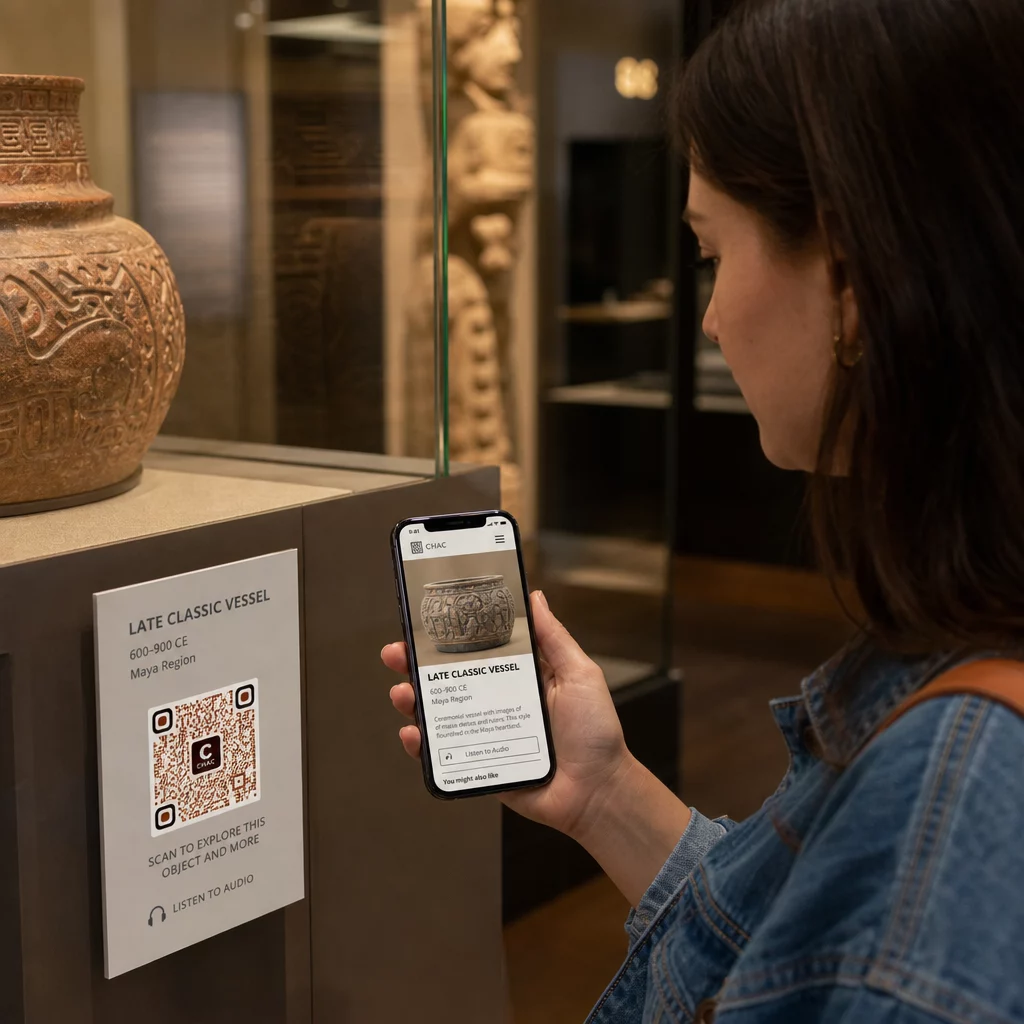
Τα μουσεία έχουν επίσης χρησιμοποιήσει κωδικούς QR σε εγκαταστάσεις σύγχρονης τέχνης για να συνδέσουν το φυσικό έργο με την ψηφιακή αφήγηση, συμπεριλαμβανομένου του παιχνιδοποιημένου περιεχομένου και των αφηγήσεων ιστορίας σχεδιασμού που είναι ενσωματωμένες στους ίδιους τους κωδικούς.
Έκδοση Εισιτηρίων και Ανέπαφη Είσοδος
Η ψηφιακή έκδοση εισιτηρίων μέσω κωδικών QR παρέχει στους επισκέπτες σαρώσιμα εισιτήρια που μπορούν να επιδείξουν στα σημεία εισόδου απευθείας από τα τηλέφωνά τους. Αυτό απλοποιεί τη διαχείριση των εισόδων, μειώνει τις ουρές και καταργεί την εξάρτηση από φυσικά αποθέματα εισιτηρίων – ιδιαίτερα χρήσιμο για περιόδους υψηλής επισκεψιμότητας.
Σχόλια Επισκεπτών
Η τοποθέτηση κωδικών QR στις εξόδους ή σε όλο τον χώρο της γκαλερί επιτρέπει στους επισκέπτες να συμπληρώσουν γρήγορα μια φόρμα σχολίων χωρίς να τους δοθεί μια έντυπη έρευνα. Τα δεδομένα που συλλέγονται βοηθούν τα μουσεία να κατανοήσουν τις προτιμήσεις των επισκεπτών, να αξιολογήσουν τα εκθέματα και να σχεδιάσουν βελτιώσεις. Ένας QR code συνδέσμου που οδηγεί σε μια ηλεκτρονική φόρμα είναι ο απλούστερος τρόπος για να το ρυθμίσετε.
Θέματα Προσβασιμότητας
Οι κωδικοί QR μπορούν να βελτιώσουν σημαντικά την προσβασιμότητα όταν εφαρμόζονται με προσοχή – αλλά μπορούν επίσης να δημιουργήσουν εμπόδια εάν αυτές οι ανάγκες δεν αντιμετωπιστούν εκ των προτέρων.
Παρέχετε μια εναλλακτική λύση. Δεν θα έχει κάθε επισκέπτης smartphone ή δεν θα αισθάνεται άνετα να σαρώνει έναν κωδικό. Πάντα να προσφέρετε έναν άλλο τρόπο πρόσβασης στο ίδιο περιεχόμενο, όπως μια κοντινή εκτυπωμένη διεύθυνση URL, μια επιλογή SMS ή ένα μέλος του προσωπικού που μπορεί να βοηθήσει. Οι επισκέπτες που είναι τυφλοί ή έχουν χαμηλή όραση μπορεί να βρουν την πρόσβαση μέσω SMS πιο εύχρηστη από τη σάρωση QR.
Σχεδιάστε για αντίθεση και ορατότητα. Χρησιμοποιήστε σκούρα στοιχεία κώδικα σε ανοιχτόχρωμο φόντο και στοχεύστε σε αναλογία αντίθεσης τουλάχιστον 4:1. Αυτό πληροί τις απαιτήσεις αντίθεσης μη κειμένου του WCAG 2.1 και διασφαλίζει ότι ο κώδικας παραμένει ευανάγνωστος για επισκέπτες με χαμηλή όραση. Λεπτομερείς οδηγίες για την επίτευξη αυτού είναι διαθέσιμες στην βέλτιστες πρακτικές χρηστικότητας κωδικών QR αναφορά.
Κωδικοί μεγέθους για την απόσταση σάρωσης. Ένας πρόχειρος εμπειρικός κανόνας είναι μια αναλογία 10:1 – για κάθε 10 cm αναμενόμενης απόστασης σάρωσης, ο κωδικός πρέπει να έχει πλάτος τουλάχιστον 1 cm. Το πρακτικό ελάχιστο για τις περισσότερες τοποθετήσεις μουσείων είναι 2 × 2 cm (περίπου 0,8 × 0,8 ίντσες), αν και οι μεγαλύτερες μορφές είναι καλύτερες για εκθέματα που προβάλλονται από απόσταση.
Λάβετε υπόψη το ύψος τοποθέτησης. Τοποθετήστε τους κωδικούς σε ύψος και γωνία που οι επισκέπτες που χρησιμοποιούν αναπηρικά αμαξίδια ή όσοι έχουν περιορισμένη ανάπτυξη μπορούν να φτάσουν και να σαρώσουν άνετα. Η τοποθέτηση στο ύψος των ματιών, 3 έως 5 πόδια από το πάτωμα, λειτουργεί καλά για τους όρθιους επισκέπτες. Ενδέχεται να απαιτούνται χαμηλότερες τοποθετήσεις για πλήρη συμπερίληψη.
Παρέχετε σύντομες, σαφείς οδηγίες. Δεν θα γνωρίζουν όλοι οι επισκέπτες πώς να σαρώσουν έναν κωδικό QR. Μια σύντομη οδηγία – “Ανοίξτε την εφαρμογή της κάμεράς σας και στρέψτε την σε αυτόν τον κωδικό” – αφαιρεί τις εικασίες. Διατηρήστε τις οδηγίες συνεπείς σε ολόκληρο το μουσείο, ώστε οι επισκέπτες να μην χρειάζεται να μάθουν ξανά την αλληλεπίδραση σε κάθε έκθεμα.
Δοκιμή με υποστηρικτικές τεχνολογίες. Πριν από την κυκλοφορία, επαληθεύστε ότι το συνδεδεμένο περιεχόμενο και τυχόν εναλλακτικές μέθοδοι πρόσβασης λειτουργούν σωστά με προγράμματα ανάγνωσης οθόνης και εργαλεία μεγέθυνσης όπως το VoiceOver και το TalkBack.
Για μουσεία που ενδιαφέρονται ειδικά για την προσβασιμότητα ήχου, κωδικοί QR που ενεργοποιούνται με φωνή προσφέρετε μια εναλλακτική λύση hands-free που συνδέει τη σάρωση με την προφορική αφήγηση – ιδιαίτερα χρήσιμη για επισκέπτες που δεν μπορούν να πλοηγηθούν άνετα σε οπτικές διεπαφές.
Πώς να ρυθμίσετε τους κωδικούς QR στο Μουσείο σας
Βήμα 1: Καθορίστε το Περιεχόμενο και τους Στόχους σας
Πριν δημιουργήσετε έναν κωδικό, αποφασίστε τι θα προσφέρει ο κάθε κωδικός και σε ποιον απευθύνεται. Ένας ηχητικός οδηγός για ένα βασικό έκθεμα έχει διαφορετικές απαιτήσεις από μια φόρμα ανατροφοδότησης στην έξοδο. Καθορίστε τους τύπους των κωδικών σας – ήχος, χάρτης PDF, βίντεο, σύνδεσμος έρευνας – και αντιστοιχίστε τον καθένα στην κατάλληλη μορφή περιεχομένου.
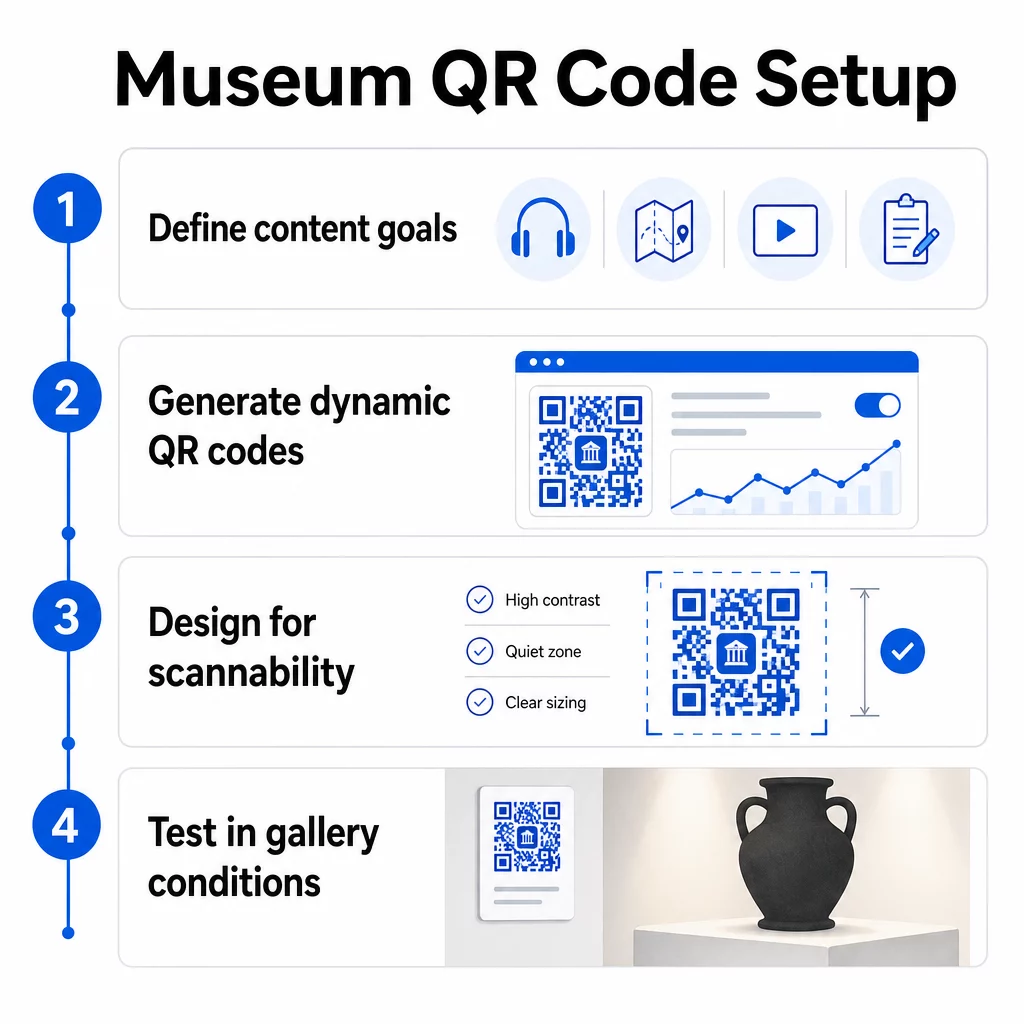
Βήμα 2: Δημιουργήστε τους Κωδικούς σας
Χρησιμοποιήστε μια πλατφόρμα κωδικών QR που υποστηρίζει δυναμικούς κωδικούς, ώστε να μπορείτε να ενημερώνετε τους προορισμούς χωρίς επανεκτύπωση. Η πλατφόρμα Pageloot Γεννήτρια Κωδικών QR σας επιτρέπει να δημιουργείτε κωδικούς για URL, PDF, αρχεία ήχου, βίντεο και πολλά άλλα, και στη συνέχεια να τους διαχειρίζεστε από έναν ενιαίο πίνακα ελέγχου. Οι δυναμικοί κωδικοί παρέχουν επίσης αναλύσεις σάρωσης – παρακολούθηση όγκου, τοποθεσίας, τύπου συσκευής και χρόνου – ώστε να μπορείτε να δείτε ποια εκθέματα προκαλούν το μεγαλύτερο ενδιαφέρον.
Παρακολούθηση της Αλληλεπίδρασης με τα Εκθέματα Θέλετε να μάθετε με ποια εκθέματα αλληλεπιδρούν περισσότερο οι επισκέπτες; Χρησιμοποιήστε δυναμικούς κωδικούς QR με ενσωματωμένα αναλυτικά στοιχεία για να παρακολουθείτε τα δεδομένα σάρωσης σε κάθε έκθεμα του μουσείου σας.
Βήμα 3: Σχεδιασμός για Σαρωσιμότητα
Εφαρμόστε συνεπή επωνυμία – τα χρώματα και το λογότυπο του μουσείου σας – διατηρώντας παράλληλα υψηλή αντίθεση μεταξύ του κωδικού και του φόντου του. Διατηρήστε μια σαφή ήσυχη ζώνη (κενό περίγραμμα) γύρω από κάθε κωδικό. Για λεπτομερείς οδηγίες σχεδιασμού, το βέλτιστες πρακτικές για την αναγνωσιμότητα των κωδικών QR άρθρο καλύπτει τις αναλογίες αντίθεσης, τις ήσυχες ζώνες, την τοποθέτηση λογότυπου και τα επίπεδα διόρθωσης σφαλμάτων με πρακτικούς όρους.
Βήμα 4: Εκτυπώστε και Τοποθετήστε τους Κωδικούς Στρατηγικά
Εκτυπώστε τους κωδικούς σε επαρκές μέγεθος για την αναμενόμενη απόσταση σάρωσης, χρησιμοποιώντας μορφές διανυσματικών γραφικών υψηλής ανάλυσης (SVG, EPS ή PDF) για να αποφύγετε το θάμπωμα. Τοποθετήστε τους στο ύψος των ματιών κοντά στο έκθεμα στο οποίο αναφέρονται – όχι στην άλλη άκρη του δωματίου. Για μεγάλες ή σύνθετες εγκαταστάσεις, το απόλυτο οδηγό τοποθέτησης κωδικών QR παρέχει συμβουλές ειδικά για το περιβάλλον που μεταφράζονται καλά σε μουσειακές ρυθμίσεις.
Βήμα 5: Δοκιμάστε πριν Ανοίξετε
Δοκιμάστε κάθε κωδικό τόσο σε συσκευές iOS όσο και Android, υπό τις πραγματικές συνθήκες φωτισμού της γκαλερί σας. Επαληθεύστε ότι οι συνδεδεμένες σελίδες φορτώνουν γρήγορα με δεδομένα κινητής τηλεφωνίας (όχι μόνο με WiFi), ότι το περιεχόμενο ήχου και βίντεο αναπαράγεται σωστά και ότι τυχόν εναλλακτικές διαδρομές πρόσβασης λειτουργούν όπως προβλέπεται.
Δημοφιλή μουσεία με χρήση κωδικών QR
- Το Εθνικό Μουσείο Φυσικής Ιστορίας Smithsonian έχει χρησιμοποιήσει εμπειρίες επαυξημένης πραγματικότητας συνδεδεμένες με QR για να ζωντανέψει φυσικά εκθέματα με ψηφιακές επικαλύψεις και τρισδιάστατες ανακατασκευές.
- Το Μητροπολιτικό Μουσείο Τέχνης ενσωματώνει την πρόσβαση με κωδικό QR στην τυπική εμπειρία των επισκεπτών του ως επιλογή για την πρόσβαση στον ψηφιακό του οδηγό.
- Το Μουσείο Ακρόπολης προσφέρει έναν ηχητικό οδηγό βασισμένο σε QR που επιτρέπει αυτο-οδηγούμενες περιηγήσεις, καθιστώντας την επίσκεψη πιο ευέλικτη και ενημερωτική για τους διεθνείς επισκέπτες.
- Το Βρετανικό Μουσείο χρησιμοποιεί κωδικούς QR ώστε οι επισκέπτες να μπορούν να έχουν πρόσβαση σε επιπλέον περιεχόμενο και να μαθαίνουν περισσότερα για τα εκθέματα με τον δικό τους ρυθμό.
Για μια ευρύτερη προοπτική σχετικά με καινοτόμες εφαρμογές, ο οδηγός για κωδικούς QR για εικονικές περιηγήσεις τέχνης τεκμηριώνει πώς τα ιδρύματα χρησιμοποιούν αυτά τα εργαλεία για να επεκτείνουν την εμπειρία του μουσείου πέρα από τους φυσικούς τοίχους.
Συχνές ερωτήσεις
Ένας κωδικός QR μουσείου μπορεί να συνδεθεί με σχεδόν οποιοδήποτε ψηφιακό περιεχόμενο: ηχητικές αφηγήσεις, οδηγοί βίντεο, εμπειρίες επαυξημένης πραγματικότητας, χάρτες PDF, σελίδες πληροφοριών εκθεμάτων, πολύγλωσσο κείμενο, φόρμες ανατροφοδότησης, πύλες δωρεών ή εικονικές περιηγήσεις. Η μορφή που επιλέγετε εξαρτάται από το τι εξυπηρετεί καλύτερα κάθε έκθεμα και ανάγκη επισκέπτη.
Όχι. Τα σύγχρονα smartphone iOS και Android μπορούν να σαρώνουν κωδικούς QR απευθείας χρησιμοποιώντας την ενσωματωμένη εφαρμογή κάμερας – δεν απαιτείται ξεχωριστή εφαρμογή. Ορισμένες παλαιότερες συσκευές ενδέχεται να χρειάζονται έναν ειδικό σαρωτή QR, οπότε είναι καλή πρακτική να το αναφέρετε στις οδηγίες σας και να διασφαλίσετε ότι το συνδεδεμένο περιεχόμενό σας φορτώνει γρήγορα σε ένα τυπικό πρόγραμμα περιήγησης κινητού.
Δυναμικοί κωδικοί QR σάς επιτρέπουν να ενημερώνετε το περιεχόμενο στο οποίο παραπέμπει ένας κωδικός ανά πάσα στιγμή χωρίς να χρειάζεται να ανατυπώσετε τον φυσικό κωδικό. Αυτό σημαίνει ότι μπορείτε να ανανεώνετε τις περιγραφές των εκθεμάτων, να αλλάζετε αρχεία ήχου για μια νέα σεζόν, ή να διορθώνετε έναν χαλασμένο σύνδεσμο χωρίς να επηρεάζετε την έντυπη σήμανσή σας. Οι δυναμικοί κωδικοί παρέχουν επίσης αναλυτικά στοιχεία σάρωσης – δείχνοντάς σας ποια εκθέματα προσελκύουν τη μεγαλύτερη αλληλεπίδραση, ποιες ώρες, και σε ποιες συσκευές – δίνοντας στην ομάδα σας εφαρμόσιμα δεδομένα για τον σχεδιασμό εκθέσεων και τη βελτίωση της εμπειρίας των επισκεπτών.