Trying to decide between a free generator and a professional management platform? Picking the wrong tool can leave you with uneditable codes and no performance data, which can directly hurt your marketing ROI. This comparison breaks down QRCodeChimp and QRCode Monkey across features, pricing, analytics, and design so you can choose the right fit.
Static vs. Dynamic QR Codes: Why It Matters First
Before comparing platforms, you need to identify whether you need a permanent or a flexible solution. Static QR codes embed information directly into the pattern, meaning the content cannot be changed once the code is printed. Dynamic QR codes use a short redirect link, so you can update the destination URL at any time without reprinting the physical code.
Understanding the difference between static and dynamic QR codes is the most important factor in this decision. A static code is a fixed flyer; a dynamic code is a living marketing asset you can redirect, measure, and update. QRCode Monkey focuses on free static generation, while QRCodeChimp is built around dynamic code management. If you are running a campaign where links might change or you need to measure results, a dynamic platform is the only practical choice.
QRCodeChimp Features for Professional Campaigns
QRCodeChimp is designed for marketers and agencies that need detailed control over their physical touchpoints. Its “Forever Free” plan includes 10 dynamic QR codes and a combined limit of 1,000 scans per month across all codes. Once that limit is reached, scans are paused for the remainder of the month. This gives small businesses a genuine way to test the platform before committing to a paid tier.
For teams that need more scale, QRCodeChimp offers tiered paid plans billed annually:
- Starter at $6.99/month – 50 dynamic QR codes
- Pro at $13.99/month – 300 dynamic QR codes
- Ultima at $34.99/month – 900 dynamic QR codes with unlimited scans
- Enterprise – custom pricing for large-scale deployments
Advanced security features like Multi-Factor Authentication (MFA) and Single Sign-On (SSO) are available on higher tiers, which matters for agencies managing multiple client campaigns. The platform also supports high-resolution downloads up to 4,096 x 4,096 pixels, making it suitable for large-format print like billboards or vehicle wraps.
Customization options include over 60 unique shapes, 150 stickers with pre-designed calls to action, 3D effects, and decorative frames. When you add a logo to a QR code, you improve brand recognition and can increase scan rates – QRCodeChimp supports larger logo file uploads to prevent pixelation in the final design.
QRCode Monkey for Simple Static Solutions
If you need a fast, no-cost tool for a personal project or a permanent link, QRCode Monkey is a reliable option. It lets you generate an unlimited number of static QR codes for commercial use without creating an account. These codes do not expire and support a range of data types including plain text, email addresses, phone numbers, and URLs.
QRCode Monkey also supports quality output formats: PNG, SVG, PDF, and EPS. Vector formats like SVG and EPS are essential for professional printing because they scale to any size without losing sharpness. Its API is built for generating thousands of high-quality codes in PNG or SVG format, which makes it useful for developers who need bulk creation of static assets.
However, because QRCode Monkey is a link QR code generator focused on static output, it has no native editing or tracking capabilities. If a URL changes after printing, you have no option but to generate and reprint a new code. It is best suited for situations where the destination is permanent – think business cards, book covers, or product labels with a fixed URL.
Analytics and Tracking Capabilities
Tracking is the foundation of data-driven marketing, and this is where the two platforms diverge most sharply.
QRCodeChimp provides a built-in analytics dashboard that shows total scans, unique visitors, and geographic data down to the city level. Higher-tier plans include more advanced scan tracking and reporting features. The platform also integrates with Google Analytics, so you can track QR code scans in real-time alongside your other digital marketing data.
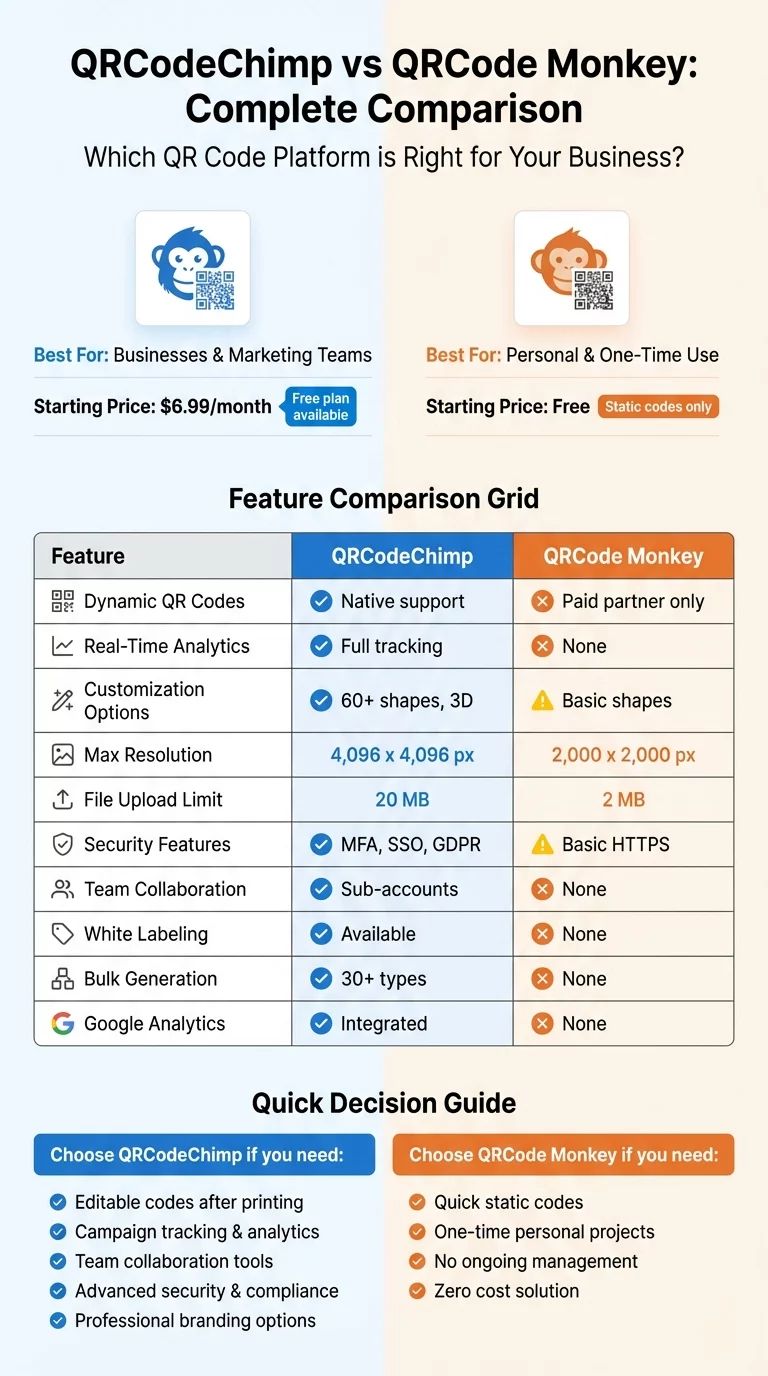
QRCode Monkey does not offer native tracking for its free static codes. Users who want analytics are typically directed to a separate paid partner service, which adds both cost and friction. Without built-in insights, you cannot measure the success of a physical ad placement or make data-driven decisions about which campaigns to scale.
Pricing and Feature Comparison
| Feature | QRCode Monkey | QRCodeChimp |
|---|---|---|
| Dynamic QR Codes | Not available | 10 free; paid plans from $6.99/month |
| Scan Analytics | Not included | Real-time dashboard |
| Max Resolution | 2,000 x 2,000 px | 4,096 x 4,096 px |
| Edit After Printing | No | Yes |
| Security Features | Basic HTTPS | MFA, SSO, SOC 2 |
| Team Collaboration | Not available | Sub-accounts and folders |
| File Formats | PNG, SVG, PDF, EPS | PNG, SVG, PDF, EPS |
| Account Required | No | Optional (free plan available) |
When doing a free vs. paid QR code tools comparison, factor in the hidden cost of static codes. If a link breaks or a promotion ends, every printed piece requires a full reprint. A dynamic subscription eliminates that risk entirely, letting you update the destination in seconds from a dashboard.
Design and Customization
Both platforms offer meaningful customization, but at different levels of depth.
QRCode Monkey gives you gradient controls, shape adjustments, logo uploads, and background images. Its output quality is solid, and the vector format support makes it a practical choice when print fidelity matters. Customization is mostly confined to the internal pattern and color palette.
QRCodeChimp goes further with 3D effects, decorative frames, stickers, and a broader range of shape options. Using a QR code generator with logo support like QRCodeChimp lets you place your branding in the center of the code while preserving scannability – useful on packaging, posters, or retail displays where brand consistency matters. The platform also supports larger logo file uploads to maintain sharpness in the final output.
Paid tools also support custom domains for redirect links, which means your QR code’s short URL can reflect your brand rather than a generic platform domain – an added layer of trust when customers are deciding whether to scan.
Upgrade Your Brand Visibility Need a professional tool that combines custom design with powerful tracking? Start creating branded, trackable codes with the QR Code Generator and get access to a full performance dashboard.
Which Tool Fits Your Needs
The right choice depends on how you plan to use QR codes and how long they need to remain accurate.
- If you need a quick, permanent code for a fixed URL and have no need for analytics or future edits, QRCode Monkey is fast and free.
- If you are running campaigns, managing multiple codes across a team, or need the ability to edit QR codes after printing, a dynamic management platform is the more sustainable investment.
For businesses comparing multiple options before deciding, the ME QR vs. QRCode Monkey comparison and the best QR code subscription plans guide can also help you evaluate the broader landscape.
Frequently Asked Questions
No. QRCode Monkey generates static codes, meaning the destination is permanently encoded in the pattern. To change the link, you must generate and print a new QR code entirely.
Yes. QRCodeChimp’s “Forever Free” plan includes 10 dynamic QR codes and up to 1,000 combined scans per month. Once that scan limit is reached, scans pause until the following month. The free plan includes basic analytics and customization features.
Vector formats like SVG, PDF, or EPS are the best choice for large-format printing. They scale to any size without losing sharpness or scannability, unlike raster formats such as PNG or JPEG that can become pixelated at large dimensions.