Ați salvat vreodată o captură de ecran a unui cod QR, doar pentru a realiza că camera telefonului dvs. nu poate scana propriul ecran? Încercarea de a deschide linkuri din imagini salvate este frustrantă atunci când aplicațiile standard de cameră așteaptă un obiect fizic. Din fericire, puteți decoda cu ușurință orice captură de ecran cu cod QR folosind instrumente încorporate pe smartphone sau instrumente bazate pe web.
Scanarea unei capturi de ecran cu cod QR pe iPhone și dispozitive iOS
iPhone-urile moderne care rulează iOS 11 sau versiuni ulterioare includ funcții native ale sistemului care analizează datele imaginii stocate în biblioteca dvs. foto. Nu este necesar să descărcați software terț doar pentru a extrage un link salvat dintr-un fișier imagine.
Urmați acești pași pentru a decoda o captură de ecran în iOS:
- Deschideți aplicația Fotografii și localizați captura de ecran salvată.
- Apăsați și mențineți apăsat codul QR matrice până când apare meniul de selecție.
- Selectați acțiunea preferată pentru a deschide linkul în Safari, a copia URL-ul sau a partaja conținutul.
Dacă dispozitivul dvs. acceptă Live Text (iOS 15 și versiuni ulterioare), o pictogramă Live Text apare, de asemenea, în colțul din dreapta jos al vizualizatorului foto. Atingerea acestei pictograme evidențiază automat codul QR și afișează o bandă de acțiune pe care se poate face clic sub acesta. Pentru versiuni mai vechi de iOS sau configurații hardware specializate, consultarea ghidului nostru complet despre scanarea codurilor QR pe iPhone oferă soluții manuale suplimentare.
Extragerea linkurilor codurilor QR din capturi de ecran pe Android
Sistemele de operare Android utilizează recunoașterea optică a caracterelor pentru a procesa fișierele imagine salvate în stocarea locală. Dispozitivele echipate cu Google Play Services pot extrage datele încorporate instantaneu prin galeria dvs. foto.
Urmați acești pași pentru a procesa o captură de ecran pe Android:
- Lansați Google Photos și selectați captura de ecran salvată din galeria dvs.
- Atingeți pictograma Google Lens în partea de jos a ecranului pentru a analiza imaginea.
- Selectați URL-ul pop-up evidențiat pentru a deschide linkul de destinație sau a executa acțiunea stocată.
Dacă aplicația dvs. implicită de cameră sau galerie nu dispune de recunoaștere optică nativă, puteți afla mai multe despre scurtături alternative ale dispozitivului citind ghidul nostru despre scanarea codurilor QR pe dispozitive Android.
Scanați instantaneu imagini salvate cu coduri QR Aveți nevoie să decodați un cod QR salvat pe dispozitivul dvs. fără a instala software suplimentar? Utilizați Pageloot QR Code Scanner pentru a încărca captura de ecran și a extrage datele imediat.
Citirea capturilor de ecran cu coduri QR pe browsere desktop și web
Sistemele de operare desktop precum Windows și macOS nu dispun întotdeauna de scurtături de cameră "point-and-click" pentru fișierele salvate. Cu toate acestea, browserele web moderne oferă modalități rapide de a analiza fișierele imagine direct de pe hard disk-ul dvs.
Metoda 1: Google Lens în Chrome Desktop
Dacă întâlniți o imagine cu cod QR în timp ce navigați sau salvată pe computer, Google Chrome oferă funcții de recunoaștere a imaginilor încorporate:
- Trageți și plasați fișierul capturii de ecran direct într-o filă deschisă a browserului Chrome.
- Faceți clic dreapta pe imagine odată ce se încarcă în fereastra browserului.
- Selectați “Căutați imaginea cu Google” pentru a vizualiza linkul decodat în panoul lateral.
Metoda 2: Instrumente de încărcare fișiere bazate pe web
Atunci când lucrați pe mai multe sisteme de operare desktop, încărcarea unui fișier imagine într-un decodor bazat pe web este cea mai consecventă soluție:
- Salvați captura de ecran pe desktop-ul local sau în folderul de descărcări.
- Navigați la un scaner online folosind orice browser web modern.
- Încărcați fișierul imagine în zona de glisare pentru a analiza instantaneu sarcina utilă codificată.
Pentru a explora tehnici suplimentare pentru desktop pe Windows și macOS, consultați tutorialul nostru despre scanarea codurilor QR pe laptopuri.
Depanarea capturilor de ecran cu coduri QR ilizibile
Uneori, un decodor de imagini nu reușește să detecteze un cod QR dintr-o captură de ecran. Problemele tehnice provin de obicei din rezoluția imaginii, modelele matriceale comprimate sau marginile insuficiente.
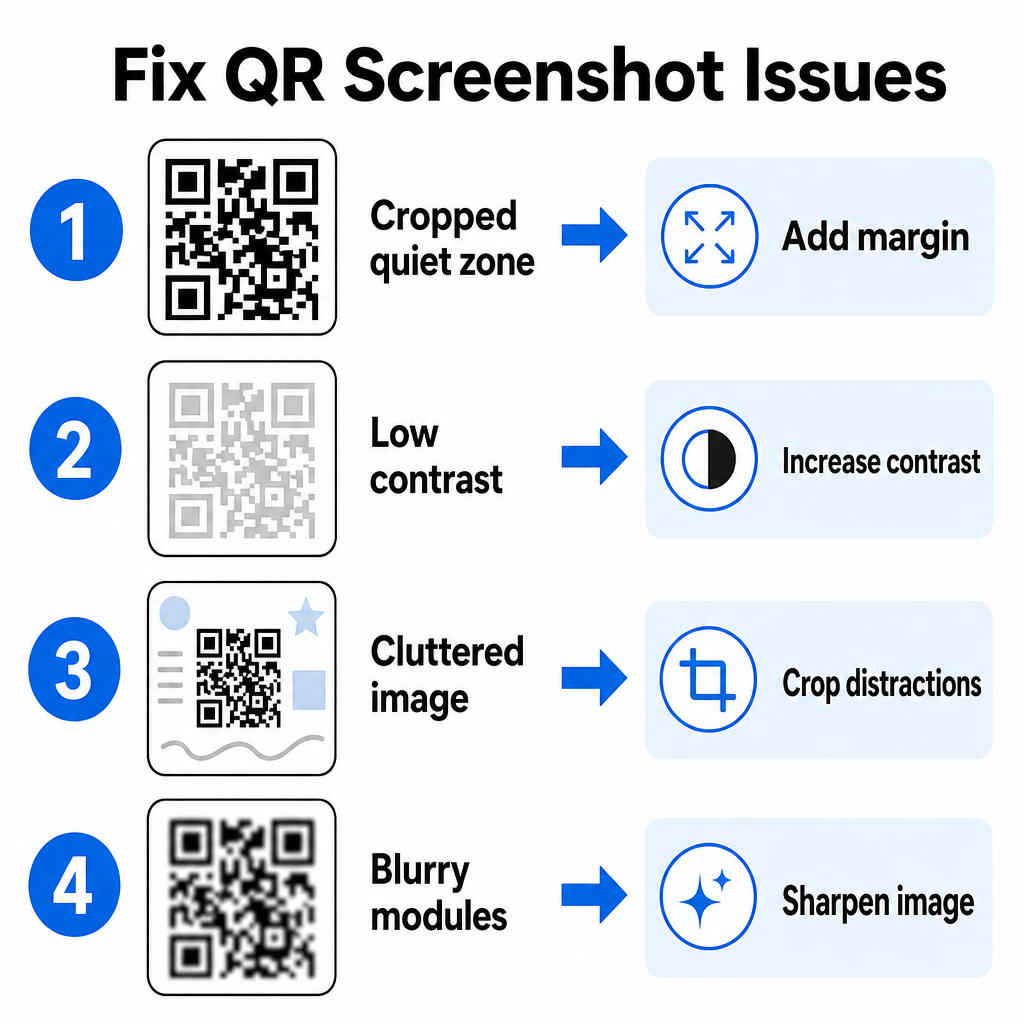
| Problemă | Cauză | Soluție |
|---|---|---|
| Zonă liniștită lipsă | Marginea albă din jurul codului este decupată prea strâns. | Editați fotografia pentru a adăuga o margine albă de cel puțin 4 module lățime în jurul matricei. |
| Contrast scăzut | Culorile de fundal se contopesc în modulele de date întunecate. | Creșteți contrastul sau luminați fundalul folosind un editor de imagini de bază. |
| Imagine aglomerată | Textul sau grafica din jur confundă scanerul optic. | Decupați captura de ecran astfel încât codul QR să umple cea mai mare parte a cadrului. |
| Module neclare | Rezoluția scăzută distorsionează modelul de date și marcajele de aliniere. | Clarificați sau redimensionați fișierul imaginii capturii de ecran înainte de a-l scana din nou. |
Înțelegerea acestor cerințe tehnice vă ajută să remediați rapid imaginile ilizibile. Dacă manipulați frecvent imagini de rezoluție scăzută sau fișiere deteriorate, compararea aplicațiilor de scanare QR code de top vă poate ajuta să selectați instrumente dedicate echipate cu algoritmi mai puternici de corectare a erorilor.
Ce date pot fi extrase dintr-o captură de ecran cu cod QR?
Codurile QR stochează formate de date structurate dincolo de simple adrese de site web. În funcție de modul în care creatorul a construit codul, citirea unei imagini salvate poate debloca diverse acțiuni direct pe ecranul dvs.:
- URL-uri web: Direcționează browserul dvs. către pagini de destinație, meniuri digitale sau formulare online.
- Detalii de contact vCard: Salvează nume, numere de telefon și adrese de e-mail direct în contactele dvs.
- Credențiale Wi-Fi: Conectează dispozitivul dvs. la rețele wireless transferând nume SSID și parole.
- Note text simplu: Afișează mesaje neformatate, coduri promoționale sau instrucțiuni offline.
- Șabloane de comunicare: Pre-completează mesaje text SMS sau schițe de e-mail cu detalii desemnate ale destinatarului.
Cunoașterea tipurilor de date existente facilitează navigarea prin solicitările de prompt la procesarea fișierelor salvate pe diferite smartphone-uri și dispozitive mobile.
Cele mai bune practici de securitate pentru scanarea imaginilor QR code salvate
Deoarece capturile de ecran ascund destinația finală a unui link încorporat până la decodare, infractorii cibernetici folosesc uneori coduri QR frauduloase – o practică cunoscută sub numele de quishing – pentru a direcționa utilizatorii către site-uri web malițioase. Protejarea informațiilor dvs. personale necesită o verificare de bază înainte de a deschide conținutul decodat.
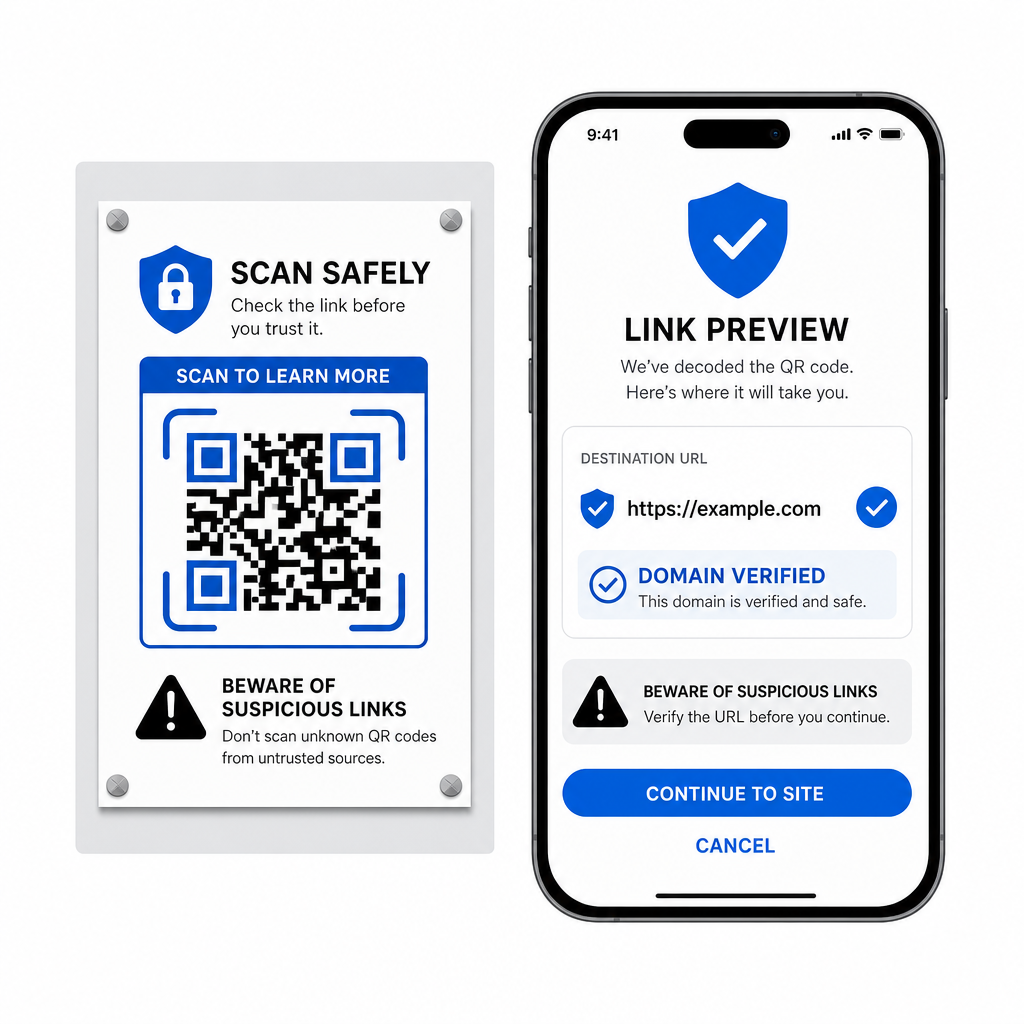
- Previzualizați URL-urile de destinație în meniul pop-up al scanerului înainte de a le deschide.
- Verificați ortografia domeniului pentru a vă asigura că adresa web corespunde numelui oficial al mărcii.
- Evitați introducerea credențialelor sensibile sau a detaliilor de plată pe paginile deschise direct din codurile scanate.
- Refuzați solicitările de descărcare neașteptate sau cererile de permisiune care apar imediat după scanare.
Decodați cu ușurință orice imagine QR code
Nu aveți nevoie de un al doilea telefon sau de o lentilă de cameră fizică pentru a citi un cod QR salvat pe ecran. Indiferent dacă apăsați lung pe o imagine în Apple Photos, scanați un fișier cu Google Lens pe Android sau încărcați o captură de ecran salvată într-un browser desktop, extragerea linkurilor încorporate durează doar câteva secunde.
Pentru cel mai rapid flux de lucru multi-platformă, fără a instala software suplimentar, păstrați un scaner bazat pe browser la favorite, astfel încât să puteți introduce fișiere de captură de ecran ori de câte ori aveți nevoie să le dezvăluiți conținutul ascuns.
Întrebări frecvente
Da. iOS și Android dispun de decodoare de galerie integrate, precum Apple Photos și Google Lens, care extrag date direct din imaginile salvate. Alternativ, puteți încărca fișierul imagine direct în Scanerul de coduri QR Pageloot bazat pe web.
Aplicațiile de cameră fizică necesită intrare optică de la o lentilă de cameră externă care indică un obiect. Citirea unei imagini stocate în stocarea internă a dispozitivului dvs. necesită software capabil să analizeze fișierele de imagine salvate, cum ar fi decodoare de fotografii din galerie sau utilitare de încărcare de fișiere.
Decupați captura de ecran strâns în jurul matricei codului QR pentru a elimina distragerile de fundal. Asigurați-vă că marginea albă (zona de liniște) din jurul modulelor pătrate rămâne intactă și creșteți luminozitatea sau contrastul imaginii dacă designul pare întunecat.