Ste si kdaj shranili posnetek zaslona QR kode, le da bi ugotovili, da vaša telefonska kamera ne more skenirati vašega zaslona? Poskus odpiranja povezav iz shranjenih slik je frustrirajoč, ko standardne aplikacije za kamere pričakujejo fizični predmet. Na srečo lahko katero koli posnetek zaslona QR kode enostavno dekodirate z vgrajenimi orodji za pametne telefone ali spletnimi orodji.
Skeniranje posnetka zaslona QR kode na napravah iPhone in iOS
Sodobni iPhoni z operacijskim sistemom iOS 11 ali novejšim vključujejo izvorne sistemske funkcije, ki analizirajo podatke slik, shranjene v vaši knjižnici fotografij. Ne potrebujete prenosa programske opreme tretjih oseb samo za izluščenje shranjene povezave iz slikovne datoteke.
Sledite tem korakom za dekodiranje posnetka zaslona v sistemu iOS:
- Odprite aplikacijo Photos in poiščite svoj shranjeni posnetek zaslona.
- Pritisnite in držite QR kodo matriko, dokler se ne prikaže meni za izbiro.
- Izberite želeno dejanje za odpiranje povezave v Safariju, kopiranje URL-ja ali deljenje vsebine.
Če vaša naprava podpira funkcijo Live Text (iOS 15 in novejši), se ikona Live Text prikaže tudi v spodnjem desnem kotu pregledovalnika fotografij. Dotaknite se te ikone, da samodejno poudarite QR kodo in prikažete klikljivo pasico z dejanjem pod njo. Za starejše različice iOS ali specializirane strojne nastavitve si oglejte naš celoten vodnik o skeniranju QR kod na iPhonu ponuja dodatne ročne rešitve.
Izluščenje povezav QR kod iz posnetkov zaslona na Androidu
Operacijski sistemi Android uporabljajo optično prepoznavanje znakov za obdelavo slikovnih datotek, shranjenih v vaši lokalni shrambi. Naprave, opremljene z Google Play storitvami, lahko takoj izluščijo vgrajene podatke prek vaše galerije fotografij.
Sledite tem korakom za obdelavo posnetka zaslona na Androidu:
- Zaženite Google Photos in izberite shranjeni posnetek zaslona iz svoje galerije.
- Dotaknite se ikone Google Lens blizu spodnjega dela zaslona, da analizirate sliko.
- Izberite poudarjeni pojavni URL za odpiranje ciljne povezave ali izvedbo shranjenega dejanja.
Če vaša privzeta kamera ali aplikacija za galerijo nima izvornega optičnega prepoznavanja, se lahko naučite več o nadomestnih bližnjicah za naprave tako, da preberete naš vodnik o skeniranju QR kod na napravah Android.
Takojšnje skeniranje shranjenih slik QR kod Potrebujete dekodirati QR kodo, shranjeno na vaši napravi, ne da bi namestili dodatno programsko opremo? Uporabite Pageloot QR Scanner za nalaganje vašega posnetka zaslona in takojšnje izluščenje vaših podatkov.
Branje posnetkov zaslona QR kod na namiznih in spletnih brskalnikih
Namizni operacijski sistemi, kot sta Windows in macOS, nimajo vedno bližnjic kamere z vlečenjem in spuščanjem za shranjene datoteke. Vendar pa sodobni spletni brskalniki ponujajo hitre načine za neposredno analizo slikovnih datotek s vašega trdega diska.
Metoda 1: Google Lens v namiznem Chromeu
Če naletite na sliko QR kode med brskanjem ali shranjeno na vašem računalniku, Google Chrome ponuja vgrajene funkcije za prepoznavanje slik:
- Povlecite in spustite datoteko s posnetkom zaslona neposredno v odprt zavihek brskalnika Chrome.
- Z desno tipko miške kliknite sliko ko se naloži v oknu brskalnika.
- Izberite “Išči sliko z Googlom” za ogled dekodirane povezave v stranski vrstici.
Metoda 2: Spletna orodja za nalaganje datotek
Pri delu z več namiznimi operacijskimi sistemi je nalaganje slikovne datoteke v spletni dekoder najbolj dosledna rešitev:
- Shranite posnetek zaslona v svojo lokalno namizno mapo ali mapo za prenose.
- Pomaknite se do spletnega skenerja z uporabo katerega koli sodobnega spletnega brskalnika.
- Naložite slikovno datoteko v območje za spuščanje, da takoj analizirate kodirano vsebino.
Če želite raziskati dodatne namizne tehnike v sistemih Windows in macOS, si oglejte našo vadnico o skeniranju QR kod na prenosnikih.
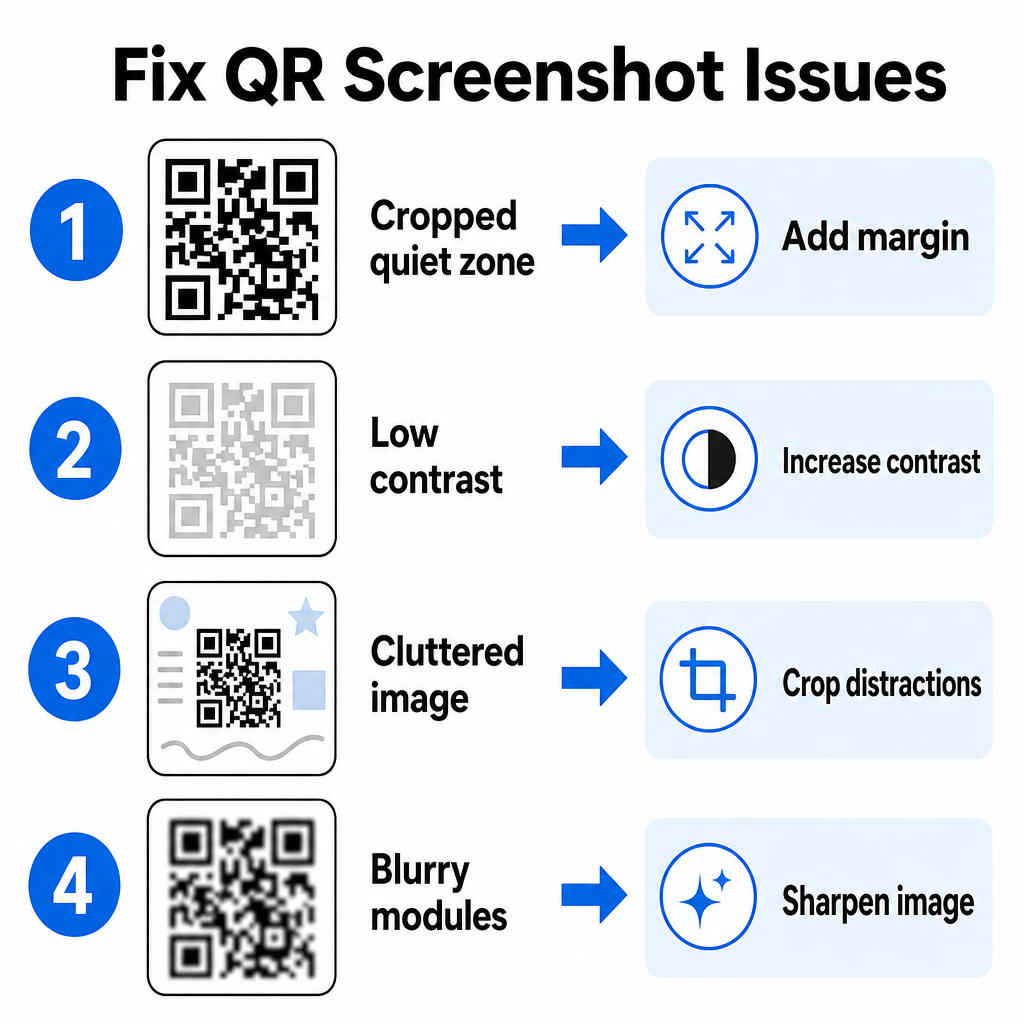
Odpravljanje težav z neberljivimi posnetki zaslona QR kod
Včasih dekoder slik ne zazna QR kode v posnetku zaslona. Tehnične težave običajno izvirajo iz ločljivosti slike, stisnjenih vzorcev matrike ali nezadostnih robov.
| Problem | Vzrok | Rešitev |
|---|---|---|
| Manjkajoča tiha cona | Beli obrob je okoli kode pretesno obrezan. | Uredite fotografijo, da dodate belo obrobo širine vsaj 4 module okoli matrike. |
| Nizek kontrast | Barve ozadja se zlijejo s temnimi podatkovnimi moduli. | Povečajte kontrast ali posvetlite ozadje z osnovnim urejevalnikom slik. |
| Zmedena slika | Okoliško besedilo ali grafika zmede optični bralnik. | Obrežite posnetek zaslona, tako da koda QR zavzame večino okvirja. |
| Zamegljeni moduli | Nizka ločljivost izkrivlja vzorec podatkov in oznake poravnave. | Pred ponovnim skeniranjem izostrite ali spremenite velikost slikovne datoteke posnetka zaslona. |
Razumevanje teh tehničnih zahtev vam pomaga hitro popraviti neberljive slike. Če pogosto delate z slikami nizke ločljivosti ali poškodovanimi datotekami, primerjava najboljših aplikacij za skeniranje kod QR vam lahko pomaga izbrati namensko orodje, opremljeno z močnejšimi algoritmi za odpravljanje napak.
Kakšne podatke je mogoče ekstrahirati iz posnetka zaslona kode QR?
Kode QR shranjujejo strukturirane podatkovne formate, ki presegajo preproste spletne naslove. Odvisno od tega, kako je ustvarjalec ustvaril kodo, lahko branje shranjene slike odklene različna dejanja neposredno na vašem zaslonu:
- Spletni URL-ji: Vaš brskalnik usmeri na ciljne strani, digitalne menije ali spletne obrazce.
- Podatki o stiku vCard: Shranite imena, telefonske številke in e-poštne naslove neposredno v svoje stike.
- Podatki o povezavi Wi-Fi: Povežite svojo napravo z brezžičnimi omrežji s prenosom imen SSID in gesel.
- Navadna besedilna sporočila: Prikaže neoblikovana sporočila, promocijske kode ali navodila brez povezave.
- Predloge za komunikacijo: Predhodno izpolni sporočila SMS ali osnutke e-poštnih sporočil z določenimi podatki prejemnika.
Poznavanje vrst podatkov olajša navigacijo po zahtevah za pozive pri obdelavi shranjenih datotek na različnih pametnih telefonih in mobilnih napravah.
Varnostni najboljši postopki za skeniranje shranjenih slik kod QR
Ker posnetki zaslona skrivajo končni cilj vgrajene povezave, dokler niso dekodirani, kibernetski kriminalci včasih uporabljajo lažne kode QR – praksa, znana kot quishing – za usmerjanje uporabnikov na zlonamerne spletne strani. Zaščita vaših osebnih podatkov zahteva osnovno preverjanje pred odpiranjem dekodirane vsebine.
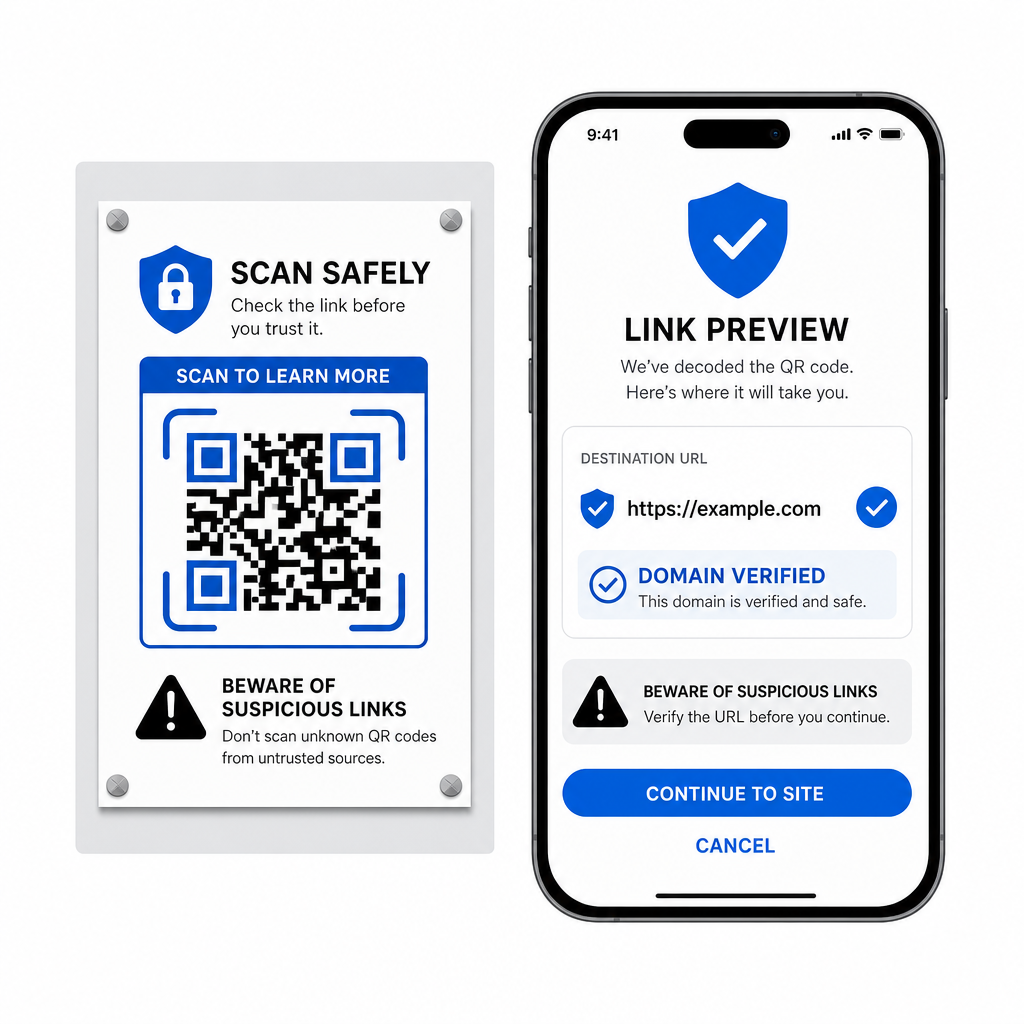
- Predogled ciljnih URL-jev v pojavnem meniju skenerja, preden jih odprete.
- Preverite črkovanje domene , da zagotovite, da se spletni naslov ujema z uradnim imenom blagovne znamke.
- Izogibajte se vnosu občutljivih poverilnic ali podatkov o plačilu na straneh, odprtih neposredno iz skeniranih kod.
- Zavrnite nepričakovane pozive za prenos ali zahteve za dovoljenje, ki se pojavijo takoj po skeniranju.
Preprosto dekodirajte katero koli sliko kode QR
Za branje kode QR, shranjene na vašem zaslonu, ne potrebujete drugega telefona ali fizičnega objektiva kamere. Ne glede na to, ali dolgo pritisnete sliko v Apple Photos, skenirate datoteko z Google Lens na Androidu ali naložite shranjeni posnetek zaslona v namizni brskalnik, ekstrahiranje vgrajenih povezav traja le nekaj sekund.
Za najhitrejši medplatformski potek dela brez namestitve dodatne programske opreme, obdržite v zaznamkih skener, ki temelji na brskalniku, tako da lahko kadar koli želite razkriti njihovo skrito vsebino, vanj povlečete datoteke s posnetki zaslona.
Pogosta vprašanja
Da. iOS in Android imata vgrajene dekoderje galerije, kot sta Apple Photos in Google Lens, ki iz ekstrakta podatke neposredno iz shranjenih slik. Lahko pa svojo slikovno datoteko naložite neposredno v spletni skener kod Pageloot QR.
Aplikacije za fizične kamere zahtevajo optični vnos z zunanjega objektiva kamere, usmerjenega na predmet. Branje slike, shranjene v notranjem pomnilniku vaše naprave, zahteva programsko opremo, ki lahko analizira shranjene slikovne datoteke, kot so dekoderji fotografij iz galerije ali pripomočki za nalaganje datotek.
Obrežite posnetek zaslona tesno okoli matrike QR kode, da odstranite moteče ozadje. Zagotovite, da bela obroba (tihi pas) okoli kvadratnih modulov ostane nedotaknjena, in povečajte svetlost ali kontrast slike, če je dizajn temen.