Bir QR kodunun ekran görüntüsünü kaydettiğiniz, ancak telefonunuzun kamerasının kendi ekranınızı tarayamadığını fark ettiğiniz oldu mu? Standart kamera uygulamaları fiziksel bir nesne beklediğinde, kaydedilmiş resimlerden bağlantı açmaya çalışmak sinir bozucudur. Neyse ki, yerleşik akıllı telefon araçlarını veya web tabanlı araçları kullanarak herhangi bir QR kod ekran görüntüsünü kolayca çözebilirsiniz.
iPhone ve iOS Cihazlarında QR Kodu Ekran Görüntüsünü Tarama
iOS 11 veya daha yeni sürümleri çalıştıran modern iPhone'lar, fotoğraf kitaplığınızda depolanan resim verilerini ayrıştıran yerel sistem özellikleri içerir. Kaydedilmiş bir bağlantıyı bir resim dosyasından çıkarmak için üçüncü taraf yazılım indirmenize gerek yoktur.
Bir ekran görüntüsünü iOS'ta çözmek için şu adımları izleyin:
- Fotoğraflar uygulamasını açın ve kaydedilmiş ekran görüntünüzü bulun.
- QR kodunu basılı tutun seçim menüsü görünene kadar matris.
- Tercih ettiğiniz eylemi seçin bağlantıyı Safari'de açmak, URL'yi kopyalamak veya içeriği paylaşmak için.
Cihazınız Canlı Metin'i destekliyorsa (iOS 15 ve üstü), fotoğraf görüntüleyicinin sağ alt köşesinde bir Canlı Metin simgesi de görünür. Bu simgeye dokunmak QR kodunu otomatik olarak vurgular ve altında tıklanabilir bir eylem banner'ı görüntüler. Daha eski iOS sürümleri veya özel donanım kurulumları için, tamamlanmış kılavuzumuza göz atın iPhone'da QR kodlarını tarama ek manuel geçici çözümler sağlar.
Android'de Ekran Görüntülerinden QR Kodu Bağlantılarını Çıkarma
Android işletim sistemleri, yerel depolamanızda kayıtlı resim dosyalarını işlemek için optik karakter tanımayı kullanır. Google Play Hizmetleri ile donatılmış cihazlar, fotoğraf galeriniz aracılığıyla yerleşik verileri anında çıkarabilir.
Android'de bir ekran görüntüsünü işlemek için şu adımları izleyin:
- Google Fotoğraflar'ı başlatın ve galerinizden kaydedilmiş ekran görüntüsünü seçin.
- Google Lens simgesine dokunun resmi analiz etmek için ekranınızın alt kısmına yakın.
- Vurgulanan açılır URL'yi seçin hedef bağlantıyı açmak veya depolanan eylemi yürütmek için.
Varsayılan kamera veya galeri uygulamanız yerel optik tanıma özelliğine sahip değilse, kılavuzumuzu okuyarak alternatif cihaz kısayolları hakkında daha fazla bilgi edinebilirsiniz. Android cihazlarda QR kodlarını tarama.
Kayıtlı QR Kodu Resimlerini Anında Tara Ekstra yazılım yüklemeden cihazınızda kayıtlı bir QR kodunu çözmeniz mi gerekiyor? Kullanın Pageloot QR Kod Tarayıcı ekran görüntünüzü yüklemek ve verilerinizi hemen çıkarmak için.
Masaüstü ve Web Tarayıcılarında QR Kodu Ekran Görüntülerini Okuma
Windows ve macOS gibi masaüstü işletim sistemleri, kaydedilmiş dosyalar için her zaman nokta ve tıklama kamera kısayollarına sahip değildir. Ancak, modern web tarayıcıları, doğrudan sabit sürücünüzden resim dosyalarını ayrıştırmak için hızlı yollar sunar.
Yöntem 1: Masaüstü Chrome'da Google Lens
Göz atarken veya bilgisayarınızda kayıtlı bir QR kodu resmiyle karşılaşırsanız, Google Chrome yerleşik resim tanıma özellikleri sunar:
- Ekran görüntüsü dosyasını sürükleyip bırakın doğrudan açık bir Chrome tarayıcı sekmesine.
- Görsele sağ tıklayın tarayıcı penceresinde yüklendikten sonra.
- “Görüntüyü Google ile Ara”yı seçin” yan panelde çözülmüş bağlantıyı görüntülemek için.
Yöntem 2: Web Tabanlı Dosya Yükleme Araçları
Birden çok masaüstü işletim sisteminde çalışırken, bir resim dosyasını bir web tabanlı kod çözücüye yüklemek en tutarlı çözümdür:
- Ekran görüntüsünü kaydedin yerel masaüstünüze veya indirme klasörünüze.
- Çevrimiçi bir tarayıcıya gidin herhangi bir modern web tarayıcısını kullanarak.
- Resim dosyasını yükleyin kodlanmış yükü anında ayrıştırmak için bırakma alanına.
Windows ve macOS genelinde ek masaüstü tekniklerini keşfetmek için öğreticimize başvurun. dizüstü bilgisayarlarda QR kodlarını tarama.
Okunamayan QR Kodu Ekran Görüntülerini Sorun Giderme
Bazen bir resim kod çözücü, bir ekran görüntüsündeki bir QR kodunu algılayamaz. Teknik aksaklıklar genellikle resim çözünürlüğü, sıkıştırılmış matris desenleri veya yetersiz kenar boşluklarından kaynaklanır.
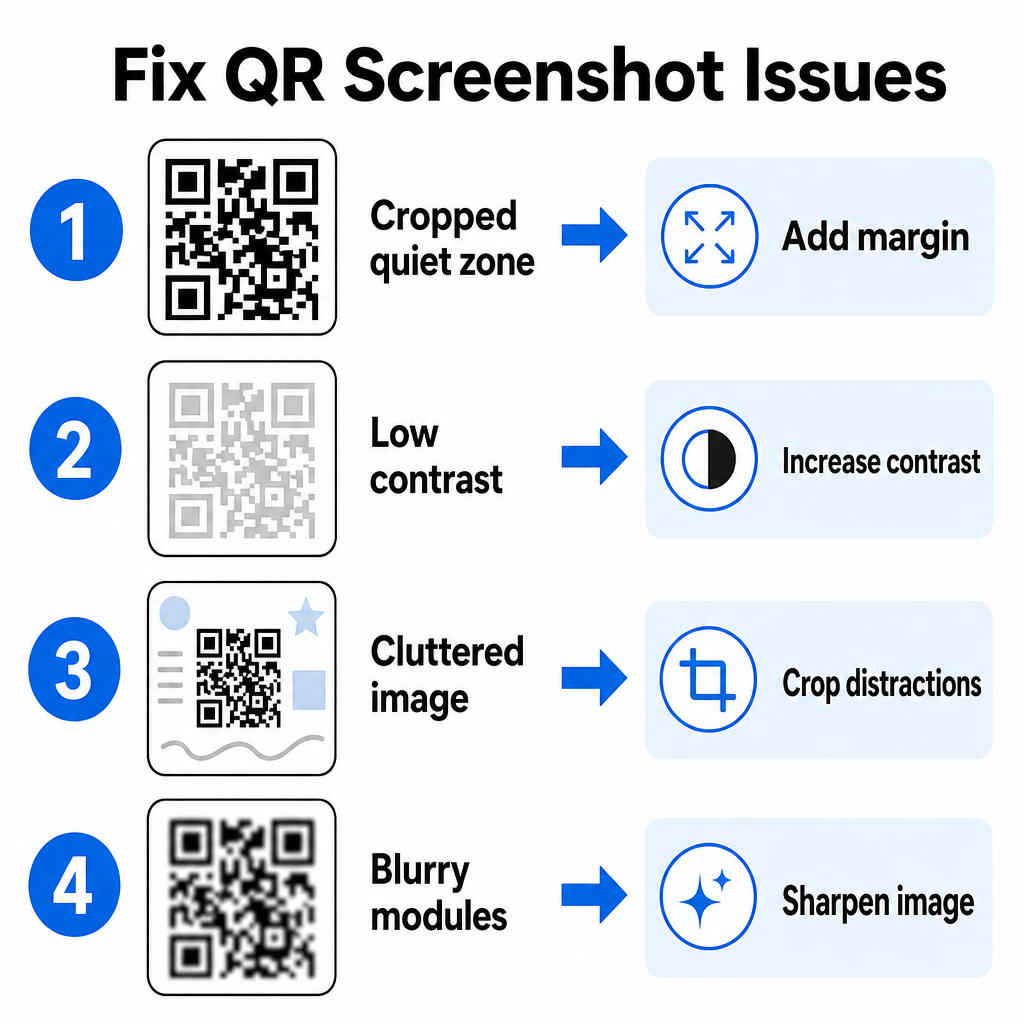
| Sorun | Sebep | Çözüm |
|---|---|---|
| Eksik Sessiz Bölge | Kodun etrafındaki beyaz kenarlık çok sıkı kırpılmış. | Matrisin etrafına en az 4 modül genişliğinde beyaz bir kenar boşluğu eklemek için fotoğrafı düzenleyin. |
| Düşük kontrast | Arka plan renkleri, koyu veri modüllerine karışır. | Temel bir resim düzenleyici kullanarak kontrastı artırın veya arka planı aydınlatın. |
| Dağınık Görüntü | Çevredeki metin veya grafikler optik tarayıcıyı karıştırır. | QR kodunun çerçeveyi doldurması için ekran görüntüsünü kırpın. |
| Bulanık Modüller | Düşük çözünürlük, veri desenini ve hizalama işaretlerini bozar. | Tarama yapmadan önce ekran görüntüsü dosyasını keskinleştirin veya yeniden boyutlandırın. |
Bu teknik gereksinimleri anlamak, okunamaz görüntüleri hızlı bir şekilde düzeltmenize yardımcı olur. Sık sık düşük çözünürlüklü görüntülerle veya bozuk dosyalarla uğraşıyorsanız, en iyi QR kod tarayıcı uygulamalarını karşılaştırmak daha güçlü hata düzeltme algoritmaları ile donatılmış özel araçlar seçmenize yardımcı olabilir.
Bir QR Kodu Ekran Görüntüsünden Hangi Veriler Çıkarılabilir?
QR kodları, basit web sitesi adreslerinin ötesinde yapılandırılmış veri biçimlerini depolar. Oluşturucunun kodu nasıl oluşturduğuna bağlı olarak, kaydedilmiş bir görüntüyü okumak doğrudan ekranınızda çeşitli eylemleri tetikleyebilir:
- Web URL'leri: Tarayıcınızı açılış sayfalarına, dijital menülere veya çevrimiçi formlara yönlendirir.
- vCard İletişim Bilgileri: Adları, telefon numaralarını ve e-posta adreslerini doğrudan kişilerinize kaydeder.
- Wi-Fi Kimlik Bilgileri: SSID adlarını ve şifrelerini aktararak cihazınızı kablosuz ağlara bağlar.
- Düz Metin Notları: Biçimlendirilmemiş mesajları, promosyon kodlarını veya talimatları çevrimdışı olarak görüntüler.
- İletişim Şablonları: Belirlenen alıcı ayrıntılarıyla SMS metin mesajlarını veya taslak e-postaları önceden doldurur.
Hangi veri türlerinin bulunduğunu bilmek, farklı cihazlarda kaydedilmiş dosyaları işlerken istem istemlerini gezinmeyi kolaylaştırır akıllı telefonlar ve mobil cihazlar.
Kaydedilmiş QR Kodu Görüntülerini Tarama İçin Güvenlik En İyi Uygulamaları
Ekran görüntüleri, kod çözülene kadar yerleşik bir bağlantının son hedefini gizlediği için, siber suçlular bazen kullanıcıları kötü amaçlı web sitelerine yönlendirmek için sahte QR kodları kullanırlar (quishing olarak bilinen bir uygulama). Kişisel bilgilerinizin korunması, kodlanmış içeriği açmadan önce temel doğrulama gerektirir.
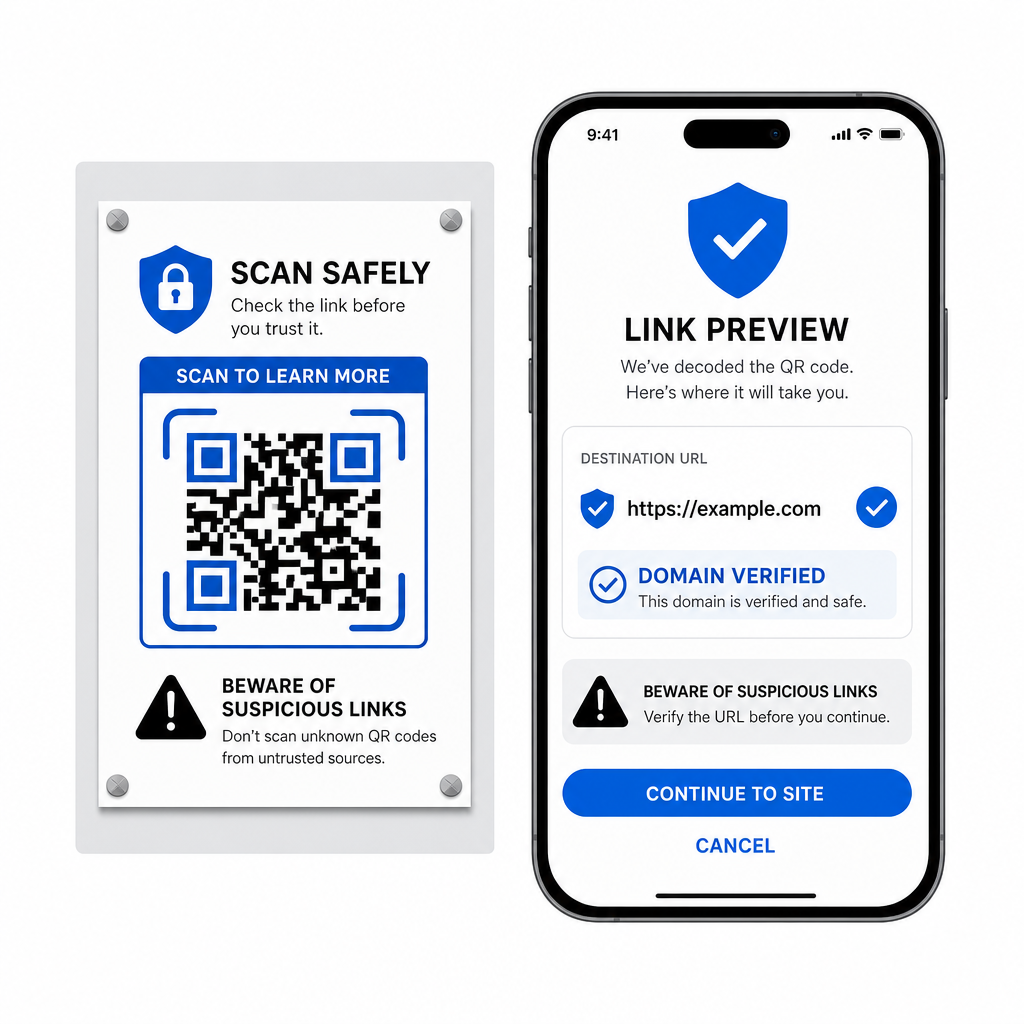
- Tarayıcı açılır menüsünde hedef URL'leri açmadan önce önizleyin. : açmadan önce tarayıcı açılır menüsünde hedef URL'leri önizleyin.
- Alan adının yazımını doğrulayın : web adresinin resmi marka adıyla eşleştiğinden emin olmak için.
- Hassas kimlik bilgileri girmekten kaçının : taranan kodlardan doğrudan açılan sayfalarda veya ödeme ayrıntılarında.
- Beklenmeyen indirme istemlerini reddedin : tarama yaptıktan hemen sonra görünen veya izin isteklerini.
Herhangi Bir QR Kodu Görüntüsünü Kolayca Kod Çözün
Ekranınızda kayıtlı bir QR kodunu okumak için ikinci bir telefona veya fiziksel bir kamera lensine ihtiyacınız yoktur. Apple Fotoğraflar'da bir görüntüye uzun basmak, Android'de Google Lens ile bir dosyayı taramak veya masaüstü tarayıcısında kaydedilmiş bir ekran görüntüsünü yüklemek olsun, yerleşik bağlantıları çıkarmak yalnızca birkaç saniye sürer.
Ekstra yazılım yüklemeden en hızlı platformlar arası iş akışı için, gizli içeriklerini ortaya çıkarmanız gerektiğinde ekran görüntüsü dosyalarını bırakabilmeniz için tarayıcı tabanlı bir tarayıcıyı yer imlerine ekleyin.
Sıkça sorulan sorular
Evet. iOS ve Android, kaydedilmiş resimlerden doğrudan veri çıkaran Apple Photos ve Google Lens gibi yerleşik galeri kod çözücülerine sahiptir. Alternatif olarak, resim dosyanızı doğrudan web tabanlı Pageloot QR Kodu Tarayıcısına yükleyebilirsiniz.
Fiziksel kamera uygulamaları, bir nesneye işaret eden harici bir kamera lensinden optik giriş gerektirir. Cihazınızın dahili depolamasında saklanan bir görüntüyü okumak, galeri fotoğraf kod çözücüleri veya dosya yükleme yardımcı programları gibi kaydedilmiş görüntü dosyalarını analiz edebilen yazılımlar gerektirir.
QR kod matrisinin etrafını, arka plan dikkat dağıtıcılarını kaldırmak için ekran görüntüsünü sıkıca kırpın. Kare modüllerin etrafındaki beyaz kenarlığın (sessiz bölge) sağlam kaldığından emin olun ve tasarım karanlık görünüyorsa görüntünün parlaklığını veya kontrastını artırın.