Kas olete kunagi salvestanud QR-koodi ekraanipildi, kuid avastanud, et teie telefoni kaamera ei suuda teie enda ekraani skannida? Linkide avamine salvestatud piltidelt on frustreeriv, kui tavalised kaamerarakendused ootavad füüsilist objekti. Õnneks saate sisseehitatud nutitelefoni tööriistade või veebipõhiste tööriistade abil hõlpsalt dekodeerida mis tahes QR-koodi ekraanipildi.
QR-koodi ekraanipildi skannimine iPhone'is ja iOS-i seadmetes
Kaasaegsed iPhone'id, mis kasutavad iOS 11 või uuemat versiooni, sisaldavad natiivseid süsteemifunktsioone, mis töötlevad teie fototeeki salvestatud pildiandmeid. Te ei pea allalaadima kolmanda osapoole tarkvara, et lihtsalt salvestatud link pildifailist välja võtta.
Järgige neid samme ekraanipildi dekodeerimiseks iOS-is:
- Avage rakendus Fotod ja leidke oma salvestatud ekraanipilt.
- Vajutage ja hoidke QR-koodi maatriksit, kuni ilmub valikumenüü.
- Valige oma eelistatud toiming lingi avamiseks Safaris, URL-i kopeerimiseks või sisu jagamiseks.
Kui teie seade toetab funktsiooni Live Text (iOS 15 ja uuem), ilmub pildivaaturi paremas alanurgas ka Live Text ikoon. Selle ikooni puudutamine tõstab QR-koodi automaatselt esile ja kuvab selle all klõpsatava toiminguriba. Vanemate iOS-i versioonide või spetsiaalsete riistvarakonfiguratsioonide puhul pakub meie täielik juhend QR-koodide skannimine iPhone'is täiendavaid käsitsi lahendusi.
QR-koodi linkide väljavõtmine ekraanipiltidelt Androidis
Androidi operatsioonisüsteemid kasutavad optilist märgituvastust, et töödelda teie kohalikku salvestusruumi salvestatud pildifaile. Google Play teenustega varustatud seadmed saavad sisseehitatud andmeid koheselt teie fotogalerii kaudu välja võtta.
Järgige neid samme ekraanipildi töötlemiseks Androidis:
- Käivitage Google Photos ja valige oma galeriist salvestatud ekraanipilt.
- Puudutage ikooni Google Lens ekraani allosas, et pilti analüüsida.
- Valige esile tõstetud hüpikaken URL sihtlingi avamiseks või salvestatud toimingu täitmiseks.
Kui teie vaikimisi kaamera või galerii rakendusel puudub natiivne optiline tuvastus, saate meie juhendist lugedes rohkem teada alternatiivsete seadme otseteedest QR-koodide skannimine Android-seadmetes.
Skannige salvestatud QR-koodi pilte koheselt Kas teil on vaja dekodeerida teie seadmesse salvestatud QR-koodi ilma lisatarkvara installimata? Kasutage Pagelooti QR-koodi skanner oma ekraanipildi üleslaadimiseks ja oma andmete koheseks väljavõtmiseks.
QR-koodi ekraanipiltide lugemine töölaual ja veebibrauserites
Lauaarvuti operatsioonisüsteemidel, nagu Windows ja macOS, ei ole alati salvestatud failide jaoks kaamera otseteid. Kaasaegsed veebibrauserid pakuvad aga kiireid viise pildifailide otse teie kõvakettalt töötlemiseks.
meetod: Google Lens töölaual Chrome'is
Kui kohtate sirvimise ajal või oma arvutisse salvestatud QR-koodi pilti, pakub Google Chrome sisseehitatud pildituvastusfunktsioone:
- Lohistage ekraanipildi fail otse avatud Chrome'i brauseri vahekaardile.
- Paremklõpsake pildil kui see brauseriaknas laaditakse.
- Valige “Otsi pilti Google'iga” dekodeeritud lingi vaatamiseks külgpaneelil.
meetod: veebipõhised failide üleslaadimise tööriistad
Kui töötate mitme lauaarvuti operatsioonisüsteemiga, on pildifaili üleslaadimine veebipõhisesse dekoodrisse kõige järjepädevam lahendus:
- Salvestage ekraanipilt oma kohalikku töölauale või allalaadimiste kausta.
- Navigeerige veebipõhisesse skannerisse mis tahes kaasaegse veebibrauseri abil.
- Laadige pildifail üles sisestusalale, et kodeeritud koormus koheselt töödelda.
Täiendavate töölaua tehnikate uurimiseks Windowsi ja macOS-i kaudu tutvuge meie juhendiga QR-koodide skannimine sülearvutites.
Probleemide lahendamine loetamatute QR-koodi ekraanipiltide korral
Mõnikord ei suuda pildidekooder ekraanipildi sees QR-koodi tuvastada. Tehnilised tõrked tulenevad tavaliselt pildi eraldusvõimest, tihendatud maatriksimustritest või ebapiisavatest marginaalidest.
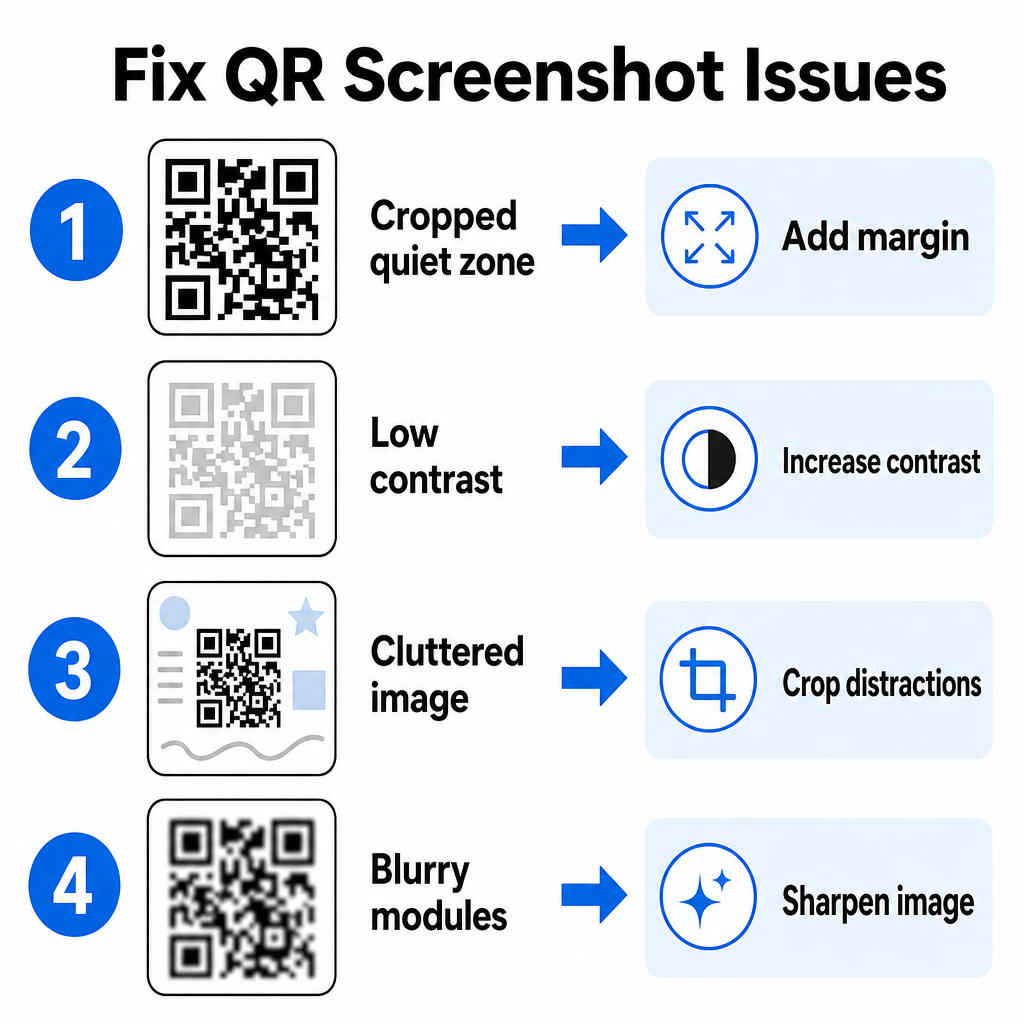
| Probleem | Põhjus | Lahendus |
|---|---|---|
| Puuduv vaikne tsoon | Koodi ümber olev valge äär on liiga tihedalt kärbitud. | Muuda foto nii, et lisada maatriksi ümber vähemalt 4 mooduli laiune valge äär. |
| Madal kontrast | Taustavärvid sulanduvad tumedatesse andmemoodulitesse. | Suurendage kontrasti või heledamaks tausta, kasutades lihtsat pildiredaktorit. |
| Segane pilt | Ümbritsev tekst või graafika ajavad optilise skanneri segadusse. | Kärbi ekraanipilti nii, et QR-kood täidaks suurema osa raamist. |
| Udused moodulid | Madal resolutsioon moonutab andmemustrit ja joondusmärke. | Teravustage või muutke ekraanipildi pildifaili suurust enne selle uuesti skannimist. |
Nende tehniliste nõuete mõistmine aitab teil kiiresti lugematuid pilte parandada. Kui sageli töötate madala resolutsiooniga piltide või kahjustatud failidega, võrdlemine parimate QR-koodi skannerirakendustega aitab teil valida spetsiaalseid tööriistu, mis on varustatud tugevamate veaparandusalgoritmidega.
Milliseid andmeid saab QR-koodi ekraanipildist ekstraheerida?
QR-koodid salvestavad struktureeritud andmevorminguid, mis on enamat kui lihtsalt veebisaidi aadressid. Sõltuvalt sellest, kuidas looja koodi koostas, võib salvestatud pildi lugemine avada teie ekraanil erinevaid toiminguid:
- Veebi URL-id: Suunab teie brauseri sihtlehtedele, digitaalsetele menüüdele või veebivormidele.
- vCard kontaktandmed: Salvestab nimed, telefoninumbrid ja e-posti aadressid otse teie kontaktidesse.
- Wi-Fi mandaadid: Ühendab teie seadme traadita võrkudega, edastades SSID-nimed ja paroolid.
- Lihtteksti märkused: Kuvab vormindamata sõnumeid, sooduskoodid või juhised võrguühenduseta.
- Kommunikatsioonimallid: Eeltäidab SMS-sõnumeid või e-posti mustandeid määratud vastuvõtja andmetega.
Teades, milliseid andmetüüpe on olemas, on lihtsam navigeerida kiirpalvetes, kui töötlete salvestatud faile erinevatest nutitelefonidest ja mobiilseadmetest.
Turvalised parimad tavad salvestatud QR-koodi piltide skannimiseks
Kuna ekraanipildid peidavad sisseehitatud lingi lõpliku sihtkoha enne dekodeerimist, kasutavad küberkurjategijad mõnikord petturlikke QR-koode – seda tava nimetatakse quishinguks –, et suunata kasutajaid pahatahtlikele veebisaitidele. Teie isikliku teabe kaitsmiseks on vaja enne dekodeeritud sisu avamist põhilist kontrollimist.
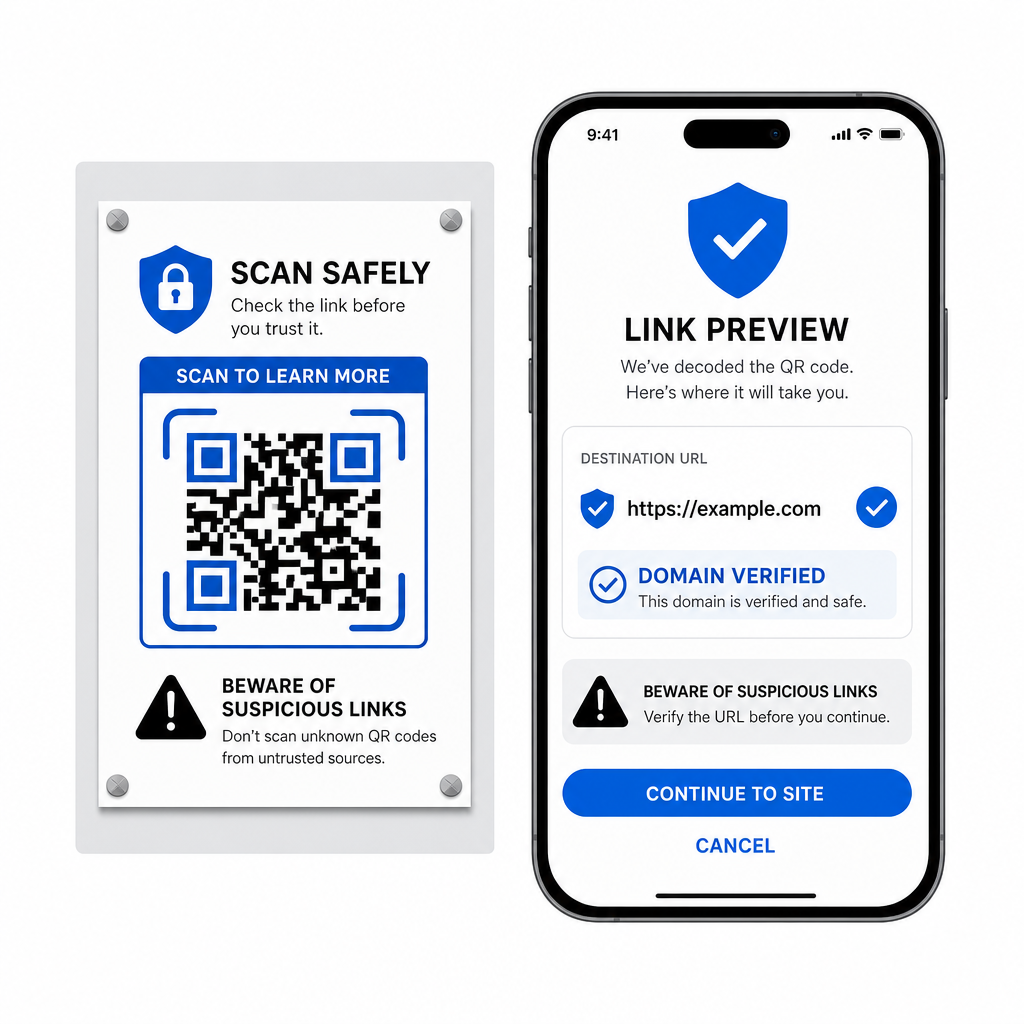
- Eelvaate siht-URL-id skanneri hüpikmenüüs enne nende avamist.
- Kontrollige domeeni õigekirja veendumaks, et veebiaadress vastab ametlikule brändinimele.
- Vältige tundlike mandaatide sisestamist või makseandmete sisestamist lehtedele, mis avatakse otse skannitud koodidest.
- Keelduge ootamatutest allalaadimispakkumistest või lubade taotlustest, mis ilmuvad kohe pärast skannimist.
Dekodeerige hõlpsalt mis tahes QR-koodi pilt
Te ei vaja teist telefoni ega füüsilist kaamera objektiivi, et lugeda teie ekraanil salvestatud QR-koodi. Ükskõik, kas vajutate pikalt Apple Photos'i pilti, skannite Google Lensiga Androidis faili või laadite töölaua brauseris üles salvestatud ekraanipildi, sisseehitatud linkide ekstraheerimine võtab vaid mõne sekundi.
Kiireima platvormideülese töövoo jaoks ilma lisatarkvara installimata hoidke brauseripõhist skannerit järjehoidjana, et saaksite ekraanipildi faile sisestada alati, kui peate nende peidetud sisu paljastama.
Korduma kippuvad küsimused
Jah. iOS ja Android pakuvad sisseehitatud galeriide dekoodreid, nagu Apple Photos ja Google Lens, mis eraldavad andmeid otse salvestatud piltidest. Teise võimalusena saate oma pildifaili otse üles laadida veebipõhisesse Pageloot QR-koodi skannerisse.
Füüsilised kaamerarakendused nõuavad optilist sisendit välisest kaameraobjektiivist, mis on suunatud objektile. Teie seadme sisemällu salvestatud pildi lugemine nõuab tarkvara, mis suudab analüüsida salvestatud pildifaile, näiteks galeriifotode dekoodreid või failiüleslaadimise utiliite.
Lõika ekraanipilt tihedalt QR-koodi maatriksi ümber, et eemaldada tausta segajad. Veenduge, et ruudukujuliste moodulite ümber olev valge äär (vahetsoon) jääks puutumata, ja suurendage pildi heledust või kontrasti, kui kujundus tundub tume.