Mentsettél már el QR-kód képernyőmentést, csak hogy rájöjj, a telefonod kamerája nem tudja beolvasni a saját képernyődet? Frusztráló linkeket megnyitni mentett képekből, amikor az alapértelmezett kameraalkalmazások fizikai tárgyat várnak. Szerencsére bármilyen QR-kód képernyőmentést könnyedén dekódolhatsz beépített okoseszközökkel vagy webes eszközökkel.
QR-kód képernyőmentés beolvasása iPhone-on és iOS-eszközökön
A modern, iOS 11-es vagy újabb verziót futtató iPhone-ok beépített rendszerfunkciókkal rendelkeznek, amelyek képesek feldolgozni a fotókönyvtáradban tárolt képadatokat. Nem kell harmadik féltől származó szoftvert letöltened csak azért, hogy egy mentett linket kinyerj egy képfájlból.
Kövesd ezeket a lépéseket a képernyőmentés dekódolásához iOS-en:
- Nyisd meg a Fotók alkalmazást és keresd meg a mentett képernyőmentést.
- Tartsd lenyomva a QR-kódot mátrixot, amíg meg nem jelenik a kiválasztási menü.
- Válaszd ki a kívánt műveletet a link megnyitásához a Safariban, az URL másolásához vagy a tartalom megosztásához.
Ha az eszközöd támogatja az Élő szöveget (iOS 15 és újabb), akkor az Élő szöveg ikon is megjelenik a fotónézegető jobb alsó sarkában. Az ikonra koppintva automatikusan kiemeli a QR-kódot, és egy kattintható műveleti sávot jelenít meg alatta. Régebbi iOS-verziók vagy speciális hardverkonfigurációk esetén a teljes útmutatónk áttekintése a QR-kódok beolvasása iPhone-on további manuális megoldásokat kínál.
QR-kód linkek kinyerése képernyőmentésekből Androidon
Az Android operációs rendszerek optikai karakterfelismerést használnak a helyi tárhelyeden mentett képfájlok feldolgozásához. A Google Play Szolgáltatásokkal felszerelt eszközök azonnal kinyerhetik a beágyazott adatokat a fotógalériádon keresztül.
Kövesd ezeket a lépéseket a képernyőmentés feldolgozásához Androidon:
- Indítsd el a Google Fotókat és válaszd ki a mentett képernyőmentést a galériádból.
- Koppints a Google Lens ikonra a képernyő alján, hogy elemezd a képet.
- Válaszd ki a kiemelt felugró URL-t a célhivatkozás megnyitásához vagy a tárolt művelet végrehajtásához.
Ha az alapértelmezett kamera vagy galéria alkalmazásod nem rendelkezik beépített optikai felismeréssel, többet is megtudhatsz a további eszközparancsikonokról útmutatónkban a QR-kódok beolvasása Androidos eszközökön.
Mentett QR-kód képek azonnali beolvasása Dekódolnod kell egy, az eszközödön mentett QR-kódot anélkül, hogy extra szoftvert kellene telepítened? Használd a Pageloot QR-kód szkenner -t a képernyőmentés feltöltéséhez és az adatok azonnali kinyeréséhez.
QR-kód képernyőmentések olvasása asztali számítógépen és webböngészőkben
Az olyan asztali operációs rendszerek, mint a Windows és a macOS, nem mindig rendelkeznek kattintással elérhető kameraparancsikonokkal a mentett fájlokhoz. Azonban a modern webböngészők gyors módszereket kínálnak a képfájlok közvetlen a merevlemezről történő feldolgozására.
módszer: Google Lens asztali Chrome-ban
Ha böngészés közben vagy a számítógépeden mentett QR-kód képpel találkozol, a Google Chrome beépített képelemző funkciókat kínál:
- Húzd és vidd a képernyőmentés fájlt közvetlenül egy megnyitott Chrome böngésző lapra.
- Kattintson jobb gombbal a képre amint betöltődik a böngészőablakban.
- Válaszd a “Kép keresése a Google-lal” lehetőséget” a dekódolt link megtekintéséhez az oldalsávban.
módszer: Webes fájlfeltöltő eszközök
Több asztali operációs rendszeren való munkavégzés esetén a képfájl webes dekóderbe való feltöltése a legkonzisztensebb megoldás:
- Mentsd el a képernyőmentést a helyi asztali számítógépedre vagy a letöltések mappába.
- Látogass el egy online szkennerhez bármely modern webböngésző segítségével.
- Töltsd fel a képfájlt a fogadó zónába a kódolt hasznos teher azonnali feldolgozásához.
További asztali technikák megismeréséhez Windows és macOS rendszereken, tekintsd meg útmutatónkat a QR-kódok beolvasása laptopokon.
Nem olvasható QR-kód képernyőmentések hibaelhárítása
Néha egy képdekóder nem tudja felismerni a QR-kódot egy képernyőmentésen belül. A technikai hibák általában a képfelbontásból, a tömörített mátrix mintákból vagy az elégtelen margókból adódnak.
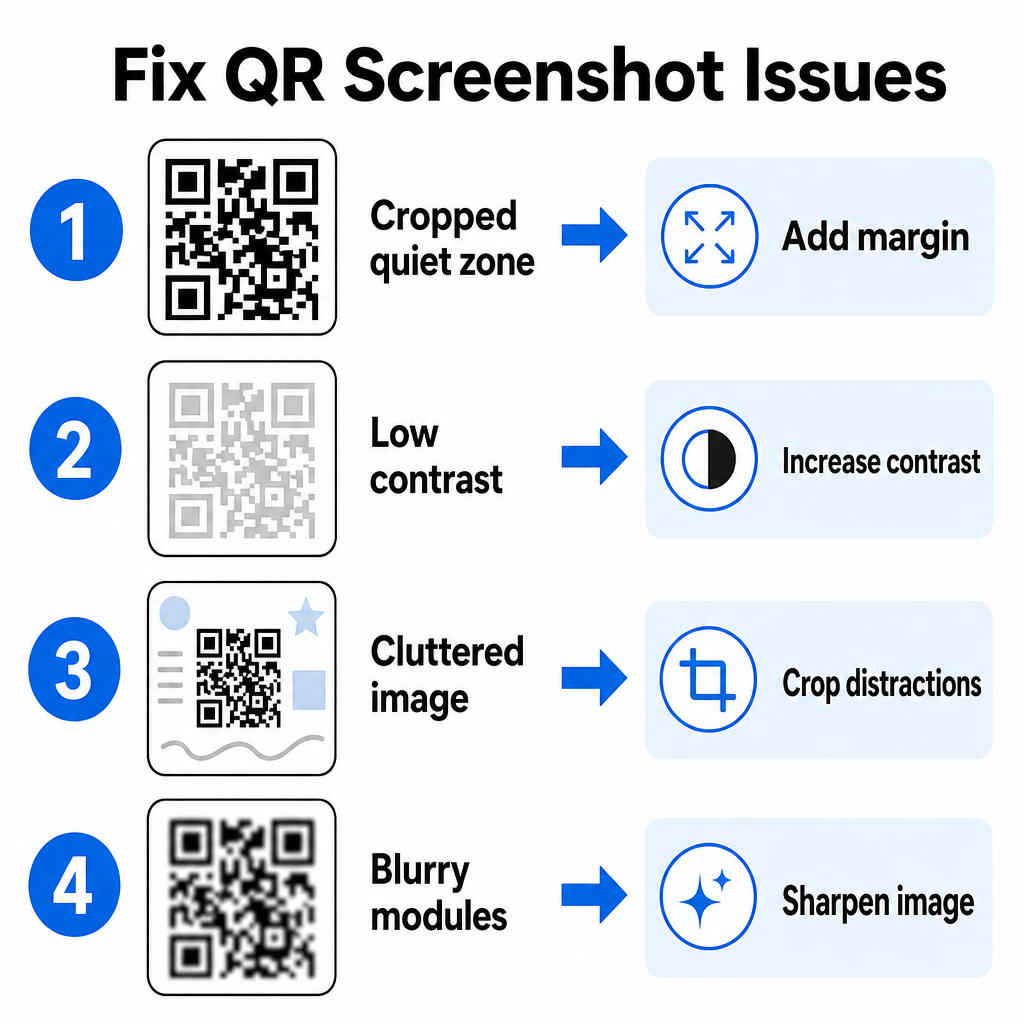
| Probléma | Ok | Megoldás |
|---|---|---|
| Hiányzó csendes zóna | A kód körüli fehér keret túl szűkre van vágva. | Szerkessze a fényképet úgy, hogy legalább 4 modul széles fehér margót adjon a mátrix köré. |
| Alacsony kontraszt | A háttérszínek beleolvadnak a sötét adatmodulokba. | Növelje a kontrasztot, vagy világosítsa fel a hátteret egy alapvető képszerkesztővel. |
| Zavaros kép | A környező szöveg vagy grafika összezavarja az optikai szkennert. | Vágja le a képernyőfelvételt úgy, hogy a QR-kód töltse ki a kép nagy részét. |
| Elmosódott modulok | Az alacsony felbontás torzítja az adatmintát és a jelölőket. | Élesítse vagy méretezze át a képernyőfelvétel képfájlját, mielőtt újra beolvasná. |
Ezen technikai követelmények megértése segít a nehezen olvasható képek gyors javításában. Ha gyakran foglalkozik alacsony felbontású képekkel vagy sérült fájlokkal, a legjobb QR-kód-szkenner alkalmazások összehasonlítása segíthet olyan speciális eszközök kiválasztásában, amelyek erősebb hiba-javító algoritmusokkal rendelkeznek.
Milyen adatokat lehet kinyerni egy QR-kód képernyőfelvételből?
A QR-kódok az egyszerű webhelycímeken túl strukturált adatformátumokat tárolnak. Attól függően, hogy a létrehozó hogyan építette fel a kódot, a mentett kép olvasása különféle műveleteket indíthat el közvetlenül a képernyőn:
- Web URL-ek: Böngészőjét céloldalakra, digitális menükre vagy online űrlapokra irányítja.
- vCard kapcsolati adatok: Neveket, telefonszámokat és e-mail címeket ment egyenesen a névjegyeihez.
- Wi-Fi hitelesítő adatok: Csatlakoztatja eszközét vezeték nélküli hálózatokhoz SSID-nevek és jelszavak átvitelével.
- Egyszerű szöveges jegyzetek: Formázatlan üzeneteket, promóciós kódokat vagy utasításokat jelenít meg offline.
- Kommunikációs sablonok: Előre kitölti az SMS-szöveges üzeneteket vagy a piszkozat e-maileket a kijelölt címzettek adataival.
Az adatfajták ismerete megkönnyíti a prompt kérések navigálását a mentett fájlok különböző okostelefonokon és mobileszközökön.
történő feldolgozása során.
Biztonsági legjobb gyakorlatok mentett QR-kód képek beolvasásához.
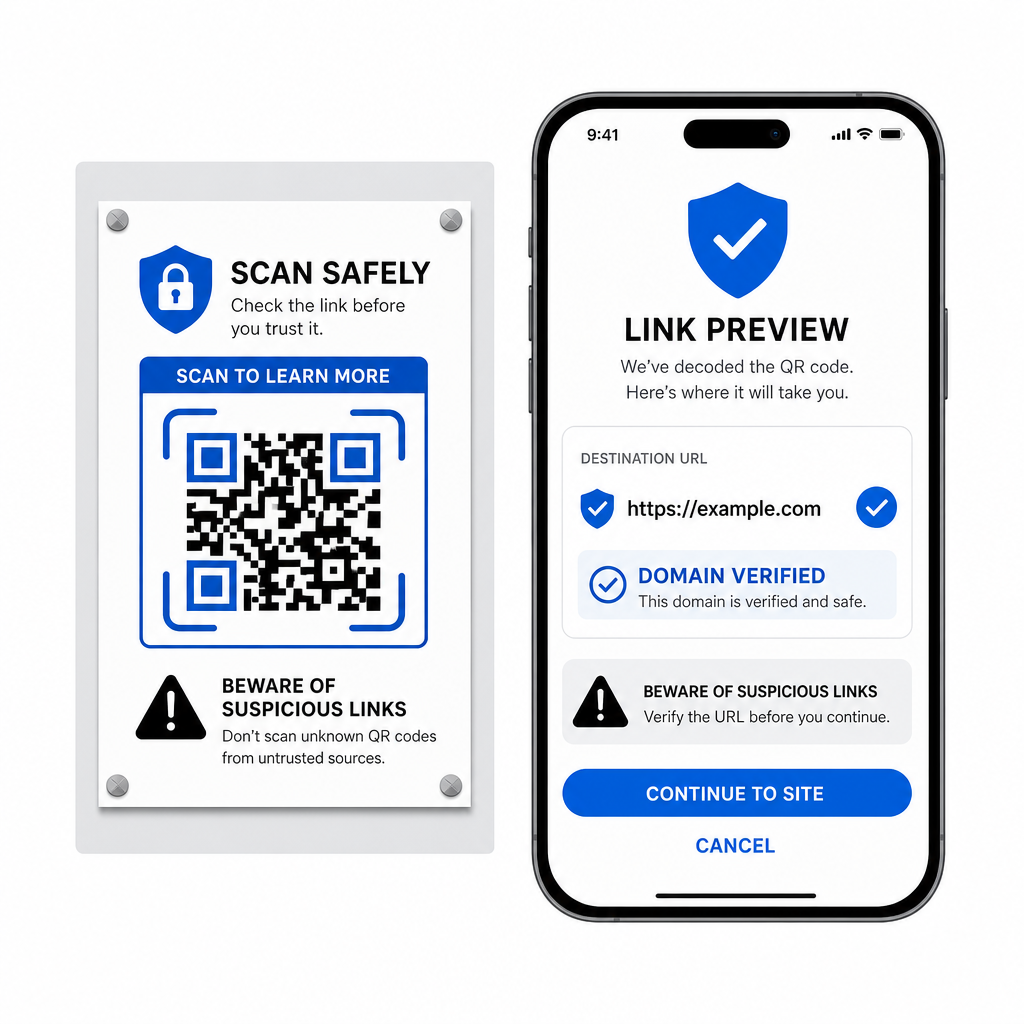
- Mivel a képernyőfelvételek csak dekódolás után rejtik el egy beágyazott link végső célállomását, a kiberbűnözők néha hamis QR-kódokat használnak – ezt a gyakorlatot quishingnek nevezik –, hogy rosszindulatú webhelyekre irányítsák a felhasználókat. Személyes adatainak védelme alapvető ellenőrzést igényel a dekódolt tartalom megnyitása előtt. Előnézet a cél URL-ekről.
- a szkenner felugró menüjében, mielőtt megnyitná őket. Ellenőrizze a domain helyesírását.
- annak biztosítására, hogy a webcím megegyezzen a hivatalos márkanevével. Kerülje az érzékeny hitelesítő adatok.
- vagy fizetési adatok megadását olyan oldalakon, amelyeket közvetlenül beolvasott kódokból nyitott meg. Tagadja meg a váratlan letöltési kéréseket.
vagy a beolvasás után azonnal megjelenő engedélykéréseket.
Bármilyen QR-kód kép könnyű dekódolása.
Nincs szüksége második telefonra vagy fizikai kamerára a képernyőn mentett QR-kód olvasásához. Akár hosszú lenyomással érint egy képet az Apple Photos alkalmazásban, akár egy fájlt beolvas a Google Lens segítségével Androidon, akár egy mentett képernyőfelvételt tölt fel egy asztali böngészőbe, a beágyazott linkek kinyerése csak néhány másodpercet vesz igénybe.
Gyakori kérdések
Igen. Az iOS és az Android beépített galéria dekódolókkal rendelkezik, mint például az Apple Photos és a Google Lens, amelyek közvetlenül az elmentett képekből nyernek ki adatokat. Alternatív megoldásként közvetlenül feltöltheti a képfájlt a web-alapú Pageloot QR-kód szkennerre.
A leggyorsabb platformfüggetlen munkafolyamat érdekében extra szoftver telepítése nélkül tartson egy böngészőalapú szkenner könyvjelzőt, hogy amikor csak szüksége van rá, hogy felfedje a rejtett tartalmat, be tudja dobni a képernyőfelvétel fájlokat.
Vágja be a képernyőképet szorosan a QR-kód mátrixa körül, hogy eltávolítsa a háttérzavaró elemeket. Győződjön meg arról, hogy a négyzet alakú modulok körüli fehér szegély (nyugati zóna) sértetlen marad, és növelje a kép fényerejét vagy kontrasztját, ha a dizájn sötétnek tűnik.