האם אי פעם שמרת צילום מסך של קוד QR, רק כדי לגלות שמצלמת הטלפון שלך לא יכולה לסרוק את המסך שלך? ניסיון לפתוח קישורים מתמונות שמורות מתסכל כאשר אפליקציות מצלמה רגילות מצפות לאובייקט פיזי. למרבה המזל, אתה יכול בקלות לפענח כל צילום מסך של קוד QR באמצעות כלים מובנים בסמארטפון או כלים מבוססי אינטרנט.
סריקת צילום מסך של קוד QR באייפון ובמכשירי iOS
אייפונים מודרניים המריצים iOS 11 ומעלה כוללים תכונות מערכת מובנות שמנתחות נתוני תמונה המאוחסנים בספריית התמונות שלך. אינך צריך להוריד תוכנה של צד שלישי רק כדי לחלץ קישור שמור מקובץ תמונה.
בצע את השלבים הבאים כדי לפענח צילום מסך ב-iOS:
- פתח את אפליקציית התמונות ולאיתור צילום המסך השמור שלך.
- לחץ לחיצה ארוכה על קוד ה-QR מטריצה עד שיופיע תפריט הבחירה.
- בחר את הפעולה המועדפת עליך כדי לפתוח את הקישור בספארי, להעתיק את כתובת ה-URL, או לשתף את התוכן.
אם המכשיר שלך תומך ב-Live Text (iOS 15 ומעלה), סמל Live Text מופיע גם בפינה הימנית התחתונה של מציג התמונות. הקשה על סמל זה מדגישה את קוד ה-QR באופן אוטומטי ומציגה באנר פעולה הניתן ללחיצה מתחתיו. עבור גרסאות iOS ישנות יותר או הגדרות חומרה מיוחדות, סקירת המדריך המלא שלנו בנושא סריקת קודי QR באייפון מספקת פתרונות עוקפים ידניים נוספים.
חילוץ קישורי קוד QR מצילומי מסך באנדרואיד
מערכות הפעלה של אנדרואיד ממנפות זיהוי תווים אופטי כדי לעבד קבצי תמונה השמורים באחסון המקומי שלך. מכשירים המצוידים בשירותי Google Play יכולים לחלץ נתונים מוטמעים באופן מיידי דרך גלריית התמונות שלך.
בצע את השלבים הבאים כדי לעבד צילום מסך באנדרואיד:
- הפעל את Google Photos ובחר את צילום המסך השמור מהגלריה שלך.
- הקש על סמל Google Lens ליד החלק התחתון של המסך שלך כדי לנתח את התמונה.
- בחר את כתובת ה-URL המודגשת שמופיעה כדי לפתוח את קישור היעד או לבצע את הפעולה המאוחסנת.
אם אפליקציית המצלמה או הגלריה ברירת המחדל שלך חסרה זיהוי אופטי מובנה, תוכל ללמוד עוד על קיצורי דרך חלופיים למכשירים על ידי קריאת המדריך שלנו בנושא סריקת קודי QR במכשירי אנדרואיד.
סרוק תמונות קוד QR שמורות באופן מיידי צריך לפענח קוד QR שמור במכשיר שלך מבלי להתקין תוכנה נוספת? השתמש ב סורק קודי QR של Pageloot כדי להעלות את צילום המסך שלך ולחלץ את הנתונים שלך באופן מיידי.
קריאת צילומי מסך של קוד QR בדפדפני שולחן עבודה ואינטרנט
מערכות הפעלה של שולחן עבודה כמו Windows ו-macOS לא תמיד כוללות קיצורי דרך למצלמה בלחיצה אחת עבור קבצים שמורים. עם זאת, דפדפני אינטרנט מודרניים מציעים דרכים מהירות לנתח קבצי תמונה ישירות מהכונן הקשיח שלך.
שיטה 1: Google Lens בכרום למחשב
אם אתה נתקל בתמונת קוד QR בזמן גלישה או שמורה במחשב שלך, Google Chrome מספק תכונות זיהוי תמונה מובנות:
- גרור ושחרר את קובץ צילום המסך ישירות לתוך לשונית דפדפן כרום פתוחה.
- לחץ לחיצה ימנית על התמונה לאחר שהוא נטען בתוך חלון הדפדפן.
- בחר “חפש תמונה עם Google” כדי להציג את הקישור המפוענח בחלונית הצד.
שיטה 2: כלים להעלאת קבצים מבוססי אינטרנט
בעת עבודה על פני מערכות הפעלה מרובות של שולחן עבודה, העלאת קובץ תמונה למפענח מבוסס אינטרנט היא הפתרון העקבי ביותר:
- שמור את צילום המסך לשולחן העבודה המקומי שלך או לתיקיית ההורדות.
- נווט לסורק מקוון באמצעות כל דפדפן אינטרנט מודרני.
- העלה את קובץ התמונה לאזור הגרירה כדי לנתח את המטען המקודד באופן מיידי.
כדי לחקור טכניקות נוספות למחשב אישי על פני Windows ו-macOS, עיין במדריך שלנו בנושא סריקת קודי QR במחשבים ניידים.
פתרון בעיות בצילומי מסך של קוד QR שלא ניתנים לקריאה
לפעמים מפענח תמונות נכשל בזיהוי קוד QR בתוך צילום מסך. תקלות טכניות נובעות בדרך כלל מרזולוציית תמונה, דפוסי מטריצה דחוסים, או שוליים לא מספקים.
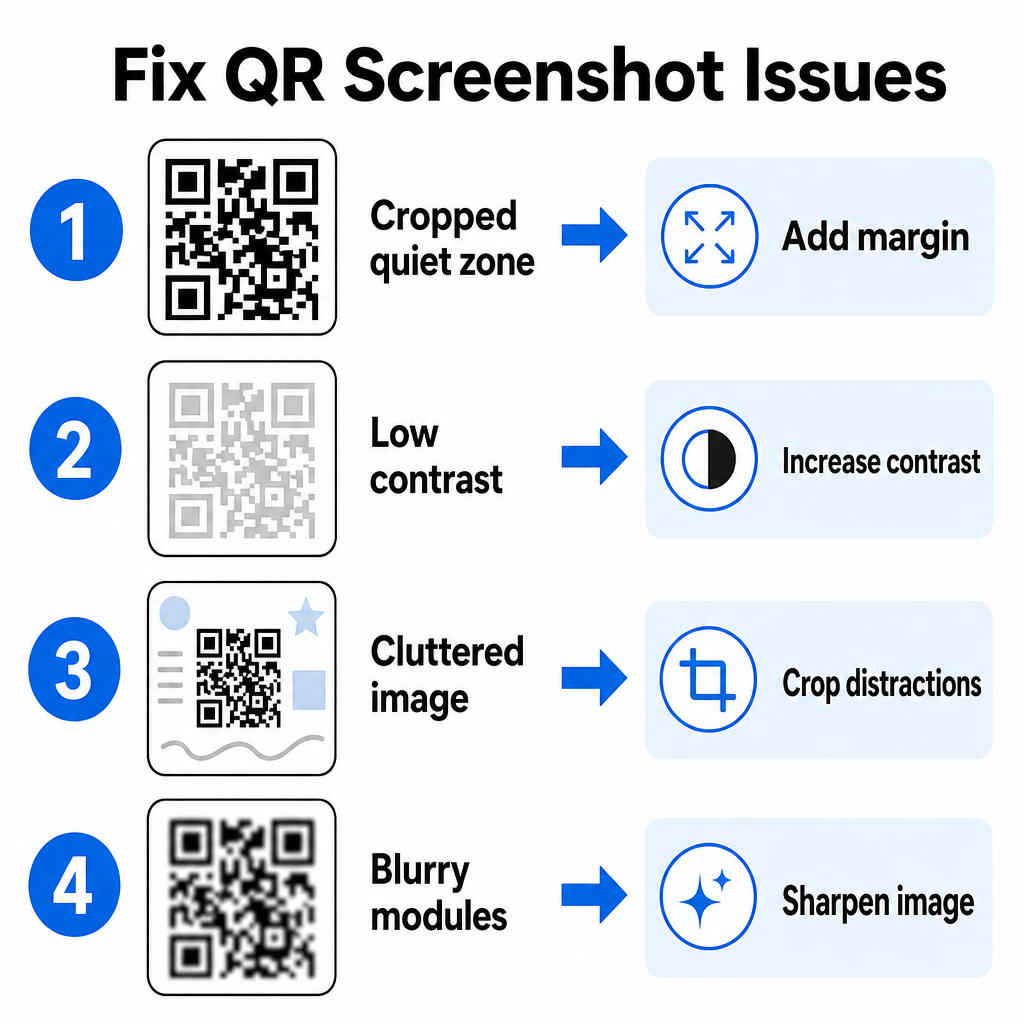
| בְּעָיָה | סיבה | פִּתָרוֹן |
|---|---|---|
| אזור שקט חסר | הגבול הלבן סביב הקוד חתוך הדוק מדי. | ערוך את התמונה כדי להוסיף שוליים לבנים ברוחב של לפחות 4 מודולים סביב המטריצה. |
| ניגודיות נמוכה | צבעי רקע משתלבים במודולי הנתונים הכהים. | הגבר את הניגודיות או הבהר את הרקע באמצעות עורך תמונות בסיסי. |
| תמונה עמוסה | טקסט או גרפיקה מקיפים מבלבלים את הסורק האופטי. | חתוך את צילום המסך כך שקוד ה-QR ימלא את רוב המסגרת. |
| מודולים מטושטשים | רזולוציה נמוכה מעוותת את תבנית הנתונים וסימני היישור. | חדד או שנה את גודל קובץ התמונה של צילום המסך לפני סריקה מחדש. |
הבנת הדרישות הטכניות הללו עוזרת לך לתקן תמונות בלתי קריאות במהירות. אם אתה מתמודד לעיתים קרובות עם תמונות ברזולוציה נמוכה או קבצים פגומים, השוואת אפליקציות סריקת קוד QR מובילות יכולה לעזור לך לבחור כלים ייעודיים המצוידים באלגוריתמים חזקים יותר לתיקון שגיאות.
איזה מידע ניתן לחלץ מצילום מסך של קוד QR?
קודי QR מאחסנים פורמטים של נתונים מובנים מעבר לכתובות אתרים פשוטות. בהתאם לאופן שבו היוצר בנה את הקוד, קריאת תמונה שמורה יכולה לפתוח פעולות שונות ישירות על המסך שלך:
- כתובות אתרים: מפנה את הדפדפן שלך לדפי נחיתה, תפריטים דיגיטליים או טפסים מקוונים.
- פרטי קשר של vCard: שומר שמות, מספרי טלפון וכתובות דוא"ל ישירות לאנשי הקשר שלך.
- פרטי אימות Wi-Fi: מחבר את המכשיר שלך לרשתות אלחוטיות על ידי העברת שמות SSID וסיסמאות.
- הערות טקסט פשוט: מציג הודעות ללא עיצוב, קודי קידום או הוראות במצב לא מקוון.
- תבניות תקשורת: ממלא מראש הודעות טקסט SMS או טיוטות דוא"ל עם פרטי נמען ייעודיים.
הידיעה אילו סוגי נתונים קיימים מקלה על ניווט בבקשות הנחיה בעת עיבוד קבצים שמורים במכשירים שונים סמארטפונים ומכשירים ניידים.
שיטות עבודה מומלצות לאבטחה לסריקת תמונות קוד QR שמורות
מכיוון שצילומי מסך מסתירים את היעד הסופי של קישור מוטמע עד לפענוח, פושעי סייבר משתמשים לעיתים בקודי QR מזויפים – פרקטיקה הידועה כ-quishing – כדי להפנות משתמשים לאתרים זדוניים. הגנה על המידע האישי שלך דורשת אימות בסיסי לפני פתיחת תוכן מפוענח.
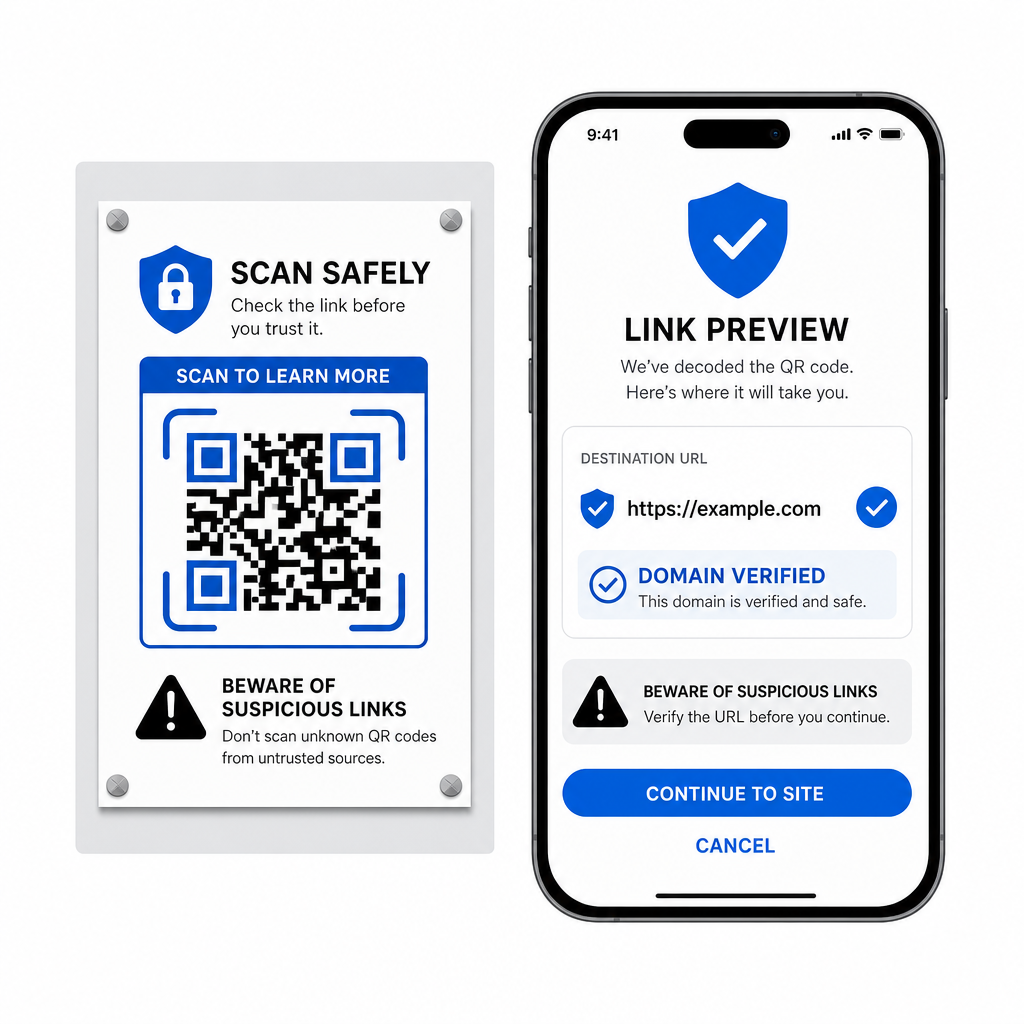
- הצג תצוגה מקדימה של כתובות אתרים ליעד בתפריט הקופץ של הסורק לפני פתיחתם.
- אמת את איות הדומיין כדי לוודא שכתובת האינטרנט תואמת את שם המותג הרשמי.
- הימנע מהזנת פרטי אימות רגישים או פרטי תשלום בדפים שנפתחים ישירות מקודים שנסרקו.
- סרב לבקשות הורדה בלתי צפויות או בקשות הרשאה שמופיעות מיד לאחר הסריקה.
פענח בקלות כל תמונת קוד QR
אינך זקוק לטלפון שני או לעדשת מצלמה פיזית כדי לקרוא קוד QR שמור על המסך שלך. בין אם אתה לוחץ לחיצה ארוכה על תמונה ב-Apple Photos, סורק קובץ עם Google Lens באנדרואיד, או מעלה צילום מסך שמור בדפדפן שולחני, חילוץ קישורים מוטמעים לוקח רק כמה שניות.
לקבלת זרימת עבודה חוצת פלטפורמות המהירה ביותר ללא התקנת תוכנה נוספת, שמור דפדפן סורק כסימניה כדי שתוכל להכניס קבצי צילומי מסך בכל פעם שתצטרך לחשוף את תוכנם הנסתר.
שאלות נפוצות
כן. מערכות ההפעלה iOS ואנדרואיד כוללות מקודדי גלריה מובנים כמו Apple Photos ו-Google Lens, אשר מחלצים נתונים ישירות מתמונות שמורות. לחלופין, ניתן להעלות את קובץ התמונה שלכם ישירות לסורק קוד QR מבוסס האינטרנט של Pageloot.
אפליקציות מצלמה פיזיות דורשות קלט אופטי מעדשת מצלמה חיצונית המכוונת לעצם. קריאת תמונה המאוחסנת באחסון הפנימי של המכשיר שלך דורשת תוכנה המסוגלת לנתח קבצי תמונה שמורים, כגון מפענחי תמונות גלריה או כלי העלאת קבצים.
חתוך את צילום המסך בצורה הדוקה סביב מטריצת קוד ה-QR כדי להסיר הסחות דעת ברקע. ודא שהגבול הלבן (אזור שקט) סביב המודולים הריבועיים נשאר שלם, והגבר את בהירות התמונה או הניגודיות אם העיצוב נראה כהה.