> 가이드 > How to Scan a QR Code From a Screenshot
Scannen eines QR-Screenshots

How to Scan a QR Code From a Screenshot

Learn how to scan a QR code from a screenshot on iPhone, Android, or desktop using built-in photo tools, Google Lens, and web-based image decoders.
Updated on 7월 27, 2026
목차

Have you ever saved a screenshot of a QR code, only to realize your phone camera cannot scan your own screen? Trying to open links from saved images is frustrating when standard camera apps expect a physical object. Fortunately, you can easily decode any QR code screenshot using built-in smartphone tools or web-based tools.

Scanning a QR Code Screenshot on iPhone and iOS Devices

Modern iPhones running iOS 11 or later include native system features that parse image data stored in your photo library. You do not need to download third-party software just to extract a saved link from an image file.

Follow these steps to decode a screenshot in iOS:

  • Open the Photos app and locate your saved screenshot.
  • Press and hold the QR code matrix until the selection menu pops up.
  • Select your preferred action to open the link in Safari, copy the URL, or share the content.

If your device supports Live Text (iOS 15 and higher), a Live Text icon also appears in the bottom-right corner of the photo viewer. Tapping this icon highlights the QR code automatically and displays a clickable action banner beneath it. For older iOS versions or specialized hardware setups, reviewing our complete guide on scanning QR codes on iPhone provides additional manual workarounds.

Extracting QR Code Links From Screenshots on Android

Android operating systems leverage optical character recognition to process image files saved in your local storage. Devices equipped with Google Play Services can extract embedded data instantly through your photo gallery.

Follow these steps to process a screenshot on Android:

  • Launch Google Photos and select the saved screenshot from your gallery.
  • Tap the Google Lens icon near the bottom of your screen to analyze the image.
  • Select the highlighted pop-up URL to open the destination link or execute the stored action.

If your default camera or gallery app lacks native optical recognition, you can learn more about alternative device shortcuts by reading our guide on scanning QR codes on Android devices.

Scan Saved QR Code Images Instantly Need to decode a QR code saved on your device without installing extra software? Use the Pageloot QR 코드 스캐너 to upload your screenshot and extract your data immediately.

Reading QR Code Screenshots on Desktop and Web Browsers

Desktop operating systems like Windows and macOS do not always feature point-and-click camera shortcuts for saved files. However, modern web browsers offer quick ways to parse image files directly off your hard drive.

Method 1: Google Lens in Desktop Chrome

If you encounter a QR code image while browsing or saved on your computer, Google Chrome provides built-in image recognition features:

  • Drag and drop the screenshot file directly into an open Chrome browser tab.
  • Right-click the image once it loads inside the browser window.
  • Select “Search image with Google” to view the decoded link in the side panel.

Method 2: Web-Based File Upload Tools

When working across multiple desktop operating systems, uploading an image file to a web-based decoder is the most consistent solution:

  • Save the screenshot to your local desktop or downloads folder.
  • Navigate to an online scanner using any modern web browser.
  • Upload the image file into the drop zone to parse the encoded payload instantly.

To explore additional desktop techniques across Windows and macOS, consult our tutorial on scanning QR codes on laptops.

Troubleshooting Unreadable QR Code Screenshots

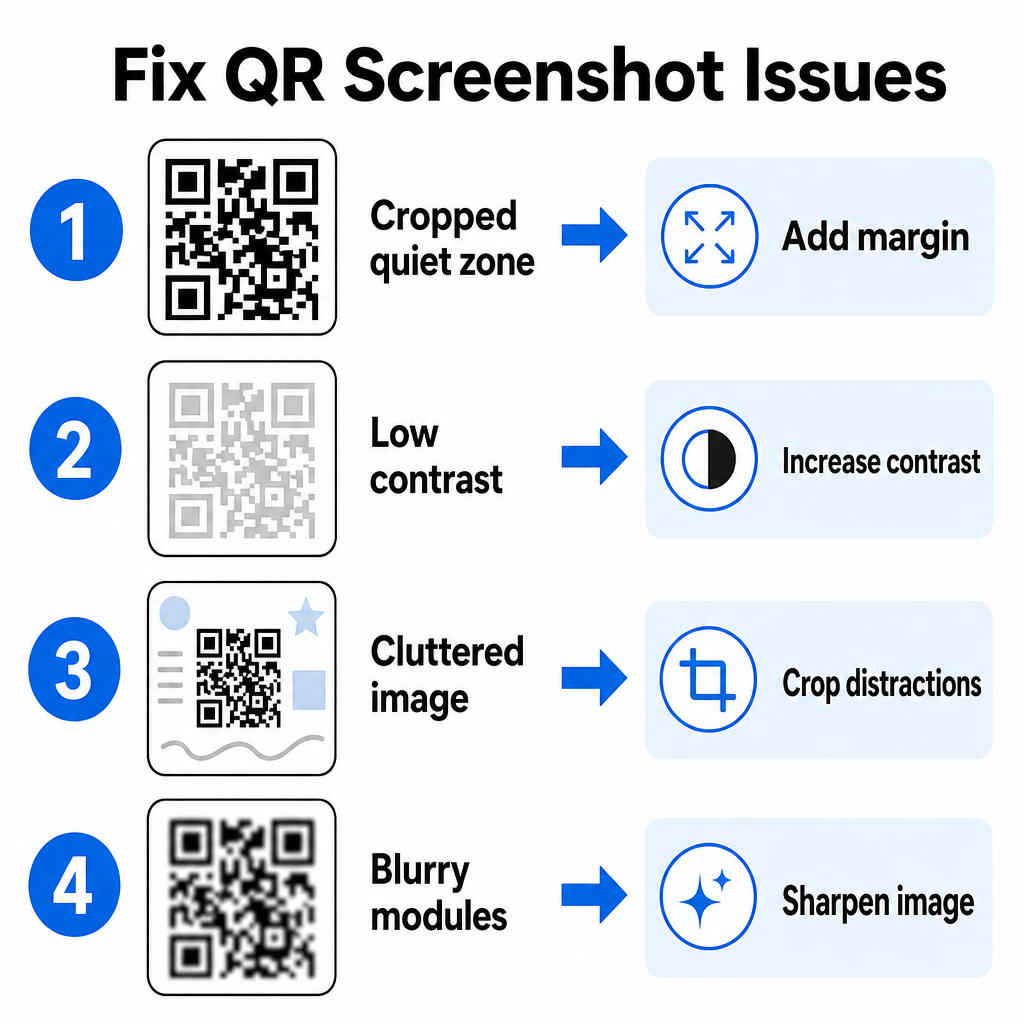
Sometimes an image decoder fails to detect a QR code inside a screenshot. Technical glitches usually stem from image resolution, compressed matrix patterns, or insufficient margins.

QR-Code-Probleme schnell beheben
문제 Cause 솔루션
콰이어트 존 누락 The white border around the code is cropped too tight. Edit the photo to add at least a 4-module-wide white margin around the matrix.
Low Contrast Background colors blend into the dark data modules. Boost contrast or lighten the background using a basic image editor.
Cluttered Image Surrounding text or graphics confuse the optical scanner. Crop the screenshot so the QR code fills most of the frame.
Blurry Modules Low resolution distorts the data pattern and alignment marks. Sharpen or resize the screenshot image file before scanning it again.

Understanding these technical requirements helps you fix unreadable images quickly. If you frequently handle low-resolution images or damaged files, comparing top QR code scanner apps can help you select dedicated tools equipped with stronger error-correction algorithms.

What Data Can Be Extracted From a QR Code Screenshot?

QR codes store structured data formats beyond simple website addresses. Depending on how the creator built the code, reading a saved image can unlock various actions directly on your screen:

  • Web URLs: Directs your browser to landing pages, digital menus, or online forms.
  • vCard Contact Details: Saves names, phone numbers, and email addresses straight to your contacts.
  • Wi-Fi Credentials: Connects your device to wireless networks by transferring SSID names and passwords.
  • Plain Text Notes: Displays unformatted messages, promo codes, or instructions offline.
  • Communication Templates: Pre-fills SMS text messages or draft emails with designated recipient details.

Knowing what data types exist makes it easier to navigate prompt requests when processing saved files across different smartphones and mobile devices.

Security Best Practices for Scanning Saved QR Code Images

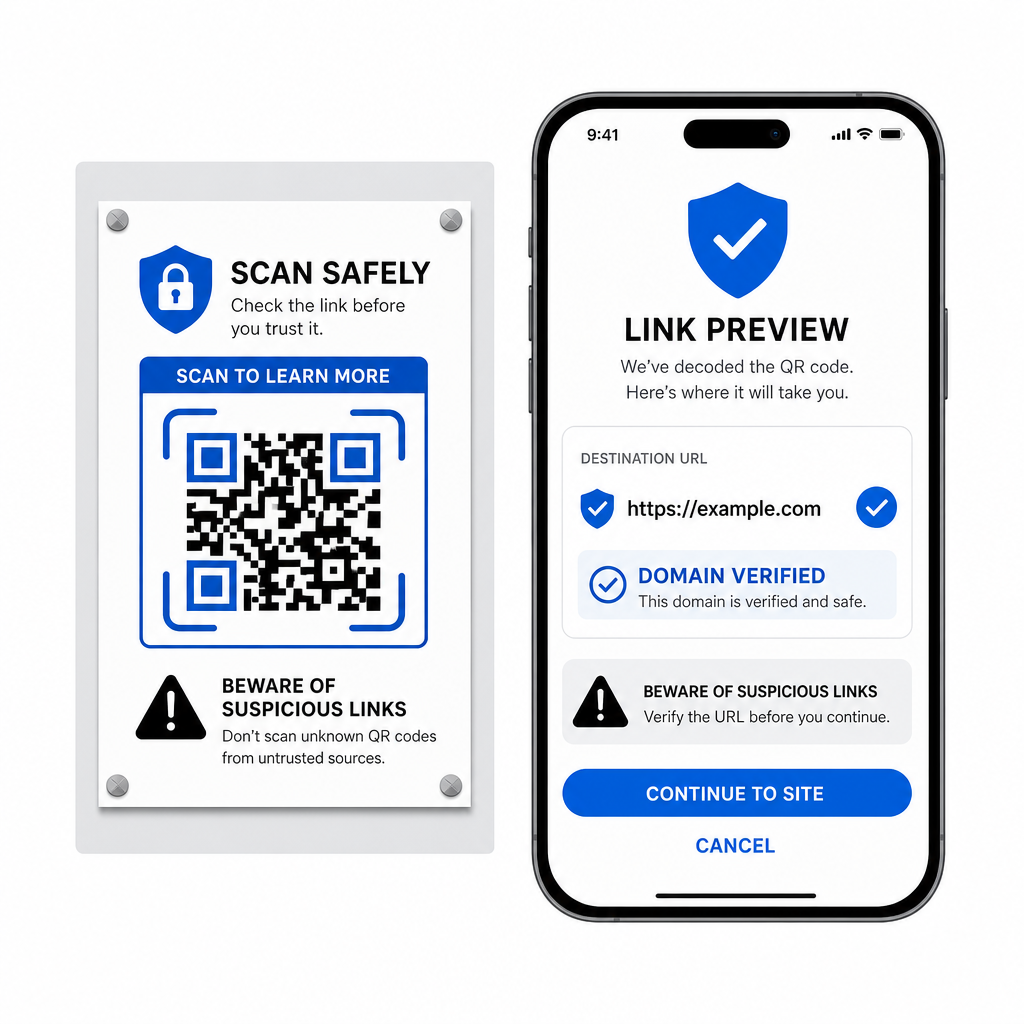
Because screenshots hide the final destination of an embedded link until decoded, cybercriminals sometimes use fraudulent QR codes – a practice known as quishing – to direct users toward malicious websites. Protecting your personal information requires basic verification before opening decoded content.

Sicher QR-Links prüfen
  • Preview destination URLs in the scanner pop-up menu before opening them.
  • Verify domain spelling to ensure the web address matches the official brand name.
  • Avoid entering sensitive credentials or payment details on pages opened directly from scanned codes.
  • Refuse unexpected download prompts or permission requests that appear immediately after scanning.

Easily Decode Any QR Code Image

You do not need a second phone or a physical camera lens to read a QR code saved on your screen. Whether you long-press an image in Apple Photos, scan a file with Google Lens on Android, or upload a saved screenshot in a desktop browser, extracting embedded links takes only a few seconds.

For the fastest cross-platform workflow without installing extra software, keep a browser-based scanner bookmarked so you can drop in screenshot files whenever you need to reveal their hidden content.

자주 묻는 질문

Can I scan a QR code screenshot without downloading a new app?

Yes. iOS and Android feature built-in gallery decoders like Apple Photos and Google Lens that extract data directly from saved images. Alternatively, you can upload your image file directly to the web-based Pageloot QR Code Scanner.

Why is my phone camera app not reading a screenshot on my display?

Physical camera apps require optical input from an external camera lens pointing at an object. Reading an image stored in your device’s internal storage requires software capable of analyzing saved image files, such as gallery photo decoders or file upload utilities.

What should I do if my screenshot QR code will not scan?

Crop the screenshot tightly around the QR code matrix to remove background distractions. Ensure the white border (quiet zone) around the square modules remains intact, and boost the image brightness or contrast if the design looks dark.

작성자 정보

시임 코스타비는 페이지루트의 콘텐츠 책임자입니다. 그는 페이지루트의 혁신적인 QR 코드 생성 서비스에 대한 글을 쓰고 있습니다. 5년 이상 QR 코드 분야에서 쌓아온 깊이 있는 전문 지식을 바탕으로, 시임은 이 분야의 전문가로 인정받고 있습니다. 그는 QR 기술을 활용하여 디지털 상호작용을 간소화하고 향상시키는 데 크게 기여하고 있습니다.

범주
에 대해 자세히 알아보기
Scanning podcast QR code
QR 코드 팟캐스트

온라인으로 QR 코드를 생성해야하는 경우 QR 코드 만들기 무료로 여기!
Pageloot는 #1 Go-To 솔루션 QR 코드를 만들고 스캔합니다.

BL-0346

블로그 스캔

20,000개 이상의 브랜드로부터 신뢰를 받아 더 많은 매출, 리뷰, 팔로워를 확보했습니다.

클라이언트 로고
최고 브랜드의 신뢰
5 중 4.8 평가

4.86 / 5 별점

휴고 로랑
휴고 로랑
레스토랑 주인
가장 쉽고 안정적인 QR 코드 생성기. PDF 파일을 즉시 업로드할 수 있습니다. 이제 레스토랑 메뉴가 디지털화되었습니다.
루카스 얀센
루카스 얀센
부동산 개발사
이것은 훌륭한 도구이며 QR 코드를 사용하면 원하는 곳으로 이동할 수 있습니다. 우리는 위치 QR 코드만 사용하지만 유용한 기능이 너무 많습니다.
엠마 모레티
엠마 모레티
소매 제품
사용하기 쉽고 빠릅니다. 그것은 훌륭하게 작동하고 완벽한 이미지를 생성하므로 직원들이 내 vCard를 다운로드할 수 있습니다.
휴고 로랑
휴고 로랑
레스토랑 주인
가장 쉽고 안정적인 QR 코드 생성기. PDF 파일을 즉시 업로드할 수 있습니다. 이제 레스토랑 메뉴가 디지털화되었습니다.
루카스 얀센
루카스 얀센
부동산 개발사
이것은 훌륭한 도구이며 QR 코드를 사용하면 원하는 곳으로 이동할 수 있습니다. 우리는 위치 QR 코드만 사용하지만 유용한 기능이 너무 많습니다.
엠마 모레티
엠마 모레티
소매 제품
사용하기 쉽고 빠릅니다. 그것은 훌륭하게 작동하고 완벽한 이미지를 생성하므로 직원들이 내 vCard를 다운로드할 수 있습니다.
더 많은 QR 코드보기
노트북 QR 코드 스캔
QR 코드 스캔 PC 및 Mac
무엇이든 디지털 경험으로 전환하세요 3분 이내에.

14일 무료 체험.

신용카드는 필요 없습니다.

첫 구매 시 30% 할인

코드를 사용하세요:

MP3 파일 공유

PDF QR 코드를 생성하려면 가입하세요

필요한 모든 것을 업로드하고 표시합니다.

  • 오디오 파일
  • 팟캐스트
  • 음악

가입 시 14일 무료 체험.
체험 기간 후 QR 코드 만료.

오디오 mp3 QR 코드를 생성하려면 가입하세요

프레임으로 더 많은 스캔 확보

QR 코드에 더 많은 프레임을 추가하려면 가입하세요

클릭 유도 문안 프레임은 고객이 QR 코드와 쉽게 상호 작용할 수 있도록 도와줍니다. 사용해 보세요!

가입 시 14일 무료 체험.
체험 기간 후 QR 코드 만료.

QR 코드에 더 많은 프레임을 추가하려면 가입하세요

도형으로 더 많은 스타일 추가

더 많은 도형을 만들려면 가입하세요

QR 코드는 정사각형일 필요가 없습니다. 브랜드 이미지에 맞게 전환해 보세요.

가입 시 14일 무료 체험.
체험 기간 후 QR 코드 만료.

더 많은 도형을 만들려면 가입하세요

QR 코드에 로고 추가

QR 코드에 로고를 추가하려면 가입하세요

로고와 브랜드를 추가하여 QR 코드를 돋보이게 만드세요.

가입 시 14일 무료 체험.
체험 기간 후 QR 코드 만료.

QR 코드에 로고를 추가하려면 가입하세요

스마트 앱 스토어 리디렉션

앱 스토어 QR 코드를 생성하려면 가입하세요

스마트 앱 스토어 QR 코드에 앱 링크를 추가하세요. 사용자는 장치에 따라 리디렉션됩니다.

가입 시 14일 무료 체험.
체험 기간 후 QR 코드 만료.

앱 스토어 QR 코드를 생성하려면 가입하세요

QR 코드에 이미지 업로드

이미지 QR 코드를 생성하려면 가입하세요

이미지를 쉽게 공유하세요. 몇 초 안에 동적으로 이미지를 변경하십시오.

가입 시 14일 무료 체험.
체험 기간 후 QR 코드 만료.

이미지 QR 코드를 생성하려면 가입하세요

PDF 파일 공유

PDF QR 코드를 생성하려면 가입하세요

필요한 모든 것을 업로드하고 표시합니다.

  • 메뉴 및 가격표
  • 명령
  • 모든 문서

가입 시 14일 무료 체험.
체험 기간 후 QR 코드 만료.

PDF QR 코드를 생성하려면 가입하세요

인쇄 없이 나중에 편집

다시 인쇄하지 않고 QR 코드를 편집하려면 가입하세요

동적 QR 코드를 사용하면 새 QR 코드를 인쇄하지 않고도 QR 코드의 내용을 변경할 수 있습니다.

가입 시 14일 무료 체험.
체험 기간 후 QR 코드 만료.

다시 인쇄하지 않고 QR 코드를 편집하려면 가입하세요

언제? 어디서? QR 코드 스캔 추적

QR 코드를 추적하려면 가입하세요

어떤 QR 코드가 가장 많이 스캔되고 무엇이 고객을 가장 흥분시키는지 알아보십시오.

가입 시 14일 무료 체험.
체험 기간 후 QR 코드 만료.

QR 코드를 추적하려면 가입하세요

인쇄 준비 파일 제공

PDF 및 SVG와 같은 벡터 QR 코드를 생성하려면 가입하세요.

.EPS, .PDF, .SVG

HD 해상도로 QR 코드를 다운로드하고 싶으신가요? 인쇄할 준비가 된 벡터 또는 픽셀 형식을 가져옵니다.

가입 시 14일 무료 체험.
체험 기간 후 QR 코드 만료.

PDF 및 SVG와 같은 벡터 QR 코드를 생성하려면 가입하세요.

기다리세요. 귀하의 QR 코드는 로드 중... 로드 중...

나만의 것으로 만들기

나중을 위해 QR 코드를 저장하려면 가입하세요.

다양한 색상, 로고 및 클릭 유도문안 프레임으로 멋진 QR 코드를 만들어 더 많은 스캔을 받으세요.

가입 시 14일 무료 체험.
체험 기간 후 QR 코드 만료.

나중을 위해 QR 코드를 저장하려면 가입하세요.