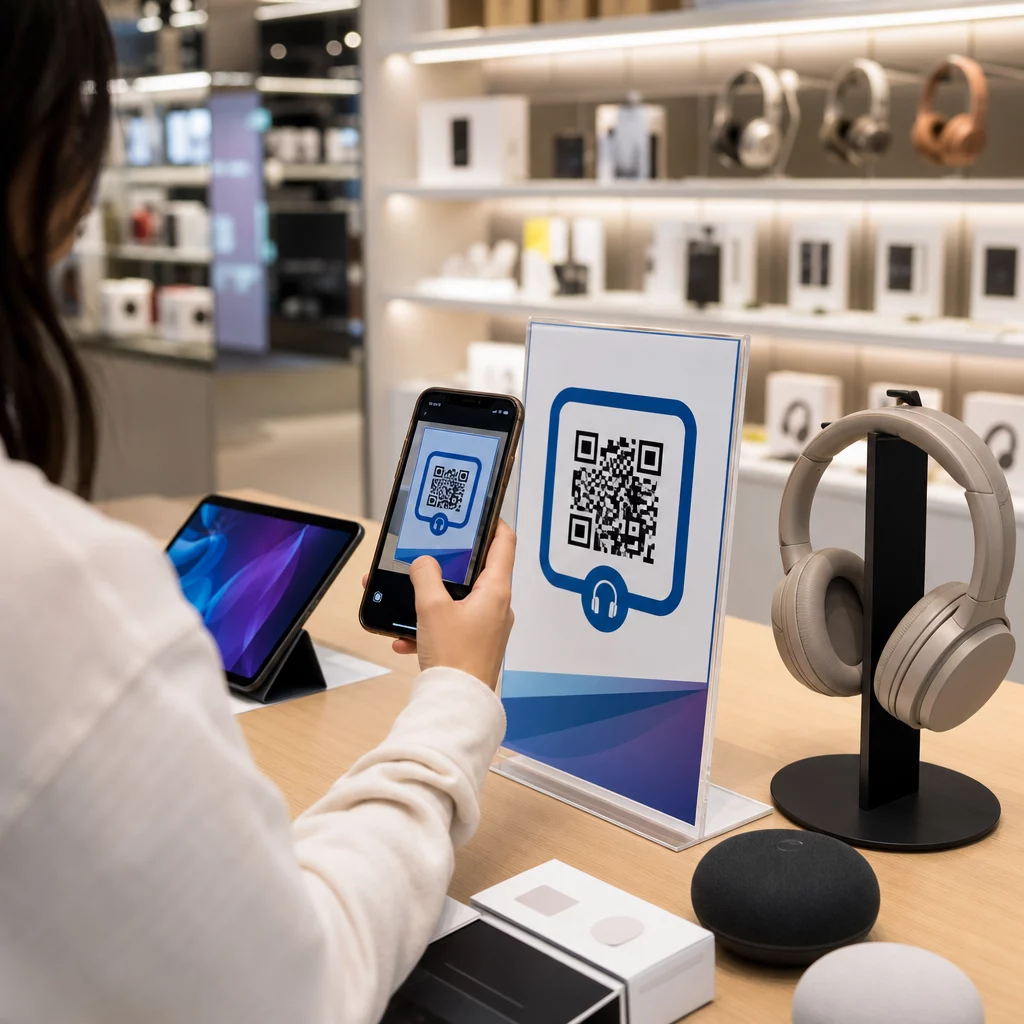
Bagaimana anda menghalang pelanggan yang masuk ke kedai elektronik anda daripada membeli produk yang sama dengan harga lebih murah di Amazon? Masalahnya ialah kebanyakan peruncit fizikal tidak memberi sebab kepada pembeli yang bersenjatakan telefon pintar untuk kekal. Kod QR pada produk dan pembungkusan mengubah persamaan itu dengan menjadikan setiap rak sebagai titik sentuh interaktif.
Penyelidikan pengguna menunjukkan bahawa 64% pembeli telah mengimbas kod QR pada produk semasa membeli-belah di kedai, dan 61% telah melakukannya selepas pembelian. Tahap penglibatan itu bukan kebetulan – ia mencerminkan jangkaan sebenar bahawa produk fizikal bersambung dengan maklumat digital. Panduan ini menerangkan tujuh cara praktikal jenama dan peruncit elektronik boleh menggunakan kod QR untuk meningkatkan pengalaman pelanggan dan menarik jualan yang mungkin sebaliknya terlepas.
Mengapa Pembeli Elektronik Mengimbas Lebih Banyak Berbanding Kategori Lain
Pembeli elektronik pengguna didorong oleh penyelidikan secara unik. Mereka membandingkan spesifikasi, membaca ulasan, dan menonton demo sebelum membuat pembelian – selalunya sambil berdiri betul-betul di sebelah produk. Tingkah laku itu mewujudkan peluang: jika kod QR anda adalah cara termudah untuk mendapatkan maklumat yang boleh dipercayai pada saat keputusan, anda menguasai saat itu.
Menurut data pengguna terkini, 43% pengguna paling kerap mengimbas kod QR untuk mengakses maklumat produk. Dalam elektronik khususnya, pembeli sudah pun mencapai telefon mereka – kod QR hanya memberikan naluri itu tempat yang berguna untuk dituju.
Asas untuk semua ini adalah kod QR dinamik, yang membolehkan anda mengemas kini URL destinasi selepas mencetak. Untuk elektronik – di mana spesifikasi produk berubah, kemas kini perisian tegar dikeluarkan, dan promosi bertukar mengikut musim – ini bermakna anda tidak perlu mencetak semula pembungkusan hanya untuk memastikan kandungan yang dipautkan sentiasa terkini.
Pastikan Kandungan Produk Anda Sentiasa Terkini Menggunakan Penjana dynamic QR code untuk mencipta kod QR yang boleh dijejak dan boleh diedit untuk produk elektronik anda. Kemas kini destinasi pada bila-bila masa tanpa mencetak semula satu label pun.
7 Cara Menggunakan Kod QR untuk Elektronik Pengguna
1. Akses Segera kepada Ulasan pada Titik Keputusan
Lebih daripada 70% pembeli elektronik membaca ulasan pada telefon pintar mereka semasa melayari di kedai. Daripada membiarkan mereka hilang ke tapak pihak ketiga yang mungkin memaparkan produk pesaing, kod QR pada tag rak atau kotak produk anda boleh memaut terus ke halaman ulasan terpilih yang anda kawal.
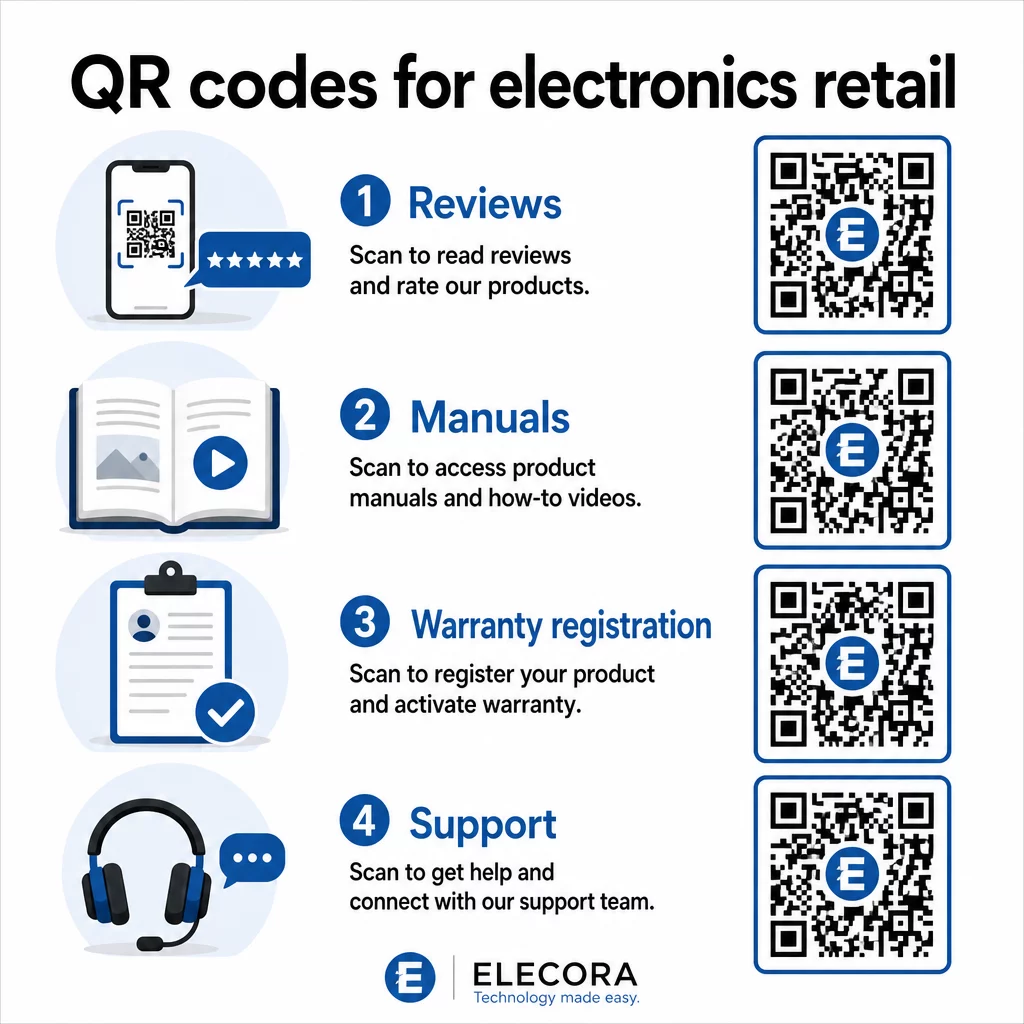
Apabila pembeli dapat memenuhi keperluan penyelidikan mereka tanpa meninggalkan persekitaran anda, mereka lebih cenderung untuk menyelesaikan pembelian pada masa itu juga. Pautkan kod tersebut ke halaman pendaratan yang menggabungkan penarafan bintang, sorotan ulasan utama, dan laluan yang jelas untuk pembelian.
2. Manual Produk Digital dan Panduan Persediaan
Mencetak manual arahan berwarna penuh, berbilang bahasa menambah kos dan saiz kepada setiap unit. Kod QR pada Pembungkusan produk atau terus pada peranti memautkan kepada manual digital yang sentiasa terkini – yang boleh merangkumi panduan video, rajah beranotasi, dan pilihan bahasa.
Pendekatan ini juga menyelesaikan masalah kemas kini. Apabila perisian tegar berubah atau ciri baharu dihantar, anda mengemas kini PDF atau halaman yang dipautkan sekali, dan setiap pelanggan yang mengimbas kod tersebut akan mendapat versi terkini. Ini Cara buat QR code untuk dokumen PDF memudahkan untuk mengehos dan mengemas kini dokumen manual tanpa menyentuh kod yang dicetak.
Bagi pengeluar, ini amat praktikal. Seperti yang dibincangkan dalam Kod QR untuk pembuatan, membenamkan kod QR dalam bahan arahan yang memautkan kepada tutorial video memudahkan pemasangan dan mengurangkan hubungan sokongan.
3. Pendaftaran Waranti dan Produk yang Diperkemas
Kad waranti kertas mempunyai kadar penyiapan yang sangat rendah. Pelanggan kehilangannya, lupa untuk mengeposnya, atau tidak pernah mengisinya. Kod QR yang dicetak di dalam kotak atau pada peranti itu sendiri memautkan terus ke borang pendaftaran digital – boleh diakses sebaik sahaja pelanggan membuka pembungkusan.
Menggunakan a Kod QR Borang Google atau halaman pendaratan tersuai, anda boleh menangkap data pendaftaran, pilihan dan butiran hubungan dengan geseran yang jauh lebih rendah. Analitis imbasan juga memberitahu anda berapa ramai pelanggan yang melengkapkan pendaftaran dan bila, jadi anda boleh membuat susulan dengan notis kemas kini perisian tegar atau tawaran waranti lanjutan pada masa yang tepat.
4. Pengesahan Produk dan Anti-Pemalsuan
Untuk elektronik premium – fon kepala, kamera, peranti rumah pintar – pemalsuan adalah kebimbangan sebenar bagi jenama dan pengguna. Kod QR yang dipautkan ke halaman pengesahan membolehkan pelanggan mengesahkan bahawa apa yang mereka beli adalah tulen. Pengimbasan membawa mereka ke halaman yang dikawal jenama yang mengesahkan ketulenan dan nombor siri produk.
Kes penggunaan ini juga membina kepercayaan selepas pembelian. Pelanggan yang mengesahkan produk mereka tulen lebih cenderung untuk mendaftar, meninggalkan ulasan, dan kembali kepada jenama untuk pembelian seterusnya.
5. Kod Kupon Dalam Kedai dan Tawaran Terhad Masa
Kod QR berhampiran kawasan pembayaran atau pada paparan produk boleh memberikan diskaun yang hanya terpakai jika pelanggan membeli hari ini. Ini berfungsi dengan baik untuk aksesori atau tambahan pakej – kod pada paparan penghala yang menawarkan 20% diskaun untuk nod mesh yang serasi, contohnya, mencipta peluang jualan naik pada kos minimum.
Kerana kod QR dinamik membolehkan anda menukar tawaran yang dipautkan tanpa mencetak semula apa-apa, anda boleh memutar promosi setiap minggu atau mengikatnya dengan tahap inventori. Pelanggan yang mengimbas dan berkongsi tawaran dengan orang lain meluaskan jangkauannya secara organik.
Jejaki Promosi Mana yang Mendorong Imbasan Terbanyak Menggunakan Penjana Kod QR Pautan untuk mencipta kod promosi yang boleh dijejaki. Lihat dengan tepat penempatan produk dan tawaran mana yang menukar dalam masa nyata.
6. Pemperibadian Imbasan Berdasarkan Tingkah Laku
Kod QR dengan penjejakan imbasan membolehkan pengalaman yang lebih canggih dari masa ke masa. Jika pelanggan sebelum ini telah mengimbas kod untuk pembesar suara pintar, imbasan seterusnya boleh memaparkan halaman yang relevan dengan minat tersebut – pengumuman model baharu, aksesori yang serasi, atau pakej masa terhad. Konteks tingkah laku seperti ini mengubah label pasif menjadi titik sentuh yang diperibadikan.
Platform seperti Pageloot menyediakan analitik imbasan yang menunjukkan bila, di mana, dan berapa kerap kod diimbas, memberikan pasukan pemasaran anda data untuk memperhalusi pengalaman ini dari masa ke masa.
7. Sokongan Selepas Pembelian dan Penyelesaian Masalah
Satu jenama perkakas rumah besar yang mengalihkan sumber sokongan kepada kod QR pintar pada produk menyaksikan pengurangan 20% dalam jumlah panggilan pusat panggilan. Bagi elektronik pengguna – di mana isu persediaan dan soalan ciri adalah biasa – ini adalah manfaat operasi yang bermakna.
Kod QR pada peranti atau dalam kotak boleh memautkan ke hab sokongan dengan panduan penyelesaian masalah, halaman Soalan Lazim, akses sembang langsung, atau tutorial video. Seperti yang dibincangkan dalam Kod QR untuk sokongan dalam e-dagang, kod-kod ini malah boleh memuatkan tetingkap sembang dengan butiran produk, membolehkan pasukan sokongan menyelesaikan masalah dengan lebih cepat.
Ini mengurangkan kekecewaan pelanggan dan mengurangkan kos untuk operasi sokongan anda secara serentak.
Garis Panduan Praktikal untuk Mencetak Kod QR pada Pembungkusan Elektronik
Mendapatkan kes penggunaan yang betul hanyalah separuh daripada kerja. Kod QR yang tidak boleh diimbas dengan andal dalam persekitaran runcit akan menewaskan tujuannya sendiri. Ingatlah asas-asas ini semasa menyediakan kod untuk dicetak:
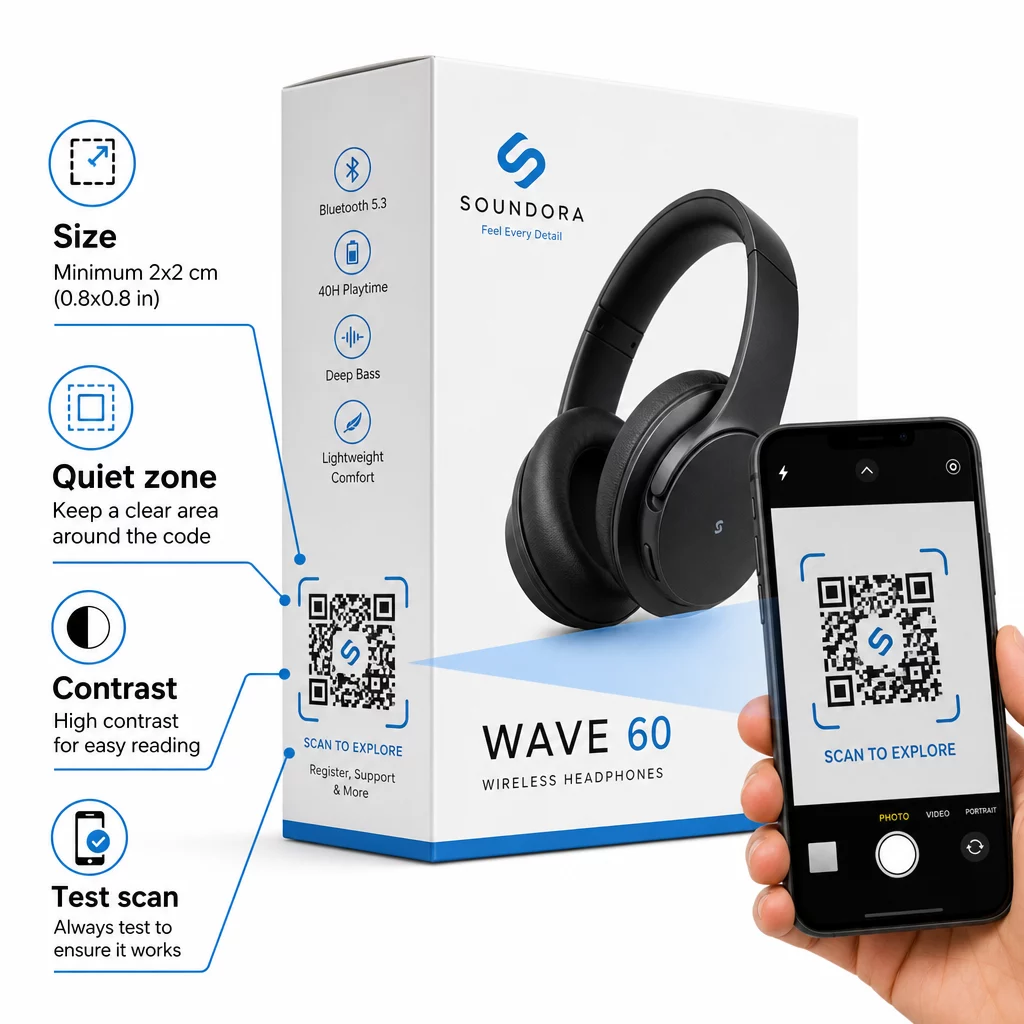
- Saiz minimum: Cetak tidak lebih kecil daripada 2 × 2 cm (kira-kira 0.8 × 0.8 inci) untuk pengimbasan jarak dekat yang boleh dipercayai. Lebih besar adalah lebih baik untuk kotak atau pembungkusan yang dilihat dari jauh.
- Zon senyap: Kekalkan margin yang jelas, tidak dicetak sekurang-kurangnya empat modul pada semua sisi kod. Tanpa penampan ini, pengecaman pengimbas akan merosot dengan ketara.
- Kontras: Gunakan modul gelap pada latar belakang terang. Nisbah kontras 4:1 antara kod QR dan latar belakangnya adalah minimum yang boleh dipercayai. Elakkan warna latar depan merah atau jingga, yang sukar dibaca oleh banyak kamera telefon pintar.
- Pembetulan ralat: Gunakan Tahap M (15%) untuk pembungkusan standard. Jika anda membenamkan logo di dalam kod, tukar kepada Tahap H (30%) dan uji pada pelbagai peranti.
- Format fail: Bekalkan karya seni kod QR dalam format vektor – SVG, EPS, atau PDF – dan cetak pada 300–400 dpi untuk mengekalkan kejelasan modul.
Untuk melihat dengan lebih mendalam tentang saiz merentasi bahan yang berbeza, saiz kod QR untuk bahan cetakan yang berbeza meliputi kadbod, kertas, dan fabrik secara terperinci. Untuk kontras dan piawaian kebolehbacaan, amalan terbaik untuk kebolehbacaan kod QR menyediakan rujukan teknikal yang menyeluruh.
Anda juga boleh meneroka bagaimana kod QR pada pembungkusan memberi manfaat kepada peruncitan secara meluas dan semak panduan muktamad untuk kod QR bagi label produk untuk nasihat pelaksanaan khusus label.
Menghubungkan Produk Fizikal ke Pengalaman Digital
Tujuh kes penggunaan di atas berkongsi benang merah: ia mengurangkan geseran pada saat-saat tepat apabila pelanggan paling memerlukan maklumat, jaminan, atau sokongan. Pembeli yang boleh mengesahkan ketulenan produk, membaca ulasan telus, dan mendaftarkan waranti mereka semuanya dari satu imbasan pada kotak adalah pelanggan dengan lebih sedikit sebab untuk teragak-agak – dan lebih banyak sebab untuk mempercayai jenama anda.
Kod QR dinamik adalah asas praktikal untuk semua ini. Tidak seperti kod statik yang mengunci anda ke satu destinasi, kod dinamik membolehkan anda mengemas kini kandungan yang dipautkan, memutar promosi, dan menjejaki prestasi tanpa mengubah apa-apa pada pembungkusan itu sendiri.
Mula Membina Pengalaman Produk yang Lebih Pintar Cipta kod QR berjenama, boleh dijejak untuk produk elektronik anda dengan Pageloot Penjana Kod QR. Percubaan percuma 14 hari. Tiada kad kredit diperlukan.
Soalan lazim
Kod QR dinamik adalah pilihan yang lebih baik untuk pembungkusan produk kerana ia membolehkan anda mengemas kini destinasi yang dipautkan – sama ada manual, halaman sokongan, atau promosi – tanpa mencetak semula. Kod QR statik mengunci anda ke URL tetap secara kekal, yang menimbulkan masalah apabila kandungan berubah atau promosi tamat tempoh.
Letakkan kod QR pada permukaan rata, licin jauh dari lipatan, jahitan, dan tepi melengkung. Untuk pembungkusan utama, panel belakang atau panel maklumat khusus berfungsi dengan baik. Elakkan meletakkan kod berhampiran sempadan bercetak atau elemen grafik sibuk yang mengurangkan zon senyap. Seruan tindakan ringkas berdekatan – seperti “Imbas untuk panduan persediaan” atau “Imbas untuk mendaftar” – meningkatkan kadar imbasan dengan menjelaskan nilai sebelum pelanggan mengambil telefon mereka.
Kod QR Dinamik termasuk analitik imbasan terbina dalam yang merekodkan berapa kali setiap kod diimbas, bersama dengan masa, lokasi, dan jenis peranti. Data ini membolehkan anda membandingkan prestasi merentasi produk, penempatan, atau kempen yang berbeza. Platform seperti Pageloot menyediakan papan pemuka berpusat di mana anda boleh memantau semua kod QR anda sekaligus dan melaraskan destinasi atau kandungan berdasarkan apa yang ditunjukkan oleh data.