> 산업 > QR Codes for Consumer Electronics: 7 Use Cases That Drive Sales
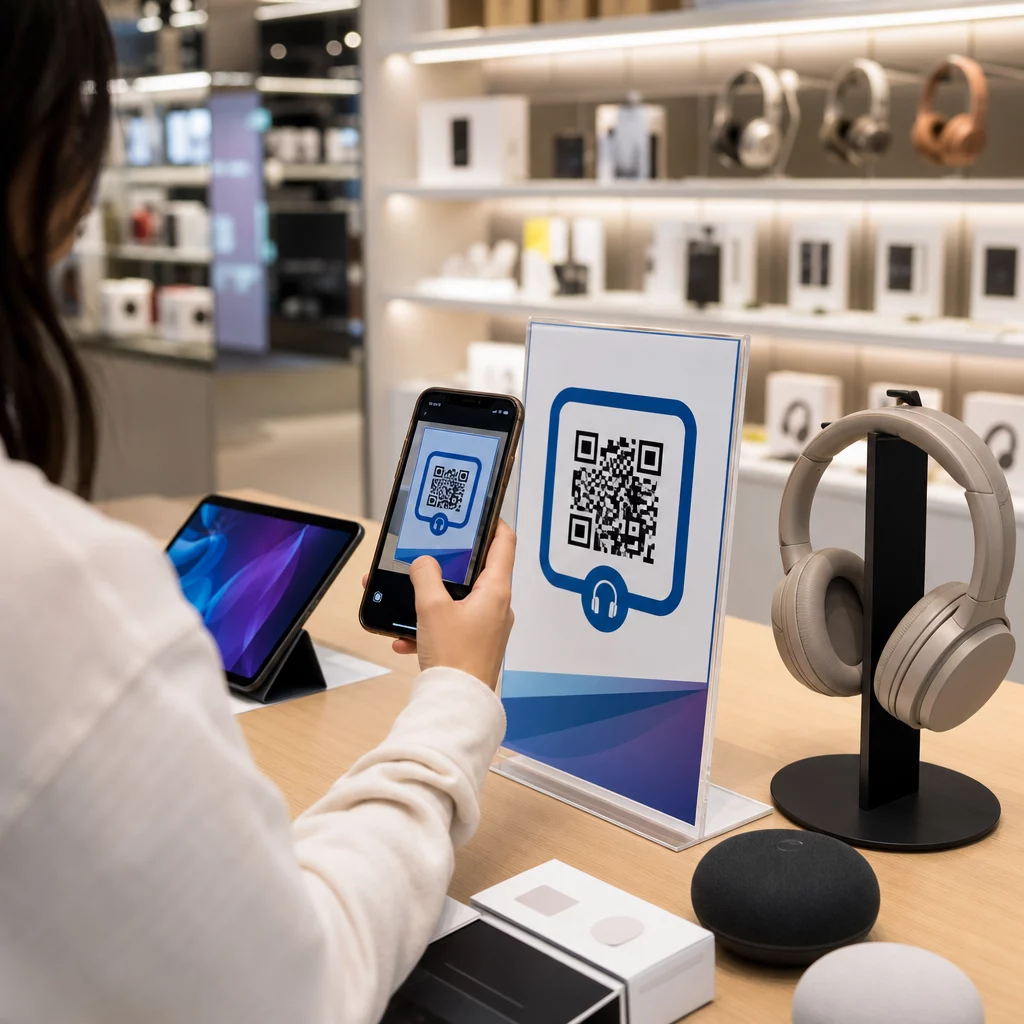
Shopper scans electronics QR

QR Codes for Consumer Electronics: 7 Use Cases That Drive Sales

Learn how QR codes for consumer electronics drive sales and engagement. Explore 7 use cases from digital manuals and registration to reviews and support.
Updated on 6월 10, 2026
목차

How do you keep a customer who walks into your electronics store from buying the same product cheaper on Amazon? The problem is that most brick-and-mortar retailers give smartphone-armed shoppers no reason to stay. QR codes on products and packaging change that equation by turning every shelf into an interactive touchpoint.

Consumer research shows that 64% of shoppers have scanned a QR code on a product while shopping in a store, and 61% have done so after purchase. That level of engagement is not incidental – it reflects a genuine expectation that physical products connect to digital information. This guide walks through seven practical ways electronics brands and retailers can use QR codes to improve the customer experience and capture sales that might otherwise walk out the door.

Why Electronics Shoppers Scan More Than Other Categories

Consumer electronics buyers are uniquely research-driven. They compare specs, read reviews, and watch demos before committing to a purchase – often while standing right next to the product. That behavior creates an opening: if your QR code is the easiest way to get reliable information at the moment of decision, you own that moment.

According to recent consumer data, 43% of consumers most often scan QR codes to access product information. In electronics specifically, shoppers are already reaching for their phones – QR codes simply give that instinct somewhere useful to go.

The foundation for all of this is 동적 QR 코드, which let you update the destination URL after printing. For electronics – where product specs change, firmware updates roll out, and promotions rotate seasonally – this means you never need to reprint packaging just to keep linked content current.

Keep Your Product Content Always Up to Date 사용 동적 QR 코드 생성기 to create trackable, editable QR codes for your electronics products. Update destinations any time without reprinting a single label.

7 Ways to Use QR Codes for Consumer Electronics

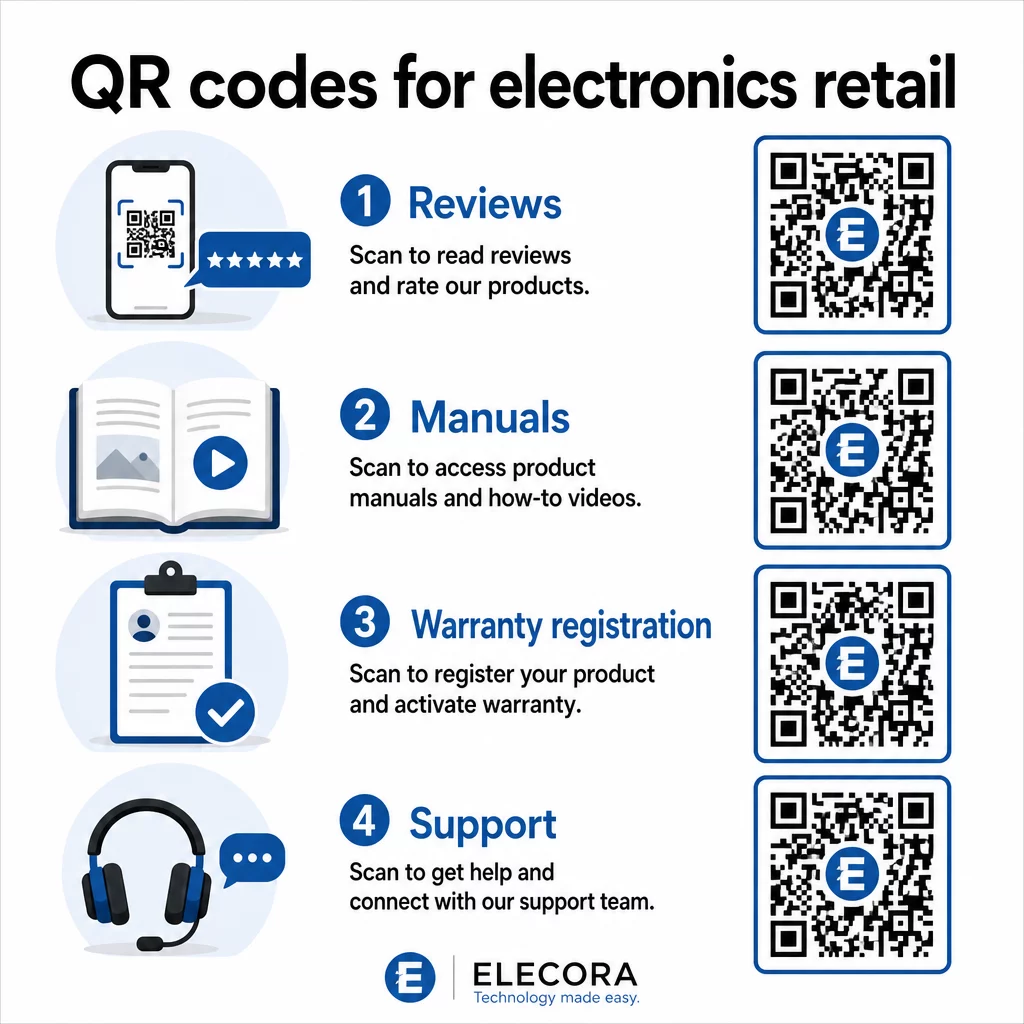
1. Instant Access to Reviews at the Point of Decision

More than 70% of electronics buyers read reviews on their smartphones while browsing in-store. Rather than letting them disappear into a third-party site that might surface a competitor’s product, a QR code on your shelf tag or product box can link directly to a curated review page you control.

Electronics QR code uses

When shoppers can satisfy their research need without leaving your environment, they are more likely to complete the purchase then and there. Link the code to a landing page that combines star ratings, key review highlights, and a clear path to purchase.

2. Digital Product Manuals and Setup Guides

Printing a full-color, multi-language instruction manual adds cost and bulk to every unit. A QR code on 제품 포장 or directly on the device links to an always-current digital manual – one that can include video walkthroughs, annotated diagrams, and language selection.

This approach also solves the update problem. When firmware changes or a new feature ships, you update the linked PDF or page once, and every customer who scans that code gets the latest version. The PDF QR 코드 생성기 makes it straightforward to host and update manual documents without touching the printed code.

For manufacturers, this is especially practical. As covered in 제조용 QR 코드, embedding QR codes in instruction materials that link to video tutorials simplifies assembly and reduces support contacts.

3. Streamlined Warranty and Product Registration

Paper warranty cards have notoriously low completion rates. Customers lose them, forget to mail them, or simply never fill them out. A QR code printed inside the box or on the device itself links directly to a digital registration form – accessible the moment the customer opens the packaging.

를 사용하여 Google Forms QR 코드 or a custom landing page, you can capture registration data, preferences, and contact details with far less friction. The scan analytics also tell you how many customers are completing registration and when, so you can follow up with firmware update notices or extended warranty offers at exactly the right time.

4. Product Authentication and Anti-Counterfeiting

For premium electronics – headphones, cameras, smart home devices – counterfeiting is a real concern for both brands and consumers. A QR code linked to an authentication page lets customers verify that what they purchased is genuine. Scanning takes them to a brand-controlled page that confirms the product’s authenticity and serial number.

This use case also builds post-purchase trust. A customer who confirms their product is genuine is more likely to register, leave a review, and return to the brand for their next purchase.

5. In-Store Coupon Codes and Time-Limited Offers

A QR code near the checkout area or on a product display can deliver a discount that applies only if the customer buys today. This works particularly well for accessories or bundle add-ons – a code on a router display that offers 20% off a compatible mesh node, for example, creates an upsell opportunity at minimal cost.

Because dynamic QR codes let you change the linked offer without reprinting anything, you can rotate promotions weekly or tie them to inventory levels. Customers who scan and share the offer with others extend its reach organically.

Track Which Promotions Drive the Most Scans 사용 링크 QR 코드 생성기 to create trackable promotional codes. See exactly which product placements and offers are converting in real time.

6. Behavior-Based Scan Personalization

QR codes with scan tracking enable a more sophisticated experience over time. If a customer has previously scanned codes for smart speakers, the next scan can surface a page relevant to that interest – a new model announcement, a compatible accessory, or a limited-time bundle. This kind of behavioral context turns a passive label into a personalized touchpoint.

Platforms like Pageloot provide 스캔 분석 that show when, where, and how often codes are scanned, giving your marketing team the data to refine these experiences over time.

7. Post-Purchase Support and Troubleshooting

One large home-appliance brand that shifted support resources to smart QR codes on products saw a 20% reduction in call center volume. For consumer electronics – where setup issues and feature questions are common – this is a meaningful operational benefit.

A QR code on the device or in the box can link to a support hub with troubleshooting guides, FAQ pages, live chat access, or video tutorials. As discussed in QR codes for support in e-commerce, these codes can even pre-load a chat window with product details, allowing support teams to resolve issues faster.

This reduces frustration for the customer and reduces cost for your support operation simultaneously.

Practical Guidelines for Printing QR Codes on Electronics Packaging

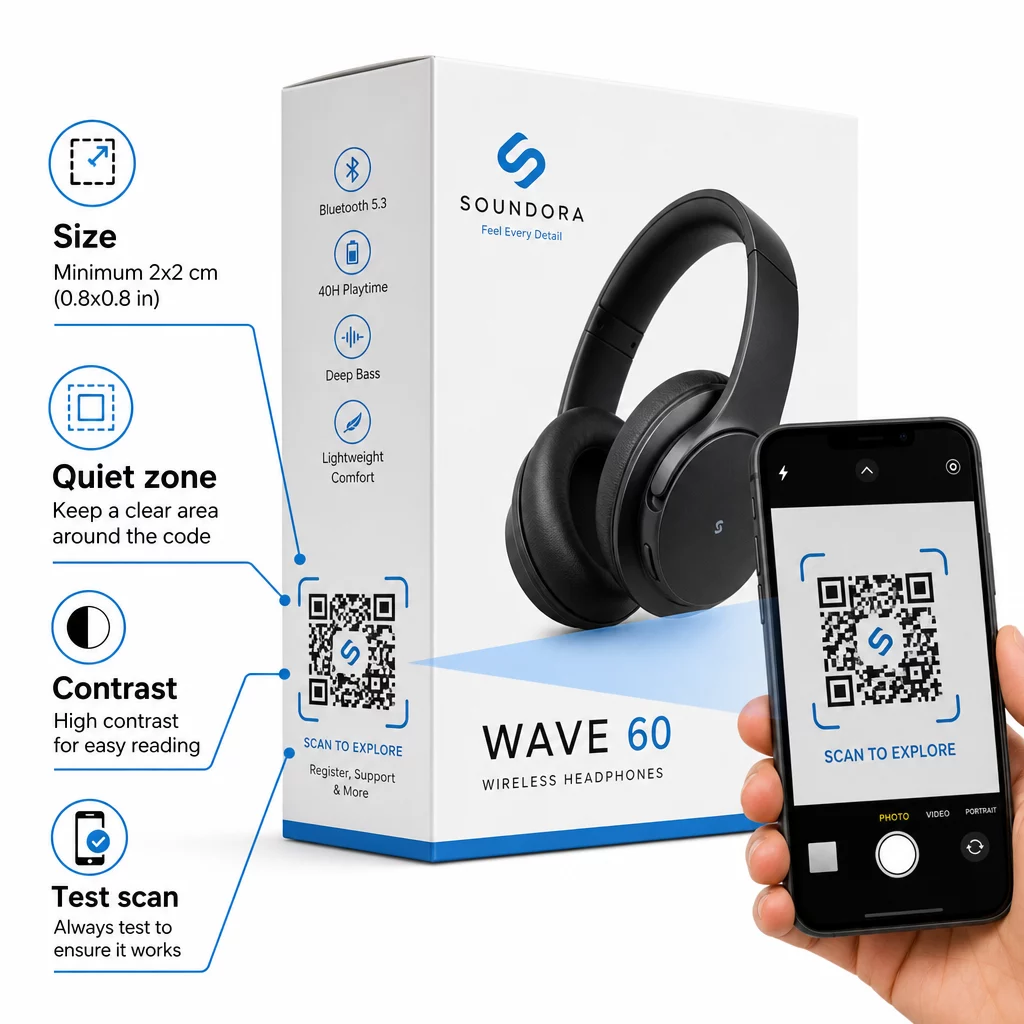
Getting the use cases right is only half the work. A QR code that does not scan reliably in a retail environment defeats its own purpose. Keep these fundamentals in mind when preparing codes for print:

QR packaging guidelines
  • 최소 크기: Print at no smaller than 2 × 2 cm (approximately 0.8 × 0.8 inches) for reliable close-range scanning. Larger is better for boxes or packaging viewed from a distance.
  • 콰이어트 존: Maintain a clear, unprinted margin of at least four modules on all sides of the code. Without this buffer, scanner recognition degrades significantly.
  • 대비: Use dark modules on a light background. A 4:1 contrast ratio between the QR code and its background is the reliable minimum. Avoid red or orange foreground colors, which many smartphone cameras struggle to read.
  • Error correction: Use Level M (15%) for standard packaging. If you embed a logo inside the code, switch to Level H (30%) and test across multiple devices.
  • 파일 형식: Supply QR code artwork in vector format – SVG, EPS, or PDF – and print at 300–400 dpi to preserve module clarity.

For a deeper look at sizing across different materials, 다양한 인쇄 재료에 대한 QR 코드 크기 조정 covers cardboard, paper, and fabric in detail. For contrast and readability standards, QR 코드 가독성을 위한 모범 사례 provides a thorough technical reference.

You can also explore how QR codes on packaging benefit retail broadly and review the 제품 라벨용 QR 코드 궁극 가이드 for label-specific implementation advice.

Connecting Physical Products to Digital Experiences

The seven use cases above share a common thread: they reduce friction at the exact moments when customers most need information, reassurance, or support. A shopper who can verify a product’s authenticity, read transparent reviews, and register their warranty all from a single scan on the box is a customer with fewer reasons to hesitate – and more reasons to trust your brand.

Dynamic QR codes are the practical foundation for all of this. Unlike static codes that lock you into a single destination, dynamic codes let you update linked content, rotate promotions, and track performance without changing anything on the packaging itself.

Start Building Smarter Product Experiences Create branded, trackable QR codes for your electronics products with Pageloot’s QR 코드 생성기. Free 14-day trial. No credit card required.

자주 묻는 질문

What type of QR code should I use on consumer electronics packaging?

Dynamic QR codes are the better choice for product packaging because they let you update the linked destination – whether that’s a manual, a support page, or a promotion – without reprinting. Static QR codes lock you to a fixed URL permanently, which creates problems when content changes or promotions expire.

Where is the best place to put a QR code on electronics packaging?

Place QR codes on flat, smooth surfaces away from folds, seams, and curved edges. For primary packaging, the back panel or a dedicated information panel works well. Avoid placing codes near printed borders or busy graphic elements that reduce the quiet zone. A brief call-to-action nearby – such as “Scan for setup guide” or “Scan to register” – increases scan rates by making the value clear before the customer picks up their phone.

How can I measure whether my QR codes are actually being used?

Dynamic QR codes include built-in scan analytics that record how many times each code is scanned, along with the time, location, and device type. This data lets you compare performance across different products, placements, or campaigns. Platforms like Pageloot provide a centralized dashboard where you can monitor all your QR codes at once and adjust destinations or content based on what the data shows.

작성자 정보

시임 코스타비는 페이지루트의 콘텐츠 책임자입니다. 그는 페이지루트의 혁신적인 QR 코드 생성 서비스에 대한 글을 쓰고 있습니다. 5년 이상 QR 코드 분야에서 쌓아온 깊이 있는 전문 지식을 바탕으로, 시임은 이 분야의 전문가로 인정받고 있습니다. 그는 QR 기술을 활용하여 디지털 상호작용을 간소화하고 향상시키는 데 크게 기여하고 있습니다.

범주
에 대해 자세히 알아보기

온라인으로 QR 코드를 생성해야하는 경우 QR 코드 만들기 무료로 여기!
Pageloot는 #1 Go-To 솔루션 QR 코드를 만들고 스캔합니다.

QF-07

블로그 세대

20,000개 이상의 브랜드로부터 신뢰를 받아 더 많은 매출, 리뷰, 팔로워를 확보했습니다.

클라이언트 로고
최고 브랜드의 신뢰
5 중 4.8 평가

4.86 / 5 별점

휴고 로랑
휴고 로랑
레스토랑 주인
가장 쉽고 안정적인 QR 코드 생성기. PDF 파일을 즉시 업로드할 수 있습니다. 이제 레스토랑 메뉴가 디지털화되었습니다.
루카스 얀센
루카스 얀센
부동산 개발사
이것은 훌륭한 도구이며 QR 코드를 사용하면 원하는 곳으로 이동할 수 있습니다. 우리는 위치 QR 코드만 사용하지만 유용한 기능이 너무 많습니다.
엠마 모레티
엠마 모레티
소매 제품
사용하기 쉽고 빠릅니다. 그것은 훌륭하게 작동하고 완벽한 이미지를 생성하므로 직원들이 내 vCard를 다운로드할 수 있습니다.
휴고 로랑
휴고 로랑
레스토랑 주인
가장 쉽고 안정적인 QR 코드 생성기. PDF 파일을 즉시 업로드할 수 있습니다. 이제 레스토랑 메뉴가 디지털화되었습니다.
루카스 얀센
루카스 얀센
부동산 개발사
이것은 훌륭한 도구이며 QR 코드를 사용하면 원하는 곳으로 이동할 수 있습니다. 우리는 위치 QR 코드만 사용하지만 유용한 기능이 너무 많습니다.
엠마 모레티
엠마 모레티
소매 제품
사용하기 쉽고 빠릅니다. 그것은 훌륭하게 작동하고 완벽한 이미지를 생성하므로 직원들이 내 vCard를 다운로드할 수 있습니다.
더 많은 QR 코드보기
마케팅 QR 코드 스캔
QR 코드 메일침프
브로슈어 QR 코드 스캔
QR 코드 사용 브로셔
고객이 QR 배너를 스캔합니다.
QR 코드 사용 야외 배너
무엇이든 디지털 경험으로 전환하세요 3분 이내에.

14일 무료 체험.

신용카드는 필요 없습니다.

첫 구매 시 30% 할인

코드를 사용하세요:

MP3 파일 공유

PDF QR 코드를 생성하려면 가입하세요

필요한 모든 것을 업로드하고 표시합니다.

  • 오디오 파일
  • 팟캐스트
  • 음악

가입 시 14일 무료 체험.
체험 기간 후 QR 코드 만료.

오디오 mp3 QR 코드를 생성하려면 가입하세요

프레임으로 더 많은 스캔 확보

QR 코드에 더 많은 프레임을 추가하려면 가입하세요

클릭 유도 문안 프레임은 고객이 QR 코드와 쉽게 상호 작용할 수 있도록 도와줍니다. 사용해 보세요!

가입 시 14일 무료 체험.
체험 기간 후 QR 코드 만료.

QR 코드에 더 많은 프레임을 추가하려면 가입하세요

도형으로 더 많은 스타일 추가

더 많은 도형을 만들려면 가입하세요

QR 코드는 정사각형일 필요가 없습니다. 브랜드 이미지에 맞게 전환해 보세요.

가입 시 14일 무료 체험.
체험 기간 후 QR 코드 만료.

더 많은 도형을 만들려면 가입하세요

QR 코드에 로고 추가

QR 코드에 로고를 추가하려면 가입하세요

로고와 브랜드를 추가하여 QR 코드를 돋보이게 만드세요.

가입 시 14일 무료 체험.
체험 기간 후 QR 코드 만료.

QR 코드에 로고를 추가하려면 가입하세요

스마트 앱 스토어 리디렉션

앱 스토어 QR 코드를 생성하려면 가입하세요

스마트 앱 스토어 QR 코드에 앱 링크를 추가하세요. 사용자는 장치에 따라 리디렉션됩니다.

가입 시 14일 무료 체험.
체험 기간 후 QR 코드 만료.

앱 스토어 QR 코드를 생성하려면 가입하세요

QR 코드에 이미지 업로드

이미지 QR 코드를 생성하려면 가입하세요

이미지를 쉽게 공유하세요. 몇 초 안에 동적으로 이미지를 변경하십시오.

가입 시 14일 무료 체험.
체험 기간 후 QR 코드 만료.

이미지 QR 코드를 생성하려면 가입하세요

PDF 파일 공유

PDF QR 코드를 생성하려면 가입하세요

필요한 모든 것을 업로드하고 표시합니다.

  • 메뉴 및 가격표
  • 명령
  • 모든 문서

가입 시 14일 무료 체험.
체험 기간 후 QR 코드 만료.

PDF QR 코드를 생성하려면 가입하세요

인쇄 없이 나중에 편집

다시 인쇄하지 않고 QR 코드를 편집하려면 가입하세요

동적 QR 코드를 사용하면 새 QR 코드를 인쇄하지 않고도 QR 코드의 내용을 변경할 수 있습니다.

가입 시 14일 무료 체험.
체험 기간 후 QR 코드 만료.

다시 인쇄하지 않고 QR 코드를 편집하려면 가입하세요

언제? 어디서? QR 코드 스캔 추적

QR 코드를 추적하려면 가입하세요

어떤 QR 코드가 가장 많이 스캔되고 무엇이 고객을 가장 흥분시키는지 알아보십시오.

가입 시 14일 무료 체험.
체험 기간 후 QR 코드 만료.

QR 코드를 추적하려면 가입하세요

인쇄 준비 파일 제공

PDF 및 SVG와 같은 벡터 QR 코드를 생성하려면 가입하세요.

.EPS, .PDF, .SVG

HD 해상도로 QR 코드를 다운로드하고 싶으신가요? 인쇄할 준비가 된 벡터 또는 픽셀 형식을 가져옵니다.

가입 시 14일 무료 체험.
체험 기간 후 QR 코드 만료.

PDF 및 SVG와 같은 벡터 QR 코드를 생성하려면 가입하세요.

기다리세요. 귀하의 QR 코드는 로드 중... 로드 중...

나만의 것으로 만들기

나중을 위해 QR 코드를 저장하려면 가입하세요.

다양한 색상, 로고 및 클릭 유도문안 프레임으로 멋진 QR 코드를 만들어 더 많은 스캔을 받으세요.

가입 시 14일 무료 체험.
체험 기간 후 QR 코드 만료.

나중을 위해 QR 코드를 저장하려면 가입하세요.