Adakah pelanggan anda bergelut untuk mencari bantuan selepas pembelian? Sokongan selepas pembelian yang lemah adalah salah satu cara terpantas untuk kehilangan pembeli berulang – dan 52% pengguna mengatakan perkhidmatan yang lemah adalah sebab utama mereka tidak akan membeli lagi. Panduan ini menerangkan cara praktikal untuk menggunakan kod QR bagi menjadikan sokongan, pemulangan, dan penjejakan pesanan lebih pantas dan mudah untuk pelanggan anda.
Mengapa Sokongan Selepas Pembelian Lebih Penting Berbanding Sebelum Ini
Jangkaan pelanggan telah berubah. Penghantaran pantas, penjejakan masa nyata, dan pemulangan tanpa geseran bukan lagi faedah tambahan – ia adalah keperluan asas. Pertimbangkan apa yang dipertaruhkan:
- 88% pelanggan lebih cenderung untuk membuat pembelian lain selepas pengalaman perkhidmatan yang hebat
- 70% pembeli mengatakan proses pemulangan yang mudah dan telus meningkatkan kesetiaan mereka kepada peruncit e-dagang
- 73% pengguna ingin menjejaki pesanan mereka sepanjang penghantaran, dan apabila penjejakan tersedia, 96% daripadanya menggunakannya
Cabaran bagi kebanyakan jenama e-dagang ialah titik sentuh sokongan bertaburan: pelanggan perlu mencari halaman hubungan, menavigasi portal pemulangan, atau menyelongkar pengesahan e-mel untuk mencari butiran pesanan. Kod QR menyelesaikan masalah ini dengan membawa sokongan terus ke tempat pelanggan berada – pada bungkusan di tangan mereka, resit dalam peti masuk mereka, atau label pada produk.
Di Mana Meletakkan Kod QR dalam Perjalanan Selepas Pembelian
Strategi kod QR yang paling berkesan memetakan setiap kod kepada detik tertentu dalam pengalaman pelanggan. Berikut adalah penempatan berimpak tinggi:
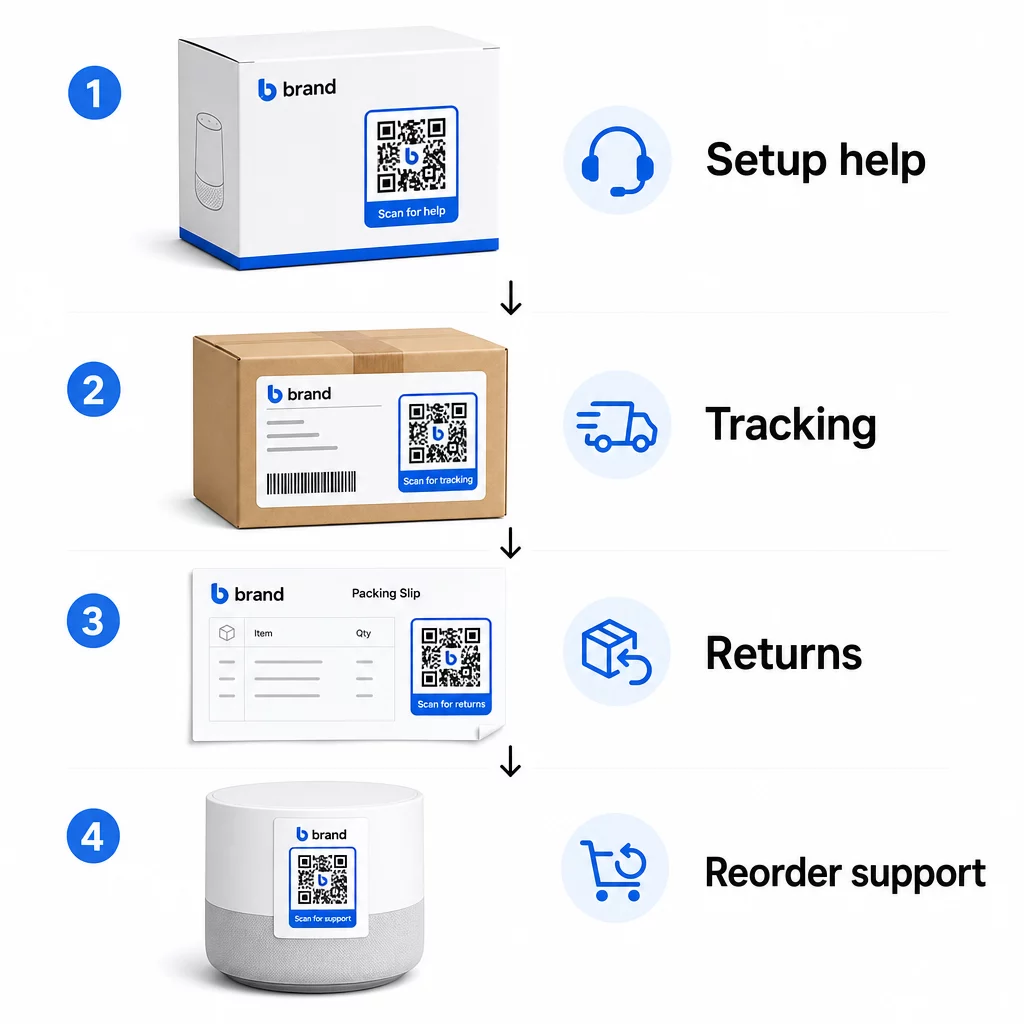
Pembungkusan produk. Kod QR pada kotak atau label memberikan pelanggan akses segera kepada panduan persediaan, butiran waranti, dan bantuan penyelesaian masalah sebaik sahaja membuka kotak. Untuk barangan tahan lama seperti perkakas atau alatan, menambah kod QR pada pembungkusan produk juga boleh memautkan kepada video cara-cara, pendaftaran produk, atau panduan alat ganti – berguna berbulan-bulan selepas pembelian.
Label penghantaran dan halaman penjejakan. 88% pembeli dalam talian mengatakan penjejakan penghantaran masa nyata adalah kritikal untuk pengalaman positif, dan 43% menyemak pesanan mereka yang dijejaki setiap hari sehingga penghantaran. Kod QR pada label penghantaran yang memaut terus ke halaman penjejakan langsung menghilangkan geseran log masuk ke akaun atau mencari e-mel pengesahan.
E-mel pengesahan pesanan dan pemberitahuan penghantaran. Ini adalah e-mel yang sebenarnya dibuka oleh pelanggan. Membenamkan kod QR yang memaut ke hab sokongan khusus pesanan – dengan penjejakan, Soalan Lazim, dan arahan pemulangan – memastikan semuanya dalam satu imbasan.
Resit dan slip pembungkusan. Kod QR pada slip pembungkusan boleh memaut ke portal pemulangan, borang maklum balas, atau halaman ulasan produk. Ini adalah penempatan yang memerlukan usaha rendah tetapi bernilai tinggi yang mengubah dokumen yang sudah dibaca pelanggan menjadi gerbang sokongan.
Label produk. Untuk barangan guna habis atau item yang digunakan berulang kali, kod QR pada label menyediakan akses berterusan kepada arahan terkini, maklumat keselamatan, atau pautan pesanan semula lama selepas pembelian asal.
Jadikan Titik Sentuh Sokongan Anda Boleh Dijejak Menggunakan Penjana Kod QR Pautan untuk mencipta kod yang boleh diimbas untuk pembungkusan, e-mel, dan bahan penghantaran – kemudian menjejaki dengan tepat sumber sokongan mana yang digunakan pelanggan.
Kes Penggunaan Sokongan Utama untuk E-dagang
Kod QR cukup fleksibel untuk memenuhi beberapa fungsi sokongan yang berbeza. Yang paling biasa dan berbaloi untuk dibina ke dalam aliran kerja anda:
Penyelesaian masalah layan diri. Pautkan kod QR ke halaman Soalan Lazim khusus produk atau tutorial video. Pelanggan mendapat bantuan 24/7 tanpa menunggu ejen sokongan, dan anda mengurangkan jumlah tiket masuk.
Pemulangan dan pertukaran. Peruncit menganggarkan 15.8% daripada jumlah jualan tahunan akan dipulangkan pada tahun 2025 – hampir $850 bilion. Memudahkan proses permulaan adalah penting. Kod QR yang membuka borang pemulangan yang telah diisi, menjana label penghantaran, atau menyediakan arahan langkah demi langkah menghilangkan titik geseran terbesar dalam pengalaman pemulangan. Jenama seperti IKEA telah beralih kepada aliran kerja pemulangan berasaskan QR, menghantar kod melalui e-mel atau SMS setelah pemulangan didaftarkan.
Sembang langsung dan hubungan terus. Daripada memerlukan pelanggan mencari widget sembang di laman web anda, kod QR pada pembungkusan atau resit boleh membuka tetingkap sembang yang telah dimuatkan dengan butiran pesanan pelanggan – mempercepatkan masa penyelesaian di kedua-dua belah pihak.
Pendaftaran waranti dan pendaftaran produk. Kod QR pada pembungkusan yang pautan terus ke borang pendaftaran mengurangkan langkah antara pembelian dan pendaftaran, yang meningkatkan kadar penyiapan dan keupayaan anda untuk membuat susulan dengan sokongan yang relevan.
Maklum balas dan ulasan. A kod QR maklum balas pelanggan yang diletakkan pada resit, pembungkusan, atau e-mel susulan memudahkan pelanggan berkongsi pengalaman mereka. A kod QR Google review menghantar mereka terus ke halaman ulasan anda dalam satu imbasan. Mengumpul maklum balas ini secara proaktif juga membantu anda mengesan isu produk atau pemenuhan sebelum ia bertambah buruk.
Sokongan berbilang bahasa. Kod QR dinamik boleh mengesan lokasi pelanggan dan menyajikan kandungan dalam bahasa yang sesuai – berguna untuk penjual antarabangsa yang perlu menyokong khalayak yang pelbagai tanpa mencipta bahan bercetak berasingan untuk setiap wilayah.
Kumpul Maklum Balas Tanpa Geseran Tambahan Menggunakan Cara buat QR code untuk Google Form untuk membina pautan maklum balas yang boleh diimbas untuk e-mel selepas pembelian atau slip pembungkusan dan mula mengumpul pandangan yang boleh diambil tindakan daripada setiap pesanan.
Mengapa Kod QR Dinamik Adalah Pilihan Tepat untuk Sokongan
A kod QR dinamik adalah satu di mana URL destinasi boleh diedit selepas kod telah dicetak – tanpa mengubah kod itu sendiri. Untuk sokongan pelanggan, perbezaan ini lebih penting daripada yang disangka.
Sumber sokongan berubah secara berkala. Polisi pemulangan dikemas kini, panduan penyelesaian masalah disemak semula, dan kaedah hubungan berubah. Dengan kod QR statik, sebarang kemas kini bermakna mencetak semula semua pembungkusan, sisipan, atau label anda. Dengan kod dinamik, anda mengemas kini destinasi dalam papan pemuka anda dan setiap kod sedia ada serta-merta mencerminkan perubahan tersebut.
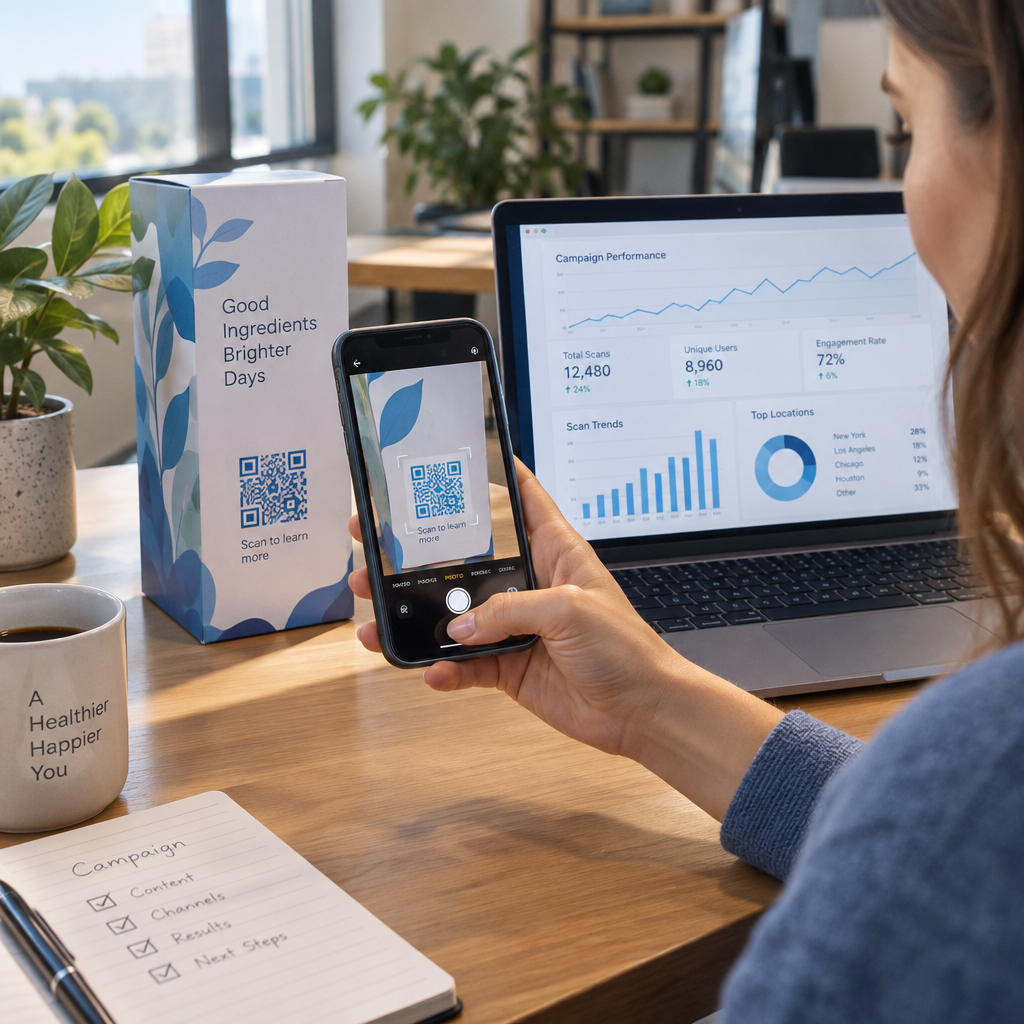
Kod QR dinamik juga membolehkan analitik. Anda boleh menjejaki berapa kali kod telah diimbas, dari lokasi mana, pada jenis peranti mana, dan pada waktu bila. Data ini mendedahkan sumber sokongan mana yang sebenarnya digunakan pelanggan – dan titik sentuh mana yang menjana permintaan paling banyak. Sebagai contoh, peningkatan imbasan pada panduan penyelesaian masalah mungkin menunjukkan isu produk berulang yang patut ditangani di peringkat awal. Anda boleh meneroka bagaimana kod QR meningkatkan penghantaran dan sokongan e-dagang untuk melihat bagaimana jenama lain menggunakan pendekatan ini.
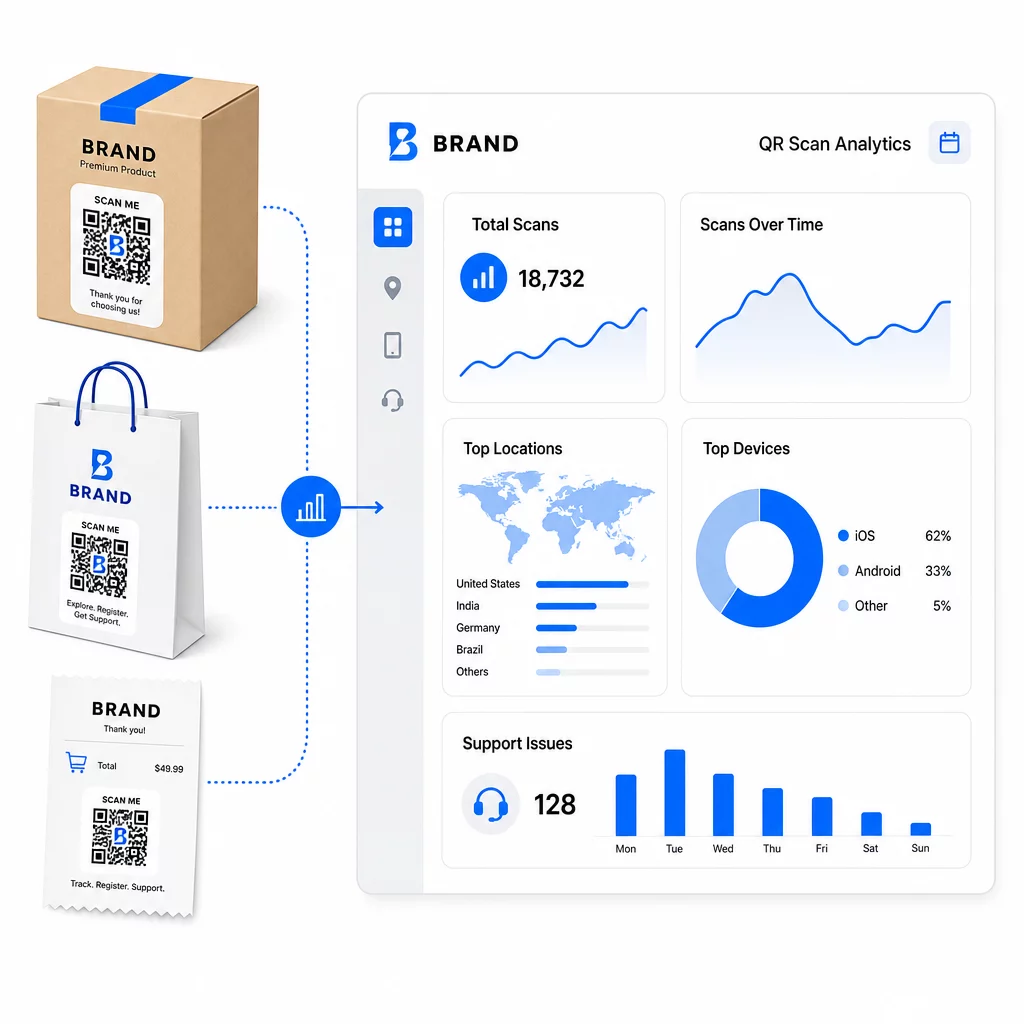
Kekalkan Pautan Sokongan Terkini Tanpa Cetakan Semula Gunakan Pageloot’s Penjana Kod QR untuk mencipta kod dinamik untuk pembungkusan dan sisipan anda – kemas kini destinasi pada bila-bila masa dari papan pemuka anda tanpa menyentuh bahan bercetak.
Pemperibadian Melalui Kod QR
Satu keupayaan yang kurang digunakan ialah menyampaikan kandungan sokongan yang disesuaikan dengan pelanggan atau produk tertentu. Dengan kod QR dinamik, anda boleh mengkonfigurasi kod untuk menyajikan kandungan yang berbeza berdasarkan:
- Jenis produk – Kod QR pada pengisar memautkan kepada panduan persediaan dan waranti pengisar, bukan halaman sokongan generik
- Sejarah pembelian – Pelanggan yang kembali boleh dihalakan ke hab kesetiaan atau halaman pesanan semula yang diperibadikan
- Lokasi – Pelanggan antarabangsa melihat kandungan khusus wilayah atau arahan pemulangan tempatan
Pendekatan ini mengubah titik sentuh sokongan generik menjadi sesuatu yang terasa direka untuk pelanggan individu – yang secara langsung mempengaruhi sama ada mereka kembali.
Menggunakan Analitik Kod QR untuk Meningkatkan Sokongan
Data yang dikumpul daripada imbasan kod QR bukan sekadar metrik kesombongan – ia adalah isyarat langsung tentang di mana pelanggan menghadapi masalah. Persediaan analitik yang tersusun rapi boleh memberitahu anda:
- Produk mana yang menjana imbasan sokongan terbanyak (kemungkinan isu kualiti atau dokumentasi)
- Titik sentuh mana yang paling banyak berinteraksi dengan pelanggan (pembungkusan lwn. e-mel lwn. resit)
- Bila dalam garis masa selepas pembelian pelanggan mencari bantuan (serta-merta selepas penghantaran lwn. beberapa minggu kemudian)
- Corak geografi yang mungkin menunjukkan isu pemenuhan serantau
Platform yang menawarkan Penjejakan dan analitik kod QR memberikan anda gelung maklum balas masa nyata yang jika tidak memerlukan tinjauan pelanggan manual atau analisis tiket sokongan. Digunakan dengan baik, data ini membolehkan anda membuat penambahbaikan proaktif dan bukannya reaktif.
Petua Praktikal untuk Pelaksanaan
Sebelum melancarkan kod QR untuk sokongan pelanggan, beberapa garis panduan akan menyelamatkan anda daripada masalah biasa:
- Uji kod sebelum mencetak secara besar-besaran. Imbas setiap kod pada pelbagai peranti dan sistem pengendalian untuk mengesahkan ia berfungsi dengan betul.
- Pastikan halaman pendaratan dioptimumkan untuk mudah alih. Pelanggan yang mengimbas kod QR menggunakan telefon mereka. Halaman yang memuatkan lambat atau tidak dipaparkan dengan betul pada mudah alih akan menjejaskan keseluruhan pengalaman.
- Saiz kod dengan sesuai untuk permukaan. Kod pada label produk kecil perlu cukup besar untuk diimbas dengan andal. Semak amalan terbaik kebolehgunaan kod QR untuk panduan saiz khusus berdasarkan jarak pandangan.
- Sertakan seruan tindakan ringkas berhampiran kod. “Imbas untuk panduan persediaan” atau “Imbas untuk memulakan pemulangan” menghilangkan kekaburan dan meningkatkan kadar imbasan.
- Gunakan reka bentuk berjenama yang mudah dikenali. Pelanggan lebih cenderung untuk mempercayai dan mengimbas kod yang sepadan secara visual dengan jenama anda. Kod dengan logo dan warna jenama berprestasi lebih baik daripada segi empat hitam-putih generik.
- Gunakan kod dinamik apabila kandungan mungkin berubah. Jika ada kemungkinan URL destinasi perlu dikemas kini, mulakan dengan kod dinamik.
Kebaikan dan Keburukan Sepintas Lalu
| Faktor | Sokongan Kod QR | Sokongan Digital Tradisional |
|---|---|---|
| Kelajuan Akses | Serta-merta melalui imbasan | Memerlukan navigasi atau carian |
| Ketersediaan 24/7 | ya | Berbeza-beza |
| Pemperibadian | Tinggi (kod dinamik) | Sederhana |
| Penyelenggaraan | Rendah (kemas kini dinamik) | Sederhana |
| ANALITIK | Terbina dalam | Memerlukan persediaan berasingan |
| Kebolehcapaian | Memerlukan telefon pintar | Berfungsi merentas peranti |
| Kebergantungan cetakan | Memerlukan penempatan fizikal | Digital sahaja |
Batasan utama ialah jurang digital: pelanggan tanpa telefon pintar atau akses internet yang boleh dipercayai tidak boleh menggunakan sokongan berasaskan QR. Untuk pelanggan tersebut, anda memerlukan laluan sokongan selari – nombor telefon atau arahan bercetak – supaya tiada sesiapa yang terpinggir tanpa bantuan.
Keselamatan juga perlu diberi perhatian. Gunakan pautan HTTPS, kekalkan reka bentuk berjenama yang konsisten, dan pertimbangkan untuk memberitahu pelanggan terlebih dahulu (melalui salinan pembungkusan atau e-mel pesanan) ke mana kod QR anda membawa dan data apa yang dikumpul. Ketelusan membina kepercayaan yang menjadikan pelanggan bersedia untuk mengimbas.
Menyatukannya
Kod QR berfungsi paling baik untuk sokongan pelanggan apabila ia diletakkan pada saat pelanggan paling memerlukan bantuan – membuka kotak, menjejak penghantaran, atau memulakan pemulangan – dan apabila ia memautkan kepada sumber yang benar-benar berguna dan bukannya hanya halaman utama. Kod dinamik menjadikannya mampan: anda boleh mengemas kini kandungan sokongan tanpa mencetak semula apa-apa, dan analitik memberi maklumat terus kepada pemahaman anda tentang di mana pengalaman pelanggan terganggu.
Yang kajian kes kod QR dalam e-dagang menunjukkan hasil yang boleh diukur apabila pelaksanaannya disengajakan. Mulakan dengan satu atau dua titik sentuh geseran tinggi – pemulangan dan penjejakan pesanan adalah calon yang baik – dan kembangkan dari situ apabila anda mengetahui apa yang sebenarnya diimbas oleh pelanggan.
Mula Membina Kod QR Sokongan Anda Pageloot Penjana Kod QR membolehkan anda mencipta kod berjenama dinamik untuk setiap peringkat perjalanan selepas pembelian – menjejak imbasan, mengemas kini destinasi, dan menyampaikan pengalaman sokongan yang lebih baik tanpa mencetak semula.
Soalan lazim
Penggunaan paling berkesan adalah pautan ke halaman penjejakan pesanan, borang permulaan pemulangan, panduan penyelesaian masalah khusus produk, video persediaan, pendaftaran waranti, dan sembang langsung. Kandungan yang pelanggan perlukan dengan cepat dan pada peranti mudah alih sangat sesuai. Manual PDF, Google Forms untuk maklum balas, dan halaman hubungan sokongan langsung juga berfungsi dengan baik apabila dipautkan melalui kod QR PDF atau kod berasaskan pautan.
Gunakan kod QR dinamik, yang membolehkan anda menukar URL destinasi dari papan pemuka tanpa mengubah kod yang dicetak itu sendiri. Ini bermakna anda boleh mengemas kini polisi pemulangan, menukar panduan penyelesaian masalah, atau mengalihkan pelanggan ke portal sokongan baharu pada bila-bila masa – tanpa mencetak semula pembungkusan, sisipan, atau label.
Analitik kod QR menunjukkan anda jumlah imbasan, masa imbasan, lokasi geografi, dan jenis peranti untuk setiap kod. Jika anda melihat kadar imbasan yang tinggi pada panduan penyelesaian masalah tertentu, itu adalah isyarat masalah produk yang berulang. Kadar imbasan yang rendah pada kod pemulangan mungkin bermakna penempatan yang kurang baik atau arahan yang tidak jelas di sekitar kod. Gunakan data ini untuk memperhalusi penempatan dan kandungan destinasi dari semasa ke semasa.