Czy masz trudności z zabezpieczeniem kont uprzywilejowanych bez stwarzania problemów dla administratorów? Statyczne hasła i przestarzałe metody MFA narażają środowiska PAM na phishing, kradzież danych uwierzytelniających i przejmowanie sesji. Ta strona wyjaśnia, w jaki sposób uwierzytelnianie oparte na kodach QR eliminuje te luki – omawiając krajobraz zagrożeń, sposób działania rejestracji, mechanikę TOTP oraz praktyki bezpieczeństwa, które Twój zespół musi wdrożyć prawidłowo.
Dlaczego tradycyjne uwierzytelnianie PAM jest niewystarczające
Systemy zarządzania dostępem uprzywilejowanym (PAM) chronią najbardziej wrażliwe konta w Twojej organizacji. Gdy te konta opierają się na statycznych hasłach, współdzielonych danych uwierzytelniających lub MFA opartym na SMS-ach, atakujący mają dobrze udokumentowane ścieżki do ich wykorzystania.
Phishing i kradzież danych uwierzytelniających pozostają najczęstszym punktem wejścia. Użytkownicy uprzywilejowani są celem ataków właśnie dlatego, że ich konta odblokowują krytyczne systemy. Nawet doświadczeni administratorzy mogą zostać oszukani przez przekonujące fałszywe strony logowania, zwłaszcza gdy atakujący wykorzystują inżynierię społeczną do podszywania się pod dostawców lub wsparcie IT. Po kradzieży danych uwierzytelniających atakujący przemieszczają się bocznie, eskalują uprawnienia i utrzymują trwały dostęp.
Współdzielone konta potęgują problem. Gdy wielu administratorów używa tych samych danych uwierzytelniających, znika indywidualna odpowiedzialność. Dochodzenia w sprawie naruszeń utykają w martwym punkcie, monitorowanie zgodności zawodzi, a jedno skompromitowane hasło odblokowuje dostęp do wielu systemów.
Przejęcie sesji stanowi trzecie poważne ryzyko. Po udanym zdarzeniu uwierzytelnienia, atakujący mogą przechwycić tokeny sesji, wykorzystać pliki cookie lub użyć technik man-in-the-middle do podszywania się pod uwierzytelnionych użytkowników – wszystko to bez znajomości oryginalnego hasła. Trwałe tokeny sesji sprawiają, że ataki te są szczególnie trudne do wykrycia, ponieważ atakujący wtapia się w normalny ruch administracyjny.
Te luki w zabezpieczeniach mają wspólną przyczynę: uwierzytelnianie, które zależy od statycznych, wielokrotnego użytku sekretów. Uwierzytelnianie oparte na kodach QR bezpośrednio rozwiązuje ten problem.
Jak działa uwierzytelnianie kodem QR w PAM
Uwierzytelnianie kodem QR zastępuje statyczne dane uwierzytelniające dynamicznymi kodami specyficznymi dla urządzenia. Zamiast wpisywać hasło, administrator skanuje kod QR zarejestrowanym urządzeniem mobilnym. Urządzenie odczytuje kod, stosuje bezpieczne klucze przechowywane w sprzęcie i kończy uwierzytelnianie w ciągu kilku sekund.
Najczęstsza implementacja w środowiskach PAM dla przedsiębiorstw łączy kody QR z TOTP (jednorazowe hasło oparte na czasie) zgodnie z definicją w RFC 6238. Oto jak działa ten przepływ:
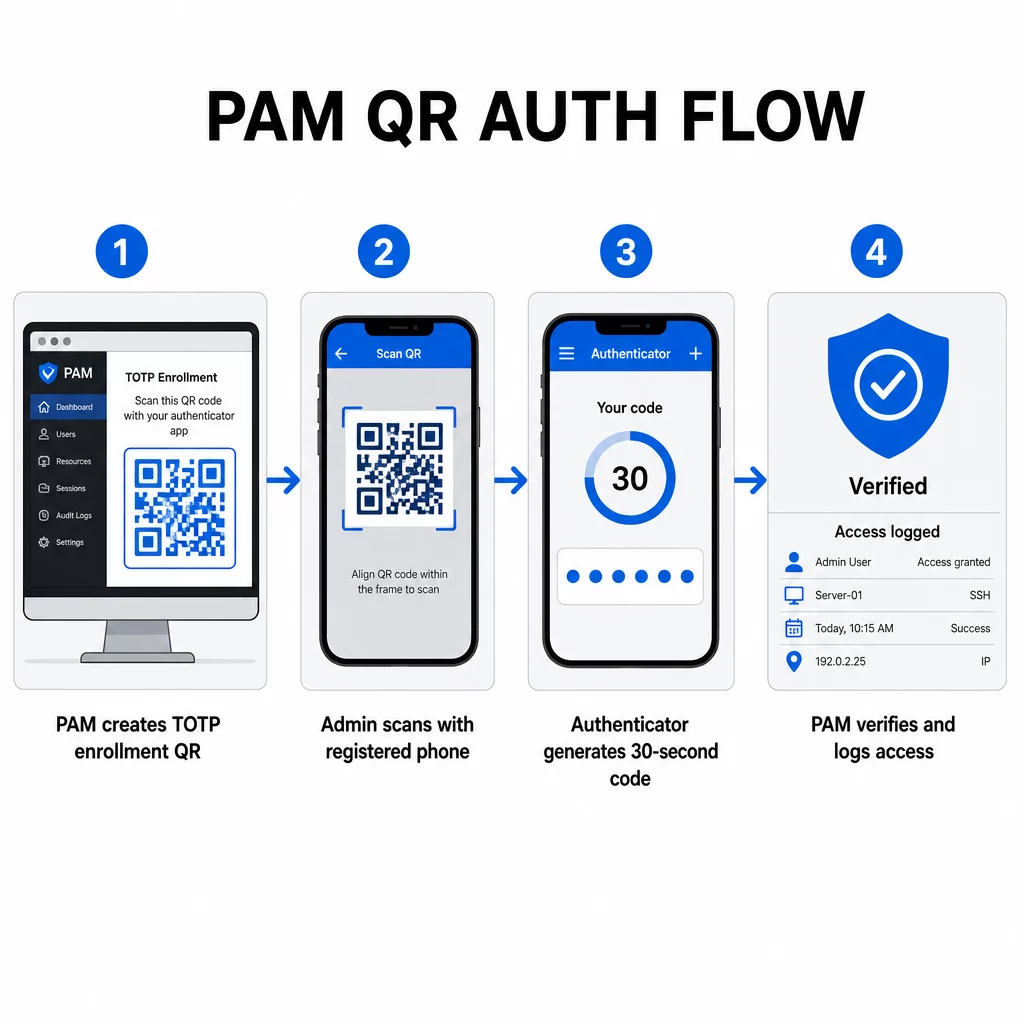
- Podczas rejestracji system generuje współdzielony klucz tajny i koduje go w kodzie QR jako URI sformatowany w sposób: `otpauth://totp/LABEL?secret=SECRET&issuer=ISSUER`
- Użytkownik skanuje ten kod QR za pomocą aplikacji uwierzytelniającej (takiej jak Google Authenticator, Microsoft Authenticator lub Okta Verify), która przechowuje sekret lokalnie na urządzeniu
- Podczas logowania aplikacja stosuje algorytm HOTP do licznika opartego na czasie, pochodzącego z bieżącego czasu Unix, generując jednorazowy kod dostępu ważny domyślnie przez 30 sekund
- Serwer wykonuje to samo obliczenie niezależnie i akceptuje kody z bieżącego oraz bezpośrednio poprzedniego kroku czasowego, aby uwzględnić dryf zegara
Ponieważ kod dostępu pochodzi z czasu i sekretu przypisanego do urządzenia – nie jest przesyłany przez sieć – przechwycenie go w trakcie transmisji nie ma trwałej wartości. Każdy kod jest bezużyteczny w ciągu 30 sekund.
Platformy takie jak CyberArk implementują ten model bezpośrednio. Administratorzy włączają rejestrację użytkowników opartą na kodach QR w sekcji Ustawienia → Uwierzytelnianie → Platforma → Ustawienia bezpieczeństwa → Opcje uwierzytelniania, a następnie definiują zasady MFA, które uruchamiają kreatora rejestracji przy pierwszym logowaniu. Aplikacja mobilna CyberArk Identity obsługuje również opcję “Zarejestruj za pomocą QR”, gdzie użytkownicy skanują kod przedstawiony na portalu Identity, aby aktywować swoje urządzenie jako czynnik MFA.
Konfiguracja rejestracji MFA za pomocą kodu QR
Dla inżynierów DevOps konfigurujących MFA oparte na kodach QR w środowisku PAM, ogólny proces rejestracji przebiega w następujących krokach, niezależnie od konkretnej platformy:
- Włącz rejestrację QR w ustawieniach uwierzytelniania platformy. Większość korporacyjnych systemów PAM udostępnia to jako przełącznik w opcjach konfiguracji uwierzytelniania lub bezpieczeństwa.
- Zdefiniuj politykę MFA która określa, którzy użytkownicy lub role wymagają MFA, kiedy jest ono egzekwowane i co dzieje się przy pierwszym logowaniu.
- Przedstaw kod QR do rejestracji użytkownikowi podczas jego pierwszej uwierzytelnionej sesji. Kod koduje współdzielony sekret TOTP w formacie URI `otpauth://`.
- Poprowadź użytkownika do zeskanowania kod za pomocą ich zarejestrowanej aplikacji uwierzytelniającej. Zapewnij awaryjne wprowadzanie ręczne (surowy klucz tajny) w przypadkach, gdy kamera nie może odczytać kodu.
- Zweryfikuj rejestrację prosząc użytkownika o przesłanie kodu TOTP przed zakończeniem konfiguracji, potwierdzając, że klucz tajny został poprawnie przesłany.
- Wygeneruj i przechowuj zapasowe kody odzyskiwania aby użytkownicy nie zostali zablokowani, jeśli zgubią swoje urządzenie.
Dla zespołów zarządzających wdrożeniami na dużą skalę, połączenie tego przepływu rejestracji z Generator dynamicznych kodów QR pozwala centralnie aktualizować, śledzić i odwoływać kody rejestracyjne – ważne, gdy dane uwierzytelniające wymagają rotacji lub gdy urządzenie zostanie zgłoszone jako zgubione.
Śledź i zarządzaj kodami QR do uwierzytelniania na dużą skalę Potrzebujesz wydawać, aktualizować lub odwoływać kody QR w rozproszonym zespole? Użyj Generator dynamicznych kodów QR aby tworzyć edytowalne kody z analizami w czasie rzeczywistym i scentralizowanym zarządzaniem.
Dynamiczne vs. Statyczne kody QR w środowiskach PAM
Wybór między statycznymi a dynamicznymi kodami QR ma bezpośrednie implikacje bezpieczeństwa dla przepływów pracy PAM.
| FUNKCJA | Statyczne kody QR | Dynamiczne kody QR |
|---|---|---|
| Treść po utworzeniu | Stała, nie może być zmieniona | Edytowalna w dowolnym momencie |
| Odwołanie | Wymaga ponownego wydania i redystrybucji | Natychmiastowo, z centralnego pulpitu nawigacyjnego |
| STATYSTYKI | Brak | Skanuj znaczniki czasu, typy urządzeń, lokalizacje |
| Ryzyko ataku powtórzeniowego | Wyższe (kod jest stały) | Niższe (opcje wygaśnięcia i jednorazowego użycia) |
| Najlepszy przypadek użycia | Treści niskiego ryzyka, jednorazowe | Dostęp uprzywilejowany, wrażliwe przepływy pracy |
W przypadku uwierzytelniania PAM i rejestracji MFA zdecydowanie preferowane są dynamiczne kody QR. Jeśli urządzenie zostanie zgłoszone jako zgubione, administrator może natychmiast dezaktywować powiązany kod rejestracyjny. Kody ograniczone czasowo zapobiegają atakom powtórzeniowym, sprawiając, że każdy przechwycony kod staje się bezużyteczny w ciągu kilku chwil. A analityka skanowania zapewnia ścieżkę audytu, która wspiera wymagania zgodności.
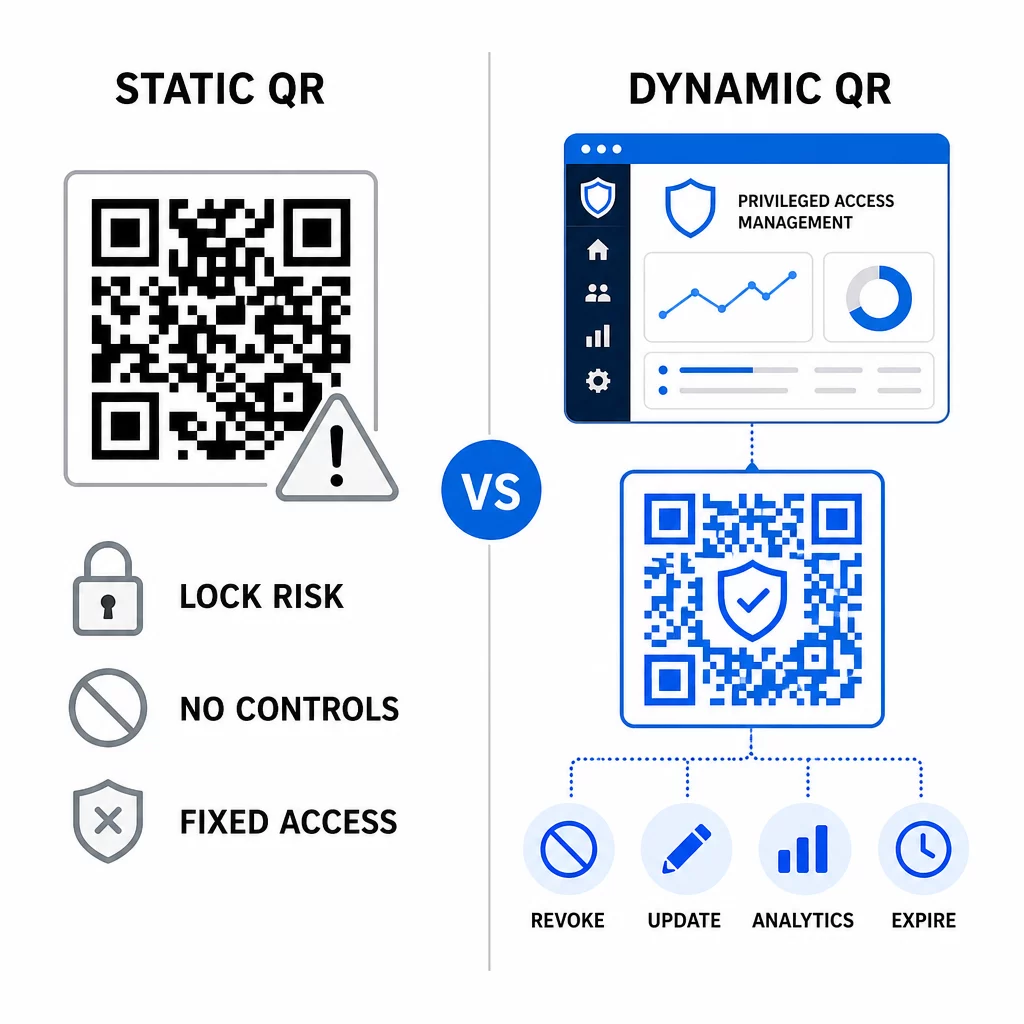
Statyczne kody QR mogą nadal odgrywać rolę w wewnętrznych przypadkach użycia o niższym ryzyku – takich jak linkowanie do dokumentacji lub zasobów tylko do odczytu – ale nie powinny być używane do przepływów uwierzytelniania obejmujących dostęp uprzywilejowany.
Kluczowe kwestie bezpieczeństwa dla uwierzytelniania PAM opartego na kodach QR
Wdrożenie uwierzytelniania kodem QR w środowisku PAM wprowadza własną powierzchnię ataku. Zrozumienie i złagodzenie tych zagrożeń jest kluczowe przed wdrożeniem do produkcji.
Podatność kodu QR do rejestracji. Wspólny sekret zakodowany w kodzie QR do rejestracji TOTP nie wygasa samoczynnie. Jeśli ten kod zostanie przechwycony w zrzucie ekranu, przesłany e-mailem lub przechowywany w kopii zapasowej, atakujący może później użyć go do ponownej rejestracji urządzenia i generowania ważnych kodów TOTP w nieskończoność. Środki zaradcze są proste: skonfiguruj kody rejestracyjne tak, aby wygasały po jednym udanym skanowaniu. Przeprowadź audyt i usuń wszelkie historyczne kody QR do rejestracji przechowywane w systemach pocztowych lub kopiach zapasowych, a także ponownie zarejestruj dotkniętych użytkowników za pomocą nowych kodów jednorazowego użytku.
Phishing z kodem QR (quishing). Atakujący udokumentowali kampanie, w których podszywają się pod procesy rejestracji MFA, wysyłając e-maile instruujące użytkowników do zeskanowania złośliwego kodu QR prowadzącego do strony wyłudzającej dane uwierzytelniające. Naucz swoich użytkowników, aby traktowali nieproszone prośby o skanowanie QR z podejrzliwością, niezależnie weryfikowali nadawcę przed skanowaniem i używali aplikacji uwierzytelniających, które obsługują ładunek `otpauth://` w środowisku piaskownicy, zamiast otwierać dowolne adresy URL. Aby uzyskać bardziej szczegółowe wskazówki, zobacz Weryfikacja tożsamości kodem QR w cyberbezpieczeństwie.
Wycofanie SMS. Wytyczne NIST dotyczące tożsamości cyfrowej wyraźnie odradzają używanie SMS-ów i połączeń głosowych do uwierzytelniania poza pasmem ze względu na ryzyka takie jak zamiana karty SIM, zamiana urządzenia i przenoszenie numeru. Rejestracja QR oparta na TOTP z aplikacjami uwierzytelniającymi jest silniejszą alternatywą, którą NIST uznaje za ważny mechanizm poza pasmem, gdy jest dostarczana za pośrednictwem bezpiecznego kanału wtórnego.
Wiązanie urządzenia i biometria. Powiązanie uwierzytelniania kodem QR z wcześniej zarejestrowanymi urządzeniami dodaje warstwę sprzętową, której SMS nie może zapewnić. Dodanie weryfikacji biometrycznej – odcisku palca lub rozpoznawania twarzy – tworzy model trójczynnikowy: coś, co posiadasz (zarejestrowane urządzenie), coś, czym jesteś (biometria) i kod ograniczony czasowo (zależny od kontekstu). W przypadku operacji wysokiego ryzyka skonfiguruj krótsze okna TOTP lub wymagaj dodatkowych kroków weryfikacji.
Testowanie przed wdrożeniem. Zawsze testuj przepływy uwierzytelniania kodem QR na wielu urządzeniach, systemach operacyjnych i aplikacjach uwierzytelniających przed wdrożeniem do produkcji. Sprawdź, czy kody rejestracyjne wygasają po użyciu, czy unieważnienie działa zgodnie z oczekiwaniami i czy awaryjne ścieżki wejścia funkcjonują poprawnie.
Aby uzyskać kompleksowe spojrzenie na wzmocnienie implementacji kodu QR, zobacz najlepszymi praktykami w zakresie bezpieczeństwa kodów QR w cyberobronie oraz bezpieczne generowanie kodów QR najlepsze praktyki.
Integracja uwierzytelniania QR z istniejącymi MFA i SSO
Kody QR dobrze współpracują z istniejącą infrastrukturą uwierzytelniania, zamiast ją całkowicie zastępować. W konfiguracjach MFA, TOTP oparte na QR działa jako czynnik “coś, co posiadasz”, uzupełniając hasło lub biometrię. W środowiskach SSO, kod QR może służyć jako krok wyzwanie-odpowiedź, który potwierdza posiadanie urządzenia przed wydaniem tokenu sesji. Aby uzyskać szczegółowe porównanie tych podejść, zobacz Kody QR kontra hasła w SSO.
Wzorzec rejestracji wykracza również poza PAM. Zespoły już używające menedżerów haseł, takich jak LastPass, mogą postępować według niemal identycznego procesu konfiguracji skanowania QR – skanuj, aby połączyć, potwierdź kodem TOTP, przechowuj kody odzyskiwania – co sprawia, że przepływ pracy jest znajomy dla użytkowników, którzy już skonfigurowali MFA gdzie indziej. Zobacz Przewodnik konfiguracji kodu QR LastPass aby uzyskać odniesienie krok po kroku.
Każda próba uwierzytelnienia w dobrze skonfigurowanym systemie powinna generować wpis w dzienniku zawierający identyfikator kodu QR, informacje o urządzeniu, wynik biometryczny (jeśli dotyczy), znacznik czasu i lokalizację geograficzną. Te dzienniki są kluczowe dla audytów zgodności, wykrywania anomalii i reagowania na incydenty.
Zaawansowane funkcje: Analityka, Dostosowywanie i Kontrola w czasie rzeczywistym
Korporacyjne platformy kodów QR dodają możliwości wykraczające poza podstawowe generowanie kodów, które są bezpośrednio związane z operacjami PAM.
Statystyki w czasie rzeczywistym pozwalają zespołom bezpieczeństwa monitorować wzorce uwierzytelniania na bieżąco. Wskaźniki warte śledzenia obejmują znaczniki czasu skanowania, typy urządzeń, lokalizacje geograficzne i podstawowe wzorce zachowań użytkowników. Algorytmy, które sygnalizują odchylenia – nietypowy typ urządzenia, skanowanie z nieoczekiwanego kraju, wzrost liczby nieudanych prób – mogą wywołać uwierzytelnianie krokowo lub automatyczne alerty. Aby dowiedzieć się więcej o tym, jak te metryki wyglądają w praktyce, zobacz jak kody QR upraszczają uwierzytelnianie wieloskładnikowe.
Markowe kody uwierzytelniania pełnią praktyczną funkcję bezpieczeństwa wykraczającą poza estetykę. Kiedy Twoja organizacja używa spójnych, markowych kodów QR z logo firmy i schematami kolorów, użytkownicy rozwijają wizualną podstawę dla legalnych żądań uwierzytelnienia. Kod, który odbiega od tej podstawy, staje się sygnałem ostrzegawczym. Zapewnienie wystarczającego kontrastu kolorów – stosunku co najmniej 4,5:1 – również sprawia, że kody są niezawodnie skanowalne na różnych urządzeniach i w różnych warunkach oświetleniowych.
Dynamiczna kontrola to funkcja, która najbardziej bezpośrednio zmniejsza ryzyko operacyjne. Kiedy pracownik odchodzi, dezaktywujesz jego kody natychmiast z centralnego pulpitu nawigacyjnego, nie czekając na cykle rotacji poświadczeń. Kiedy wykryty zostanie incydent bezpieczeństwa, odwołujesz i ponownie wydajesz kody bez ponownego drukowania. The Generator dynamicznych kodów QR na Pageloot obsługuje wszystkie te przepływy pracy, z wbudowanym śledzeniem skanowania w czasie rzeczywistym i edytowalnymi miejscami docelowymi.
Dla zespołów obsługujących zaszyfrowane poświadczenia lub dane tokenów w ładunkach QR, zobacz zaszyfrowanych kodów QR dla platform uwierzytelniających wskazówki dotyczące podejść do szyfrowania AES i RSA.
Zastosowania branżowe
Ten sam model PAM oparty na kodach QR ma zastosowanie w różnych branżach z różnymi profilami dostępu uprzywilejowanego.
In bankowości i usługach finansowych, administratorzy używają kodów QR wrażliwych na czas, aby uzyskać dostęp do podstawowych systemów bankowych, platform handlowych i baz danych klientów. Każda uprzywilejowana sesja jest rejestrowana w odniesieniu do użytego kodu, zapewniając wyraźny ślad audytowy dla zgodności z przepisami.
In rozwoju oprogramowania, rozproszone zespoły używają kodów QR do uzyskiwania dostępu do systemów produkcyjnych, repozytoriów kodu i potoków wdrożeniowych bez statycznych poświadczeń. Dynamiczne kody przyspieszają wdrażanie i sprawiają, że wycofywanie jest natychmiastowe – bez czekania na propagację rotacji haseł.
In opieka zdrowotna, personel kliniczny, który przemieszcza się między stacjami roboczymi, może szybko uwierzytelniać się poprzez skanowanie zamiast wpisywania, zmniejszając tarcie podczas logowania, jednocześnie zachowując ścieżki audytu wymagane przez HIPAA.
Wzorzec jest spójny: kody QR w połączeniu z dynamicznym zarządzaniem i analityką dają zespołom bezpieczeństwa kontrolę, której potrzebują, nie spowalniając użytkowników, którzy polegają na szybkim i niezawodnym dostępie. Uwierzytelnianie kodem QR nie jest zamiennikiem dojrzałej strategii PAM – jest to mechanizm, który wzmacnia jeden z najbardziej wrażliwych komponentów PAM. Zastępując statyczne poświadczenia kodami ograniczonymi czasowo i do urządzenia, wymuszając jednorazową rejestrację i monitorując każde zdarzenie uwierzytelniania, zamykasz luki w zabezpieczeniach przed phishingiem i kradzieżą poświadczeń, które pozostawiają otwarte metody dziedziczone. Zacznij od włączenia rejestracji QR w ustawieniach uwierzytelniania platformy PAM, zdefiniuj swoje zasady MFA i używaj dynamicznych kodów z scentralizowaną platformą zarządzania, aby utrzymywać kontrolę nad dostępem w czasie rzeczywistym.
Twórz i zarządzaj kodami QR dla swoich przepływów pracy uwierzytelniania Użyj Generator kodów QR aby zacząć, lub poznaj Generator dynamicznych kodów QR dla kodów rejestracyjnych, które możesz aktualizować, śledzić i odwoływać z jednego pulpitu nawigacyjnego.
Najczęściej zadawane pytania
Podczas rejestracji system PAM generuje wspólny klucz tajny i koduje go jako kod QR, używając formatu URI `otpauth://totp/`. Użytkownik skanuje to za pomocą aplikacji uwierzytelniającej, która przechowuje klucz tajny na urządzeniu. Podczas logowania aplikacja i serwer niezależnie obliczają 30-sekundowy kod dostępu z tego klucza tajnego i bieżącego czasu. Ponieważ kod jest związany z czasem i urządzeniem, przechwycenie go w trakcie transmisji nie zapewnia atakującemu trwałej wartości.
Podatność kodu QR do rejestracji jest najczęściej pomijanym ryzykiem. Sekret TOTP osadzony w kodzie QR do rejestracji nie wygasa samoistnie, dlatego każdy zrzut ekranu, przekazany e-mail lub kopia zapasowa tego kodu pozostaje użyteczny bezterminowo. Złagodź to poprzez skonfigurowanie kodów rejestracyjnych tak, aby wygasały po jednym udanym skanowaniu, oraz przeprowadź audyt swoich systemów poczty e-mail i kopii zapasowych, aby usunąć wszelkie przechowywane historyczne kody rejestracyjne.
Zawsze preferuj dynamiczne kody QR do uwierzytelniania i procesów rejestracji MFA. Kody dynamiczne mogą być natychmiastowo unieważnione w przypadku zgubienia urządzenia, aktualizowane bez ponownego rozprowadzania materiałów fizycznych i monitorowane za pomocą analiz w czasie rzeczywistym. Kody statyczne są odpowiednie tylko dla treści niskiego ryzyka, tylko do odczytu, gdzie natychmiastowe unieważnienie i logowanie audytu nie są wymagane.