Küzd azzal, hogy biztonságossá tegye a privilegizált fiókokat anélkül, hogy súrlódást okozna az adminisztrátoroknak? A statikus jelszavak és a régi MFA-módszerek sebezhetővé teszik a PAM-környezeteket az adathalászat, a hitelesítő adatok ellopása és a munkamenet-eltérítés számára. Ez az oldal elmagyarázza, hogyan orvosolja ezeket a hiányosságokat a QR-kód alapú hitelesítés – bemutatva a fenyegetési környezetet, a regisztráció működését, a TOTP mechanikáját és azokat a biztonsági gyakorlatokat, amelyeket csapatának helyesen kell alkalmaznia.
Miért elégtelen a hagyományos PAM-hitelesítés
A privilegizált hozzáférés-kezelő rendszerek védik a szervezet legérzékenyebb fiókjait. Amikor ezek a fiókok statikus jelszavakra, megosztott hitelesítő adatokra vagy SMS-alapú MFA-ra támaszkodnak, a támadóknak jól dokumentált útvonalaik vannak azok kihasználására.
Adathalászat és hitelesítő adatok ellopása marad a leggyakoribb belépési pont. A privilegizált felhasználókat pontosan azért célozzák meg, mert fiókjaik kritikus rendszereket nyitnak meg. Még a tapasztalt rendszergazdákat is megtéveszthetik a meggyőző hamis bejelentkezési oldalak, különösen akkor, ha a támadók szociális mérnöki módszereket alkalmaznak, hogy eladóknak vagy IT-támogatásnak adják ki magukat. Amint a hitelesítő adatok ellopásra kerülnek, a támadók oldalirányban mozognak, jogosultságokat emelnek, és fenntartják az állandó hozzáférést.
Megosztott fiókok súlyosbítják a problémát. Amikor több adminisztrátor ugyanazokat a hitelesítő adatokat használja, az egyéni elszámoltathatóság megszűnik. A jogsértési vizsgálatok megakadnak, a megfelelőségi ellenőrzés összeomlik, és egyetlen kompromittált jelszó több rendszerhez is hozzáférést biztosít.
Munkamenet-eltérítés harmadik jelentős kockázatot jelent. Egy legitim hitelesítési esemény után a támadók elfoghatják a munkamenet-tokeneket, kihasználhatják a sütiket, vagy man-in-the-middle technikákat alkalmazhatnak a hitelesített felhasználók megszemélyesítésére – mindezt anélkül, hogy valaha is ismernék az eredeti jelszót. Az állandó munkamenet-tokenek különösen megnehezítik ezeknek a támadásoknak a felderítését, mivel a támadó beolvad a normál adminisztratív forgalomba.
Ezek a sebezhetőségek egy közös okra vezethetők vissza: a statikus, újrafelhasználható titkoktól függő hitelesítésre. A QR-kód alapú hitelesítés közvetlenül kezeli ezt.
Hogyan működik a QR-kódos hitelesítés a PAM-ban
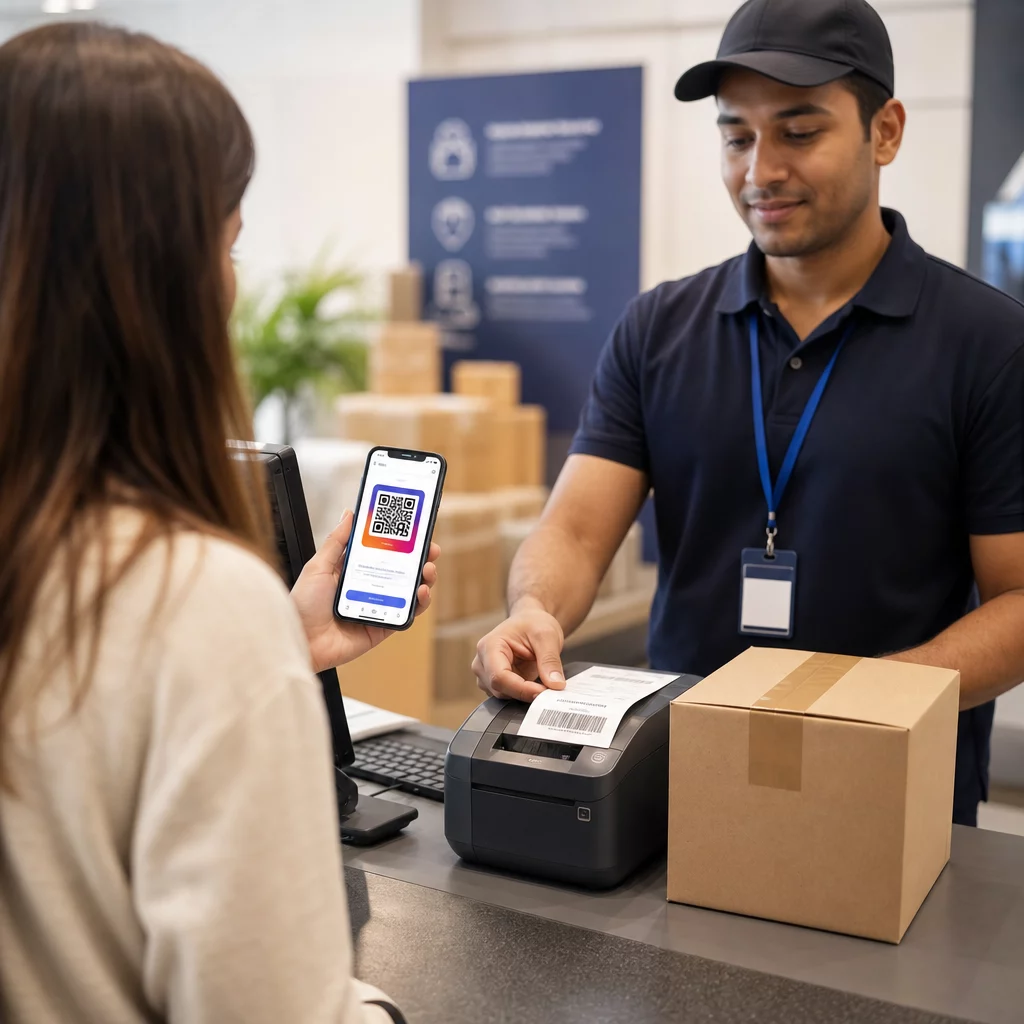
A QR-kódos hitelesítés a statikus hitelesítő adatokat dinamikus, eszközspecifikus kódokkal váltja fel. A jelszó beírása helyett az adminisztrátor egy regisztrált mobileszközzel beolvas egy QR-kódot. Az eszköz beolvassa a kódot, alkalmazza a hardverben tárolt biztonságos kulcsokat, és másodpercek alatt befejezi a hitelesítést.
A vállalati PAM-környezetekben a leggyakoribb megvalósítás a QR-kódokat párosítja a TOTP (időalapú egyszeri jelszó) az RFC 6238-ban meghatározottak szerint. Íme, hogyan működik ez a folyamat:
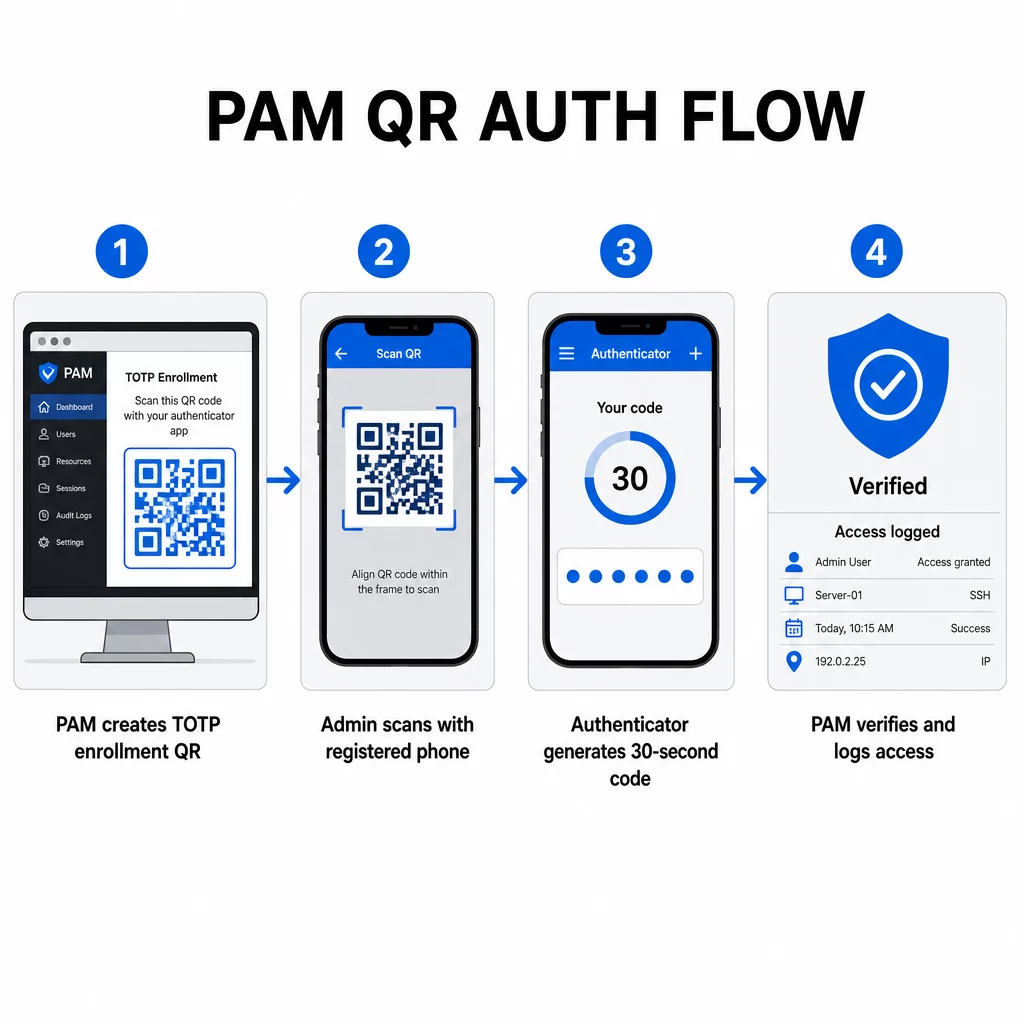
- A regisztráció során a rendszer generál egy megosztott titkos kulcsot, és QR-kódba kódolja URI formátumban, például `otpauth://totp/LABEL?secret=SECRET&issuer=ISSUER`
- A felhasználó beolvassa ezt a QR-kódot egy hitelesítő alkalmazással (például Google Authenticator, Microsoft Authenticator vagy Okta Verify), amely helyileg tárolja a titkot az eszközön
- Bejelentkezéskor az alkalmazás a HOTP algoritmust alkalmazza egy időalapú számlálóra, amely az aktuális Unix időből származik, és alapértelmezés szerint 30 másodpercig érvényes egyszeri jelszót generál
- A szerver önállóan elvégzi ugyanazt a számítást, és elfogadja az aktuális és az azonnal megelőző időlépésből származó kódokat az óraeltolódás figyelembevételéhez
Mivel a jelszó időből és egy eszközhöz kötött titokból származik – nem a hálózaton keresztül továbbítódik –, az átvitel közbeni elfogása nem biztosít tartós értéket. Minden kód 30 másodpercen belül használhatatlanná válik.
Az olyan platformok, mint a CyberArk, közvetlenül implementálják ezt a modellt. Az adminisztrátorok engedélyezik a QR-kód alapú felhasználói regisztrációt a következő helyen: Beállítások → Hitelesítés → Platform → Biztonsági beállítások → Hitelesítési lehetőségek, majd meghatározzák az MFA-házirendeket, amelyek az első bejelentkezéskor elindítják a regisztrációs varázslót. A CyberArk Identity mobilalkalmazás támogatja az “Regisztráció QR-kóddal” opciót is, ahol a felhasználók beolvasnak egy, az Identity portálon megjelenített kódot, hogy aktiválják eszközüket MFA-faktorként.
QR-kódos MFA regisztráció beállítása
A QR-alapú MFA-t PAM környezetben konfiguráló DevOps mérnökök számára az általános regisztrációs folyamat a következő lépéseket követi, függetlenül a konkrét platformtól:
- Engedélyezze a QR-regisztrációt a platform hitelesítési beállításaiban. A legtöbb vállalati PAM rendszer ezt kapcsolóként teszi elérhetővé a hitelesítési vagy biztonsági konfigurációs lehetőségek alatt.
- Határozzon meg egy MFA-házirendet amely meghatározza, hogy mely felhasználók vagy szerepkörök igényelnek MFA-t, mikor kerül érvényesítésre, és mi történik az első bejelentkezéskor.
- Mutassa be a regisztrációs QR-kódot a felhasználónak az első hitelesített munkamenet során. A kód a megosztott TOTP titkot `otpauth://` URI formátumban kódolja.
- Irányítsa a felhasználót a beolvasásra a kódot a regisztrált hitelesítő alkalmazásukkal. Biztosítson manuális beviteli lehetőséget (a nyers titkos kulcsot) azokra az esetekre, amikor a kamera nem tudja leolvasni a kódot.
- Ellenőrizze a regisztrációt azáltal, hogy megkéri a felhasználót, hogy a beállítás befejezése előtt adjon meg egy TOTP kódot, megerősítve, hogy a titok megfelelően átkerült.
- Hozzon létre és tároljon biztonsági helyreállítási kódokat hogy a felhasználók ne legyenek kizárva, ha elveszítik eszközüket.
Nagyszabású bevezetéseket kezelő csapatok számára, ha ezt a regisztrációs folyamatot párosítják egy Dinamikus QR-kód generátor lehetővé teszi a regisztrációs kódok központi frissítését, nyomon követését és visszavonását – ami fontos, ha a hitelesítő adatoknak rotálniuk kell, vagy ha egy eszközt elveszettként jelentenek.
Hitelesítési QR-kódok nyomon követése és kezelése nagy léptékben Szüksége van QR-kódok kiadására, frissítésére vagy visszavonására egy elosztott csapatban? Használja a Dinamikus QR-kód generátor szerkeszthető kódok létrehozásához valós idejű elemzésekkel és központosított kezeléssel.
Dinamikus vs. statikus QR-kódok PAM környezetekben
A statikus és dinamikus QR-kódok közötti választás közvetlen biztonsági következményekkel jár a PAM munkafolyamatokra nézve.
| FUNKCIÓ | Statikus QR-kódok | Dinamikus QR-kódok |
|---|---|---|
| Tartalom létrehozás után | Rögzített, nem módosítható | Bármikor szerkeszthető |
| Visszavonás | Újrakiadást és újraelosztást igényel | Azonnali, egy központi irányítópultról |
| ELEMZÉS | Nincs | Szkennelési időbélyegek, eszköz típusok, helyszínek |
| Újrajátszásos támadás kockázata | Magasabb (a kód állandó) | Alacsonyabb (lejárati és egyszer használatos opciók) |
| Legjobb felhasználási eset | Alacsony kockázatú, egyszeri tartalom | Jogosult hozzáférés, érzékeny munkafolyamatok |
PAM hitelesítéshez és MFA regisztrációhoz erősen ajánlottak a dinamikus QR-kódok. Ha egy eszközt elveszettként jelentenek, egy adminisztrátor azonnal deaktiválhatja a hozzá tartozó regisztrációs kódot. Az időkorlátos kódok megakadályozzák az újrajátszásos támadásokat azáltal, hogy az elfogott kód pillanatokon belül használhatatlanná válik. A szkennelési analitika pedig auditálási nyomvonalat biztosít, amely támogatja a megfelelőségi követelményeket.
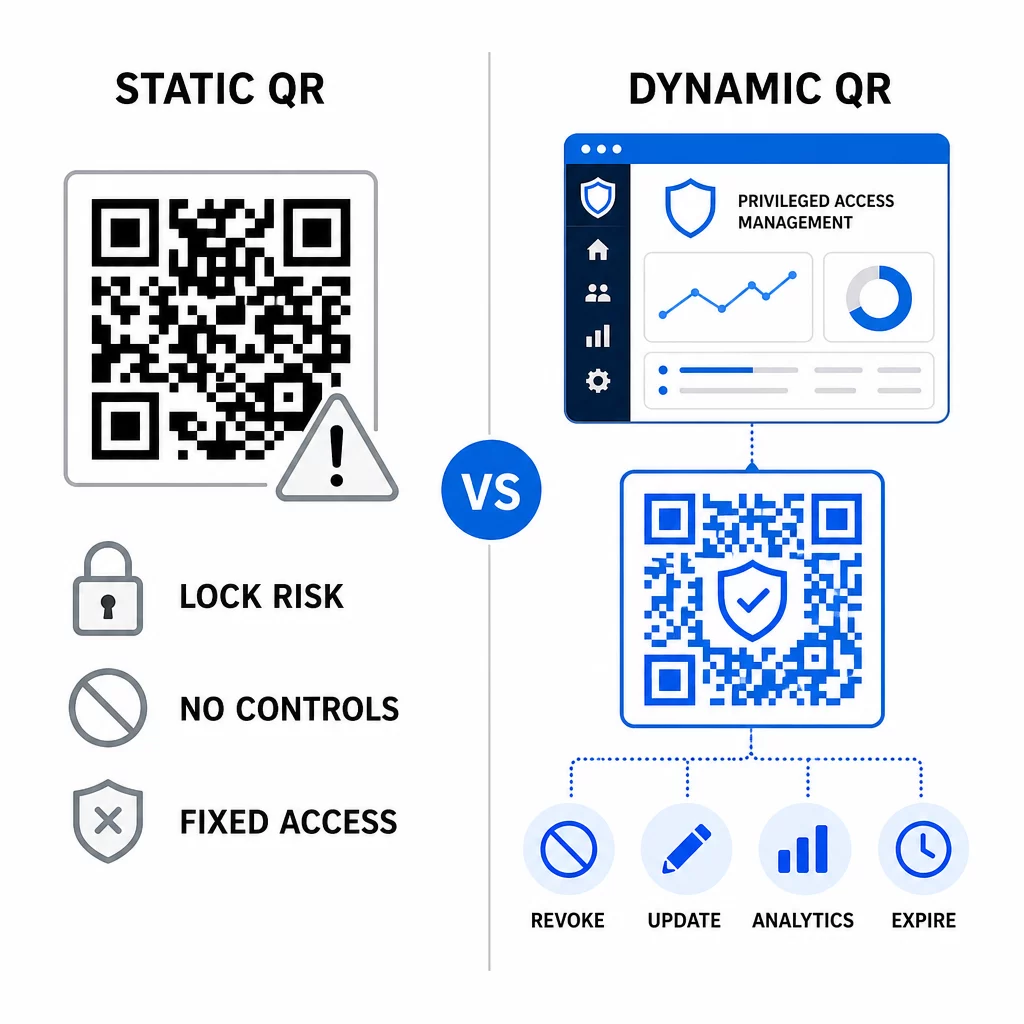
A statikus QR-kódok továbbra is szerepet játszhatnak alacsonyabb kockázatú belső felhasználási esetekben – például dokumentációhoz vagy csak olvasható erőforrásokhoz való linkelésben –, de nem szabad őket jogosult hozzáférést igénylő hitelesítési folyamatokhoz használni.
Főbb biztonsági szempontok QR-alapú PAM hitelesítéshez
A QR-kódos hitelesítés bevezetése egy PAM környezetben saját támadási felületet hoz létre. Ezen kockázatok megértése és mérséklése elengedhetetlen a gyártásba való bevezetés előtt.
Regisztrációs QR-kód sebezhetőség. A TOTP regisztrációs QR-kódban kódolt megosztott titok önmagában nem jár le. Ha ezt a kódot képernyőképen rögzítik, e-mailben továbbítják, vagy biztonsági mentésben tárolják, egy támadó később felhasználhatja egy eszköz újbóli regisztrálására és érvényes TOTP kódok generálására korlátlan ideig. A kockázatcsökkentés egyszerű: konfigurálja a regisztrációs kódokat úgy, hogy egyetlen sikeres szkennelés után lejárjanak. Ellenőrizze és törölje az e-mail rendszerekben vagy biztonsági mentésekben tárolt összes korábbi regisztrációs QR-kódot, és regisztrálja újra az érintett felhasználókat friss, egyszer használatos kódokkal.
QR-kód adathalászat (quishing). Támadók dokumentált kampányokat, ahol MFA regisztrációs folyamatokat imitálnak, olyan e-maileket küldve, amelyek arra utasítják a felhasználókat, hogy szkenneljenek be egy rosszindulatú QR-kódot, ami egy hitelesítőadat-gyűjtő oldalra vezet. Képezze felhasználóit, hogy gyanakvással kezeljék a kéretlen QR-kód beolvasási kéréseket, szkennelés előtt önállóan ellenőrizzék a feladót, és használjanak hitelesítő alkalmazásokat, amelyek a `otpauth://` adatcsomagot egy szigetelt környezetben kezelik, ahelyett, hogy tetszőleges URL-eket nyitnának meg. Részletesebb útmutatásért lásd: QR-kódos személyazonosság-ellenőrzés a kiberbiztonságban.
SMS elavulása. A NIST digitális identitásra vonatkozó útmutatója kifejezetten ellenzi az SMS és hanghívások használatát sávon kívüli hitelesítésre olyan kockázatok miatt, mint a SIM-csere, eszközcsere és számhordozás. A TOTP-alapú QR-regisztráció hitelesítő alkalmazásokkal erősebb alternatíva, amelyet a NIST érvényes sávon kívüli mechanizmusként ismer el, ha biztonságos másodlagos csatornán keresztül történik.
Eszközhozzárendelés és biometria. A QR-kódos hitelesítés előre regisztrált eszközökhöz való kapcsolása olyan hardveres réteget ad hozzá, amelyet az SMS nem tud biztosítani. A biometrikus ellenőrzés – ujjlenyomat vagy arcfelismerés – hozzáadása háromfaktoros modellt hoz létre: valami, amid van (a regisztrált eszköz), valami, ami vagy (biometria), és az időhöz kötött kód (környezetfüggő). Magas kockázatú műveletek esetén konfiguráljon rövidebb TOTP időablakokat, vagy igényeljen további ellenőrzési lépéseket.
Tesztelés telepítés előtt. Mindig tesztelje a QR-kódos hitelesítési folyamatokat több eszközön, operációs rendszeren és hitelesítő alkalmazáson keresztül, mielőtt éles üzembe helyezné. Ellenőrizze, hogy a regisztrációs kódok lejárnak-e használat után, hogy a visszavonás a várt módon működik-e, és hogy a tartalék belépési útvonalak megfelelően működnek-e.
A QR-kód implementációjának megerősítéséhez lásd: a QR-kód biztonságának legjobb gyakorlatait a kiberbiztonságban és biztonságos QR-kód generálási legjobb gyakorlatok.
QR-hitelesítés integrálása meglévő MFA és SSO rendszerekkel
A QR-kódok jól működnek a meglévő hitelesítési infrastruktúra mellett, ahelyett, hogy teljesen lecserélnék azt. Az MFA beállításokban a QR-alapú TOTP a “valami, amid van” faktorként működik, kiegészítve egy jelszót vagy biometrikus adatot. Az SSO környezetekben a QR-kód szolgálhat kihívás-válasz lépésként, amely megerősíti az eszköz birtoklását, mielőtt munkamenet-tokent adna ki. Ezen megközelítések részletes összehasonlításáért lásd: QR-kódok vs. jelszavak az SSO-ban.
A regisztrációs minta a PAM-en túl is kiterjed. Azok a csapatok, amelyek már használnak jelszókezelőket, mint például a LastPass, szinte azonos QR-szkennelési beállítási folyamatot követhetnek – szkennelés a linkeléshez, megerősítés TOTP kóddal, helyreállítási kódok tárolása – így a munkafolyamat ismerős lesz azoknak a felhasználóknak, akik már máshol is beállítottak MFA-t. Lásd a LastPass QR-kód beállítási útmutatót lépésről lépésre útmutatóként.
Minden hitelesítési kísérlet egy jól konfigurált rendszerben naplóbejegyzést kell, hogy generáljon, amely rögzíti a QR-kód azonosítóját, az eszközinformációkat, az esetleges biometrikus eredményt, az időbélyeget és a földrajzi helyet. Ezek a naplók kritikusak a megfelelőségi auditokhoz, az anomáliák észleléséhez és az incidensekre való reagáláshoz.
Fejlett funkciók: Analitika, testreszabás és valós idejű vezérlés
A vállalati QR-kód platformok a kódgeneráláson túlmutató képességeket is hozzáadnak, amelyek közvetlenül relevánsak a PAM műveletekhez.
Valós idejű elemzés lehetővé teszik a biztonsági csapatok számára, hogy valós időben figyeljék a hitelesítési mintákat. A nyomon követésre érdemes metrikák közé tartoznak a szkennelési időbélyegek, az eszköztípusok, a földrajzi helyek és a felhasználói viselkedési alapvonalak. Az eltéréseket jelző algoritmusok – szokatlan eszköztípus, váratlan országból származó szkennelés, sikertelen kísérletek megugrása – fokozott hitelesítést vagy automatikus riasztásokat válthatnak ki. Arról, hogy ezek a metrikák hogyan néznek ki a gyakorlatban, lásd hogyan egyszerűsítik a QR-kódok a többfaktoros hitelesítést.
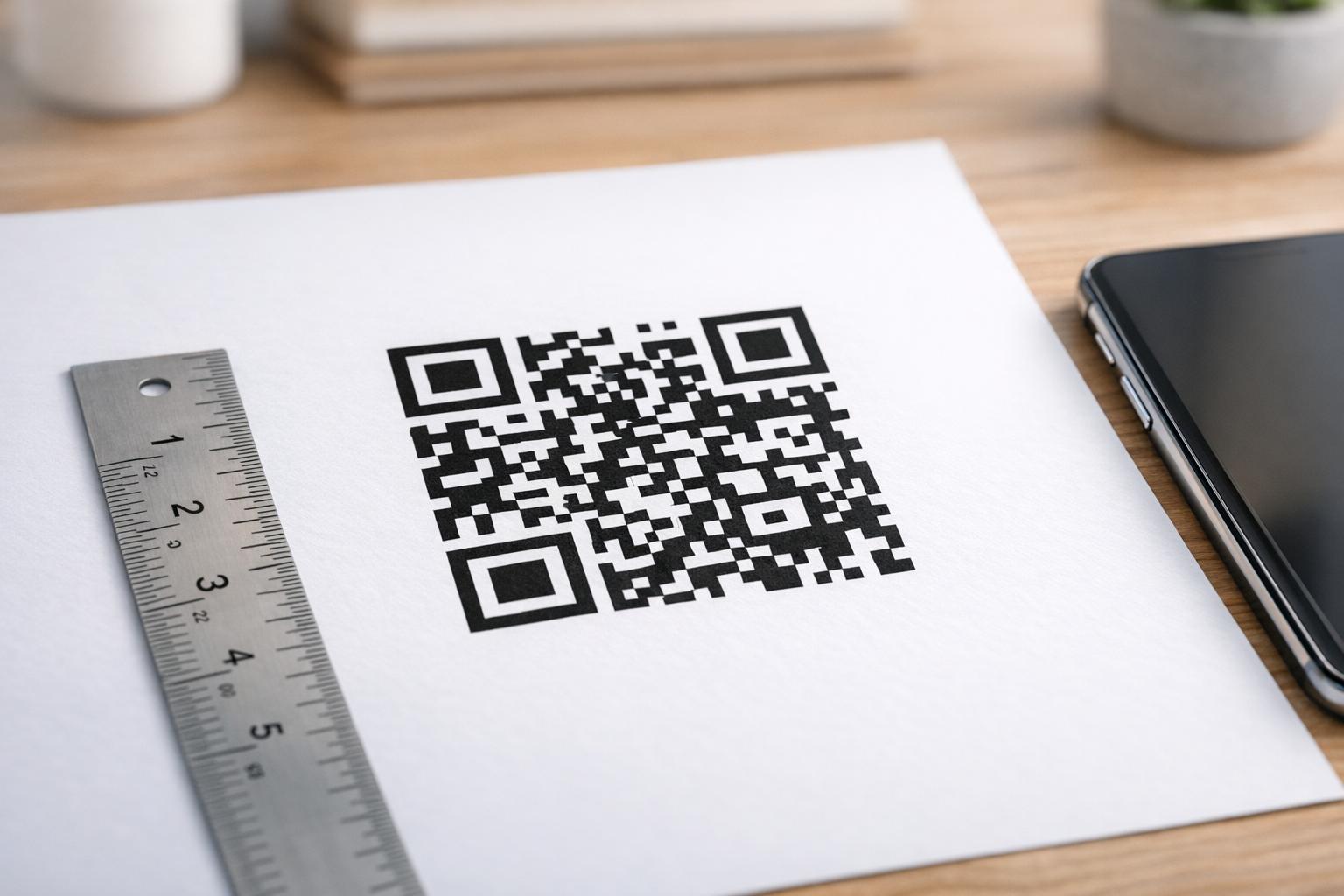
Márkázott hitelesítési kódok gyakorlati biztonsági funkciót töltenek be az esztétikán túl. Amikor szervezete egységes, márkázott QR-kódokat használ céges logókkal és színsémákkal, a felhasználók vizuális alapvonalat alakítanak ki a legitim hitelesítési kérésekhez. Az ettől az alapvonaltól eltérő kód figyelmeztető jellé válik. A megfelelő színkontraszt – legalább 4,5:1 arány – biztosítása szintén megbízhatóan szkennelhetővé teszi a kódokat különböző eszközökön és fényviszonyok között.
Dinamikus vezérlés az a funkció, amely a legközvetlenebbül csökkenti az operatív kockázatot. Amikor egy alkalmazott távozik, azonnal deaktiválhatja a kódjait egy központi irányítópultról, anélkül, hogy megvárná a hitelesítő adatok rotációs ciklusait. Amikor biztonsági incidenst észlelnek, visszavonhatja és újra kiadhatja újranyomtatás nélkül. A Dinamikus QR-kód generátor a Pageloot-on támogatja ezeket a munkafolyamatokat, beépített valós idejű szkenneléskövetéssel és szerkeszthető célhelyekkel.
Azoknak a csapatoknak, amelyek titkosított hitelesítő adatokat vagy tokenadatokat kezelnek QR-hasznos terhekben, lásd titkosított QR-kódok hitelesítési platformokhoz az AES és RSA titkosítási megközelítésekkel kapcsolatos útmutatásért.
Ipari alkalmazások
Ugyanaz a QR-alapú PAM modell alkalmazható különböző iparágakban, eltérő jogosult hozzáférési profilokkal.
In banki és pénzügyi szolgáltatások, -ban az adminisztrátorok időérzékeny QR-kódokat használnak a központi banki rendszerekhez, kereskedési platformokhoz és ügyféladatbázisokhoz való hozzáféréshez. Minden jogosult munkamenet naplózásra kerül az adott használt kódhoz, tiszta ellenőrzési nyomvonalat biztosítva a szabályozási megfelelőséghez.
In szoftverfejlesztés, elosztott csapatok QR-kódokat használnak a gyártási rendszerekhez, kód-tárolókhoz és telepítési folyamatokhoz való hozzáféréshez statikus hitelesítő adatok nélkül. A dinamikus kódok felgyorsítják a beillesztést és azonnalivá teszik a kiléptetést – nem kell várni a jelszórotációk terjedésére.
In egészségügyi ellátás, a munkaállomások között mozgó klinikai személyzet gyorsan hitelesíthet szkenneléssel gépelés helyett, csökkentve a bejelentkezési súrlódást, miközben fenntartja a HIPAA által megkövetelt ellenőrzési nyomvonalakat.
A minta következetes: a QR-kódok dinamikus kezeléssel és analitikával kombinálva biztosítják a biztonsági csapatoknak a szükséges ellenőrzést anélkül, hogy lelassítanák a gyors, megbízható hozzáférést igénylő felhasználókat. A QR-kódos hitelesítés nem helyettesíti az érett PAM stratégiát – ez egy olyan mechanizmus, amely megerősíti a PAM egyik legsebezhetőbb komponensét. A statikus hitelesítő adatok időhöz kötött, eszközhöz kötött kódokkal való felváltásával, az egyszeri regisztráció kikényszerítésével és minden hitelesítési esemény monitorozásával bezárja azokat az adathalászati és hitelesítőadat-lopási réseket, amelyeket a hagyományos módszerek nyitva hagynak. Kezdje a QR-regisztráció engedélyezésével a PAM platform hitelesítési beállításaiban, határozza meg az MFA-szabályzatait, és használjon dinamikus kódokat egy központosított felügyeleti platformmal a hozzáférés valós idejű ellenőrzéséhez.
Hozzon létre és kezeljen QR-kódokat a hitelesítési munkafolyamataihoz Használja a QR Kód Generátor a kezdéshez, vagy fedezze fel a Dinamikus QR-kód generátor regisztrációs kódokhoz, amelyeket egyetlen irányítópultról frissíthet, nyomon követhet és visszavonhat.
Gyakori kérdések
A regisztráció során a PAM rendszer generál egy megosztott titkos kulcsot, és QR-kódként kódolja azt az `otpauth://totp/` URI formátumot használva. A felhasználó beolvassa ezt egy hitelesítő alkalmazással, amely eltárolja a titkot az eszközön. Bejelentkezéskor az alkalmazás és a szerver egymástól függetlenül kiszámít egy 30 másodperces jelszót ebből a titokból és az aktuális időből. Mivel a kód időhöz és eszközhöz kötött, az átvitel során történő elfogása nem biztosít tartós értéket egy támadó számára.
A regisztrációs QR-kód sebezhetősége a leggyakrabban figyelmen kívül hagyott kockázat. A regisztrációs QR-kódba ágyazott TOTP titok önmagában nem jár le, így a kód bármilyen képernyőképe, e-mail továbbítása vagy biztonsági másolata korlátlan ideig használható marad. Ezt úgy enyhítheti, hogy a regisztrációs kódokat egyetlen sikeres beolvasás után lejáróvá konfigurálja, és ellenőrzi e-mail és biztonsági mentési rendszereit, hogy törölje az összes tárolt korábbi regisztrációs kódot.
Mindig a dinamikus QR-kódokat részesítse előnyben a hitelesítési és MFA-regisztrációs folyamatokhoz. A dinamikus kódok azonnal visszavonhatók, ha egy eszköz elveszik, frissíthetők fizikai anyagok újraelosztása nélkül, és valós idejű analitikával monitorozhatók. A statikus kódok csak alacsony kockázatú, csak olvasható tartalomhoz megfelelőek, ahol az azonnali visszavonás és a naplózás nem szükséges.