Har du svært ved at sikre privilegerede konti uden at skabe friktion for dine administratorer? Statiske adgangskoder og ældre MFA-metoder efterlader PAM-miljøer udsat for phishing, tyveri af legitimationsoplysninger og session hijacking. Denne side forklarer, hvordan QR-kodebaseret godkendelse adresserer disse mangler – dækkende trusselslandskabet, hvordan tilmelding fungerer, TOTP-mekanik, og de sikkerhedspraksisser dit team skal implementere det korrekt.
Hvorfor traditionel PAM-godkendelse ikke slår til
Privileged Access Management-systemer beskytter de mest følsomme konti i din organisation. Når disse konti er afhængige af statiske adgangskoder, delte legitimationsoplysninger eller SMS-baseret MFA, har angribere veldokumenterede veje til at udnytte dem.
Phishing og tyveri af legitimationsoplysninger forbliver det mest almindelige indgangspunkt. Privilegerede brugere er målrettet netop fordi deres konti låser op for kritiske systemer. Selv erfarne administratorer kan blive narret af overbevisende falske login-sider, især når angribere bruger social engineering til at udgive sig for at være leverandører eller IT-support. Når legitimationsoplysninger er stjålet, bevæger angribere sig lateralt, eskalerer privilegier og opretholder vedvarende adgang.
Delte konti forværrer problemet. Når flere administratorer bruger de samme legitimationsoplysninger, forsvinder individuel ansvarlighed. Brudundersøgelser går i stå, compliance-overvågning bryder sammen, og en enkelt kompromitteret adgangskode låser op for adgang på tværs af flere systemer.
Session hijacking udgør en tredje stor risiko. Efter en legitim godkendelsesbegivenhed kan angribere opsnappe sessionstokens, udnytte cookies eller bruge man-in-the-middle-teknikker til at udgive sig for at være godkendte brugere – alt sammen uden nogensinde at kende den originale adgangskode. Vedvarende sessionstokens gør disse angreb særligt vanskelige at opdage, da angriberen falder i ét med normal administrativ trafik.
Disse sårbarheder deler en grundlæggende årsag: godkendelse, der afhænger af statiske, genanvendelige hemmeligheder. QR-kodebaseret godkendelse adresserer dette direkte.
Sådan fungerer QR-kode-godkendelse i PAM
QR-kode-godkendelse erstatter statiske legitimationsoplysninger med dynamiske, enhedsspecifikke koder. I stedet for at indtaste en adgangskode scanner en administrator en QR-kode med en registreret mobilenhed. Enheden læser koden, anvender sikre nøgler gemt i hardware og fuldfører godkendelsen på få sekunder.
Den mest almindelige implementering i virksomheders PAM-miljøer parrer QR-koder med TOTP (Time-Based One-Time Password) som defineret i RFC 6238. Sådan fungerer dette flow:
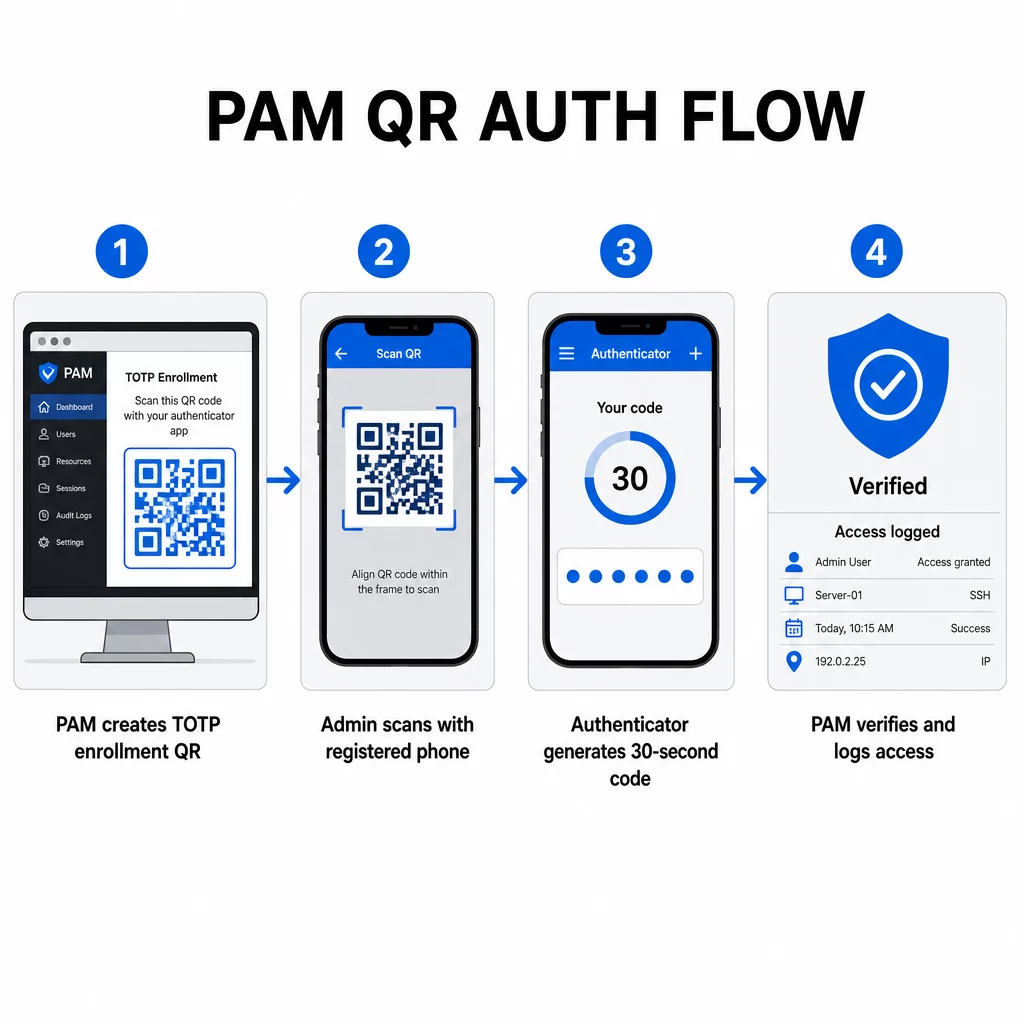
- Under tilmelding genererer systemet en delt hemmelig nøgle og koder den ind i en QR-kode som en URI formateret som `otpauth://totp/LABEL?secret=SECRET&issuer=ISSUER`
- Brugeren scanner denne QR-kode med en authenticator-app (såsom Google Authenticator, Microsoft Authenticator eller Okta Verify), som gemmer hemmeligheden lokalt på enheden
- Ved login anvender appen HOTP-algoritmen på en tidsbaseret tæller, der er afledt af den aktuelle Unix-tid, og genererer en engangskode, der som standard er gyldig i 30 sekunder
- Serveren udfører den samme beregning uafhængigt og accepterer koder fra det aktuelle og umiddelbart forudgående tidstrin for at tage højde for tidsforskydning
Da adgangskoden er afledt af tid og en enhedsbundet hemmelighed – ikke transmitteret over netværket – giver opsnapning af den under transmission ingen varig værdi. Hver kode er ubrugelig inden for 30 sekunder.
Platforme som CyberArk implementerer denne model direkte. Administratorer aktiverer QR-kodebaseret brugerregistrering under Indstillinger → Godkendelse → Platform → Sikkerhedsindstillinger → Godkendelsesmuligheder, og definerer derefter MFA-politikker, der udløser registreringsguiden ved første login. CyberArk Identity-mobilappen understøtter også en “Tilmeld med QR”-mulighed, hvor brugere scanner en kode, der præsenteres på Identity-portalen for at aktivere deres enhed som en MFA-faktor.
Opsætning af QR-kode MFA-registrering
For DevOps-ingeniører, der konfigurerer QR-baseret MFA i et PAM-miljø, følger den generelle registreringsproces disse trin uanset den specifikke platform:
- Aktiver QR-registrering i platformens godkendelsesindstillinger. De fleste virksomheds-PAM-systemer viser dette som en skifteknap under godkendelses- eller sikkerhedskonfigurationsmuligheder.
- Definer en MFA-politik der bestemmer, hvilke brugere eller roller der kræver MFA, hvornår det håndhæves, og hvad der sker ved første login.
- Præsenter registrerings-QR-koden for brugeren under deres første godkendte session. Koden koder den delte TOTP-hemmelighed i `otpauth://` URI-format.
- Vejled brugeren til at scanne koden ved hjælp af deres registrerede authenticator-app. Giv en manuel indtastningsmulighed (den rå hemmelige nøgle) til tilfælde, hvor kameraet ikke kan læse koden.
- Bekræft tilmeldingen ved at bede brugeren om at indsende en TOTP-kode, før opsætningen er fuldført, hvilket bekræfter, at den hemmelige nøgle blev overført korrekt.
- Generer og gem backup-gendannelseskoder så brugere ikke bliver låst ude, hvis de mister deres enhed.
For teams, der administrerer store udrulninger, kan denne tilmeldingsflow kombineres med en Dynamisk QR-kode generator giver dig mulighed for at opdatere, spore og tilbagekalde tilmeldingskoder centralt – vigtigt når legitimationsoplysninger skal roteres, eller når en enhed rapporteres tabt.
Spor og administrer autentificerings-QR-koder i stor skala Skal du udstede, opdatere eller tilbagekalde QR-koder på tværs af et distribueret team? Brug Dynamisk QR-kode generator til at oprette redigerbare koder med realtidsanalyse og centraliseret administration.
Dynamiske vs. statiske QR-koder i PAM-miljøer
Valget mellem statiske og dynamiske QR-koder har direkte sikkerhedsmæssige konsekvenser for PAM-arbejdsgange.
| FUNKTION | Statiske QR-koder | Dynamiske QR-koder |
|---|---|---|
| Indhold efter oprettelse | Fast, kan ikke ændres | Kan redigeres når som helst |
| Tilbagekaldelse | Kræver genudstedelse og omfordeling | Øjeblikkeligt, fra et centralt dashboard |
| STATISTIK | Ingen | Scan tidsstempler, enhedstyper, lokationer |
| Risiko for replay-angreb | Højere (kode er permanent) | Lavere (udløb og engangsbrugsindstillinger) |
| Bedste anvendelsestilfælde | Indhold med lav risiko, engangsindhold | Privilegeret adgang, følsomme arbejdsgange |
For PAM-autentificering og MFA-tilmelding foretrækkes dynamiske QR-koder stærkt. Hvis en enhed rapporteres tabt, kan en administrator øjeblikkeligt deaktivere den tilknyttede tilmeldingskode. Tidsbegrænsede koder forhindrer replay-angreb ved at gøre enhver opsnappet kode ubrugelig inden for få øjeblikke. Og scanningsanalyser giver et revisionsspor, der understøtter overholdelseskrav.
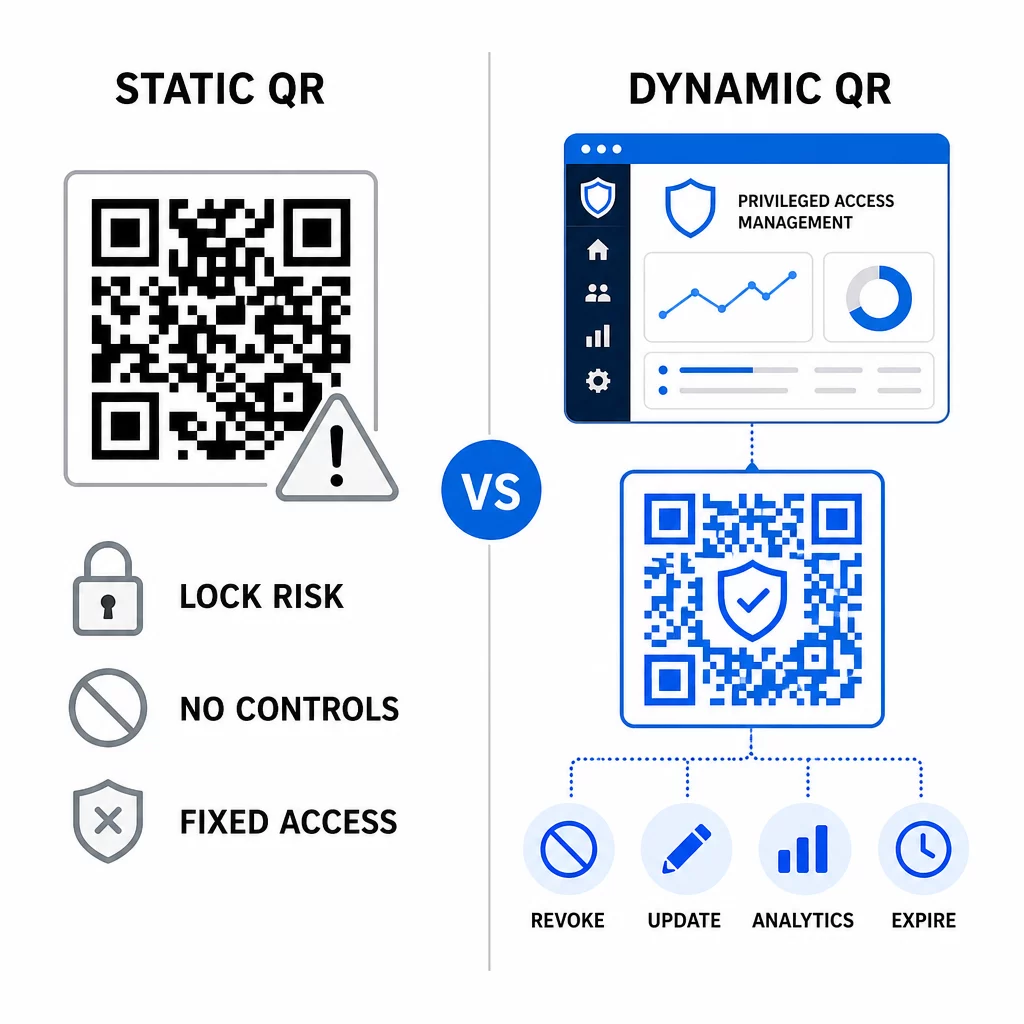
Statiske QR-koder kan stadig spille en rolle i interne anvendelsestilfælde med lavere risiko – såsom at linke til dokumentation eller skrivebeskyttede ressourcer – men de bør ikke bruges til autentificeringsflows, der involverer privilegeret adgang.
Vigtige sikkerhedsovervejelser for QR-baseret PAM-autentificering
Implementering af QR-kodeautentificering i et PAM-miljø introducerer sin egen angrebsflade. Det er afgørende at forstå disse risici og afbøde dem, før man ruller ud i produktion.
Sårbarhed ved tilmeldings-QR-kode. Den delte hemmelighed, der er kodet i en TOTP-tilmeldings-QR-kode, udløber ikke af sig selv. Hvis den kode fanges i et skærmbillede, videresendes via e-mail eller gemmes i en sikkerhedskopi, kan en angriber senere bruge den til at gentilmeldte en enhed og generere gyldige TOTP-koder på ubestemt tid. Afbødningen er ligetil: konfigurer tilmeldingskoder til at udløbe efter en enkelt vellykket scanning. Gennemgå og slet alle historiske tilmeldings-QR-koder, der er gemt i e-mailsystemer eller sikkerhedskopier, og gentilmeld berørte brugere med nye engangskoder.
QR-kode phishing (quishing). Angribere har dokumenteret kampagner, hvor de udgiver sig for at være MFA-tilmeldingsprocesser og sender e-mails, der instruerer brugere i at scanne en ondsindet QR-kode, der fører til en side til indsamling af legitimationsoplysninger. Træn dine brugere til at behandle uopfordrede QR-scanningsanmodninger med mistanke, uafhængigt verificere afsenderen, før de scanner, og bruge autentificeringsapps, der håndterer `otpauth://`-nyttelasten i et sandboxed miljø i stedet for at åbne vilkårlige URL'er. For yderligere vejledning, se QR-kode identitetsverifikation i cybersikkerhed.
Udfasning af SMS. NIST's vejledning om digital identitet fraråder udtrykkeligt brugen af SMS og taleopkald til out-of-band-autentificering på grund af risici som SIM-swapping, enhedsbyt og nummerflytning. TOTP-baseret QR-tilmelding med autentificeringsapps er et stærkere alternativ, som NIST anerkender som en gyldig out-of-band-mekanisme, når den leveres via en sikker sekundær kanal.
Enhedsbinding og biometri. At knytte QR-kodeautentificering til forhåndsregistrerede enheder tilføjer et hardwarelag, som SMS ikke kan levere. Tilføjelse af biometrisk verifikation – fingeraftryk eller ansigtsgenkendelse – skaber en trefaktormodel: noget du har (den registrerede enhed), noget du er (biometri) og den tidsbegrænsede kode (kontekstafhængig). For højrisikohandlinger skal du konfigurere kortere TOTP-vinduer eller kræve yderligere verificeringstrin.
Test før implementering. Altid test QR-kode autentificeringsflows på tværs af flere enheder, operativsystemer og autentificeringsapps, før de sendes til produktion. Verificer, at tilmeldingskoder udløber efter brug, at tilbagekaldelse fungerer som forventet, og at fallback-indgangsstier fungerer korrekt.
For et omfattende kig på at styrke din QR-kodeimplementering, se bedste praksis for QR-kodesikkerhed inden for cyberforsvar og bedste praksis for sikker QR-kodegenerering.
Integrering af QR-autentificering med eksisterende MFA og SSO
QR-koder fungerer godt sammen med eksisterende autentificeringsinfrastruktur i stedet for at erstatte den fuldstændigt. I MFA-opsætninger fungerer QR-baseret TOTP som “noget du har”-faktoren, der supplerer en adgangskode eller biometri. I SSO-miljøer kan en QR-kode fungere som udfordrings-respons-trinnet, der bekræfter enhedsbesiddelse, før der udstedes et sessions-token. For en detaljeret sammenligning af disse tilgange, se QR-koder vs. adgangskoder i SSO.
Tilmeldingsmønsteret strækker sig også ud over PAM. Teams, der allerede bruger adgangskodemanagere som LastPass, kan følge en næsten identisk QR-scanningsopsætningsproces – scan for at linke, bekræft med en TOTP-kode, gem gendannelseskoder – hvilket gør arbejdsgangen velkendt for brugere, der allerede har opsat MFA andre steder. Se LastPass QR-kode opsætningsguide for en trin-for-trin reference.
Hvert godkendelsesforsøg i et velkonfigureret system bør generere en logpost, der registrerer QR-kodeidentifikatoren, enhedsinformation, biometrisk resultat hvis relevant, tidsstempel og geografisk placering. Disse logfiler er afgørende for compliance-revisioner, anomalidetektion og hændelsesrespons.
Avancerede funktioner: Analyse, tilpasning og realtidskontrol
Virksomheds-QR-kodeplatforme tilføjer funktioner ud over grundlæggende kodegenerering, som er direkte relevante for PAM-operationer.
Statistik i realtid lader sikkerhedsteams overvåge godkendelsesmønstre, som de sker. Metrikker, der er værd at spore, inkluderer scanningstidsstempler, enhedstyper, geografiske placeringer og baselinjer for brugeradfærd. Algoritmer, der markerer afvigelser – en usædvanlig enhedstype, en scanning fra et uventet land, en stigning i mislykkede forsøg – kan udløse trinvis godkendelse eller automatiske advarsler. For mere om, hvordan disse metrikker ser ud i praksis, se hvordan QR-koder forenkler multifaktorautentificering.
Brandede godkendelseskoder tjener en praktisk sikkerhedsfunktion ud over æstetik. Når din organisation bruger konsekvente, brandede QR-koder med firmalogoer og farveskemaer, udvikler brugere en visuel baseline for legitime godkendelsesanmodninger. En kode, der afviger fra denne baseline, bliver et advarselstegn. At sikre tilstrækkelig farvekontrast – et forhold på mindst 4,5:1 – holder også koder pålideligt scanbare på tværs af enheder og lysforhold.
Dynamisk kontrol er den funktion, der mest direkte reducerer driftsrisikoen. Når en medarbejder forlader virksomheden, deaktiverer du øjeblikkeligt deres koder fra et centralt dashboard uden at vente på cyklusser for legitimationsrotation. Når en sikkerhedshændelse opdages, tilbagekalder og genudsteder du uden at genudskrive. Den Dynamisk QR-kode generator på Pageloot understøtter alle disse arbejdsgange, med realtids scanningsovervågning og redigerbare destinationer indbygget.
For teams, der håndterer krypterede legitimationsoplysninger eller token-data inden for QR-nyttelast, se krypterede QR-koder til godkendelsesplatforme for vejledning om AES- og RSA-krypteringsmetoder.
Brancheapplikationer
Den samme QR-baserede PAM-model gælder på tværs af brancher med forskellige privilegerede adgangsprofiler.
Inden for bank- og finansielle tjenester, bruger administratorer tidsfølsomme QR-koder til at få adgang til kernebankingsystemer, handelsplatforme og kundedatabaser. Hver privilegeret session logges mod den specifikke kode, der blev brugt, hvilket giver et klart revisionsspor for lovgivningsmæssig overholdelse.
Inden for softwareudvikling, distribuerede teams bruger QR-koder til at få adgang til produktionssystemer, kodelagre og udrulningspipelines uden statiske legitimationsoplysninger. Dynamiske koder fremskynder onboarding og gør offboarding øjeblikkelig – ingen ventetid på, at adgangskodrotationer spredes.
Inden for sundhedspleje, klinisk personale, der bevæger sig mellem arbejdsstationer, kan godkende hurtigt ved at scanne i stedet for at taste, hvilket reducerer login-friktion, samtidig med at de revisionsspor, der kræves af HIPAA, opretholdes.
Mønsteret er konsekvent: QR-koder kombineret med dynamisk administration og analyse giver sikkerhedsteams den kontrol, de har brug for, uden at sænke hastigheden for de brugere, der er afhængige af hurtig og pålidelig adgang. QR-kodeautentificering er ikke en erstatning for en moden PAM-strategi – det er en mekanisme, der styrker en af PAM's mest sårbare komponenter. Ved at erstatte statiske legitimationsoplysninger med tidsbegrænsede, enhedsbundne koder, håndhæve engangsregistrering og overvåge hver godkendelsesbegivenhed lukker du de huller for phishing og tyveri af legitimationsoplysninger, som ældre metoder efterlader åbne. Start med at aktivere QR-registrering i din PAM-platforms godkendelsesindstillinger, definer dine MFA-politikker, og brug dynamiske koder med en centraliseret administrationsplatform til at opretholde realtidskontrol over adgang.
Opret og administrer QR-koder til dine godkendelsesarbejdsgange Brug QR-kodegenerator for at komme i gang, eller udforsk Dynamisk QR-kode generator for registreringskoder, du kan opdatere, spore og tilbagekalde fra et enkelt dashboard.
Ofte stillede spørgsmål
Under tilmeldingen genererer PAM-systemet en delt hemmelig nøgle og koder den som en QR-kode ved hjælp af URI-formatet `otpauth://totp/`. Brugeren scanner denne med en authenticator-app, som gemmer hemmeligheden på enheden. Ved login beregner appen og serveren uafhængigt en 30-sekunders adgangskode ud fra den hemmelige nøgle og den aktuelle tid. Fordi koden er tidsbegrænset og enhedsbegrænset, giver opsnapning af den under transmission ingen varig værdi for en angriber.
Sårbarheden i tilmeldings-QR-koden er den mest almindeligt oversete risiko. TOTP-hemmeligheden, der er indlejret i en tilmeldings-QR-kode, udløber ikke af sig selv, så ethvert skærmbillede, videresendt e-mail eller sikkerhedskopi af den kode forbliver brugbar på ubestemt tid. Afhjælp dette ved at konfigurere tilmeldingskoder til at udløbe efter en enkelt vellykket scanning, og revider dine e-mail- og backupsystemer for at slette eventuelle lagrede historiske tilmeldingskoder.
Foretræk altid dynamiske QR-koder til godkendelse og MFA-tilmeldingsforløb. Dynamiske koder kan øjeblikkeligt tilbagekaldes, hvis en enhed mistes, opdateres uden at omfordele fysiske materialer og overvåges med realtidsanalyse. Statiske koder er kun passende til indhold med lav risiko og skrivebeskyttet indhold, hvor øjeblikkelig tilbagekaldelse og revisionslogning ikke er påkrævet.