Stai faticando a proteggere gli account privilegiati senza creare attrito per i tuoi amministratori? Le password statiche e i metodi MFA legacy lasciano gli ambienti PAM esposti a phishing, furto di credenziali e dirottamento di sessione. Questa pagina spiega come l'autenticazione basata su codice QR affronta queste lacune, coprendo il panorama delle minacce, come funziona l'iscrizione, la meccanica TOTP e le pratiche di sicurezza che il tuo team deve implementare correttamente.
Perché l'autenticazione PAM tradizionale è insufficiente
I sistemi di gestione degli accessi privilegiati proteggono gli account più sensibili della tua organizzazione. Quando questi account si basano su password statiche, credenziali condivise o MFA basata su SMS, gli aggressori hanno percorsi ben documentati per sfruttarli.
Phishing e furto di credenziali rimangono il punto di ingresso più comune. Gli utenti privilegiati sono presi di mira proprio perché i loro account sbloccano sistemi critici. Anche gli amministratori esperti possono essere ingannati da pagine di accesso false e convincenti, soprattutto quando gli aggressori utilizzano l'ingegneria sociale per impersonare fornitori o il supporto IT. Una volta rubate le credenziali, gli aggressori si muovono lateralmente, aumentano i privilegi e mantengono un accesso persistente.
Account condivisi aggravano il problema. Quando più amministratori utilizzano le stesse credenziali, la responsabilità individuale scompare. Le indagini sulle violazioni si bloccano, il monitoraggio della conformità si interrompe e una singola password compromessa sblocca l'accesso a più sistemi.
Dirottamento di sessione presenta un terzo rischio importante. Dopo un evento di autenticazione legittimo, gli aggressori possono intercettare i token di sessione, sfruttare i cookie o utilizzare tecniche man-in-the-middle per impersonare gli utenti autenticati, il tutto senza mai conoscere la password originale. I token di sessione persistenti rendono questi attacchi particolarmente difficili da rilevare, poiché l'aggressore si confonde con il normale traffico amministrativo.
Queste vulnerabilità condividono una causa radice: l'autenticazione che dipende da segreti statici e riutilizzabili. L'autenticazione basata su codice QR affronta direttamente questo problema.
Come funziona l'autenticazione con codice QR in PAM
L'autenticazione con codice QR sostituisce le credenziali statiche con codici dinamici e specifici del dispositivo. Invece di digitare una password, un amministratore scansiona un codice QR con un dispositivo mobile registrato. Il dispositivo legge il codice, applica chiavi sicure memorizzate nell'hardware e completa l'autenticazione in pochi secondi.
L'implementazione più comune negli ambienti PAM aziendali abbina i codici QR a TOTP (Password Monouso Basata sul Tempo) come definito in RFC 6238. Ecco come funziona questo flusso:
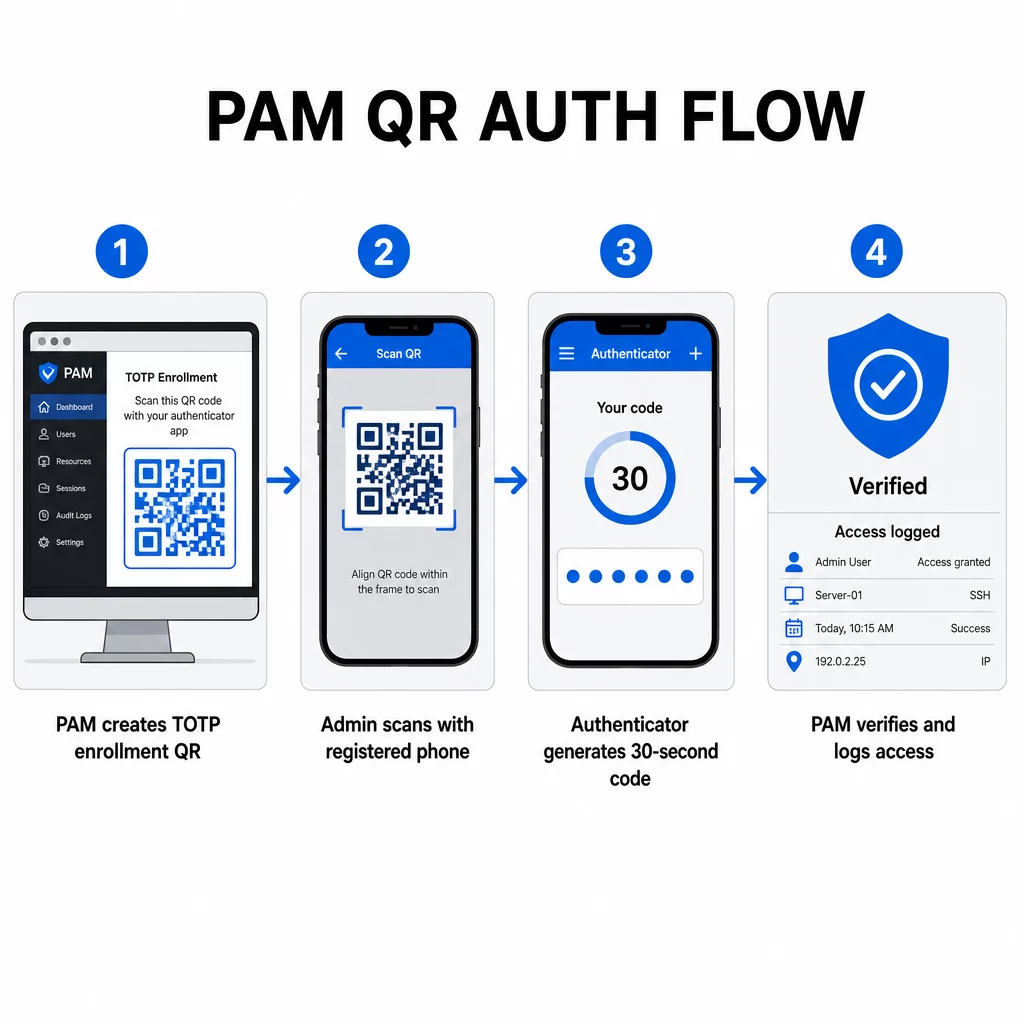
- Durante l'iscrizione, il sistema genera una chiave segreta condivisa e la codifica in un codice QR come URI formattato come `otpauth://totp/LABEL?secret=SECRET&issuer=ISSUER`
- L'utente scansiona questo codice QR con un'app di autenticazione (come Google Authenticator, Microsoft Authenticator o Okta Verify), che memorizza il segreto localmente sul dispositivo
- Al momento dell'accesso, l'app applica l'algoritmo HOTP a un contatore basato sul tempo derivato dall'ora Unix corrente, generando una password monouso valida per 30 secondi per impostazione predefinita
- Il server esegue lo stesso calcolo in modo indipendente e accetta codici dal passo temporale corrente e immediatamente precedente per tenere conto della deriva dell'orologio
Poiché la password è derivata dal tempo e da un segreto legato al dispositivo – non trasmessa sulla rete – intercettarla in transito non fornisce alcun valore duraturo. Ogni codice è inutile entro 30 secondi.
Piattaforme come CyberArk implementano direttamente questo modello. Gli amministratori abilitano la registrazione utente basata su codice QR in Impostazioni → Autenticazione → Piattaforma → Impostazioni di sicurezza → Opzioni di autenticazione, quindi definiscono le policy MFA che attivano la procedura guidata di registrazione al primo accesso. L'app mobile CyberArk Identity supporta anche un'opzione “Registra con QR”, dove gli utenti scansionano un codice presentato sul portale Identity per attivare il proprio dispositivo come fattore MFA.
Configurazione della registrazione MFA con codice QR
Per gli ingegneri DevOps che configurano l'MFA basato su QR in un ambiente PAM, il processo di registrazione generale segue questi passaggi indipendentemente dalla piattaforma specifica:
- Abilitare la registrazione QR nelle impostazioni di autenticazione della piattaforma. La maggior parte dei sistemi PAM aziendali espone questa opzione come un interruttore sotto le opzioni di configurazione dell'autenticazione o della sicurezza.
- Definire una policy MFA che determina quali utenti o ruoli richiedono l'MFA, quando viene applicata e cosa succede al primo accesso.
- Presentare il codice QR di registrazione all'utente durante la sua prima sessione autenticata. Il codice codifica il segreto TOTP condiviso nel formato URI `otpauth://`.
- Guidare l'utente a scansionare il codice utilizzando la loro app di autenticazione registrata. Fornire un fallback di immissione manuale (la chiave segreta grezza) per i casi in cui la fotocamera non riesce a leggere il codice.
- Verificare l'iscrizione chiedendo all'utente di inviare un codice TOTP prima di completare la configurazione, confermando che il segreto è stato trasferito correttamente.
- Generare e archiviare codici di recupero di backup in modo che gli utenti non vengano bloccati se perdono il loro dispositivo.
Per i team che gestiscono implementazioni su larga scala, abbinare questo flusso di iscrizione a un Generatore di QR code dinamici consente di aggiornare, tracciare e revocare i codici di iscrizione centralmente – importante quando le credenziali devono essere ruotate o quando un dispositivo viene segnalato come smarrito.
Tracciare e Gestire i Codici QR di Autenticazione su Larga Scala Hai bisogno di emettere, aggiornare o revocare codici QR in un team distribuito? Usa il Generatore di QR code dinamici per creare codici modificabili con analisi in tempo reale e gestione centralizzata.
Codici QR Dinamici vs. Statici negli Ambienti PAM
La scelta tra codici QR statici e dinamici ha implicazioni dirette sulla sicurezza per i flussi di lavoro PAM.
| FUNZIONE | Codici QR statici | Codici QR Dinamici |
|---|---|---|
| Contenuto dopo la creazione | Fisso, non modificabile | Modificabile in qualsiasi momento |
| Revoca | Richiede la riemissione e la ridistribuzione | Istantaneo, da una dashboard centrale |
| STATISTICHE | Nessuno | Timestamp di scansione, tipi di dispositivo, posizioni |
| Rischio di attacco di replay | Maggiore (il codice è permanente) | Minore (opzioni di scadenza e monouso) |
| Miglior caso d'uso | Contenuto a basso rischio, una tantum | Accesso privilegiato, flussi di lavoro sensibili |
Per l'autenticazione PAM e l'iscrizione MFA, i codici QR dinamici sono fortemente preferiti. Se un dispositivo viene segnalato come smarrito, un amministratore può disattivare immediatamente il codice di iscrizione associato. I codici a tempo limitato prevengono gli attacchi di replay rendendo qualsiasi codice intercettato inutile in pochi istanti. E l'analisi delle scansioni fornisce una traccia di controllo che supporta i requisiti di conformità.
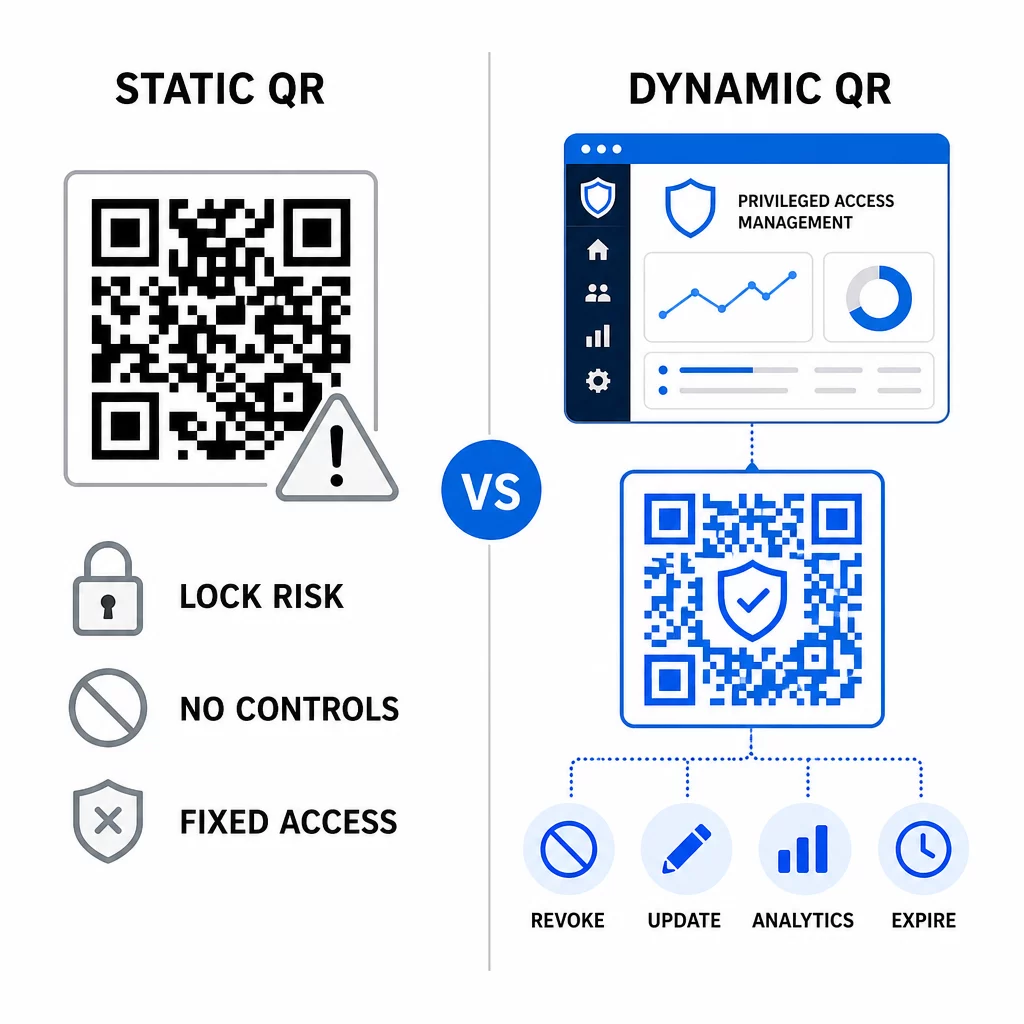
I codici QR statici possono ancora svolgere un ruolo in casi d'uso interni a basso rischio – come il collegamento a documentazione o risorse di sola lettura – ma non dovrebbero essere utilizzati per flussi di autenticazione che coinvolgono l'accesso privilegiato.
Considerazioni chiave sulla sicurezza per l'autenticazione PAM basata su QR
L'implementazione dell'autenticazione tramite codice QR in un ambiente PAM introduce una propria superficie di attacco. Comprendere e mitigare questi rischi è essenziale prima di implementare in produzione.
Vulnerabilità del codice QR di iscrizione. Il segreto condiviso codificato in un codice QR di iscrizione TOTP non scade da solo. Se quel codice viene catturato in uno screenshot, inoltrato via email o archiviato in un backup, un attaccante può successivamente usarlo per re-iscrivere un dispositivo e generare codici TOTP validi indefinitamente. La mitigazione è semplice: configurare i codici di iscrizione in modo che scadano dopo una singola scansione riuscita. Controllare ed eliminare qualsiasi codice QR di iscrizione storico archiviato in sistemi di posta elettronica o backup, e re-iscrivere gli utenti interessati con nuovi codici monouso.
Phishing tramite codice QR (quishing). Gli attaccanti hanno documentato campagne in cui impersonano i processi di registrazione MFA, inviando email che istruiscono gli utenti a scansionare un codice QR malevolo che porta a una pagina di raccolta credenziali. Addestra i tuoi utenti a trattare con sospetto le richieste di scansione QR non sollecitate, a verificare indipendentemente il mittente prima di scansionare e a utilizzare app di autenticazione che gestiscono il payload `otpauth://` all'interno di un ambiente sandbox piuttosto che aprire URL arbitrari. Per una guida più approfondita, vedi Verifica dell'identità tramite codice QR nella cybersecurity.
Deprecazione degli SMS. Le linee guida sull'identità digitale del NIST scoraggiano esplicitamente l'uso di SMS e chiamate vocali per l'autenticazione out-of-band a causa di rischi come lo scambio di SIM, lo scambio di dispositivi e il porting del numero. La registrazione QR basata su TOTP con app di autenticazione è un'alternativa più robusta che il NIST riconosce come un valido meccanismo out-of-band quando fornita tramite un canale secondario sicuro.
Associazione del dispositivo e biometria. Collegare l'autenticazione tramite codice QR a dispositivi preregistrati aggiunge un livello hardware che gli SMS non possono fornire. L'aggiunta della verifica biometrica – impronta digitale o riconoscimento facciale – crea un modello a tre fattori: qualcosa che hai (il dispositivo registrato), qualcosa che sei (biometria) e il codice a tempo (dipendente dal contesto). Per operazioni ad alto rischio, configura finestre TOTP più brevi o richiedi passaggi di verifica aggiuntivi.
Test prima del deployment. Sempre testare i flussi di autenticazione tramite codice QR su più dispositivi, sistemi operativi e app di autenticazione prima di passare alla produzione. Verifica che i codici di registrazione scadano dopo l'uso, che la revoca funzioni come previsto e che i percorsi di accesso di fallback funzionino correttamente.
Per uno sguardo completo su come rafforzare la tua implementazione del codice QR, vedi le migliori pratiche per la sicurezza dei codici QR nella difesa informatica e migliori pratiche per la generazione sicura di codici QR.
Integrare l'autenticazione QR con MFA e SSO esistenti
I codici QR funzionano bene insieme all'infrastruttura di autenticazione esistente piuttosto che sostituirla completamente. Nelle configurazioni MFA, il TOTP basato su QR agisce come fattore “qualcosa che hai”, integrando una password o una biometria. Negli ambienti SSO, un codice QR può servire come passaggio di sfida-risposta che conferma il possesso del dispositivo prima di emettere un token di sessione. Per un confronto dettagliato di questi approcci, vedi Codici QR vs. password in SSO.
Il modello di registrazione si estende anche oltre il PAM. I team che utilizzano già gestori di password come LastPass possono seguire un processo di configurazione tramite scansione QR quasi identico – scansiona per collegare, conferma con un codice TOTP, memorizza i codici di recupero – rendendo il flusso di lavoro familiare agli utenti che hanno già configurato l'MFA altrove. Vedi la Guida alla configurazione del codice QR di LastPass per un riferimento passo-passo.
Ogni tentativo di autenticazione in un sistema ben configurato dovrebbe generare una voce di registro che catturi l'identificatore del codice QR, le informazioni sul dispositivo, il risultato biometrico se applicabile, il timestamp e la posizione geografica. Questi registri sono fondamentali per gli audit di conformità, il rilevamento delle anomalie e la risposta agli incidenti.
Funzionalità Avanzate: Analisi, Personalizzazione e Controllo in Tempo Reale
Le piattaforme di codici QR aziendali aggiungono funzionalità che vanno oltre la generazione di codici di base e che sono direttamente rilevanti per le operazioni PAM.
Statistiche in tempo reale consentono ai team di sicurezza di monitorare i modelli di autenticazione man mano che si verificano. Le metriche da tenere traccia includono i timestamp delle scansioni, i tipi di dispositivo, le posizioni geografiche e le linee di base del comportamento degli utenti. Algoritmi che segnalano deviazioni – un tipo di dispositivo insolito, una scansione da un paese inaspettato, un picco di tentativi falliti – possono attivare l'autenticazione a più fattori o avvisi automatici. Per maggiori informazioni su come queste metriche si presentano nella pratica, vedi come i codici QR semplificano l'autenticazione a più fattori.
Codici di autenticazione brandizzati svolgono una funzione di sicurezza pratica che va oltre l'estetica. Quando la tua organizzazione utilizza codici QR coerenti e brandizzati con loghi aziendali e schemi di colori, gli utenti sviluppano una base visiva per le richieste di autenticazione legittime. Un codice che si discosta da tale base diventa un segnale di avvertimento. Garantire un contrasto cromatico sufficiente – un rapporto di almeno 4.5:1 – mantiene inoltre i codici scansionabili in modo affidabile su tutti i dispositivi e in diverse condizioni di illuminazione.
Controllo dinamico è la funzionalità che riduce più direttamente il rischio operativo. Quando un dipendente se ne va, disattivi i suoi codici istantaneamente da una dashboard centrale senza attendere i cicli di rotazione delle credenziali. Quando viene rilevato un incidente di sicurezza, revochi e riemetti senza ristampare. Il Generatore di QR code dinamici su Pageloot supporta tutti questi flussi di lavoro, con tracciamento delle scansioni in tempo reale e destinazioni modificabili integrate.
Per i team che gestiscono credenziali crittografate o dati di token all'interno di payload QR, vedi codici QR crittografati per piattaforme di autenticazione per indicazioni sugli approcci di crittografia AES e RSA.
Applicazioni Settoriali
Lo stesso modello PAM basato su QR si applica a settori diversi con profili di accesso privilegiato differenti.
Nel settore bancario e dei servizi finanziari, gli amministratori utilizzano codici QR sensibili al tempo per accedere ai sistemi bancari centrali, alle piattaforme di trading e ai database dei clienti. Ogni sessione privilegiata viene registrata rispetto al codice specifico utilizzato, fornendo una chiara traccia di audit per la conformità normativa.
Nel sviluppo software, i team distribuiti utilizzano i codici QR per accedere a sistemi di produzione, repository di codice e pipeline di deployment senza credenziali statiche. I codici dinamici accelerano l'onboarding e rendono immediato l'offboarding – senza attendere la propagazione delle rotazioni delle password.
Nel assistenza sanitaria, il personale clinico che si sposta tra le workstation può autenticarsi rapidamente scansionando anziché digitando, riducendo l'attrito del login pur mantenendo le tracce di audit richieste da HIPAA.
Il modello è coerente: i codici QR combinati con la gestione dinamica e l'analisi offrono ai team di sicurezza il controllo di cui hanno bisogno senza rallentare gli utenti che dipendono da un accesso rapido e affidabile. L'autenticazione tramite codice QR non è un sostituto di una strategia PAM matura – è un meccanismo che rafforza uno dei componenti più vulnerabili di PAM. Sostituendo le credenziali statiche con codici vincolati al tempo e al dispositivo, applicando l'iscrizione monouso e monitorando ogni evento di autenticazione, si chiudono le lacune di phishing e furto di credenziali che i metodi legacy lasciano aperte. Inizia abilitando l'iscrizione QR nelle impostazioni di autenticazione della tua piattaforma PAM, definisci le tue politiche MFA e utilizza codici dinamici con una piattaforma di gestione centralizzata per mantenere il controllo in tempo reale sull'accesso.
Crea e Gestisci Codici QR per i Tuoi Flussi di Lavoro di Autenticazione Utilizzare il Generatore di codici QR per iniziare, o esplora il Generatore di QR code dinamici per i codici di iscrizione che puoi aggiornare, tracciare e revocare da un'unica dashboard.
Domande frequenti
Durante l'iscrizione, il sistema PAM genera una chiave segreta condivisa e la codifica come codice QR utilizzando il formato URI `otpauth://totp/`. L'utente lo scansiona con un'app di autenticazione, che memorizza il segreto sul dispositivo. Al momento dell'accesso, l'app e il server calcolano indipendentemente un passcode di 30 secondi da quel segreto e dall'ora corrente. Poiché il codice è vincolato al tempo e al dispositivo, intercettarlo in transito non fornisce alcun valore duraturo a un attaccante.
La vulnerabilità del codice QR di registrazione è il rischio più comunemente trascurato. Il segreto TOTP incorporato in un codice QR di registrazione non scade da solo, quindi qualsiasi screenshot, inoltro via email o copia di backup di quel codice rimane utilizzabile a tempo indeterminato. Mitiga questo configurando i codici di registrazione in modo che scadano dopo una singola scansione riuscita, e controlla i tuoi sistemi di email e di backup per eliminare qualsiasi codice di registrazione storico memorizzato.
Preferire sempre i codici QR dinamici per i flussi di autenticazione e di registrazione MFA. I codici dinamici possono essere revocati istantaneamente se un dispositivo viene smarrito, aggiornati senza ridistribuire materiali fisici e monitorati con analisi in tempo reale. I codici statici sono appropriati solo per contenuti a basso rischio e di sola lettura, dove la revoca istantanea e la registrazione degli audit non sono richieste.