¿Le cuesta proteger las cuentas privilegiadas sin crear fricción para sus administradores? Las contraseñas estáticas y los métodos MFA heredados dejan los entornos PAM expuestos a la suplantación de identidad (phishing), el robo de credenciales y el secuestro de sesiones. Esta página explica cómo la autenticación basada en códigos QR aborda esas deficiencias, cubriendo el panorama de amenazas, cómo funciona la inscripción, la mecánica de TOTP y las prácticas de seguridad que su equipo necesita implementar correctamente.
Por qué la autenticación PAM tradicional se queda corta
Los sistemas de gestión de acceso privilegiado protegen las cuentas más sensibles de su organización. Cuando esas cuentas dependen de contraseñas estáticas, credenciales compartidas o MFA basado en SMS, los atacantes tienen rutas bien documentadas para explotarlas.
Phishing y robo de credenciales siguen siendo el punto de entrada más común. Los usuarios privilegiados son el objetivo precisamente porque sus cuentas desbloquean sistemas críticos. Incluso los administradores experimentados pueden ser engañados por páginas de inicio de sesión falsas convincentes, especialmente cuando los atacantes utilizan ingeniería social para suplantar a proveedores o soporte de TI. Una vez que se roban las credenciales, los atacantes se mueven lateralmente, escalan privilegios y mantienen un acceso persistente.
Cuentas compartidas agravan el problema. Cuando varios administradores utilizan las mismas credenciales, la responsabilidad individual desaparece. Las investigaciones de brechas se estancan, la supervisión del cumplimiento se interrumpe y una única contraseña comprometida desbloquea el acceso a múltiples sistemas.
Secuestro de sesión presenta un tercer riesgo importante. Después de un evento de autenticación legítimo, los atacantes pueden interceptar tokens de sesión, explotar cookies o utilizar técnicas de intermediario (man-in-the-middle) para suplantar a usuarios autenticados, todo ello sin conocer nunca la contraseña original. Los tokens de sesión persistentes hacen que estos ataques sean especialmente difíciles de detectar, ya que el atacante se mezcla con el tráfico administrativo normal.
Estas vulnerabilidades comparten una causa raíz: la autenticación que depende de secretos estáticos y reutilizables. La autenticación basada en códigos QR aborda esto directamente.
Cómo funciona la autenticación con código QR en PAM
La autenticación con código QR reemplaza las credenciales estáticas con códigos dinámicos y específicos del dispositivo. En lugar de escribir una contraseña, un administrador escanea un código QR con un dispositivo móvil registrado. El dispositivo lee el código, aplica claves seguras almacenadas en el hardware y completa la autenticación en segundos.
La implementación más común en entornos PAM empresariales combina códigos QR con TOTP (Contraseña de un solo uso basada en el tiempo) tal como se define en RFC 6238. Así es como funciona ese flujo:
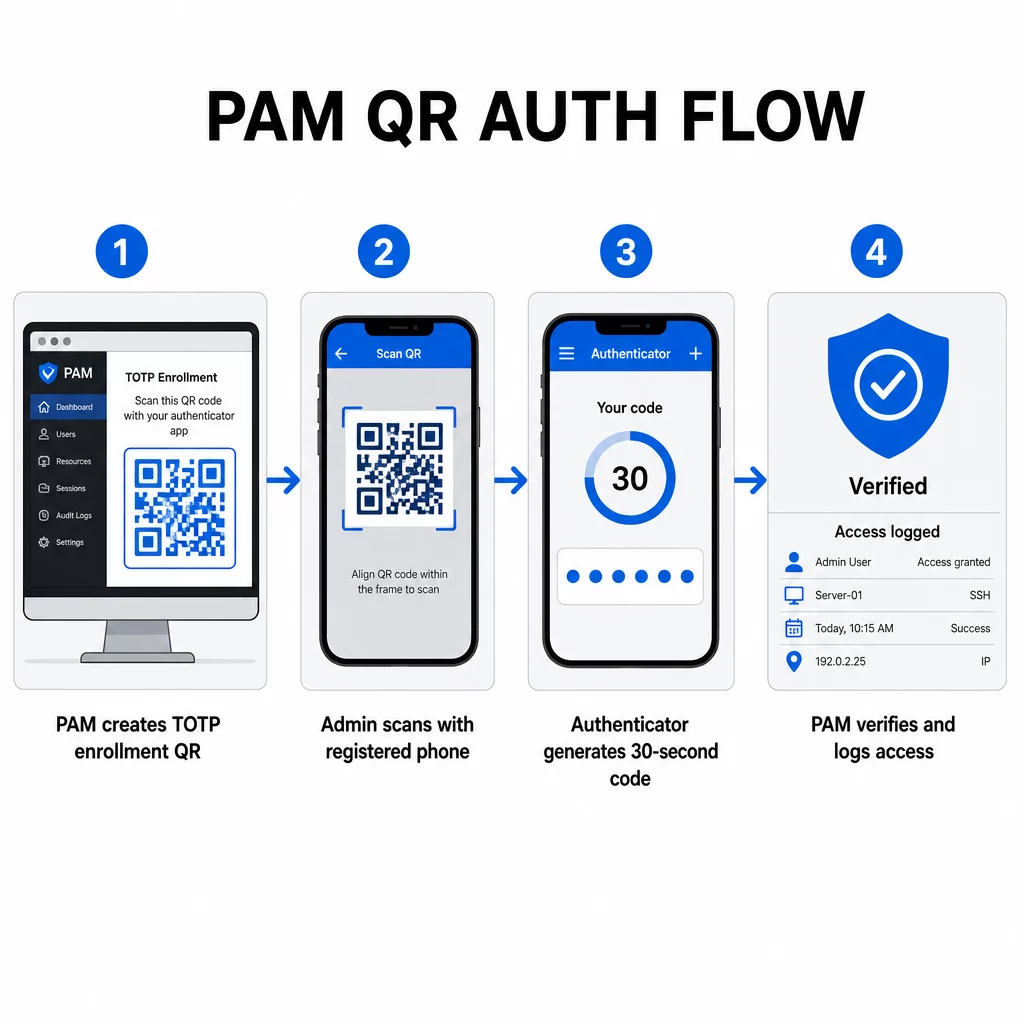
- Durante la inscripción, el sistema genera una clave secreta compartida y la codifica en un código QR como una URI con el formato `otpauth://totp/LABEL?secret=SECRET&issuer=ISSUER`
- El usuario escanea este código QR con una aplicación de autenticación (como Google Authenticator, Microsoft Authenticator u Okta Verify), que almacena el secreto localmente en el dispositivo
- Al iniciar sesión, la aplicación aplica el algoritmo HOTP a un contador basado en el tiempo derivado de la hora Unix actual, generando una contraseña de un solo uso válida por 30 segundos por defecto
- El servidor realiza el mismo cálculo de forma independiente y acepta códigos del paso de tiempo actual e inmediatamente anterior para tener en cuenta la deriva del reloj
Dado que la contraseña se deriva del tiempo y de un secreto vinculado al dispositivo – no se transmite por la red – interceptarla en tránsito no proporciona ningún valor duradero. Cada código es inútil en 30 segundos.
Plataformas como CyberArk implementan este modelo directamente. Los administradores habilitan la inscripción de usuarios basada en códigos QR en Configuración → Autenticación → Plataforma → Configuración de seguridad → Opciones de autenticación, luego definen políticas de MFA que activan el asistente de inscripción en el primer inicio de sesión. La aplicación móvil CyberArk Identity también admite una opción de “Inscribirse con QR”, donde los usuarios escanean un código presentado en el portal de Identity para activar su dispositivo como un factor de MFA.
Configuración de la inscripción de MFA con código QR
Para los ingenieros de DevOps que configuran MFA basada en QR en un entorno PAM, el proceso general de inscripción sigue estos pasos, independientemente de la plataforma específica:
- Habilitar la inscripción QR en la configuración de autenticación de la plataforma. La mayoría de los sistemas PAM empresariales exponen esto como un interruptor en las opciones de configuración de autenticación o seguridad.
- Definir una política de MFA que determina qué usuarios o roles requieren MFA, cuándo se aplica y qué sucede en el primer inicio de sesión.
- Presentar el código QR de inscripción al usuario durante su primera sesión autenticada. El código codifica el secreto TOTP compartido en formato URI `otpauth://`.
- Guiar al usuario para que escanee el código usando su aplicación de autenticación registrada. Proporcione una opción de entrada manual de respaldo (la clave secreta sin procesar) para los casos en que la cámara no pueda leer el código.
- Verificar la inscripción pidiendo al usuario que envíe un código TOTP antes de completar la configuración, confirmando que el secreto se transfirió correctamente.
- Generar y almacenar códigos de recuperación de respaldo para que los usuarios no queden bloqueados si pierden su dispositivo.
Para equipos que gestionan implementaciones a gran escala, combinar este flujo de inscripción con un Generador de códigos QR dinámicos le permite actualizar, rastrear y revocar códigos de inscripción de forma centralizada – importante cuando las credenciales necesitan rotar o cuando se informa de la pérdida de un dispositivo.
Rastrear y Gestionar Códigos QR de Autenticación a Escala ¿Necesita emitir, actualizar o revocar códigos QR en un equipo distribuido? Utilice el Generador de códigos QR dinámicos para crear códigos editables con análisis en tiempo real y gestión centralizada.
Códigos QR Dinámicos vs. Estáticos en Entornos PAM
La elección entre códigos QR estáticos y dinámicos tiene implicaciones de seguridad directas para los flujos de trabajo PAM.
| FUNCIÓN | Códigos QR Estáticos | Códigos QR dinámicos |
|---|---|---|
| Contenido después de la creación | Fijo, no se puede cambiar | Editable en cualquier momento |
| Revocación | Requiere reemisión y redistribución | Instantáneo, desde un panel central |
| ESTADÍSTICAS | Ninguno | Registra marcas de tiempo, tipos de dispositivos, ubicaciones |
| Riesgo de ataque de repetición | Mayor (el código es permanente) | Menor (opciones de caducidad y un solo uso) |
| Mejor caso de uso | Contenido de bajo riesgo y de un solo uso | Acceso privilegiado, flujos de trabajo sensibles |
Para la autenticación PAM y la inscripción MFA, se prefieren encarecidamente los códigos QR dinámicos. Si se informa de la pérdida de un dispositivo, un administrador puede desactivar el código de inscripción asociado de inmediato. Los códigos con límite de tiempo evitan los ataques de repetición al hacer que cualquier código interceptado sea inútil en cuestión de momentos. Y los análisis de escaneo proporcionan una pista de auditoría que respalda los requisitos de cumplimiento.
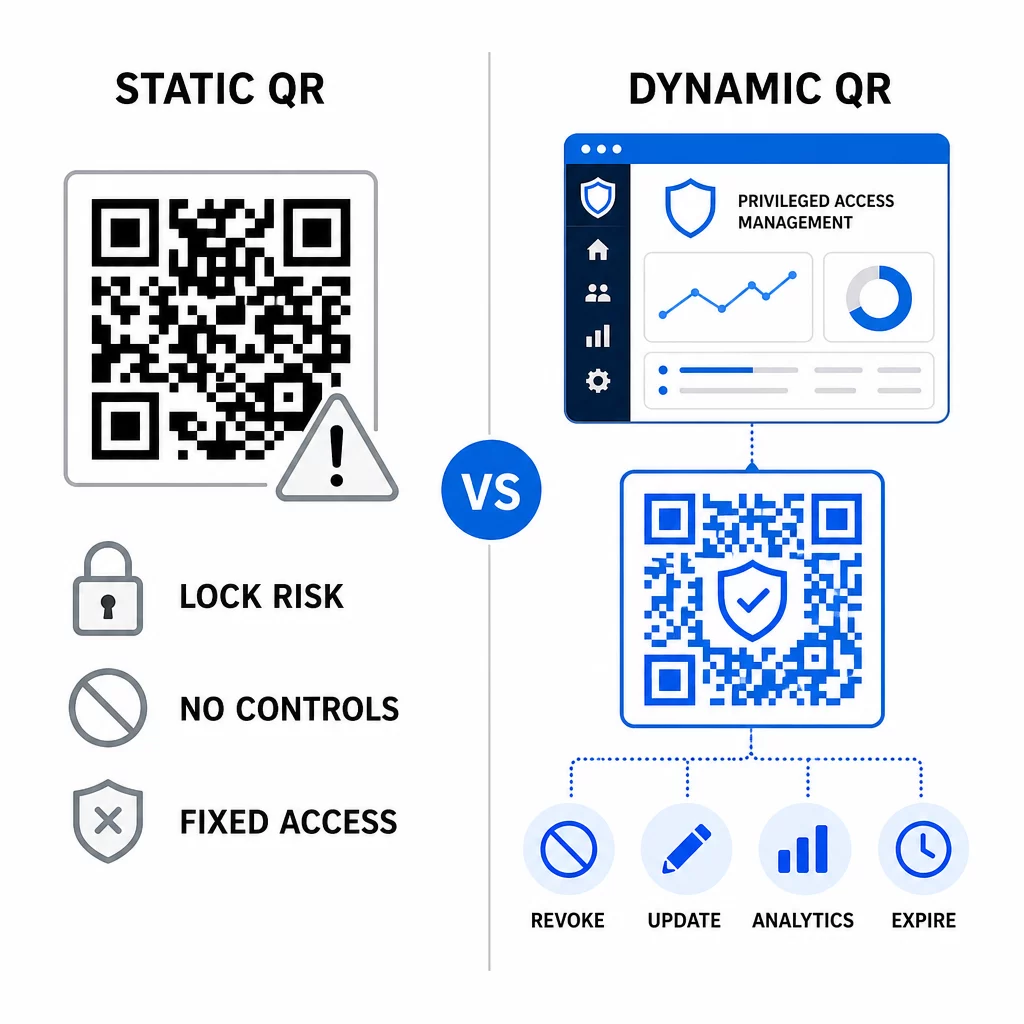
Los códigos QR estáticos aún pueden desempeñar un papel en casos de uso internos de menor riesgo – como vincular a documentación o recursos de solo lectura – pero no deben usarse para flujos de autenticación que impliquen acceso privilegiado.
Consideraciones clave de seguridad para la autenticación PAM basada en QR
La implementación de la autenticación con códigos QR en un entorno PAM introduce su propia superficie de ataque. Comprender estos riesgos y mitigarlos es esencial antes de implementarlo en producción.
Vulnerabilidad del código QR de inscripción. El secreto compartido codificado en un código QR de inscripción TOTP no caduca por sí solo. Si ese código es capturado en una captura de pantalla, reenviado por correo electrónico o almacenado en una copia de seguridad, un atacante puede usarlo más tarde para volver a inscribir un dispositivo y generar códigos TOTP válidos indefinidamente. La mitigación es sencilla: configure los códigos de inscripción para que caduquen después de un único escaneo exitoso. Audite y purgue cualquier código QR de inscripción histórico almacenado en sistemas de correo electrónico o copias de seguridad, y vuelva a inscribir a los usuarios afectados con nuevos códigos de un solo uso.
Phishing de código QR (quishing). Los atacantes han documentado campañas en las que suplantan procesos de inscripción de MFA, enviando correos electrónicos que instruyen a los usuarios a escanear un código QR malicioso que lleva a una página de recolección de credenciales. Capacite a sus usuarios para que traten las solicitudes de escaneo de QR no solicitadas con sospecha, verifiquen de forma independiente al remitente antes de escanear y utilicen aplicaciones de autenticación que manejen la carga útil `otpauth://` dentro de un entorno aislado en lugar de abrir URL arbitrarias. Para una guía más profunda, consulte Verificación de identidad con código QR en ciberseguridad.
Desuso de SMS. La guía de identidad digital del NIST desaconseja explícitamente el uso de SMS y llamadas de voz para la autenticación fuera de banda debido a riesgos como el intercambio de SIM, el cambio de dispositivo y la portabilidad numérica. La inscripción QR basada en TOTP con aplicaciones de autenticación es una alternativa más sólida que el NIST reconoce como un mecanismo fuera de banda válido cuando se entrega a través de un canal secundario seguro.
Vinculación de dispositivos y biometría. Vincular la autenticación con código QR a dispositivos preregistrados añade una capa de hardware que los SMS no pueden proporcionar. Añadir verificación biométrica –reconocimiento de huellas dactilares o facial– crea un modelo de tres factores: algo que tienes (el dispositivo registrado), algo que eres (biometría) y el código con límite de tiempo (dependiente del contexto). Para operaciones de alto riesgo, configure ventanas TOTP más cortas o requiera pasos de verificación adicionales.
Pruebas antes del despliegue. Siempre probar flujos de autenticación con código QR en múltiples dispositivos, sistemas operativos y aplicaciones de autenticación antes de pasar a producción. Verifique que los códigos de inscripción caduquen después de su uso, que la revocación funcione como se espera y que las rutas de entrada de respaldo funcionen correctamente.
Para una visión completa sobre cómo fortalecer su implementación de código QR, consulte las mejores prácticas para la seguridad de códigos QR en ciberdefensa y mejores prácticas para la generación segura de códigos QR.
Integración de la autenticación QR con MFA y SSO existentes
Los códigos QR funcionan bien junto con la infraestructura de autenticación existente en lugar de reemplazarla por completo. En configuraciones de MFA, el TOTP basado en QR actúa como el factor de “algo que tienes”, complementando una contraseña o biometría. En entornos SSO, un código QR puede servir como el paso de desafío-respuesta que confirma la posesión del dispositivo antes de emitir un token de sesión. Para una comparación detallada de estos enfoques, consulte Códigos QR vs. contraseñas en SSO.
El patrón de inscripción también se extiende más allá de PAM. Los equipos que ya utilizan gestores de contraseñas como LastPass pueden seguir un proceso de configuración de escaneo QR casi idéntico –escanear para vincular, confirmar con un código TOTP, almacenar códigos de recuperación– haciendo que el flujo de trabajo sea familiar para los usuarios que ya han configurado MFA en otros lugares. Consulte la guía de configuración de código QR de LastPass para una referencia paso a paso.
Cada intento de autenticación en un sistema bien configurado debe generar una entrada de registro que capture el identificador del código QR, la información del dispositivo, el resultado biométrico si corresponde, la marca de tiempo y la ubicación geográfica. Estos registros son críticos para auditorías de cumplimiento, detección de anomalías y respuesta a incidentes.
Características avanzadas: análisis, personalización y control en tiempo real
Las plataformas de códigos QR empresariales añaden capacidades más allá de la generación básica de códigos que son directamente relevantes para las operaciones de PAM.
Estadísticas en tiempo real permiten a los equipos de seguridad monitorear los patrones de autenticación a medida que ocurren. Las métricas que vale la pena rastrear incluyen las marcas de tiempo de escaneo, los tipos de dispositivos, las ubicaciones geográficas y las líneas base del comportamiento del usuario. Los algoritmos que señalan desviaciones –un tipo de dispositivo inusual, un escaneo desde un país inesperado, un pico en intentos fallidos– pueden activar la autenticación por pasos o alertas automáticas. Para más información sobre cómo se ven estas métricas en la práctica, consulte cómo los códigos QR simplifican la autenticación multifactor.
Códigos de autenticación de marca cumplen una función de seguridad práctica más allá de la estética. Cuando su organización utiliza códigos QR consistentes y de marca con logotipos y esquemas de color de la empresa, los usuarios desarrollan una línea base visual para las solicitudes de autenticación legítimas. Un código que se desvía de esa línea base se convierte en una señal de advertencia. Asegurar un contraste de color suficiente –una relación de al menos 4.5:1– también mantiene los códigos escaneables de forma fiable en todos los dispositivos y condiciones de iluminación.
Control dinámico es la característica que más directamente reduce el riesgo operativo. Cuando un empleado se va, desactiva sus códigos instantáneamente desde un panel central sin esperar los ciclos de rotación de credenciales. Cuando se detecta un incidente de seguridad, revoca y reemite sin reimprimir. El Generador de códigos QR dinámicos en Pageloot soporta todos estos flujos de trabajo, con seguimiento de escaneo en tiempo real y destinos editables incorporados.
Para equipos que manejan credenciales cifradas o datos de tokens dentro de cargas útiles QR, consulte códigos QR cifrados para plataformas de autenticación para obtener orientación sobre los enfoques de cifrado AES y RSA.
Aplicaciones Industriales
El mismo modelo PAM basado en QR se aplica en todas las industrias con diferentes perfiles de acceso privilegiado.
En banca y servicios financieros, los administradores utilizan códigos QR sensibles al tiempo para acceder a sistemas bancarios centrales, plataformas de negociación y bases de datos de clientes. Cada sesión privilegiada se registra contra el código específico utilizado, proporcionando una clara pista de auditoría para el cumplimiento normativo.
En desarrollo de software, los equipos distribuidos utilizan códigos QR para acceder a sistemas de producción, repositorios de código y pipelines de despliegue sin credenciales estáticas. Los códigos dinámicos aceleran la incorporación y hacen que la desvinculación sea inmediata, sin esperar a que se propaguen las rotaciones de contraseñas.
En sanidad, el personal clínico que se mueve entre estaciones de trabajo puede autenticarse rápidamente escaneando en lugar de teclear, reduciendo la fricción de inicio de sesión mientras se mantienen los registros de auditoría requeridos por HIPAA.
El patrón es consistente: los códigos QR combinados con la gestión dinámica y el análisis brindan a los equipos de seguridad el control que necesitan sin ralentizar a los usuarios que dependen de un acceso rápido y confiable. La autenticación con código QR no es un reemplazo para una estrategia PAM madura, es un mecanismo que fortalece uno de los componentes más vulnerables de PAM. Al reemplazar las credenciales estáticas con códigos vinculados al tiempo y al dispositivo, al aplicar la inscripción de un solo uso y al monitorear cada evento de autenticación, se cierran las brechas de phishing y robo de credenciales que los métodos heredados dejan abiertas. Comience habilitando la inscripción QR en la configuración de autenticación de su plataforma PAM, defina sus políticas de MFA y use códigos dinámicos con una plataforma de gestión centralizada para mantener el control en tiempo real sobre el acceso.
Cree y gestione códigos QR para sus flujos de trabajo de autenticación Use el Generador de códigos QR para empezar, o explore el Generador de códigos QR dinámicos para códigos de inscripción que puede actualizar, rastrear y revocar desde un único panel.
Preguntas frecuentes
Durante la inscripción, el sistema PAM genera una clave secreta compartida y la codifica como un código QR utilizando el formato URI `otpauth://totp/`. El usuario lo escanea con una aplicación de autenticación, que almacena el secreto en el dispositivo. Al iniciar sesión, la aplicación y el servidor calculan de forma independiente un código de acceso de 30 segundos a partir de ese secreto y la hora actual. Debido a que el código está vinculado al tiempo y al dispositivo, interceptarlo en tránsito no proporciona ningún valor duradero a un atacante.
La vulnerabilidad del código QR de inscripción es el riesgo más comúnmente pasado por alto. El secreto TOTP incrustado en un código QR de inscripción no caduca por sí solo, por lo que cualquier captura de pantalla, reenvío de correo electrónico o copia de seguridad de ese código sigue siendo utilizable indefinidamente. Mitigue esto configurando los códigos de inscripción para que caduquen después de un único escaneo exitoso, y audite sus sistemas de correo electrónico y de copia de seguridad para purgar cualquier código de inscripción histórico almacenado.
Siempre prefiera los códigos QR dinámicos para la autenticación y los flujos de inscripción de MFA. Los códigos dinámicos pueden ser revocados instantáneamente si se pierde un dispositivo, actualizados sin redistribuir materiales físicos y monitoreados con análisis en tiempo real. Los códigos estáticos son apropiados solo para contenido de bajo riesgo y de solo lectura donde no se requiere la revocación instantánea ni el registro de auditoría.